
Affiliate disclosure: As an Amazon Associate, Tech Rig Review earns from qualifying purchases. Links on this page may be affiliate links, at no extra cost to you.
What is a 2-in-1 laptop? Learn how convertible laptops work, their pros and cons, tablet and laptop modes, and what to check before buying one.
If you’ve searched for “what is a 2-in-1 laptop?”, you’re probably trying to understand why some laptops can also work like tablets.
The basic idea is simple. A 2-in-1 laptop is a computer that combines the features of a traditional laptop with some of the flexibility of a tablet. Depending on the design, the screen can fold backward, rotate around a 360-degree hinge, or detach from the keyboard.
This lets you use the same computer in different ways. You can use it as a normal laptop for typing, fold it into tent mode for watching videos, place it in a presentation position, or — on some models — fold it completely flat into a tablet-like form.
Microsoft describes 2-in-1 devices as computers that can adapt between desktop and tablet-style experiences.
The important point is that not every 2-in-1 laptop works exactly the same way. Some have a 360-degree hinge. Others use a detachable keyboard. Some include a stylus, while others require you to buy one separately.
This guide explains what a 2-in-1 laptop is, how it works, who should buy one, what to look for, and several current Amazon options worth researching.
Table of Contents
What Is a 2-in-1 Laptop?
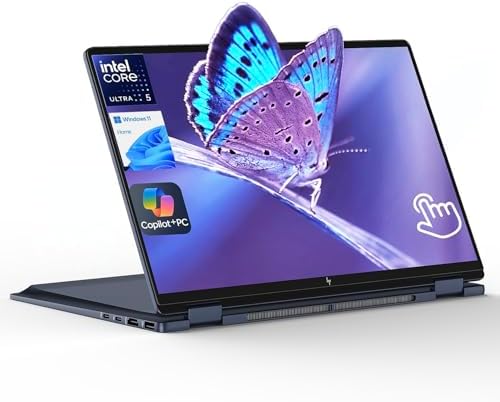


A 2-in-1 laptop is a portable computer designed to work in more than one form.
In normal laptop mode, it looks and works much like a traditional notebook. You have a keyboard, touchpad, display, processor, RAM, SSD, operating system, USB ports, Wi-Fi, and a battery.
The difference is the design. A 2-in-1 usually has a touchscreen and a flexible hinge or detachable keyboard. This allows you to change the position of the computer — for example, you could use a convertible laptop normally at your desk, then later fold the keyboard behind the display and use the touchscreen more like a tablet.
That flexibility is the main reason people buy 2-in-1 computers.
How Does a 2-in-1 Laptop Work?
There are two common designs.
1. Convertible 2-in-1
A convertible laptop has a keyboard permanently attached to the computer. The display rotates around a special hinge — this is the design used by many Lenovo Yoga, HP, ASUS, and other convertible laptops. You can move the computer through several positions:
Laptop mode — the normal position, using keyboard, touchpad, and screen. Best for writing, browsing, spreadsheets, email, and most normal computer tasks.
Tent mode — the display is folded so the laptop forms a tent shape. Useful when you want to watch a video or use the touchscreen without the keyboard getting in the way.
Stand or presentation mode — the keyboard sits behind the screen while the display faces you. Useful for presentations, recipes, video calls, and entertainment.
Tablet mode — the display folds all the way backward, letting you interact with the touchscreen more like a tablet.
Lenovo’s current Yoga 2-in-1 models, for example, use a 360-degree design and support laptop, tablet, and tent-style use.
2. Detachable 2-in-1
The second type has a keyboard that can be removed. The screen itself contains most of the computer hardware — when the keyboard is attached, it works like a laptop; when you remove it, you have a tablet-style device.
This design can be lighter when used as a tablet, but it can also have different trade-offs in keyboard comfort, ports, cooling, and performance.
If you want the feel of a normal laptop most of the time, a convertible model may be the better choice. If tablet use is extremely important, a detachable can make more sense.
What Makes a Laptop a 2-in-1?
A laptop doesn’t become a 2-in-1 simply because it has a touchscreen. A normal touchscreen laptop may still have a traditional hinge. A proper 2-in-1 is designed to change its physical form or separate into different parts.
The most common features are:
- Touchscreen
- Flexible hinge
- Tablet mode
- Tent mode
- Stand mode
- Laptop mode
- Stylus support on some models
Some models include a pen; others make the pen optional. That distinction is important when shopping on Amazon.
Best 2-in-1 Laptops to Research on Amazon
Amazon listings change often, so don’t treat an Amazon price or seller as permanent — check the live listing before publishing your article or recommending a specific configuration. Here are several product families that are useful examples of the 2-in-1 category.
Lenovo Yoga 7i 2-in-1
The Lenovo Yoga 7i 2-in-1 is a strong example of a modern convertible laptop. Lenovo’s current Yoga 7i 2-in-1 Gen 10 uses a 360-degree design, touchscreen, and optional Yoga Pen. Depending on configuration, it can use Intel Core Ultra processors and an OLED display.
Best for: Students, office users, creators, and people who want one device for laptop and tablet-style use.
→ Search Lenovo Yoga 7i 2-in-1 on Amazon
Lenovo Yoga 9i 2-in-1
The Lenovo Yoga 9i 2-in-1 is a more premium example. Lenovo describes the Yoga 9i as a 360-degree convertible with touchscreen and pen support. Its current-generation specifications include Intel Core Ultra processors and a high-resolution OLED display.
Best for: Buyers who want a premium convertible with strong display and creative features.
→ Search Lenovo Yoga 9i 2-in-1 on Amazon
Lenovo Yoga 7 2-in-1 AMD
Another interesting option is the Lenovo Yoga 7 2-in-1 with AMD processors. Lenovo’s current model uses a 360-degree hinge and touchscreen. Depending on configuration, it can include AMD Ryzen AI processors and an optional Yoga Pen.
Best for: Buyers who prefer AMD-powered Windows laptops.
→ Search Lenovo Yoga 7 2-in-1 on Amazon
Why Buy a 2-in-1 Laptop?
The biggest advantage is flexibility. Instead of buying a laptop and tablet separately, you can use one device for both styles of computing — useful for students, remote workers, travelers, and creative users.
1. One Computer Can Do More
A traditional laptop is excellent for typing; a tablet is excellent for touch interaction. A 2-in-1 tries to combine both — you can type a report in laptop mode, then fold the display backward and read the document using touch.
2. Touchscreen Support
Most modern 2-in-1 laptops use touchscreens, giving you another way to control the computer: tap buttons, scroll pages, zoom images, draw, write notes, navigate presentations, and interact with creative applications. Touch doesn’t replace the keyboard — it gives you another input method.
3. Great for Presentations
Tent and stand modes can be useful for presentations. Instead of opening the laptop normally, you can position the screen so other people can see it — also useful in small spaces.
4. Useful for Watching Videos
A convertible laptop can be convenient for entertainment. Fold the keyboard behind the display, place the device on a desk, and the screen can face you without the keyboard taking up the same working space.
5. Useful for Digital Notes
If the laptop supports a compatible pen, you can write directly on the screen — useful for students, designers, artists, note-taking, diagram work, and PDF annotation.
But always check whether the pen is included. Some manufacturers sell the stylus separately — Lenovo specifically notes that its Yoga Pen is optional on several current Yoga 2-in-1 models.
What Are the Disadvantages of a 2-in-1 Laptop?
2-in-1 laptops are not perfect. Their flexibility comes with trade-offs.
1. Usually more expensive than basic laptops. A touchscreen and special hinge add cost — you’re also paying for a design that can work in multiple positions. If you never use tablet mode, you may be paying for a feature you don’t need.
2. More moving parts. A convertible hinge is more complex than a standard laptop hinge. That doesn’t mean it will fail — it simply means hinge quality matters. When researching a 2-in-1, pay attention to manufacturer design, warranty, and long-term customer feedback.
3. Heavier than a tablet. A 2-in-1 is still a full computer, containing a processor, RAM, SSD, cooling, keyboard, battery, and ports — so even when folded into tablet mode, it may feel heavier than a dedicated tablet.
4. Keyboard comfort can vary. Some thin convertible laptops have excellent keyboards; others make compromises to keep the body thin. If you type for several hours every day, keyboard comfort should be a major buying factor.
5. Battery life depends on the model. Don’t assume every 2-in-1 has excellent battery life — screen type matters (OLED displays can consume more power in some workloads), processor choice matters, and brightness also affects battery life. Manufacturer battery claims are useful for comparison, but real-world results depend on how you use the machine.
2-in-1 Laptop vs. Traditional Laptop
Which one should you choose? It depends on how you use your computer.
| Feature | 2-in-1 Laptop | Traditional Laptop |
|---|---|---|
| Keyboard | Yes | Yes |
| Touchscreen | Usually | Optional |
| Tablet-style use | Yes | Usually no |
| Tent mode | Usually | No |
| 360° hinge | Common | No |
| Stylus support | Common on some models | Less common |
| Flexibility | Excellent | Good |
| Simple design | More complex | Simpler |
| Best for | Flexible use | Traditional computing |
If you only want a laptop for typing and browsing, a traditional laptop may offer better value. If you want touch and tablet-style flexibility, a 2-in-1 can be worth it.
2-in-1 Laptop vs. Tablet
This comparison is even more interesting.
A tablet is usually lighter. A 2-in-1 is usually better for serious typing.
A tablet may be better for reading, entertainment, touch apps, and casual browsing. A 2-in-1 may be better for writing, research, office work, programming, file management, and desktop applications.
The right choice depends on your workload.
Are 2-in-1 Laptops Good for Students?
Yes. They can be especially useful for students because one device can handle several types of work:
- Morning: Use laptop mode to write an assignment.
- Class: Use tablet mode to read course material.
- Study session: Use a compatible pen to annotate documents.
- Evening: Use tent mode to watch educational videos.
That flexibility is difficult to get from a basic laptop. However, students should still consider weight — if you carry the laptop around campus every day, a lighter 13- or 14-inch model can be more comfortable.
Are 2-in-1 Laptops Good for Work?
They can be excellent for office work. A convertible laptop can handle normal productivity tasks such as Microsoft Word, Excel, PowerPoint, email, web browsing, video meetings, project management, and cloud applications.
A larger 14- or 16-inch 2-in-1 can also provide more screen space. Lenovo’s current Yoga 7i 16-inch model, for example, combines a large display with a 360-degree convertible design.
Are 2-in-1 Laptops Good for Drawing?
They can be, but you need to check three things:
- Pen compatibility — does the laptop support an active pen?
- Pen included? — is it included in the box?
- Display quality — does the screen have the resolution and color performance you need?
For serious creative work, the display can be just as important as the processor. Lenovo’s Yoga 9i and Yoga 7i models support pen-based interaction, with the exact pen and configuration varying by model.
Are 2-in-1 Laptops Good for Programming?
Yes, but tablet mode is not the reason. Programming is mostly a keyboard-based task, so your main priorities should be a comfortable keyboard, good CPU, enough RAM, SSD storage, good display, ports, and battery life.
The touchscreen is a bonus — a 2-in-1 can be useful for reading documentation or viewing diagrams, but you’ll probably spend most programming time in laptop mode.
Are 2-in-1 Laptops Good for Video Editing?
Some are. Don’t assume that every 2-in-1 is designed for heavy video editing. For serious editing, look at CPU performance, GPU, RAM, SSD, cooling, display, and color coverage.
A premium 2-in-1 with a powerful processor can handle many creative tasks, but a thin budget convertible may not be suitable for long, demanding video exports.
Are 2-in-1 Laptops Good for Gaming?
Some can play games, but gaming shouldn’t be your main reason to choose a 2-in-1. Many 2-in-1 models use integrated graphics — fine for everyday work, but less ideal for demanding games. If gaming is your main priority, compare dedicated gaming laptops instead.
What Screen Size Is Best for a 2-in-1?
There’s no single answer.
| Size | Best For |
|---|---|
| 13-inch | Portability — students, travelers, commuters |
| 14-inch | Probably the best balance — work, school, creative tasks, general use |
| 15- or 16-inch | Screen space — spreadsheets, editing, multitasking, presentations |
The trade-off is weight and size.
What Processor Should a 2-in-1 Have?
For most Windows users, look for a modern processor from Intel, AMD, or Qualcomm. The exact processor depends on your workload:
- Basic use (web browsing, email, documents, streaming) doesn’t require the fastest processor.
- Office multitasking — a modern Core Ultra or Ryzen 5/7-class chip can be a good target depending on the configuration.
- Creative work — look higher if you edit photos, videos, or work with demanding applications.
- AI workloads — some newer processors include dedicated neural processing units. Lenovo’s newer Yoga models, for example, include AI-focused processors and NPUs designed for newer Copilot+ PC experiences.
How Much RAM Does a 2-in-1 Need?
RAM affects multitasking.
- 8GB is suitable for lighter tasks, but can feel limiting if you keep many browser tabs and applications open.
- 16GB is a better target for most modern Windows buyers, giving you more room for multitasking.
- 32GB is useful for demanding work — consider it if you edit video, run development tools, use large projects, run virtual machines, or keep many applications open.
How Much Storage Should a 2-in-1 Have?
Storage depends on your files.
- 256GB is good for cloud-first users.
- 512GB is a strong general choice.
- 1TB is better if you store lots of photos, videos, games, projects, or downloads.
A 2-in-1 is often designed to be your main computer, so buying enough storage at the beginning can be useful.
Do All 2-in-1 Laptops Include a Pen?
No — this is one of the most common shopping mistakes. A product image may show a pen, but that doesn’t always mean the pen is included.
Lenovo explicitly identifies the Yoga Pen as optional on several current Yoga 2-in-1 models. Before buying, check what’s in the box — don’t rely only on the product photos.
Key 2-in-1 Modes Explained
What Is a 360-Degree Laptop?
A 360-degree laptop is a type of convertible 2-in-1. Its hinge allows the display to rotate around the keyboard through a wide range of positions, letting you create laptop mode, tent mode, stand mode, or tablet mode. Lenovo uses this design throughout its Yoga 2-in-1 lineup.
What Is Tent Mode?
Tent mode means the laptop is folded into an upside-down V shape. The keyboard isn’t being used, and the touchscreen faces outward. This can be useful for watching videos, presentations, cooking recipes, video calls, and touch applications — one of the simplest but most useful 2-in-1 modes.
What Is Tablet Mode?
Tablet mode is when the keyboard is folded behind the screen or detached, and the device can then be used mainly through touch. Modern Windows devices can adapt their interface to the hardware form factor — Microsoft’s documentation explains how Windows can respond to hardware transitions on 2-in-1 devices.
What Is Stand Mode?
Stand mode places the screen upright while the keyboard sits behind it. Useful when you want to view the screen without using the keyboard — for example, watching a movie, following a recipe, reading, presenting slides, or video calls.
What Is the Difference Between Convertible and Detachable 2-in-1?
This is worth understanding before buying.
Convertible — the keyboard stays attached.
- More laptop-like
- Usually stronger keyboard experience
- No separate keyboard to lose
- Easy to change modes
Detachable — the keyboard comes off.
- Better tablet experience
- Can be lighter without keyboard
- More flexible for touch use
If you type a lot, lean toward a convertible. If tablet use is equally important, consider a detachable.
What Should You Check Before Buying a 2-in-1 Laptop on Amazon?
Don’t buy based only on the headline. Check these details:
- Exact processor — don’t stop at “Intel Core” or “AMD Ryzen”; find the exact chip.
- RAM — check whether it has 8GB, 16GB, 32GB, or more.
- SSD — check the exact storage capacity.
- Display — look at resolution, panel type, refresh rate, brightness, touch support, and aspect ratio.
- Pen — check whether a stylus is included.
- Weight — a tablet-style device can still be heavy.
- Ports — count the ports you actually need.
- Battery — compare manufacturer claims carefully.
- Operating system — check the exact Windows version.
- Seller — Amazon may show several sellers for similar products; check who is actually selling the configuration.
Common Mistakes When Buying a 2-in-1
| Mistake | Why It Matters |
|---|---|
| Buying touchscreen instead of true 2-in-1 | A touchscreen alone doesn’t guarantee tablet functionality. |
| Assuming the pen is included | Always check the box contents. |
| Choosing the biggest screen | Large screens are nice, but they’re heavier. |
| Ignoring the keyboard | If you write every day, keyboard quality matters. |
| Buying too little RAM | 16GB is often a safer starting point for a modern Windows productivity machine. |
| Ignoring software compatibility | This matters especially with newer processor platforms. |
| Comparing only processor names | Two laptops with similar processor branding can have very different displays, RAM, cooling, and storage. |
2-in-1 Laptop Buying Guide by Use Case
If you’re confused by all the specifications, use this simple checklist.
For students:
- 13–14 inch display
- 16GB RAM if possible
- 512GB SSD
- Touchscreen
- Pen support if you take handwritten notes
- Good battery life
- Low weight
For office work:
- 14-inch display
- Comfortable keyboard
- 16GB RAM
- 512GB SSD
- Good webcam
- Good port selection
For creative work:
- High-quality OLED or IPS display
- Strong CPU
- 16GB or 32GB RAM
- Large SSD
- Pen support
- Good color coverage
For travel:
- Low weight
- Compact size
- Battery life
- Durable hinge
- USB-C charging
- Good wireless connectivity
Related Reading
For readers who want to continue their laptop research, these existing TechRigReview articles fit naturally with this topic:
- 10 Best Amazon Laptop Computers — useful for comparing 2-in-1 laptops with traditional notebooks.
- 7 Best HP Laptops on Amazon — useful if a reader wants to compare HP’s laptop lineup with Lenovo and other brands.
- TechRigReview Laptop Guides — a useful starting point for readers researching other laptop categories.
These links are relevant because someone researching what a 2-in-1 laptop is may next want to compare convertible computers with standard laptops.
FAQ
What is a 2-in-1 laptop?
A 2-in-1 laptop is a computer that can work as a normal laptop and also change into another form, such as a tablet, tent, or stand. Most models use a touchscreen and flexible hinge.
Is a 2-in-1 laptop the same as a tablet?
No. A 2-in-1 laptop usually has a full laptop operating system, keyboard, trackpad, and PC hardware. A tablet is designed primarily around touch interaction.
Is a 2-in-1 laptop worth buying?
It can be worth buying if you’ll use the flexibility. If you only want a standard laptop and never use touch or tablet mode, a traditional laptop may offer better value.
Can you use a 2-in-1 laptop as a tablet?
Yes. Convertible models can fold the keyboard behind the display, while detachable models can remove the keyboard.
Do 2-in-1 laptops have keyboards?
Most do. Convertible models keep the keyboard attached. Detachable models allow you to remove it.
Are 2-in-1 laptops good for college?
Yes. They can be especially useful for students who want one device for typing, reading, presentations, and handwritten notes.
Can you draw on a 2-in-1 laptop?
Many models support an active stylus. However, pen support varies by model, and the stylus may be sold separately.
Are 2-in-1 laptops good for work?
Yes. A modern 2-in-1 can handle common work such as documents, email, spreadsheets, browsing, meetings, and presentations.
Final Verdict: What Is a 2-in-1 Laptop?
So, what is a 2-in-1 laptop?
It’s a computer designed to give you the main benefits of a laptop while adding the flexibility of a tablet. The most common type uses a 360-degree hinge — you can use it as a laptop for typing, fold it into tent mode for entertainment, put it into stand mode for presentations, or fold it into tablet mode for touch interaction.
That flexibility is the main reason to buy one. For students, a 2-in-1 can combine note-taking, research, writing, and entertainment in one device. For professionals, it can provide a normal laptop when you need to work and a flexible touchscreen when you need it. For creative users, pen support can make a convertible laptop useful for drawing and handwritten notes.
But there’s no reason to buy a 2-in-1 simply because it sounds more advanced. If you never use the touchscreen or convertible design, a normal laptop may be the smarter choice.
Before buying from Amazon, check the exact processor, RAM, storage, display, pen support, weight, ports, seller, and what’s included in the box.
And most importantly, check the live Amazon listing because availability and configurations can change.
Editorial note: This article is research-based. I did not personally purchase and hands-on test the products discussed. Product information was compared with manufacturer documentation and current web/Amazon search results. Amazon listings, configurations, sellers, availability, and customer feedback can change over time.

MD.HASAN is an experienced SEO expert and amazon products review writer passionate about helping people find right products on amzon for buy without confusion. With 4 years of hands-on experience in content strategy and search engine optimization, he specializes in writing SEO-friendly blog posts that rank, engage, and convert.


