
Affiliate disclosure: As an Amazon Associate, Tech Rig Review earns from qualifying purchases. Links on this page may be affiliate links, at no extra cost to you.
Use our monitor height calculator to find your perfect screen position. Stop neck and eye strain with the right ergonomic monitor height for any desk setup in 2026.
Your monitor is probably set at the wrong height — and your neck already knows it.
Most people place their monitor wherever it fits on the desk, then wonder why they end up with neck stiffness, eye strain, and headaches by the end of a long workday. The fix isn’t a new chair or a prescription change. Nine times out of ten, it’s a simple height adjustment.
This guide gives you a practical monitor height calculator you can use right now — no apps, no tools needed. You’ll learn the exact measurement to target based on your height, how to apply it whether you’re sitting, standing, or switching between both, and how to handle special cases like dual monitors, ultrawide screens, and progressive lenses.
Then we’ll cover the products that actually solve the problem. If your monitor’s fixed stand won’t reach the right height — a very common issue — a monitor arm or riser is the answer, and we’ve verified real, currently available Amazon options at every budget.
Whether you spend all day at a home office desk or a corporate workstation, getting your monitor height right takes less than five minutes and makes a bigger difference than almost any other ergonomic change you can make.
Table of Contents
Why Monitor Height Matters More Than You Think

Most ergonomic advice focuses on chairs, keyboards, and standing desks. Monitor height gets less attention, but it’s arguably the biggest factor in neck and shoulder comfort.
Here’s why: your head weighs roughly 10–12 pounds. When it’s perfectly balanced over your spine, your neck muscles barely work. Tilt your chin up just 15 degrees to look at a too-high screen, and the effective load on your neck roughly doubles. Do that for six to eight hours a day, and chronic tension, headaches, and upper back pain become inevitable.
The research is consistent on this point. A 2026 ergonomics review confirms that the top of the screen should sit at or slightly below eye level, with the center of the display falling naturally below your line of sight. That gentle downward gaze keeps your neck muscles relaxed, reduces eye dryness (blinking rate goes up when your gaze drops slightly), and allows your shoulders to stay in a neutral position.
Getting this right takes less than five minutes. The payoff compounds over thousands of hours at your desk.
The Monitor Height Calculator: Find Your Number in 3 Steps

This is the practical section. Follow these three steps and you’ll have your target monitor height in under two minutes.
Step 1: Measure Your Seated Eye Level
Sit in your work chair in your normal working posture — feet flat, hips back, spine naturally upright. Don’t slump, but don’t sit unnaturally straight either. Just sit how you actually sit.
Have someone measure the distance from the floor to your eyes, or measure it yourself: measure from the floor to the bridge of your nose.
Write this number down. This is your seated eye level.
Step 2: Find Your Target Monitor Height
Your target is simple:
The top edge of your screen should sit at your seated eye level, or 0–2 inches below it.
That’s the whole formula. The center of the screen then falls naturally below your line of sight, which is exactly where it should be.
Use this reference table if you want a quick starting point based on height:
| Your Height | Typical Seated Eye Level | Target Top-of-Screen Height |
|---|---|---|
| Under 5’2″ | 43–45 inches | 41–45 inches |
| 5’2″ – 5’6″ | 45–47 inches | 43–47 inches |
| 5’6″ – 5’10” | 47–49 inches | 45–49 inches |
| 5’10” – 6’1″ | 49–51 inches | 47–51 inches |
| 6’1″ – 6’4″ | 51–54 inches | 49–54 inches |
| Over 6’4″ | 54+ inches | 52+ inches |
These are starting points. Your personal measurement from Step 1 is always more accurate than a height-based estimate.
Step 3: Measure Your Current Setup and Adjust
Measure from the floor to the top edge of your current monitor screen (not the top of the monitor housing — the actual top edge of the display area).
Compare it to your target height from Step 2.
- Too low? You need to raise your monitor. A monitor arm or riser will solve this.
- Too high? Lower the monitor stand, or lower your chair and adjust everything from there.
- In range? Check posture. If you’re still tilting your chin to read, lower the screen slightly.
That’s the complete monitor height calculator. No app required.
How Much Should a Monitor Be Above Desk Level?
This is a common question, and the answer surprises most people: it’s different for everyone.
The desk surface to monitor-top measurement varies significantly based on your chair height, your own proportions, and what type of desk you use. A short person in a high chair will have a very different desk-to-screen gap than a tall person sitting low.
Here’s a rough desk-height-to-screen-top reference for a standard 29–30 inch desk:
| Your Height | Approx. Gap — Desk Top to Monitor Top |
|---|---|
| 5’0″ – 5’4″ | 14–17 inches |
| 5’4″ – 5’8″ | 16–19 inches |
| 5’8″ – 6’0″ | 18–21 inches |
| 6’0″ – 6’4″ | 20–23 inches |
Most standard monitor stands only raise the screen 6–10 inches above the desk. For many people — especially those shorter than average or taller than average — the stock stand simply can’t get the screen to the right height.
This is the single most common reason people buy monitor arms. Not because they look sleek (they do), but because their screen physically cannot reach the right position on the stock stand.
Monitor Height for Standing Desks
If you use a sit-stand desk, your monitor height needs to change when you switch positions. That’s a critical point that most sit-stand desk guides gloss over.
Your standing eye level is typically 4–10 inches higher than your seated eye level, depending on your height. When you raise the desk, your monitor needs to go up by the same amount — or you’re standing at the right desk height but looking down at a screen set for sitting.
There are two ways to handle this:
Option 1: Use a monitor arm. A monitor arm attached to your desk rises and lowers with the desk. When the desk goes up, the monitor goes with it at the same relative height. This is the simplest and most reliable solution for sit-stand users.
Option 2: Set the monitor height for standing, use a keyboard tray for sitting. Set your monitor to the correct standing height, then use a keyboard tray that drops the keyboard down when sitting. This is less common but works well for people who stand more than they sit.
For most sit-stand users, a monitor arm is the right answer. It takes the guesswork out of the equation completely.
Special Cases: Dual Monitors, Ultrawides, and Progressive Lenses

Standard monitor height advice assumes a single, standard-size monitor. There are a few situations where the rules need to be adjusted.
Dual Monitors
If you use two monitors and look at them roughly equally, both screens should be at the same height with the inner edges touching, both centered on your body. Place the seam directly in front of you so you don’t need to turn your head in either direction for extended periods.
If one is primary and one is secondary (reference monitor, Teams chat, etc.), place the primary monitor directly in front of you at eye level. The secondary monitor goes to the side at a slight angle, with the same top-edge height.
Ultrawide Monitors
Ultrawide screens are wide enough that you may find yourself turning your head to reach the corners. Check that you can see the full width of the screen by moving only your eyes, not your neck. If you’re turning your head to see the corners, the monitor is too close or too wide for your desk depth. Move it back or raise the desk slightly.
For height, the same rule applies: top of the screen at eye level. But with a very large ultrawide (34 inches or more), having the top at eye level may put the center unusually low. If this feels uncomfortable, raise the screen 1–2 inches above your eye level target as a compromise.
Progressive Lens Wearers
This is an important exception. Progressive lenses have different focal zones — distance at the top, reading at the bottom. If your monitor is at the standard eye-level height, you’ll instinctively tilt your head back to look through the reading zone at the bottom of your glasses.
Progressive lens users typically need to lower their monitor 2–4 inches below the standard eye-level target. This allows you to look through the correct lens zone without straining your neck backward. If you wear progressives, start at 3 inches below eye level and adjust from there.
What to Do When Your Monitor Can’t Reach the Right Height
Here’s the reality: the standard fixed stand that ships with most monitors raises the screen 4–8 inches above the desk. For a typical desk at 29–30 inches high, that puts the top of the screen around 33–38 inches from the floor. Most people need the screen top at 43–54 inches from the floor.
That’s a gap of 5–16 inches. Your stock monitor stand can’t cover it. You have two options: a monitor riser (a physical stand that sits under the monitor) or a monitor arm (a mechanical arm that clamps to the desk).
Monitor risers are the simplest option. They add 4–8 inches of height, cost $20–$50, and require no installation. The downside: you lose the ability to fine-tune the height, and they take up desk space.
Monitor arms are more flexible. They let you set any height within a 13–20 inch range, get the monitor base off the desk completely (freeing up space), and allow easy adjustments throughout the day. A good monitor arm is the right long-term solution for anyone who takes their ergonomic setup seriously.
Below are verified, currently available Amazon picks for both.
Best Monitor Arms on Amazon (Verified Available 2026)
All ASINs below were confirmed as currently available on Amazon at the time of research.
Best Overall: Ergotron LX Desk Monitor Arm

- Broad compatibility: Fits single screens up to 34 inches diagonal and 7 to 25 pounds; compatible with VESA patterns 75×7…
- Versatile mounting options: Includes two-piece desk clamp and grommet mount to fit a variety of desk types; desk clamp a…
- Improved comfort: Easily raise your monitor up to 17.3 inches above your worksurface with 13 inches of lift; find your b…
Ergotron LX Desk Monitor Arm — Polished Aluminum
The Ergotron LX is the reference standard in monitor arms, period. It uses Ergotron’s patented Constant Force technology — a precision tension mechanism that holds your monitor exactly where you put it and moves smoothly with one finger.
It supports monitors up to 34 inches and 25 lbs, offers 13 inches of height range, and has been Wirecutter’s top pick for monitor arms for multiple consecutive years. Amazon reviewers rate it 4.7 stars across thousands of reviews. The 10-year warranty is exceptional for this product category.
Height range: 13 inches (approximately 33 cm), which covers the ergonomic needs of more than 90% of adults. For taller users, the Ergotron LX Tall Pole version extends this range further.
Priced around $150–$220 depending on the color and configuration (matte black, white, polished aluminum).
Best for: Anyone who wants a set-it-and-forget-it monitor arm that will outlast multiple monitor upgrades. Professional setups, home offices, anyone tired of cheap arms that sag or drift.
Best Budget Single: VIVO Single Monitor Arm (STAND-V001)
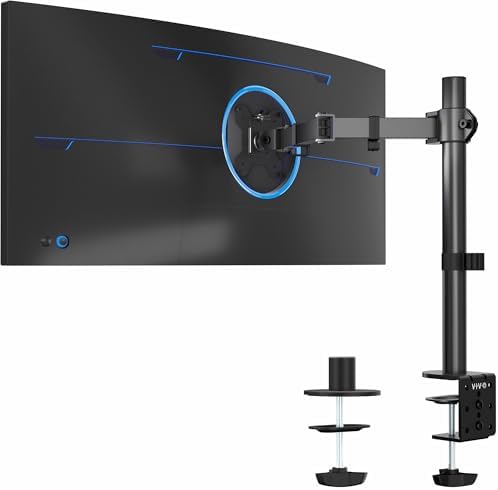
- Screen Compatibility: This single-arm mount fits screens that weigh up to 22 lbs with backside mounting (VESA 75x75mm or…
- Articulation and Height Adjustment: Adjustable arm offers +90° to -90° tilt, 360° swivel, 360° rotation, and height adju…
- Heavy Duty Desk Clamp: Secures to desks (up to 3.25″ thick) with simple hand tightening for toolless installation. An op…
VIVO Single Monitor Arm Desk Mount STAND-V001
The VIVO STAND-V001 is a #1 Amazon Best Seller in Computer Monitor Arms with over 18,000 reviews at 4.5 stars. It supports monitors from 13 to 32 inches (and ultrawides up to 38 inches), holds up to 22 lbs, and offers full 360° tilt, swivel, and rotation.
The arm uses a spring-tension mechanism rather than a gas spring — adequate for most users who set their monitor position once and leave it. The construction is aluminum and steel, which feels solid for the price. Installation takes about 15 minutes with the included C-clamp or grommet base.
At under $25, this is genuinely the best value in monitor arms. If you want to try a monitor arm without committing to a premium model, start here.
Best for: Budget-conscious buyers, first-time monitor arm users, single-monitor home office setups where frequent repositioning isn’t needed.
Best Value Gas Spring: HUANUO HNSS6 Single Monitor Mount

HUANUO HNSS6 Single Monitor Mount
The HUANUO HNSS6 is the single-monitor sibling of the HNDS6, which holds the Amazon #1 Best Seller ranking in Computer Monitor Arms. It uses a high-purity nitrogen gas spring rated to 20,000 motion cycles — more durable than standard spring arms and significantly smoother to adjust.
It supports monitors from 13 to 32 inches weighing 4.4–19.8 lbs, offers 15.75 inches of arm height (enough for nearly all seated ergonomic setups), 180° swivel, 360° rotation, and ±35°/−50° tilt. The aerospace-grade aluminum arm is noticeably more substantial than budget alternatives.
Priced around $40–$55. For under $55, this gives you a true gas spring arm — something you’d normally pay $100+ for from premium brands.
Best for: Anyone who adjusts their monitor frequently, home office users who want gas spring smoothness without Ergotron pricing, shared workstations where multiple people use the same desk.
Best for Sit-Stand Desks: MSI MAG MT101G Gas Spring Monitor Arm

- Upgrade your workspace with the MAG MT101G Premium Aluminum Dual Monitor Stand Arms, designed to support monitors rangin…
- Versatile Base Options: Choose between clamp and grommet base options for easy installation on desktops with thicknesses…
- Compatibility: Designed with VESA compatibility (75×75, 100×100 mm) to accommodate a wide range of monitors, ensuring a …
MSI MAG MT101G Gas Spring Single Monitor Stand Arm
The MSI MAG MT101G earned Amazon’s Choice status and holds a 4.6-star rating. It features a gas spring arm designed specifically for frequent height adjustments — making it an excellent companion for sit-stand desk users who need to reposition their monitor throughout the day.
It supports monitors from 17 to 32 inches (up to 17.6 lbs), offers full tilt, swivel, and rotation, and includes built-in cable management. The arm’s adjustment range covers both seated and standing eye-level positions for most users up to 6’2″.
Priced around $30–$35 — remarkable value for a genuine gas spring arm from an established monitor brand.
Best for: Sit-stand desk users, gamers who switch between positions, budget buyers who want gas spring quality without paying HUANUO or Ergotron prices.
What About Monitor Risers? (No-Installation Option)

A monitor arm is the best long-term solution, but some buyers want something simpler. Monitor risers sit under the existing monitor stand and add fixed height. No installation, no VESA compatibility required, works with any monitor.
The trade-off: you can’t fine-tune the height, and the riser takes up desk space. But if you just need to raise your screen 3–6 inches and want to spend $20–$30, a riser is a completely valid solution.
Look for risers with at least 3.5–5 inches of elevation and a stable, non-slip base. Most Amazon risers are made of wood, bamboo, or plastic. Bamboo options tend to feel more premium for a similar price.
The Complete Ergonomic Desk Setup — Beyond Monitor Height
Getting your monitor at the right height is the single most impactful ergonomic adjustment. But it works best when the rest of your setup is aligned too. Here’s the full picture in one place.
Chair and Desk Height
Set your chair height first. Your elbows should be at 90 degrees with your forearms parallel to the desk when your hands are on the keyboard. Your feet should be flat on the floor (use a footrest if they’re not). Your thighs should be roughly parallel to the ground.
Standard desk height is 29–30 inches, which is fine for most adults between 5’6″ and 6’0″. Shorter or taller users on fixed-height desks should adjust their chair height and use a footrest if needed.
Keyboard and Mouse
The keyboard should be at roughly elbow height. Your wrists should be flat or very slightly downward — not bent upward. If your desk is slightly too high, a keyboard tray mounted under the desk surface solves this without changing anything else.
Distance to Screen
The screen should be roughly an arm’s length away — about 20–28 inches for a 24-inch monitor. Larger screens need more distance. The general rule is that text should be readable without leaning forward. If you find yourself leaning in to read, the text is too small, not the screen too far.
Lighting
Screen glare causes both eye strain and postural problems (you tilt your head to avoid glare). Avoid placing monitors facing a window. If you have no choice, use a matte screen protector or anti-glare filter. Ambient room lighting should be similar in brightness to the screen — working in a dark room with a bright screen accelerates eye fatigue.
Movement Breaks
No ergonomic setup makes extended static sitting harmless. Ergotron’s research suggests standing for at least 30 minutes out of every 90-minute block. More practically: get up every 30–45 minutes, even briefly. Ergonomic hardware supports your posture; movement prevents the compounding effects of stillness.
If you’re also setting up a standing desk, our guide on how to choose the best standing desk on Amazon walks through the full process with verified Amazon picks.
External Resources
- Cornell University Ergonomics Web — Computer Workstation Guidelines — Detailed, research-backed guidelines from Cornell’s Human Factors and Ergonomics Research Group on workstation setup, including monitor height, chair adjustment, and keyboard placement.
- OSHA Computer Workstations eTool — Monitors — The official OSHA guidance on monitor positioning for workplace ergonomics, covering height, distance, tilt, and glare reduction.
- Ergotron WorkFit Workspace Planner — Ergotron’s free online tool lets you enter your height and generates specific ergonomic recommendations for monitor height, desk height, and chair positioning. Useful for double-checking your own calculations.
FAQ: Monitor Height Calculator
What is the correct monitor height for my desk?
The top edge of your screen should sit at or up to 2 inches below your seated eye level. Measure from the floor to your eyes while sitting in your normal working position, then set the monitor top to that height (or slightly below). The center of the screen will then naturally fall slightly below your line of sight, which is the ideal ergonomic position.
How do I calculate my monitor height without a tool?
Sit in your work chair as you normally would. Measure from the floor to the bridge of your nose. That measurement is your seated eye level and the target height for the top edge of your screen. Compare that to the actual height of your monitor’s top edge. The difference tells you how much to raise or lower the display.
Should the center or the top of the monitor be at eye level?
The top of the screen should be at eye level, not the center. When the top is at eye level, the center falls naturally below your line of sight. This creates a gentle downward gaze that keeps your neck muscles relaxed. If the center is at eye level, the top is too high and you’ll tilt your chin up to read — which is the most common posture mistake at a desk.
How high should a monitor be on a standing desk?
The same rule applies: the top of the screen should be at eye level when standing. Your standing eye level is typically 4–10 inches higher than your seated eye level. A monitor arm that rises with the desk is the most practical way to maintain the correct height in both sitting and standing positions.
My monitor stand doesn’t go high enough. What should I do?
This is very common. Most stock stands only raise the screen 4–8 inches above the desk, which falls short of most people’s seated eye level. A monitor arm is the most effective fix — arms like the VIVO STAND-V001 or HUANUO HNSS6 provide 13–16 inches of height range for $25–$55. A monitor riser is a simpler, no-installation alternative if you just need a few extra inches.
Is it bad if my monitor is too high?
Yes — it’s just a different problem. A monitor that’s too high forces you to tilt your chin up to read, which compresses the back of your neck and strains the muscles along the sides. Many people actually prefer screens set too high because it feels like better posture (head raised), but it causes the same long-term strain as a too-low monitor. Keep the top of the screen at eye level, not above it.
How far should I sit from my monitor?
For a 24-inch monitor, about 20–24 inches (arm’s length) is ideal. For a 27-inch monitor, 24–28 inches. For a 32-inch or larger screen, 28–36 inches. The test: you should be able to read text clearly without leaning forward. If you find yourself moving closer to read, increase text size rather than moving the screen closer — your eyes will thank you.
Does monitor height matter for gaming?
Yes, and arguably more so. Gaming sessions often run 2–4+ hours without a break. A monitor set too high causes neck fatigue that compounds quickly into headaches and upper back tension. The ergonomic rule still applies: top of screen at eye level. Many gamers also prefer a slightly lower monitor position to reduce glare from overhead room lighting — which is a legitimate reason to drop 1–2 inches below the standard target.
Conclusion
Getting your monitor at the right height is one of the simplest ergonomic changes you can make, and it has an outsized impact on how you feel after a full day at your desk.
The formula is simple: measure your seated eye level, set the top of your screen to match it (or up to 2 inches below), and verify you’re about an arm’s length away. If your current monitor stand can’t reach that height, a monitor arm is the right fix — and with options starting at under $25, it’s one of the most cost-effective ergonomic upgrades available.
For most buyers, the HUANUO HNSS6 hits the best balance of gas spring quality and value at around $40–$55. If budget is the primary concern, the VIVO STAND-V001 at under $25 is a genuine best seller for a reason. And if you want the best money can buy, the Ergotron LX is the reference standard with a 10-year warranty to back it up.
Take five minutes today to check your setup. Your neck will notice the difference by tomorrow.
As an Amazon Associate I earn from qualifying purchases. Product availability and pricing are accurate at time of research but may change. Always verify current availability on Amazon before purchasing.

MD.HASAN is an experienced SEO expert and amazon products review writer passionate about helping people find right products on amzon for buy without confusion. With 4 years of hands-on experience in content strategy and search engine optimization, he specializes in writing SEO-friendly blog posts that rank, engage, and convert.


