
Affiliate disclosure: As an Amazon Associate, Tech Rig Review earns from qualifying purchases. Links on this page may be affiliate links, at no extra cost to you.
HP has restructured its entire laptop lineup in 2026, replacing the beloved Spectre and Envy brand names with the new OmniBook Ultra and OmniBook X families. Whether you are a student hunting for affordability, a professional needing enterprise-grade security, or a gamer chasing frame rates, this guide breaks down the best HP laptops currently available on Amazon — with honest specs, real price ranges, and smart alternatives when another brand might serve you better.
Table of Contents
Why HP Laptops in 2026?
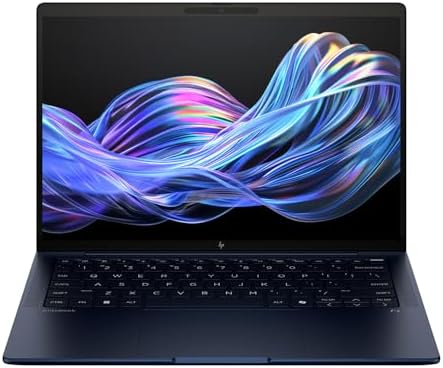

Hewlett-Packard has been building personal computers since the early 1980s, and in 2026, that decades-long engineering experience is more visible than ever. The company has stopped chasing feature bloat and started refining the fundamentals: battery efficiency, display quality, thermal management, and AI acceleration.
What makes HP particularly interesting on Amazon right now is the sheer breadth of its catalog. You can spend $350 on an entry-level machine or $2,000 on a premium convertible, and both products carry the same commitment to build quality that has made HP one of the most trusted names in consumer laptops worldwide. Unlike some competitors that maintain a single flagship product line, HP covers every use case — productivity, gaming, creativity, education, and enterprise security — with dedicated hardware designed around that specific workflow.
Another reason HP deserves serious attention in 2026: the brand’s aggressive move into AI-native computing. Every new HP laptop launched this year ships as a certified Microsoft Copilot+ PC or is built around an NPU (neural processing unit) that accelerates on-device AI tasks. For buyers who plan to use AI writing assistants, real-time transcription, image generation, or smart video calling features, HP’s new hardware is built for exactly that.
What Changed: HP’s New Laptop Lineup Explained
If you have been searching for the HP Spectre x360 or HP Envy x360 on Amazon in 2026 and found confusing results, here is what happened: HP officially retired both the Spectre and Envy brand names and replaced them with two new product families.
- HP OmniBook Ultra — The direct successor to the Spectre lineup. These are HP’s premium, thin-and-light laptops designed for creators, freelancers, and power users who want a beautiful display and serious performance in a slim chassis.
- HP OmniBook X — The successor to the Envy range, sitting in the mid-premium tier. These machines prioritize battery life, AI performance, and everyday productivity at a slightly lower price point than the Ultra line.
- HP EliteBook — HP’s business-focused line remains unchanged in branding but has been refreshed with Intel Core Ultra and Qualcomm Snapdragon processors, enhanced security features, and better webcam quality for the hybrid work generation.
- HP Omen / Victus — The gaming lines remain intact and have received meaningful GPU upgrades heading into 2026.
- HP Pavilion / HP Stream — Budget and student-oriented machines that continue to offer solid everyday performance at accessible price points.
Understanding this rebrand is crucial before shopping on Amazon, because many listings still show the old Spectre or Envy names in their titles while selling the new OmniBook hardware underneath.
HP Laptop Comparison Table
| Model | Best For | Price Range | Display | Battery | Weight |
|---|---|---|---|---|---|
| OmniBook Ultra Flip 14 | Overall Best | $1,299–$1,969 | 14″ 3K OLED 120Hz | 15–18 hrs | 1.3 kg |
| EliteBook Ultra G1i | Business | $1,199–$1,799 | 14″ 2.8K IPS/OLED | 15–18 hrs | 1.3 kg |
| Pavilion Aero 13 | Students | $499 – $749 | 13.3″ WUXGA IPS | 10.5 hrs | 0.96 kg |
| Omen 16 | Gaming | $1,099–$1,799 | 16.1″ QHD 165Hz | 6–8 hrs | 2.4 kg |
| Victus 15 | Budget Gaming | $649–$899 | 15.6″ FHD 144Hz | 6–7 hrs | 2.3 kg |
| OmniBook X 14 | Battery Life | $999–$1,299 | 14″ 2K IPS Touch | 20–26 hrs | 1.35 kg |
| ZBook Studio 16 G11 | Creatives/Pro | $1,899–$3,499 | 16″ 4K OLED | 8–9 hrs | 1.8 kg |
Best HP Laptops on Amazon 2026 – Our Top Picks
1. HP OmniBook Ultra Flip 14 — Best HP Laptop Overall

Price Range on Amazon: $1,299 – $1,969
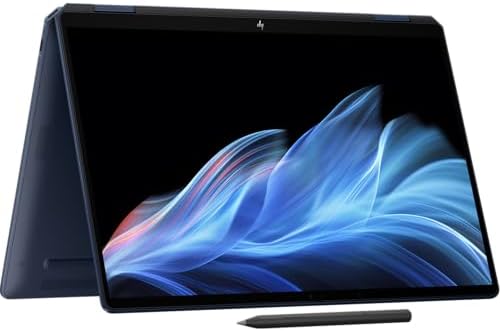
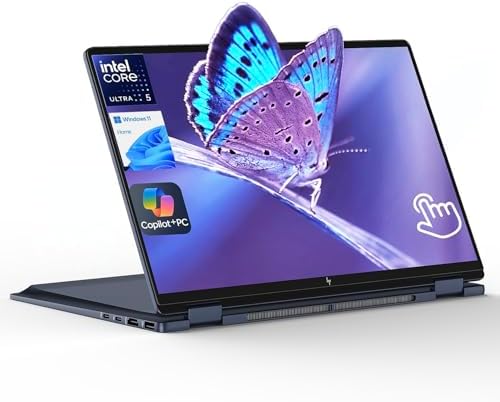
The HP OmniBook Ultra Flip 14 is the machine that replaced the iconic Spectre x360 14, and it improves on its predecessor in every meaningful way. Where the Spectre x360 was already one of the most polished Windows convertibles on the market, the OmniBook Ultra Flip 14 sharpens the formula with Intel Core Ultra Series 2 (Lunar Lake) processors, a 120Hz adaptive OLED display, and battery life that genuinely competes with ARM-powered laptops.
Key Specifications:
- Display: 14-inch 3K (2880×1800) OLED touchscreen, 120Hz, 0.2ms response, 500 nits SDR / 1,100 nits HDR, 100% DCI-P3
- Processor: Intel Core Ultra 7 256V (up to 4.8 GHz, 8 cores) or Core Ultra 7 258V with 50 NPU TOPS
- RAM: 16GB or 32GB LPDDR5X (soldered)
- Storage: 512GB, 1TB, or 2TB PCIe Gen5 NVMe SSD
- Graphics: Intel Arc Graphics 140V
- Battery: 64 WHr, rated for 15–18 hours mixed use
- Ports: 2x Thunderbolt 4, 1x USB 3.2 Type-C, headphone/mic combo jack
- Weight: Under 1.3 kg (approximately 2.87 lbs)
- Dimensions: Just 10.7mm thin at its thinnest point
What We Love: The OLED display alone justifies serious consideration. Viewing content, editing photos, or simply reading long documents on a panel that produces genuine black levels and 1,100 nits of peak HDR brightness is a qualitatively different experience from a standard IPS screen. The 120Hz refresh rate keeps everything feeling buttery-smooth during scrolling and animation.
Battery life, once a traditional weakness of premium Windows convertibles, is now a genuine strength. Real-world mixed usage — browser tabs, video calls, document editing, occasional video playback — consistently returns over 12 hours on a single charge, and some configurations with the Snapdragon X2 variant push even further.
The 360-degree hinge remains one of HP’s most practical design decisions. You get a traditional laptop, a tent mode for presentations, and a full tablet experience for sketching, annotating PDFs, or streaming content lying flat.
What to Watch Out For: RAM is soldered to the motherboard, so the configuration you buy at checkout is the one you live with long-term. For most buyers, 16GB handles everyday workloads comfortably, but anyone running virtual machines, heavy creative software, or data science tools should consider investing in the 32GB model upfront.
The port selection is minimal. Two Thunderbolt 4 ports and one USB-C cover the basics, but if your workflow involves external storage, multiple monitors, or older USB-A peripherals, budget for a dock.
Best For: Professionals, remote workers, content consumers, and general power users who want a premium Windows experience with genuinely long battery life and a class-leading display.
2. HP EliteBook Ultra G1i — Best HP Laptop for Business
Price Range on Amazon: $1,199 – $1,799
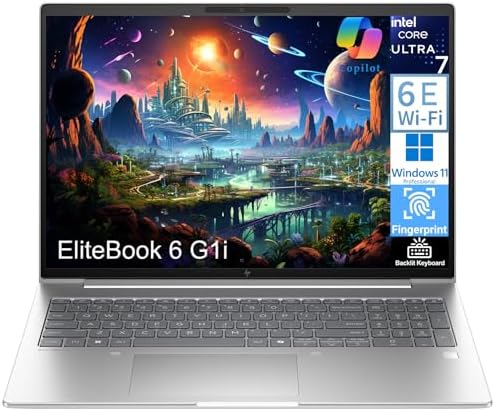
HP’s business lineup has always distinguished itself from consumer products through security, manageability, and durability — and the EliteBook Ultra G1i brings all three in a design that no longer looks like a traditional corporate laptop.
This is a machine built for people whose work week involves airports, client meetings, hot-desks, and video calls. HP has clearly designed it around the physical reality of hybrid and remote work: it passed 20 MIL-STD 810H military durability tests, ships with a 9MP webcam that outperforms most dedicated webcams, and packs enterprise-grade HP Wolf Security directly into the firmware.
Key Specifications:
- Display: 14-inch 2.8K IPS or OLED, up to 1,000 nits brightness, anti-glare
- Processor: Intel Core Ultra 7 or Qualcomm Snapdragon X Elite
- RAM: 16GB or 32GB
- Storage: 512GB or 1TB NVMe SSD
- Security: HP Wolf Security, IR face recognition, fingerprint reader, webcam privacy shutter
- Battery: Up to 18 hours mixed use (Snapdragon variant)
- Connectivity: Wi-Fi 7, optional 5G LTE, Thunderbolt 4, USB-C, HDMI
What We Love: The webcam quality deserves special mention. While most laptop manufacturers treat the integrated camera as an afterthought, HP has shipped a 9MP sensor here that handles low-light environments well and integrates with AI noise cancellation for cleaner audio on calls. For anyone spending hours daily in video meetings, this matters more than an extra gigabyte of RAM.
HP Wolf Security operates at the hardware level, protecting BIOS, memory, and network access in ways that software-only security tools cannot. For professionals handling sensitive client data or working in regulated industries, this is a meaningful differentiator.
What to Watch Out For: The EliteBook Ultra G1i is designed and priced for professionals, not casual users. If your workload is primarily web browsing, streaming, and light office work, the Pavilion Aero or OmniBook X delivers similar everyday speed at a fraction of the price.
Best For: Business travelers, corporate users, IT-managed fleets, consultants, and anyone who needs enterprise security without carrying a clunky traditional corporate machine.
3. HP Pavilion Aero 13 — Best HP Laptop for Students

- Brand New in box. The product ships with all relevant accessories
Price Range on Amazon: $499 – $749
The Pavilion Aero 13 has quietly become one of HP’s most compelling value propositions over the past two years, and in 2026 it remains the most sensible recommendation for the majority of students who need a reliable, portable, and affordable daily machine.
At under 1 kg (roughly 2.2 lbs), it is genuinely one of the lightest laptops available in its price range — which matters enormously when you are carrying it between classrooms, libraries, and coffee shops every single day.
Key Specifications:
- Display: 13.3-inch WUXGA (1920×1200) IPS, 400 nits
- Processor: AMD Ryzen 5 or Ryzen 7 (Ryzen 7000 series)
- RAM: 8GB or 16GB DDR5
- Storage: 256GB or 512GB NVMe SSD
- Battery: Up to 10.5 hours
- Weight: Starting at 958 grams (2.1 lbs)
What We Love: The weight. In a market where “thin and light” often still means 1.4–1.6 kg, the Pavilion Aero 13 is a genuinely featherweight machine that does not feel cheap in the hand. The aluminum chassis is sturdy enough for daily student life without adding unnecessary bulk.
AMD’s Ryzen processors in this price range remain exceptionally competitive for academic workloads. Multitasking across research papers, spreadsheets, streaming lecture recordings, and communication apps happens without the stuttering or throttling that plagued budget laptops a few years ago.
What to Watch Out For: The 400-nit display is adequate but not exceptional. Students who frequently work outdoors or in brightly lit spaces may find themselves fighting screen reflections. The baseline 8GB RAM configuration is manageable today but may feel constrained in two or three years as browser and application demands grow — the 16GB model is worth the additional spend if budget allows.
Best For: College students, high school students, and budget-conscious buyers who need a reliable, portable machine for everyday academic and productivity tasks.
4. HP Omen 16 — Best HP Laptop for Gaming

Price Range on Amazon: $1,099 – $1,799
HP’s gaming lineup under the Omen brand has earned a dedicated following among enthusiasts, and the Omen 16 in 2026 continues the tradition of delivering serious gaming performance in a chassis that is more refined than pure gaming-rig aesthetics might suggest.
Key Specifications:
- Display: 16.1-inch QHD (2560×1440), 165Hz or 240Hz options, 3ms response time
- Processor: Intel Core i9-13900H or AMD Ryzen 9 7940HS
- RAM: 16GB or 32GB DDR5 (upgradeable)
- Storage: 1TB NVMe SSD (upgradeable)
- GPU: NVIDIA GeForce RTX 4060 or RTX 4070
- Battery: 6–8 hours light use, 2–3 hours gaming
- Cooling: Dual fan system with customizable fan curves via OMEN Gaming Hub
What We Love: The QHD 165Hz display is a legitimate upgrade over the 1080p 144Hz panels that dominated this price tier just a year ago. Gaming at 1440p with a refresh rate high enough to reduce motion blur makes a perceptible difference in competitive titles, particularly first-person shooters and fast-paced action games.
The Omen Gaming Hub software is more useful than most manufacturer gaming utilities. Fan curve customization, GPU overclocking, network prioritization, and per-game performance profiles are all accessible from a clean interface without requiring third-party tools.
What to Watch Out For: Like every dedicated gaming laptop, the Omen 16 compromises on battery life when running demanding titles. Expect 2–3 hours while gaming and six to eight hours during lighter use. If you need a machine that transitions smoothly between gaming sessions and all-day office work, the trade-off is manageable but worth understanding before purchase.
Best For: Gamers who want a dedicated Windows gaming machine with a high-refresh-rate QHD display and the option to upgrade RAM and storage as their needs evolve.
5. HP Victus 15 — Best Budget Gaming HP Laptop


Price Range on Amazon: $649 – $899
Not everyone needs or can afford RTX 4070 performance, and the HP Victus 15 exists precisely for that buyer. It makes intelligent compromises to deliver a genuine gaming experience at a price that does not require a second mortgage.
Key Specifications:
- Display: 15.6-inch FHD (1920×1080), 144Hz
- Processor: AMD Ryzen 5 7535HS or Intel Core i5-12450H
- RAM: 8GB or 16GB DDR5
- Storage: 512GB SSD
- GPU: NVIDIA GeForce RTX 3050 or GTX 1650 (varies by config)
- Battery: 4 hours gaming, 6–7 hours general use
What We Love: For buyers entering PC gaming from a console background or upgrading from an older laptop, the Victus 15 delivers a meaningful step up in visual quality and frame rate capability. Popular titles like Fortnite, Valorant, League of Legends, and Minecraft run smoothly at 1080p with medium-to-high settings.
The chassis is user-serviceable — RAM and storage can be upgraded, which means the Victus 15 can grow with you rather than becoming obsolete the moment your needs change.
What to Watch Out For: The baseline RTX 3050 configuration feels adequate today but will begin to show its age with more demanding titles over the next two years. Prioritizing the RTX 3050 Ti or RTX 4050 configuration when available provides noticeably better longevity.
Best For: First-time PC gamers, students who game casually, and budget shoppers who want GPU power without committing to a $1,000+ gaming machine.
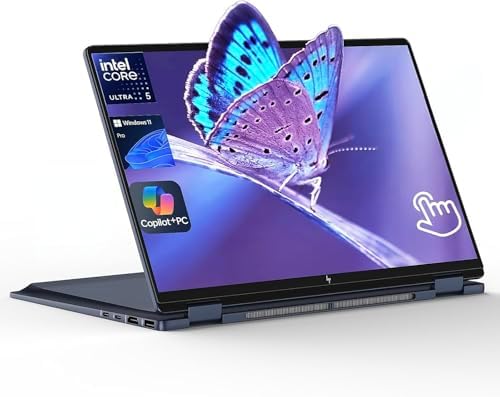
6. HP OmniBook X 14 — Best HP Laptop for Battery Life
Price Range on Amazon: $999 – $1,299
The HP OmniBook X 14 is built around a single promise: exceptional battery life without sacrificing everyday performance. Powered by AMD Ryzen AI processors or Qualcomm Snapdragon X options, this machine is engineered for users who spend their days away from power outlets and cannot afford to hunt for charging spots every few hours.
Key Specifications:
- Display: 14-inch 2K IPS touchscreen, 400 nits
- Processor: AMD Ryzen AI 7 or Intel Core Ultra 7
- RAM: 16GB or 32GB
- Storage: 512GB or 1TB NVMe SSD
- Battery: Rated up to 26 hours (AMD), 20+ hours real-world mixed use
- Weight: Approximately 1.35 kg
What We Love: Battery figures above 20 hours in real-world use are rare in any laptop category. The OmniBook X achieves this through a combination of efficient ARM-adjacent processor architecture, intelligent power management, and a moderately sized panel that does not demand excessive energy. For travelers, field workers, and anyone who spends long stretches without reliable power access, this is a genuinely life-changing machine.
What to Watch Out For: Qualcomm Snapdragon configurations may encounter compatibility issues with some legacy Windows applications that are not yet optimized for ARM architecture. For standard web-based tools, Microsoft 365, streaming services, and modern productivity applications, compatibility is excellent — but niche professional software may need verification before purchase.
Best For: Frequent travelers, field professionals, writers, and anyone whose biggest pain point with a current laptop is battery anxiety.
7. HP ZBook Studio 16 G11 — Best HP Laptop for Creative Professionals


Price Range on Amazon: $1,899 – $3,499
The HP ZBook Studio 16 G11 sits at the top of HP’s professional hierarchy for a reason. This is a workstation-class machine built for video editors, 3D artists, architects, data scientists, and engineers who need certified professional GPU performance alongside genuine portability.
Key Specifications:
- Display: 16-inch 4K OLED DreamColor, 120Hz, factory-calibrated, 100% DCI-P3, Delta-E < 2
- Processor: Intel Core Ultra 9 185H
- RAM: Up to 64GB DDR5
- Storage: Up to 4TB NVMe SSD
- GPU: NVIDIA RTX 2000 Ada Generation (professional, ISV-certified)
- Battery: Up to 9 hours mixed professional use
- Extras: Thunderbolt 4, HDMI 2.1, SD card reader, optional 5G
What We Love: The DreamColor OLED display is factory-calibrated to Delta-E < 2 — meaning colors are accurate enough for professional color grading and print preparation out of the box without relying on third-party calibration hardware. For colorists, photographers, and motion graphics artists, display accuracy is not an optional luxury; it is a professional requirement.
The ISV-certified professional GPU means software applications like Autodesk Maya, SolidWorks, Adobe Premiere Pro, and DaVinci Resolve have been validated to run correctly and stably on this hardware — something that consumer GPUs like the RTX 4060 or 4070 cannot offer for certified professional workflows.
What to Watch Out For: The ZBook Studio is an investment, and it is an honest one. Its price point is not accessible for casual users, and buyers who primarily need document editing and web browsing will get no practical benefit from workstation-class hardware. This machine earns its price only for professionals whose work genuinely demands what it offers.
Best For: Video editors, 3D artists, architects, engineers, data scientists, and creative professionals who need workstation-class performance in a laptop they can take to client sites.
How to Buy the Right HP Laptop on Amazon
Choosing a laptop from Amazon’s enormous HP catalog is far easier once you know what to prioritize. Here is a practical framework for narrowing your decision.
Step 1 – Define Your Primary Use Case
Before looking at any specifications, write down the three things you do most on a computer. If those are writing documents and browsing the web, a $700 Pavilion Aero does everything the $1,900 OmniBook Ultra does for your workflow. If they are 4K video editing and 3D rendering, the ZBook Studio’s extra cost is fully justified.
Step 2 – Set a Realistic Budget (and Stick to It)
Amazon’s HP listings span from roughly $350 to $3,500. Before browsing, determine your ceiling. A useful rule of thumb: spend at least $700 if you want a machine that will feel responsive for four or more years. Below that price point, compromises in RAM, storage speed, and display quality become significant over time.
Step 3 – Choose the Right Specifications
RAM: 16GB is the baseline for a new purchase in 2026. 8GB configurations exist and feel adequate today, but browser tabs, video calls, and background applications consume memory quickly. 32GB is worthwhile for content creators, developers, and power users.
Storage: 512GB is the minimum sensible choice. A 256GB drive fills quickly once you account for the operating system, application installations, and personal files. If you work with video, audio projects, or large datasets, 1TB gives meaningful breathing room.
Display Resolution: For a 13–14 inch laptop, 1920×1200 (WUXGA) or higher. For a 15–16 inch machine, 1920×1080 is acceptable at a budget price, but 2560×1440 (QHD) offers a noticeably sharper image.
Processor Generation: Look for Intel Core Ultra Series 2 or AMD Ryzen AI 300 series processors. These offer the best combination of performance efficiency and on-device AI acceleration in 2026.
Step 4 – Read the Amazon Product Title Carefully
Due to HP’s 2026 rebrand, many Amazon listings include both the old product name (Spectre x360, Envy x360) and the new name (OmniBook Ultra, OmniBook X) in the same listing title. Confirm you are looking at the correct model by checking the model number against HP’s official product page before purchasing.
Step 5 – Check the Return Window and Warranty
HP laptops sold directly through Amazon.com or by Amazon itself typically include the standard 30-day return window. HP’s manufacturer warranty on most consumer laptops is one year, with options to extend through Amazon’s protection plans at checkout. For business machines like the EliteBook, HP often includes three-year limited warranties.
Best Alternatives to HP Laptops in 2026
HP makes excellent machines, but it is not always the best answer for every buyer. Here are the situations where a competing brand might serve you better — and honest recommendations for when to consider them.
If You Want Maximum Performance Per Dollar: Lenovo ThinkPad X1 Carbon or IdeaPad Slim 5

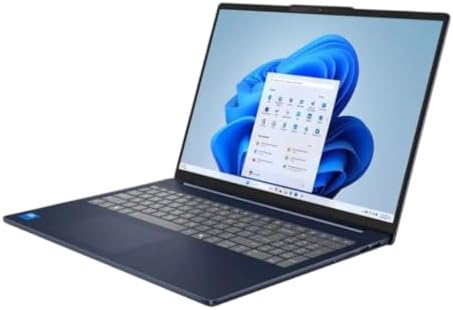
Lenovo’s ThinkPad and IdeaPad lines compete directly with HP’s EliteBook and Pavilion families. ThinkPad keyboards remain the industry standard for tactile typing satisfaction, and Lenovo’s build quality is comparable to HP’s best. For buyers who type extensively, a ThinkPad Carbon Gen 12 is worth comparing against the EliteBook Ultra G1i.
If You Want Longer Battery Life at a Lower Price: ASUS Zenbook A14

- 【RAM & Storage】This computer comes with 16GB RAM DDR5 | 512GB SSD
- 【Intel Core Ultra 7 255H Processor】It is a mobile high-end CPU for larger notebooks based on the Arrow Lake architecture…
- 【Stunning 14-inch WUXGA OLED Touch Display】Indulge in stunning visuals in breathtaking 1920 x 1200 resolution (16:10) an…
ASUS’s Zenbook A14 with Qualcomm Snapdragon X Elite delivers extraordinary battery life — often exceeding 20 hours in mixed use — at a price point that undercuts HP’s OmniBook Ultra by several hundred dollars. The display is not OLED, but for buyers where battery longevity is the absolute priority, the Zenbook A14 is a formidable alternative.
If You Want the Best Display Quality Available: Dell XPS 13 or XPS 15


Dell’s XPS series remains the benchmark for display quality in Windows laptops. The XPS 13 Plus and XPS 15 OLED configurations offer panels that match or slightly exceed HP’s OmniBook Ultra in color accuracy and brightness. If display quality is your single most important criterion, comparing the current XPS and OmniBook Ultra head-to-head is worthwhile.
If You Are Open to macOS: Apple MacBook Air M4 or MacBook Pro M4
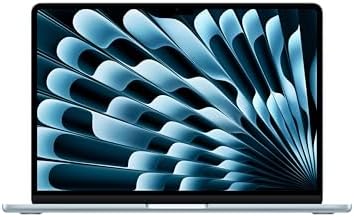


For creative professionals and students who do not specifically require Windows software, Apple’s MacBook Air M4 offers benchmark-beating performance, exceptional battery life, and one of the best-built laptop keyboards available. At comparable price points to the OmniBook Ultra Flip 14, the MacBook Air M4 outperforms it in raw benchmarks while offering similar display quality. The trade-off is platform lock-in and the absence of touchscreen capability.
If You Want the Best Gaming Performance: ASUS ROG Zephyrus G16 or Razer Blade 15
For serious gaming at the highest graphical settings, ASUS ROG and Razer Blade laptops with RTX 4080 or 4090 mobile GPUs outperform the HP Omen at comparable price points. If gaming is your primary use case and you want the absolute maximum frame rates, HP’s Omen is a strong contender but not always the outright leader in its segment.
Final Verdict
HP’s 2026 laptop lineup represents a genuine maturation of the brand’s consumer and business hardware. The transition from Spectre and Envy to OmniBook Ultra and OmniBook X is not merely cosmetic — these machines deliver tangible improvements in display refresh rates, battery efficiency, AI processing capability, and build refinement over the previous generation.
For most people who want one HP laptop to recommend without hesitation: the HP OmniBook Ultra Flip 14 covers more use cases with fewer compromises than any other model in HP’s 2026 lineup. Its OLED display, all-day battery life, premium build, and 360-degree flexibility make it an excellent laptop for professionals, students with larger budgets, and anyone who wants a Windows machine that genuinely competes with Apple’s MacBook offerings.
For students on a budget: the Pavilion Aero 13 remains the most sensible sub-$850 HP laptop available, combining rare lightweight portability with reliable everyday performance.
For business users: the EliteBook Ultra G1i is the most complete professional laptop HP currently makes, with enterprise security, an outstanding webcam, and all-day battery life in a design that works as well in boardrooms as it does in airports.
For gamers: the Omen 16 at the $1,200–$1,500 price point delivers a high-refresh QHD gaming experience that punches well above its price, while the Victus 15 makes entry-level gaming accessible at under $900.
The right HP laptop is the one that matches your actual workflow — not the most expensive model or the one with the highest benchmark scores. Use the guide above, be honest about how you use a computer every day, and you will find exactly the right machine in HP’s 2026 Amazon catalog.
Also Check:
10 Best Amazon Laptop Computers Review Under $700
Frequently Asked Questions
Is the HP Spectre x360 still available in 2026?
HP officially retired the Spectre x360 name in 2025 and replaced it with the OmniBook Ultra Flip 14. Some Amazon listings still use “Spectre x360” in the title to help buyers find the successor model, but the underlying product is the OmniBook Ultra generation with newer Intel Lunar Lake processors.
What is the best HP laptop under $800 on Amazon?
For under $800, the HP Pavilion Aero 13 is the best balanced choice, offering portability, AMD Ryzen performance, and solid battery life. For budget gaming under $900, the HP Victus 15 with RTX 3050 is the top pick.
Are HP laptops good for video editing?
It depends on the model. The HP ZBook Studio 16 G11 is purpose-built for professional video editing with a factory-calibrated 4K OLED DreamColor display and a certified professional GPU. For casual 1080p or 4K editing, the OmniBook Ultra Flip 14 with 32GB RAM handles Premiere Pro and DaVinci Resolve capably. Budget HP laptops under $800 are not recommended for regular video editing workflows.
How long do HP laptops typically last?
Build quality varies significantly by product line. Budget HP Pavilion and HP Stream machines typically provide reliable performance for three to five years. Mid-range Envy/OmniBook X machines comfortably last five to six years with normal care. Premium EliteBook and OmniBook Ultra machines are built to last six to eight years, partly because HP’s business-tier laptops are engineered for longevity and repairability.
Does HP offer student discounts on Amazon?
HP does not typically run student discount programs directly through Amazon. However, HP’s official website offers an Education Store with verified student and educator pricing that can represent meaningful savings on Pavilion, Envy, and premium models. Check both Amazon and HP’s direct site before purchasing to compare final prices.
Is 16GB RAM enough for an HP laptop in 2026?
For the vast majority of everyday users — web browsing, video calls, Microsoft 365, streaming, light photo editing — 16GB RAM provides comfortable performance in 2026. Content creators working with high-resolution video, developers running multiple containers or virtual machines, and data professionals processing large datasets will benefit from 32GB configurations.
What is HP Wolf Security?
HP Wolf Security is HP’s hardware-level security platform included with EliteBook and certain premium consumer HP machines. It operates below the operating system level, protecting the BIOS, memory, and network connections from threats that traditional antivirus software cannot detect. It is particularly valuable for business users handling sensitive data.
Disclosure: This article contains references to products available on Amazon. Prices are subject to change and were current as of June 2026. Always verify the current price and specifications on Amazon before purchasing.

MD.HASAN is an experienced SEO expert and amazon products review writer passionate about helping people find right products on amzon for buy without confusion. With 4 years of hands-on experience in content strategy and search engine optimization, he specializes in writing SEO-friendly blog posts that rank, engage, and convert.


