
Affiliate disclosure: As an Amazon Associate, Tech Rig Review earns from qualifying purchases. Links on this page may be affiliate links, at no extra cost to you.
Looking to buy a Lenovo IdeaPad 1 student laptop on Amazon? Compare real current configurations, specs, pros, cons, and buying tips so you can choose the right budget Windows laptop for school.
Buying a student laptop should not feel like a gamble. You need something that opens documents quickly, handles online classes, keeps multiple browser tabs alive, and lasts through a normal study day without constant frustration. The Lenovo IdeaPad 1 sits in that practical budget zone many students actually shop in.
This guide focuses on real Lenovo IdeaPad 1 configurations currently sold on Amazon.com. It explains what the different versions actually offer, where the compromises sit, and how to match a model to the kind of schoolwork you do. All recommendations use verified product pages and the affiliate format https://www.amazon.com/dp/[ASIN]?tag=techrigreview-20. Prices and stock change, so always confirm the live listing before you buy.
If you are still comparing broader student options, see our guide to the best laptops on Amazon for students.
Table of Contents
Why the IdeaPad 1 Appeals to Students
Lenovo positions the IdeaPad 1 as an everyday, thin, budget-friendly Windows laptop. Official Lenovo specifications for the 15-inch AMD versions (IdeaPad 1 15AMN7 family) list options built around AMD Athlon or Ryzen 3/5 processors, soldered LPDDR5 memory, M.2 SSD storage, a 15.6-inch Full HD display in many configs, Wi-Fi 6, a 720p webcam with privacy shutter, and a roughly 42 Wh battery.
The machine is not meant for heavy video editing, serious coding compiles, or modern gaming. It is meant for writing papers, research in the browser, Microsoft 365 or Google Workspace, Zoom or Teams classes, streaming lectures, and light multitasking. That matches what most students actually need day to day.
Third-party Amazon sellers often upgrade base Celeron models with more RAM and larger SSDs. Those upgraded listings appear frequently under “IdeaPad 1 Student Laptop” titles. Some configurations use the Intel Celeron N4500 (dual-core, up to 2.8 GHz). Others use the stronger AMD Ryzen 5 7520U (4 cores / 8 threads, up to 4.3 GHz). The difference in daily feel is noticeable.
Current IdeaPad 1 Configurations Worth Considering on Amazon
Availability shifts. Always open the live product page and confirm the exact processor, RAM, storage, and seller.
1. High-Memory Celeron Configurations (Popular Student Value Picks)

- 【High Speed RAM And Enormous Space】20GB high-bandwidth RAM to smoothly run multiple applications and browser tabs all at…
- 【Processor】Celeron N4500 (Cores:2 Threads:2; Clockspeed:1.1 GHz Turbo Speed: 2.8GHz; Cache Size: L1: 4096 KB, L2: 12.0 M…
- 【Display】15.6″ FHD (1920×1080), 250nits, IPS-Level, Anti-glare
One frequently listed configuration is the Lenovo IdeaPad 1 with an Intel dual-core processor (typically Celeron N4500), 20 GB RAM, 1 TB SSD + 128 GB eMMC, 15.6-inch Full HD display, Windows 11 Home, Wi-Fi 6, and a 1-year Office 365 subscription in many listings.
Key points from listing data and reviews of similar configs:
- 15.6-inch Full HD (1920 × 1080) anti-glare panel
- 20 GB DDR4 RAM (helps keep many browser tabs and documents open)
- Large combined storage (1 TB SSD + eMMC) reduces the “storage full” problem common on base models
- Numeric keypad, HDMI, USB-A, USB-C (data only on many units), SD card reader
- Weight around 3.4 lb
Who it suits: Students who mainly write papers, research online, use Office apps, attend video classes, and want maximum RAM and storage on a tight budget.
Limitation: The dual-core Celeron sets a clear performance ceiling. It handles light multitasking but slows under heavier loads or many simultaneous apps.
2. AMD Ryzen 5 7520U Configurations (Stronger Everyday Performance)
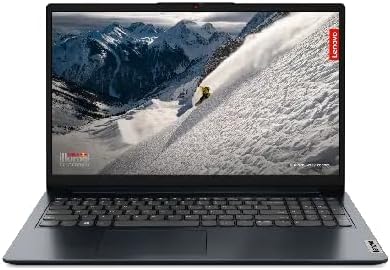
- 【Brilliant 15.6″ FHD Touchscreen Display】The 1920×1080 resolution boasts impressive color and clarity. IPS Touchscreen 3…
- 【AMD Ryzen 5 7520U Processor】Ultra Smart Platform. (Up to 4.3 GHz, 4 cores, 8 Threads, 4MB L3 Cache)
- 【Full Size Keyboard with Numpad】720p HD Camera with Privacy Shutter; 42Whr 3-Cell Lithium-Ionbattery (up to 6 hours batt…
Lenovo’s official IdeaPad 1 15AMN7 line includes the AMD Ryzen 5 7520U (4 cores / 8 threads, 2.8–4.3 GHz) with 8 GB soldered LPDDR5-5500, 256 GB or 512 GB SSD options, 15.6-inch Full HD display (TN or IPS depending on exact model), AMD Radeon 610M graphics, Wi-Fi 6, and up to roughly 9–10 hours of claimed battery life in light use.
Amazon listings for these appear under various seller configurations (sometimes with extra accessories or Office licenses). Example ASINs that have appeared for Ryzen 5 versions include configurations around B0GFL9HLXT and similar. Always confirm the processor name on the page.
Typical strengths:
- Noticeably better multi-threaded performance than Celeron models
- Good for students who keep many tabs open, run light local software, or switch between apps often
- Slim chassis (about 0.7 inch thick) and weight around 3.5 lb
Limitation: Memory is soldered and usually capped at 8 GB or 16 GB on higher configs. You cannot upgrade later. Storage is often expandable via the M.2 slot on some units, but check the exact model.
How to Choose the Right IdeaPad 1 for Your School Work
Match the machine to your actual workload rather than chasing the highest number on the box.
Light use (browser + Google Docs / Microsoft 365 + video calls)
A well-configured Celeron model with 12–20 GB RAM and solid SSD storage can work. Prioritize RAM and a Full HD screen.
Moderate multitasking (many tabs, local Office apps, light note-taking software)
Look for the Ryzen 5 7520U versions. The extra cores and threads make a real difference when several programs run at once.
Storage needs
128 GB fills quickly with Windows updates, downloaded PDFs, lecture recordings, and personal files. 256 GB is a practical minimum; 512 GB or 1 TB is more comfortable for most students.
Display
Prefer Full HD (1920 × 1080) over older HD (1366 × 768) panels. Anti-glare helps in bright classrooms or libraries. IPS panels give better viewing angles than basic TN panels when available.
Ports and everyday practicality
Most IdeaPad 1 units include HDMI, USB-A, USB-C (often data-only), headphone jack, and an SD card reader. The numeric keypad on 15.6-inch models is useful for spreadsheets. The privacy shutter on the webcam is a small but welcome feature for online classes.
Battery and charging
Official claims for the 42 Wh battery range from roughly 9 hours in light productivity tests to longer video playback times. Real-world results depend on brightness, Wi-Fi use, and background apps. Rapid Charge Boost (a short charge for a couple of hours of use) is useful between classes.
Buyer Feedback Patterns Across Listings
Across multiple IdeaPad 1 student listings, common positive themes include:
- Enough performance for writing, browsing, and online classes when RAM is adequate
- Decent keyboard and numeric pad for the price
- Acceptable battery for a school day of mixed use
- Value when the configuration includes higher RAM or larger storage
Common complaints include:
- Base Celeron models feel slow once several tabs and apps are open
- Small storage fills quickly
- Plastic build is fine for careful use but not premium
- Some third-party upgraded units have mixed experiences with seller support or warranty handling
These patterns appear consistently enough that they are useful decision filters. Always read the most recent reviews on the exact ASIN you are considering.
Practical Buying Checklist Before You Click “Add to Cart”
- Confirm the exact processor name (Celeron N4500 vs Ryzen 5 7520U, etc.).
- Confirm installed RAM and whether it is soldered.
- Confirm storage type and size (SSD preferred over eMMC alone).
- Check the display resolution and panel type.
- Note the seller (Lenovo, Amazon, or third-party) and return policy.
- Look at recent verified buyer reviews for that specific configuration.
- Verify any included Office subscription length and terms.
- Compare the total price against current alternatives in the same budget.
If Amazon and Best Buy pricing or return policies matter to your decision, see our comparison of Amazon vs Best Buy for laptops.
FAQ
Is the Lenovo IdeaPad 1 good for college students?
Yes for typical college work: writing, research, online classes, Microsoft 365 or Google Workspace, and light multitasking. It is not ideal for heavy software development, video editing, or gaming.
Should I buy a Celeron or Ryzen 5 version?
Choose the Ryzen 5 7520U if you can stretch the budget and expect more simultaneous apps or tabs. The higher-RAM Celeron versions remain usable for lighter loads and often cost less.
Can I upgrade the RAM later?
On most current IdeaPad 1 models the memory is soldered. Plan for the amount you need at purchase.
Is 8 GB of RAM enough in 2026?
It works for light use. 12 GB or 16 GB+ gives clearer headroom for modern browser-heavy schoolwork. 20 GB configurations on some Celeron listings are unusually generous for the price tier.
How important is the Full HD screen?
Very. An HD (1366 × 768) panel feels dated for reading PDFs and working with two windows side by side. Full HD is the practical minimum for most students.
Does it come with Microsoft Office?
Some Amazon listings include a 1-year Microsoft 365 subscription. Check the exact product description; the subscription is not permanent unless the listing specifically says so.
What about battery life for a full school day?
Expect roughly a full day of mixed use on the 42 Wh battery if you manage brightness and background apps. Heavy video or continuous Wi-Fi use shortens that.
Are third-party upgraded models safe to buy?
Many are fine, but check the seller rating, return window, and whether the upgrade voids any manufacturer warranty. Prefer listings with clear recent feedback.
Conclusion
The Lenovo IdeaPad 1 remains a practical budget choice for students who need a simple Windows laptop for everyday school tasks. The key is matching the exact configuration to your workload. Prioritize enough RAM, a real SSD of usable size, and a Full HD display. The Ryzen 5 versions deliver better everyday responsiveness; the higher-RAM Celeron configurations can still serve lighter needs well when priced attractively.
Always open the live Amazon product page, confirm the processor, memory, storage, and seller, and read the newest reviews for that specific ASIN. Stock and pricing move quickly.
If you want a broader set of student laptop options beyond the IdeaPad 1 family, start with our best student laptops on Amazon roundup. For more Lenovo models across different budgets, see the best Lenovo laptops on Amazon guide.
As an Amazon Associate I earn from qualifying purchases.

MD.HASAN is an experienced SEO expert and amazon products review writer passionate about helping people find right products on amzon for buy without confusion. With 4 years of hands-on experience in content strategy and search engine optimization, he specializes in writing SEO-friendly blog posts that rank, engage, and convert.


