
Affiliate disclosure: As an Amazon Associate, Tech Rig Review earns from qualifying purchases. Links on this page may be affiliate links, at no extra cost to you.
Microsoft Surface devices are different from most Windows laptops — and that’s where the confusion starts.
Some are traditional clamshell laptops. Others, like the Surface Pro, are tablets that become laptops when you attach a keyboard. The Surface family spans different processor platforms, different generations, and very different use cases. Choosing the right Microsoft Surface laptop on Amazon takes more than comparing processor speed and storage size.
For this guide, I focused on four Surface models that make the most sense for real buyers. I looked at design, screen quality, processor platform, memory, storage, portability, ports, and the type of user each model genuinely suits.


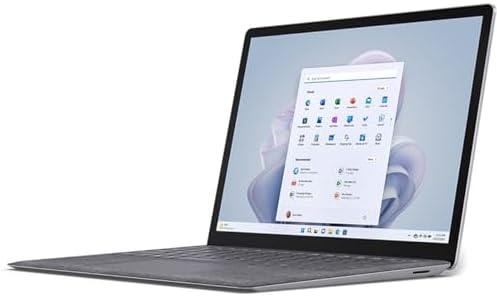

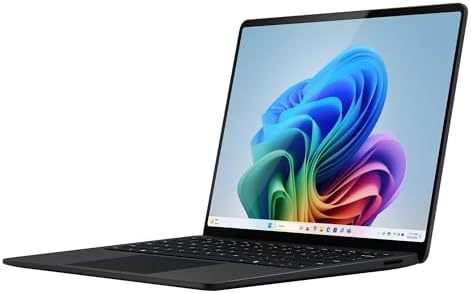

One key thing to know upfront: The Surface Pro is not the same as a normal laptop. It is a detachable 2-in-1 device, and the keyboard is sold separately on the standard configuration. Factor that into your budget when comparing it with a traditional Surface Laptop.
Research note: This article is based on research of Amazon listings, Microsoft’s official specifications, and publicly available product information. Amazon availability, sellers, configurations, and customer feedback can change — always verify the live Amazon listing before buying.
Table of Contents
Quick Comparison: All 4 Surface Models at a Glance
| Product | Best For | Key Feature | Link |
|---|---|---|---|
| Microsoft Surface Pro 11 | 2-in-1 flexibility | 13″ OLED touchscreen + detachable design | Check on Amazon |
| Surface Laptop 7 — 13.8″ | Best portable traditional laptop | Snapdragon X Elite + 16GB RAM + 512GB SSD | Check on Amazon |
| Surface Laptop 5 — 13.5″ | Best Intel Surface value | 12th-gen Core i7 + 16GB RAM + 512GB SSD | Check on Amazon |
| Surface Laptop 5 — 15″ | Best large-screen Surface | 15″ 3:2 touchscreen + Intel Core i7 | Check on Amazon |
⚠️ Important: Exact Amazon configurations vary by seller. Always verify the model number, RAM, SSD, keyboard language, OS, and product condition before ordering.
1. Microsoft Surface Pro 11 — Best For: 2-in-1 Flexibility

- [This is a Copilot+ PC] — A new AI era begins. Experience enhanced performance and AI capabilities with Copilot+ PC, boo…
- [13″ OLED Touch Screen Display] — Cinematic display on-the-go. 1M:1 contrast ratio delivers a wider range of colors.
- [All day battery life] — 14 hours of battery life[5], fast charging with 65W PSU via Surface Connect or USB-C.
The Surface Pro 11 is the right Surface if you want a device that genuinely shifts between tablet and laptop use. This is not a traditional notebook. The display is the computer. A built-in kickstand props it on a desk, and a detachable keyboard turns it into a laptop-style workstation.
The verified Amazon configuration (ASIN: B0CXKXNNPX) features a 13-inch OLED touchscreen, Snapdragon X Elite processor, 16GB RAM, and 256GB SSD. The OLED panel delivers deep contrast and vivid colours — a step above the IPS screens on the Surface Laptop family.
The Snapdragon X Elite is an ARM-based chip. For common modern Windows apps — Microsoft 365, Chrome, Teams, Zoom, streaming — it performs extremely well. If you rely on older specialist Windows software, verify compatibility with ARM Windows before buying.
Key Specifications
- Display: 13-inch OLED Touchscreen
- Resolution: 2880 × 1920
- Processor: Snapdragon X Elite (12-core)
- RAM: 16GB
- Storage: 256GB SSD
- Operating System: Windows 11 Home
- Form Factor: Detachable 2-in-1
- Weight: Approximately 1.97 lbs
- Ports: USB-C / USB4
- Front Camera: Surface Studio Camera
- Rear Camera: 10MP class
- Kickstand: Built-in, adjustable
Pros
- Excellent 2-in-1 flexibility — genuinely switches between tablet and laptop
- Ultra-light body at approximately 1.97 lbs
- OLED touchscreen with high resolution and vivid contrast
- Snapdragon X Elite delivers strong performance for modern apps
- USB-C / USB4 connectivity
- Built-in kickstand adjusts across a wide range of angles
- Great choice for travel, note-taking, and presentations
Cons
- Keyboard is not included with every configuration — check the listing
- 256GB storage is tight for power users
- ARM compatibility should be checked for specialist or older Windows software
- More complex to set up for desk-first users than a traditional laptop
- Exact configuration varies between Amazon listings and sellers
Buyer Sentiment
The Surface Pro 11 has strong marketplace interest on Amazon, including an Amazon’s Choice designation on the verified listing. Buyers consistently highlight screen quality, portability, and flexibility. Pay close attention to reviews about the keyboard experience — since it’s sold separately, satisfaction varies depending on which keyboard buyers chose.
Who Should Buy It?
Great for: Students who take handwritten notes, travelers who want tablet and laptop in one, remote workers who present often, anyone using modern Windows applications, buyers who value a very light device.
Consider alternatives if: You want a traditional always-attached keyboard, you use older specialist Windows software, you need more than 256GB of local storage.
Final Verdict
The Surface Pro 11 is the most flexible device in this comparison. Its design is the reason to buy it. If you want a conventional laptop, look at the Surface Laptop options below. If you want a device that genuinely adapts to what you are doing — tablet in the morning, laptop at the desk, sketch pad in a meeting — the Surface Pro 11 is compelling.
Check Current Price on Amazon →
2. Microsoft Surface Laptop 7 — 13.8-inch — Best For: Premium Portable Traditional Laptop

- [This is a Copilot+ PC] — A new AI era begins. Experience enhanced performance and AI capabilities with Copilot+ PC, boo…
- [Introducing Surface Laptop] — Power, speed, and touchscreen versatility with AI features. Transform your work, play, an…
- [Exceptional Performance] — Surface Laptop delivers faster performance than the MacBook Air M3[1], with blazing NPU spee…
If you want the Surface experience in a normal laptop design, the Surface Laptop 7 is the strongest option in this comparison. The screen does not detach. The keyboard is built in. The touchpad is large and haptic. You open the lid and start working — no decisions to make about kickstands or keyboard accessories.
The 13.8-inch display uses a 3:2 aspect ratio rather than the common 16:9 widescreen format. That makes the screen noticeably taller, giving you more room for documents, spreadsheets, and web pages without scrolling. Microsoft lists a 2304 × 1536 resolution with up to 120Hz dynamic refresh rate.
The researched Amazon configuration (ASIN: B0D1VZCM76) combines Snapdragon X Elite, 16GB RAM, and 512GB SSD — a well-balanced setup for professional productivity.
Key Specifications
- Display: 13.8-inch PixelSense Flow Touchscreen
- Resolution: 2304 × 1536
- Aspect Ratio: 3:2
- Refresh Rate: Up to 120Hz
- Processor: Snapdragon X Elite (12-core)
- RAM: 16GB LPDDR5x
- Storage: 512GB SSD
- GPU: Qualcomm Adreno
- Wi-Fi: Wi-Fi 7
- Bluetooth: 5.4
- Weight: Approximately 2.96 lbs
- Ports: USB-C/USB4 × 2, USB-A, 3.5mm headphone jack, Surface Connect
- Battery (claimed): Up to 20 hours local video playback
Pros
- Excellent 3:2 touchscreen gives more vertical space for work and documents
- Snapdragon X Elite with strong efficiency and modern performance
- 16GB RAM in the researched configuration
- 512GB SSD — comfortable for most users
- Wi-Fi 7 — the fastest current wireless standard
- Good port selection without immediately needing a hub
- Microsoft claims up to 20 hours battery life
- Traditional laptop design — open the lid and start working
Cons
- Snapdragon ARM compatibility deserves checking for older or specialist software
- RAM is not user-upgradeable after purchase
- More expensive than older Surface generations
- Not suited for demanding dedicated-GPU workloads like gaming or 3D rendering
- Always verify the exact seller and configuration on Amazon before ordering
Buyer Sentiment
The Surface Laptop 7 is well-established as a premium Windows laptop. The most useful buyer feedback focuses on real-world battery life versus Microsoft’s claimed figures, keyboard feel, display quality, and how well Snapdragon handles specific software. Read recent reviews for the exact 13.8-inch configuration specifically.
Why the 3:2 Display Matters
The 13.8-inch screen’s 3:2 ratio is taller than a standard widescreen laptop. For writing, researching, and working with spreadsheets, the extra vertical room is immediately noticeable. You’re not just getting more pixels — you’re getting a display shape that fits the way office work actually looks on screen.
Who Should Buy It?
Great for: Remote workers, students, writers, freelancers, business users, Microsoft 365 users, anyone who wants a premium Windows laptop with a modern processor platform.
Consider alternatives if: You want tablet functionality, you need a 360-degree rotation stand for presentations, or you rely on software that requires Intel x86 compatibility.
Final Verdict
The Surface Laptop 7 13.8-inch is the best traditional laptop in this comparison and our overall top pick. It combines a modern Snapdragon X Elite platform, 16GB RAM, 512GB SSD, a 3:2 touchscreen, and a lightweight design. Check software compatibility before buying if you use older or specialist Windows applications.
Check Current Price on Amazon →
3. Microsoft Surface Laptop 5 — 13.5-inch — Best For: Intel x86 Windows Compatibility

- Microsoft Surface Laptop 5 features 12th generation Intel Core i7 processor, 13.5-inch PixelSense Touchscreen Display (2…
- 512GB Solid State Drive, 16GB RAM
- Clean, elegant design thin and light, starting at just 2.76 pounds, Surface Laptop 5 fits easily in your bag, Graphics: …
The Surface Laptop 5 is an older generation, but it stays relevant for one specific reason: it uses a 12th-generation Intel Core i7 processor instead of Qualcomm Snapdragon. If Intel x86 compatibility is your priority, this is the Surface Laptop in this comparison worth looking at.
The researched Amazon configuration (ASIN: B0CT6B7QYC) pairs the Core i7 with 16GB RAM, 512GB SSD, and a 13.5-inch 3:2 PixelSense touchscreen at 2256 × 1504 resolution.
⚠️ Important distinction: Do not compare the Surface Laptop 5 and Surface Laptop 7 based only on their names. The Laptop 7 consumer configuration uses Qualcomm Snapdragon ARM. The Laptop 5 uses Intel x86. This affects software compatibility — not just performance.
Key Specifications
- Display: 13.5-inch PixelSense Touchscreen
- Resolution: 2256 × 1504
- Aspect Ratio: 3:2
- Processor: 12th-generation Intel Core i7
- RAM: 16GB
- Storage: 512GB SSD
- Graphics: Intel Integrated
- Keyboard: Backlit, built-in
- OS: Windows
- ASIN: B0CT6B7QYC
Pros
- Intel Core i7 — full x86 Windows compatibility with all traditional Windows software
- 16GB RAM for comfortable multitasking
- 512GB SSD — plenty of space for most users
- 3:2 touchscreen with high resolution
- Slim, premium Surface design
- Traditional clamshell laptop — no keyboard accessory needed
Cons
- Older generation than Surface Laptop 7
- Not a Copilot+ PC like newer Snapdragon models
- Intel integrated graphics — not for gaming or GPU-heavy work
- Amazon configurations can vary — check exactly what you are buying
- Some listings may be renewed or sold by third-party sellers — verify condition carefully
Buyer Sentiment
The Surface Laptop 5 has a long history on Amazon. For listings of this older model, recent feedback matters far more than old reviews. Check specifically for comments about battery health, keyboard condition, and whether the unit was new or renewed. This is especially important for third-party seller listings.
Why Choose Intel in 2026?
The Surface Laptop 7’s consumer models use Snapdragon ARM. The Surface Laptop 5 uses Intel. If your work relies on older professional software, enterprise tools, specialist plugins, or specific drivers that require traditional x86 Windows, Intel remains the safer choice. For users whose workflow is built around Chrome, Microsoft 365, Teams, Zoom, and modern web applications, Snapdragon works extremely well.
Is the Surface Laptop 5 Still Worth Buying?
It depends on the listing. If you find it at a good price with a trustworthy seller and the exact 16GB and 512GB Intel configuration, it can be a smart buy — especially if Intel compatibility matters more to you than having the newest generation. Always compare the actual configuration and current condition, not just the model name.
Who Should Buy It?
Great for: Users who need Intel x86 compatibility, Windows users who rely on older business or specialist software, Microsoft 365 users, students, office workers, buyers who find a good deal on a trustworthy listing.
Final Verdict
The Surface Laptop 5 is no longer Microsoft’s newest consumer laptop, but Intel compatibility keeps it relevant in 2026. If your software is better suited to traditional x86 Windows and you find a trustworthy Amazon listing with the right configuration, this model deserves serious consideration.
Check Current Price on Amazon →
4. Microsoft Surface Laptop 5 — 15-inch — Best For: Maximum Screen Space

- With 16 GB of memory, runs as many programs as you want without losing the execution
- The 15″ 2496 x 1664 screen provides a great movie watching experience
- 256 GB SSD keeps your running programs active while your computer resumes from suspension in seconds
The 15-inch Surface Laptop 5 is for a specific buyer: someone who wants more screen space than a compact 13-inch laptop provides and is comfortable working on a larger machine.
The researched Amazon listing (ASIN: B0F7D96XDP) is identified as a renewed configuration with a 15-inch Intel Core i7, 16GB RAM, and 256GB SSD.
⚠️ Renewed listing notice: The researched configuration for this model is a renewed product. Do not compare its price directly with a brand-new Surface Laptop. Before purchasing any renewed laptop, verify: seller identity, product condition, battery health, return policy, warranty, included accessories, keyboard layout, RAM, storage, and OS.
Key Specifications
- Display: 15-inch PixelSense Touchscreen
- Resolution: 2496 × 1664
- Aspect Ratio: 3:2
- Processor: 12th-generation Intel Core i7
- RAM: 16GB
- Storage: 256GB SSD
- Graphics: Intel Integrated
- Condition: Renewed — verify on Amazon listing
- ASIN: B0F7D96XDP
Pros
- Large 15-inch 3:2 touchscreen — more vertical screen space than 13-inch models
- Intel Core i7 — full x86 Windows compatibility
- 16GB RAM for comfortable multitasking
- Premium Surface design and build quality
- Good choice for desk workers who need more workspace
Cons
- The researched listing is a renewed unit — not brand-new
- Only 256GB SSD — tight for users with large local file needs
- Older generation than Surface Laptop 7
- Larger and heavier than 13-inch Surface options
- Condition, battery health, and warranty must be checked carefully before buying
Buyer Sentiment
The Surface Laptop 5 remains a well-known Microsoft laptop family, but buyer feedback for renewed units should be evaluated completely separately from feedback for new devices. Read the most recent reviews for comments about cosmetic condition, battery health, charger condition, display quality, and whether the actual configuration matched the listing.
Is 256GB Enough?
For users who rely on cloud storage and work primarily with documents, 256GB can be sufficient. For anyone who stores photos, videos, large applications, or project files locally, 256GB will feel restrictive quickly. If storage is a concern, look for a 512GB configuration or plan to use an external drive consistently.
Who Should Buy It?
Great for: Desk workers, spreadsheet users, writers, students who want a larger display, remote workers who need more screen space, buyers comfortable with renewed products from verified sellers.
Final Verdict
The 15-inch Surface Laptop 5 is interesting for its large 3:2 display and Intel platform. The renewed status and 256GB SSD are the two things to examine carefully before buying. If you want maximum screen space and are comfortable with a renewed purchase from a verified seller, this can be an attractive option.
Check Current Price on Amazon →
Buyer’s Guide: How to Choose the Right Microsoft Surface
Step 1 — Surface Pro or Surface Laptop?
Answer one question first: do you want a device that works as a tablet?
Choose Surface Pro if you want:
- A tablet and laptop in one device
- Handwritten notes with a stylus
- A very light device for travel
- PDF annotation and drawing
- Flexibility between multiple modes
Choose Surface Laptop if you want:
- A traditional clamshell laptop
- Built-in keyboard with no extra cost
- A simpler desk setup
- All-day typing comfort
- A larger screen (up to 15 inches)
Step 2 — Snapdragon or Intel?
Choose Snapdragon (Surface Pro 11, Surface Laptop 7) if:
- Your daily tools are Chrome, Microsoft 365, Teams, and Zoom
- You want strong energy efficiency and long battery life
- You want Copilot+ AI features
- You use modern web applications
Choose Intel (Surface Laptop 5) if:
- You rely on older Windows software or specialist applications
- Your business software requires traditional x86 compatibility
- You use specific plugins or drivers that require Intel
Simple rule: If your work lives in modern apps and web tools, Snapdragon works very well. If you depend on older software with specific Windows requirements, Intel is the safer choice — or check ARM compatibility carefully before deciding.
Step 3 — How Much RAM and Storage?
For a new Windows productivity laptop, 16GB RAM is the comfortable starting point in 2026. All four models in this comparison offer 16GB in their researched configurations.
256GB storage — Good for cloud storage users, web and document work, students on a budget.
512GB storage — Better for most professionals, photo storage, multiple applications, general long-term comfort.
1TB storage — Useful for large media libraries, video production, users who avoid external drives.
Step 4 — Pre-Purchase Checklist
Before clicking Buy Now, verify these details on the live Amazon listing:
- Exact model name and generation
- Processor type (Snapdragon vs Intel, and specific variant)
- RAM amount (8GB, 16GB, or 32GB)
- Storage size (256GB, 512GB, or 1TB)
- Display size
- Product condition (New, Renewed, Open Box)
- Keyboard included or sold separately (critical for Surface Pro)
- Sold by Amazon or a third-party seller
- Return policy and warranty terms
- Keyboard language and region
Surface Laptop 7 vs. Surface Laptop 5: Side-by-Side
| Feature | Surface Laptop 7 | Surface Laptop 5 |
|---|---|---|
| Generation | Newer (2024) | Older (2022) |
| Processor platform | Snapdragon ARM | Intel Core x86 |
| Display (13-inch class) | 13.8-inch, 3:2 | 13.5-inch, 3:2 |
| RAM (researched config) | 16GB LPDDR5x | 16GB |
| Storage (researched) | 512GB SSD | 512GB SSD |
| Wi-Fi | Wi-Fi 7 | Wi-Fi 6 |
| AI features | Copilot+ PC | Standard Windows |
| Best reason to choose | Modern platform + efficiency | Intel x86 compatibility |
Surface Pro 11 vs. Surface Laptop 7: Which Is Right for You?
Choose Surface Pro 11 if:
- You want tablet and laptop in one device
- You take handwritten notes or annotate PDFs
- You want an OLED display
- Flexibility and lightness matter most
Choose Surface Laptop 7 if:
- You want a traditional always-attached keyboard
- You prefer a simpler desk and travel setup
- You need more local storage (512GB vs 256GB on the verified Pro config)
- You type heavily throughout the day
Frequently Asked Questions
What is the best Microsoft Surface laptop on Amazon?
For a traditional laptop, the Surface Laptop 7 13.8-inch is the strongest overall option in this comparison. It combines a modern Snapdragon X Elite platform, 16GB RAM, 512GB SSD, a 3:2 touchscreen, and a lightweight design. If you want tablet functionality alongside laptop use, the Surface Pro 11 is the better choice.
Is Microsoft Surface Pro a laptop or a tablet?
It is both. The Surface Pro is a Windows 2-in-1 device with a detachable keyboard. Microsoft positions it as a flexible PC that moves between laptop and tablet use. The screen is the computer — the keyboard is an optional accessory that must often be purchased separately.
Does the Surface Pro come with a keyboard?
Not always. The standard Surface Pro listing we researched identifies the detachable keyboard as an accessory sold separately. Always check the Amazon package contents before buying — and factor the keyboard cost into your budget when comparing it with Surface Laptop prices.
Is Surface Laptop 7 better than Surface Laptop 5?
For most buyers wanting a current Surface experience, yes. The Surface Laptop 7 is a newer generation with Snapdragon X-series processors, Copilot+ features, Wi-Fi 7, and updated connectivity. The Surface Laptop 5 remains relevant specifically if you need Intel x86 compatibility or find a trustworthy listing at a compelling price.
Should I choose a Snapdragon or Intel Surface?
Choose Snapdragon if your daily work involves Chrome, Microsoft 365, Teams, Zoom, and modern web applications. Choose Intel if you depend on older Windows software, specialist plugins, or enterprise applications that specifically require x86 compatibility. When in doubt, check your most important applications against ARM Windows compatibility before deciding.
Are Surface laptops good for college students?
Yes. The Surface Laptop is especially good for students who want a light Windows laptop for writing, research, and Microsoft 365. The Surface Pro is worth considering if you also want tablet functionality and handwritten notes. Prioritize 16GB RAM and at least 512GB storage for a comfortable experience, and check that your school’s required software is compatible with your chosen processor platform.
Are Surface laptops good for video calls?
Yes. The current Surface family includes Full HD cameras, dual Studio Mics, and Windows Studio Effects — making them well-suited for Zoom, Teams, Google Meet, and online classes. Your room lighting and background environment still matter, but the hardware foundation on Surface devices is strong.
What battery life does Microsoft claim for the Surface Laptop 7?
Microsoft lists up to 20 hours of local video playback for the 13.8-inch Surface Laptop 7 under its specified testing conditions. Real-world battery life will vary significantly based on screen brightness, active applications, Wi-Fi use, and workload. Treat the manufacturer figure as a ceiling, not a daily guarantee.
Our Rankings: Best Microsoft Surface by Use Case
🏆 Best Overall Traditional Laptop: Surface Laptop 7 — 13.8-inch Best balance of modern platform, portability, 3:2 touchscreen, 16GB RAM, 512GB SSD, and Wi-Fi 7. The cleanest pick for most buyers.
🥈 Best 2-in-1 Device: Surface Pro 11 Best choice for tablet and laptop flexibility. OLED display, ultra-light body, Snapdragon X Elite. Remember the keyboard is sold separately.
🥉 Best Intel Surface: Surface Laptop 5 — 13.5-inch Best for buyers who specifically need x86 Intel Windows compatibility. 12th-gen Core i7, 16GB RAM, 512GB SSD, 3:2 touchscreen.
🖥️ Best Large-Screen Option: Surface Laptop 5 — 15-inch For buyers who want maximum screen space. Verify the renewed condition carefully before ordering.
Final Verdict
Microsoft Surface laptops are not all designed for the same buyer.
If you want the easiest traditional laptop experience, start with the Microsoft Surface Laptop 7 13.8-inch. Its modern Snapdragon X Elite platform, 16GB RAM, 512GB SSD, touchscreen, and 3:2 display make it a strong fit for work, school, travel, and general productivity.
If you want something more flexible, the Surface Pro 11 is the standout. Its detachable design lets you use it as a tablet or laptop, and the verified Amazon listing offers a 13-inch OLED configuration with Snapdragon X Elite and 16GB RAM.
The Surface Laptop 5 remains worth considering when Intel x86 compatibility matters. The 13.5-inch i7 configuration offers 16GB RAM and 512GB SSD, while the 15-inch version suits buyers who need more screen space.
The most important lesson is simple: do not buy a Surface based only on the model name. Check the exact processor, RAM, storage, display, condition, seller, and included accessories before buying.
And if you choose Surface Pro, remember to check whether the keyboard is included. A tablet without the keyboard is a very different purchase from a complete laptop setup.
Check Microsoft Surface Pro 11 on Amazon →
Check Microsoft Surface Laptop 7 on Amazon →
Check Microsoft Surface Laptop 5 (13.5″) on Amazon →
Check Microsoft Surface Laptop 5 (15″) on Amazon →
As an Amazon Associate I earn from qualifying purchases. Product configurations, pricing, and availability on Amazon change frequently — always verify the live listing before purchasing.

MD.HASAN is an experienced SEO expert and amazon products review writer passionate about helping people find right products on amzon for buy without confusion. With 4 years of hands-on experience in content strategy and search engine optimization, he specializes in writing SEO-friendly blog posts that rank, engage, and convert.


