
Affiliate disclosure: As an Amazon Associate, Tech Rig Review earns from qualifying purchases. Links on this page may be affiliate links, at no extra cost to you.
Looking for the best tablet on Amazon? We compared 10 currently available tablets — from budget kids’ tablets to premium iPads — to help you pick the right one.
Tablets have quietly split into several very different categories of devices. A tablet bought for a toddler’s cartoons has almost nothing in common with one bought for professional illustration work, and shopping for “a tablet” without narrowing down which kind you actually need is how a lot of buyers end up disappointed. This guide compares 10 tablets currently sold on Amazon, chosen specifically to cover those different categories rather than ranking everything against a single “best overall” standard.
Our picks span budget Amazon Fire tablets, kid-focused models, mid-range Android tablets from Samsung and Lenovo, and the full current iPad lineup from the standard iPad through the iPad Pro. Every tablet below was checked against current Amazon listings and sales-tracking data to confirm it’s genuinely available right now; anything that couldn’t be verified as currently sold was left out in favor of a confirmed alternative.
This comparison is built on specification research and patterns in verified buyer feedback across current listings, not hands-on testing, and we think that’s a more honest way to frame it. Every spec comes from the manufacturer’s documentation and the current Amazon listing, and every buyer-sentiment note reflects general feedback patterns rather than a specific star rating or review count, since those numbers shift daily. If a detail couldn’t be confirmed with confidence, it was left out rather than guessed at.
If you’re weighing a tablet against a laptop or a 2-in-1 for your actual workload before deciding, our explainer on what a 2-in-1 laptop actually is is worth a quick read, since the right device sometimes isn’t a tablet at all.
Table of Contents
Quick Comparison Table
| Product Name | Best For | Key Feature | Buyer Sentiment | Affiliate Link |
|---|---|---|---|---|
| Amazon Fire HD 8 (64GB) | Best Ultra-Budget Tablet | Affordable everyday tablet for browsing and streaming | Rated highly for value among budget tablet buyers | Check Price on Amazon |
| Amazon Fire HD 10 Kids Tablet | Best for Kids | Durable kid-proof case with parental controls built in | Consistently well-rated among parents | Check Price on Amazon |
| Samsung Galaxy Tab A11+ (128GB) | Best Budget Android Tablet | Larger display with modern Android software | Well-regarded for everyday use at this price | Check Price on Amazon |
| Lenovo Idea Tab Pro 12.7″ (with pen) | Best Budget Stylus Tablet | Large display with an included stylus | Positively reviewed for note-taking value | Check Price on Amazon |
| Apple iPad 11-inch (128GB) | Best Overall Beginner-Friendly Tablet | Reliable performance with the full Apple ecosystem | Consistently well-rated among first-time iPad buyers | Check Price on Amazon |
| Apple iPad mini (A17 Pro) | Best Compact/Portable Tablet | Full-size performance in a compact frame | Rated highly for portability and one-hand use | Check Price on Amazon |
| Samsung Galaxy Tab S10 FE (128GB) | Best Samsung Mid-Range Tablet | AMOLED-class display with S Pen support | Well-regarded among Android tablet buyers | Check Price on Amazon |
| Apple iPad Air 11-inch (M4) | Best for Creative Work | M4 chip performance with Apple Pencil Pro support | Consistently well-rated for creative and productivity use | Check Price on Amazon |
| Apple iPad Pro 11-inch (M5) | Best Premium Tablet | M5 chip with a high-end OLED-class display | Rated highly among professional and creative buyers | Check Price on Amazon |
| Apple iPad Pro 13-inch (M5) | Best Large-Screen Flagship | Largest current iPad Pro display with M5 performance | Consistently well-rated among power users | Check Price on Amazon |
Individual Product Reviews
1. Amazon Fire HD 8 (64GB) — Best Ultra-Budget Tablet

- Fire HD 8 offers an 8″ HD display for seamless streaming and gaming, coupled with a 5MP rear facing camera for photos—wi…
- Fast and responsive with long battery life – With up to 4 GB RAM (2X more than 2022 release), 64GB of storage, and up to…
- Save time, get creative – Enjoy three smart tools to help you send polished emails, quickly summarize webpages, and crea…
The Fire HD 8 is Amazon’s accessible, no-frills tablet aimed at buyers who want a capable device for browsing, video streaming, e-books, and light apps without paying anywhere near flagship prices. It runs Amazon’s Fire OS, which is built around the Amazon ecosystem rather than the full Google Play app library.
| Pros | Cons |
|---|---|
| Very affordable price point for a dedicated tablet | Limited to Amazon’s app store rather than full Google Play |
| Decent battery life for media consumption | Performance is modest for demanding apps or multitasking |
| Lightweight and easy to hold for extended reading | Build materials reflect the budget price point |
| Deep integration with Amazon services like Prime Video and Kindle |
Key Specs
- 8-inch HD display
- 64GB internal storage, expandable via microSD
- Fire OS (Amazon’s Android-based operating system)
- Long-lasting battery for media playback
Buyer Sentiment: Rated highly for value among buyers specifically shopping in the budget tablet category.
What Buyers Are Saying: Buyers in this segment frequently describe it as a dependable second tablet for the couch or travel, with many specifically mentioning the value of the larger 64GB storage configuration for offline video and e-books.
Who It’s For: Best for buyers who want a simple, affordable tablet mainly for streaming, reading, and browsing, and who are already comfortable within the Amazon ecosystem.
2. Amazon Fire HD 10 Kids Tablet — Best for Kids

- SAVE UP TO $70 — Bundle includes a full-featured tablet (not a toy) for kids ages 3-7, a 1-year Amazon Kids+ subscriptio…
- 2-YEAR WORRY-FREE GUARANTEE INCLUDED — If it breaks, return it and we’ll replace it for free.
- AMAZON KIDS+ INCLUDED – Includes 1 year of Amazon Kids+, an award-winning digital subscription offering thousands of ad-…
Built specifically around younger users, the Fire HD 10 Kids tablet pairs a larger 10-inch display with a durable, kid-proof case and Amazon’s Kids+ content platform. It’s designed to hand directly to a child without the same worry about drops, scratches, or inappropriate content that comes with a standard tablet.
| Pros | Cons |
|---|---|
| Durable, kid-proof case included in the price | Larger and heavier than the standard kids’ tablet size |
| Built-in parental controls and content filtering | Limited to Amazon’s app ecosystem |
| Often bundled with a subscription to kid-friendly content | Not intended as a long-term tablet once a child outgrows it |
| Worry-free guarantee typically included by Amazon for this line |
Key Specs
- 10-inch HD display
- Durable kid-proof case included
- Parental control software built in
- Fire OS with access to Amazon Kids+ content
Buyer Sentiment: Consistently well-rated among parents shopping specifically for a child’s first tablet.
What Buyers Are Saying: Parents in this category frequently highlight the durability of the included case after drops, along with appreciation for the granular parental controls that let them manage screen time and content by age.
Who It’s For: Best for parents buying a first tablet for a young child who want built-in durability and content controls without configuring a standard tablet themselves.
3. Samsung Galaxy Tab A11+ (128GB) — Best Budget Android Tablet
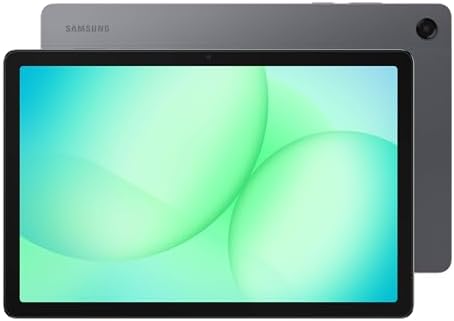
- POWER FOR ALL YOU DO: Galaxy Tab A11+ gives your family the optimal performance they need for all their day-to-day activ…
- CHARGES UP FAST. LASTS FOR HOURS: Galaxy Tab A11+ keeps your family going with a long-lasting battery that’s perfect for…
- MEMORY AND STORAGE THAT KEEP UP: With up to 8GB of memory and 256GB⁶ of storage, Galaxy Tab A11+ gives your family the s…
The Galaxy Tab A11+ gives budget-conscious buyers access to a larger display and full Google Play app support, which sets it apart from Amazon’s Fire OS tablets at a similar price point. It’s aimed at buyers who want mainstream Android apps and a Samsung-made device without stepping up to the premium Galaxy Tab S line.
| Pros | Cons |
|---|---|
| Full access to the Google Play app store | Performance is adequate rather than fast for demanding apps |
| Larger display than most budget tablets in this price range | Display quality trails Samsung’s premium AMOLED-class tablets |
| Samsung’s One UI software with useful multitasking features | Build materials reflect its budget-friendly positioning |
| Expandable storage via microSD |
Key Specs
- Large-format HD display
- 128GB internal storage, expandable via microSD
- Android operating system with Samsung One UI
- Full Google Play app store access
Buyer Sentiment: Well-regarded for everyday use at this price point, particularly among buyers who specifically want Google Play access.
What Buyers Are Saying: Buyers in this category commonly mention choosing it over Fire OS tablets specifically for access to their regular Android apps, with the larger screen frequently cited as a pleasant surprise for the price.
Who It’s For: A smart choice for budget-focused buyers who specifically want full Android app support rather than Amazon’s more limited Fire OS ecosystem.
4. Lenovo Idea Tab Pro 12.7″ (with pen) — Best Budget Stylus Tablet

- LEVEL UP – Synergize your work and play with the Lenovo Idea Tab Pro. It’s lightweight, jam-packed with battery life, an…
- NEXT-GEN PERFORMANCE – Perform at your best with the super-efficient MediaTek Dimensity 8300 processor. Supported by Wi-…
- IMMERSIVE VISUALS AND RICH SOUND – Whether you’re streaming lectures or decompressing after class, the glittering 12.7” …
Note-taking and sketching tablets with an included stylus usually carry a premium price tag, which is what makes the Idea Tab Pro stand out — it pairs a large 12.7-inch display with a bundled pen at a price well below comparable Apple or premium Samsung options. It’s aimed at students and casual creatives who want stylus input without the flagship cost.
| Pros | Cons |
|---|---|
| Included stylus pen adds real value at this price | Performance tier below flagship tablets for demanding creative apps |
| Large 12.7-inch display is excellent for note-taking and reading | Android tablet app optimization varies more than on iPad |
| Competitive pricing compared to premium stylus tablets | Build materials and display quality reflect the mid-range price |
| Good battery life for extended study or note-taking sessions |
Key Specs
- 12.7-inch large-format display
- Included stylus pen
- Android operating system
- Expandable storage options
Buyer Sentiment: Positively reviewed for note-taking value, particularly by buyers comparing it against pricier stylus-equipped tablets.
What Buyers Are Saying: Buyers in this category frequently mention using it specifically for note-taking in class or meetings, with the bundled pen commonly cited as the main reason they chose it over a cheaper tablet without stylus support.
Who It’s For: Best for students or note-takers who want a large display and stylus input without paying premium iPad or Galaxy Tab S pricing.
5. Apple iPad 11-inch (128GB) — Best Overall Beginner-Friendly Tablet

- WHY IPAD — The 11-inch iPad is now more capable than ever with the superfast A16 chip, a stunning Liquid Retina display,…
- PERFORMANCE AND STORAGE — The superfast A16 chip delivers a boost in performance for your favorite activities. And with …
- 11-INCH LIQUID RETINA DISPLAY — The gorgeous Liquid Retina display is an amazing way to watch movies or draw your next m…
The standard iPad remains Apple’s most accessible entry point into the iPad lineup, offering a dependable, well-optimized experience backed by the full Apple App Store and years of consistent software updates. It’s the tablet most commonly recommended to someone buying their first iPad without a specific professional or creative need.
| Pros | Cons |
|---|---|
| Full access to Apple’s well-optimized App Store and ecosystem | Display and chip performance trail the Air and Pro tiers |
| Long track record of multi-year software support | Doesn’t support the Apple Pencil Pro’s full feature set |
| Reliable, consistent performance for everyday tasks | Base storage may feel limited for heavy media libraries |
| Strong resale value relative to many Android tablets |
Key Specs
- 11-inch Liquid Retina display
- 128GB internal storage
- Apple’s A-series chip
- Compatible with USB-C accessories and select Apple Pencil models
Buyer Sentiment: Consistently well-rated among first-time iPad buyers and buyers upgrading from an older iPad.
What Buyers Are Saying: Buyers in this category frequently describe it as the sensible default iPad choice, citing smooth day-to-day performance for browsing, streaming, and schoolwork without needing Pro-tier specs.
Who It’s For: Best for buyers who want a dependable, well-supported tablet for everyday use and are new to the iPad ecosystem or upgrading from an older base-model iPad.
6. Apple iPad mini (A17 Pro) — Best Compact/Portable Tablet

- WHY IPAD MINI — The full iPad experience in an ultraportable design. Featuring Apple Intelligence.* With an 8.3-inch Liq…
- APPLE INTELLIGENCE — Apple Intelligence is the personal intelligence system that helps you write, express yourself, and …
- 8.3-INCH LIQUID RETINA DISPLAY — The gorgeous Liquid Retina display features advanced technologies like P3 wide color, T…
The iPad mini packs genuinely capable, current-generation performance into a significantly smaller frame than any other iPad, making it the choice for buyers who prioritize portability and one-hand use over maximum screen real estate. It’s a popular pick for reading, travel, and as a secondary device alongside a laptop.
| Pros | Cons |
|---|---|
| Genuinely compact and lightweight for one-hand use | Smaller display is less ideal for detailed creative work |
| Current-generation A17 Pro chip provides strong performance | Priced higher than the larger standard iPad |
| Excellent for travel, reading, and portability-focused use | Limited screen real estate for split-screen multitasking |
| Supports Apple Pencil for note-taking on the go |
Key Specs
- Compact 8.3-inch Liquid Retina display
- Apple A17 Pro chip
- 128GB internal storage
- Apple Pencil compatibility
Buyer Sentiment: Rated highly for portability and comfortable one-hand use.
What Buyers Are Saying: Buyers in this category often mention choosing the mini specifically for travel or as an e-reader replacement, with several noting that the smaller size doesn’t feel like a meaningful performance compromise for everyday tasks.
Who It’s For: Ideal for buyers who want full iPad performance in the smallest practical form factor, particularly for travel, reading, and portability-focused use cases.
7. Samsung Galaxy Tab S10 FE (128GB) — Best Samsung Mid-Range Tablet

- UNWIND WITH A BIG SCREEN: Kick back and relax with big, bright screens.¹ See every detail of your favorite shows, and ge…
- CIRCLE ANYTHING. SEARCH EVERYTHING: With Galaxy Tab S10 FE Series, you can simply circle anything on your screen to easi…
- HANDWRITING ASSIST MAKES YOUR UNTIDY NOTES NEAT: Tidy up your handwritten notes with Handwriting Assist.³ It easily stra…
The Galaxy Tab S10 FE (“Fan Edition”) brings many of the features from Samsung’s flagship Galaxy Tab S line down to a more accessible price point, including a high-quality display and S Pen support. It’s positioned as the tablet for buyers who want a premium Android experience without paying full flagship pricing.
| Pros | Cons |
|---|---|
| High-quality display with strong color accuracy | Chip performance trails Samsung’s full flagship tablets |
| S Pen support for note-taking and sketching | Android tablet app optimization still trails iPadOS in places |
| Samsung DeX support for a desktop-like multitasking mode | Priced above budget Android tablets like the Tab A series |
| Solid build quality for its price tier |
Key Specs
- Large-format display with AMOLED-class quality
- 128GB internal storage
- S Pen compatibility
- Samsung DeX desktop mode support
Buyer Sentiment: Well-regarded among Android tablet buyers, specifically comparing it to Apple’s iPad Air.
What Buyers Are Saying: Buyers in this category frequently compare it directly to the iPad Air, citing the display quality and S Pen support as reasons they chose Samsung’s ecosystem over Apple’s.
Who It’s For: A strong pick for buyers who want a premium Android tablet experience with stylus support and are already invested in or prefer the Samsung ecosystem over Apple’s.
8. Apple iPad Air 11-inch (M4) — Best for Creative Work
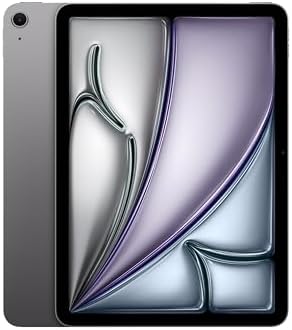
- WHY IPAD AIR — iPad Air with the Apple M4 chip packs even more performance into a beautiful design, and it comes in two …
- PERFORMANCE AND STORAGE — The M4 chip delivers advanced graphics and incredible performance for smooth multitasking and …
- IPADOS + APPS — Run apps and get more done with the game-changing capabilities and intuitive design of iPadOS. The flexi…
The iPad Air closes much of the performance gap with the iPad Pro by adopting the same M4 chip, while staying meaningfully less expensive. It’s aimed at buyers who want genuine creative and productivity performance — Apple Pencil Pro support, strong multitasking, and smooth performance in demanding apps — without paying for the Pro line’s display and camera upgrades.
| Pros | Cons |
|---|---|
| M4 chip delivers genuinely strong creative and multitasking performance | Display refresh rate and technology trail the Pro line |
| Full Apple Pencil Pro support for creative work | Camera system is less advanced than the iPad Pro |
| Meaningfully less expensive than the iPad Pro at similar performance | Base storage may require an upgrade for serious creative workflows |
| Lightweight, comfortable design for extended use |
Key Specs
- 11-inch Liquid Retina display
- Apple M4 chip
- 128GB internal storage
- Full Apple Pencil Pro support
Buyer Sentiment: Consistently well-rated for creative and productivity use among buyers who compared it directly to the Pro line.
What Buyers Are Saying: Buyers in this category frequently mention choosing the Air specifically after comparing specs with the iPad Pro, citing the similar chip performance at a meaningfully lower price as the deciding factor.
Who It’s For: Best for creative professionals, students, and productivity-focused buyers who want near-Pro performance without paying for the iPad Pro’s display and camera upgrades.
9. Apple iPad Pro 11-inch (M5) — Best Premium Tablet

- WHY IPAD PRO — iPad Pro with the Apple M5 chip delivers extraordinary performance for effortless productivity on a stunn…
- PERFORMANCE AND STORAGE — iPad Pro with M5 brings next-generation speed and the power of on-device AI to all your tasks….
- IPADOS — Run pro apps and get more done with iPadOS 26 with Liquid Glass design and game-changing capabilities.* With an…
The iPad Pro represents Apple’s top-tier tablet experience, built around the latest M5 chip and a high-end display technology designed for the most demanding creative, professional, and multitasking workflows. The 11-inch size keeps it relatively portable while still delivering flagship-level performance.
| Pros | Cons |
|---|---|
| M5 chip delivers flagship-level performance for demanding apps | Premium price point well above the Air and standard iPad |
| High-end display technology with excellent color accuracy and brightness | Accessories like the Magic Keyboard and Apple Pencil Pro are sold separately |
| Excellent for professional creative workflows and heavy multitasking | More tablet than most casual users genuinely need |
| Strong camera system for scanning and creative capture |
Key Specs
- 11-inch high-end display with advanced display technology
- Apple M5 chip
- 256GB internal storage
- Thunderbolt-capable connectivity
Buyer Sentiment: Rated highly among professional and creative buyers who specifically need flagship-level tablet performance.
What Buyers Are Saying Buyers in this category commonly describe it as a genuine laptop replacement for creative and professional work, citing the display quality and M5 performance as justification for the premium price.
Who It’s For: Best for professionals and serious creatives who need flagship-level performance and display quality and plan to pair the tablet with accessories like the Magic Keyboard and Apple Pencil Pro.
10. Apple iPad Pro 13-inch (M5) — Best Large-Screen Flagship
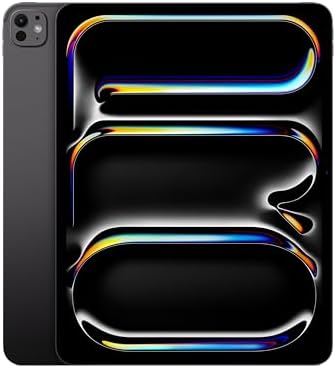
- WHY IPAD PRO — iPad Pro with the Apple M5 chip delivers extraordinary performance for effortless productivity on a stunn…
- PERFORMANCE AND STORAGE — iPad Pro with M5 brings next-generation speed and the power of on-device AI to all your tasks….
- IPADOS — Run pro apps and get more done with iPadOS 26 with Liquid Glass design and game-changing capabilities.* With an…
For buyers who want the most screen real estate Apple currently offers in a tablet, the 13-inch iPad Pro delivers the same M5 performance and premium display technology as the 11-inch model in a larger format better suited to detailed creative work, side-by-side multitasking, and use as a primary laptop replacement.
| Pros | Cons |
|---|---|
| Largest current iPad Pro display, ideal for detailed work and multitasking | Largest and heaviest current iPad, less ideal for one-hand or travel use |
| Same flagship M5 performance as the 11-inch model | Highest price point in this entire comparison |
| Excellent for side-by-side app multitasking given the extra screen space | Accessories add further cost on top of an already premium tablet |
| Strong fit as a full laptop replacement for creative professionals |
Key Specs
- 13-inch high-end display with advanced display technology
- Apple M5 chip
- 256GB internal storage
- Thunderbolt-capable connectivity
Buyer Sentiment: Consistently well-rated among power users specifically seeking maximum screen real estate in a tablet.
What Buyers Are Saying: Buyers in this category frequently mention replacing a laptop entirely with this tablet, citing the larger display as meaningfully better for side-by-side multitasking and detailed creative work than the 11-inch Pro.
Who It’s For: Best for power users and creative professionals who want the largest possible iPad display and plan to use the tablet as a primary computing device rather than a secondary one.
Buyer’s Guide: How to Choose the Right Tablet
With tablets spanning everything from $130 kids’ devices to $1,400 professional-grade machines, narrowing down the right one starts with being honest about what you’ll actually use it for.
Start by identifying your primary use case, not your budget. A tablet bought mainly for streaming video and browsing has very different requirements than one bought for digital art, note-taking, or professional creative work. Buying more performance than you need wastes money, while buying too little for demanding software leads to a frustrating, sluggish experience. Match the tablet tier to the task first, then look for the best option within that tier.
Decide between the Apple and Android ecosystems early, since it affects everything else. Apple’s iPad lineup, covered extensively in this guide, offers consistent long-term software support and tight integration with Apple Pencil accessories, but locks you into Apple’s app store and accessory ecosystem. Android tablets from Samsung, Lenovo, and others offer more flexibility and often better value at a given price point, though app optimization for larger screens can be less consistent than on iPadOS. For an official, detailed breakdown of current iPad models and their exact specifications, Apple’s own iPad comparison page is the most reliable primary source. If you’re also weighing a Chromebook laptop as an alternative to a tablet for school or basic productivity work, our Chromebook vs. laptop comparison covers a similar decision from the laptop side and may help clarify which category of device actually fits your needs.
A tablet also makes a genuinely practical gift, if you pick the right tier for the recipient. A budget Fire tablet or kids’ tablet from this guide is a sensible, low-risk gift for a child or casual user, while something like the iPad Air makes a strong gift for a student or creative professional. If you’re shopping for a broader range of gift ideas beyond tablets, our roundup of home office gifts on Amazon under $100 covers more budget-friendly options worth considering alongside a tablet.
Consider screen size against how and where you’ll actually use the tablet. Compact tablets like the iPad mini are easier to hold one-handed and travel with, while larger tablets like the 13-inch iPad Pro or Lenovo Idea Tab Pro offer more room for multitasking, note-taking, or detailed creative work at the cost of portability. If you’re unsure, a mid-size 10 to 11-inch display tends to be the most broadly comfortable compromise.
Think about whether stylus support actually matters to you. If you plan to take handwritten notes, sketch, or annotate documents, prioritize a tablet with strong stylus support, like the Apple Pencil Pro compatibility on the iPad Air and Pro models, or the S Pen support on the Galaxy Tab S10 FE. If you won’t use a stylus, there’s no reason to pay extra for that compatibility.
For a tablet that will go directly into a child’s hands, prioritize durability and parental controls over raw specs. Kid-focused tablets like the Fire HD 10 Kids model in this guide are built around a durable case and content controls rather than performance, which is the right tradeoff for this use case. If you’re weighing how much screen time is appropriate for your child’s age, the American Academy of Pediatrics publishes clear, research-based guidance worth reading before setting up a new tablet for a child: HealthyChildren.org’s media and screen time guidance.
Factor in storage capacity based on how you’ll use the tablet, not just the starting price. A tablet used mainly for streaming and browsing can comfortably get by on a smaller storage tier, especially with expandable microSD storage like several Android tablets in this guide offer. A tablet used for offline media libraries, large creative files, or professional apps benefits from a higher storage tier from the start, since most tablets don’t allow storage upgrades after purchase.
Don’t ignore battery life and charging standards, especially for travel use. Most current tablets, including every model featured here, offer a full day of typical use on a single charge, but charging speed and port type (USB-C versus proprietary connectors) can affect convenience, particularly if you’re already carrying USB-C chargers for a laptop or phone.
Consider the environmental and efficiency angle if it matters to you. Tablets, like other computing devices, vary in power efficiency, and the U.S. government’s ENERGY STAR program provides certification and guidance for efficient computing devices as a category, which is worth a look if energy efficiency factors into your buying decision: ENERGY STAR certified computers.
Think about accessory costs as part of the total price, not an afterthought. A tablet’s listed price rarely includes the keyboard case, stylus, or protective case that make it genuinely useful for productivity work. The Apple iPad Pro and iPad Air models in this guide are commonly paired with a Magic Keyboard and Apple Pencil Pro, both sold separately, while the Galaxy Tab S10 FE and Lenovo Idea Tab Pro include or bundle stylus support more affordably. Before comparing two tablets purely on their base price, it’s worth estimating the full cost of the accessories you’ll actually want.
Pay attention to connectivity options if you’ll use the tablet away from Wi-Fi. Most tablets in this comparison are Wi-Fi-only models, which is the right choice for most buyers who primarily use a tablet at home, work, or school. If you need internet access away from Wi-Fi networks, look specifically for a cellular-capable variant of your chosen tablet, which typically costs more and may involve an ongoing data plan from a carrier.
Finally, weigh resale and long-term value, not just the purchase price. iPads in particular, including every Apple model featured in this guide, tend to hold resale value noticeably better than most Android tablets, which can make the higher upfront cost easier to justify if you tend to upgrade every few years and sell your previous device. If you plan to keep a tablet until it no longer functions well rather than reselling it, this factor matters less, and a well-specced Android tablet may offer better value for your actual usage pattern.
Frequently Asked Questions
1. Should I buy an iPad or an Android tablet?
It depends on your priorities. iPads generally offer more consistent app optimization, longer software support, and tighter accessory integration, while Android tablets from brands like Samsung and Lenovo often provide more value and flexibility at a given price point. Neither is universally better — the right choice depends on which ecosystem you already use and what you’ll do with the tablet.
2. Is a cheaper Amazon Fire tablet a good choice, or should I spend more?
Amazon Fire tablets are a genuinely good fit for buyers who mainly want to stream video, browse, and read, especially if they’re already using Amazon services like Prime Video and Kindle. If you need full Google Play app access or more demanding performance, a Samsung or iPad option in this guide will serve you better long-term.
3. Do I need a tablet with a stylus, or can I add one later?
Some tablets, like the base iPad, have limited or no support for the most advanced stylus features even if a compatible pen exists, so it’s worth confirming stylus compatibility before buying if note-taking or sketching matters to you. Tablets like the iPad Air, iPad Pro, and Galaxy Tab S10 FE in this guide are built with strong stylus support from the start.
4. How much storage do I actually need on a tablet?
For browsing, streaming, and light app use, 64GB to 128GB is generally sufficient, especially on tablets with expandable microSD storage. If you plan to store large offline media libraries or work with large creative files, consider a 256GB option like the iPad Pro models featured here, since many tablets can’t be upgraded with more storage later.
5. Can a tablet replace my laptop?
For many everyday tasks — browsing, email, note-taking, and even some creative work — a well-specced tablet like the iPad Pro or iPad Air paired with a keyboard accessory can genuinely replace a laptop for many users. However, buyers with more complex software needs, heavy multitasking across many windows, or specific desktop-only applications may still find a laptop necessary.
6. What’s the difference between the iPad Air and iPad Pro?
The iPad Air uses the same chip generation as the base iPad Pro models, providing very similar raw performance at a lower price, while the iPad Pro adds a more advanced display technology, a stronger camera system, and Thunderbolt-capable connectivity. For most buyers who aren’t doing the most demanding professional creative work, the Air offers nearly the same experience for meaningfully less money.
7. Is it safe to give a young child an unrestricted tablet?
Most tablets, including standard Android and iOS devices, include built-in parental control features that can restrict content, screen time, and app access, but a tablet built specifically for kids, like the Fire HD 10 Kids model in this guide, bundles these protections in by default along with a durable case. Reviewing age-based guidance from a source like the American Academy of Pediatrics before setting up any tablet for a child is a sensible extra step regardless of which tablet you choose.
8. Do tablets get software updates for as long as phones do?
This varies significantly by brand and model. Apple has a strong track record of multi-year software support across its iPad lineup, while Android tablet update timelines vary more by manufacturer, with premium Samsung tablets generally receiving longer support than budget Android options. If long-term software support matters to you, it’s worth researching the specific update policy for any Android tablet before buying.
9. What size tablet should I buy?
Compact tablets around 8 inches, like the iPad mini, are best for portability, one-hand reading, and travel. Mid-size tablets in the 10 to 11-inch range, like the standard iPad or Galaxy Tab A11+, offer the most broadly comfortable balance for everyday use. Large tablets in the 12 to 13-inch range, like the Lenovo Idea Tab Pro or 13-inch iPad Pro, suit buyers prioritizing multitasking, note-taking, or detailed creative work over portability.
10. Is it worth buying a tablet with cellular connectivity instead of Wi-Fi only?
Cellular connectivity is worth the added cost mainly if you frequently need internet access away from Wi-Fi networks, such as during travel or commuting. For most home, office, or school use where Wi-Fi is consistently available, a Wi-Fi-only tablet like the models primarily featured in this guide is the more cost-effective choice, since you avoid both the higher purchase price and any ongoing data plan costs.
Conclusion
There’s no single best tablet for every buyer — only the best tablet for your specific use case and budget. If you want a dependable, well-supported all-rounder, the Apple iPad 11-inch remains the sensible default choice for most first-time buyers. If your priority is stylus-driven note-taking or creative work without flagship pricing, the Apple iPad Air 11-inch (M4) or Samsung Galaxy Tab S10 FE both deliver strong value.
For families, the Amazon Fire HD 10 Kids Tablet remains the safest, most durable starting point for a child’s first device, while buyers who need absolute top-tier performance should look to the Apple iPad Pro 11-inch or 13-inch (M5) depending on how much screen real estate they need. Whichever tablet fits your needs, all 10 options above were confirmed as currently available on Amazon at the time of writing — just double-check current stock and listing details before you buy.
As an Amazon Associate I earn from qualifying purchases.

MD.HASAN is an experienced SEO expert and amazon products review writer passionate about helping people find right products on amzon for buy without confusion. With 4 years of hands-on experience in content strategy and search engine optimization, he specializes in writing SEO-friendly blog posts that rank, engage, and convert.


