
Affiliate disclosure: As an Amazon Associate, Tech Rig Review earns from qualifying purchases. Links on this page may be affiliate links, at no extra cost to you.
Shopping for a printer on Amazon? Here are 10 real, currently-sold picks for home, office, and photo use — compared honestly, with no guesswork.
“Best printer” is a different question depending on who’s asking. A student printing the occasional essay has nothing in common with a small business printing hundreds of invoices a month, and someone printing family photos has entirely different needs than someone who just wants a reliable black-and-white workhorse.

To make this easier, we compared specs, manufacturer documentation, and patterns in verified customer feedback for printers currently sold on Amazon. Each pick below covers a genuinely different use case — budget home printing, cartridge-free ink tanks, monochrome laser speed, color laser quality, portability, and photo printing — so you can match the pick to how you’ll actually use it, not just the cheapest option on the page.
Below you’ll find a quick comparison table, a full breakdown of each printer, a buyer’s guide covering what actually matters when choosing a printer, and answers to the questions people search most before buying one. If you’re setting up a full home office around your new printer, our Amazon laptop buying guide and standing desk roundup cover the rest of the desk.
Table of Contents
Quick Comparison Table
| Product | Best For | Printer Type | Buyer Sentiment | Price |
|---|---|---|---|---|
| HP DeskJet 4255e | Best Budget All-in-One | Inkjet, color | Popular entry-level pick | Check Price on Amazon |
| Epson EcoTank ET-2800 | Best Cartridge-Free Ink Tank | Inkjet, color | Amazon’s Choice, strong repeat-buy rate | Check Price on Amazon |
| Brother HL-L2350DW | Best Budget Monochrome Laser | Laser, print-only | Reliable, long-running Brother model | Check Price on Amazon |
| Brother MFC-L2750DW XL | Best Monochrome Laser All-in-One | Laser, AIO | Praised for high-yield toner value | Check Price on Amazon |
| HP Smart Tank 7301 | Best Color Ink Tank All-in-One | Inkjet, color | Well-regarded for home-office workflow | Check Price on Amazon |
| Canon PIXMA TR4720 | Best for Basic Home Use | Inkjet, color | Consistently well-rated budget pick | Check Price on Amazon |
| Canon PIXMA TS3522 | Best for Photo Printing | Inkjet, color | Popular compact pick for photo use | Check Price on Amazon |
| Brother HL-L3295CDW | Best Color Laser for Small Business | Laser, print-only | Trusted for business-grade reliability | Check Price on Amazon |
| HP OfficeJet 250 | Best Portable Printer | Inkjet, color | Long-standing favorite for mobile use | Check Price on Amazon |
| HP LaserJet Tank MFP 2604sdw | Best Low-Cost-Per-Page Laser | Laser, AIO | Praised for toner value over time | Check Price on Amazon |
Prices change frequently on Amazon — always click through to confirm current pricing before buying.
1. HP DeskJet 4255e — Best Budget All-in-One
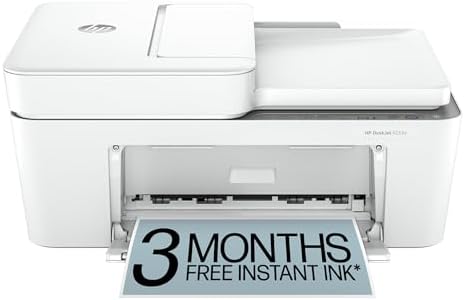
- The DeskJet 4255e is perfect for homes printing to-do lists, letters, financial documents and recipes. Print speeds up t…
- PERFECTLY FORMATTED PRINTS WITH HP AI – Print web pages and emails with precision—no wasted pages or awkward layouts; HP…
- KEY FEATURES – Color printing, copy, scan, auto document feeder, and a 60-sheet input trays
Best For: Buyers who want a simple, inexpensive printer for everyday home documents.
Not every household needs a feature-loaded printer — sometimes the goal is simply printing a boarding pass, a recipe, or a school form without a big outlay. The HP DeskJet 4255e is built for exactly that use case: a compact color inkjet all-in-one covering print, scan, and copy at an entry-level price point.
It connects over Wi-Fi and works with the HP Smart app for setup and basic print management, and HP bundles an Instant Ink trial with new units, which can meaningfully lower the real cost of ownership if you stick with the subscription afterward. This isn’t a printer built for heavy volume — its 60-sheet paper capacity reflects that — but for light, occasional home printing, it covers the basics without asking for a large upfront investment.
Key Specs
| Spec | Detail |
|---|---|
| Printer Type | Inkjet, color |
| Functions | Print, scan, copy |
| Connectivity | Wi-Fi |
| Paper Capacity | 60 sheets |
| Ink System | HP 67 cartridges (Instant Ink compatible) |
| ❌ Cons | ✅ Pros |
|---|---|
| Small 60-sheet paper capacity suits light use only No automatic duplex (two-sided) printing Cartridge-based ink costs more per page than tank printers | Low upfront price point Simple Wi-Fi setup through HP Smart app Compact footprint for small desks Instant Ink trial included with new units |
Buyer Sentiment
Consistently well-rated among budget-focused buyers for basic home printing needs.
What Buyers Are Saying
Feedback highlights straightforward setup and reliable basic performance for light use, which lines up with what this printer is actually designed for. The main recurring note is that per-page ink costs add up faster than a tank-based printer if you print frequently, which is an expected trade-off for a printer at this price point.
Check Current Price on Amazon →
2. Epson EcoTank ET-2800 — Best Cartridge-Free Ink Tank

- EcoTank ET-2850 All-in-One Supertank Printer – Black
- Innovative Cartridge-Free Printing ? No more tiny, expensive ink cartridges; each ink bottle set is equivalent to about …
- Dramatic Savings on Replacement Ink ? Save up to 90% with replacement ink bottles vs. ink cartridges (1) – that’s enough…
Best For: Households that print often enough that cartridge costs have become a real annoyance.
Cartridge replacement cost is the single biggest ongoing frustration with budget inkjet printers, and Epson’s EcoTank line exists specifically to solve that. The ET-2800 replaces disposable cartridges with large, refillable ink tanks visible on the front of the printer, dramatically cutting the cost per page for anyone who prints regularly.
It’s an Amazon’s Choice pick in its category, and for good reason: the combination of cartridge-free printing, borderless photo capability, and a straightforward setup process makes it one of the more approachable ink tank printers for buyers switching away from traditional cartridges for the first time. Refill bottles do need to be purchased separately once the included starter ink runs low, which is worth planning for but still works out cheaper over time than repeated cartridge purchases for moderate-to-heavy printing households.
Key Specs
| Spec | Detail |
|---|---|
| Printer Type | Inkjet, color, cartridge-free ink tank |
| Functions | Print, scan, copy |
| Print Speed | Up to 10 ppm |
| Resolution | 5760 x 1440 dpi |
| Display | 1.44″ LCD |
| ❌ Cons | ✅ Pros |
|---|---|
| Higher upfront price than basic cartridge printers No automatic duplex printing Refill bottles are a separate purchase once starter ink is used | Significantly lower cost per page over time Borderless photo printing included Amazon’s Choice designation in its category Visible ink tanks make refill timing easy to judge |
Buyer Sentiment
Consistently well-reviewed, with a strong repeat-purchase pattern among households replacing older cartridge printers.
What Buyers Are Saying
The ink-tank cost savings are the most frequently cited reason buyers choose this model, especially those who print frequently enough that cartridge costs had become a real household expense. Setup and refill process are also commonly described as more approachable than buyers expected going in.
Check Current Price on Amazon →
3. Brother HL-L2350DW — Best Budget Monochrome Laser

- Print Up To 32 Pages Per Minute
- Automatic Duplex Print
- Up to 250 Sheets Paper Insert
Best For: Anyone who prints mostly text documents and wants laser speed and quality without color or AIO features.
If you don’t need scanning or copying — just fast, crisp black-and-white printing — paying for an all-in-one is paying for features you won’t use. The Brother HL-L2350DW is a compact, print-only monochrome laser printer built around that simpler need, and Brother has a long-standing reputation specifically in this category of small-office and home laser printers.
It prints up to 32 pages per minute, which is meaningfully faster than most budget inkjets, and includes automatic duplex (two-sided) printing — a feature often missing from printers at this price tier. Laser printing also avoids the “dried-out cartridge” problem that affects inkjets left unused for weeks, making this a strong fit for buyers who print in occasional bursts rather than daily.
Key Specs
| Spec | Detail |
|---|---|
| Printer Type | Laser, monochrome, print-only |
| Print Speed | Up to 32 ppm |
| Duplex Printing | Automatic |
| Paper Capacity | Up to 250 sheets |
| Display | 1-line LCD |
| ❌ Cons | ✅ Pros |
|---|---|
| Print-only — no scan or copy function Monochrome only, no color output Basic 1-line LCD offers minimal on-device feedback | Fast 32 ppm print speed for the price Automatic duplex printing included Toner doesn’t dry out like unused inkjet ink Compact footprint for small desks |
Buyer Sentiment
Reliable, long-running pick with consistent positive feedback in Brother’s budget laser lineup.
What Buyers Are Saying
Speed and reliability for text-heavy printing are the most consistently praised aspects, particularly from buyers who previously dealt with slow or clogged inkjet printers. The lack of scan/copy functionality is clearly understood by buyers choosing this model, since it’s a deliberate trade-off for a lower price and faster printing.
Check Current Price on Amazon →
4. Brother MFC-L2750DW XL — Best Monochrome Laser All-in-One

- Produce high-quality printing with this Brother laser all-in-one printer. The print speed of up to 36 pages per minute a…
- ENSURE OPTIMAL AND UNCOMPROMISING PERFORMANCE: When it’s time to replace your toner, be sure to choose Brother Genuine T…
- PRINT MORE, WAIT LESS – Engineered for increased efficiency with class leading class print speeds of up to 36 pages per …
Best For: Home offices and small businesses that need print, scan, copy, and fax without color.
For buyers who need the full all-in-one function set — print, scan, copy, fax — but still don’t need color, the Brother MFC-L2750DW XL extends the HL-L2350DW’s laser speed and reliability into a complete document-handling machine. It’s the “XL” extended-print version, which ships with higher-capacity starter toner rated for up to two years of typical printing before a replacement is needed.
The 2.7-inch touchscreen simplifies navigating scan and copy functions compared to a basic LCD, and the 50-sheet automatic document feeder makes multi-page scanning and copying genuinely hands-free rather than a page-by-page chore. At up to 36 pages per minute, it’s also one of the faster all-in-one laser options in this category, which matters for home offices scanning or copying longer documents regularly.
Key Specs
| Spec | Detail |
|---|---|
| Printer Type | Laser, monochrome, all-in-one |
| Functions | Print, scan, copy, fax |
| Print Speed | Up to 36 ppm |
| Automatic Document Feeder | 50 sheets |
| Display | 2.7″ touchscreen |
| ❌ Cons | ✅ Pros |
|---|---|
| Monochrome only, no color output Larger footprint than print-only laser models Higher upfront cost than basic inkjet AIOs | XL toner rated for up to two years of typical use 50-sheet ADF speeds up multi-page scanning/copying Touchscreen simplifies navigation Fast 36 ppm print speed |
Buyer Sentiment
Praised for value, particularly the extended toner capacity included with the XL version.
What Buyers Are Saying
The extended-capacity toner is the standout feature in feedback, with buyers specifically noting it reduces how often they think about replacement toner compared to standard-yield laser printers. The ADF and touchscreen also draw consistent praise for making document handling noticeably less tedious than basic models.
Check Current Price on Amazon →
5. HP Smart Tank 7301 — Best Color Ink Tank All-in-One
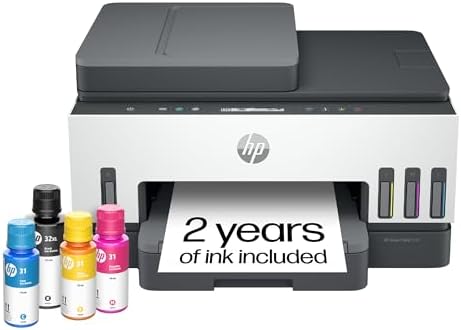
- SET IT UP ONCE AND PRINT WITH CONFIDENCE. No complicated maintenance. Just easy, reliable printing you can count on.
- INK FOR YEARS. NOT MONTHS. Up to 2 years of ink included. Get thousands of pages of cartridge-free printing. More pages,…
- KEEPS PRINTING WELL AFTER COMPETITORS HAVE QUIT. No complex maintenance. Sharper text, richer colors.[2] Only with HP Sm…
Best For: Home offices that print in color regularly and want tank-based savings with full AIO functionality.
The HP Smart Tank 7301 pairs cartridge-free ink tank economics with a complete all-in-one feature set, making it a strong fit for home offices that print, scan, and copy in color on a regular basis. HP includes up to two years of ink with new units, and the refillable tank system keeps ongoing costs low well beyond that initial period.
What separates the 7301 from more basic tank printers is its 35-sheet automatic document feeder and Ethernet port, both aimed at genuine home-office workflows rather than occasional light use. The ADF in particular means multi-page scanning and copying doesn’t require manually placing each sheet on the glass, and the Ethernet option gives it reliable wired connectivity for shared office setups where Wi-Fi alone isn’t ideal.
Key Specs
| Spec | Detail |
|---|---|
| Printer Type | Inkjet, color, cartridge-free ink tank |
| Functions | Print, scan, copy |
| Automatic Document Feeder | 35 sheets |
| Connectivity | Wi-Fi, Ethernet, Bluetooth |
| Duplex Printing | Automatic |
| ❌ Cons | ✅ Pros |
|---|---|
| Higher upfront price than basic cartridge AIOs Larger footprint to accommodate the ink tanks Refill bottles needed once included ink is used | Up to 2 years of included ink 35-sheet ADF for hands-free scanning/copying Ethernet port for wired office networking Automatic duplex printing included |
Buyer Sentiment
Well-regarded specifically for home-office workflows, with the ADF and Ethernet port drawing consistent praise.
What Buyers Are Saying
Buyers consistently highlight the combination of long-term ink savings and genuine office-ready features like the ADF and Ethernet port, distinguishing it from more basic tank printers aimed purely at casual home use. The larger size compared to basic inkjets is occasionally mentioned, which is an expected trade-off for the tank system and added functionality.
Check Current Price on Amazon →
6. Canon PIXMA TR4720 — Best for Basic Home Use

- Wireless 4-in-1 (print | copy | scan | fax)..Power Consumption: 7W (0.8W Standby / 0.3W Off)
- Print speed up to: 4″ x 6″ Borderless Photo (PP-201): Approx. 65.0 Seconds / Black Document (Letter/Simplex): Approx. 8….
- Designed for easy ink cartridge installation and replacement.
Best For: Buyers who want a straightforward, no-frills all-in-one with fax included.
The Canon PIXMA TR4720 is a true 4-in-1 — print, copy, scan, and fax — aimed squarely at everyday home printing without unnecessary complexity. Its hybrid ink system is designed to produce sharp black text alongside reasonably vibrant color output, and the compact design fits easily on a small desk or shelf.
The 20-sheet automatic document feeder is a genuinely useful inclusion at this price point, letting you scan or copy a few-page document without feeding each sheet manually. Canon’s PRINT app rounds out the package with straightforward mobile setup and printing, making this a sensible choice for buyers who want fax capability — still relevant for some medical, legal, and school paperwork — without stepping up to a business-focused machine.
Key Specs
| Spec | Detail |
|---|---|
| Printer Type | Inkjet, color, all-in-one |
| Functions | Print, copy, scan, fax |
| Resolution | 4800 x 1200 dpi |
| Automatic Document Feeder | 20 sheets |
| Display | 2-line LCD |
| ❌ Cons | ✅ Pros |
|---|---|
| Slower color print speed than ink-tank alternatives No automatic duplex printing Basic 2-line LCD limits on-device navigation | Included fax function, uncommon at this price 20-sheet ADF for light multi-page scanning Compact, space-friendly design Straightforward Canon PRINT app setup |
Buyer Sentiment
Consistently well-rated as a budget pick for basic home document needs.
What Buyers Are Saying
The included fax function comes up repeatedly as a deciding factor for buyers who specifically needed it and found it missing from competing budget printers. Overall sentiment trends positive for simple, everyday home use, with speed expectations set appropriately for an entry-level inkjet.
Check Current Price on Amazon →
7. Canon PIXMA TS3522 — Best for Photo Printing
Best For: Buyers who want a compact printer that handles borderless photo prints alongside everyday documents.
Canon’s PIXMA line has a long-standing reputation for photo output quality, and the TS3522 brings that strength to a genuinely compact, budget-friendly all-in-one. It supports borderless photo printing up to 5×7 and uses Canon’s Chromalife100 system, which is rated to protect printed photos from fading for years when stored properly — a meaningfully different claim than a generic “photo-capable” label on a basic document printer.
Beyond photo output, it handles everyday print, scan, and copy tasks through a simple 1.5-segment LCD interface, and connects via Wi-Fi, USB, or HDMI for flexible setup options. For buyers who want one printer that handles both document printing and occasional photo prints without stepping up to a dedicated photo printer, this is a sensible middle ground.
Key Specs
| Spec | Detail |
|---|---|
| Printer Type | Inkjet, color, compact all-in-one |
| Functions | Print, scan, copy |
| Borderless Photo Printing | Up to 5×7 |
| Photo Longevity | Chromalife100 system |
| Connectivity | Wi-Fi, USB, HDMI |
| ❌ Cons | ✅ Pros |
|---|---|
| Slower print speeds than ink-tank or laser alternatives No fax function, unlike the TR4720 No automatic duplex printing | Genuine borderless photo printing up to 5×7 Chromalife100 fade-resistance rating for printed photos Compact size for small desks Flexible connectivity including HDMI |
Buyer Sentiment
Popular compact pick among buyers specifically prioritizing photo print quality in a budget all-in-one.
What Buyers Are Saying
Photo print quality is the most consistently praised aspect, with buyers specifically noting it outperforms expectations for a printer in this price range. The lack of a fax function occasionally comes up from buyers comparing it directly to Canon’s TR-series models, which is a reasonable trade-off given the TS3522’s photo-focused design.
Check Current Price on Amazon →
8. Brother HL-L3295CDW — Best Color Laser for Small Business

- Create beautiful prints quickly with help from this Brother printer. The wireless color printer offers a number of conne…
- AMPLIFY YOUR PROFESSIONAL DOCUMENTS. With the consistent dependability and performance of laser-quality digital color pr…
- MAXIMIZE PRODUCTIVITY WITH LASER FOCUSED FUNCTIONALITY. Maximize every hour of your workday with timesaving print speeds…
Best For: Small businesses and home offices that need fast, professional-quality color documents without inkjet running costs.
Color laser printing sits in a different category entirely from color inkjet — sharper text, faster output, and no risk of ink drying out between uses. The Brother HL-L3295CDW brings that to a compact, business-focused package, printing up to 31 pages per minute in both black and color, which is genuinely fast for a printer this size.
It includes NFC for badge-based authentication, a 2.7-inch touchscreen for cloud-printing access (Google Drive, Dropbox, and similar services), and both Ethernet and dual-band Wi-Fi connectivity — all signs this is built for small-business and home-office environments rather than casual home use. Brother also backs it with their standard reliability reputation in the laser printer category, which matters for a device expected to handle consistent, high-volume use.
Key Specs
| Spec | Detail |
|---|---|
| Printer Type | Laser, color, print-only |
| Print Speed | Up to 31 ppm (mono and color) |
| Connectivity | Wi-Fi, Ethernet, NFC |
| Display | 2.7″ touchscreen |
| Paper Capacity | 250-sheet tray |
| ❌ Cons | ✅ Pros |
|---|---|
| Print-only — no scan, copy, or fax Higher upfront cost than inkjet alternatives Larger footprint suited to a dedicated printer space | Fast 31 ppm print speed in color and mono NFC authentication for shared office use Touchscreen cloud-printing access Dual connectivity via Wi-Fi and Ethernet |
Buyer Sentiment
Trusted pick for small-business reliability, consistent with Brother’s broader laser printer reputation.
What Buyers Are Saying
Print speed and color quality for business documents are the most frequently praised aspects, especially among buyers replacing a slower inkjet with a dedicated color laser. The lack of scan/copy functions is a clear, intentional trade-off for buyers who specifically wanted a fast, dedicated print device rather than a full all-in-one.
Check Current Price on Amazon →
9. HP OfficeJet 250 — Best Portable Printer

- BUSINESS PRINTING—VIRTUALLY ANYWHERE – Use your laptop, tablet, or smartphone to print, scan, and copy on the go, withou…
- EASY PORTABLE PRINTING, SCANNING, AND COPYING WHEREVER YOU NEED IT – Print business documents anytime, anywhere, with a …
- HP APP – Print and scan right from your smartphone with the easiest-to-use print app
Best For: Mobile professionals who need to print, scan, or copy away from a desk.
Most printers assume a fixed spot on a desk. The HP OfficeJet 250 assumes the opposite — a battery-powered, genuinely portable all-in-one small enough to fit in a car, backpack, or briefcase, built for professionals who need document output away from a traditional office setup.
It includes a 2.65-inch color touchscreen, Bluetooth and Wi-Fi Direct connectivity for pairing without a network, and an automatic document feeder for scanning or copying on the go. HP rates it for solid battery life between charges, and while it won’t match a desktop printer’s speed or paper capacity, that’s an intentional trade-off for a device this compact. For field sales, real estate, legal professionals who need signed documents on-site, or anyone who regularly works away from a fixed office, this fills a genuinely different need than every other printer on this list.
Key Specs
| Spec | Detail |
|---|---|
| Printer Type | Inkjet, color, portable |
| Functions | Print, scan, copy |
| Power | Rechargeable battery included |
| Connectivity | Bluetooth, Wi-Fi Direct, USB |
| Display | 2.65″ color touchscreen |
| ❌ Cons | ✅ Pros |
|---|---|
| Smaller paper capacity than desktop printers Slower print speeds than fixed office models Higher cost per page than tank-based printers | Genuinely portable with built-in battery Bluetooth and Wi-Fi Direct for network-free pairing Auto document feeder even in a portable form factor Compact enough for a bag or car |
Buyer Sentiment
Long-standing favorite among buyers specifically needing mobile printing capability.
What Buyers Are Saying
Portability and battery life are consistently the top-praised features, particularly from buyers in field-based roles who previously had no reliable way to print away from an office. Buyers generally understand the speed and capacity trade-offs that come with the compact, battery-powered design.
Check Current Price on Amazon →
10. HP LaserJet Tank MFP 2604sdw — Best Low-Cost-Per-Page Laser

- BEST FOR SMALL BUSINESSES – Designed for everyday black-and-white printing jobs at the lowest cost per page
- POWERFUL PRODUCTIVITY – Print, scan and copy, and get more done with fast 2-sided printing and an auto document feeder
- PREFILLED WITH UP TO 2 YEARS OF TONER – Enough to print up to 5,000 pages right out of the box
Best For: High-volume home offices and small businesses that want laser speed with ink-tank-style savings.
Ink tanks solved cartridge costs for inkjet printers — the HP LaserJet Tank MFP 2604sdw applies a similar idea to laser printing, shipping prefilled with up to two years of original HP toner and designed around easy, lower-cost toner refills going forward. For a monochrome laser all-in-one, that combination of laser speed and lower long-term running costs is a meaningfully different value proposition than a standard cartridge-based laser.
It includes a 40-sheet automatic document feeder, dual-band Wi-Fi, and automatic duplex printing, all aimed at genuine small-business and high-volume home-office use rather than occasional printing. HP backs it with up to a 3-year extended warranty when registered, reinforcing that this is built for buyers who expect to put real volume through it over several years, not a light-use printer that happens to have a bigger toner tank.
Key Specs
| Spec | Detail |
|---|---|
| Printer Type | Laser, monochrome, ink-tank all-in-one |
| Functions | Print, scan, copy |
| Print Speed | Up to 20-22 ppm |
| Automatic Document Feeder | 40 sheets |
| Connectivity | Dual-band Wi-Fi |
| ❌ Cons | ✅ Pros |
|---|---|
| Monochrome only, no color output Higher upfront cost than standard cartridge laser printers Larger footprint to house the toner tank system | Up to 2 years of toner included from the start Lower long-term cost per page than cartridge-based lasers 40-sheet ADF for high-volume scanning/copying Extended warranty available with registration |
Buyer Sentiment
Praised specifically for toner-cost value among buyers with consistent, higher-volume printing needs.
What Buyers Are Saying
The long-term toner savings are the most consistently cited reason buyers choose this model over a standard cartridge-based laser, particularly for small businesses printing regularly. The larger size and higher upfront price are understood trade-offs for the toner-tank savings, similar to how ink-tank inkjet buyers view their printers.
Check Current Price on Amazon →
How to Choose the Right Printer
Start With Inkjet vs. Laser, Not Brand
This is the single biggest decision and it should come before comparing specific models. Inkjet printers handle photos and color graphics better and cost less upfront, but ink can dry out if the printer sits unused for weeks. Laser printers print text faster and more sharply, never dry out between uses, and generally cost less per page for black-and-white documents — but color laser printers cost significantly more upfront than color inkjets.
Figure Out Your Real Print Volume Before Buying
A printer rated for light home use will struggle, wear out faster, or cost more per page if you’re actually running small-business volume through it. Conversely, paying for a high-duty-cycle laser printer when you print twenty pages a month is overspending on capacity you’ll never use. Be honest about your actual monthly page count before choosing.
Understand How “Page Yield” Numbers Are Actually Measured
Ink and toner yield claims (“prints up to X pages”) aren’t arbitrary marketing numbers — they’re based on ISO/IEC 24711 for inkjet cartridges and a parallel ISO standard for toner, a standardized test using a fixed page pattern at 5% coverage. That means stated yields are comparable across brands using the same methodology, but real-world yield will vary based on what you actually print — dense graphics and photos use far more ink per page than a simple text document.
Cartridges vs. Ink Tanks Is a Math Problem, Not a Preference
Cartridge-based printers cost less upfront but more per page over time. Ink-tank (and toner-tank) printers cost more upfront but meaningfully less per page afterward. The breakeven point depends on your print volume — light, occasional printers often never recoup the higher ink-tank purchase price, while frequent printers can recoup it within the first year. Estimate your actual pages-per-month before deciding which side of that trade-off makes sense.
Check for ENERGY STAR and EPEAT, Not Just Marketing Terms
Independent sustainability and efficiency labels are worth checking on a printer’s listing. ENERGY STAR certification verifies a device meets federal energy-efficiency standards, tested by an accredited lab rather than self-reported by the manufacturer. EPEAT registration goes further, independently verifying a product’s environmental impact across its full lifecycle. Neither label tells you about print quality, but both indicate the listing is backed by independently verified claims rather than marketing language alone.
Don’t Overlook Automatic Duplex Printing
Automatic two-sided printing isn’t just an eco-friendly nice-to-have — it genuinely saves paper costs over time and speeds up printing longer documents without manually flipping pages. It’s inconsistently included even among similarly priced printers, so check this spec specifically rather than assuming it’s standard.
Frequently Asked Questions
Is inkjet or laser better for a home printer?
It depends on what you print most. Inkjet is better for photos and color graphics and costs less upfront. Laser is better for frequent text-document printing, doesn’t dry out between uses, and typically costs less per page for black-and-white output.
Are ink tank printers actually cheaper in the long run?
Yes, for moderate-to-heavy printing households. The higher upfront cost is offset by meaningfully lower per-page ink costs once you start refilling tanks instead of buying cartridges. Light, occasional printers may not print enough to recoup the higher initial price.
How much should I expect to spend on a basic home printer?
Budget inkjet all-in-ones typically start in the $50-$100 range, with ink-tank and laser options generally running higher upfront in exchange for lower running costs. Spend based on your actual print volume and need for color, not just the lowest sticker price.
Do I need a printer with scan and copy functions, or just print?
If you ever need to digitize a document, sign and return paperwork, or make copies, an all-in-one with scan and copy saves a trip to a print shop. If you genuinely only print, a print-only model is typically faster and cheaper for the same core print quality.
What does automatic duplex printing actually mean?
It means the printer automatically prints on both sides of the paper without you manually flipping and reinserting the page. It saves paper and time on longer documents, and it’s worth checking for specifically, since it’s not included on every printer even at similar price points.
Is a portable printer worth it, or should I just use a print shop?
If you regularly need documents printed away from a fixed office — field sales, real estate showings, on-site client meetings — a portable printer pays for itself in convenience quickly. For occasional one-off needs, a print shop or library is usually more cost-effective than buying dedicated portable hardware.
How accurate are manufacturer-stated page yields for ink and toner?
They’re based on a standardized industry test (ISO/IEC 24711 for ink, a parallel standard for toner) using a fixed test page at 5% coverage, which makes them comparable across brands. Your real-world yield will vary based on what you actually print — photos and dense graphics use significantly more ink per page than simple text documents.
Why don’t you list exact prices in this article?
Amazon prices on these models shift regularly, sometimes within the same week, so a printed number here would likely be outdated by the time you’re reading this. Click through to Amazon directly for current, accurate pricing on any pick above.
Conclusion
If you want a dependable all-around printer that fits a typical home office without overspending, the Epson EcoTank ET-2800 is the strongest overall pick on this list — the cartridge-free ink tank system pays for itself for anyone printing regularly, and it’s genuinely one of the more approachable ink-tank printers for first-time buyers.
If your printing is almost entirely text documents and speed matters more than color, the Brother HL-L2350DW is the better choice — fast, reliable, and free of the ink-drying issues that affect inkjets left unused between print jobs.
Whichever you choose, match the printer type — inkjet, ink tank, or laser — and feature set to your actual print volume and needs, rather than picking based on price alone. Click through to any listing above to check current pricing and availability before you buy.
As an Amazon Associate I earn from qualifying purchases. This post may contain affiliate links, at no extra cost to you.

MD.HASAN is an experienced SEO expert and amazon products review writer passionate about helping people find right products on amzon for buy without confusion. With 4 years of hands-on experience in content strategy and search engine optimization, he specializes in writing SEO-friendly blog posts that rank, engage, and convert.


