
Affiliate disclosure: As an Amazon Associate, Tech Rig Review earns from qualifying purchases. Links on this page may be affiliate links, at no extra cost to you.
Learn how to choose the best standing desk for your space, budget, and body. Compare real Amazon picks for desks, converters, and L-shaped setups.
Picking the best standing desk sounds simple until you start looking. There are electric desks, manual crank desks, desk converters, L-shaped desks, single-motor desks, and dual-motor desks. Prices range from under $150 to well over $800.
The truth is, there’s no single “best” standing desk. The best one is the one that fits your space, your budget, and how you actually work.



This guide walks through exactly how to choose the best standing desk for your situation. We’ll cover desk types, weight capacity, motor strength, desktop size, storage, and budget. Along the way, I’ll point to real, currently-sold products on Amazon that fit each specific need, based on their published specs and general buyer feedback patterns rather than hands-on testing.
By the end, you should know exactly which type of standing desk fits your home office, and which specific model is worth putting in your cart.
Table of Contents
Quick Comparison: Standing Desks Worth Considering
| Product | Best For | Key Feature |
|---|---|---|
| FLEXISPOT EN1 One-Piece Standing Desk | Budget-friendly first desk | 176 lb capacity, 4 memory presets |
| FLEXISPOT E6 Dual Motor Standing Desk | Heavy monitor setups | 220 lb capacity, 3-stage dual motor |
| SHW 55 x 28 Electric Standing Desk with Drawer | Buyers who need built-in storage | Drawer, hanging hooks, cable tray |
| FLEXISPOT 55″ L-Shaped Standing Desk with Drawers | Multi-monitor and corner setups | Reversible L-shape, built-in cabinet |
| VIVO 36″ Standing Desk Converter with Dual Monitor Mount | Renters and dual-monitor users | Sits on your existing desk |
| VIVO 26″ Compact Standing Desk Converter | Small desks and tight spaces | Compact footprint, keyboard tray |
As always, Amazon pricing, colors, and specific configurations can shift. Check the live listing before you buy.
Step 1: Decide Between a Full Desk and a Desk Converter
This is the first fork in the road, and it matters more than people expect.
A full standing desk replaces your current desk entirely. It has its own legs, its own frame, and usually its own motor. You get a clean look and a desk built specifically for sit-stand use.
A standing desk converter sits on top of your existing desk. You raise and lower the converter, while your actual desk stays in place underneath.
When a Full Desk Makes More Sense
Choose a full standing desk if you:
- Own your home and don’t plan to move soon
- Want the cleanest possible setup with no second platform on your desk
- Need a wider desktop than your current desk offers
- Want built-in cable management and storage

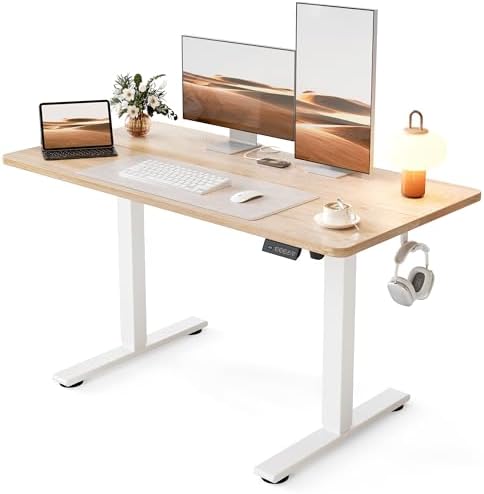
- 1″ THICK ONE-PIECE DESKTOP:Experience the elegance of a completely smooth, seamless desktop surface. This design not onl…
- SMOOTH ELECTRIC HEIGHT ADJUSTMENT: Say goodbye to manual height adjustments. This desk is equipped with an electric lift…
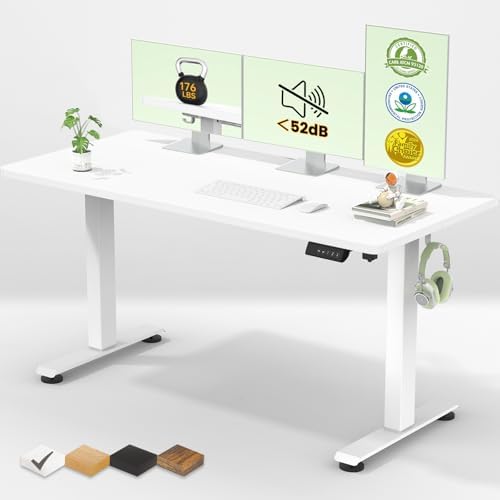
- 4 MEMORY PRESETS: Easily store and recall different height settings with our multifunctional memory system. Effortlessly…
A desk like the FLEXISPOT EN1 One-Piece Standing Desk is a good example of this category. It’s a complete electric desk with a one-piece, seamless desktop, a 176-pound weight capacity, and four programmable height presets, so you can jump straight to your preferred sitting or standing height instead of holding a button and guessing.
When a Converter Makes More Sense
Choose a desk converter if you:
- Rent your home or apartment and don’t want to commit to a full desk
- Already like your current desk and don’t want to replace it
- Want a lower-cost way to try standing while you work
- Need something you can move or remove easily

- Desk Riser with Dual Monitor Mount: Take productivity and comfortable viewing angles to new heights with this desktop ri…
- Compatibility: The stand fits two 13” to 30” screens weighing up to 22 lbs each with VESA 75x75mm or 100x100mm mounting …
- Height Adjustable Desktop: Go from sitting to standing in one smooth motion using the innovative height locking mechanis…
The VIVO 36″ Standing Desk Converter with Dual Monitor Mount is worth a look here. It sits on your current desk, includes dual monitor arms built into the unit for screens up to 30 inches, and lets you raise your keyboard, mouse, and monitors together instead of just propping up a laptop on a box.
If your desk is smaller, or you just don’t need a wide converter, the VIVO 26″ Compact Standing Desk Converter takes up noticeably less desktop space while still giving you a keyboard tray and a riser platform for your monitor.
Step 1.5: Know the Difference Between Electric, Manual, and Pneumatic Lift Mechanisms
Before comparing specific models, it helps to understand how a standing desk actually changes height, since this affects price, noise, and day-to-day convenience.
Electric Standing Desks


Electric desks use a motor, or two motors on dual-motor models, to raise and lower the desktop at the push of a button. This is by far the most common type sold today, and it’s what every desk recommended in this guide uses. The main advantages are convenience and precision. You press a button, the desk moves, and with memory presets, you can return to your exact preferred height every time.
The tradeoff is cost. Electric motors, controllers, and the wiring involved all add to the price compared to a manual desk.
Manual Crank Desks


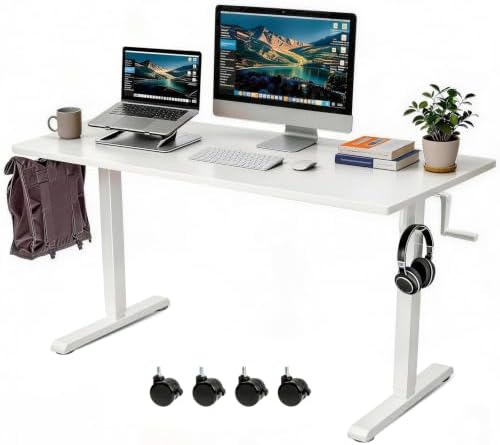
Manual crank desks use a hand crank to physically raise and lower the desktop through a gear system. They’re generally the least expensive way to get height adjustability, since there’s no motor or electronics involved.
The obvious downside is effort. Raising or lowering a manual desk takes real physical cranking, which can get old fast if you’re switching between sitting and standing multiple times a day. Most people who want to actually use their sit-stand desk regularly end up preferring an electric model for this reason.
Pneumatic and Gas-Spring Desks
Some desk converters, rather than full desks, use a pneumatic or gas-spring lift instead of a motor or crank. You release a lever or handle, and a spring-assisted mechanism helps raise or lower the platform, which you then lock into place. This is common on converter-style products because it keeps the unit lightweight and doesn’t require a power cord.
The VIVO converters mentioned in this guide use this kind of spring-assisted lift system, which is part of why they don’t need to be plugged in and can be repositioned easily.
Why This Matters for Your Decision
If you plan to switch between sitting and standing several times a day, an electric desk with memory presets removes the friction that often causes people to stop using their standing desk after a few weeks. If you’re on a tight budget and plan to change height less frequently, a manual or pneumatic option can still get the job done at a lower cost.
Step 1.75: Desktop Material Matters More Than Color
It’s easy to choose a desktop based on which wood tone matches your room. But the material also affects durability, weight, and how the desk feels day to day.
Engineered Wood (MDF or Particleboard with Laminate)
Most budget and mid-range standing desks, including many of the models in this guide, use an engineered wood core with a laminate finish. This keeps costs down while still giving you a smooth, consistent surface that resists scratches reasonably well. The tradeoff is that engineered wood is heavier than solid wood per square inch and can be more sensitive to prolonged moisture exposure, like a wet coffee mug left sitting too long.
Bamboo
Bamboo desktops, which show up in several FlexiSpot models, are marketed as a more sustainable material since bamboo regenerates faster than hardwood trees. Bamboo tends to be lighter than engineered wood while still offering solid durability, and it has a distinct grain pattern that some buyers prefer visually.
One-Piece or Seamless Tops

- SPACIOUS ONE-PIECE DESKTOP: Enjoy a sleek, seamless desktop made of FSC-Certified wood. Its smooth surface not only elev…
- SMOOTH ELECTRIC HEIGHT ADJUSTMENT: Say goodbye to manual height adjustments. This desk is equipped with an electric lift…
- 4 MEMORY PRESETS: Easily store and recall different height settings with our multifunctional memory system. Effortlessly…
Some desks, like the FLEXISPOT EN1 featured earlier, use what’s called a one-piece or seamless desktop. Instead of multiple boards or panels joined together, the surface is built as a single continuous piece. This avoids the small seam lines you sometimes see on cheaper desks, and it tends to feel sturdier under a monitor arm’s clamp, since there’s no joint to work loose over time.
None of these materials is objectively “best.” A seamless engineered wood top is a practical, affordable choice for most home offices. Bamboo appeals to buyers who care about the material’s sustainability story and lighter weight. What matters most is making sure whichever material you choose is rated for the weight you’re planning to put on it.
Step 2: Think About Desktop Size and Shape Before Anything Else
It’s tempting to shop by price first. Don’t. Desktop size and shape should come before price, because a desk that doesn’t physically fit your room, or your workflow, isn’t a bargain no matter how cheap it was.
Standard Rectangular Desks
Most standing desks come in 48-inch, 55-inch, or 60-inch widths, with a depth of around 24 to 30 inches. A 48-inch desk works fine for a single monitor and basic accessories. If you run two monitors, a laptop stand, a notebook, and a desk lamp, 55 inches or wider gives you room to breathe.
L-Shaped Desks
If you work with multiple monitors, run a dual setup with a laptop dock, or just like having a separate zone for writing, reading, or using a tablet, an L-shaped standing desk solves a problem rectangular desks can’t.

- REVERSIBLE STORAGE DRAWERS: This computer desk has two spacious drawers or shelves for storage. This desk with drawers i…
- LARGE & SPACIOUS WORKSPACE: The 63″ x 27.6″ desktop offers ample space for work, study, or gaming. This L-shaped standin…
- ADJUSTABLE HEIGHT STANDING DESK: Experience the benefits of ergonomic design with adjustable height settings ranging fro…
The FLEXISPOT 55″ L-Shaped Standing Desk with Drawers is built around exactly this use case. It has a reversible L-shaped design, so you can configure the corner to the left or right depending on your room layout, along with a built-in cabinet, drawers, hooks, and a USB port. For anyone running a multi-monitor setup who’s outgrown a standard rectangle, this is the category to look at.
Measure Before You Buy
Before you choose a size, physically measure your available wall space. Add a few inches of clearance on each side for your chair and walking space. It sounds obvious, but “the desk looked right in the photo” is one of the most common reasons people end up returning standing desks.
Step 3: Understand Weight Capacity and Motor Type
This is where a lot of buyers get tripped up. Not all standing desks are built to carry the same load, and the motor setup changes how the desk performs over time.
Why Weight Capacity Matters More Than You Think
Standing desk weight capacity isn’t just about your monitor. It includes everything that stays on the desktop while the desk moves up and down: your monitors, monitor arm, laptop, desk lamp, speakers, and anything else sitting on the surface.
A dual 27-inch monitor setup with arms can easily weigh 30 to 40 pounds on its own. Add a laptop, a desk lamp, and some accessories, and you can be pushing past 60 or 70 pounds before you’ve even started working.
If you’re running a single monitor and a laptop, a desk rated around 150 to 180 pounds, like the FLEXISPOT EN1 mentioned above, has plenty of headroom.
Single Motor vs. Dual Motor
A single-motor desk uses one motor to raise and lower both legs through a connecting rod. It’s generally fine for lighter loads and tends to cost less.
A dual-motor desk uses an independent motor in each leg. That typically means a higher weight capacity, steadier lifting (especially with a heavier or wider desktop), and less wobble at taller heights.

- 【COZY & ERGONOMIC WHOLE-PIECE WORKSPACE】 The spacious 55.1” x 27.5” whole-piece desktop offers ample room for two monito…
- 【3-STAGE LIFT SYSTEM】 Compared to the 2-stage lift system, the 3-stage standing desk offers a 30% wider range of lifting…
- 【QUIET & SMOOTH DUAL MOTORS】 Effortlessly lift and lower the electric standing desk with whisper-quiet dual motors that …
If you’re carrying multiple monitors, a monitor arm, or you just want more margin for error, a dual-motor desk is the safer choice. The FLEXISPOT E6 Dual Motor Standing Desk is built for exactly this. It uses a 3-stage dual-motor frame with a listed 220-pound weight capacity, which gives you real room for a multi-monitor setup, a monitor arm, and other desk accessories without worrying about pushing the desk past its limit.
A Note on Stability Standards
If you want a more technical way to judge desk stability, the furniture industry does have a formal standard for this. ANSI/BIFMA X5.5 is the American National Standard that covers the safety, durability, and structural performance of desk and table products, including height-adjustable desks. You can read the scope of the standard directly from BIFMA’s own standards page. Not every desk brand publishes BIFMA testing results, but it’s a useful benchmark to know exists if you’re comparing two similarly priced desks and want another data point beyond the marketing copy.
Step 4: Decide How Much Storage and Cable Management You Need
A standing desk changes shape throughout the day. That means anything loose on your desk, or hanging off the back of it, needs somewhere to go that won’t get crushed, tangled, or knocked over every time you adjust the height.
Built-In Drawers
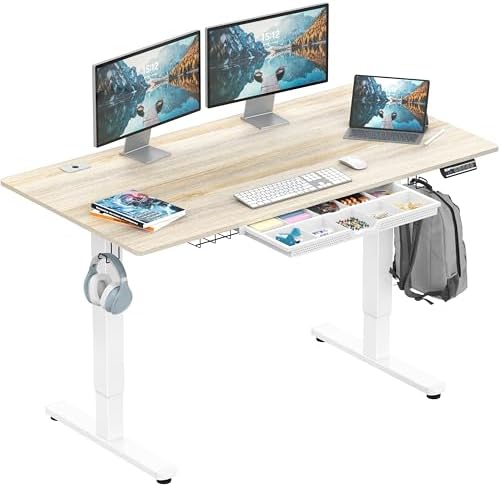
- Built-in Convenience Features: Includes integrated hooks for headphones or bags, a cable management tray, and desktop gr…
- Enhanced Stability and Comfort: Equipped with adjustable floor levellers for a stable setup on uneven surfaces and a cur…
- Quiet & Reliable Performance: Powered by a quiet, smooth motorized lift system that ensures seamless transitions between…
If you keep notebooks, chargers, cables, or office supplies on your desk right now, a drawer solves that instantly. The SHW 55 x 28 Electric Standing Desk with Drawer includes a drawer with adjustable compartments, hanging hooks for bags or headphones, and a cable management tray, all built into a 55 x 28-inch desktop that adjusts between 28 and 45 inches of height.
Hanging Hooks and Cable Trays
Even if you don’t need a full drawer, hanging hooks are genuinely useful. They give you a spot for headphones, a backpack, or a charging cable without cluttering your desktop. A cable tray mounted underneath the desk keeps your power strip and cords from swinging and tangling every time the desk moves.
If You’re Using an L-Shaped Desk
Storage becomes even more valuable on a larger L-shaped setup, since you’ve got more surface area to keep organized. That’s part of why the FLEXISPOT L-shaped desk mentioned above pairs its larger footprint with a cabinet and drawers rather than leaving you to sort out storage separately.
Step 5: Set a Realistic Budget
Standing desks span a wide price range, and the differences usually map to real features rather than just branding.
Budget Range: Converters
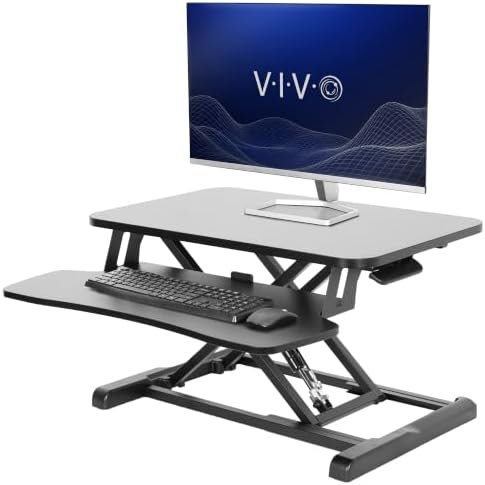
- Create Instant Active Standing: VIVO’s desk riser provides on-demand standing throughout the day for the freedom to get …
- Space Efficient 26″ Surface: The top surface measures 25.6” x 15.7”, which will easily fit in your workspace. The 25.4” …
- Strong Steel Frame: Durable steel frame resists scratches and provides sturdy support for your devices. The desktop hold…
Desk converters are generally the least expensive way to get a sit-stand setup, since you’re not paying for a full frame, legs, or motor system. The compact VIVO 26″ Standing Desk Converter sits at the lower end of this category and is a sensible way to try standing while you work before committing to a full electric desk.
Mid-Range: Single-Piece Electric Desks
A one-piece electric desk like the FLEXISPOT EN1 sits in a comfortable middle ground. You get a dedicated motorized frame, memory height presets, and a proper desktop, without paying for dual motors or built-in storage you might not need.
Higher Range: Dual Motor, Storage, or L-Shaped Desks
Once you add a second motor, a drawer, or an L-shaped desktop, the price climbs, but so does the capability. The FLEXISPOT E6 dual-motor desk and the SHW desk with a drawer both sit in this tier, and the L-shaped FLEXISPOT desk with a cabinet sits toward the top of it. None of this means you need the most expensive option. It just means you should match the price to features you’ll actually use, not features that sound impressive on a spec sheet.
Step 6: Think About Assembly and Setup
Almost every standing desk on Amazon ships unassembled or partially assembled. Before you buy, it helps to know what you’re signing up for.
Full electric desks generally take 30 minutes to over an hour to assemble, depending on the model. You’re usually attaching legs to a crossbar, mounting the motor controller, and securing the desktop on top. Having a second person around makes this noticeably easier, especially for wider desktops like 55-inch or 60-inch models.
L-shaped desks, like the FLEXISPOT model above, take longer simply because there’s more desk to put together, including the corner connection piece.
Desk converters are the easiest setup of the bunch. Most, including both VIVO converters mentioned in this guide, arrive mostly or fully assembled. You place them on your existing desk and you’re ready to go, which is part of why converters are such a popular entry point for people who’ve never used a sit-stand setup before.
Step 7: Get the Ergonomics Right, Not Just the Desk
Buying a standing desk is only half the equation. How you use it matters just as much.
Why Sitting Too Much Is the Real Problem You’re Solving
A lot of standing desk buyers are really trying to solve one core problem: too much sitting. According to the Mayo Clinic, extended periods of sitting have been linked to a higher risk of death from heart disease and cancer, and research covering more than a million people found that sitting more than eight hours a day with no physical activity carried health risks comparable to smoking or obesity. Mayo Clinic’s guidance also suggests taking a break from sitting roughly every 30 minutes, and using a standing desk is one practical way to do that.
Don’t Just Swap Sitting All Day for Standing All Day
Here’s the part people get wrong: standing all day isn’t the goal either. The point of a sit-stand desk is alternating between positions, not picking one and staying there for eight hours.
Cornell University’s ergonomics program, one of the most widely cited sources on computer workstation design, recommends alternating your posture between sitting and standing multiple times throughout the day rather than locking into one position. Their Cornell Ergonomic Workstation Advisor specifically checks whether you’re changing posture at least 16 times a day as part of evaluating a healthy workstation setup.
In practice, that might mean starting with 20 to 30 minutes standing for every hour or so of sitting, then adjusting based on how your back, legs, and feet feel. If you notice fatigue in your legs or feet while standing, that’s a signal to sit back down rather than push through it.
Getting the Height Right
Whichever desk or converter you choose, the setup matters:
- When standing, your elbows should sit at roughly a 90-degree angle with your keyboard and mouse.
- Your monitor’s top edge should be close to eye level, so you’re not tilting your neck down or craning it up.
- Your wrists should stay straight and relaxed, not bent upward or downward while typing.
A desk with memory presets, like the FLEXISPOT EN1 and FLEXISPOT E6 models mentioned earlier, makes this easier day to day. Instead of eyeballing your height every time, you set your ideal sitting and standing positions once and recall them with the press of a button.
Common Mistakes People Make When Buying a Standing Desk
A few patterns show up again and again in standing desk buying decisions. Avoiding these can save you a return shipment and a lot of frustration.
Buying Based on Price Alone
The cheapest desk in a category is sometimes a perfectly reasonable choice, but not always. A desk priced far below similar models is usually cutting costs somewhere, whether that’s a lower weight capacity, a single motor instead of dual motors, a thinner desktop, or less thorough quality control. That doesn’t mean you need the most expensive option. It means you should check what you’re actually giving up before choosing the lowest price.
Ignoring the Height Range
Every standing desk has a minimum and maximum height. If you’re notably tall or short, check these numbers before buying rather than assuming “standing desk” automatically means it’ll fit you. A desk that only goes up to 45 inches might not reach a comfortable standing height for someone well over six feet tall, and a desk that only goes down to 28 inches might sit too high for someone shorter or seated in a low chair.
Forgetting About the Chair
A standing desk doesn’t replace your chair, it works alongside it. If your chair doesn’t adjust well, or doesn’t support good posture when you are sitting, you’ll still deal with discomfort during the sitting half of your day no matter how good your standing desk is.
Skipping Cable Planning
Height-adjustable desks move. Cables that aren’t managed well can get stretched, pinched, or yanked out of a port every time the desk goes up or down. This is exactly why features like hanging hooks and cable trays, found on desks like the SHW model mentioned above, matter more than they might seem to at first glance.
Expecting the Desk Alone to Fix Everything
A standing desk is a tool, not a cure. It makes it easier to change position throughout the day, but it won’t automatically fix poor posture, an unsupportive chair, or a monitor set at the wrong height. Pairing the desk with the ergonomic basics covered in Step 7 makes a real difference in how much benefit you actually get from it.
Which Standing Desk Should You Actually Buy?
If you’ve read this far, here’s how to turn everything above into one decision.
If you’re on a tight budget or just want to try standing desks: Start with the VIVO 26″ Compact Standing Desk Converter. It’s the lowest-commitment option on this list and works with the desk you already own.
If you run a dual-monitor setup but don’t want a new desk: The VIVO 36″ Standing Desk Converter with Dual Monitor Mount handles two screens without needing separate monitor arms.
If you want a clean, dedicated electric desk without overspending: The FLEXISPOT EN1 One-Piece Standing Desk covers the basics well, with memory presets and a seamless desktop.
If you’re running multiple monitors, a monitor arm, or anything heavier than a basic setup: Go with the FLEXISPOT E6 Dual Motor Standing Desk for the extra weight capacity and sturdier dual-motor lift.
If you want a drawer and cable management built in: The SHW 55 x 28 Electric Standing Desk with Drawer solves storage and standing in one purchase.
If you need serious desk space for multiple monitors or a corner office setup: The FLEXISPOT 55″ L-Shaped Standing Desk with Drawers gives you the most usable surface area on this list.
Frequently Asked Questions
What is the best height for a standing desk?
It depends on your height, not a fixed number. A good starting point is to stand naturally, relax your shoulders, and adjust the desk until your elbows sit at roughly a 90-degree angle over your keyboard. Cornell University’s ergonomics guidance uses this elbow-height test as one of the core checks for a properly set up standing workstation.
How long should I stand at a standing desk each day?
There’s no single official number, but the general guidance from health researchers is to avoid staying in any one position, sitting or standing, for too long. Mayo Clinic suggests breaking up sitting roughly every 30 minutes. Many people find alternating between 30 to 60 minutes sitting and 20 to 30 minutes standing works well, then adjusting from there based on comfort.
Is a standing desk converter as good as a full standing desk?
It depends on your goal. A converter is a great way to add sit-stand functionality to a desk you already own, and it’s usually cheaper and easier to set up. A full standing desk gives you a dedicated, often more stable platform, usually with a higher weight capacity and more desktop space, but it replaces your existing desk entirely.
Do I need a dual-motor standing desk?
Not always. If you’re running a single monitor and a laptop, a single-motor desk is usually enough. If you’re carrying two or more monitors, a monitor arm, or you just want extra stability at taller heights, a dual-motor desk like the FLEXISPOT E6 is the safer choice.
How much weight can a standing desk hold?
It varies by model. Many single-motor desks are rated between 150 and 180 pounds, while dual-motor desks often reach 220 pounds or more. Remember that this weight includes everything on the desktop, not just your monitor, so add up your monitor, monitor arm, laptop, and accessories before assuming a desk has enough headroom.
Are standing desks hard to assemble?
Full electric desks typically take between 30 minutes and an hour to assemble, and having a second person helps, especially with wider desktops. L-shaped desks take longer because of the extra corner section. Desk converters are the easiest option, since most arrive mostly or fully assembled and just need to be placed on your existing desk.
Can a standing desk fix back pain from sitting?
A standing desk can help by letting you change position throughout the day, which reduces the amount of time you spend in any single static posture. But it isn’t a guaranteed fix on its own. Proper desk height, monitor position, and regularly alternating between sitting and standing all matter. If you have ongoing back pain, it’s worth talking to a healthcare provider about your specific situation rather than relying on a desk alone.
What’s the difference between a one-piece desktop and a regular desktop?
A one-piece, or seamless, desktop is built from a single continuous surface rather than multiple panels joined together. It tends to look cleaner and avoids the small seam or gap you sometimes see on lower-cost desks. The FLEXISPOT EN1 desk mentioned in this guide uses this one-piece design.
Final Thoughts
Choosing the best standing desk really comes down to answering a few honest questions about your own setup: How much space do you have? What do you actually put on your desk every day? And how much are you realistically willing to spend?
If you’re not sure where to start, a desk converter like the VIVO 26″ Compact Standing Desk Converter is a low-risk way to test whether standing while you work fits your routine. If you already know you want a dedicated desk, the FLEXISPOT EN1 One-Piece Standing Desk is a solid, no-frills starting point, and the FLEXISPOT E6 Dual Motor Standing Desk is there if you need more weight capacity for a bigger setup.
Whatever you choose, remember that the desk itself is only part of the solution. Alternating between sitting and standing throughout the day, keeping your monitor at eye level, and paying attention to how your body actually feels matter just as much as the model you buy.
As an Amazon Associate I earn from qualifying purchases.

MD.HASAN is an experienced SEO expert and amazon products review writer passionate about helping people find right products on amzon for buy without confusion. With 4 years of hands-on experience in content strategy and search engine optimization, he specializes in writing SEO-friendly blog posts that rank, engage, and convert.


