
Affiliate disclosure: As an Amazon Associate, Tech Rig Review earns from qualifying purchases. Links on this page may be affiliate links, at no extra cost to you.
Looking for the best rechargeable wireless mouse? We compared 8 real Amazon picks for work, travel, ergonomics, Mac, gaming, and budget buyers.
Why the Best Rechargeable Wireless Mouse Beats a Battery Mouse
You have probably done this before. You sit down to work, move your mouse, and nothing happens. The AA battery is dead. You dig through a drawer, find one that may or may not work, and lose five minutes.
A rechargeable wireless mouse fixes that. You plug it in with a USB-C cable, and it is ready again. Many models also give you hours of use from a one-minute charge. That means a surprise low battery stops being a real problem.
Rechargeable mice also cut waste. You stop buying batteries for years. You also get slimmer bodies, since the maker does not have to design around a bulky battery bay.
This guide covers eight rechargeable wireless mice that are listed on Amazon right now. We picked them for different jobs. Some are made for office work. Some are made for travel. Others are built for ergonomics, Mac users, gaming, or tight budgets.
If you want a wider look at wireless mice (including battery-powered ones), see our Amazon wireless mouse roundup. This article focuses only on mice you charge, not mice you feed with batteries.
Table of Contents
How We Picked These Mice
We did not buy or hands-on test these mice. We built this list from research. That means we compared official specs, feature lists, and the common themes in buyer feedback across Amazon listings and independent coverage.
Here is what we looked for:
- A built-in rechargeable battery. No AA or AAA mice made the list.
- A live Amazon listing. We checked each product page to confirm it could be bought new from Amazon.com at the time of research. If a version showed as unavailable, we skipped it and picked a listing that was in stock.
- A clear reason to exist. No two mice on this list fill the same role. You will not see three near-identical office mice here.
- Honest trade-offs. Every pick has real downsides, and we list them.
We also avoid exact prices, star scores, and review counts. Those change daily on Amazon. Always open the live listing to check the current price, the exact bundle, and the seller before you buy.
Quick Comparison Table
| Product | Best For | Key Feature | Buyer Sentiment | Link |
|---|---|---|---|---|
| Logitech MX Master 3S | Best Overall | Quiet clicks, fast scrolling, 8K DPI sensor | Consistently well-rated on Amazon | Check Price on Amazon |
| Logitech MX Master 4 | Best Premium Upgrade | Haptic feedback on an ergonomic body | Strong early reception among buyers | Check Price on Amazon |
| Logitech MX Anywhere 3S | Best Compact / Travel | Pocket-size body with fast scrolling | Rated highly among travelers and remote workers | Check Price on Amazon |
| Logitech MX Vertical | Best Premium Ergonomic | Steep vertical angle, 3-device switching | Well-regarded by buyers with wrist strain | Check Price on Amazon |
| ProtoArc EM11 NL | Best Budget Ergonomic | Vertical design with USB-C charging | Popular among budget-minded buyers | Check Price on Amazon |
| TECKNET Rechargeable Silent Mouse | Best Budget Everyday Mouse | Silent clicks with Bluetooth and 2.4G | Generally positive for value | Check Price on Amazon |
| Apple Magic Mouse (USB-C) | Best for Mac | Multi-Touch surface for gestures | Loved by gesture fans, debated on comfort | Check Price on Amazon |
| Logitech G502 X Plus | Best Rechargeable Gaming Mouse | 13 buttons and LIGHTSPEED wireless | Rated highly among gamers | Check Price on Amazon |
We use words, not star numbers, in the Buyer Sentiment column. Ratings change daily, so check the live listing.
The 8 Best Rechargeable Wireless Mice on Amazon
1. Logitech MX Master 3S — Best Overall

- Logitech MX Master 3S Standard Edition comes with a Logi Bolt USB receiver (dongle), and a USB-C charging cable (USB-A t…
- Install free Logi Options+ App to enable Logi AI Prompt Builder for your Logitech wireless mouse and keyboard setups
- 8K DPI Any-surface tracking: Use MX Master 3S cordless computer mouse to work on any surface – even glass (1) – with an …
Best For: Office workers, remote workers, and anyone who spends all day on a computer.
The Logitech MX Master 3S is the mouse most people should look at first. It has been the default “good mouse” recommendation for years, and for good reason. It does a lot of things well, and it does not ask you to make big trade-offs.
The body is sculpted for your right hand. It has a thumb rest, a tall back, and a textured grip. If you have used a flat, basic mouse for years, the shape feels very different at first. Most people find it far more comfortable after a short adjustment.
The scroll wheel is the star. Logitech calls it MagSpeed. You can scroll slowly, one line at a time, or flick it and fly through a long document or spreadsheet. A second wheel under your thumb scrolls sideways, which is handy in wide spreadsheets and timelines.
This model uses a high-resolution sensor rated up to 8,000 DPI. The listing says it can track on glass, so you can use it on a glass desk or a smooth table. The buttons use quiet-click switches. That makes it a good fit for shared offices, late-night calls, and quiet rooms.
Battery life is strong. Independent coverage lists up to about 70 hours per charge, and charging is done over USB-C. A short charge can also give you hours of use. You can pair the mouse with up to three devices and switch between them with a button. With Logitech’s Options+ software, you can even move your cursor from one computer to another.
One thing to check on Amazon: Logitech sells several versions. Some come with a Logi Bolt USB receiver. Others are Bluetooth only. There is also a version made for Mac. The listing we picked mentions the Bolt receiver, but always read the title and “What’s in the box” section before you click buy.
If you use a Logitech keyboard too, our MX Keys vs MX Keys S comparison explains how the two work together through Logitech’s software.
Key Specifications
| Specification | Details |
|---|---|
| Battery | Built-in rechargeable, USB-C charging |
| Sensor | Up to 8,000 DPI, tracks on glass |
| Connection | Bluetooth, plus Logi Bolt receiver on the listing we picked |
| Devices | Pairs with up to 3 devices |
| Buttons | 7 |
| Clicks | Quiet-click design |
| Scroll | MagSpeed main wheel, plus thumb wheel |
| Works With | Windows, macOS, Linux, ChromeOS (check the listing for your version) |
Pros and Cons
| 👍 Pros | 👎 Cons |
|---|---|
| Very comfortable shape for long workdays | Right-handed shape only |
| Quiet clicks keep shared spaces calm | Large body is not ideal for small hands |
| Fast, smooth scrolling with a thumb wheel | Bigger than travel mice, so it takes space in a bag |
| Easy switching between three devices | Several versions on Amazon can confuse buyers |
Buyer Sentiment: Consistently well-rated on Amazon.
What Buyers Are Saying
Buyer feedback often praises the comfort and the scroll wheel. Many people say it feels like a real upgrade from a basic mouse. A smaller group says it feels big, and some small-handed buyers prefer a smaller shape.
Who Should Buy It
Pick this if you want one mouse that does nearly everything well. It is a smart choice for writers, analysts, designers, and developers who need comfort and speed. It is also a good pick for people who split time between a laptop and a desktop.
Who Should Skip It
Skip it if you are left-handed, if you have small hands, or if you want something you can toss in a small pouch. For travel, look at the MX Anywhere 3S below.
Check Price on Amazon: Logitech MX Master 3S
2. Logitech MX Master 4 — Best Premium Upgrade

- Precision you can feel with the Haptic Sense Panel; customizable (1) haptic feedback on specific actions, shortcuts, not…
- Effortlessly access favorite tools with Actions Ring (2) on this MX Series mouse—a dynamic, customizable overlay adapts …
- Scroll 1,000 lines per second and stop on a pixel with the MagSpeed scroll wheel—Logitech’s fastest (3), quietest, and m…
Best For: Power users who want the newest top-end Logitech mouse and like extra features.
The MX Master 4 is Logitech’s newer flagship. It keeps the sculpted, ergonomic style of the MX Master line, then adds haptic feedback. Haptics means the mouse can give you small vibrations or “taps” to confirm an action. Instead of only seeing something happen on screen, you can feel it in your hand.
This is a new kind of feature for a mouse, and it is not for everyone. Some people love the extra feedback. Others find it a gimmick. If you work in creative apps, or you like customizing your tools, it may be a real help. If you just want a quiet, comfortable mouse, the MX Master 3S may be all you need.
The listing describes ultra-fast scrolling, quiet clicks, and an 8,000 DPI sensor that works on many surfaces. It charges by USB-C and connects by Bluetooth. It works with Windows and macOS. There is also a “for Mac” version sold as a separate listing, so pick the one that matches your computer.
One note on research: this mouse is newer, so there is less long-term feedback than for the 3S. We cannot confirm its real-world battery life or durability beyond what the listing says. Check the live listing for the full spec sheet, including battery claims, before you buy.
The MX Master 4 also fits well in a bigger Logitech setup. If you already use an MX keyboard and Logitech’s software, it will feel at home. If your desk also has a laptop riser, our guide to using a laptop stand shows how to set up a full external mouse-and-keyboard desk for better posture.
Who is it for? It suits people who spend long hours in one workspace and want the best of what Logitech makes. Think designers, editors, developers, and heavy multitaskers. It is a “buy once, enjoy daily” tool for those users.
The trade-off is cost and size. This is a premium mouse, so expect to pay more than for the 3S. It is also a full-size mouse, so it is not a travel pick.
Key Specifications
| Specification | Details |
|---|---|
| Battery | Built-in rechargeable, USB-C charging |
| Sensor | 8,000 DPI, any-surface tracking per the listing |
| Connection | Bluetooth (check listing for receiver details) |
| Feedback | Advanced haptic feedback |
| Clicks | Quiet clicks |
| Scroll | Ultra-fast scrolling |
| Works With | Windows and macOS (separate Mac version exists) |
Pros and Cons
| 👍 Pros | 👎 Cons |
|---|---|
| Haptic feedback adds a new layer of control | Haptics may feel like a gimmick to some |
| Same ergonomic MX Master style | Costs more than the 3S |
| Quiet clicks and fast scrolling | Newer, so less long-term feedback exists |
| USB-C charging and multi-device use | Full-size body, so not a travel mouse |
Buyer Sentiment: Strong early reception among buyers.
What Buyers Are Saying
Early buyer feedback focuses on the comfort and the new haptic feel. Some people say it feels refined and premium. Others say the 3S already does everything they need and ask whether the upgrade is worth it.
Who Should Buy It
Buy it if you want Logitech’s latest and you will use the extra features. It is a good fit if you are building a premium desk setup.
Who Should Skip It
Skip it if you are happy with the 3S, if you are on a budget, or if you want a small mouse for travel.
Check Price on Amazon: Logitech MX Master 4
3. Logitech MX Anywhere 3S — Best Compact / Travel Pick

- Logitech MX Anywhere 3S comes with a USB-C charging cable (USB-A to USB-C) only, no USB receiver / dongle.
- Tracks Anywhere, Goes Everywhere: Work on any surface, even glass (1), with MX Anywhere 3S Bluetooth Mouse – now with an…
- Deeper Flow with Quiet Clicks: MX Anywhere 3S Wireless Mouse introduces Quiet Clicks – the same satisfying feel but with…
Best For: Travelers, commuters, and anyone with smaller hands.
Not everyone wants a big mouse. If you work from cafes, planes, and hotel rooms, a small mouse that fits in a pocket is a smarter buy. The Logitech MX Anywhere 3S is made for that life.
It is a compact mouse, but it does not feel like a toy. It carries over many of the features from its bigger MX Master sibling. You get fast scrolling, quiet clicks, and a sensor rated up to 8,000 DPI. Logitech says it tracks on nearly any surface, including glass. That matters when you work in odd places. A coffee shop table or a hotel desk is rarely perfect.
The body is small and rounded. It works for either hand since it has a symmetrical shape. People with small to medium hands often find it very comfortable. People with large hands may find it a bit cramped for all-day use.
There are six buttons, and you can program them in Logitech’s software. You can also connect it by Bluetooth. A USB-C port handles charging. A short charge can give you hours of use, which is helpful when you forget to charge before a trip.
The Amazon listing we picked is the Graphite version for Windows, Mac, Chrome, and Linux. Logitech also sells a Mac-focused version in a separate listing. Both exist, so read the title carefully.
Is it good as a main desk mouse? It can be, if you like small mice. Many remote workers use it that way. But if you spend eight hours a day on it, the larger MX Master 3S gives better support for your palm.
Think of this mouse as the best “take it anywhere” option. It is small enough for a laptop sleeve pocket. It is quiet enough for a library. It is smart enough to switch between your laptop and tablet.
Also, if you often work on the couch or in bed, pair it with a hard surface. A small lap desk or a book makes any mouse work better. For setting up a more permanent desk later, our wrist rest guide can help you build a more comfortable setup.
Key Specifications
| Specification | Details |
|---|---|
| Battery | Built-in rechargeable, USB-C charging |
| Sensor | Up to 8,000 DPI, tracks on glass |
| Connection | Bluetooth |
| Buttons | 6, programmable |
| Clicks | Quiet clicks |
| Scroll | MagSpeed fast scrolling |
| Works With | Windows, macOS, Linux, ChromeOS (check the listing for your version) |
Pros and Cons
| 👍 Pros | 👎 Cons |
|---|---|
| Pocket-friendly size | Small body can tire large hands |
| Tracks on glass and tricky surfaces | Fewer buttons than the MX Master |
| Quiet clicks for shared spaces | No dedicated thumb wheel |
| Works with either hand | Mac and Windows versions are separate listings |
Buyer Sentiment: Rated highly among travelers and remote workers.
What Buyers Are Saying
Buyers often say it is the best travel mouse they have used. Many like the quiet clicks and the way it tracks on odd surfaces. A few mention it feels small for long sessions.
Who Should Buy It
Buy it if you travel, commute, or work in tight spaces. It also suits anyone who likes a small mouse at their desk.
Who Should Skip It
Skip it if you have large hands, or if you want a thumb wheel and the most comfort for all-day use.
Check Price on Amazon: Logitech MX Anywhere 3S
4. Logitech MX Vertical — Best Premium Ergonomic Mouse
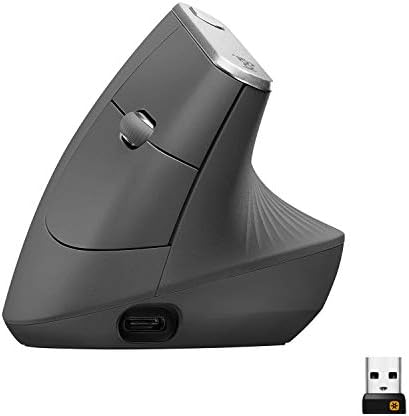
- NATURAL HANDSHAKE POSITION – MX Vertical’s natural handshake position reduces muscular activity by 10 percent compared t…
- 57° VERTICAL ANGLE FOR IMPROVED WRIST POSTURE – MX Vertical’s unique 57° vertical angle reduces the pressure on your wri…
- USER TESTED. ERGONOMIST-APPROVED. MX Vertical has been designed and tested with criteria set out by leading ergonomists …
Best For: People with wrist, hand, or forearm discomfort from a flat mouse.
A regular mouse makes your forearm twist so your palm faces down. A vertical mouse lets your hand sit in a “handshake” position instead. The Logitech MX Vertical is one of the best-known examples of this style.
Its angle is steep. Logitech lists a 57 degree vertical angle, and says the design reduces muscular strain by 10 percent. That is a manufacturer claim, so treat it as a company statement, not a medical promise. If you have pain, talk to a health professional. But many people do find vertical mice more comfortable.
The shape also changes how you move. Instead of swinging your wrist, you tend to move your whole arm more. Logitech says its sensor, rated up to 4,000 DPI, lets you move your hand less to cover the same screen space. That helps if you use several monitors.
Charging is by USB-C. The built-in battery is a 240 mAh unit, according to a retailer’s spec sheet. Logitech’s own materials describe up to four months on a full charge, plus about three hours of use from a one-minute quick charge. Those are manufacturer numbers, so real-world results may vary.
You can connect it with Bluetooth or the included Unifying receiver. It can also pair with three computers, and you can switch between them with a button. The listing notes a drop-resistant build, which is nice for a mouse that spends its days on a desk.
Be aware of the fit. Logitech describes this mouse as best for medium to large hands. If your hands are small, the EM11 NL below may be a better choice. The MX Vertical is also right-handed.
Give it time. Many people need a week or two to adjust. At first, the mouse can feel strange, and precise tasks may feel slower. Many users say the comfort is worth the learning curve.
If you also type a lot, pair a good vertical mouse with a supportive keyboard setup. Our mechanical keyboards roundup has options that work well for long typing days.
One note on research: one Logitech MX Vertical listing on Amazon showed as unavailable when we checked. The listing we picked was in stock. Check stock yourself before you buy.
Key Specifications
| Specification | Details |
|---|---|
| Battery | 240 mAh rechargeable, USB-C charging |
| Sensor | Up to 4,000 DPI |
| Connection | Bluetooth or Unifying USB receiver |
| Devices | Up to 3 with Easy-Switch |
| Angle | 57 degrees, vertical |
| Buttons | 4 |
| Hand Fit | Right-handed, medium to large hands |
Pros and Cons
| 👍 Pros | 👎 Cons |
|---|---|
| Natural handshake posture | Takes days or weeks to get used to |
| Less hand movement needed | Right-handed only |
| Fast one-minute charge | Not good for small hands |
| Connects to three computers | Fewer buttons than MX Master models |
Buyer Sentiment: Well-regarded by buyers with wrist strain.
What Buyers Are Saying
Many buyers say the vertical design eased discomfort they felt with flat mice. Others say it took time to adjust. A few note it is bulky for travel.
Who Should Buy It
Buy it if a flat mouse makes your wrist or forearm ache. It also suits people who work long hours at a desk.
Who Should Skip It
Skip it if you travel a lot, if you have small hands, or if you are left-handed.
Check Price on Amazon: Logitech MX Vertical
5. ProtoArc EM11 NL — Best Budget Ergonomic Mouse

- Perfect Fit for Small to Medium Hands: Designed specifically for hand lengths under 7.5 inches (19.05 cm), the EM11 NL r…
- Connect up to 3 Devices: This ergonomic wireless mouse features dual Bluetooth connectivity and 2.4G USB-A connectivity …
- Rechargeable Ergonomic Mouse: The Bluetooth Vertical Mouse has a built-in 500mAh Li-Ion battery that can be conveniently…
Best For: Anyone who wants to try a vertical mouse without a big spend.
Vertical mice can feel like a risk. You do not know if you will like one until you use it. That is why the ProtoArc EM11 NL is so popular. It lets you test the vertical style at a much lower cost than a premium model.
The mouse uses a 58 degree vertical design. That puts your hand in a natural handshake position. The listing says it supports a more neutral wrist posture. As with any ergonomic product, comfort varies by person. It is a design aid, not a medical device.
It also does more than you might expect at this level. You can connect it by Bluetooth or a 2.4G USB-A receiver. It can link to three devices. That means you can move between a work laptop, a tablet, and a desktop. Seven buttons give you room for back and forward actions and DPI changes.
The battery is a built-in 500 mAh unit that charges over USB-C. One independent review lists three DPI settings (1,000, 1,600, and 2,400), a weight of about 3.9 ounces, and a click life of over three million presses. Those numbers come from a review, not from us, so double check them on the live listing.
Size matters here. The listing describes it as made for small to medium hands. That is the opposite of the MX Vertical, which suits medium to large hands. If you have smaller hands, this could be the better vertical option for you.
What are the compromises? The build and software are simpler than Logitech’s. You will not get a polished app with deep customization, and the materials feel more budget. But for the price, most buyers find it a smart trade.
A note on research: some color variants of this mouse showed as unavailable on Amazon when we checked. The black version we picked was listed and in stock. Always confirm stock and color before you buy.
If you are worried about wrist comfort in general, a vertical mouse is just one piece of the puzzle. A good wrist rest and a proper desk height matter too. Our wrist rest roundup covers affordable ways to improve your setup. And the U.S. government’s workplace safety agency has a helpful page on computer workstation work habits, including why short breaks help.
Key Specifications
| Specification | Details |
|---|---|
| Battery | Built-in 500 mAh, USB-C charging |
| Angle | 58 degrees, vertical |
| Connection | Bluetooth and 2.4G USB-A receiver |
| Devices | Up to 3 |
| Buttons | 7 |
| DPI | Multiple levels, up to 2,400 (per review and listing) |
| Hand Fit | Small to medium hands |
Pros and Cons
| 👍 Pros | 👎 Cons |
|---|---|
| Low-risk way to try a vertical mouse | Simpler software than Logitech |
| Three-device connection | Build feels more budget |
| USB-C charging with a decent battery | Not suited to large hands |
| Light body | Some color options may be out of stock |
Buyer Sentiment: Popular among budget-minded buyers.
What Buyers Are Saying
Buyers often say it is a great value for an ergonomic mouse. Many mention that the angle feels natural after a short adjustment. Some say it feels small and wish it came in a bigger size.
Who Should Buy It
Buy it if you want to test a vertical mouse, or if you have small to medium hands and a modest budget.
Who Should Skip It
Skip it if you have large hands, or if you want advanced software and premium materials.
Check Price on Amazon: ProtoArc EM11 NL
6. TECKNET Rechargeable Silent Wireless Mouse — Best Budget Everyday Mouse

- Dual Device Connection: Connect two devices simultaneously using either Bluetooth(3.0/5.0) or USB A connection for a wir…
- Rechargeable Mouse: Our bluetooth mouse for laptop is rechargeable, taking only 1.5 to 2 hours to fully charge. Once ful…
- 6 Adjustable Levels: This computer mouse offers 6 adjustable DPI levels (4800/3200/2400/1600/1200/800), allowing you to …
Best For: Students, home users, and anyone who wants a quiet, simple mouse for a small price.
Not everyone needs a feature-packed mouse. Sometimes you just want something that connects fast, clicks softly, and charges with a cable. The TECKNET rechargeable mouse is built for that.
This model works over Bluetooth 5.0 and over a 2.4G USB-A receiver. That gives you options. You can use the receiver for a steady link on a desktop, or use Bluetooth with a tablet or a laptop that has no spare USB port. The listing mentions two-device easy switching and wide operating system support.
The big selling point is silence. TECKNET advertises silent click buttons. The idea is that you can use it in a dorm, a library, or a bedroom without bothering anyone. We cannot confirm the exact noise reduction, so treat claims as marketing and check buyer feedback for real impressions.
It has six buttons and six DPI levels, up to 4,800. That is more than enough for web browsing, documents, and light photo work. The listing describes the shape as made for small to medium hands, so it is not a good pick for people with very large hands.
Rechargeable mice at this price often cut corners on the battery or build. That is the risk with any budget pick. So we suggest you read the “what’s in the box” list on the listing and check what warranty the seller offers. If you buy it for a student or a child, a simple, cheap mouse is often a smart choice since it is less costly to replace.
Is it a good choice for work? For light office tasks, yes. For heavy daily use, the Logitech picks are better made, with better software and more comfort. But if you need a second mouse for travel or a spare for the home office, this one makes sense.
If you are putting together a budget remote-work desk, you can combine a mouse like this with an affordable keyboard. Our laptop buying guide also lists what to check on the laptop side of the setup.
Key Specifications
| Specification | Details |
|---|---|
| Battery | Built-in rechargeable |
| Connection | Bluetooth 5.0 and 2.4G USB-A receiver |
| Devices | 2-device switching |
| DPI | 6 levels, up to 4,800 |
| Buttons | 6 |
| Clicks | Silent-click design (maker claim) |
| Hand Fit | Small to medium hands |
Pros and Cons
| 👍 Pros | 👎 Cons |
|---|---|
| Quiet clicks for shared spaces | Basic software and build |
| Bluetooth and USB receiver options | Not suited to large hands |
| Rechargeable, so no spare batteries | Only two-device switching |
| Low cost makes it easy to replace | Fewer premium features |
Buyer Sentiment: Generally positive for value.
What Buyers Are Saying
Buyers often mention the quiet clicks and easy setup. Many say it works well for school and home use. A few note that it feels light and plain compared with premium mice.
Who Should Buy It
Buy it if you want a quiet, affordable mouse for light use. It is also good as a spare or travel backup.
Who Should Skip It
Skip it if you work all day on a mouse, or if you need strong software and a premium feel.
Check Price on Amazon: TECKNET Rechargeable Silent Mouse
7. Apple Magic Mouse (USB-C) — Best for Mac

- Magic Mouse is wireless and rechargeable, with an optimised foot design that lets it glide smoothly across your desk.
- The Multi-Touch surface allows you to perform simple gestures such as swiping between web pages and scrolling through do…
- The rechargeable battery will power your Magic Mouse for about a month or more between charges.
Best For: Mac and iPad users who love gestures and a clean look.
The Apple Magic Mouse is not a typical mouse. It has no buttons or scroll wheel. The top is one smooth Multi-Touch surface. You slide your finger to scroll, swipe to move between pages, and tap or click to select.
If you live in macOS, this feels natural. The listing says it supports simple gestures like swiping between web pages and scrolling documents. It pairs automatically with your Mac. That makes setup very fast.
The current model uses a USB-C port. It comes with a woven USB-C charge cable. Apple’s listing says the battery lasts about a month or more between charges. Apple’s support page lists it as introduced in 2024, and says it needs a Mac with macOS 15.1 or later, or an iPad with iPadOS 18.1 or later. Check the Apple tech specs page to confirm your device works with it.
Style matters here. The mouse is slim, low, and sleek. It looks great on a clean desk. It comes in white and in black on Amazon.
But the design has trade-offs. The shape is flat and low, so some people find it uncomfortable during long sessions. It does not give much palm support. Apple’s design has also drawn criticism over the charging port, which has historically sat on the underside. That means you may not be able to use the mouse while it charges. We could not verify this on the listing, so please check the product photos and description before you buy.
There is also a learning curve if you come from a mouse with a wheel. Gesture scrolling feels smooth, but fine control takes practice. If you like precise scrolling and side buttons, a Logitech MX model will serve you better, even on a Mac.
So who should buy this? Pick it if you are deep in Apple’s world and you value gestures and looks. Skip it if comfort and buttons matter more.
It also works with Windows in a very limited way, but it is built for Apple devices. Do not buy it for a Windows PC.
Key Specifications
| Specification | Details |
|---|---|
| Battery | Built-in rechargeable, about a month or more per charge (per listing) |
| Port | USB-C, with woven charge cable included |
| Connection | Bluetooth, pairs automatically with Mac |
| Surface | Multi-Touch gestures |
| Compatibility | Mac (macOS 15.1 or later) and iPad (iPadOS 18.1 or later) per Apple |
| Colors | White and black available on Amazon |
Pros and Cons
| 👍 Pros | 👎 Cons |
|---|---|
| Smooth Multi-Touch gestures | Flat, low shape is not ideal for long sessions |
| Easy pairing with Mac | No scroll wheel or side buttons |
| Clean, slim design | Charging port placement may limit use while charging |
| USB-C charging cable included | Not built for Windows users |
Buyer Sentiment: Loved by gesture fans, debated on comfort.
What Buyers Are Saying
Buyers who love gestures praise the smooth scrolling and the neat look. Others say the shape is not comfortable for them. This is one of those products where opinions are strongly split.
Who Should Buy It
Buy it if you use a Mac or iPad and want a minimalist mouse with gesture control.
Who Should Skip It
Skip it if you want a comfortable shape for all-day use, side buttons, or Windows support.
Check Price on Amazon: Apple Magic Mouse (USB-C)
8. Logitech G502 X Plus — Best Rechargeable Gaming Mouse

- BUNDLE INCLUDES: Logitech G502 X PLUS LIGHTSPEED Wireless Gaming Mouse (Black), and Signature Series Logitech Mouse Char…
- HERO 25K GAMING SENSOR: HERO mouse sensor delivers more power efficiency with exceptional accuracy and responsiveness th…
- LIGHTSPEED WIRELESS: LIGHTSPEED technology provides a lag-free wireless experience. The mouse is POWERPLAY wireless char…
Best For: PC gamers who want a wireless mouse with lots of buttons.
If you play games, you need a mouse that reacts fast and does not die mid-match. The Logitech G502 X Plus is a rechargeable wireless gaming mouse with a long track record behind its design. The G502 line has been popular for years, and the X Plus brings it into the wireless era.
It uses Logitech’s LIGHTSPEED wireless tech. The product page says it offers a faster response rate than the previous generation. That is the key for gaming, since lag can cost you a round. It also uses a HERO 25K sensor with up to 25,600 DPI, which is far more than most players will ever use, but gives you room to adjust.
The mouse has 13 programmable controls. That includes a DPI-shift button that you can flip or remove depending on your grip. The scroll wheel can spin freely or click in steps. The switches are Logitech’s LIGHTFORCE hybrid design, which mix optical and mechanical parts.
RGB lighting is built in. The listing says the battery lasts up to 120 hours, but only about 37 hours with RGB on. That is a big gap, so decide how much you care about the lights. Another Amazon listing for the same mouse quotes a slightly different figure, so treat these as approximate and check the live listing.
It charges by USB-C. It is also compatible with Logitech’s POWERPLAY wireless charging system, which is sold separately. POWERPLAY keeps the mouse charged while you play, so you never need to plug in. That is a premium upgrade, and not required.
The listing we picked is a bundle that includes the mouse and a Signature Series charging dock. Bundle contents can change, so confirm exactly what comes in the box.
Size and weight matter in gaming. This is a full-size mouse with a high button count. It is better for palm and claw grips than for people who want an ultra-light “esports” mouse. If you want very light, look at other brands.
Is it only for gamers? No. Some office users like the extra buttons for shortcuts. But the design leans into gaming, and the RGB and styling reflect that.
Key Specifications
| Specification | Details |
|---|---|
| Battery | Built-in rechargeable, USB-C charging |
| Battery Life | Up to about 120 hours, around 37 with RGB on (per listing) |
| Sensor | HERO 25K, up to 25,600 DPI |
| Connection | LIGHTSPEED wireless with USB-A receiver |
| Buttons | 13 programmable controls |
| Switches | LIGHTFORCE hybrid optical-mechanical |
| Charging | POWERPLAY compatible (sold separately) |
| Works With | PC and Mac |
Pros and Cons
| 👍 Pros | 👎 Cons |
|---|---|
| Fast LIGHTSPEED wireless for gaming | Battery life drops a lot with RGB on |
| 13 programmable controls | Full-size and heavier than esports mice |
| Strong sensor and hybrid switches | Gaming style may not suit office use |
| POWERPLAY charging option | Bundle contents can change by listing |
Buyer Sentiment: Rated highly among gamers.
What Buyers Are Saying
Gamers often praise the sensor, the button layout, and the wireless speed. Some mention that the mouse is large. A few wish the battery lasted longer with lights on.
Who Should Buy It
Buy it if you play on PC and want many programmable buttons and a trusted wireless system.
Who Should Skip It
Skip it if you want an ultra-light mouse, or if you only need a quiet office mouse.
Check Price on Amazon: Logitech G502 X Plus
Rechargeable vs. Battery Mouse: A Side-by-Side Look
Many buyers wonder if a rechargeable mouse is really worth it. Here is a plain comparison.
| Factor | Rechargeable Mouse | Battery (AA/AAA) Mouse |
|---|---|---|
| Ongoing cost | No batteries to buy | You keep buying batteries |
| Convenience | Plug in with USB-C | Swap in a fresh battery in seconds |
| Weight and size | Often slimmer and lighter | Battery bay adds bulk |
| Dead battery risk | Quick charge can save you | A spare battery solves it instantly |
| Long-term wear | Built-in battery slowly ages | Batteries are replaced each time |
| Waste | Less waste over time | More used batteries |
The short answer: if you use your mouse daily at a desk, rechargeable wins on cost and convenience. If you travel for weeks with no power outlet, a battery mouse with spares can still make sense. Some people also like having both.
Common Mistakes When Buying a Rechargeable Mouse
Even a good mouse can be the wrong mouse. Here are the slips we see most often in buyer feedback patterns.
Ignoring hand size. A mouse that is too small or too large is the number one cause of discomfort. Check the size guidance on the listing before you buy.
Buying the wrong version. Logitech, in particular, sells several versions of the same mouse. Some include a USB receiver, some are Bluetooth only, and some are made for Mac. Read the full title and the “in the box” list.
Trusting battery claims blindly. Battery life on the box is measured under ideal conditions. Bright lights, high polling rates, and busy wireless use all shorten it.
Skipping the return policy. A mouse is a personal fit. If it does not feel right, you want an easy return. Confirm the return window and the seller on the live listing.
Expecting an instant fit with a vertical mouse. A vertical mouse can feel odd at first. Give it a couple of weeks before you decide.
Forgetting the rest of the desk. A great mouse cannot fix a bad desk height or a poor chair. Pair your new mouse with a comfortable setup, such as the one in our monitor stand guide.
Setting Up Your New Rechargeable Mouse in Five Minutes
A smooth first day makes a big difference. Follow these quick steps.
- Charge it first. Plug it in with the included cable for a short top-up before you start.
- Choose your connection. Use Bluetooth for laptops and tablets. Use the USB receiver for desktops or if Bluetooth acts up.
- Install the software. For Logitech models, download Logi Options+ to set up buttons and scrolling. For the Apple Magic Mouse, use System Settings on your Mac.
- Set your speed. Start at a medium DPI and raise or lower it until the cursor feels natural.
- Set up multi-device switching. If your mouse supports it, pair each computer to a different slot so you can switch with one press.
- Place it close to your keyboard. OSHA’s workstation guidance stresses keeping the mouse near the keyboard to avoid reaching.
Give your hand a few days to adjust, and take short breaks to stretch.
How to Make a Rechargeable Mouse Battery Last Longer
A rechargeable mouse has a small lithium battery inside. These batteries age. The good news is that a few habits can slow that down.
Do not let it sit at zero. Letting a lithium battery drain to nothing and then sit for weeks is hard on it. Battery University explains that partial discharges are gentler than deep ones. Their article on prolonging lithium-based batteries says heat and holding a battery at a very high charge are two of the biggest stress factors.
Avoid heat. Do not leave your mouse on a hot dashboard, near a heater, or in direct summer sun. Heat speeds up aging.
Top up often. You do not need to wait until the mouse is nearly dead. Short, frequent charges are fine for lithium batteries. Many of the mice in this list also give hours of use from a quick charge, so a plug-in at lunch is enough.
Use a normal charger. A standard USB port or a basic phone charger works. Very hot, very fast chargers are not needed for a tiny mouse battery.
Store it half charged. If you will not use the mouse for months, charge it to around the middle and keep it in a cool place. Do not store it fully charged or fully empty.
Know the limits. Over years, any rechargeable battery will lose some capacity. Some mice let you replace the battery. Most do not. That is a real trade-off, and it is why a good warranty matters.
These tips apply to every mouse on our list. They are simple, and they cost nothing.
Buyer’s Guide: How to Choose the Right Rechargeable Wireless Mouse
Picking a mouse sounds simple. But small details change how it feels over a long day. Here are the factors that matter most.
1. Battery Type and Charging Speed
Look for USB-C charging. It is common now, and you can use the same cable as your phone or laptop. Check whether the mouse supports quick charging. A mouse that gives hours of use from a one-minute charge is a lifesaver when you forget to plug in.
Also check how the battery life is stated. Some companies measure in light use. Others measure with lights off. Real life is often lower than the box.
2. Connection Type
There are three common ways to connect.
- Bluetooth. No receiver needed. It is great for laptops and tablets. It uses fewer ports.
- 2.4 GHz USB receiver. A small dongle gives a steady link and low delay. It is good for desktops and gaming.
- Both. Many mice, like the ProtoArc and TECKNET, offer both. That gives you the most choice.
If your laptop has only USB-C ports, check whether you will need an adapter for the receiver.
3. Size and Hand Fit
This is the factor people skip, and it matters a lot. A mouse that is too small makes your hand cramp. One that is too big makes your fingers stretch.
As a rough guide, measure your hand from your wrist crease to the tip of your middle finger. Small and medium hands often like compact or small-to-medium mice. Large hands often like full-size shapes like the MX Master. The product descriptions for the ProtoArc, TECKNET, and MX Vertical all mention a target hand size, so use that.
4. Shape and Ergonomics
A flat mouse keeps your forearm twisted. A sculpted mouse supports your palm. A vertical mouse rotates your hand to a handshake grip.
If you have no discomfort, a good sculpted mouse like the MX Master 3S is a fine choice. If you feel strain, try a vertical mouse. OSHA’s computer workstation pages also stress that placing your mouse close to your keyboard and taking short breaks help reduce strain. Our guide to using a laptop stand is a good companion if you work on a laptop all day.
5. Sensor and DPI
DPI means how far the cursor moves when you move the mouse. Higher DPI is not always better. For office work, 1,000 to 2,000 DPI is plenty. High numbers like 8,000 or 25,600 matter mostly on big or multiple monitors, or in gaming.
What matters more is surface tracking. If you work on glass or smooth tables, look for a mouse that says it tracks on glass.
6. Buttons and Software
Extra buttons can save time. They can open apps, copy and paste, or switch windows. Good software lets you set them up. Logitech’s software is strong. Budget brands often offer little or none.
7. Noise
If you share a room, quiet clicks matter. The MX models and the TECKNET list quiet or silent clicks. Gaming mice tend to be louder.
8. Operating System Support
Check that the mouse supports your system. The Magic Mouse is for Apple devices. Logitech has Mac-specific and Windows-friendly listings. Read titles closely.
9. Price and Warranty
Rechargeable mice range from budget to premium. A cheap mouse is fine for light use. A premium mouse is worth it if you use it daily. Whatever you pick, read the warranty terms on the listing. Do not trust any price you see in an article. Check the live Amazon page.
10. Your Full Desk Setup
A mouse works best when the rest of your desk supports it. A keyboard, wrist rest, and monitor height all play a part. If you are upgrading your whole setup, see our mechanical keyboards guide and our Logitech keyboard comparison.
Quick Picks by Need
- Best overall: Logitech MX Master 3S
- Best premium upgrade: Logitech MX Master 4
- Best for travel: Logitech MX Anywhere 3S
- Best premium ergonomic: Logitech MX Vertical
- Best budget ergonomic: ProtoArc EM11 NL
- Best budget everyday: TECKNET Rechargeable Silent Mouse
- Best for Mac gestures: Apple Magic Mouse
- Best for gaming: Logitech G502 X Plus
Frequently Asked Questions
What is the best rechargeable wireless mouse overall?
For most people, the Logitech MX Master 3S is the best all-around pick. It combines a comfortable shape, quiet clicks, fast scrolling, and USB-C charging. If you want the newest Logitech flagship, look at the MX Master 4. If you want a smaller mouse, the MX Anywhere 3S is a better fit.
How long does a rechargeable wireless mouse battery last?
It depends on the model and how you use it. Some Logitech MX mice are listed with weeks or months of use per charge, and the MX Vertical is described as lasting up to four months. The Apple Magic Mouse is listed at about a month or more. Gaming mice like the G502 X Plus last fewer hours, especially with lights on. Always treat battery claims as rough guides.
Are rechargeable mice better than battery mice?
For most people, yes. You do not need to buy batteries, and you can top up with a cable. The trade-off is that the built-in battery may wear out after several years, and most cannot be swapped. Battery mice can be swapped in seconds, which some people prefer for travel.
Can I use a rechargeable mouse while it charges?
On many mice, yes, since the USB-C port is on the front. Some designs differ. The Apple Magic Mouse has historically placed its port on the underside, which makes use while charging awkward. Check the product photos before you buy if this matters to you.
Do rechargeable wireless mice work with Mac, Windows, and Chromebook?
Many do. Logitech lists support for Windows, macOS, Linux, and ChromeOS on its MX models, though some have separate Mac versions. The Apple Magic Mouse is built for Mac and iPad. Always check the compatibility notes on the live listing.
Is a vertical mouse better for wrist pain?
Some people find a vertical mouse more comfortable because it keeps the hand in a handshake position. It does not work for everyone, and it takes time to adjust to. If you have ongoing pain, speak with a doctor or an ergonomics specialist. A vertical mouse is one tool, not a cure.
What is DPI, and how much do I need?
DPI stands for dots per inch. It measures how far your cursor moves compared to your hand. For office work, 1,000 to 2,000 DPI is usually fine. Larger screens and gaming can use more. Higher is not always better, since very sensitive settings can feel jumpy.
How do I make my rechargeable mouse battery last longer?
Avoid heat, avoid leaving it fully drained for long periods, and top it up in short sessions. If you store it for months, leave it about half charged in a cool place. See our battery care section above for more tips.
Final Verdict: Which Rechargeable Wireless Mouse Should You Buy?
If you only read one section, read this one.
The Logitech MX Master 3S is our top pick for the best rechargeable wireless mouse. It is comfortable, quiet, fast, and flexible. It suits office workers, remote workers, and creators. If you want the latest and you like new features, the Logitech MX Master 4 adds haptic feedback on top of that same proven style.
If you travel, the Logitech MX Anywhere 3S is the better choice. It is small, it tracks on tough surfaces, and it keeps the quiet clicks.
If your wrist hurts, try the Logitech MX Vertical for a premium vertical mouse, or the ProtoArc EM11 NL for a budget option. Mac fans who love gestures should look at the Apple Magic Mouse. Gamers will like the Logitech G502 X Plus, and anyone on a tight budget can start with the TECKNET silent mouse.
Whichever you choose, open the live Amazon listing first. Confirm the exact version, bundle, seller, and current price. Then you can enjoy the best part of a rechargeable wireless mouse: never hunting for batteries again.
For more desk and gear ideas, browse more reviews on TechRigReview.
As an Amazon Associate I earn from qualifying purchases.

MD.HASAN is an experienced SEO expert and amazon products review writer passionate about helping people find right products on amzon for buy without confusion. With 4 years of hands-on experience in content strategy and search engine optimization, he specializes in writing SEO-friendly blog posts that rank, engage, and convert.


