
Affiliate disclosure: As an Amazon Associate, Tech Rig Review earns from qualifying purchases. Links on this page may be affiliate links, at no extra cost to you.
Shopping for the best mini PCs on Amazon in 2026? We compared 10 real picks, from Mac mini to Ryzen and Core Ultra, so you can choose fast.
The best mini PCs on Amazon now rival full-size desktops. They fit in your palm. They hide behind a monitor. And they sip power while they work. But the listings are a mess. Dozens of brands sell near-identical boxes with long, confusing titles.
This guide cuts through that. We compared specs, ports, cooling design, upgrade options, and common buyer feedback patterns across many Amazon listings. Then we picked 10 mini PCs that each earn their spot for a different reason. One suits Apple fans. One suits tight budgets. One suits creators. One suits offices that need a quiet, tidy desk.
A quick note on honesty. We did not unbox or benchmark these machines ourselves. This is a research-based comparison. We checked manufacturer specs, professional reviews where they exist, and the product pages on Amazon. Where something could not be verified, we say so.
Pair your pick with a good display. Our guide to the best Amazon computer monitors for remote work is a good next stop. And if you are weighing a laptop instead, see our best Intel Core i5 Lenovo laptops on Amazon.
Table of Contents
Quick Comparison Table
| Product Name | Best For | Key Feature | Buyer Sentiment | Affiliate Link |
|---|---|---|---|---|
| Apple Mac mini (M4) | Best Overall | Apple M4 chip in a tiny, efficient box | Rated highly among buyers in this category | Check Price on Amazon |
| Beelink SER9 Pro (Ryzen 7 H 255) | Best Windows All-Rounder | 32GB fast memory and 1TB SSD | Well regarded in this category | Check Price on Amazon |
| Beelink Mini S13 (Intel N150) | Best Budget Pick | Tiny size with 16GB RAM | Well regarded in this category | Check Price on Amazon |
| GMKtec K8 Plus (Ryzen 7 8845HS) | Best for Light Gaming | USB4 and HDMI 2.1 with dual 2.5G LAN | Well regarded in this category | Check Price on Amazon |
| GMKtec NucBox K10 (Core i9) | Best for Multitasking and Ports | 14-core CPU and a huge port selection | Well reviewed by tech outlets and buyers | Check Price on Amazon |
| Minisforum UM890 Pro (Ryzen 9) | Best for Power Users | OCuLink port and two USB4 ports | Well regarded in this category | Check Price on Amazon |
| Minisforum UM870 Slim (Ryzen 7) | Best Slim Design | Slim body with 8K-capable outputs | Well regarded in this category | Check Price on Amazon |
| GEEKOM GT1 Mega (Core Ultra 7) | Best for AI-Ready Intel | Core Ultra 7 with Wi-Fi 7 and dual LAN | Well regarded in this category | Check Price on Amazon |
| Lenovo ThinkCentre M70q Gen 5 | Best for Office Work | Business-grade Tiny 1L build | Well regarded in this category | Check Price on Amazon |
| Beelink SER8 (Ryzen 7 8745HS) | Best Value Ryzen | Ryzen 7 with Radeon 780M graphics | Well regarded in this category | Check Price on Amazon |
How We Picked These Mini PCs
We started with one question: would a real buyer be happy with this box a year from now? To answer it, we followed a simple research process.
First, we looked for real, current Amazon listings. Every pick links to a product page on Amazon.com. We used the listing title, the “About this item” bullets, and the spec tables to confirm the processor, memory, storage, and ports. We skipped any listing that showed signs of being unavailable.
Second, we looked for variety. Ten near-identical Ryzen boxes would not help you. So we mixed chip families (Apple, AMD, Intel), budget tiers, and use cases. You will find a budget office box, a light-gaming box, an upgrade-friendly power box, and a business-grade Tiny desktop.
Third, we read what tech outlets and buyers tend to say. Where professional reviews exist, such as for the Mac mini and the GMKtec K10, we used them. For the rest, we looked at common feedback patterns across listings. We did not invent quotes, star ratings, or review counts.
Finally, we flagged the gotchas. Many mini PC listings share one product page across several RAM and SSD sizes. Some sell a barebone version with no memory or storage. We call these out in the pros and cons, so you do not get surprised at checkout.
Keep in mind that Amazon listings change often. A version that is in stock today may sell out tomorrow. Always check the live page before you buy.
Individual Product Reviews
1. Apple Mac mini (M4) — Best For: Best Overall

- SIZE DOWN. POWER UP — The far mightier, way tinier Mac mini desktop computer is five by five inches of pure power. Built…
- LOOKS SMALL. LIVES LARGE — At just five by five inches, Mac mini is designed to fit perfectly next to a monitor and is e…
- CONVENIENT CONNECTIONS — Get connected with Thunderbolt, HDMI, and Gigabit Ethernet ports on the back and, for the first…
The Mac mini is the mini PC most people should look at first. It uses Apple’s M4 chip, which blends a 10-core CPU, a 10-core GPU, and a 16-core Neural Engine on one piece of silicon. That design is very efficient. It sips power and stays small.
The box itself is tiny. Think of a stack of coasters. Yet it holds three Thunderbolt 4 ports, two front USB-C ports, an HDMI port, and Gigabit Ethernet. It also supports Wi-Fi 6E and Bluetooth 5.3.
This is the pick for writers, students, designers, and anyone already in Apple’s world. It works with an iPhone and iPad out of the box. It is less ideal if you need Windows-only software or you want to open the case and upgrade parts later.
Key Specifications
| Spec | Detail |
|---|---|
| Brand | Apple |
| Chip | Apple M4, 10-core CPU and 10-core GPU |
| Memory | 16GB unified memory |
| Storage | 256GB SSD |
| Ports | 3x Thunderbolt 4, 2x USB-C, HDMI, Ethernet |
| Wireless | Wi-Fi 6E, Bluetooth 5.3 |
| Operating System | macOS |
Pros and Cons
| ❌ Cons | ✅ Pros |
|---|---|
| • Memory and storage cannot be upgraded later • 256GB of storage fills up fast • Fan can get louder under heavy load • Will not run Windows-only programs | • Very fast for everyday and creative work • Extremely small and power efficient • Thunderbolt 4 for fast drives and displays • Works smoothly with iPhone and iPad • Strong resale value over time |
Buyer Sentiment: Rated highly among buyers in this category.
What Buyers Are Saying: Professional reviews praise the efficient M4 chip, the compact case, and the strong port selection. Common complaints focus on the lack of upgrade options and fan noise that rises under full load. Buyers who stay with light to medium work rarely mention noise at all.
2. Beelink SER9 Pro (Ryzen 7 H 255) — Best For: Best Windows All-Rounder

- ✅【New Upgrade SER9 Pro Mini PC】- Beelink SER9 Pro Mini PC is powered by AMD Ryzen 7 H 255 (TSMC 4nm FinFET, 8 cores/16 t…
- ✅【32GB LPDDR5 and 1TB PCle 4.0 SSD】- Beelink ser9 pro mini PC comes with 32GB (2*16GB) LPDDR5 RAM.LPDDR5 RAM 6400MHz is …
- ✅【4K 240Hz Output Display, 2.4Gbps-Wifi6】- Beelink SER9 Pro H255 Mini PC supports triple display (HDMI2.1+DP1.4+USB4) wi…
The SER9 Pro is the easy Windows recommendation. It runs an AMD Ryzen 7 H 255, an 8-core, 16-thread chip built on a 4nm process. It reaches speeds up to 4.9GHz. That is plenty for office work, photo editing, and light video work.
Memory is a standout here. The listing shows 32GB of LPDDR5 running at 6400MHz, paired with a 1TB PCIe 4.0 SSD. That is a roomy setup that should last for years. It also ships with Windows 11 Pro.
Beelink adds a fun extra. The listing mentions a built-in microphone and speakers with voice interaction. It supports up to three displays, including 4K at 240Hz on the right port.
Key Specifications
| Spec | Detail |
|---|---|
| Brand | Beelink |
| Processor | AMD Ryzen 7 H 255, 8 cores / 16 threads, up to 4.9GHz |
| Memory | 32GB LPDDR5 (per listing; other versions exist) |
| Storage | 1TB PCIe 4.0 SSD |
| Display Support | Triple display, up to 4K@240Hz |
| Extras | Built-in microphone and speakers |
| Operating System | Windows 11 Pro |
Pros and Cons
| ❌ Cons | ✅ Pros |
|---|---|
| • Several RAM versions share similar listings • Built-in speakers will not replace real ones • Brand support is smaller than Apple or Lenovo • Check that this exact version is in stock | • Strong 8-core Ryzen performance • Generous 32GB memory • Fast 1TB SSD • Triple-display support • Windows 11 Pro included |
Buyer Sentiment: Well regarded in this category.
What Buyers Are Saying: Buyers of Beelink’s Ryzen minis often mention quiet daily use and a tidy, solid build. A recurring tip is to double-check the memory and storage version before ordering, because Beelink sells several versions under similar titles.
3. Beelink Mini S13 (Intel N150) — Best For: Best Budget Pick

- ✅【2025 New 13th Intel Twin Lake- N150】The Beelink Mini S13 Mini computer is built-in 13th Intel Twin Lake- N150 processo…
- ✅【More Storage Expansion & Upgraded Fan】The Beelink N150 Mini PC has built-in 16GB DDR4, 500GB M.2 PCIe3.0 SSD (Support …
- ✅【4K Dual Screen Display & Compact Size】The mini pc is equipped with upgraded Intel Graphics(max 1000MHz)to support 4K@6…
Not everyone needs a powerhouse. If you mostly browse, stream, write documents, and join video calls, the Mini S13 does the job. It uses an Intel N150 processor with four cores and speeds up to 3.6GHz.
It also includes 16GB of DDR4 memory and a 500GB SSD. That is a better starting point than many budget machines that ship with 8GB. The listing says it can drive two 4K displays over HDMI and runs Windows 11 Home.
The case is tiny. The listing gives its size as about 115 by 102 by 41mm. That makes it easy to hide behind a monitor, tuck into a classroom, or use as a media box.
Key Specifications
| Spec | Detail |
|---|---|
| Brand | Beelink |
| Processor | Intel N150, 4 cores, up to 3.6GHz |
| Memory | 16GB DDR4 |
| Storage | 500GB M.2 SSD |
| Display Support | Dual HDMI, 4K |
| Wireless | Wi-Fi 6, Bluetooth 5.2 |
| Operating System | Windows 11 Home |
Pros and Cons
| ❌ Cons | ✅ Pros |
|---|---|
| • Four cores limit heavy multitasking • Integrated graphics are basic • Not made for gaming or video editing • Many near-identical listings can be confusing | • Low cost of entry • 16GB RAM at this tier is a plus • Very small footprint • Dual 4K display support • Good fit for home, school, and media use |
Buyer Sentiment: Well regarded in this category.
What Buyers Are Saying: Buyers in this class tend to like the size and the value. They also say it is best for light work. Heavy browser tabs plus video calls are fine, but demanding creative apps are not what this chip is built for.
4. GMKtec K8 Plus (Ryzen 7 8845HS) — Best For: Light Gaming and Fast Everyday Use
- 【Advanced Gaming PC】Powered by the AMD Ryzen 7 8845HS processor with 8 C/ 16T, up to 5.1GHz, and featuring a 16MB L3 cac…
- 【32GB DDR5 + 1TB SSD】Equipped with 32GB memory capacity,DDR5 speed up to 5600MHz, offering faster data processing and mu…
- WHY CHOOSE DDR5 5600MHz DUAL CHANNEL (2×16GB): With a 5600MHz clock—a 17% frequency uplift over 4800MHz—this kit deliver…
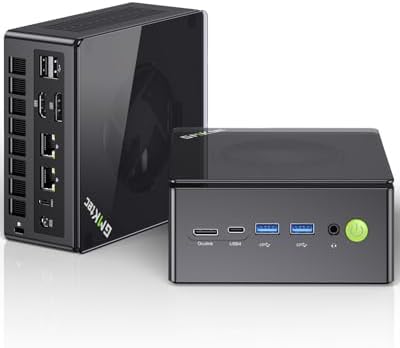
The K8 Plus pairs an AMD Ryzen 7 8845HS with Radeon 780M graphics. The chip has 8 cores and 16 threads, with speeds up to 5.1GHz. That Radeon graphics unit is strong for an integrated chip. It can handle many esports titles and older games at modest settings.
The listing shows 32GB of DDR5 memory and a 1TB SSD. It also lists dual 2.5G Ethernet ports, HDMI 2.1, and USB4. That is a rich port setup for a box this size.
The package includes an HDMI cable, a power supply, and a VESA mount. That means you can hang it on the back of a monitor right away.
Key Specifications
| Spec | Detail |
|---|---|
| Brand | GMKtec |
| Processor | AMD Ryzen 7 8845HS, 8 cores / 16 threads, up to 5.1GHz |
| Graphics | AMD Radeon 780M (integrated) |
| Memory | 32GB DDR5 |
| Storage | 1TB SSD |
| Connectivity | Dual 2.5G LAN, HDMI 2.1, USB4 |
| Operating System | Windows 11 Pro |
Pros and Cons
| ❌ Cons | ✅ Pros |
|---|---|
| • Integrated graphics will not match a gaming desktop • Newer AAA games need low settings • Smaller brand than the big PC makers • Confirm the exact version on the listing | • Strong 8-core Ryzen CPU • Capable Radeon 780M graphics • Dual 2.5G Ethernet • USB4 and HDMI 2.1 • VESA mount included |
Buyer Sentiment: Well regarded in this category.
What Buyers Are Saying: Buyers of 780M-based mini PCs often say they are surprised by how well light gaming runs. They also note that sustained heavy loads raise fan noise, which is normal for compact cooling.
5. GMKtec NucBox K10 (Intel Core i9) — Best For: Multitasking and Port Variety

- LOW ENERGY HIGH PERFORMANCE MINI PC – The Intel Core Ultra 5 125U is part of the Ultra 5 lineup, using the Meteor Lake a…
- 48GB DDR5 RAM + 1TB SSD – The K15 mini computer is equipped with Dual 24GB (Total 48GB) SO-DIMM DDR5 4800MHz memory stic…
- QUAD SCREEN 4K DISPLAY SUPPORT – K15 Mini PC support 4-screen 4K/8K output via HDMI 2.1 (8K@60Hz), DisplayPort 1.4 (4K@6…
The NucBox K10 is a workhorse. It uses an Intel Core i9-13900HK with 14 cores and 20 threads. Boost speeds reach 5.4GHz. That is a lot of muscle for a mini PC aimed at office and workspace use.
Ports are the real story. The listing counts four USB 2.0 ports, four USB 3.2 ports, two HDMI 2.0 ports, one DisplayPort 1.4, a USB-C port, a headphone jack, and even a COM port. That COM port is rare. It helps people who connect older equipment.
TechRadar and other outlets reviewed the K10 as a workspace-focused machine at a friendly price. Reviewers also liked how easy it is to open and upgrade.
Key Specifications
| Spec | Detail |
|---|---|
| Brand | GMKtec |
| Processor | Intel Core i9-13900HK, 14 cores / 20 threads, up to 5.4GHz |
| Graphics | Intel Iris Xe (integrated) |
| Memory | 32GB DDR5 |
| Storage | 1TB SSD |
| Ports | 4x USB 2.0, 4x USB 3.2, 2x HDMI 2.0, DisplayPort 1.4, USB-C, COM |
| Operating System | Windows 11 Pro |
Pros and Cons
| ❌ Cons | ✅ Pros |
|---|---|
| • Older 13th-generation Intel chip • Integrated graphics suit office work, not heavy gaming • Larger than the tiniest mini PCs • Uses more power than efficient chips | • 14-core CPU for heavy multitasking • Huge port selection • Tool-free upgrades reported by reviewers • Four-screen output support • Quiet under load, per reviews |
Buyer Sentiment: Well reviewed by tech outlets and buyers.
What Buyers Are Saying: Published reviews point to strong office performance and generous ports. The most common caveat is that the graphics are fine for work but not built for modern games.
6. Minisforum UM890 Pro (Ryzen 9 8945HS) — Best For: Power Users and Upgraders

- 【Powerful Ryzen 9 8945HS】MINISFORUM UM890 Pro is equipped with a new-generation AMD AI Ryzen 9 8945HS processor, with 8 …
- 【Large Memory & Storage Support】UM890 Pro is equipped with DDR5 32GB RAM,a SODIMM slot, frequency of up to 5600 MHz, and…
- 【Quad-Screen Display】Mini Pc Ryzen 9 8945HS UM890 Pro is equipped with HDMI 2.1, DP 1.4 , and 2 x USB4, supporting maxim…
The UM890 Pro is for people who like to tinker. It runs an AMD Ryzen 9 8945HS with 8 cores, 16 threads, and speeds up to 5.2GHz. Minisforum lets the chip draw up to 70 watts, which is higher than AMD’s default range. That extra headroom helps with sustained work.
It has two USB4 ports, HDMI 2.1, and DisplayPort 1.4, so it can drive up to four screens. It also has an OCuLink port, which lets you connect an external graphics card later. That is a big plus if you want to start small and grow.
Upgrades are simple. There are two SODIMM slots that take up to 96GB of DDR5 memory, plus two M.2 slots for fast SSDs.
Key Specifications
| Spec | Detail |
|---|---|
| Brand | Minisforum |
| Processor | AMD Ryzen 9 8945HS, 8 cores / 16 threads, up to 5.2GHz |
| Graphics | AMD Radeon 780M (integrated) |
| Memory | 32GB DDR5 5600MHz (up to 96GB supported) |
| Storage | 1TB PCIe 4.0 SSD (two M.2 slots) |
| Ports | 2x USB4, HDMI 2.1, DisplayPort 1.4, OCuLink, dual 2.5G LAN |
| Wireless | Wi-Fi 6E, Bluetooth 5.3 |
Pros and Cons
| ❌ Cons | ✅ Pros |
|---|---|
| • Some listings sell a barebone version with no RAM or SSD • Higher power draw than efficient chips • Larger than the slimmest mini PCs • External GPU costs extra | • Top-tier Ryzen 9 performance • OCuLink for external graphics • Easy RAM and SSD upgrades • Two USB4 ports • Dual 2.5G Ethernet |
Buyer Sentiment: Well regarded in this category.
What Buyers Are Saying: Feedback patterns for this model highlight its power and upgrade room. The key warning is to check the listing carefully. Amazon shows both complete versions and barebone versions, and buyers who skip that step end up without memory or storage.
7. Minisforum UM870 Slim (Ryzen 7 8745H) — Best For: A Slim, Quiet-Looking Desk Setup

- 【High Performance Processor】 MINISFORUM UM880 Plus mini PC is equipped with the latest AMD Ryzen 7 8845HS processor, man…
- 【AMD Radeon 780M】Powered by modern Zen 4 architecture, the UM880 Plus delivers up to 14% higher single-core performance …
- 【OCuLink Port for External Graphics Power】The UM880 Plus is equipped with an OCuLink port, an external PCIe connection s…
The UM870 Slim trades a bit of raw power for a thinner body. It uses an AMD Ryzen 7 8745H with 8 cores and 16 threads, plus Radeon 780M graphics. Speeds reach up to 5.0GHz.
The listing shows 32GB of DDR5 memory and a 512GB PCIe 4.0 SSD. It supports 8K at 60Hz over HDMI 2.1 and USB4. It also lists Wi-Fi 6E, Bluetooth 5.3, and an auto power-on feature.
Auto power-on is handy for small offices and kiosks. The machine can start by itself after a power cut. This is a good fit for a desk where you want a clean, flat shape.
Key Specifications
| Spec | Detail |
|---|---|
| Brand | Minisforum |
| Processor | AMD Ryzen 7 8745H, 8 cores / 16 threads, up to 5.0GHz |
| Graphics | AMD Radeon 780M (integrated) |
| Memory | 32GB DDR5 |
| Storage | 512GB PCIe 4.0 SSD |
| Outputs | HDMI 2.1 and USB4, up to 8K@60Hz |
| Wireless | Wi-Fi 6E, Bluetooth 5.3 |
Pros and Cons
| ❌ Cons | ✅ Pros |
|---|---|
| • 512GB of storage on this version • Slim shape may limit cooling room • Several versions share similar titles • Fewer ports than larger models | • Slim, tidy design • 8-core Ryzen performance • 32GB DDR5 memory • 8K output support<br>• Auto power-on feature |
Buyer Sentiment: Well regarded in this category.
What Buyers Are Saying: Buyers of slim mini PCs often praise how little desk space they use. Some mention that very heavy sustained tasks make the fan work harder, which is common for thin cases.
8. GEEKOM GT1 Mega (Core Ultra 7 155H) — Best For: AI-Ready Intel Performance

- 🖥️【High Performance】GEEKOM GT1 Mega mini pc is equipped with an powerful 14th Gen Intel Core Ultra U7-155H Processor (16…
- 🎮【AI Boost NPU & Intel ARC Graphics】The Intel Core Ultra processor has a built-in Intel AI Boost 1.4GHz NPU, which suppo…
- 💾【Expandable Storage】The GT1 Mega mini desktop computer supports for up to 32GB DDR5 dual-channel 5600MT/s RAM which is …
The GT1 Mega is built around Intel’s Core Ultra 7 155H. That chip has 16 cores and 22 threads, with a mix of performance, efficiency, and low-power cores. Speeds reach up to 4.8GHz. Intel designed this chip family with built-in AI hardware. You can read more on Intel’s Core Ultra processor page.
The listing shows 32GB of DDR5 memory and a 1TB PCIe Gen4 SSD. It also lists Wi-Fi 7, Bluetooth 5.4, dual 2.5G LAN, USB4, and 8K display support. That is a very modern connectivity set.
GEEKOM says the CPU can run up to 65 watts. That helps it keep up with demanding work like coding and editing.
Key Specifications
| Spec | Detail |
|---|---|
| Brand | GEEKOM |
| Processor | Intel Core Ultra 7 155H, 16 cores / 22 threads, up to 4.8GHz |
| Memory | 32GB DDR5 |
| Storage | 1TB PCIe Gen4 SSD |
| Connectivity | Wi-Fi 7, Bluetooth 5.4, dual 2.5G LAN, USB4 |
| Display | Up to 8K |
| Operating System | Windows 11 Pro |
Pros and Cons
| ❌ Cons | ✅ Pros |
|---|---|
| • Several chip and RAM versions share similar titles • Integrated graphics have limits for heavy gaming • Costs more than entry-level picks • Check warranty details on the exact listing | • Modern 16-core Core Ultra CPU • Wi-Fi 7 and Bluetooth 5.4 • Dual 2.5G Ethernet • 32GB DDR5 and 1TB SSD • Windows 11 Pro included |
Buyer Sentiment: Well regarded in this category.
What Buyers Are Saying: Feedback patterns for GEEKOM models often mention solid build quality and a strong port selection. As with other brands, buyers suggest confirming the exact chip, memory, and storage before ordering.
9. Lenovo ThinkCentre M70q Gen 5 — Best For: Office and Business Work

- Compact Yet Powerful Desktop: Powered by 14th-Gen Intel Core i5-14400T (10-core, up to 4.5 GHz turbo) — delivering stron…
- Fast Memory & Storage: Comes with 16 GB DDR5 memory and a 512 GB PCIe NVMe SSD — ensuring quick boot times, fast data ac…
- Integrated Graphics & Multi-Display Support: Intel UHD Graphics 730 handles everyday graphics needs and video playback; …
The ThinkCentre M70q Gen 5 is the “boring in a good way” choice. It is a business-grade Tiny desktop from Lenovo, a name most IT teams already trust. The listing shows a 14th Gen Intel Core i5-14400T with 10 cores, 16GB of DDR5 memory, and a 512GB NVMe SSD.
It also lists Wi-Fi 6E and Gigabit Ethernet. Other listings for the same line show HDMI, DisplayPort, and a USB-C port. It runs Windows 11 Pro, which is what most workplaces want.
This is a smart pick for a home office, a front desk, a school, or any place that values reliability over flash.
Key Specifications
| Spec | Detail |
|---|---|
| Brand | Lenovo |
| Processor | Intel Core i5-14400T, 10 cores |
| Graphics | Intel UHD Graphics 730 |
| Memory | 16GB DDR5 |
| Storage | 512GB NVMe SSD |
| Wireless | Wi-Fi 6E, Gigabit Ethernet |
| Operating System | Windows 11 Pro |
Pros and Cons
| ❌ Cons | ✅ Pros |
|---|---|
| • Basic integrated graphics • Plain business styling • Keyboard and mouse may not be included • Many sellers list different versions | • Trusted business brand • Efficient 10-core processor • Wi-Fi 6E • Windows 11 Pro • Compact 1L body |
Buyer Sentiment: Well regarded in this category.
What Buyers Are Saying: Business buyers often like the quiet, steady performance of ThinkCentre Tiny machines. The common reminder is to check which seller and version you are buying, since many third-party sellers offer custom configurations.
10. Beelink SER8 (Ryzen 7 8745HS) — Best For: Value Ryzen Performance

- ✔【High Performance Processor】The beelink SER8 mini pc is equipped with AMD Ryzen 7 8745HS processor(8C/16T,up to 4.9 GHz…
- ✔【Gaming Mini PC & Strong Scalability】The 8745hs mini pc equipped with default 54W,up to 65W TDP and based on the latest…
- ✔【Efficient heat dissipation & low-noise design】The amd 8745hs mini pc adopt Adopt MSC2.0 Cooling System and Vapor Chamb…
The SER8 is the budget-friendlier cousin to the SER9. It uses an AMD Ryzen 7 8745HS with 8 cores and 16 threads, plus Radeon 780M graphics. Max speed is 4.9GHz. Best Buy’s listing describes it as similar to the 8845HS, minus the AI engine, and aimed at better value.
This listing shows 16GB of DDR5 memory and a 512GB PCIe 4.0 SSD. It supports three 4K displays through HDMI, DisplayPort, and USB4. It also has Wi-Fi 6, Bluetooth 5.2, and 2.5G Ethernet.
Beelink advertises quiet running on its SER8 product page, with a figure of 32dB. Treat that as a manufacturer claim, since real noise depends on your workload.
Key Specifications
| Spec | Detail |
|---|---|
| Brand | Beelink |
| Processor | AMD Ryzen 7 8745HS, 8 cores / 16 threads, up to 4.9GHz |
| Graphics | AMD Radeon 780M (integrated) |
| Memory | 16GB DDR5 |
| Storage | 512GB PCIe 4.0 SSD |
| Display Support | Triple 4K (HDMI, DisplayPort, USB4) |
| Connectivity | Wi-Fi 6, Bluetooth 5.2, 2.5G LAN |
Pros and Cons
| ❌ Cons | ✅ Pros |
|---|---|
| • Wi-Fi 6 instead of Wi-Fi 7 • No dedicated AI chip in this model • 512GB of storage may fill quickly • Many version options on Amazon | • Strong 8-core Ryzen performance • Capable Radeon 780M graphics • Triple 4K display support • 2.5G Ethernet • Good value for the power |
Buyer Sentiment: Well regarded in this category.
What Buyers Are Saying: The SER8 line is widely discussed among budget-minded buyers. They like the performance for the cost. Some mention wanting more storage and double-check which RAM and SSD size they are getting.
Buyer’s Guide: How to Choose the Right Mini PC
Picking among the best mini PCs on Amazon is easier when you know what matters. Here are the factors to weigh.
1. Start with your real workload. Light browsing, email, and video calls need little. A chip like the Intel N150 handles that. Photo editing, coding, and heavy multitasking call for a Ryzen 7, Ryzen 9, Core Ultra, or Apple M4. Match the chip to your hardest daily task, not your average one.
2. Choose enough RAM. Eight gigabytes is the bare minimum today. Sixteen gigabytes is the sweet spot for most people. Thirty-two gigabytes helps if you edit video, run virtual machines, or keep dozens of tabs open. This RAM explainer from Tom’s Guide breaks down how much memory different tasks need.
3. Check whether you can upgrade. Many Windows mini PCs let you swap RAM and SSDs. The Mac mini does not. If you want a machine that grows with you, look for SODIMM slots and extra M.2 slots. The Minisforum UM890 Pro is a good example.
4. Think about ports before you buy. Count your screens, drives, and accessories. Look for USB4 or Thunderbolt if you want fast external storage. Look for 2.5G Ethernet if your network supports it. Our guide to the best USB flash drives on Amazon can help with backups and installs.
5. Weigh integrated graphics honestly. Modern integrated graphics like the Radeon 780M handle light gaming and creative work. They do not replace a dedicated gaming card. If you may want more power later, a model with an OCuLink port lets you add an external graphics card.
6. Watch cooling and noise. Small cases have small fans. Under heavy load, any mini PC gets louder. Efficient chips like the Apple M4 and Intel N150 stay calmer. Higher-power chips need stronger cooling, so read buyer feedback on noise.
7. Look at the processor family. Intel’s Core Ultra line adds built-in AI hardware. AMD’s Ryzen chips often lead in integrated graphics. Apple’s M-series leads in efficiency. None is “best” for everyone.
8. Consider power use. Mini PCs sip power compared to full desktops, which can save money over years. You can learn how efficiency ratings work on the ENERGY STAR computers page. Most Amazon mini PCs are not labeled, so compare wattage claims where listed.
9. Be careful with versions and sellers. Many listings share one ASIN across several RAM and SSD sizes. Some are barebone. Always read the title, the “About this item” bullets, and the seller name. A great price on a barebone box is not a deal if you needed RAM included.
10. Pair it with the right desk gear. A mini PC needs a screen, a keyboard, and a mouse. Our monitor stands guide can help you set up an ergonomic desk.
Mini PC vs. Laptop vs. Full Desktop: Which Should You Buy?
A mini PC is not always the right answer. Here is a quick way to decide.
Choose a mini PC if you already own a monitor, keyboard, and mouse, or you plan to buy them. You get desktop-level speed in a small box for a lower cost than many laptops with the same chip. Mini PCs also use little power and take almost no desk space. They are great for home offices, classrooms, media centers, and small businesses.
Choose a laptop if you need to move around. A mini PC needs a screen and a power outlet. If you work at cafes, travel often, or switch rooms during the day, a laptop fits better. Our best Intel Core i5 Lenovo laptops guide covers solid options.
Choose a full desktop if you want top gaming performance, a powerful graphics card, or lots of internal storage. Towers have room for big coolers and extra drives. They also let you upgrade nearly every part. That freedom costs space, power, and money.
A middle path: Some mini PCs, like the Minisforum UM890 Pro, include an OCuLink port. That port lets you add an external graphics card later. It gives you a small starting box and a path to more power.
Think about how you work every day. If you sit at one desk, a mini PC is often the smartest buy. If you are always on the move, pick a laptop. If you chase the highest frame rates in new games, look at a tower.
Frequently Asked Questions
1. What is the best mini PC on Amazon in 2026?
The Apple Mac mini (M4) is our best overall pick because of its efficiency and speed. For Windows users, the Beelink SER9 Pro is a strong all-rounder. Budget buyers should look at the Beelink Mini S13.
2. Are mini PCs good enough for everyday work?
Yes. Modern mini PCs handle browsing, office apps, video calls, and light creative work well. Pick a stronger chip and more RAM if you do heavy editing or coding.
3. Can a mini PC replace a desktop?
For most people, yes. Higher-end models with Ryzen 7, Ryzen 9, Core Ultra, or Apple M4 chips rival many tower desktops for everyday tasks. Serious 3D gaming or workstation tasks still favor a larger PC with a dedicated graphics card.
4. Can you game on a mini PC?
Light gaming works well on models with Radeon 780M graphics, like the GMKtec K8 Plus and Beelink SER8. Expect lower settings for newer games. Models with OCuLink, such as the Minisforum UM890 Pro, can add an external graphics card for more power.
5. How much RAM and storage do I need in a mini PC?
Sixteen gigabytes of RAM and 512GB of storage suit most people. Choose 32GB of RAM and 1TB of storage for heavy multitasking or large files.
6. Do mini PCs come with Windows?
Most Windows mini PCs on Amazon ship with Windows 11 Home or Pro. Some barebone versions ship with no operating system. Always read the listing.
7. Are mini PCs noisy?
Most are quiet during everyday use. Fans spin up under heavy load. Efficient chips like the Apple M4 and Intel N150 tend to stay calmer.
8. Are Chinese mini PC brands like Beelink, GMKtec, and GEEKOM safe to buy?
They are widely sold on Amazon and covered by tech outlets. Buy from the brand’s official Amazon storefront when you can. Read the warranty and return terms on the listing before you order.
Conclusion
The best mini PCs on Amazon in 2026 offer real power in a tiny box. For most people, the Apple Mac mini (M4) is the best overall pick. It is fast, efficient, and small. It fits writers, students, creators, and anyone in the Apple world.
For Windows fans, the Beelink SER9 Pro is our top all-rounder. It pairs a strong Ryzen chip with generous memory and a fast SSD. If you want to spend less, the Beelink Mini S13 covers the basics well. Power users should look at the Minisforum UM890 Pro, and offices should consider the Lenovo ThinkCentre M70q Gen 5.
Check the current listings on Amazon before you buy, since versions, sellers, and availability change often.
As an Amazon Associate I earn from qualifying purchases.

MD.HASAN is an experienced SEO expert and amazon products review writer passionate about helping people find right products on amzon for buy without confusion. With 4 years of hands-on experience in content strategy and search engine optimization, he specializes in writing SEO-friendly blog posts that rank, engage, and convert.


