
Affiliate disclosure: As an Amazon Associate, Tech Rig Review earns from qualifying purchases. Links on this page may be affiliate links, at no extra cost to you.
Logitech MX Keys vs MX Keys S — a detailed comparison covering design, typing feel, battery life, smart features, and value to help you decide which keyboard is right for you.
If you have spent any time browsing productivity keyboards in the mid-to-high price range, chances are the Logitech MX Keys has come up more than once. It has earned a strong reputation among professionals, writers, and developers who want a comfortable typing experience without switching to a mechanical board. Then Logitech quietly introduced the MX Keys S — a refreshed version that promised some meaningful upgrades while keeping the same iconic design.
Now the question is: should you grab the original MX Keys at a potentially discounted price, or is the MX Keys S worth paying a premium for?
This article breaks down every meaningful difference between the two keyboards — from build quality and typing comfort to battery performance, smart features, and software support. By the end, you will have a clear answer that matches your actual workflow and budget.
Table of Contents
Quick Overview: What Are These Keyboards?

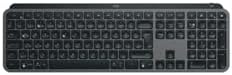
Before diving into the granular details, it helps to know where each keyboard sits in Logitech’s product lineup.
Logitech MX Keys was launched in 2019 and quickly became a benchmark for premium wireless productivity keyboards. It targets power users who spend long hours typing — writers, coders, designers, and remote professionals who need reliability across multiple devices.
Logitech MX Keys S arrived in 2022 as a successor that kept the same hardware frame and key layout but introduced upgraded internals, improved backlighting intelligence, and tighter software integration with Logi Options+.
Both keyboards are designed for the same core audience, which is exactly why comparing them requires more than just a spec-sheet glance.
Design and Build Quality: Nearly Identical Siblings
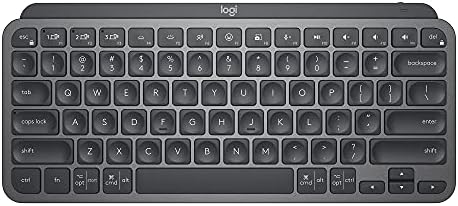
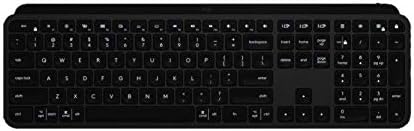
At first look, the MX Keys S and the original MX Keys are practically twins. They share the same brushed aluminum top plate, the same low-profile form factor, and the same comfortable incline angle. Logitech did not reinvent the shell here — and honestly, there was no need to.
The keyboard body is made from sturdy plastic on the underside and features a full-size layout with a number pad, function row, and standard arrow key cluster. The aluminum top surface gives both keyboards a premium, weighted feel without making them unnecessarily heavy for a desk setup.
Both models weigh around 810 grams and measure roughly 430 mm wide, 131 mm deep, and 20 mm tall. Neither keyboard is ultra-portable, but they are not meant to be. These are desk-first, travel-occasionally boards.
Color Options:
- MX Keys: Available in Graphite and Space Grey
- MX Keys S: Available in Graphite, Pale Grey, and Rose — giving the newer model a slight edge for those who care about desk aesthetics
One subtle design improvement in the MX Keys S is that the status indicators for battery, Bluetooth channels, and Caps Lock are slightly better positioned. It is not a massive change, but it shows Logitech paid attention to the minor ergonomic complaints users had about the original.
Winner on Design: A draw for most people, with the MX Keys S edging ahead slightly due to more color options.
Key Feel and Typing Experience: The Heart of the Comparison
This is where most buyers get confused because both keyboards use the same low-profile scissor switches with spherically-dished keycaps. That distinctive concave shape in each keycap is designed to cradle your fingertip and reduce lateral movement — a feature that genuinely works and contributes to reduced typing fatigue over long sessions.
The actuation force sits around 45 grams on both keyboards, and the pre-travel distance is approximately 1.8 mm with 0.8 mm of total travel beyond the actuation point. These numbers produce a typing feel that is satisfying without being loud — a tactile bump without the clatter of mechanical switches.
So what is actually different between them?
Honest answer: the raw typing feel is almost indistinguishable if you swap between the two in a blind test. Logitech did not change the switch mechanism or the keycap profile between generations.
Where the MX Keys S arguably improves is in the stabilization of the spacebar and larger keys. Some early MX Keys units received feedback about slight spacebar rattle, and Logitech appears to have addressed this in the MX Keys S revision, resulting in a more consistent feel across every key.
For touch-typists who prefer a quiet, controlled keystroke over the louder clack of mechanicals, both keyboards deliver. But the MX Keys S lands with a fractionally more refined feel in daily use.
Winner on Typing Experience: MX Keys S by a small but real margin.
Backlighting: Where the MX Keys S Pulls Ahead Clearly
This is one of the more noticeable practical differences between the two keyboards and worth paying close attention to if you work in variable lighting conditions.
MX Keys features per-key RGB-adjacent backlight — it is actually white LED lighting that illuminates each keycap legend clearly. It includes a proximity sensor that detects your hands approaching and lights up the keyboard automatically. You can adjust brightness manually through keyboard shortcuts or through Logitech Options software.
MX Keys S takes this a step further with what Logitech calls Smart Backlighting. The system learns your personal brightness preferences in different lighting environments and adjusts dynamically over time. Rather than simply switching on when your hands are nearby, the MX Keys S uses ambient light sensing to calibrate the ideal brightness level for the current conditions.
In real-world use, this means less fiddling with brightness controls throughout the day. If you move from a bright sunlit desk to a dim evening workspace, the MX Keys S adapts without you needing to intervene. This sounds like a minor quality-of-life feature, but once you experience it, going back to manual adjustment feels unnecessary.
Additionally, the MX Keys S has marginally better backlight uniformity per key, reducing the subtle hot-spot effect that some users noticed on the original, where the center of each keycap was brighter than the edges.
Winner on Backlighting: MX Keys S, clearly.
Connectivity: Multi-Device Workflow at Its Best
Both keyboards offer the same connectivity options — Bluetooth and Logitech’s Unifying USB receiver (Bolt receiver on the MX Keys S). Both support connecting to up to three devices simultaneously and switching between them with a dedicated key press.
However, there is an important distinction at the receiver level:
- MX Keys uses the older Unifying Receiver, which has been Logitech’s standard wireless dongle for years.
- MX Keys S uses the newer Logi Bolt Receiver, which operates on a more secure wireless protocol with improved protection against keyboard snooping attacks. For enterprise users or anyone working with sensitive data, this is a meaningful upgrade.
Bluetooth range is rated at 10 meters for both. In practical desktop use, you will never hit this limit, but it is good to know both are consistent at longer distances if you are pairing with a monitor-connected computer across a large desk setup.
Switching between three connected devices remains equally fast on both — a single button tap triggers the switch, and the lag is barely perceptible.
Winner on Connectivity: MX Keys S, due to the Logi Bolt security upgrade.
Battery Life: Both Excellent, One Slightly Better
Logitech rates both keyboards at up to 10 days of battery life with backlighting on and an impressive 5 months with backlighting turned off entirely.
In real-world testing across various reviews and user reports, these numbers are roughly accurate for moderate use. Heavy typists who keep backlighting on full brightness all day will see the battery drop faster, while lighter users who rely on the auto-dimming and proximity sensor will comfortably reach those longer figures.
The MX Keys S benefits slightly from the smarter backlighting system in that it uses less power during periods when ambient light is already sufficient, contributing to marginally longer real-world battery sessions compared to the original MX Keys used under the same conditions.
Both keyboards charge via USB-C, which is a significant convenience over the older micro-USB charging found on some competing boards. A one-minute charge delivers roughly three hours of use — useful in a pinch.
Winner on Battery: Tie for rated capacity, with MX Keys S having a practical edge due to efficient smart backlighting.
Software: Logi Options vs Logi Options+
Software support is an underrated aspect of keyboard ownership, especially when you rely on customizable shortcuts, macros, or application-specific profiles.
MX Keys is supported by the older Logitech Options software. It allows users to remap keys, create application-specific profiles, assign custom functions to the function keys, and set backlighting preferences. It works well and covers most use cases.
MX Keys S is supported exclusively by Logi Options+, Logitech’s completely rebuilt software platform. The difference is substantial:
Logi Options+ has a cleaner, more modern interface that is noticeably faster to navigate. It introduces Smart Actions — automated sequences that trigger based on specific applications opening, times of day, or device connections. For example, you could configure a Smart Action that switches your keyboard to a specific device profile whenever a video editing application launches.
The newer software also has deeper integration with other Logitech MX-series peripherals. If you use an MX Master mouse alongside your keyboard, Logi Options+ lets you manage both devices from a unified interface and enables Flow — a cross-computer cursor and clipboard feature — more seamlessly than the older software.
The MX Keys is NOT compatible with Logi Options+, and the MX Keys S is NOT backward-compatible with the older Logitech Options. This software split is one of the clearest reasons to choose based on which ecosystem you are already in or want to enter.
Winner on Software: MX Keys S, with Logi Options+ being a genuinely better experience.
Compatibility: macOS, Windows, Linux, iOS, and Android
Both keyboards are fully compatible with Windows, macOS, Linux, iOS, and Android. They are officially sold in Mac-specific variants (labeled “for Mac”) that swap some key legends to match macOS conventions, such as replacing Win with Command and Alt with Option labels.
Whether you buy the standard or Mac variant, the keyboards function on both operating systems — the legends on the keycaps just look more familiar depending on your primary platform.
Logi Options+ (for MX Keys S) is available for both Windows and macOS. Linux users will need to rely on default Bluetooth pairing without the software layer, which is perfectly functional for typing but removes customization features.
Winner on Compatibility: Tie — both are excellent cross-platform keyboards.
Price and Value: Where Things Get Interesting

Here is the financial reality of this comparison.
At launch, the MX Keys S retails for approximately $109–$119 USD, while the original MX Keys is now commonly found between $75–$99 USD depending on the retailer, sale timing, and region. In some markets, the original MX Keys has been discontinued as a primary product, making it available mainly through remaining stock or third-party sellers.
Is the price difference justified?
If you primarily care about raw typing quality and multi-device Bluetooth switching, the original MX Keys at a lower price represents outstanding value. The typing experience is excellent, the build is solid, and it will serve you reliably for years.
If you care about smart backlighting, better wireless security, Logi Options+ software access, or you already use other Logi MX devices and want unified management — the MX Keys S earns its higher price comfortably.
For new buyers making a fresh purchase today with full retail pricing, the gap between the two is usually $20–$30. At that margin, the MX Keys S is the smarter long-term investment.
Who Should Buy the MX Keys?
The original MX Keys still makes strong sense for a specific type of buyer:
- You find a great deal on it at $75 or under
- You use Logitech’s older Unifying receiver ecosystem across multiple devices
- You work primarily on a single computer and do not need advanced software features
- You are a budget-conscious buyer who wants a premium typing feel without full premium pricing
- You already have Logitech Options configured and prefer not to switch software platforms
The MX Keys remains a top-tier productivity keyboard even three years after its launch. Its typing feel, build quality, and multi-device convenience have not aged poorly at all.
Who Should Buy the MX Keys S?
The MX Keys S is the better choice if:
- You are buying new today and the price difference is within your budget
- Smart backlighting and ambient adjustment matter to your daily workflow
- You want the Logi Bolt receiver for improved wireless security
- You already use or plan to use Logi Options+ with other Logitech peripherals
- You value future software support and ecosystem updates from Logitech
- You work across multiple computers using Logitech Flow for cross-device cursor control
For most professional buyers making a fresh purchase in 2024 or beyond, the MX Keys S is the right answer.
Head-to-Head Comparison Table
| Feature | MX Keys | MX Keys S |
|---|---|---|
| Launch Year | 2019 | 2022 |
| Switch Type | Low-Profile Scissor | Low-Profile Scissor |
| Key Travel | 1.8 mm actuation | 1.8 mm actuation |
| Backlight | Proximity sensor LED | Smart Adaptive LED |
| Receiver | Unifying | Logi Bolt |
| Bluetooth Channels | 3 | 3 |
| Battery (with BL) | Up to 10 days | Up to 10 days |
| Battery (without BL) | Up to 5 months | Up to 5 months |
| Charging Port | USB-C | USB-C |
| Software | Logitech Options | Logi Options+ |
| Smart Actions | No | Yes |
| Color Options | 2 | 3 |
| Approximate Price | $75–$99 | $109–$119 |
| Best For | Budget-conscious buyers | New purchases, ecosystem users |
Common Questions Answered
Can I use the MX Keys S without the software?
Yes. The keyboard functions perfectly as a plug-and-play device on any computer without Logi Options+ installed. You simply lose access to key remapping, application profiles, and Smart Actions. For basic typing and multi-device switching, no software is needed at all.
Is the MX Keys S louder than the MX Keys?
No. Both keyboards produce essentially the same sound profile. They are quiet enough for open offices and video calls without generating distracting noise.
Does the MX Keys S work well for gaming?
Neither keyboard is marketed or optimized for gaming. They lack N-key rollover, anti-ghosting features, and RGB gaming aesthetics. If you need a productivity keyboard that you occasionally use in casual gaming sessions, both will handle simple games fine, but competitive gamers will want a dedicated gaming board.
Which keyboard is better for programmers?
Both keyboards work well for coding environments. The MX Keys S has a slight advantage if you use multiple machines and want application-specific shortcuts through Logi Options+. The key feel suits long coding sessions on either model.
Is there an MX Keys S Mini?
Yes. Logitech also sells the MX Keys S Mini, a compact tenkeyless version without the number pad. It is lighter and more portable, making it a strong choice for laptop users or those with smaller desk setups. The Mini version shares the same smart backlighting and Logi Options+ software as the full-size MX Keys S.
Final Verdict: Which One Is Worth Buying?
If you are reading this in 2024 or 2025, the Logitech MX Keys S is the keyboard worth buying for most people. The improvements in smart backlighting, wireless security via Logi Bolt, and the much better Logi Options+ software experience add up to a meaningfully better product — not just a cosmetic refresh.
The price premium over the original MX Keys has also narrowed as the original model has been discounted at various retailers, making the gap smaller than it was at launch.
That said, the original MX Keys is far from a bad buy. If you find it significantly discounted or already have the Unifying receiver ecosystem, it delivers an excellent typing experience that holds up against keyboards at much higher prices.
Buy MX Keys S if: You are purchasing new, you want the best version of this keyboard family, or you use other Logitech MX peripherals with Logi Options+.
Buy MX Keys if: You find it at a strong discount, you are on a tighter budget, or you are already invested in the older Logitech ecosystem.
Either way, you will end up with one of the best productivity keyboards on the market today — a comfortable, quiet, well-built board that earns its reputation session after session.
Final Thoughts
The Logitech MX Keys lineup represents what happens when a company listens closely to professional users and refines a product over multiple generations without chasing unnecessary gimmicks. Neither keyboard tries to be all things to all people — they are focused, well-executed tools for people who type a lot and value reliability over flash.
The MX Keys S is the smarter long-term investment if you are spending money today. But the original MX Keys remains a keyboard that would not feel out of place on any productivity desk — and that is genuinely high praise in a crowded market.
Whichever you choose, invest the time to set it up properly through the companion software, pair it with a comfortable mouse, and take the time to adjust your desk ergonomics. The keyboard is only one part of a productive workspace — but it is an important one, and both of these options get it right.
Found this comparison helpful? Share it with someone who is trying to make the same decision — and feel free to leave a comment below with your own experience using either keyboard.

MD.HASAN is an experienced SEO expert and amazon products review writer passionate about helping people find right products on amzon for buy without confusion. With 4 years of hands-on experience in content strategy and search engine optimization, he specializes in writing SEO-friendly blog posts that rank, engage, and convert.

