
Affiliate disclosure: As an Amazon Associate, Tech Rig Review earns from qualifying purchases. Links on this page may be affiliate links, at no extra cost to you.
The mechanical keyboard market in 2026 is the best it has ever been — and also the most confusing.
Hall Effect magnetic switches with adjustable actuation points are now mainstream. Gasket-mounted boards with five layers of acoustic foam are available for under $60. QMK/VIA firmware and hot-swappable sockets — features that used to cost $300 and require a six-month group buy wait — now ship in stock on Amazon for a fraction of that. Battery life has reached 8,000mAh. Pre-lubed switches that type like butter come factory-installed.
If you’ve been putting off buying a mechanical keyboard because the category felt overwhelming or expensive, 2026 is the year to finally pull the trigger.
This roundup covers 10 of the best mechanical keyboards available on Amazon right now, spanning every budget from entry-level to professional-grade. To select them, I analyzed specs against manufacturer data, reviewed thousands of verified buyer patterns across Amazon listings, and cross-referenced independent testing from established keyboard reviewers.
The result is a list built around one question: which keyboard is genuinely best for this specific buyer? No two picks on this list serve the same person.
Table of Contents
Quick Comparison Table
| Product | Best For | Key Feature | Amazon Rating* | Link |
|---|---|---|---|---|
| EPOMAKER RT100 | Retro aesthetics + full layout | Built-in Mini TV display | ★★★★½ | 👉 Check Price on Amazon |
| Epomaker x Aula F75 Pro | Best-value 75% wireless | Gasket mount + tri-mode under $80 | ★★★★½ | 👉 Check Price on Amazon |
| Keychron K2 Pro | Mac & Windows multi-device users | QMK/VIA + Bluetooth 5.1 + hot-swap | ★★★★★ | 👉 Check Price on Amazon |
| EPOMAKER HE75 V2 | Competitive gamers | Hall Effect 8K polling + rapid trigger | ★★★★½ | 👉 Check Price on Amazon |
| AULA F99 | Budget 96% wireless | 8,000mAh battery + 5-device pairing | ★★★★ | 👉 Check Price on Amazon |
| Kisnt KN85 | Creamy sound under $60 | Gasket mount + 5-layer foam at budget price | ★★★★ | 👉 Check Price on Amazon |
| RK Royal Kludge RK61 | Beginners + travel | Cheapest tri-mode 60% on Amazon | ★★★★ | 👉 Check Price on Amazon |
| NuPhy Air75 V2 | Laptop users + low-profile fans | Low-profile keys + aluminum frame | ★★★★½ | 👉 Check Price on Amazon |
| Logitech G Pro X TKL | Competitive esports gamers | Tournament-grade TKL wireless | ★★★★½ | 👉 Check Price on Amazon |
| Redragon K552 Kumara | Budget entry point | Metal frame TKL under $40 | ★★★★ | 👉 Check Price on Amazon |
1. EPOMAKER RT100 — Best For: Retro Aesthetic Lovers Who Want a Full Layout
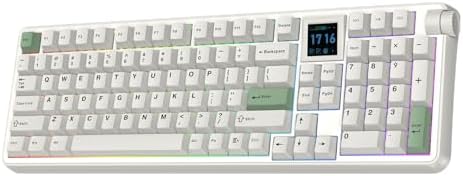
- Retro Style & 1.54 inch Swappable Screen: Matte grey, nostalgic white and refreshing fern green, the RT100 PRO delivers …
- Cushioned Gasket & Quiet Creamy Sound: Engineered with the soft and flexible gasket-mount structure and multiple sound-o…
- Tri-Mode Wireless & Multi-Device Compatible: Featuring versatile tri-mode connectivity of 2.4Ghz, BT and cable, the RT10…
The EPOMAKER RT100 is one of the most distinctive keyboards you can buy on Amazon right now — and not in a gimmicky way. This is a 97-key, gasket-mounted mechanical keyboard with a compact full-size layout (it keeps the numpad while trimming the navigation cluster to three keys), and it comes with something no other keyboard at this price has: a detachable “Mini TV” display that sits on the top right of the board and shows custom GIFs, the time, battery level, or even your CPU temperature.
It sounds like a party trick. In practice, the CPU temperature monitoring is genuinely useful for gamers pushing a hot system, and the custom GIF feature is the kind of thing that makes your desk feel like yours.
Beyond the display, the RT100 is built around real keyboard-enthusiast credentials. Its retro looks belie just how fresh this gaming keyboard is, offering high-speed tri-mode wireless connectivity and cutting-edge convenience features like gasket mounting that enhance the typing experience. The gasket mount uses a Poron sandwich layer plus slow-rebound bottom case foam, which gives the typing feel a softer, more flexible quality that’s hard to achieve at this price in a standard tray-mounted board.
Connectivity covers Bluetooth 5.0, 2.4GHz wireless, and USB-C wired — the standard tri-mode that’s now expected at any serious price point. The battery is a large 5,000mAh cell, which gives you genuinely long wireless life even with the RGB active. The standout features of the EPOMAKER RT100 include the large 5000mAh battery for wireless use and full N-Key rollover (NKRO) anti-ghosting, so every keypress registers independently no matter how many keys you hit simultaneously. That NKRO support matters for both gamers and users who use multi-key macros in tools like Excel or Google Sheets.
Key Specs
- Layout: 97-key compact full-size (with numpad and multimedia knob)
- Switch options: Wisteria Tactile, Flamingo Linear, Sea Salt Silent, others
- Mount type: Gasket with Poron layer + bottom foam
- Connectivity: Bluetooth 5.0 / 2.4GHz / USB-C tri-mode
- Battery: 5,000mAh
- Keycaps: PBT, MDA profile
- Special feature: Detachable smart mini display (GIF, CPU temp, time, battery)
- NKRO: Yes, full N-Key rollover
Pros
- The Mini TV display is genuinely fun and practically useful for monitoring CPU temp
- Gasket mount with dual foam layers creates a deep, satisfying typing feel
- 5,000mAh battery is one of the largest in this category
- Full NKRO makes it dependable for both gaming and macro-heavy productivity
- Retro aesthetic stands out compared to every other keyboard on this list
Cons
- The Epomaker Driver software is functional but clunky — you’ll get there, but don’t expect a polished Logitech G HUB experience
- The Mini TV display’s accuracy can be inconsistent — some users report it shows inaccurate information, so treat it as a fun display rather than a precision instrument
- The 97-key layout removes some navigation keys (like Print Screen) that some users rely on
What Buyers Are Saying
Verified Amazon buyers consistently praise the typing feel of the Wisteria switches and how the board sounds out of the box. The Mini TV attracts strong reactions — most buyers find it charming, while a smaller group finds the accuracy frustrating. Long-term users note the build feels solid and premium for the price point.
2. Epomaker x Aula F75 Pro — Best For: 75% Wireless on a Tight Budget

- 【Optimized 75% Compact Layout&Innovative Gasket Structure】The F75 redefines space efficiency with its 75% compact layout…
- 【Acoustic Mastery with Five-Layer Padding】The F75 boasts a five-layer sound and shock-absorbing internal design, includi…
- 【Precision-Engineered 1.2mm PCB&Pre-Lubricated Mechanical Switches】At the heart of the F75 is a meticulously crafted 1.2…
If you want to understand why 2026 is a great time to buy a mechanical wireless keyboard, the Epomaker x Aula F75 Pro is the argument. This is a 75% wireless gasket-mounted keyboard with five layers of sound dampening, hot-swappable sockets, PBT keycaps, a multimedia knob, and tri-mode connectivity — a feature set that would have cost $200+ just three years ago.
The Epomaker x Aula F75 is the best-value 75% wireless mechanical keyboard on the market in mid-2026. The gasket mount, PBT keycaps, hot-swap sockets, and tri-mode connectivity combine to deliver a typing experience that genuinely rivals boards costing twice as much.
The 75% layout is widely considered the productivity sweet spot. It’s smaller than a tenkeyless board but still includes dedicated function keys, arrow keys, and a row of navigation shortcuts — all the keys that actually matter for daily work. The multimedia knob on the top right adds fast volume control and playback management without requiring an extra key combination.
The Ice Vein linear switches come factory-lubed and deliver what reviewers describe as a smooth, deep typing feel with excellent out-of-box sound. The keyboard was praised for not sounding budget despite its price, with the gasket mount and multi-layer padding creating a sound profile that reviewers described as creamy and controlled. The LEOBOG Reaper switch option (available as an alternative) is also popular for its tactile, snappy response.
Available in multiple colorways including Black, Black Gradient, Blue Gradient, Green, Light Blue, and Purple.
Key Specs
- Layout: 75% (84 keys) with multimedia knob
- Switch options: Ice Vein Linear, TTC Crescent, LEOBOG Reaper
- Mount type: Gasket, five-layer padding
- Connectivity: Bluetooth / 2.4GHz / USB-C tri-mode
- Battery: Included rechargeable (capacity varies by version — verify on listing)
- Keycaps: Side-printed PBT
- Hot-swap: Yes (3-pin/5-pin compatible)
Pros
- Gasket mount with five-layer dampening delivers sound quality that rivals boards at twice the price
- PBT keycaps — a meaningful upgrade over ABS found on many budget competitors
- Multimedia knob is a practical daily-use feature
- Wide color variety for aesthetic customization
- Hot-swap sockets mean you can always upgrade the switches later
Cons
- Epomaker’s software ecosystem is functional but not as polished as Logitech or Razer equivalents
- Side-printed PBT keycaps mean legends are on the side rather than the top — a minor aesthetic preference issue for some buyers
- Battery capacity isn’t always clearly listed — verify on the Amazon listing before purchasing
What Buyers Are Saying
The consensus among verified buyers is consistent surprise at how good this board sounds and feels for the price. Multiple reviewers note they expected budget performance and received something much closer to mid-tier. The gasket mount and PBT keycaps are the most frequently praised specific features.
3. Keychron K2 Pro — Best For: Mac and Windows Multi-Device Professionals

- 75% Compact Layout for Daily Productivity – The Keychron K2 Pro keeps the function row, arrow keys, and essential naviga…
- QMK/VIA Programmable with Keychron Launcher – Customize your workflow with open-source QMK support and Keychron Launcher…
- Bluetooth 5.1 & USB-C Wired Connection – Connect wirelessly via Bluetooth 5.1 and pair with up to three devices for mult…
Keychron is the brand that normalized the idea that a mechanical keyboard can be both a productivity tool for professionals and a genuine enthusiast product at the same time. The K2 Pro is their flagship 75% wireless keyboard, and it earns its position as one of the most comprehensively capable boards on Amazon right now.
The K2 Pro is built around four things that matter for real productivity: multi-device wireless switching, QMK/VIA programmability, hot-swappable switches, and cross-platform Mac/Windows support. Most keyboards compromise on at least one of these. The K2 Pro doesn’t.
The K2 Pro QMK/VIA wireless custom mechanical keyboard allows anyone to master any keys or macro commands on its 75% compact layout through VIA. It connects to up to three devices wirelessly via Bluetooth 5.1, and is fully compatible with both Mac and Windows. The included keycaps cover both operating systems — there are Mac-specific keycaps (Command, Option) and Windows keycaps (Win, Alt) in the box, so you’re not hunting for replacement caps.
The hot-swappable sockets are mounted on the PCB and support almost all 3-pin and 5-pin MX style mechanical switches on the market, including Cherry, Gateron, Kailh, and others, without soldering. The PCB-mounted screw-in stabilizers are a premium detail that reduces wobble and rattle on larger keys like the spacebar, shift, and backspace.
The OSA profile PBT double-shot keycaps are Keychron’s proprietary design — a blend of OEM profile height with spherical top surface — and they feel excellent after extended typing sessions. The K2 Pro has a solid build quality, amazing performance, and Keychron’s custom OSA profile PBT provides a comfortable fingertip feel that holds up well to long-term use.
Key Specs
- Layout: 75% (84 keys)
- Switch options: Keychron K Pro Red (linear), Brown (tactile), Blue (clicky); hot-swap for any MX-compatible switch
- Mount type: Plate mount
- Connectivity: Bluetooth 5.1 (3 devices) / USB-C wired
- Battery: 4,000mAh
- Keycaps: OSA profile double-shot PBT (backlit shine-through)
- Firmware: QMK/VIA open-source
- OS: Mac, Windows, iOS, Android, Linux
Pros
- QMK/VIA support is the gold standard for keyboard programmability — full key remapping, macros, and layer control
- Three-device Bluetooth pairing with instant switching for multi-device professionals
- Includes both Mac and Windows keycaps in the box
- PCB-mounted screw-in stabilizers reduce rattle on larger keys
- Huge switch compatibility through hot-swap sockets — upgrade anytime without soldering
Cons
- The fully assembled black version lacks hot-swap capability and sound-absorbing materials — make sure you’re buying the hot-swap version specifically
- No 2.4GHz wireless — Bluetooth only for wireless mode (no Bluetooth latency issues for most users, but competitive gamers may notice this)
- On the higher end of mid-range pricing compared to some competitors in this roundup
What Buyers Are Saying
The K2 Pro is one of the most consistently reviewed keyboards in its category. Long-term buyers emphasize reliability, genuine Mac/Windows compatibility, and the practical value of QMK/VIA for remapping keys to personal workflow needs. A very common comment is that it “just works” — which for a device you use every day, matters more than most spec sheets suggest.
4. EPOMAKER HE75 V2 — Best For: Competitive Gamers Who Want the Latest Switch Technology
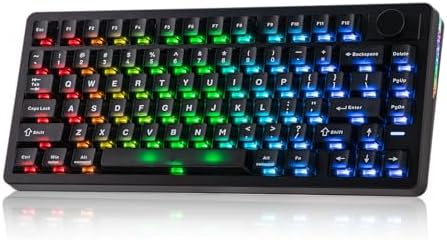
- 0.005mm Adjustable Rapid Triggering & SOCD: With the blistering 8K polling and 128Khz full board scan rate, the HE75 V2 …
- 75% Keyboard with Swappable Knob: Designed for competitive gamers and everyday use, the HE75 V2 75% keyboard features th…
- RGB Light & Transparent Keys: Looks as premium as its powerful core, the HE75 V2 keyboard packs 80+2 top-frosted transpa…
Hall Effect switches are the most significant development in keyboard technology in the past five years, and the EPOMAKER HE75 V2 brings them to a 75% form factor at a price that the category hasn’t seen before.
Here’s the quick explanation of why Hall Effect matters: standard mechanical switches use physical contact to register keystrokes, which means they have a fixed actuation point. Hall Effect switches use magnetic fields instead of physical contact, which means they have no wear — theoretically infinite lifespan — and you can adjust the actuation point in software down to sub-millimeter precision.
Since there is no physical contact taking place in keystroke registration, Hall Effect switches glide down like butter. Epomaker claims each switch stem is lubricated for frictionless travel, and in practice that claim proves entirely accurate. The practical gaming benefit is Rapid Trigger — the key resets the instant it starts moving upward rather than waiting to cross a fixed threshold point, allowing faster repeated keypresses than any standard mechanical switch.
The EPOMAKER HE75 V2 combines magnetic switches, an 8,000Hz polling rate, and extensive software customization into a compact 75% layout. Alongside its rapid trigger functionality, EPOMAKER included a gasket-mounted structure and five layers of sound dampening. That combination — competitive gaming performance plus enthusiast-quality acoustic design — is genuinely unusual at any price.
The 8,000Hz polling rate (also called 8K polling) means the keyboard reports its position to your computer 8,000 times per second, versus the standard 1,000Hz on most gaming keyboards. In competitive shooters, this translates to more consistent input recognition.
Key Specs
- Layout: 75% with swappable multimedia knob
- Switch type: Hall Effect magnetic (adjustable actuation 0.1mm–4.0mm)
- Polling rate: 8,000Hz (wired and 2.4GHz)
- Rapid Trigger: Yes, down to 0.005mm resolution
- SOCD: Yes (Simultaneous Opposite Cardinal Directions support for competitive gaming)
- Connectivity: 2.4GHz / Bluetooth 5.0 / USB-C wired
- Battery: 8,000mAh
- Mount type: Gasket, five-layer sound dampening
Pros
- Hall Effect switches with adjustable actuation from 0.1mm to 4mm — more customizable than any standard mechanical switch
- 8,000Hz polling rate matches professional-grade gaming peripherals
- Rapid Trigger gives competitive gamers a measurable edge in fast-paced games
- No switch wear — Hall Effect switches theoretically last forever
- Strong battery at 8,000mAh supports long wireless sessions
Cons
- Community feedback on earlier HE75 models raised some concerns about software refinement over time — the V2 addresses many issues, but verify current software support before purchasing
- Hall Effect switches have a distinctive feel — they don’t replicate the tactile bump of clicky or tactile mechanical switches
- 8K polling rate drains battery faster than standard 1K polling when used wirelessly
What Buyers Are Saying
Competitive gamers who have switched from standard mechanical switches to the HE75 V2 consistently note that the Rapid Trigger feature is the most impactful change to their gameplay. Long-term users praise the durability of the switches. The most common criticism is around Epomaker’s software, which works but takes time to learn.
5. AULA F99 — Best For: Budget 96% Wireless With Maximum Battery Life

- 【96% Layout&Gasket Mounted Structure】A 96% layout keyboard with 99 keys can help you save more space on your desk, while…
- 【Innovative Single-Key Slotted PCB&Five-Layer Sound-Shock Absorption】Equipped with a unique single-key slotted PCB made …
- 【Three-Way Connectivity for Any Scenario&8000 mAh Ultra-High Capacity Battery】The F99 supports BT, 2.4GHz wireless, and …
If you want a near-full-size wireless keyboard with a numpad but don’t want to spend $150+, the AULA F99 is the answer. It’s a 99-key 96% layout — which means you get the entire keyboard including a numpad, but in a more compact package that cuts the gaps between key clusters — at a price that’s among the most competitive in its category.
The 96% layout is a specific layout choice that makes sense for certain users. If you do data entry, work with spreadsheets, or just find yourself constantly reaching for the numpad, a 75% board cuts you off from that. The F99 keeps everything you need while being meaningfully more compact than a full 100% keyboard.
The AULA F99 excels in battery performance and connectivity. Its dual 4000mAh lithium batteries combine to deliver an impressive 8000mAh capacity. With RGB lighting enabled, the keyboard lasts up to 53 hours, while turning off the lighting extends usage to an astounding 400 hours.
The F99 provides three connection methods including BT5.0, 2.4GHz wireless mode, and USB wired mode. It can be connected to up to five devices at the same time — a genuinely unusual feature. Most keyboards pair to three. Connecting to five means you can move between a desktop, laptop, tablet, work PC, and home PC without ever reprogramming a pairing slot.
The gasket structure and five-layer padding give it a sound profile that buyers consistently describe as creamy and “thocky” — the satisfying deep sound that keyboard enthusiasts spend a lot of money chasing.
Key Specs
- Layout: 96% / 99 keys (with numpad)
- Switch options: Pre-lubed linear switches (multiple variants available)
- Mount type: Gasket, five-layer padding
- Connectivity: Bluetooth 5.0 / 2.4GHz / USB-C (up to 5 devices)
- Battery: 8,000mAh (dual 4,000mAh)
- Keycaps: PBT, side-printed
- Hot-swap: Yes (3-pin/5-pin)
Pros
- 96% layout gives you a numpad without the full footprint of a 100% keyboard
- 8,000mAh battery is exceptional — 400 hours with RGB off is genuinely useful
- Five-device connectivity is the most flexible wireless setup on this list
- Gasket mount with five-layer dampening at a budget-accessible price
- Hot-swappable for future switch upgrades
Cons
- The lack of robust software support compared to brands with VIA or QMK is a real limitation for deep customization
- The absence of a multimedia knob — a feature on many competitors — feels like a missed opportunity at this layout size
- Side-printed keycaps are a stylistic choice some buyers find non-standard
What Buyers Are Saying
The 8,000mAh battery life and five-device connectivity are the two features that attract the most consistent praise from verified buyers. Writers, office workers, and users who move between multiple computers throughout the day are the most enthusiastic. Budget-focused buyers who expected lower quality at this price point are frequently surprised by the build quality and sound profile.
6. Kisnt KN85 Wireless Mechanical Keyboard — Best For: “Creamy Sound” on a Tight Budget

- 【75% Space-saving Layout】Want a smaller footprint without compromise? The KN85 series is a compact 85 key keyboard(13.68…
- 【Tri-mode Connectivity with All-Day Battery】Connect via USB‑C, 2.4GHz wireless, or Bluetooth 5.0 (3 channels supported),…
- 【RGB Backlighting & Programmable】Choose from 20 preset dynamic lighting effects with adjustable color and brightness, ea…
Kisnt is a smaller brand, but the KN85 has built genuine community momentum. This is a 75% gasket-mounted keyboard with five layers of sound-dampening foam, pre-lubed linear switches, double-shot PBT keycaps, and tri-mode connectivity — at a price that regularly dips below $50 depending on sales.
The “creamy sound” framing in Kisnt’s marketing isn’t hyperbole. Every Kisnt mechanical keyboard is enhanced with a base dampener, silicone pad, and five layers of sound-dampening foam, producing a deeper, more satisfying “thock” that keyboard enthusiasts love. For a board at this price, that acoustic profile is genuinely impressive.
Verified Amazon buyers describe the keycaps as awesome and the switches as perfectly lubed and easy to swap out — noting they’re pretty nice switches that feel and sound great. One enthusiastic buyer liked the keyboard so much they bought it twice.
The 85-key layout keeps all the essential keys — F1-F12, dedicated arrow keys, and Page Up/Page Down — while eliminating the numpad to keep the form factor compact. The 4,000mAh battery supports roughly a week of moderate daily use. The 20 RGB lighting effects are adjustable through Kisnt’s software.
The KN85 excels in both aesthetics and performance. Its tri-mode connectivity provides versatility for different devices, while the hot-swappable switches make it easy for users to experiment with different switch types without soldering.
Available in Retro Beige and Textured Black, with a 2-year warranty and 30-day returns — strong support terms for a brand at this price point.
Key Specs
- Layout: 75% / 85 keys
- Switch type: Pre-lubed Bsun linear (hot-swappable 3-pin/5-pin)
- Mount type: Gasket-mounted with base dampener + silicone pad + 5-layer foam
- Connectivity: Bluetooth / 2.4GHz / USB-C tri-mode
- Battery: 4,000mAh
- Keycaps: Double-shot PBT
- RGB: 20 lighting effects
- Warranty: 2 years
Pros
- Five-layer acoustic dampening produces a “thocky” sound profile that rivals more expensive boards
- Double-shot PBT keycaps at this price is a genuine value advantage
- Hot-swappable 3-pin/5-pin switches for easy future upgrades
- 2-year warranty provides longer coverage than most budget competitors
- Retro Beige colorway is one of the most distinctive aesthetic options in this price range
Cons
- Kisnt is a smaller brand with less established community support than Keychron or EPOMAKER
- Software is functional but limited compared to QMK/VIA-based competitors
- The south-facing RGB design may not shine through all aftermarket keycap sets as well as north-facing LEDs
What Buyers Are Saying
The community verdict is consistent: the Kisnt KN85 outperforms its price. Buyers transitioning from clicky budget boards to a gasket-mounted linear setup note the immediate difference in both sound and feel. The retro beige colorway attracts specific praise from buyers building aesthetic desk setups. A smaller number of buyers mention that the price on Amazon fluctuates, and recommend waiting for it to hit its lower price points before purchasing.
7. RK Royal Kludge RK61 — Best For: Beginners and Travel Users Who Want to Spend the Least

- Mini 60% Keyboard: RK61 mini 60% gaming keyboard is a ultra-compact layout with 61 keys makes you a neat desktop with yo…
- Red Switch: Linear Switch, meaning that the force at the beginning and the end of each stroke is nearly identical. The r…
- RK61 RGB Keyboard & QMK/VIA Programmable: This 60% rgb keyboad has 18 RGB backlight modes, 8 monochrome backlight modes …
The RK61 is the board you recommend to someone who has never touched a mechanical keyboard and wants to understand what the fuss is about — without spending $80 finding out.
This is a 60% wireless keyboard. Sixty percent means no numpad, no function row, no dedicated arrow keys (accessed via function combinations instead). It’s the most compact standard keyboard layout, and it’s either liberating or limiting depending on how you work. Gamers love it because it maximizes desk space for mouse movement. Typists who need function keys or arrow keys regularly find it requires adjustment.
The RK61 is a compact, triple-mode (Bluetooth 5.0, 2.4GHz wireless, and USB-C wired) mechanical keyboard with a hot-swappable PCB, allowing easy switch customization without soldering. Getting hot-swap sockets at this price is remarkable — most budget keyboards at this level use soldered switches that can’t be changed without a soldering iron.
The RK61 has been recognized as the budget gateway 60% keyboard and consistently appears as the most-recommended cheap mechanical keyboard in 2026 reviews.
The ABS double-shot keycaps are a step above the cheapest options. The RK switches (available in Red, Brown, and Blue) are Royal Kludge’s own variants — rated for 50 million clicks, with actuation feel that’s comparable to mainstream switch options at a fraction of the price.
The switches and key feel are batting above their price point. The Red RK switches feel good to type on, and the stabilized keys are surprisingly decent. Even the keycaps are double-shot ABS plastic — a definite step up from bottom-of-the-barrel options.
Key Specs
- Layout: 60% (61 keys)
- Switch options: RK Red (linear), RK Brown (tactile), RK Blue (clicky)
- Connectivity: Bluetooth 5.0 / 2.4GHz / USB-C tri-mode
- Battery: High-capacity rechargeable (check listing for current mAh spec)
- Keycaps: ABS double-shot
- Hot-swap: Yes
- Colors: Black, White
Pros
- Triple-mode connectivity at the lowest price point on this list
- Hot-swappable PCB allows switch changes without soldering — unusual at this price
- Ultra-compact 60% footprint is ideal for small desks and travel setups
- Wide switch choice at purchase (Red/Brown/Blue)
- Consistently the most-recommended entry-level mechanical keyboard in 2026
Cons
- The single biggest issue with the board is quality control consistency — while most units are excellent, there are reports of occasional issues
- No dedicated arrow keys or function row (60% layout requires function-layer navigation for these)
- ABS keycaps show shine faster than PBT over time — an aesthetic consideration for long-term use
- Bluetooth gaming latency is better handled via 2.4GHz dongle for competitive play
What Buyers Are Saying
The RK61 has a large and enthusiastic base of verified Amazon buyers who cite it as the keyboard that got them into mechanical keyboards. It’s frequently described as “way better than expected for the price.” The most common downside mentioned is the learning curve of the 60% function-layer navigation — a trade-off inherent to the layout rather than specific to this keyboard.
8. NuPhy Air75 V2 — Best For: Laptop Users and Low-Profile Switch Enthusiasts

- Translucent bottom shell design: The overall layout of the Air75 V2 wireless keyboard is similar to that of the Air75, f…
- Supports multi-device connectivity: Air75 V2 wireless mechanical keyboard is compatible with Mac/Windows/Linux/Android/i…
- Cool RGB Backlit Effect: The backlight of Air75 V2 has more than 21 different color effects, which can be easily changed…
The NuPhy Air75 V2 occupies a very specific niche — and if you’re in that niche, nothing else on this list competes with it. It’s a low-profile 75% wireless mechanical keyboard with an aluminum frame, QMK/VIA support, and Gateron low-profile switch compatibility.
Low-profile keys sit much closer to the desk than standard mechanical keys. This makes the typing angle more similar to a laptop keyboard — which matters enormously for two groups of people: laptop users who find the height jump to a standard mechanical keyboard uncomfortable, and wrist pain sufferers who benefit from a flatter typing angle that reduces extension stress.
The Air75 V2 supports RGB backlighting customizable via QMK/VIA, reaches a polling rate of 1,000Hz in both 2.4G and wired modes, and uses double-shot PBT keycaps that won’t fade over time. The aluminum frame is a genuine structural upgrade — it gives the Air75 V2 a premium, rigid feel that purely plastic keyboards at this price cannot match.
The Air75 V2 supports wireless connectivity via Bluetooth 5.2 and 2.4GHz, QMK/VIA compatibility for full customization, and Gateron collaboration switches available in linear, tactile, and clicky variants. The keyboard is designed to pair well with laptops, with lightweight design and feet that slot between common laptop keys.
At 598 grams (the aluminum body adds weight compared to plastic competitors), it’s not the lightest travel keyboard, but the build quality justifies the trade-off for users who value feel and longevity.
Key Specs
- Layout: 75% / 84 keys (low-profile)
- Switch type: Gateron Low-Profile KS-33 2.0 (linear, tactile, or clicky options)
- Mount type: Low-profile plate with aluminum frame
- Connectivity: Bluetooth 5.2 / 2.4GHz / USB-C
- Battery: Included rechargeable
- Keycaps: Double-shot PBT (low-profile compatible)
- Firmware: QMK/VIA
- Frame: Aluminum + ABS
Pros
- Low-profile switches are a meaningful ergonomic advantage for wrist comfort and laptop users
- Aluminum frame provides premium build quality and rigidity unusual at this price
- QMK/VIA support for full remapping and macro programming
- 1,000Hz polling in both wired and 2.4GHz modes — no wireless latency penalty
- Gateron switch quality is consistently reliable across linear, tactile, and clicky variants
Cons
- Low-profile switches have a specific feel that takes adjustment coming from standard mechanical boards
- Less acoustic depth than standard-height gasket-mounted competitors — low-profile keys inherently sound different
- Aluminum frame makes it heavier than comparable plastic keyboards
- Premium pricing compared to standard-height alternatives with similar feature sets
What Buyers Are Saying
The NuPhy Air75 V2 attracts a specific buyer who immediately understands its value proposition — low-profile enthusiasts and laptop-primary users consistently rate it as the best keyboard in its category. Standard mechanical keyboard users who try low-profile for the first time often note a short adjustment period. The build quality and QMK support receive consistent long-term praise.
9. Logitech G Pro X TKL — Best For: Competitive Esports and Tournament Gaming

- Tournament-Grade Responsiveness and Precision: The PRO X TKL RAPID Wired Gaming Keyboard features magnetic analog (Hall-…
- React Instantly and Perform at Your Peak: The Rapid Trigger mode on this PC gaming keyboard allows key reactivation with…
- Optimize for Your Play Style: Achieve peak speed and accuracy with customizable actuation points and sensitivity; tailor…
If the EPOMAKER HE75 V2 is the Hall Effect keyboard for competitive gamers who want cutting-edge switch technology, the Logitech G Pro X TKL is the keyboard for competitive gamers who want tournament-proven reliability from the most established name in gaming peripherals.
This is the keyboard that professional esports athletes bring to LANs. At major gaming tournaments and professional LAN events, the Logitech G Pro X TKL appears more than any other keyboard — a testament to its dominance in esports. That kind of adoption by professionals who have access to any keyboard they want is the strongest possible endorsement.
The Pro X TKL feels like a professional tool. The aluminum frame is milled to tight tolerances with zero flex. The steel plate underneath is rigid and resonant, amplifying switch noise in a crisp, satisfying way. Stabilizers are soldered Logitech units that are rock-solid. Even the spacebar remains silent and stable under rapid use.
The GX mechanical switches come in linear (Red) and tactile (Brown) variants. They’re Logitech’s own switch design, engineered specifically for competitive gaming with fast, consistent actuation characteristics. The TKL layout removes the numpad only — you keep the function row, arrow keys, and all navigation keys, which makes it far more versatile than a 60% or 75% board for daily productivity.
Wireless performance via LIGHTSPEED 2.4GHz technology delivers 1,000Hz polling rate — effectively zero latency compared to a wired connection. What you’re getting is a solidly built gaming keyboard without unnecessary frills that’ll last you a pretty long time, delivering everything you’d want out of a competitive gaming keyboard.
Key Specs
- Layout: TKL / 87 keys
- Switch options: Logitech GX Linear (Red) or GX Tactile (Brown)
- Mount type: Aluminum frame, steel plate, gasket-tuned
- Connectivity: LIGHTSPEED 2.4GHz wireless + USB-C wired
- Battery: Up to 1,500 hours (LIGHTSPEED wireless)
- Keycaps: Dual-shot PBT
- Polling rate: 1,000Hz (wireless and wired)
- Build: Aluminum top frame, zero flex
Pros
- Tournament-tested by professional esports athletes worldwide
- LIGHTSPEED 2.4GHz wireless delivers wired-equivalent 1,000Hz polling with no perceptible latency
- Exceptional 1,500-hour battery life — months of gaming between charges
- Aluminum frame construction with zero flex
- GX switches are engineered specifically for competitive gaming performance
Cons
- Premium price reflects premium build — this is the most expensive pick on the list
- Non-standard bottom row means switching out keycaps can be more complicated than standard layout keyboards
- Keyboard technology is moving fast in 2026 — the lack of Hall Effect or adjustable actuation means it can’t match the Rapid Trigger features of Hall Effect competitors
- No Bluetooth — LIGHTSPEED dongle required for wireless (no downside for gaming, but limits non-PC device use)
What Buyers Are Saying
Competitive gamers are the core audience and they’re consistent: the G Pro X TKL is reliable, fast, and built to last through years of heavy gaming use. Long-term reviewers note it remains in regular use alongside newer keyboards precisely because of its build quality and switch feel. Buyers outside the competitive gaming context sometimes find the price harder to justify given the feature set relative to newer alternatives.
10. Redragon K552 Kumara — Best For: Absolute Beginners on the Tightest Budget

- 🔥𝗧𝗿𝘂𝗲 𝗠𝗲𝗰𝗵𝗮𝗻𝗶𝗰𝗮𝗹 𝗙𝗲𝗲𝗹 𝘄𝗶𝘁𝗵 𝗟𝗶𝗻𝗲𝗮𝗿 𝗥𝗲𝗱 𝗦𝘄𝗶𝘁𝗰𝗵𝗲𝘀 – Experience smooth, consistent keystrokes with linear red mechanical swi…
- 🔥𝗩𝗶𝗯𝗿𝗮𝗻𝘁 𝗥𝗮𝗶𝗻𝗯𝗼𝘄 𝗟𝗘𝗗 𝗕𝗮𝗰𝗸𝗹𝗶𝗴𝗵𝘁𝗶𝗻𝗴 𝘄𝗶𝘁𝗵 𝟲 𝗗𝘆𝗻𝗮𝗺𝗶𝗰 𝗠𝗼𝗱𝗲𝘀 – Enjoy eye-catching rainbow backlighting with 6 preset lighting …
- 🔥𝗦𝗼𝗳𝘁𝘄𝗮𝗿𝗲 𝗗𝗿𝗶𝘃𝗲𝗿 𝗦𝘂𝗽𝗽𝗼𝗿𝘁 𝗳𝗼𝗿 𝗙𝘂𝗹𝗹 𝗖𝘂𝘀𝘁𝗼𝗺𝗶𝘇𝗮𝘁𝗶𝗼𝗻 𝗖𝗼𝗻𝘁𝗿𝗼𝗹 – Take control of your K552-KR with dedicated software drivers, …
The Redragon K552 Kumara is the keyboard you recommend when someone says “I want to try mechanical keyboards but I’m not sure I’ll like it.” It’s the lowest-risk, lowest-cost entry point on this list — and a board that Redragon has kept relevant through consistent updates since it first launched.
This is a TKL (tenkeyless) keyboard, which means it removes only the numpad — you still get a full function row, dedicated arrow keys, and all navigation keys. TKL is widely considered the best balance between compactness and functionality for gaming specifically, because it creates more horizontal space for mouse movement while maintaining all the keys that matter.
The K552 typically comes equipped with Outemu Blue or Red mechanical switches, which deliver tactile feedback and consistent performance at a price point that makes it accessible to almost everyone. Redragon has prioritized a sturdy build and reliable mechanical performance.
The K552 stands out for its durable metal alloy frame, responsive mechanical switches, and compact tenkeyless design. Its RGB lighting and under-$50 price tag make it a top pick for budget-conscious gamers looking for quality.
What you give up at this price is significant but expected: no hot-swap sockets, no wireless, no advanced software, no programmable macros, non-detachable cable. This is a board that does one thing — give you the mechanical switch typing experience — at the lowest possible cost. For first-time mechanical keyboard users, that’s exactly what they need.
Key Specs
- Layout: TKL / 87 keys
- Switch options: Outemu Blue (clicky), Red (linear) — varies by listing variant
- Mount type: Plate-mounted
- Connectivity: USB wired only
- Keycaps: ABS
- Frame: Metal alloy + ABS
- RGB: Yes (multiple lighting effects via driver software)
Pros
- Lowest-cost mechanical keyboard on this list with genuine mechanical switches
- Metal alloy frame provides more structural rigidity than all-plastic budget alternatives
- TKL layout keeps arrow keys and function row — more practical than 60% for new users
- Anti-ghosting for reliable multi-key registration in gaming
- A proven, long-established product with thousands of verified Amazon reviews
Cons
- No wireless connectivity — wired only
- No hot-swap sockets — switches cannot be changed without soldering
- Non-detachable cable is a limitation if the cable is damaged
- ABS keycaps develop shine over time with heavy use
- No per-key RGB, no easy switch swaps, and minimal software control — this is a deliberate simplicity, not an oversight, but buyers expecting customization will be frustrated
What Buyers Are Saying
The K552 Kumara has one of the highest recommendation rates in online keyboard communities for its specific use case: absolute beginners. Verified buyers consistently describe it as the keyboard that convinced them to take mechanical keyboards seriously. Long-term buyers who have since moved to premium boards often note they keep the K552 as a second setup or backup keyboard.
Buyer’s Guide: How to Choose the Right Mechanical Keyboard
Step 1: Pick Your Layout First
Layout is the decision that shapes everything else. Here’s a quick reference:
- 100% / Full-size: Every key, including numpad. Best for data entry, accounting, anyone who uses the numpad constantly.
- 96% / 99-key: Full key set in a smaller package. Cuts spacing between key clusters. Great compromise if you need a numpad but want to save space. (→ AULA F99)
- TKL / 87-key: Removes the numpad only. Keeps everything else. The best balance for most gamers and office users. (→ Logitech G Pro X TKL, Redragon K552)
- 75% / 84-key: Removes numpad and tightens navigation cluster. Keeps function row and arrow keys. The most popular layout for daily productivity in 2026. (→ Keychron K2 Pro, Kisnt KN85, EPOMAKER HE75 V2)
- 65% / 68-key: Removes function row. Keeps arrow keys. Tight layout popular with minimalists.
- 60% / 61-key: No numpad, no function row, no arrow keys. Maximum compactness. Great for travel and gaming. (→ RK61)
Step 2: Choose Your Switch Type
Three main categories, and this matters more than any other spec:
Linear switches (Red, Silver, Speed) — smooth keypress with no tactile bump or click sound. Preferred for gaming because they’re fast and consistent. Common in most of the keyboards on this list.
Tactile switches (Brown, similar) — a slight bump when the key registers. No loud click sound. The popular middle ground — you feel the actuation without disturbing the entire office.
Clicky switches (Blue, Green) — tactile bump plus an audible click sound. Beloved by typists. Controversial in shared spaces. If you have neighbors, roommates, or coworkers nearby, be considerate.
Hall Effect switches — not linear/tactile/clicky but a category of their own. Magnetic actuation, adjustable actuation point, Rapid Trigger support. Currently the best option for competitive gaming. (→ EPOMAKER HE75 V2)
Step 3: Decide on Connectivity
Wired only — zero latency, never charge, lowest cost. (→ Redragon K552)
Bluetooth only — multi-device switching, but Bluetooth polling maxes at ~125Hz. Fine for productivity, not ideal for competitive gaming.
2.4GHz wireless — effectively wired-equivalent performance. 1,000Hz or higher polling. The correct choice for wireless gaming. Look for boards that offer this specifically.
Tri-mode (Bluetooth + 2.4GHz + USB-C) — the best of everything. This is now the standard feature set for any wireless keyboard above entry-level. (→ Most boards on this list)
Step 4: Understand Mount Types
Tray mount — switches are directly attached to the plate, which is screwed into the case. Firm and stiff. Common in budget boards. Not bad — just different.
Plate mount — the plate floats slightly above the case. Slightly more flex than tray mount. Common in mid-tier boards including the Keychron K2 Pro.
Gasket mount — the plate is supported by soft silicone or foam gaskets rather than being screwed directly to the case. Creates a soft, bouncy typing feel and significantly better acoustics. This is the gold standard in 2026 and is now available at budget prices. (→ EPOMAKER RT100, Aula F75 Pro, AULA F99, Kisnt KN85, EPOMAKER HE75 V2)
Step 5: Hot-Swap vs. Soldered
Hot-swap means you can pull out the switches and put in different ones without any tools or soldering. It costs slightly more but gives you the flexibility to change the feel of your keyboard completely for the cost of a switch set. If you’re at all curious about experimenting with different switches, get a hot-swap board.
Soldered switches are fixed. They work perfectly well for years, but you can’t change them without technical skills. The Redragon K552 is the only soldered keyboard on this list.
Step 6: Budget Tiers in 2026
| Tier | Range | What You Get |
|---|---|---|
| Entry | Under $40 | Mechanical switches, wired, basic RGB. No hot-swap, no wireless. |
| Budget | $40–$70 | Tri-mode wireless, hot-swap, gasket mount starting to appear. |
| Mid-range | $70–$130 | Full gasket mount, PBT keycaps, QMK/VIA, premium switches, aluminum options. |
| Premium | $130+ | Hall Effect switches, aluminum frames, tournament-grade build, advanced software. |
FAQ: Mechanical Keyboards on Amazon
What is a mechanical keyboard and why does it matter?
A mechanical keyboard uses individual mechanical switches under each key, rather than the rubber dome sheets used in standard membrane keyboards. Each switch has a physical mechanism that registers your keypress through a spring and contact system. The result is more consistent actuation, significantly longer lifespan (mechanical switches are typically rated 50 to 100 million keystrokes), a wider range of tactile and acoustic experiences, and the ability to customize the feel by changing switches. For anyone who types or games for hours daily, the difference is meaningful.
What does “hot-swappable” mean and do I need it?
Hot-swap means the switch sockets on the keyboard’s PCB allow you to pull out switches and insert different ones without soldering. You need a switch puller tool (often included in the box) and a new set of switches. The benefit is the ability to change the entire feel of your keyboard — from clicky to linear, or from tactile to silent — for the cost of a switch set. If you’re curious about experimenting with different switch feels, hot-swap is worth the small price premium. If you know exactly what you want and won’t change it, soldered is perfectly fine.
Is wireless latency on mechanical keyboards noticeable in gaming?
For most gaming scenarios: no, it’s not noticeable via Bluetooth. But for competitive gaming — especially fast-paced shooters or fighting games — 2.4GHz wireless is the correct choice. Modern 2.4GHz wireless keyboards like the Logitech G Pro X TKL or keyboards using EPOMAKER’s tri-mode 2.4GHz implementation achieve a 1,000Hz polling rate with no meaningful latency difference from wired. Bluetooth maxes at approximately 125Hz, which most users can’t perceive but competitive gamers can.
What switch type is best for gaming?
Linear switches (Red, Yellow, Silver) are generally preferred for gaming because their smooth, consistent actuation with no tactile bump allows for fast, repeatable keypresses. Hall Effect switches with Rapid Trigger support (like those in the EPOMAKER HE75 V2) go one step further, allowing the key to reset instantly rather than waiting to cross a fixed threshold. For most gamers, a quality linear switch is excellent. For competitive players in fast-paced games, Hall Effect with Rapid Trigger is a measurable upgrade.
What switch type is best for typing?
Tactile switches (Brown, and tactile variants from EPOMAKER, Gateron, and others) are the most popular for typing because they provide physical feedback — a slight bump — when the key actuates. This gives you tactile confirmation that the keypress registered without requiring you to bottom out (press all the way down). Clicky switches (Blue and similar) are also popular for typing and provide audible feedback as well. Silent tactile switches are a good option for shared office environments.
Do I need QMK/VIA and what is it?
QMK is open-source keyboard firmware that allows complete customization of every key on a keyboard — including remapping any key to any function, creating custom macros, defining multiple layers, and programming complex shortcuts. VIA is a graphical interface that makes QMK remapping accessible without writing code. If you want to fully customize your keyboard’s behavior — reassigning the Caps Lock key to Escape, creating a macro layer for your most-used shortcuts, or optimizing for a specific workflow — QMK/VIA is very useful. If you’re happy with a standard keyboard layout, you don’t need it.
How long do mechanical keyboards last?
Mechanical switches are typically rated for 50 to 100 million keystrokes. At a typing rate of around 6,000 keystrokes per hour and 8 hours of daily use, a 50 million keystroke rating translates to approximately 17 years before the switches are statistically likely to fail. In practice, high-quality mechanical keyboards from brands like Logitech, Keychron, and EPOMAKER regularly last a decade or more in daily use. Hall Effect switches, which use no physical contact, have no wear from keystrokes and may last even longer.
Are mechanical keyboards worth it for office work?
Yes — especially for anyone who types for several hours daily. The ergonomic benefit of a consistent, well-calibrated actuation point reduces typing fatigue compared to the inconsistent resistance of membrane keyboards. Many office users find that a tactile or silent tactile switch dramatically reduces wrist and finger strain over a full work day. For shared offices, silent or silent-tactile switches are the considerate choice; for home offices, any switch type works.
Conclusion
The best mechanical keyboard isn’t the most expensive one — it’s the one that fits how you actually work and play.
For most buyers in 2026, the Keychron K2 Pro is the cleanest overall recommendation: QMK/VIA programmability, Bluetooth 5.1 multi-device pairing, hot-swap sockets, and genuine Mac/Windows compatibility in a 75% form factor. It’s the keyboard that gets out of your way and lets you work.
If budget is the main constraint, the Kisnt KN85 delivers a gasket-mounted, hot-swappable, tri-mode keyboard with double-shot PBT keycaps at a price that shouldn’t be possible for what you get. Buy it, use it, and decide later whether you want to upgrade.
If you’re a competitive gamer who takes your input seriously, the EPOMAKER HE75 V2 brings Hall Effect switch technology — adjustable actuation, Rapid Trigger, 8K polling — to a price point that makes it accessible for the first time.
And if you just want to try a mechanical keyboard for the lowest possible cost, the Redragon K552 Kumara is still the right starting point in 2026.
Whatever you choose, check the current price on Amazon — these products go on sale regularly and the right deal at the right moment might settle the decision for you.

MD.HASAN is an experienced SEO expert and amazon products review writer passionate about helping people find right products on amzon for buy without confusion. With 4 years of hands-on experience in content strategy and search engine optimization, he specializes in writing SEO-friendly blog posts that rank, engage, and convert.

