
Affiliate disclosure: As an Amazon Associate, Tech Rig Review earns from qualifying purchases. Links on this page may be affiliate links, at no extra cost to you.
If you’ve spent the last year hunched over a 13-inch laptop screen on every video call, you already know the truth: your laptop display is the single biggest bottleneck in your home office. Neck strain, squinting at spreadsheets, and constantly alt-tabbing between windows aren’t just annoying — they’re productivity killers.
The fix is simpler than most people think. A good Amazon computer monitor can expand your workspace, reduce eye fatigue, and make an 8-hour workday feel noticeably less exhausting. But “good” is doing a lot of work in that sentence — resolution, panel type, ergonomics, and connectivity all matter more for remote work than they do for, say, gaming.
I put together this guide after researching and comparing dozens of monitors currently sold on Amazon, weighing real-world remote-work needs like USB-C laptop charging, eye-comfort features, and desk ergonomics — not just raw specs. Below are the 10 best options for every budget and workspace, from compact 24-inch panels to 34-inch ultrawides that replace a dual-monitor setup entirely.


A quick note on pricing: Amazon prices change frequently based on deals, region, and stock levels, so instead of listing prices that may already be outdated, I’ll point you to the live Amazon listing where you can check the current price and any active discounts.
Table of Contents
Quick Comparison: Best Amazon Computer Monitors for Remote Work
| Monitor | Best For | Size | Resolution | Panel |
|---|---|---|---|---|
| Dell UltraSharp U2723QE | Best Overall | 27″ | 4K UHD | IPS Black |
| LG 27UL850-W | Best Value 4K | 27″ | 4K UHD | IPS |
| ASUS ProArt PA278CV | Best for Color Accuracy | 27″ | QHD | IPS |
| Samsung Odyssey G5 | Best Work + Gaming Hybrid | 32″ | QHD | VA Curved |
| BenQ EW3280U | Best for Creative Work | 32″ | 4K UHD | IPS |
| Dell S2722DC | Best USB-C Docking | 27″ | QHD | IPS |
| ViewSonic VX2476-smhd | Best Budget Pick | 24″ | Full HD | IPS |
| LG 34WN80C-B | Best Ultrawide | 34″ | UWQHD | IPS Curved |
| ASUS ZenScreen MB16AC | Best Portable Monitor | 15.6″ | Full HD | IPS |
| Acer Vero B247Y | Best Eco-Friendly Pick | 24″ | Full HD | IPS |
How I Evaluated These Monitors
Every monitor on this list was assessed against the criteria that actually matter for remote work, not gaming benchmarks or spec-sheet bragging rights:
- Screen real estate vs. desk space — enough room for multitasking without dominating a small home office
- Eye comfort — flicker-free backlighting, blue-light filtering, and matte anti-glare coatings
- Ergonomic adjustability — height, tilt, swivel, and pivot to hit proper posture
- Connectivity — USB-C with Power Delivery, HDMI, DisplayPort, and built-in USB hubs
- Color accuracy — sRGB coverage for anyone doing design, photo, or video work
- Value — performance relative to what you’re actually paying, checked against current Amazon listings
Now let’s get into the reviews.
1. Dell UltraSharp U2723QE — Best Overall Amazon Computer Monitor for Remote Work


The Dell UltraSharp U2723QE is the monitor I recommend first to almost anyone setting up a serious home office. It strikes the rare balance of being excellent at everything without excelling at any one thing so much that it becomes a specialist tool.
Key Features:
- 27-inch 4K UHD IPS Black panel with a 2000:1 contrast ratio (roughly double a standard IPS panel)
- 90W USB-C Power Delivery — charge your laptop and drive the display over a single cable
- Built-in USB hub with multiple USB-A and USB-C ports, plus Ethernet
- Height, tilt, swivel, and pivot adjustable stand
- ComfortView Plus low blue-light technology certified by TÜV Rheinman
Why It Stands Out: The IPS Black panel technology is the real differentiator here. Standard IPS monitors have washed-out blacks that make dark-mode apps and video calls look flat; this panel delivers noticeably deeper contrast while keeping the wide, accurate viewing angles IPS panels are known for. Combined with 4K sharpness, text and spreadsheets look crisp even at smaller font sizes.
Who It’s For: Remote professionals who want a single monitor that handles video calls, spreadsheets, coding, and light creative work equally well, and who want to eliminate desk clutter with one-cable USB-C connectivity.
Pros:
- Exceptional contrast for an IPS panel
- One-cable laptop charging and display simplifies any desk setup
- Excellent ergonomic stand out of the box
- Built-in KVM-style USB hub reduces the need for a separate dock
Cons:
- Premium price point compared to standard 4K monitors
- 60Hz refresh rate — not built for gaming
2. LG 27UL850-W — Best Value 4K Monitor

- 27 inch UHD (3840 X 2160) IPS display
- VESA displayHDR 400
- USB type C connectivity. Brightness 350cd (typ) / 280cd (Min)
If the Dell above is slightly out of budget, the LG 27UL850-W delivers most of the same remote-work benefits — 4K resolution, USB-C charging, ergonomic stand — at a noticeably friendlier price.
Key Features:
- 27-inch 4K UHD IPS display with 95% DCI-P3 color coverage
- USB-C port with 60W Power Delivery
- HDR10 support
- Height-adjustable stand with tilt and pivot
- Built-in speakers
Why It Stands Out: LG has consistently made some of the best value 4K monitors on Amazon, and the 27UL850-W continues that trend. The color coverage is genuinely impressive for the price tier, making it a strong pick even for people who dabble in photo editing or design work alongside their day-to-day remote job.
Who It’s For: Budget-conscious remote workers who still want 4K sharpness and USB-C simplicity without paying for Dell’s premium branding.
Pros:
- Excellent color accuracy for the price
- USB-C charging covers most ultrabooks
- Sharp 4K text rendering for spreadsheet and document work
Cons:
- 60W USB-C Power Delivery may not fully charge larger laptops like 16-inch MacBook Pros
- Built-in speakers are serviceable but not a replacement for real speakers
3. ASUS ProArt PA278CV — Best for Color Accuracy

- Calman Verified Delta E < 2 & 100% sRGB: Ensure true-to-life colors for professional creative artwork with this highly a...
- USB-C Port with 65W Power Delivery: Declutter your desk by charging your laptop and transferring data via a single cable…
- 27-inch QHD (2560 x 1440) IPS Panel: Enjoy a sharp, spacious workspace for multitasking and detailed video editing on th…
For remote workers doing any kind of design, video editing, or photo work, color accuracy stops being a nice-to-have and becomes a requirement. The ASUS ProArt PA278CV is built specifically for that use case, at a price far more accessible than most “professional” monitors.
Key Features:
- 27-inch QHD (2560×1440) IPS panel
- 100% sRGB and 99% Adobe RGB color coverage, factory calibrated with a Delta E < 2
- USB-C with 65W Power Delivery
- Fully ergonomic stand with height, tilt, swivel, and pivot
Why It Stands Out: ASUS ships every ProArt display with individual factory calibration reports, which is a level of quality control rarely seen outside of dedicated color-grading monitors. For remote designers, marketers, and content creators, this means what you see on screen is what your client or team will see on theirs.
Who It’s For: Remote designers, video editors, marketers, and anyone whose work depends on colors looking accurate across devices.
Pros:
- Factory color calibration out of the box
- QHD resolution is a comfortable middle ground between 1080p and 4K
- Strong ergonomic stand
Cons:
- QHD instead of 4K may feel limiting for some multitasking-heavy workflows
- No built-in speakers
4. Samsung Odyssey G5 — Best Work-and-Gaming Hybrid Monitor


Not everyone wants a separate gaming monitor and work monitor taking up desk space. The Samsung Odyssey G5 is a curved VA panel that handles spreadsheets during the day and games comfortably in the evening.
Key Features:
- 32-inch curved QHD VA panel (1000R curvature)
- 165Hz refresh rate with FreeSync Premium
- HDR10 support
- Height-adjustable stand
Why It Stands Out: The 1000R curve wraps gently around your peripheral vision, which genuinely reduces eye movement when scanning across wide spreadsheets or multiple open windows. It’s a “best of both worlds” pick for remote workers who don’t want two separate monitors for two separate parts of their day.
Who It’s For: Remote workers who also game, or who simply want a larger, curved canvas for multitasking during work hours.
Pros:
- Immersive curved screen genuinely helps with multitasking
- High refresh rate makes text scrolling and window dragging feel smoother
- Strong value for a 32-inch display
Cons:
- VA panel color accuracy trails IPS panels like the ASUS ProArt above
- No USB-C connectivity, which means no laptop charging over a single cable
5. BenQ EW3280U — Best for Creative Remote Work

The BenQ EW3280U leans further into the “media and creative” side of remote work, with features aimed squarely at video editors, YouTubers, and content teams working from home.
Key Features:
- 32-inch 4K UHD IPS panel
- HDRi technology (BenQ’s proprietary HDR rendering)
- Treble Bass 2.1 channel speakers built in
- USB-C connectivity with 65W Power Delivery
- 95% DCI-P3 color coverage
Why It Stands Out: Most monitors treat built-in speakers as an afterthought. BenQ’s 2.1 channel system with a dedicated woofer is loud, clear, and genuinely usable for video review work without needing external speakers or headphones — a small but meaningful convenience for remote video editors.
Who It’s For: Remote video editors, YouTubers, and content creators who want strong color reproduction and audio without buying separate speakers.
Pros:
- Excellent built-in audio for a monitor
- Strong color accuracy for creative work
- 4K sharpness at a large 32-inch size
Cons:
- Bulkier footprint than 27-inch options — needs real desk space
- Stand adjustability is more limited than Dell or ASUS competitors
6. Dell S2722DC — Best USB-C Docking Monitor

Not every remote worker needs 4K. The Dell S2722DC keeps things at a sharp, comfortable QHD resolution while packing in the docking features that make hybrid and remote setups painless.
Key Features:
- 27-inch QHD IPS panel
- 65W USB-C Power Delivery
- Built-in USB hub
- Height, tilt, and swivel adjustable stand
- ComfortView low blue-light certification
Why It Stands Out: QHD (1440p) is often the sweet spot for remote work — sharper than 1080p, but without the UI-scaling headaches some people run into on 4K displays with certain operating systems. The S2722DC keeps the price approachable while still including the USB-C docking convenience found on Dell’s more expensive models.
Who It’s For: Remote workers who want Dell’s docking convenience without paying 4K prices.
Pros:
- Comfortable resolution with no scaling issues
- One-cable laptop charging and display
- Reliable Dell build quality
Cons:
- Not sharp enough for detailed photo or video editing work
- Curved-free flat panel, which some users prefer differently
7. ViewSonic VX2476-smhd — Best Budget Amazon Computer Monitor

- VERSATILE MONITOR: 24 Inch Full HD (1920x1080p) IPS monitor with thin bezels and 100Hz refresh rate
- ENHANCED VIEWING COMFORT: Flicker-Free technology and Blue Light Filter for reduced eye fatigue
- ULTRA-SMOOTH GAMING: FreeSync technology enables fluid and tear-free gameplay
Sometimes you just need a reliable, no-frills second screen without spending a lot. The ViewSonic VX2476-smhd is consistently one of the best-reviewed budget monitors on Amazon for exactly that reason.
Key Features:
- 24-inch Full HD IPS panel
- Ultra-thin bezel design
- Flicker-free and blue-light filter technology
- HDMI and VGA connectivity
Why It Stands Out: It doesn’t try to be everything — it’s a dependable 1080p monitor that does video calls, browsers, and office apps well, with eye-comfort features that matter more for an 8-hour workday than most people realize.
Who It’s For: Remote workers on a tight budget who need a dependable second monitor for email, video calls, and general office work.
Pros:
- Very budget-friendly
- Thin bezels look great in dual-monitor setups
- Flicker-free technology reduces eye strain
Cons:
- No USB-C or laptop charging
- 1080p resolution limits multitasking screen space
8. LG 34WN80C-B — Best Ultrawide for Remote Work

- 34” 21: 9 WQHD (3440 X 1440) Curved IPS display.Aspect ratio:21:9.Viewing Angle:178.0 degrees.Response time:5.0 millisec…
- USB type-C connectivity
- HDR 10 compatible
If you’re the type of remote worker who keeps three or four windows open at once — Slack, a browser, a document, and a spreadsheet — an ultrawide monitor can genuinely replace a two-monitor setup while removing the bezel gap in the middle.
Key Features:
- 34-inch curved UWQHD (3440×1440) IPS panel
- USB-C with 60W Power Delivery
- 21:9 aspect ratio
- Height-adjustable stand
Why It Stands Out: The extra horizontal space is transformative for split-screen work. Instead of physically turning your head between two monitors, everything lives in one continuous field of view, which several ergonomics studies suggest reduces neck strain compared to traditional dual-monitor setups.
Who It’s For: Remote workers who multitask heavily across several apps and want a single-monitor solution instead of a two-monitor desk setup.
Pros:
- Massive productivity boost for multitasking workflows
- Eliminates the bezel gap of dual-monitor setups
- USB-C laptop charging included
Cons:
- Requires significant desk depth and width
- Not ideal for small home offices
9. ASUS ZenScreen MB16AC — Best Portable Monitor for Remote Work

- 15.6” FHD IPS USB Type-C portable monitor with hybrid signal solution for compatibility with USB Type-C and Type-A sourc…
- Ultra-portable award-winning design at 1.7 pounds and 0.3 inches slim to pair perfectly with ASUS laptops
- Smart cover and smart pen hole allow for landscape and portrait orientations easily with auto rotation. Auto rotate requ…
Remote work doesn’t always mean working from the same desk every day. For digital nomads, hybrid employees, or anyone who wants a second screen that travels, the ASUS ZenScreen MB16AC is one of the most reliable portable monitors on Amazon.
Key Features:
- 15.6-inch Full HD IPS panel
- Ultra-slim, 0.3-inch profile at under 2 lbs
- Single USB-C cable for both power and video
- Includes a foldable smart case that doubles as a stand
Why It Stands Out: It genuinely fits in a laptop bag without adding noticeable bulk, and setup is as simple as plugging in a single USB-C cable — no separate power brick required for most modern laptops. For remote workers who travel or work from coffee shops and co-working spaces, this is the easiest way to get a second screen anywhere.
Who It’s For: Digital nomads, hybrid employees, and remote workers who need a second display that travels well.
Pros:
- Extremely portable and lightweight
- Plug-and-play single-cable setup
- Doubles nicely as a vertical monitor for coding or reading documents
Cons:
- 1080p resolution only
- Draws power from your laptop battery, which reduces battery life during use
10. Acer Vero B247Y — Best Eco-Friendly Pick
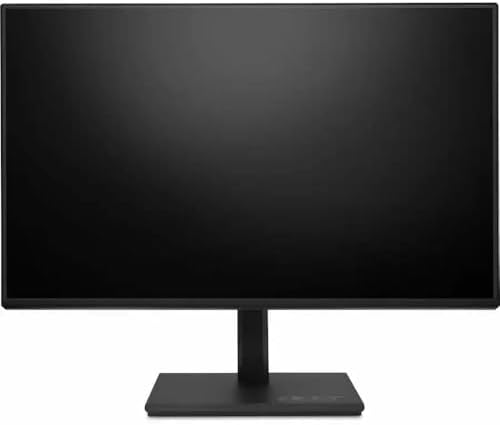


Rounding out the list is the Acer Vero B247Y, a monitor built with sustainability in mind without sacrificing the ergonomic essentials remote workers need every day.
Key Features:
- 24-inch Full HD IPS panel
- Made with over 30% post-consumer recycled plastic
- Full ergonomic stand: height, tilt, swivel, and pivot
- HDMI, DisplayPort, and VGA connectivity for compatibility with older systems
Why It Stands Out: Beyond the eco-conscious build, the Vero B247Y quietly does the ergonomic basics better than most monitors in its price range — the stand adjusts through a genuinely wide range of motion, which is often the first corner cut on budget displays.
Who It’s For: Remote workers who want a dependable everyday monitor with a strong ergonomic stand, and who value sustainable manufacturing.
Pros:
- Excellent ergonomic adjustability for the price
- Sustainable build materials
- Wide connectivity options, including legacy VGA
Cons:
- No USB-C port or laptop charging
- 1080p resolution, not suited for detailed design work
Amazon Computer Monitor Buying Guide for Remote Work
1. Resolution: 1080p vs. 1440p (QHD) vs. 4K
- 1080p (Full HD) is fine for email, video calls, and general browsing. It’s the most budget-friendly option and still perfectly usable in 2026.
- 1440p (QHD) is the current sweet spot for most remote workers — noticeably sharper than 1080p, with no scaling headaches on most operating systems.
- 4K (UHD) is best for anyone doing detailed design, spreadsheet-heavy work, or who simply wants maximum sharpness. Just make sure your laptop’s GPU can drive it comfortably.
2. Panel Type: IPS vs. VA
IPS panels are the default recommendation for remote work because of their accurate colors and wide viewing angles — important if you’re often showing your screen to someone standing beside you. VA panels offer deeper contrast and are common on curved monitors, but color accuracy typically trails IPS.
3. USB-C and Power Delivery
If you work primarily from a laptop, a monitor with USB-C Power Delivery is one of the highest-impact upgrades available. A single cable can carry video, data, and power, letting you skip a separate charger and dock entirely. Check your laptop’s wattage requirement — most ultrabooks need 65W, while larger laptops like 16-inch MacBook Pros often need 90W or more.
4. Ergonomics
Look for a stand that adjusts for height, tilt, swivel, and pivot. Ergonomics guidelines generally recommend a viewing distance of 20–40 inches, with the top of the screen roughly at eye level. A fixed-height stand makes this difficult to achieve consistently, which is a major contributor to neck and shoulder strain during long remote workdays.
5. Eye Comfort Features
Flicker-free backlighting and low blue-light modes reduce fatigue during long sessions. A matte, anti-glare coating also matters more than people expect if your desk faces a window or overhead light.
6. Single Monitor vs. Dual Monitor vs. Ultrawide
- Single large monitor (27″ QHD or 4K): Cleanest desk setup, ideal for video calls, browsing, and general office work.
- Dual monitors: Best for workflows needing two full apps visible side by side, like coding with documentation open.
- Ultrawide (34″+): Combines the benefits of dual monitors without the bezel gap, at the cost of needing a wider desk.
Frequently Asked Questions
What is the best Amazon computer monitor for remote work overall?
The Dell UltraSharp U2723QE is the best all-around pick thanks to its combination of 4K sharpness, deep IPS Black contrast, and one-cable USB-C charging that simplifies any home office desk.
Do I need a 4K monitor for remote work?
No. A 4K monitor is a nice upgrade for detailed work, but a solid QHD (1440p) or even Full HD monitor is perfectly capable for video calls, email, spreadsheets, and general office tasks.
Is USB-C Power Delivery worth it on a monitor?
For laptop users, yes. It replaces a separate charger and dock with a single cable, which meaningfully reduces desk clutter and setup time, especially for hybrid workers who dock and undock daily.
What size monitor is best for a home office?
27 inches is generally considered the productivity sweet spot — large enough for comfortable multitasking without overwhelming a smaller desk. Go 32-inch or ultrawide if you regularly work across multiple open windows.
Can I use a portable monitor as my main remote work display?
Yes, though most portable monitors top out at Full HD resolution and 15-16 inches, which is best suited as a secondary screen rather than a primary display for extended daily use.
Also Check:
Final Thoughts
Your monitor is arguably the most-used piece of equipment in your home office, and it’s often the last thing people upgrade. Whether you go with the do-it-all Dell UltraSharp U2723QE, the budget-friendly ViewSonic VX2476-smhd, or the travel-friendly ASUS ZenScreen MB16AC, any of the ten options above will be a meaningful upgrade over working off a laptop screen alone.
Before you buy, always check the current listing on Amazon for the latest price, active deals, and verified customer reviews — availability and pricing can shift quickly, and the live listing will always have the most accurate, up-to-date information.
This article is for informational purposes. As an Amazon Associate, this site earns from qualifying purchases made through the links above, at no additional cost to you.

MD.HASAN is an experienced SEO expert and amazon products review writer passionate about helping people find right products on amzon for buy without confusion. With 4 years of hands-on experience in content strategy and search engine optimization, he specializes in writing SEO-friendly blog posts that rank, engage, and convert.


