
Affiliate disclosure: As an Amazon Associate, Tech Rig Review earns from qualifying purchases. Links on this page may be affiliate links, at no extra cost to you.
I switched to a laptop-only setup about two years ago, and within a month my neck was in knots. The problem wasn’t the laptop itself — it was that I was staring down at a screen sitting flat on my desk for eight hours a day, which drags your head forward and loads your neck with far more weight than it’s designed to carry. The fix turned out to be almost embarrassingly simple: raise the screen to eye level with a stand, then use an external keyboard and mouse so your hands aren’t stuck up near your chin.


Since then, I’ve tested, researched, and compared a long list of laptop stands to figure out which ones are actually worth buying versus which ones wobble, scratch your laptop, or collapse the first time you lean on the desk. Below are ten adjustable laptop stands currently available on Amazon, broken down by build quality, adjustability, stability, portability, and who each one is really built for — so you can pick the right one instead of guessing.
Table of Contents
Why an Adjustable Laptop Stand Matters
A laptop is designed to be portable, not ergonomic. When it’s sitting flat on a desk, the screen sits roughly 6 to 8 inches below where your eyes naturally rest when you’re sitting upright, which forces your neck into a forward tilt for as long as you’re working. Physical therapists have a name for the cluster of symptoms this causes — “tech neck” — and it shows up as tension headaches, tight shoulders, and a stiff upper back that gets worse the longer you sit.
An adjustable laptop stand solves this by lifting the screen to (or close to) eye level, so your neck can stay in a neutral position instead of craning downward all day. The tradeoff is that once you raise the laptop, the keyboard and trackpad move out of a comfortable typing position — which is why almost every laptop stand review, including this one, recommends pairing your stand with an external keyboard and mouse for full-time desk use.
Beyond posture, a good stand also improves airflow around your laptop’s vents, which can meaningfully reduce fan noise and thermal throttling during demanding tasks like video calls, exports, or gaming — several of the products below specifically call out ventilated or open-frame designs for exactly this reason.
How to Choose the Right Laptop Stand
Not every laptop stand is built for the same use case. Before jumping into the reviews, here’s what actually matters when comparing options:
- Adjustability. Look for stands with multiple height and angle settings, not a single fixed position. Your ideal height depends on your chair, desk, and monitor setup, so more increments mean a better custom fit.
- Material and build quality. Aluminum and steel stands are more stable and better at dissipating heat than plastic ones, but they also weigh more — a tradeoff worth considering if portability matters to you.
- Weight capacity. If you’re running a 16-inch MacBook Pro or a heavy gaming laptop, check the stated weight limit. A stand rated for lightweight ultrabooks may flex or wobble under a heavier machine.
- Stability at your preferred height. The taller a stand is extended, the more important a wide, low base becomes — top-heavy setups are the most common cause of a laptop tipping.
- Portability vs. permanence. Foldable, lightweight stands are great for hybrid workers who move between a home office and a coffee shop. Heavier, more rigid stands are better suited to a stand that lives on your desk permanently.
- Extra features. Some stands add real utility beyond height — built-in phone holders, USB-C docking with HDMI and extra ports, or 360° rotating bases for quickly turning your screen toward a colleague.
With that framework in mind, here’s how the ten stands stack up.
Comparison at a Glance
| Stand | Best For | Compatible Size | Standout Feature |
|---|---|---|---|
| KYQEE 2-in-1 | Multi-device desks | Up to 16″ | Built-in phone holder |
| Aoviho L6 | Video calls | Up to 15.6″ | 6″ height range, 2-yr guarantee |
| Moallia N86 | Heat-prone laptops | 11–16″ | X-shape cooling frame |
| Nulaxy C1 | Best overall | 11–17″ | Proven track record, 22 lb capacity |
| JOYEKY | Budget rotating stand | 10–16″ | 11.81″ height range |
| Axbima | Collaborative spaces | Up to 16″ | Smooth 360° rotation |
| makecatch 3-in-1 | Travel | 10–16″ | Magnetic phone/tablet mount |
| ORICO PN1 | Ultra-compact travel | Up to 17″ | Pocket-sized fold |
| 9-in-1 Docking Stand | Power users | 7–15.6″ | Built-in USB-C dock + HDMI |
| MIKUSO | Heavy-duty stability | 10–16″ | ~14 lb capacity, reinforced plate |
The 10 Best Adjustable Laptop Stands on Amazon
1. KYQEE 2-in-1 Laptop Stand with Phone Holder — Best for Multi-Device Desks
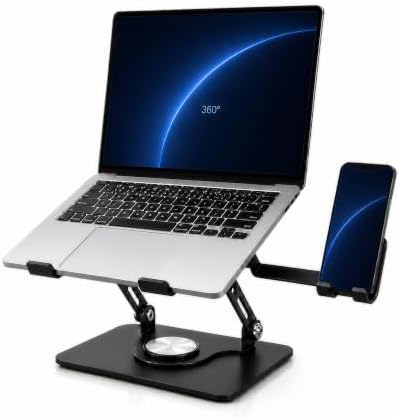
- Keep Phone and Laptop in One View: As a computer stand for laptop work, the raised platform lifts your screen while the …
- Fits Laptops up to 16 Inches: This desktop laptop stand accommodates laptops up to 16 inches, giving you a clear compati…
- Find a More Comfortable Viewing Position: An adjustable laptop stand lets you raise the screen and fine-tune the angle t…
The KYQEE stand is built around a simple idea: most people working from a laptop also have a phone sitting nearby for calls, messages, or two-factor codes, so why not combine the two? A carbon steel frame lifts your laptop to a comfortable eye-level height, while a fold-away phone stand on the side keeps your phone visible and within reach without adding a second gadget to your desk.
The base rotates a full 360°, which is genuinely useful if you frequently turn your screen to show something to a colleague on a call or in person, and the open, hollow platform is designed to keep air moving around your laptop’s underside to help with cooling. Silicone contact pads and front stops keep the laptop from sliding, and the whole thing folds flat when you’re done.
Pros:
- Doubles as a laptop stand and a phone stand — one less item on your desk
- Smooth 360° swivel base with controlled resistance
- Ventilated platform supports airflow and cooling
- Fits laptops up to 16 inches
Cons:
- Phone holder adds a small footprint even when folded away
- Carbon steel frame is heavier than aluminum-only competitors
Best for: Anyone who wants their phone and laptop visible in the same glance, especially for video calls where you’re also monitoring messages.
2. Aoviho L6 Adjustable Laptop Stand — Best for Video Calls and Screen Sharing

- ENHANCED ERGONOMICS & 360°ROTATION: Elevate your laptop (up to 10.6 inches) to eye-level with adjustable height & viewin…
- PREMIUM ALUMINUM & ULTIMATE STABILITY: Crafted from aerospace-grade aluminum alloy, this heavy-duty laptop stand ensures…
- ULTRA-PORTABLE & SPACE-SAVING DESIGN: This foldable laptop stand collapses into a compact, lightweight size for effortle…
The Aoviho L6 is an aluminum alloy stand that raises your laptop screen by up to 6 inches, which is enough to get most laptops close to genuine eye level for taller users as well as average-height ones. Like several other stands on this list, it includes a 360° rotating base, but Aoviho specifically markets this feature around virtual meetings — letting you spin your screen toward a colleague or turn your camera angle without picking up and repositioning the whole laptop.
Large rubber grips hold the laptop securely on the platform, and the manufacturer backs the build with an unusually long two-year replacement guarantee for defects, which is a meaningful signal of confidence in the manufacturing quality for a stand in this price range.
Pros:
- 6 inches of height adjustment — good range for eye-level positioning
- 360° rotation is smooth and genuinely useful for calls and collaboration
- Two-year replacement policy for defects
- Open design promotes airflow underneath the laptop
Cons:
- Rated primarily for laptops up to 15.6 inches — check compatibility if you run a larger machine
- Folds compact but is still a metal stand, so it has some heft for travel
Best for: Remote workers who spend a lot of time on video calls and want to reposition their screen without disrupting their whole desk setup.
3. Moallia N86 360° Rotating Laptop Stand — Best for Heat-Prone Laptops
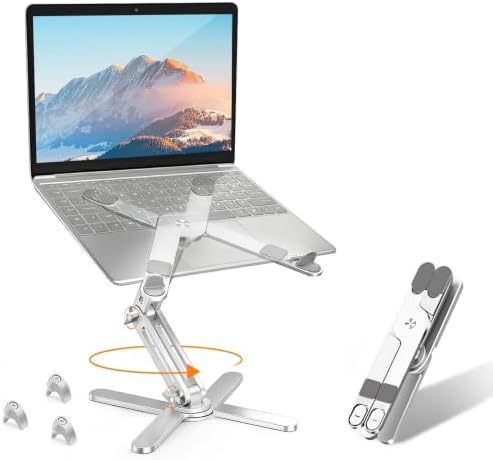
- 【360° Rotation】Featuring a 360°rotatable axis connecting with the base, Moallia rotating laptop stand for desk allows yo…
- 【Better Ergonomics】Moallia Computer stand easily lifts your laptop to a higher level. It elevates your laptop to your ey…
- 【Foldable & Portable】Moallia adjustable laptop holder weighs 790 grams and can be fully folded into a small size of 11.4…
If your laptop tends to run hot — gaming laptops and high-performance ultrabooks are the usual culprits — the Moallia N86 is worth a close look. Its X-shaped aluminum alloy frame is specifically designed to maximize airflow and ventilation, and the aluminum body itself helps passively diffuse heat away from the underside of your device, on top of the airflow benefit of simply elevating it off the desk.
The stand supports laptops from 11 to 16 inches, including most MacBook Pro and MacBook Air models, and features three adjustable screws for extra stability and load-bearing capacity — a nice touch that lets you dial in rigidity based on how heavy your specific laptop is.
Pros:
- X-shape frame is genuinely effective for heat dissipation
- Fully aluminum alloy build for durability and passive cooling
- 360° rotation with adjustable screws for added stability
- Compact fold-flat design for travel
Cons:
- Screws need to be loosened before folding, which adds a small extra step
- Better suited to 11–16 inch laptops; not ideal for larger 17-inch machines
Best for: Gamers, video editors, or anyone running a laptop that tends to heat up under load.
4. Nulaxy C1 Laptop Stand — Best Overall / Best-Selling Classic
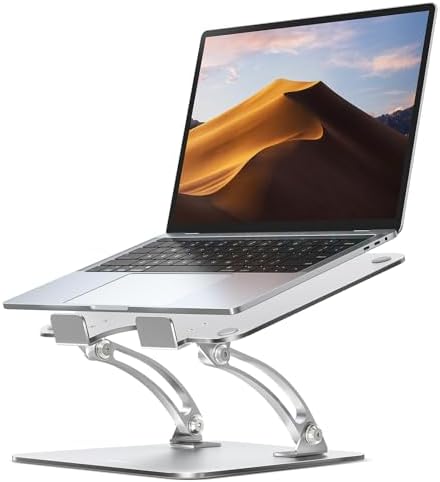
- Ergonomic Posture Correction: Designed to elevate your laptop to the perfect eye level, this adjustable laptop stand sig…
- Unshakable Dual-Rod Stability: Unlike single-hinge models, our stand features a highly engineered dual-support rod mecha…
- Advanced Thermal Cooling Panel: Maximize your device’s performance. The unique geometric heat-vent design on the upper p…
The Nulaxy C1 is one of the most established names in this category, and for good reason: it’s a simple, aluminum, height-and-angle-adjustable stand that fits a huge range of laptops (11 to 17 inches) and supports up to 22 pounds — comfortably more than any single laptop weighs, which means it also handles laptop-plus-accessory setups without flexing.
What stands out about the C1 specifically is how consistently it’s rated by long-term owners rather than first-week reviewers, with tens of thousands of ratings reflecting years of real-world use across different laptop brands and sizes. It’s not the flashiest stand on this list — no phone holder, no docking ports — but it does the core job of elevating your screen and improving posture extremely reliably.
Pros:
- Exceptionally well-reviewed with a long track record
- Wide 11–17 inch compatibility and 22 lb weight capacity
- Straightforward height and angle adjustment
- Lightweight enough to travel with, sturdy enough to leave on your desk permanently
Cons:
- No rotating base or extra features like phone holders
- Angle adjustment range is smaller than some newer competitors
Best for: Anyone who wants a no-frills, extensively proven stand without paying for features they won’t use.
5. JOYEKY Adjustable Laptop Stand — Best Budget-Friendly Rotating Stand

- 【Stable & Durable】JOYEKY Laptop Stand made of high-quality aluminum alloy, the larger heavier base greatly improves the …
- 【Adjustable & Portable】 The laptop riser can be easily adjusted to height and angle based on your actual need. Besides, …
- 【360° Swivel Flexibility】 Effortlessly rotate your laptop 360° with a smooth dual-axis base, perfect for sharing screens…
JOYEKY’s stand hits a sweet spot between price and features: a heavier aluminum alloy base for stability, height adjustment up to 11.81 inches, and a smooth dual-axis 360° swivel base — all in a stand that folds down to a compact 9.45 x 9.45 x 1.25 inches for easy storage or travel.
It supports up to 11 pounds, which comfortably covers virtually every consumer laptop, and the open, suspended platform design is built to promote airflow and prevent overheating during long work sessions. Anti-skid silicone strips protect your laptop from scratching or sliding once it’s in position.
Pros:
- Strong height range (up to 11.81 inches) for genuine eye-level positioning
- Heavier base improves stability compared to lighter budget stands
- Compact fold-flat storage
- Smooth 360° swivel for sharing your screen
Cons:
- Aluminum construction is solid but not premium-tier compared to pricier options
- 11 lb weight rating is adequate but lower than some heavy-duty competitors
Best for: Buyers who want solid build quality and real adjustability without paying for a premium brand name.
6. Axbima Adjustable Laptop Stand — Best for Collaborative Workspaces
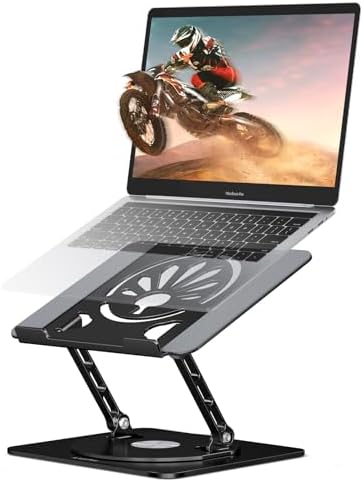
- 【360° Full Rotation for Easy Collaboration】Unlike fixed stands, the Axbima adjustable laptop stand rotates smoothly for …
- 【Ergonomic Design】Neck and shoulder pain after hours of work? This rotating laptop holder lets you adjust both height an…
- 【Heat Dissipation Design】Keep your laptop cool and efficient even during long hours. This portable laptop riser elevates…
Axbima leans into the same 360° rotation concept as several other stands here, but markets it specifically around collaboration — quickly spinning your laptop toward a coworker or a second monitor setup without needing to lift or reposition the whole unit. It’s built from aluminum, supports laptops up to 16 inches, and adjusts for both height and angle to help you land on a genuinely neutral neck position.
The company’s messaging is direct about the ergonomic goal here: reducing neck and shoulder strain by getting your screen to eye level, framing the stand explicitly as a small investment in long-term spinal health rather than just a desk accessory.
Pros:
- Full 360° rotation, ideal for shared or collaborative desks
- Height and angle both adjustable for a customized ergonomic fit
- Heat dissipation-focused design to reduce thermal throttling
- Aluminum build for durability
Cons:
- Newer product with a shorter review history than more established competitors
- Rated for laptops up to 16 inches — won’t fit the largest 17-inch models
Best for: Shared offices, co-working spaces, or anyone who frequently turns their screen to show someone else what’s on it.
7. makecatch 3-in-1 Portable Laptop Stand — Best for Travel and Multi-Device Use

- 【3-Way Multi-Purpose Stand for Laptop, Phone & Tablet】Works as a foldable laptop stand (10–16″), a desktop magnetic phon…
- 【Ultra-Portable, Travel-Ready Design】Folds down to just 2.28 × 7.12 × 0.73 inches and weighs only 0.33 lbs, making it pe…
- 【8-Level Height + Stepless Angle Adjustment】Choose from 8 laptop height levels (1.89–5.11″) for ergonomic typing and vie…
The makecatch stand is designed around portability first. It folds down to just 2.28 x 7.12 x 0.73 inches and weighs about a third of a pound, small enough to disappear into a laptop bag or even a jacket pocket, and it comes with a velvet storage pouch to keep it scratch-free in transit.
Despite the compact size, it’s genuinely a 3-in-1 device: it works as a laptop stand (10–16 inches) with 8 adjustable height levels, a magnetic phone or tablet holder (4–13 inches) using strong N52 magnets for MagSafe-compatible devices, and a hanging travel stand for use on planes, buses, or trains. For hybrid workers who split time between a home desk and coffee shops or airports, this kind of flexibility is hard to match.
Pros:
- Ultra-portable — one of the lightest, most compact stands on this list
- Genuinely functions as a laptop, tablet, and phone stand
- 8-level height adjustment plus stepless angle control
- Strong magnetic grip for MagSafe-compatible phones
Cons:
- Smaller footprint means less raw stability than heavier desk-only stands
- Magnetic phone holder only works with MagSafe-compatible or magnet-ready cases
Best for: Frequent travelers, digital nomads, or anyone who wants one compact accessory that handles a laptop, tablet, and phone.
8. ORICO PN1 Portable Laptop Stand — Best Ultra-Compact Option

- Ultra-Compact & Truly Portable: This portable laptop stand is designed for everyday mobility, folding down to 5.9 × 1.4 …
- 3-in-1 Support for Laptops, Tablets & Phones: The integrated folding structure adapts to multiple devices, supporting la…
- Stable Laptop Mode with Secure Height Levels: When fully unfolded, the stand works as a stable laptop riser for desk use…
ORICO’s PN1 pushes portability even further than the makecatch stand, folding down to a genuinely pocket-sized 5.9 x 1.4 x 0.6 inches and weighing just 6.1 ounces. It’s a 3-in-1 design supporting laptops up to 17 inches, tablets, and phones, with 5 preset height levels and an auto-locking mechanism designed to keep your selected height steady while you type.
The aluminum alloy frame is rated to support up to 5kg (about 11 pounds), and soft silicone pads cushion your device against scratching or sliding. For anyone who wants the ergonomic benefit of a stand without permanently dedicating desk space to one, this is about as unobtrusive as it gets.
Pros:
- Extremely compact and lightweight — genuinely pocket-portable
- Supports laptops up to 17 inches despite the small folded size
- Auto-locking height levels stay steady while typing
- Includes a fabric storage pouch
Cons:
- Smaller contact surface than full-size desk stands, which may feel less substantial for very heavy laptops
- Preset height levels offer less fine-tuning than fully continuous adjustment
Best for: Minimalists and travelers who want maximum portability without giving up ergonomic height adjustment.
9. Adjustable Laptop Stand with 9-in-1 Docking Station — Best All-in-One for Power Users

- 【Is it compatible with my laptop?】This laptop stand with docking station is designed for broad operating systems across …
- 【My laptop is big and heavy, does it fit?】This sturdy aluminum laptop stand boasts reinforced build quality to prevent f…
- 【Is it easy to use the docking station for laptop?】Yes, it’s straightforward. Use the provided cable to connect your lap…
This is the most feature-dense stand on the list, combining an aluminum laptop riser with a full 9-in-1 USB-C docking station built directly into the base. Beyond raising your laptop to eye level with dual hinges (adjustable up to 5.5 inches, with up to 180° of rotation at both joints), it adds a 4K60Hz HDMI output for a second display, three USB 3.0 ports, and 100W PD pass-through charging — effectively replacing a separate dock, riser, and cable clutter with one device.
It’s built for heavier machines too, with an 11 x 8.9-inch platform rated to hold up to 18 pounds, which comfortably covers large gaming and workstation laptops. The catch is that the docking functionality requires a laptop with a full-featured USB-C port that supports video and data over a single cable, so it’s worth confirming compatibility before buying.
Pros:
- Combines ergonomic height adjustment with a genuinely useful docking station
- Supports dual 4K displays via HDMI plus USB-C output
- 100W PD charging keeps your laptop powered through the same cable
- High 18 lb weight capacity for large laptops
Cons:
- Requires a laptop with full-featured USB-C (video + data + power delivery) to use the docking features
- Larger and more expensive than simpler riser-only stands, given the added electronics
Best for: Desk-bound professionals who want to consolidate a monitor stand, USB hub, and charger into a single piece of hardware.
10. MIKUSO 360° Rotating Laptop Stand — Best Heavy-Duty Build

- 360 Smooth Dual-Axis Rotation with Adjustable Tightness for Stable Screen Sharing: Engineered with precision dual-axis b…
- Ergonomic Design for Extended Work Sessions to Relieve Neck and Shoulder Pain: Freely adjust the height from 0 to 7.5 in…
- Foldable and Ultra-Portable Design Fits in Any Laptop Backpack: When folded, the stand measures only 9.8 x 8.5 x 1.8 inc…
The MIKUSO stand is built for buyers who prioritize raw stability above all else. Its widened, thickened metal load-bearing plate is rated to hold roughly 14 pounds, and the overall construction is noticeably more substantial than most lightweight aluminum competitors — closer to a small desk fixture than a travel accessory.
It still folds flat for storage, and the 360° two-axis rotating base offers the same collaborative flexibility found on several other stands in this guide, but the standout feature here is how little it flexes or wobbles under a heavier laptop, thanks to the reinforced plate design. Anti-slip silicone keeps the laptop from sliding once it’s positioned.
Pros:
- Reinforced load-bearing plate for maximum stability
- Solid ~14 lb weight capacity
- Full 360° rotation on a two-axis base
- Open ventilated design supports cooling
Cons:
- Heavier and bulkier than travel-focused stands on this list
- Overkill for users with a single lightweight ultrabook and no plans to upgrade
Best for: Anyone who wants a laptop stand that feels closer to permanent desk furniture than a portable accessory — especially useful for heavier gaming or workstation laptops.
Frequently Asked Questions
Do I need an external keyboard and mouse if I use a laptop stand?
Yes, for full-day use. Raising your laptop to eye level also raises the built-in keyboard and trackpad out of a comfortable typing position, so pairing your stand with a separate keyboard and mouse is essential to get the full ergonomic benefit rather than trading neck strain for wrist and shoulder strain.
How high should I raise my laptop screen?
As a general rule, the top third of your screen should be roughly at eye level when you’re sitting upright, so you’re looking slightly downward at the middle of the display rather than tilting your whole neck forward or craning it upward.
Are metal laptop stands better than plastic ones?
Generally, yes, for stability and heat dissipation. Aluminum and steel stands tend to flex less under weight and conduct heat away from the laptop more effectively than plastic frames, though they usually weigh more, which is a tradeoff worth considering if portability is a priority.
Will a laptop stand damage my laptop?
A well-designed stand shouldn’t, as long as it uses non-slip silicone or rubber padding at every contact point and is rated to support your laptop’s actual weight. Avoid stands with hard, ungrippy metal-on-metal contact points, which can scratch a laptop’s casing over time.
Can I use a laptop stand and still close my laptop lid for video calls with an external webcam?
Yes — many people who invest in an ergonomic setup eventually pair a laptop stand (or a dedicated riser) with an external webcam and closed-lid (“clamshell”) mode, which lets you position the camera at a more flattering eye-level angle independent of the laptop’s built-in camera position.
Do rotating-base stands wobble more than fixed stands?
Not if they’re well-built. Most of the rotating stands in this guide use a two-axis or dual-hinge design specifically engineered to stay rigid at your chosen height while still rotating smoothly — wobble is more commonly a symptom of a lightweight or poorly manufactured stand than of the rotating mechanism itself.
Final Verdict: Which Laptop Stand Should You Buy?
If you want a single, no-nonsense recommendation, the Nulaxy C1 is the safest choice for most people — it’s simple, well-proven over years of real-world use, and handles a wide range of laptop sizes without any bells and whistles you don’t need.
If cooling is a priority because your laptop runs hot under load, the Moallia N86 or the JOYEKY stand are both worth a close look for their ventilation-focused designs. If you travel often or work from multiple locations, the ORICO PN1 or the MakeCatch 3-in-1 will disappear into your bag without adding real weight. And if you’re trying to consolidate your entire desk setup — monitor, charger, and USB hub — into one purchase, the 9-in-1 docking station stand is the most complete solution on this list, provided your laptop’s USB-C port supports it.
Whichever one you choose, the underlying goal is the same: get your screen to eye level, add an external keyboard and mouse, and give your neck a break from the forward-hunched position that laptop-only setups create by default. It’s a small, inexpensive change that pays off every single day you’re at your desk.
Always check the current listing on Amazon for the latest price, color options, and availability before purchasing, as these are subject to change.
Disclaimer: This article reflects independent research and publicly available product information as of the publish date. Specifications, compatibility, and reviews may change over time — always verify current details on the product’s Amazon listing before purchasing. This content is for informational purposes only and is not a substitute for professional ergonomic or medical advice.

MD.HASAN is an experienced SEO expert and amazon products review writer passionate about helping people find right products on amzon for buy without confusion. With 4 years of hands-on experience in content strategy and search engine optimization, he specializes in writing SEO-friendly blog posts that rank, engage, and convert.


