
Affiliate disclosure: As an Amazon Associate, Tech Rig Review earns from qualifying purchases. Links on this page may be affiliate links, at no extra cost to you.
If you’ve ever spent a full workday hunched over a flat laptop on your desk, you already know the problem. Your neck aches. Your shoulders tighten. Your eyes strain from looking downward for hours. It’s a posture disaster hiding in plain sight — and it affects millions of remote workers, students, and freelancers every single day.
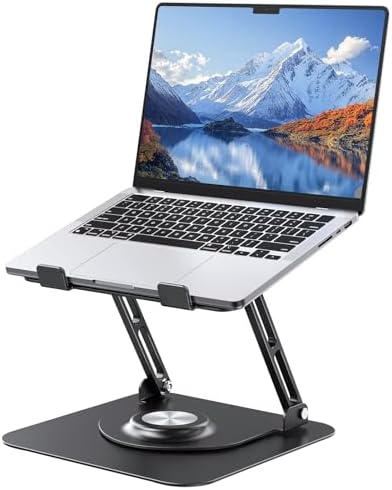
The Joyeky Adjustable Laptop Stand promises to fix all of that with a combination of height adjustment, full 360-degree rotation, foldable portability, and solid aluminum construction — all at an accessible price point on Amazon.
But does it actually deliver? After digging into every feature, analyzing thousands of verified Amazon customer reviews, and comparing it against competing stands in 2026, here’s my complete, honest verdict.
Table of Contents

Quick Summary: Who Is This Stand For?
Before diving into the details, here’s the fast answer:
The Joyeky Adjustable Laptop Stand is an excellent choice for remote workers, students, and professionals who want a height-adjustable, rotating stand that goes well beyond basic ergonomic improvement. The 360° swivel base makes it genuinely unique in this category — no other feature at this price point transforms the way you collaborate, present, and share screens.
If you use your laptop for video calls, client presentations, or collaborative work where you regularly need to show your screen to someone else, this stand earns its place on your desk immediately.
Joyeky Laptop Stand at a Glance: Full Specs
| Feature | Detail |
|---|---|
| Material | High-quality aluminum alloy |
| Max Height | 11.81 inches (30cm) |
| Tilt Range | 0° to 120° (recommended 0°–70°) |
| Rotation | 360° full swivel base |
| Weight Capacity | Up to 11 lbs (5 kg) |
| Compatibility | All laptops 10″–16″ |
| Folded Dimensions | 9.45 x 9.45 x 1.25 inches |
| Colors Available | Gray, Black |
| Amazon Rating | 4.7 out of 5 stars (2,500+ reviews) |
Design and Build Quality: First Impressions Matter

- 【Stable & Durable】JOYEKY Laptop Stand made of high-quality aluminum alloy, the larger heavier base greatly improves the …
- 【Adjustable & Portable】 The laptop riser can be easily adjusted to height and angle based on your actual need. Besides, …
- 【360° Swivel Flexibility】 Effortlessly rotate your laptop 360° with a smooth dual-axis base, perfect for sharing screens…
Take the Joyeky out of its box and the first thing you notice is that it doesn’t feel like a budget product. The aluminum alloy construction has a clean, matte finish with a modern industrial aesthetic that complements a MacBook, Dell XPS, or any premium laptop without looking like a plastic afterthought.
The stand is built around two key structural components: a robust X-frame scissor mechanism that controls height and tilt, and a circular swivel base mounted on a flat square platform. The base is heavier than competitors in this category — intentionally so. Joyeky made the base larger and heavier specifically to improve stability, which becomes important when the stand is extended to its maximum height.
At maximum extension of 11.81 inches, the Joyeky raises your laptop screen significantly above desk level — well past the eye-level requirement for most users sitting at standard desk height. The frame uses a thickened rod-type solid shaft construction through the hinges, meaning the adjustment joints don’t feel loose or wiggly. When you set a height and angle, it holds. There’s no gradual drift or sagging, which is a common complaint with cheaper stands that use thin pivot pins.
The anti-skid silicone pads on the support arms are strategically placed to grip your laptop’s bottom panel without scratching the surface. The pads have a recessed edge design that prevents them from pressing against ports or speakers, which is a thoughtful detail that cheaper alternatives regularly overlook.
The Standout Feature: 360° Swivel Base
Let’s talk about what makes the Joyeky genuinely different from the majority of laptop stands on Amazon.
Most adjustable laptop stands — even good ones — are fixed in place once you set them up. If a colleague walks around to see your screen, you physically turn the whole stand, or you awkwardly angle the laptop. It’s a small friction point that happens dozens of times a week in collaborative environments.
The Joyeky eliminates this entirely. The dual-axis swivel base rotates a full 360 degrees with a smooth, controlled motion. You can spin your laptop to face a colleague sitting across the table, rotate it 90 degrees for a side-on angle during a meeting, or swing it all the way around without lifting it off the stand.
The rotation mechanism is mounted centrally in the base using a precision bearing that handles the full weight of the laptop without grinding or wobbling. After extended use, reviewers consistently note that the rotation remains smooth — it’s not a mechanism that degrades quickly.
For freelancers who meet with clients in a coffee shop, teachers who share screens with students, designers who present work to stakeholders, or anyone who regularly shows their screen to another person during the day, this feature alone justifies the purchase. Nothing else in this category does it this well at this price.
Height and Angle Adjustment: Genuine Flexibility
Height adjustment is where many competitors cut corners. They offer “multiple positions” that turn out to be three fixed notch settings that don’t correspond to your specific eye level, body height, or chair position.
The Joyeky takes a different approach with continuous adjustment through its scissor mechanism. You’re not clicking into notch positions — you’re freely adjusting the angle of the support arms through a smooth range, then locking them in place with the side knobs. The tilt range goes from flat at 0 degrees all the way to a steep 120 degrees, with the practical sweet spot between 0 and 70 degrees for regular desk use.
The maximum height of 11.81 inches (approximately 30 centimeters) is among the most generous in the adjustable stand category for this price range. For context, a standing desk adjustment of 10 to 12 inches is typical for transitioning between sitting and standing. At maximum extension, the Joyeky puts a 13-inch laptop screen at or above eye level for most users seated at standard desk height — exactly where ergonomic guidelines recommend it.
The mechanism also supports angle adjustment independently from height, which means you can set the screen both at the right height and at the right viewing angle for your eyes. This dual adjustment is exactly what ergonomic desk setup guidelines recommend, and it’s surprisingly uncommon at this price point.
Foldable and Portable: One Stand, Every Location
Remote workers and students who split time between home, office, library, and coffee shops need their accessories to be genuinely portable — not just technically portable in the way that any rigid object can technically be carried somewhere.
The Joyeky earns its portability credentials properly. When fully folded, the stand collapses to a flat 9.45 x 9.45 x 1.25 inches — roughly the footprint of a hardcover book and about as thick. This compact form factor slides into the laptop sleeve of most backpacks without adding meaningful bulk.
The folding mechanism is clean and fast. The scissor arms fold down flat against the base in one smooth motion, and the support panel folds flat on top. There are no separate pieces to lose, no loose screws to tighten, and no assembly required when you arrive at your destination. Open it, adjust your height, place your laptop, and you’re working in under 30 seconds.
Compared to full-size adjustable stands that weigh over a kilogram and require a dedicated bag compartment, the Joyeky genuinely works as an everyday carry item. Frequent travelers, commuters, and mobile workers who cycle through multiple locations in a day will appreciate this practical portability in a way that purely desk-bound users won’t fully notice.
Load Capacity and Structural Stability
A laptop stand that wobbles when you type is worse than no stand at all. It’s distracting, it undermines your confidence in the product, and it introduces vibration into your workspace that makes precise mouse work genuinely annoying.
Joyeky rates the stand at 11 lbs (5 kg) of load capacity — approximately the combined weight of six MacBook Pro 13-inch models. This is a stress test figure rather than a practical one (no one is stacking six laptops), but it demonstrates the structural confidence behind the construction.
The thickened rod-type solid shaft used at the hinge joints is the key to this stability. The pivot points that control height and angle are built around thick aluminum rods rather than thin pins, which distributes the load across a wider contact area and eliminates the flex and wobble common in cheaper stands.
The heavier-than-average base is the other half of the stability equation. The square base platform uses enough mass to prevent the stand from rocking or shifting on the desk surface, even at full extension with a heavy 15 or 16-inch laptop. The rubber pads on the base underside prevent sliding on both smooth and textured desk surfaces.
Independent testing found the Joyeky’s stability at full extension competitive with stands at significantly higher price points. The larger, heavier base is frequently mentioned in customer reviews as a noticeable improvement over lighter competitors that rock when you type with any enthusiasm.
Heat Dissipation: Keeping Your Laptop Cool
Here’s something most people don’t think about when buying a laptop stand: the thermal impact.
A laptop lying flat on a solid desk surface has its cooling vents partially obstructed by the surface itself, particularly if that surface is a dense desk mat. The laptop’s internal fans have to work harder to move air, which increases fan noise and can lead to thermal throttling — where the processor deliberately slows itself down to prevent overheating.
The Joyeky’s open, suspended design addresses this directly. When your laptop is elevated and angled on the stand, the underside is fully exposed to open air. The open frame structure allows airflow to move freely both underneath and through the stand itself, and the aluminum alloy frame acts as a mild heat sink, conducting some of that warmth away from the laptop’s base.
Real-world user feedback consistently notes that fans run quieter and thermal performance improves noticeably during extended sessions — particularly for tasks like video rendering, large spreadsheet calculations, or running virtual machines that push the processor consistently.
For users who work long sessions with demanding applications, or who use their laptop in warm environments where cooling is already a challenge, this passive thermal benefit is a meaningful practical advantage.
Wide Compatibility: Works With Almost Everything
- 【Stable & Durable】JOYEKY Laptop Stand made of high-quality aluminum alloy, the larger heavier base greatly improves the …
- 【Adjustable & Portable】 The laptop riser can be easily adjusted to height and angle based on your actual need. Besides, …
- 【360° Swivel Flexibility】 Effortlessly rotate your laptop 360° with a smooth dual-axis base, perfect for sharing screens…
The Joyeky supports all laptops from 10 to 16 inches — which covers essentially the entire range of portable computers currently on the market. Verified compatibility includes:
- Apple: MacBook Air (13″, 15″), MacBook Pro (13″, 14″, 16″), MacBook 12″
- Dell: XPS 13, XPS 15, Inspiron series
- HP: Spectre, Envy, EliteBook series
- Lenovo: ThinkPad, IdeaPad, Yoga series
- ASUS: ZenBook, VivoBook series
- Acer: Swift, Aspire series
- Microsoft: Surface Laptop series
- Google: Chromebook (most models)
- Tablets: iPad Pro and other large tablets with compatible cases
The support arms adjust to accommodate different laptop widths, and the rubber pads provide secure grip regardless of whether your laptop has rubber feet or a smooth bare aluminum base. Users running thicker business laptops with rubber feet and those with sleek, bare-metal MacBooks both report consistent, secure placement.
One point worth noting: the stand is specifically designed for open-lid laptop use. If you want to use your laptop in clamshell mode (lid closed, connected to an external monitor), you’ll need a different type of stand that provides access to the sides for cable management. For all open-lid use cases, the Joyeky handles the range perfectly.
What Real Amazon Customers Say
With over 2,500 verified reviews and a 4.7 out of 5 stars rating on Amazon — with 81% of those being five-star ratings — the Joyeky has earned strong market validation. Here’s a summary of the consistent themes in real buyer feedback:
Most praised by customers:
The 360° rotation is consistently called out as the single most appreciated feature, with reviewers describing it as a game-changer for presentations, client work, and collaborative meetings. Multiple reviewers specifically mention switching from a competitor stand to the Joyeky purely for this feature.
The stability at full height is frequently praised, with buyers noting it doesn’t wobble when typing — a concern that prompts many people to return other stands. The heavier base gets specific credit in several reviews.
The build quality earns consistent praise from buyers comparing it to stands at higher price points, with multiple reviewers noting it “feels expensive” and “looks like it costs twice as much.”
Areas where buyers note limitations:
Some reviewers mention that direct laptop keyboard typing causes a slight bounce at maximum height, which is a common characteristic of any elevated stand at full extension. The universal recommendation is to use an external keyboard and mouse when working at maximum height — which is the ergonomically correct setup anyway, since having your screen at eye level and typing on a built-in keyboard simultaneously is impossible without neck strain.
The six-month warranty is shorter than some competitors who offer one or two-year coverage. This is a legitimate consideration given the moving parts in the hinge and swivel mechanism.
A small number of users mention that the rotation mechanism benefits from occasional tightening after extended use — a simple adjustment with a screwdriver that takes under a minute.
Who Should Buy the Joyeky Laptop Stand?
Best suited for:
- Remote workers who split time between home, office, and other locations
- Professionals who present to clients or colleagues and regularly need to rotate their screen
- Students who move between multiple study locations throughout the day
- Anyone experiencing neck, shoulder, or back pain from looking down at a flat laptop
- MacBook users who appreciate the aesthetic match of the aluminum construction
- Home office workers who want a clean, professional-looking desk setup
May not be the best fit for:
- Users who need clamshell mode with an external monitor (the stand doesn’t support closed-lid use practically)
- Anyone who types exclusively on their built-in laptop keyboard at maximum height (an external keyboard is strongly recommended for the ergonomic setup to work correctly)
- Users who need a warranty longer than six months for peace of mind
How the Joyeky Compares to Competitors
The laptop stand market is competitive, and several alternatives deserve honest mention:
vs. Basic fixed-position stands (under $20): The Joyeky wins comprehensively on adjustability, stability, and the rotation feature. For the additional cost, you get a stand that actually adapts to your specific ergonomic needs rather than locking you into one position.
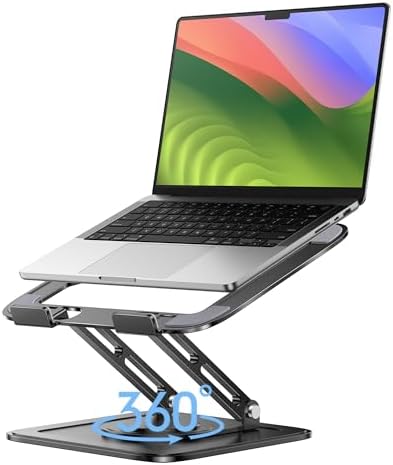


vs. LOXP and YICOSUN rotating stands: Direct competitors with similar 360° rotation features. The Joyeky differentiates on the heavier, more stable base and the slightly more premium build quality of the hinge mechanism.
vs. Nexstand and Roost (ultra-portable stands): Those stands prioritize absolute minimum weight and size for travel above all else. The Joyeky is more portable than most traditional stands but not as featherlight as these dedicated travel options. Choose the Joyeky if you need rotation and height range; choose Nexstand/Roost if weight is the primary concern.
vs. Premium monitor arms with laptop trays ($150+): Monitor arms provide the cleanest ergonomic solution and maximum desk space recovery, but they’re not portable and require clamp-mounting to your desk. The Joyeky is a better choice for anyone who needs to move their setup or doesn’t want a permanent desk installation.
Pros and Cons Summary
Pros:
- Genuine 360° rotation that works smoothly and reliably
- Height adjusts up to 11.81 inches — above eye level for most users
- 0°–120° tilt range with continuous (not notched) adjustment
- Solid aluminum alloy construction that feels and looks premium
- Heavier base provides exceptional stability at maximum height
- Folds to 9.45 x 9.45 x 1.25 inches for genuine everyday portability
- Open suspended design improves laptop cooling during extended use
- 4.7/5 stars across 2,500+ verified Amazon reviews
- Compatible with all 10–16″ laptops across all major brands
- Anti-skid silicone protects laptop surface from scratches
Cons:
- Six-month warranty is shorter than some competitors
- Slight bounce when typing directly on the built-in keyboard at max height (use an external keyboard for best results)
- Rotation mechanism may need occasional tightening with extended heavy use
- Not suitable for closed-lid clamshell mode
Final Verdict: Should You Buy the Joyeky Laptop Stand?
Yes — with clarity about what it does and what you need.
If you want a laptop stand that goes beyond basic elevation and actually transforms how you work, collaborate, and present, the Joyeky Adjustable Laptop Stand delivers on every front that matters. The 360° rotation is not a gimmick — it’s a practical tool that changes the daily experience of anyone who regularly shares a screen with another person. The height adjustment is genuinely generous. The build quality exceeds expectations at this price. And the portability is real, not theoretical.
Over 2,500 Amazon buyers have put it through daily use and returned a 4.7-star average. That kind of validation from verified purchasers is difficult to argue with.
Is it perfect? No. The warranty could be longer. Typing directly on the built-in keyboard at maximum height produces some bounce, and that limitation is worth understanding before buying. But neither of these is a deal-breaker — the warranty reflects the price point, and using an external keyboard with an elevated stand is simply the correct ergonomic approach anyway.
For the work-from-home professional, the mobile student, the freelancer who presents to clients, or anyone whose neck has been quietly suffering through another year of looking down at a flat laptop — the Joyeky Adjustable Laptop Stand is a straightforward recommendation.
Frequently Asked Questions
Does the Joyeky laptop stand work with a MacBook Pro 16″?
Yes. The stand supports all laptops from 10 to 16 inches, and the adjustable support arms accommodate the wider body of the 16-inch MacBook Pro without any modifications.
Can I use the Joyeky stand in clamshell mode (lid closed)?
The stand is designed for open-lid use. For clamshell mode with an external monitor, a different type of vertical stand or laptop dock would be more appropriate.
Is the 360° rotation smooth or does it feel loose?
The rotation is smooth and controlled — it doesn’t spin freely like a lazy Susan. It has enough resistance to stay in the position you set it, but moves easily when you apply deliberate rotation. Some users tighten the rotation mechanism slightly after extended use.
Does it work on a standing desk?
Yes. The 11.81-inch maximum height makes it particularly well-suited to standing desk users who need their screen higher than factory stands provide.
Does typing on the built-in keyboard cause the stand to wobble?
At maximum height, some users report minor bounce from direct keyboard typing. At mid-range heights, stability is solid. For the full ergonomic benefit of an elevated screen, an external keyboard and mouse is the recommended setup regardless of stand choice.
What’s included in the box?
The stand ships with the Joyeky laptop stand unit itself and basic setup documentation. No additional cables or accessories are included, which is standard for this product category.
Is the stand available in colors other than gray?
Yes. The Joyeky is available in both gray and black on Amazon. Check the listing for current color availability.
Accessories to Pair With Your Joyeky Stand
Getting the full ergonomic benefit from an elevated laptop stand means pairing it with the right supporting accessories:
External keyboard: An external keyboard allows you to type comfortably with your arms at desk level while your screen sits at eye level. Without one, you can’t actually use the elevated position comfortably. 👉 Browse external keyboards on Amazon
Wireless mouse: An external mouse is the natural companion to an external keyboard in any elevated-screen setup. 👉 Browse wireless mice on Amazon
Did this review help you make a decision? If you found it useful, consider sharing it with a colleague still working on a flat laptop. Questions about the Joyeky or comparing it to another stand? Drop them in the comments below.

MD.HASAN is an experienced SEO expert and amazon products review writer passionate about helping people find right products on amzon for buy without confusion. With 4 years of hands-on experience in content strategy and search engine optimization, he specializes in writing SEO-friendly blog posts that rank, engage, and convert.


