
Affiliate disclosure: As an Amazon Associate, Tech Rig Review earns from qualifying purchases. Links on this page may be affiliate links, at no extra cost to you.
If you spend more than a couple of hours a day hunched over a laptop, your neck, wrists, and eyes are probably paying the price without you even realizing it. It’s one of those slow-motion problems — you don’t notice the damage until the ache becomes a habit. After years of working remotely, switching between coffee shops, home offices, and the occasional airport lounge, I can say one small $30–$50 accessory changed how my body felt at the end of the workday more than any other gadget I’ve bought: a laptop stand.
This guide breaks down the real, practical benefits of laptop stand ownership — not just the marketing bullet points you see on Amazon listings, but the actual reasons ergonomists, physiotherapists, and remote workers keep recommending them. By the end, you’ll know exactly why this simple piece of aluminum or plastic deserves a spot on your desk.
Table of Contents
What Is a Laptop Stand (And Why Does It Matter)?
A laptop stand is a simple accessory that elevates your laptop off the desk surface, typically raising the screen closer to eye level while improving airflow underneath the device. Stands come in different forms — foldable travel stands, adjustable aluminum risers, vertical docking stands, and even standing-desk converters built specifically for laptops.
The core problem a laptop stand solves is simple: laptops were never designed for long-term ergonomic use. When a screen and keyboard are fused into a single low-profile unit, you’re forced to choose between good eye-level positioning and comfortable typing posture — you can’t have both at the same time without a stand and an external keyboard. That single design flaw is responsible for a huge share of the neck, shoulder, and wrist complaints among remote workers, students, and office employees.
Laptops were originally built as portable, occasional-use machines — something you’d pull out for an hour on a train or a short session at a coffee shop. Somewhere along the way, that portable device became a full-time desktop replacement for millions of people, without the hardware design catching up to that shift. Desktop setups have always separated the monitor, keyboard, and mouse for exactly this reason: independent positioning matters. A laptop stand is essentially a way to retrofit that same principle onto a device that wasn’t originally built for it.
It’s also worth noting that this isn’t a fringe recommendation. Occupational health guidelines from organizations focused on workplace ergonomics consistently list screen height, neck angle, and wrist positioning as key risk factors for musculoskeletal strain during prolonged computer use. A laptop stand directly addresses the screen-height variable, which is often the easiest one to fix.
Let’s get into exactly what changes once you fix it.
1. Better Posture and Reduced Neck Strain

This is the single biggest reason people buy a laptop stand, and for good reason.
When your laptop sits flat on a desk, your screen sits roughly 6–8 inches below eye level. To read it comfortably, you tilt your head and neck downward — sometimes referred to as “tech neck.” Over an 8-hour workday, that repeated downward tilt places significant, sustained load on your cervical spine.
Physical therapists commonly point out that for every inch your head moves forward from a neutral position, the effective weight your neck muscles support increases substantially. A laptop stand raises the screen closer to eye level, which naturally reduces how far you have to bend your neck to see your screen. Combined with an external keyboard and mouse, this allows you to maintain a neutral, upright neck position for the majority of your working hours.
Real-world effect: Fewer end-of-day headaches, less tension across the base of the skull, and noticeably less stiffness when you finally stand up.
It also has a knock-on effect on your upper back and shoulders. A forward-tilted head pulls your shoulders forward with it, rounding your upper spine over time. This rounded posture — often called “upper crossed syndrome” in physical therapy circles — can lead to tightness in the chest muscles and weakness in the muscles between your shoulder blades. By keeping your neck more upright, a laptop stand indirectly supports better shoulder and spinal alignment as well, not just neck comfort in isolation.
If you sit for long stretches, pair the stand with the habit of standing up and rolling your shoulders every 45–60 minutes. The stand fixes the static positioning problem; movement breaks handle the rest.
2. Improved Screen Height Reduces Eye Strain

Ergonomic guidelines generally recommend that the top third of your monitor sit at or just below eye level, with your gaze angled slightly downward. A laptop resting flat on a desk almost never meets this standard — you end up looking down and forward at an awkward angle, which forces your eyes to work harder to focus and track text.
A laptop stand corrects this by lifting the screen to (or close to) the recommended height. The result is less squinting, fewer instances of dry or tired eyes, and reduced digital eye strain symptoms like blurred vision or headaches after long screen sessions.
If you already use blue-light filtering glasses or software, pairing that with a properly elevated screen compounds the benefit significantly.
Screen distance matters here too. Many people who work off a laptop sit closer to their screen than they would with a desktop monitor, simply because the laptop is smaller and text feels harder to read at a distance. A stand often naturally increases the viewing distance slightly (since it changes your seating posture), and when combined with a slightly larger font size or zoom level, this reduces the strain of constantly refocusing at a very close range for hours at a time.
A simple habit that pairs well with a laptop stand is the 20-20-20 rule: every 20 minutes, look at something roughly 20 feet away for at least 20 seconds. It costs nothing, takes almost no time, and works even better once your screen is already positioned correctly.
3. Enhanced Cooling and Airflow

Laptops generate heat, and that heat has to go somewhere. Most laptops pull in cool air through vents on the bottom panel and expel warm air through side or rear vents. When your laptop sits directly on a flat desk, bed, or your lap, those bottom vents get partially or fully blocked, trapping heat inside the chassis.
This is one of the more overlooked benefits of laptop stand use — better thermal performance. Most stands elevate the laptop by at least an inch or two, creating a gap that allows air to flow freely underneath. Some premium stands even include built-in cooling fans or mesh platforms specifically designed to maximize airflow.
Better cooling means:
- Lower internal temperatures during demanding tasks (video editing, gaming, coding, multitasking)
- Reduced fan noise, since the system doesn’t have to work as hard to dissipate heat
- More consistent performance, since modern CPUs throttle speed when they overheat
If you’ve ever noticed your laptop slowing down noticeably during long work sessions, poor airflow is very often the culprit — and a stand is one of the cheapest fixes available.
It’s worth being specific about how much of a difference this can make. Depending on the laptop model, desk surface, and stand design, internal temperatures during sustained heavy workloads can drop by a meaningful margin simply from improved under-chassis airflow — enough to keep a CPU or GPU running at higher sustained clock speeds instead of throttling down to protect itself. For anyone doing rendering, compiling code, or running virtual machines, that translates directly into faster task completion times, not just a cooler-feeling laptop.
Soft surfaces make this problem worse. Working from a bed, sofa cushion, or lap with a laptop resting flat essentially seals off the intake vents completely, which is one of the fastest ways to trigger overheating and aggressive fan noise. A stand — even a basic, inexpensive one — solves this instantly by creating a hard, elevated gap between the vents and whatever surface you’re working on.
4. Longer Laptop Lifespan

This benefit follows directly from better cooling. Heat is one of the primary enemies of electronic components. Prolonged exposure to high internal temperatures accelerates wear on the battery, motherboard, and internal fans, and can shorten the effective lifespan of your device.
By keeping your laptop cooler on a consistent basis, a stand indirectly protects your investment. Over a 3–5 year ownership period, that reduced thermal stress can mean the difference between a laptop that still runs smoothly and one that starts showing performance issues or battery degradation earlier than expected.
There’s also a secondary protection benefit: laptops resting on stands are less prone to accumulating dust and debris on the underside vents, since airflow is more open and less likely to draw in surface-level dust and crumbs from a desk.
5. Increased Productivity and a Cleaner Desk Setup

Comfort and productivity are directly linked. When your body isn’t distracted by nagging discomfort — a stiff neck, sore wrists, tired eyes — your brain has more bandwidth to focus on the actual task in front of you.
Multiple workplace ergonomics studies have found a consistent pattern: employees who work in properly adjusted ergonomic setups report fewer discomfort-related interruptions and better sustained concentration throughout the day. A laptop stand is a small piece of that larger ergonomic puzzle, but it’s often the easiest and cheapest one to implement.
There’s also a practical space-saving angle. A laptop stand naturally elevates your device, which opens up the desk surface beneath it. This might sound minor, but for anyone working in a small space — a studio apartment, a shared office, a dorm room — that reclaimed space matters. Many users tuck a notebook, external hard drive, or cable organizer underneath a raised laptop, effectively expanding their usable workspace without buying a bigger desk. Vertical laptop stands, which hold the laptop upright and closed while connected to an external monitor, take this a step further by freeing up almost the entire desk surface.
A tidier desk isn’t just aesthetically pleasing — research on environmental psychology consistently links clutter to increased cognitive load and stress. A cleaner, more organized desk, even indirectly achieved through a laptop stand, can contribute to a calmer, more focused working environment.
6. Better Video Call Angles and Professional Appearance

Since remote work and video meetings became a permanent fixture of professional life, camera angle has become an unexpected ergonomic and professional issue. A laptop sitting flat on a desk points its webcam upward into your chin and nostrils — not exactly the professional look most people want during a client call or job interview.
Raising your laptop with a stand naturally lifts the camera closer to eye level, producing a far more flattering and professional angle. This is a benefit that’s easy to overlook until you compare a screenshot from a flat laptop against one on a stand — the difference is immediately obvious.
For anyone who does frequent video calls — recruiters, consultants, sales professionals, remote team leads — this alone can be a strong enough reason to invest in a good stand.
7. Seamless Multi-Monitor and External Setup Compatibility

Many professionals use their laptop as a secondary display alongside a larger external monitor. A laptop stand — particularly a vertical or adjustable-angle stand — makes this setup far more practical. Instead of an external monitor sitting awkwardly next to a flat laptop at a completely different height, a stand lets you align both screens at a comparable eye level, reducing the need to constantly shift your neck and gaze between two mismatched heights.
This is especially valuable for:
- Developers running code on one screen and documentation or output on another
- Designers referencing assets on a secondary display
- Analysts comparing spreadsheets or dashboards across two screens
- Anyone using a laptop as a webcam/notification screen while working primarily on an external monitor
A well-positioned multi-screen setup, enabled by a stand, meaningfully reduces the repetitive neck movement that flat, mismatched setups tend to cause.
8. Portability and Versatility for Hybrid Work

Not all laptop stands are bulky desk fixtures. Many are foldable, lightweight, and specifically designed for people who move between locations — home, office, cafes, co-working spaces, or while traveling. A good portable stand folds down to the size of a small notebook and weighs just a few hundred grams, making it easy to toss into a laptop bag.
This portability means you don’t have to sacrifice ergonomic comfort just because you’re not working from a fixed desk. Whether you’re working from a hotel room, an airport lounge, or a friend’s kitchen table, a compact stand lets you maintain a healthier setup wherever you land.
For hybrid and remote workers who split time between multiple environments, this versatility is one of the most practical benefits of laptop stand ownership — it’s ergonomic support that travels with you.
9. Reduced Risk of Repetitive Strain Injuries (RSI)

Repetitive strain injuries — including carpal tunnel syndrome, tendonitis, and chronic tension headaches — develop gradually from sustained poor posture and awkward joint angles, often over months or years. While a laptop stand alone won’t eliminate this risk, it addresses one of the core contributing factors: poor upper-body alignment during prolonged laptop use.
When paired with an external keyboard and mouse (which most ergonomists recommend using alongside any laptop stand), you gain the ability to position your screen, keyboard, and mouse independently — each at its own optimal height and distance. This separation is critical, because it lets you correct neck posture (via screen height) without compromising wrist and shoulder posture (via keyboard and mouse placement).
Practical setup tip: Elevate your laptop screen so the top of the display is roughly at eye level, then use a separate keyboard and mouse positioned so your elbows sit at approximately a 90-degree angle. This combination is widely considered a foundational ergonomic setup for reducing repetitive strain risk.
10. Long-Term Cost Savings on Health and Equipment

When you add up the potential costs a laptop stand helps you avoid, the value becomes clear:
- Reduced healthcare costs – Chronic neck, back, and wrist pain often lead to physiotherapy visits, chiropractic care, or even more invasive treatment down the line. A one-time $30–$80 purchase is inexpensive compared to ongoing musculoskeletal treatment.
- Extended device lifespan – As covered earlier, better cooling reduces heat-related wear, potentially delaying the need for costly repairs or replacements.
- Fewer sick days and reduced discomfort-related downtime – Chronic discomfort doesn’t just hurt; it interrupts focus and can lead to missed work or reduced output.
Viewed through this lens, a laptop stand isn’t just an accessory — it’s a low-cost preventative investment in both your physical health and your equipment’s longevity.
How to Choose the Right Laptop Stand
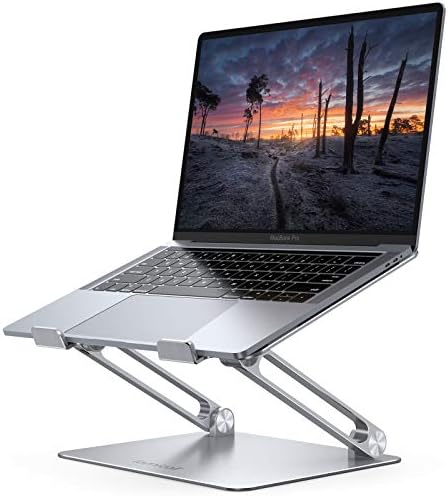


Not all stands are created equal. Here’s what to actually look for based on your specific use case:
For Home Office Use
Look for an adjustable-height aluminum stand with sturdy, non-slip feet. Adjustable models let you fine-tune the height to match your exact eye level and any external monitor you’re pairing it with.
For Travel and Hybrid Work
Prioritize foldable, lightweight designs (under 500g) made from aluminum alloy or reinforced plastic. Look for models that fold flat and fit easily into a laptop sleeve or backpack pocket.
For Cooling-Focused Needs
If you regularly run demanding software (video editing, 3D rendering, gaming), consider a stand with mesh ventilation or an integrated cooling fan for maximum airflow.
For Multi-Monitor Setups
Vertical laptop stands or docking stands work best here, since they let the laptop sit closed and out of the way while an external monitor becomes your primary display.
Material and Build Quality
Aluminum stands tend to be more durable and better at heat dissipation than plastic ones, though they’re usually slightly heavier and more expensive. Check the maximum weight capacity to ensure it comfortably supports your laptop’s size and weight.
FAQs About Benefits of A Laptop Stand
Do laptop stands actually help with neck pain?
Yes. By raising the screen closer to eye level, a laptop stand reduces the forward head tilt that contributes significantly to neck and upper back strain during long work sessions.
Do I need an external keyboard if I use a laptop stand?
It’s strongly recommended. Elevating the laptop without an external keyboard forces you to type at an uncomfortable, elevated angle. Pairing a stand with a separate keyboard and mouse allows independent, optimal positioning of your screen and input devices.
Does a laptop stand really improve cooling performance?
Yes. Elevating the laptop improves airflow to the bottom-mounted intake vents found on most laptops, which helps the internal cooling system work more efficiently and can reduce thermal throttling during demanding tasks.
What’s the ideal height for a laptop stand?
As a general rule, the top third of your screen should sit at or just below eye level when you’re seated with a neutral neck position. Adjustable stands make it easy to fine-tune this to your specific height and desk setup.
Are foldable laptop stands sturdy enough for daily use?
Quality foldable stands made from aluminum alloy are generally sturdy and stable for everyday use, though they may have slightly lower maximum weight capacities compared to bulkier desktop models. Always check the manufacturer’s specifications.
Final Thoughts
The benefits of laptop stand ownership go well beyond simple convenience. From protecting your neck and spine to keeping your device running cooler for longer, this small accessory addresses several real, well-documented problems that come with everyday laptop use. Whether you’re a remote worker logging eight hours a day at a home desk, a student juggling lectures and assignments, or a hybrid employee bouncing between locations, a laptop stand is one of the most cost-effective upgrades you can make to your daily setup.
Pair it with an external keyboard and mouse, position your screen at eye level, and you’ll likely notice the difference within the first week — less tension, clearer focus, and a laptop that runs just a little cooler and lasts just a little longer.

MD.HASAN is an experienced SEO expert and amazon products review writer passionate about helping people find right products on amzon for buy without confusion. With 4 years of hands-on experience in content strategy and search engine optimization, he specializes in writing SEO-friendly blog posts that rank, engage, and convert.


