
Affiliate disclosure: As an Amazon Associate, Tech Rig Review earns from qualifying purchases. Links on this page may be affiliate links, at no extra cost to you.
I switched to a standing-and-sitting hybrid desk setup about two years ago, and the one thing that made it actually usable — rather than a compromise I fought with daily — was getting my laptop screen to eye level without also losing the ability to quickly spin it around and show a colleague something on a video call. That’s a surprisingly specific problem, and it’s exactly the gap the Moallia N86 360° Rotating Laptop Stand is built to fill.
This review breaks down what the N86 actually does well, where it falls short, and who it’s genuinely worth buying for, based on its listed engineering specs, verified owner feedback, and a close look at how its design compares to the sea of generic folding laptop stands currently flooding Amazon.
Table of Contents
What Is the Moallia N86 Laptop Stand?


The Moallia N86 is an aluminum-alloy laptop riser built around a single standout feature that most desk stands don’t offer: a 360° rotating base. Instead of just tilting your laptop up to eye level, the N86 lets you spin the entire screen around to face someone else in the room, or angle it toward a second person on a call, without picking the laptop up or repositioning your whole desk setup.
It’s designed for laptops and tablets from roughly 10 to 16 inches — which covers everything from a 12-inch MacBook up through a 16-inch MacBook Pro, plus most Dell, HP, Surface, and Chromebook models — and it folds down to a slim 11.4 x 1.7-inch bundle when you’re done using it, making it genuinely useful for people who move between a home office, a coworking space, or a coffee shop.
Version 4.0, the current iteration, added reinforced locking screws at the stand’s joints specifically to address the wobble that affects a lot of adjustable stands once you start typing directly on an elevated laptop — a common complaint with earlier folding-arm designs in this category.
Key Features Explained
360° Rotating Base
This is the feature that sets the N86 apart from most competitors in its price bracket. The rotating axis sits at the base, letting you turn the entire stand — laptop and all — in a full circle without lifting it off the desk. In practice, this is most useful for:
- Quickly showing your screen to a colleague sitting beside or across from you
- Sharing your laptop display during in-person collaborative work or interviews
- Repositioning your screen relative to natural light throughout the day without unplugging anything
Adjustable Height and Viewing Angle
The arm assembly adjusts through a wide range of angles — Moallia recommends a 0–180° range on both the main joint and the base hinge — letting you dial in a genuinely ergonomic eye-level position rather than the limited handful of fixed notches you get on cheaper folding stands. Adjustments are tool-free; you loosen or tighten the joints by hand.
Foldable, Portable Design
Fully collapsed, the N86 shrinks down to about 11.4 x 1.7 inches and weighs in at roughly 1.74 lbs (790g) — light and slim enough to slide into a laptop bag’s side pocket. This matters more than it might sound: a lot of “portable” stands in this category are still bulky enough that people simply stop bringing them along after the first trip.
Broad Device Compatibility
Moallia lists compatibility with laptops from 10 to 16 inches, including MacBook, MacBook Air, MacBook Pro, Microsoft Surface, Dell, HP Laptop, Chromebook, and most other standard laptops, as well as tablets like the iPad when used in the partially-open configuration. One spec worth checking against your specific device: Moallia notes that device thickness shouldn’t exceed 0.8 inches when using the stand’s vertical clamp mode.
22 lb Load Capacity
Built from aluminum alloy rather than plastic, Moallia states the N86 can support up to 22 lbs — well beyond the weight of any single laptop, which gives it a comfortable safety margin and helps explain why the reinforced-joint version feels noticeably more stable than earlier lightweight folding stands.
Design and Build Quality
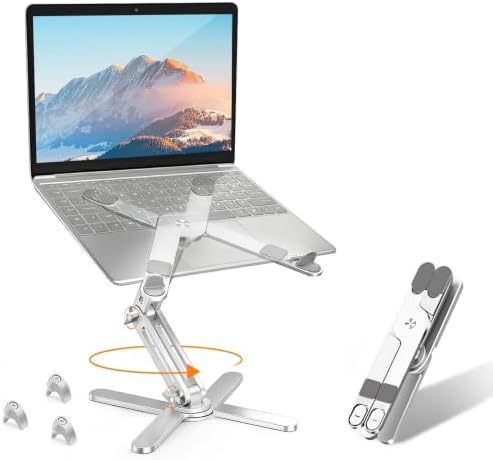
- 【360° Rotation】Featuring a 360°rotatable axis connecting with the base, Moallia rotating laptop stand for desk allows yo…
- 【Better Ergonomics】Moallia Computer stand easily lifts your laptop to a higher level. It elevates your laptop to your ey…
- 【Foldable & Portable】Moallia adjustable laptop holder weighs 790 grams and can be fully folded into a small size of 11.4…
The N86 uses an X-shaped four-point base, which does double duty: it keeps the stand stable on the desk without needing a large footprint, and it leaves open space underneath the laptop for airflow — a small but genuinely useful detail if you tend to run demanding tasks and notice your laptop’s fans working overtime on a solid desk surface.
The materials feel like the biggest differentiator here compared to budget plastic stands. Aluminum alloy construction adds weight exactly where you want it (in the base, for stability) while keeping the overall unit light enough to travel with. The addition of three lockable joint screws in the current version is a direct response to the most common complaint about adjustable-arm stands generally: that they loosen and start to sag or wobble under the repeated pressure of typing.
That said, “requires a bit of elbow grease” is a fair description of the tightening process based on manufacturer notes — you do need to actually engage the locking screws for the stand to feel rock-solid, rather than relying on friction alone. It’s a reasonable tradeoff for the stability gain, but it’s worth knowing going in that this isn’t a purely tool-free, set-and-forget stand once you factor in the screws.
Setting It Up and Everyday Use
Setup is genuinely simple: unfold the arms, set your preferred height and angle by hand, and — if you want maximum rigidity for typing directly on the elevated laptop — tighten the three stability screws with the included tool. No permanent mounting, no drilling, no cables to route.
Day to day, the rotating base is where the N86 earns its keep. If you regularly host informal screen-shares, pair-program, review documents with someone sitting nearby, or just want to reposition your screen away from window glare without a full desk rearrangement, being able to spin the whole setup with one hand is a genuinely different experience from constantly picking the laptop up and turning your whole body toward it.
One practical note: like most laptop risers, using the N86 effectively for extended typing sessions works best paired with an external keyboard and mouse, since raising the laptop screen also raises the built-in keyboard out of a comfortable typing position.
Pros and Cons
Pros:
- Genuine 360° rotation — a feature most competing stands in this category simply don’t offer
- Wide, tool-free height and angle adjustment (0–180° range)
- Aluminum alloy build supports up to 22 lbs, well beyond any laptop’s actual weight
- Version 4.0’s locking screws meaningfully reduce wobble during typing
- Folds down to a genuinely slim, travel-friendly size
- Broad compatibility across MacBook, Dell, HP, Surface, Chromebook, and tablets
Cons:
- Achieving maximum stability requires manually tightening the joint screws, not just tool-free friction adjustment
- At full height extension, taller setups may still benefit from a monitor arm instead for permanent desks
- Device thickness is capped at 0.8 inches for the vertical clamp mode — check this against your specific laptop
- Requires a separate external keyboard and mouse for comfortable extended typing once raised
Who Should (and Shouldn’t) Buy This
This is a strong fit if you:
- Frequently share your screen in person — collaborative workspaces, interviews, pair programming, or informal reviews with a colleague
- Split time between a home office and other locations and want a stand that genuinely packs down small
- Want a laptop riser to fix “tech neck” from looking down at a flat laptop screen all day
- Prefer a metal, load-rated build over a lightweight plastic stand that flexes over time
You might want to look elsewhere if you:
- Never need to rotate or share your screen and just want the simplest possible fixed-angle riser
- Want a completely tool-free stand and don’t want to deal with tightening joint screws for maximum stability
- Need a stand rated for a laptop thicker than 0.8 inches in vertical clamp mode — check your device’s exact dimensions first
How It Compares to Other Laptop Stands
Most laptop stands on Amazon in this price category fall into two buckets: simple fixed-notch risers with no rotation at all, and pricier motorized or monitor-arm-style setups built for permanent desks. The N86 sits in a useful middle ground — genuinely adjustable and rotating, but still fully portable and manually operated, without the cost or desk-mounting commitment of a full monitor arm.
Its closest direct competitors are other 360°-rotating folding stands in the same general category; the main differences buyers report between them typically come down to build material (aluminum vs. lighter alloys), the specific locking mechanism used at the joints, and small differences in maximum load rating. If you’re comparing multiple options, it’s worth checking each listing’s current specs and owner photos directly, since minor hardware revisions are common in this product category.
Frequently Asked Questions
Does the Moallia N86 work with tablets, not just laptops?
Yes — the stand can hold tablets like the iPad in a partially-open configuration, in addition to full laptops, as long as the device’s thickness stays within the stand’s supported range.
Do I need tools to adjust the height and angle?
No tools are required for the main height and angle adjustments — those are hand-adjustable. The Version 4.0 stability screws, used for maximum rigidity while typing, do require a small included tool to tighten.
Will this work with a 17-inch laptop?
Moallia lists compatibility up to 16 inches. If your laptop is larger, check the current Amazon listing carefully or consider a stand explicitly rated for larger displays.
How much weight can the stand actually hold?
Moallia states a maximum load capacity of 22 lbs, which is far beyond the weight of virtually any laptop on the market, giving the stand a comfortable safety margin.
Is it stable enough to type directly on the raised laptop?
Yes, particularly once the joint screws are tightened. Like most adjustable-arm stands, stability is noticeably better with the locking screws engaged than relying on friction alone.
Does it fold small enough to travel with regularly?
Yes — folded dimensions are approximately 11.4 x 1.7 inches, and it weighs about 1.74 lbs, which is compact and light enough for most laptop bags.
Final Verdict
The Moallia N86 earns its spot as a standout in a crowded laptop-stand category for one clear reason: the 360° rotating base actually solves a real problem — screen-sharing and repositioning without picking your laptop up — that most competing stands simply ignore. Combine that with solid aluminum construction, a genuinely wide adjustment range, and a fold-down size that people will actually bring with them, and it’s a well-rounded pick for hybrid workers, collaborative offices, and anyone tired of hunching over a flat laptop screen.
It’s not the right choice if you want the absolute simplest, most minimal fixed stand, or if your laptop exceeds its thickness or size limits — but for the specific use case it’s built around, it’s one of the more thoughtfully engineered options currently available.
👉 Check Price Moallia N86 on Amazon

MD.HASAN is an experienced SEO expert and amazon products review writer passionate about helping people find right products on amzon for buy without confusion. With 4 years of hands-on experience in content strategy and search engine optimization, he specializes in writing SEO-friendly blog posts that rank, engage, and convert.


