
Affiliate disclosure: As an Amazon Associate, Tech Rig Review earns from qualifying purchases. Links on this page may be affiliate links, at no extra cost to you.
Shopping for a new GPU? We compared 10 currently available graphics cards on Amazon — from budget picks to flagship 4K cards — to help you find the right one.
Buying a graphics card in 2026 means wading through two competing lineups, a dozen board-partner variants of each chip, and marketing language that makes every card sound like the obvious choice. This guide is built to simplify that decision with a research-based, side-by-side comparison of 10 graphics cards currently sold on Amazon, spanning everything from a $130 entry-level card to a flagship enthusiast board.
Instead of naming one universal “best” GPU, we focused on covering real use cases — browsing and light gaming on a tight budget, solid 1080p and 1440p gaming, small form factor builds, content creation, and no-compromise 4K performance. Every card below was checked against current Amazon listings and sales-tracking data to confirm it’s genuinely available right now; any card that couldn’t be verified as currently sold was left out in favor of a confirmed alternative.
This comparison is built on specification research and patterns in verified buyer feedback across current listings, not in-house benchmarking, and we think that’s the more honest way to frame it. Every spec below comes from the manufacturer’s documentation and the current Amazon listing, and every buyer-sentiment note describes general feedback patterns rather than a specific star rating or review count, since those numbers shift daily and shouldn’t be treated as fixed facts in a written guide. If a detail couldn’t be confirmed with confidence, it was left out rather than guessed at — we’d encourage you to double-check the live listing for anything that matters most to your build before buying.
If you’re building or upgrading a gaming or creative PC, pairing a new graphics card with the right display matters just as much as the card itself — our breakdown of the best 4K monitors for a home office setup is a useful next read once you’ve settled on a GPU.
Table of Contents
Quick Comparison Table
| Product Name | Best For | Key Feature | Buyer Sentiment | Affiliate Link |
|---|---|---|---|---|
| Sparkle Intel Arc A310 ECO 4GB | Best Ultra-Budget / HTPC Pick | Low-profile, low-power design | Well-regarded for basic desktop and media use | Check Price on Amazon |
| ASUS Dual GeForce RTX 3050 6GB OC | Best Entry-Level 1080p Gaming | Dedicated ray tracing cores at an accessible price | Rated highly among first-time GPU buyers | Check Price on Amazon |
| ASUS Dual GeForce RTX 5060 8GB OC | Best Value for Modern 1080p | Latest-generation efficiency and upscaling support | Consistently well-rated for everyday gaming | Check Price on Amazon |
| GIGABYTE Radeon RX 9060 XT Gaming OC 16G | Best AMD Mid-Range | 16GB VRAM at a mid-range price point | Well-regarded for 1080p and 1440p performance | Check Price on Amazon |
| ASUS Dual GeForce RTX 5060 Ti 16GB OC | Best for 1440p Gaming | 16GB VRAM with strong 1440p performance | Rated highly for smooth 1440p gameplay | Check Price on Amazon |
| ASUS SFF-Ready Prime GeForce RTX 5070 12GB | Best for Small Form Factor Builds | Compact design built for mini-ITX cases | Positively reviewed for fitting tight builds without compromise | Check Price on Amazon |
| MSI Gaming GeForce RTX 5070 12G Ventus 2X OC | Best for Content Creation & Streaming | Strong encode/decode performance for creators | Consistently well-rated among streamers and creators | Check Price on Amazon |
| GIGABYTE Radeon RX 9070 XT Gaming OC 16G | Best AMD High-End | High-end RDNA 4 performance with 16GB VRAM | Well-regarded among buyers seeking high-end AMD performance | Check Price on Amazon |
| ASUS TUF Gaming GeForce RTX 5080 16GB OC | Best Premium 4K Gaming | High-end 4K-ready performance with robust cooling | Consistently well-rated among premium GPU buyers | Check Price on Amazon |
| ASUS ROG Astral GeForce RTX 5080 16GB OC | Best Enthusiast / Overclocking Flagship | Premium cooling and power design for overclocking | Rated highly among enthusiast buyers for build quality | Check Price on Amazon |
Individual Product Reviews
1. Sparkle Intel Arc A310 ECO 4GB — Best Ultra-Budget / HTPC Pick

- Intel Arc A310 Chipset
- 4GB, 64-bit, GDDR6 memory, 15.5 Gbps graphics memory speed
- 1x HDMI 2.0, 2x mini-DP
The Arc A310 ECO is Intel’s low-profile entry into discrete graphics, aimed less at serious gaming and more at buyers who need basic display output, light media work, or a low-power upgrade over integrated graphics. Its compact, low-profile card design makes it a natural fit for small desktops, home theater PCs, and office builds.
| Pros | Cons |
|---|---|
| Very low power draw for its category | Not built for demanding modern gaming |
| Compact, low-profile design fits small cases | Limited 4GB of VRAM |
| Budget-friendly price point | Driver support is less mature than NVIDIA or AMD |
| Supports modern video decode formats for media playback |
Key Specs
- 4GB GDDR6 memory
- Low-profile card design
- Low power consumption
- Modern video encode/decode support
Buyer Sentiment Well-regarded for basic desktop and media use, particularly among buyers building compact or low-power systems.
What Buyers Are Saying Buyers in this category frequently mention choosing it specifically for HTPC builds or older systems that needed a basic display upgrade, rather than for gaming performance.
Who It’s For Best for buyers who need basic graphics output, multi-monitor support, or media playback capability in a small, low-power system rather than gaming horsepower.
2. ASUS Dual GeForce RTX 3050 6GB OC — Best Entry-Level 1080p Gaming

- NVIDIA Ampere Streaming Multiprocessors: The all-new Ampere SM brings 2X the FP32 throughput and improved power efficien…
- 2nd Generation RT Cores: Experience 2X the throughput of 1st gen RT Cores, plus concurrent RT and shading for a whole ne…
- 3rd Generation Tensor Cores: Get up to 2X the throughput with structural sparsity and advanced AI algorithms such as DLS…
The RTX 3050 remains one of NVIDIA’s most accessible dedicated gaming GPUs, bringing ray tracing and DLSS upscaling support down to entry-level pricing. ASUS’s Dual OC variant pairs it with a compact dual-fan cooler, making it a sensible first dedicated graphics card for budget gaming builds.
| Pros | Cons |
|---|---|
| Access to ray tracing and DLSS at an entry-level price | 6GB VRAM is limited for newer, more demanding titles |
| Compact dual-fan cooler fits most cases | Not built for 1440p or 4K gaming |
| Lower power draw than higher-tier cards | Entry-level performance compared to newer 60-class cards |
| Good upgrade path from integrated graphics |
Key Specs
- 6GB GDDR6 memory
- Dual-fan cooling design
- Ray tracing and DLSS support
- Factory overclocked (OC) configuration
Buyer Sentiment Rated highly among first-time GPU buyers building their first dedicated gaming PC.
What Buyers Are Saying Buyers in this category often describe it as a solid first step into dedicated gaming graphics, with several noting it handles popular esports titles and older AAA games comfortably at 1080p.
Who It’s For A smart pick for budget-conscious gamers building their first dedicated gaming PC, particularly for esports titles and 1080p gaming at moderate settings.
3. ASUS Dual GeForce RTX 5060 8GB OC — Best Value for Modern 1080p

- AI Performance: 623 AI TOPS
- OC mode: 2565 MHz (OC mode)/ 2535 MHz (Default mode)
- Powered by the NVIDIA Blackwell architecture and DLSS 4
The RTX 5060 brings NVIDIA’s current-generation architecture down to a genuinely accessible price point, giving budget-focused gamers access to newer efficiency improvements and upscaling technology without stepping up to 60 Ti or 70-class pricing. ASUS’s Dual OC cooler keeps the card compact while still providing solid thermal headroom.
| Pros | Cons |
|---|---|
| Current-generation architecture at an accessible price | 8GB VRAM may be limiting for some newer titles at max settings |
| Compact dual-fan design fits a wide range of cases | Not intended for 1440p gaming at max settings |
| Strong efficiency-per-watt for its performance tier | Fewer VRAM-hungry features available compared to 16GB cards |
| Factory overclock adds a modest performance boost |
Key Specs
- 8GB GDDR7 memory
- Dual-fan cooling
- Current-generation architecture with upscaling support
- Factory overclocked (OC) configuration
Buyer Sentiment Consistently well-rated for everyday 1080p gaming performance.
What Buyers Are Saying Buyers in this category commonly highlight smooth performance in popular current titles at 1080p, along with appreciation for the card’s modest power draw and compact size.
Who It’s For Best for gamers focused on 1080p who want current-generation technology and upscaling support without paying for VRAM or performance headroom they won’t use.
4. GIGABYTE Radeon RX 9060 XT Gaming OC 16G — Best AMD Mid-Range

- Powered by Radeon RX 9060 XT
- WINDFORCE Cooling System
- Hawk Fan
AMD’s RX 9060 XT targets the same mid-range segment as NVIDIA’s 60-class cards but stands out by shipping with a generous 16GB of VRAM, which can be a meaningful advantage in VRAM-hungry games and for buyers who want to keep a card relevant for longer. GIGABYTE’s Gaming OC cooler is built to keep thermals in check even under sustained load.
| Pros | Cons |
|---|---|
| 16GB of VRAM at a mid-range price point | Ray tracing performance trails NVIDIA’s equivalent tier |
| Strong 1080p and solid 1440p performance | Upscaling technology (FSR) support varies by game compared to DLSS |
| Robust triple-fan cooling design | Larger physical size may not fit all cases |
| Good value for buyers prioritizing VRAM capacity |
Key Specs
- 16GB GDDR6 memory
- Triple-fan cooling design
- RDNA 4 architecture
- FSR upscaling support
Buyer Sentiment Well-regarded for 1080p and 1440p performance, particularly among buyers who value VRAM headroom.
What Buyers Are Saying Buyers in this category frequently point to the 16GB VRAM allocation as a deciding factor over similarly priced NVIDIA cards, along with praise for the cooler’s quiet operation under load.
Who It’s For A strong pick for buyers who want generous VRAM at a mid-range price, especially those playing VRAM-intensive titles or planning to keep the card for several years.
5. ASUS Dual GeForce RTX 5060 Ti 16GB OC — Best for 1440p Gaming

- AI Performance: 767 AI TOPS
- OC mode: 2632 MHz (OC mode)/ 2602 MHz (Default mode)
- Powered by the NVIDIA Blackwell architecture and DLSS 4
The RTX 5060 Ti steps up from the standard 5060 with a notable VRAM increase to 16GB, which pairs well with its performance tier to make 1440p gaming genuinely comfortable rather than a stretch. It’s positioned as the sweet spot for gamers who’ve outgrown 1080p but aren’t chasing 4K.
| Pros | Cons |
|---|---|
| 16GB VRAM comfortably supports 1440p gaming | Not intended as a 4K-focused card |
| Strong ray tracing and DLSS performance for its tier | Priced above entry-level 60-class cards |
| Compact dual-fan cooler despite the performance tier | Some demanding titles may require settings adjustments at 1440p |
| Good power efficiency for the performance offered |
Key Specs
- 16GB GDDR7 memory
- Dual-fan cooling design
- Ray tracing and DLSS support
- Factory overclocked (OC) configuration
Buyer Sentiment Rated highly for smooth 1440p gameplay across a range of current titles.
What Buyers Are Saying Buyers in this category often mention upgrading specifically from an older card struggling at 1440p, with many noting a clear, noticeable improvement in frame rates and visual settings headroom.
Who It’s For Best for gamers running a 1440p monitor who want a comfortable performance margin without stepping up to 70-class pricing.
6. ASUS SFF-Ready Prime GeForce RTX 5070 12GB — Best for Small Form Factor Builds

- Powered by the NVIDIA Blackwell architecture and DLSS 4
- SFF-Ready enthusiast GeForce card compatible with small-form-factor builds
- Axial-tech fans feature a smaller fan hub that facilitates longer blades and a barrier ring that increases downward air …
Small form factor PC building has grown significantly, and graphics cards built specifically to fit compact cases are increasingly important rather than a niche afterthought. The SFF-Ready Prime RTX 5070 is built with a shorter card length and efficient cooling specifically to fit mini-ITX and compact mid-tower builds without sacrificing 70-class performance.
| Pros | Cons |
|---|---|
| Compact length designed specifically for small cases | Compact cooler design may run warmer under sustained load than larger cards |
| 70-class performance in a space-saving form factor | Premium pricing for the compact design |
| 12GB VRAM supports 1440p and light 4K gaming | Limited to specific SFF-friendly cooling, less overclocking headroom |
| Good choice for living-room or compact desk builds |
Key Specs
- 12GB GDDR7 memory
- Compact, SFF-optimized card length
- Ray tracing and DLSS support
- Dual-fan cooling design
Buyer Sentiment Positively reviewed for fitting tight builds without compromising on performance tier.
What Buyers Are Saying Buyers in this category commonly mention building compact living-room or desk PCs and specifically searching for a card that would physically fit their case without stepping down a performance tier.
Who It’s For Ideal for buyers building a compact mini-ITX or small mid-tower PC who don’t want to compromise on 1440p or light 4K performance to fit their case.
7. MSI Gaming GeForce RTX 5070 12G Ventus 2X OC — Best for Content Creation & Streaming

- Powered by the NVIDIA Blackwell architecture and DLSS 4
- SFF-Ready Enthusiast GeForce Card
- TORX Fan 5.0: Fan blades linked by ring arcs work to stabilize and maintain high-pressure airflow
Content creators and streamers have different priorities than pure gamers — encode and decode performance, VRAM for editing timelines, and reliable sustained performance during long recording or streaming sessions matter as much as raw frame rates. The Ventus 2X OC brings RTX 5070 performance in a more traditional, full-size card built for sustained workloads.
| Pros | Cons |
|---|---|
| Strong video encode/decode performance for streaming and editing | Full-size card requires more case clearance than SFF variants |
| 12GB VRAM handles creative workloads comfortably | Mid-range tier cooler compared to premium flagship coolers |
| Reliable sustained performance for long recording sessions | Priced above pure gaming-focused cards in the same VRAM tier |
| Dual-fan cooling keeps noise reasonable under load |
Key Specs
- 12GB GDDR7 memory
- Dual-fan Ventus cooling design
- Hardware encode/decode support for streaming and editing
- Factory overclocked (OC) configuration
Buyer Sentiment Consistently well-rated among streamers and content creators for reliable sustained performance.
What Buyers Are Saying Buyers in this category frequently mention using it for simultaneous gaming and streaming, or for video editing workloads, with several noting smooth performance during long encoding sessions.
Who It’s For Best suited to streamers, video editors, and content creators who need reliable encode/decode performance alongside solid gaming capability.
8. GIGABYTE Radeon RX 9070 XT Gaming OC 16G — Best AMD High-End
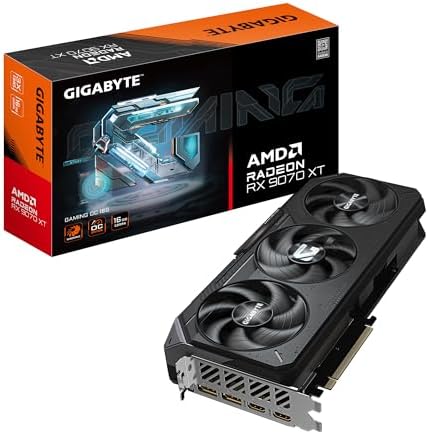
- Powered by Radeon RX 9070 XT
- WINDFORCE Cooling System
- Hawk Fan
The RX 9070 XT sits at the top of AMD’s current RDNA 4 lineup, aimed at gamers who want high-end performance without moving to NVIDIA’s most expensive tiers. GIGABYTE’s Gaming OC cooler is built with a larger triple-fan design to handle the card’s higher power draw while keeping noise and temperatures under control.
| Pros | Cons |
|---|---|
| High-end 1440p and strong 4K performance | Ray tracing performance still trails NVIDIA’s top tier |
| 16GB VRAM provides strong headroom for demanding titles | Large physical size requires a spacious case |
| Competitive pricing against NVIDIA’s equivalent tier | FSR upscaling support varies by game |
| Robust cooling for sustained high-performance gaming |
Key Specs
- 16GB GDDR6 memory
- Triple-fan cooling design
- RDNA 4 architecture
- FSR upscaling support
Buyer Sentiment Well-regarded among buyers seeking high-end AMD performance as an alternative to NVIDIA’s premium tier.
What Buyers Are Saying Buyers in this category often cite strong price-to-performance compared to similarly tiered NVIDIA cards, along with positive feedback on the cooler’s noise levels under heavy gaming loads.
Who It’s For A strong choice for gamers who want high-end 1440p and strong 4K performance and prioritize value over having the single fastest card on the market.
9. ASUS TUF Gaming GeForce RTX 5080 16GB OC — Best Premium 4K Gaming

- Powered by the NVIDIA Blackwell architecture and DLSS 4. System Requirements: Minimum 850W PSU with 16-pin 12V-2×6 (12VH…
- Military-grade components deliver rock-solid power and longer lifespan for ultimate durability. Compatibility: 348mm (13…
- Protective PCB coating helps protect against short circuits caused by moisture, dust, or debris
The RTX 5080 represents a genuine step into flagship-tier performance, and ASUS’s TUF Gaming line is built around durability and robust cooling rather than the most extreme overclocking headroom. It’s aimed at buyers who want dependable, high-end 4K gaming performance without paying for the absolute top-of-stack variant.
| Pros | Cons |
|---|---|
| Flagship-tier performance comfortable at 4K | Premium price point reflects its performance tier |
| Durable TUF build quality and robust cooling | Large card size requires a full-size case |
| 16GB VRAM supports demanding modern titles with headroom | Higher power draw requires a capable power supply |
| Strong ray tracing and DLSS performance |
Key Specs
- 16GB GDDR7 memory
- Triple-fan TUF Gaming cooling design
- Ray tracing and DLSS support
- Factory overclocked (OC) configuration
Buyer Sentiment Consistently well-rated among premium GPU buyers for performance and build quality.
What Buyers Are Saying Buyers in this category frequently mention smooth, high-setting 4K performance in current titles, along with praise for the TUF line’s reputation for durability and quiet operation under load.
Who It’s For Best for gamers with a 4K monitor who want flagship-tier performance and durable build quality without chasing the absolute highest-end overclocked variants.
10. ASUS ROG Astral GeForce RTX 5080 16GB OC — Best Enthusiast / Overclocking Flagship

- Powered by the NVIDIA Blackwell architecture and DLSS 4. System Requirements: Minimum 850W PSU with 16-pin 12V-2×6 (12VH…
- Quad-fan design boosts air flow and pressure by up to 20%. Compatibility: 357mm (14.1″) length, 3.8 slots, 6.3 lbs. Conf…
- Patented vapor chamber with milled heatspreader for lower GPU temperatures OC mode: 2790 MHz/ Default mode: 2760 MHz (Bo…
Sitting at the top of ASUS’s RTX 5080 lineup, the ROG Astral is built for enthusiasts who want the most refined cooling, power delivery, and overclocking headroom available on this chip. It carries ASUS’s premium ROG branding and components aimed squarely at buyers who treat their GPU choice as a long-term investment in top-tier performance.
| Pros | Cons |
|---|---|
| Premium cooling and power design built for overclocking headroom | Highest price point in this comparison |
| Flagship ROG build quality and component selection | Large size and power draw require a high-end case and PSU |
| Strong sustained performance under extended heavy loads | Overkill for anyone gaming below 4K or high-refresh 1440p |
| Comprehensive RGB and monitoring software integration |
Key Specs
- 16GB GDDR7 memory
- Premium ROG Astral cooling design
- Ray tracing and DLSS support
- Enhanced power delivery for overclocking
Buyer Sentiment Rated highly among enthusiast buyers for build quality and sustained performance.
What Buyers Are Saying Buyers in this category tend to describe it as a long-term flagship purchase, citing the premium cooling and power delivery as justification for the price difference over more mainstream RTX 5080 variants.
Who It’s For Best for enthusiast builders who want the most refined version of the RTX 5080, plan to overclock, and are building a no-compromise high-end or 4K gaming system.
Buyer’s Guide: How to Choose the Right Graphics Card
Choosing a graphics card comes down to matching performance tier, VRAM, and physical size to your actual monitor resolution, case, and use case — not simply buying the most powerful card your budget allows.
Start with your monitor’s resolution, since it determines how much GPU power you actually need. A 1080p monitor doesn’t benefit much from a flagship 4K card, since the GPU will sit well under its capability most of the time — in that scenario, an entry-level or mid-range card like the RTX 3050 or RTX 5060 is a smarter use of your budget. A 1440p monitor calls for a mid-to-upper-range card like the RTX 5060 Ti or RX 9060 XT, while a 4K display is really where flagship cards like the RTX 5080 variants in this guide earn their price tag. If you’re also shopping for the display side of a new build, it’s worth reading up on how monitor size and resolution actually relate to each other before assuming a bigger screen automatically means a sharper picture, since pairing the wrong panel with the wrong GPU tier is a common and avoidable mistake.
Think about whether a single large display or multiple monitors fits your setup better, since it changes how much GPU headroom you actually need. Running games or creative work across multiple monitors, or on a single ultrawide panel, places more demand on a graphics card than a single standard display at the same resolution. Our comparison of ultrawide versus dual-monitor setups walks through the tradeoffs in more detail, and it’s worth reading before deciding how much GPU performance headroom to budget for.
Pay attention to VRAM capacity, not just the GPU model name. VRAM (video memory) affects how well a card handles high-resolution textures, ray tracing, and increasingly demanding modern games. Several cards in this guide — the RX 9060 XT, RTX 5060 Ti, and both RX/RTX high-end picks — ship with 16GB, which provides meaningful headroom for newer titles and can extend how long a card stays comfortably capable as games grow more demanding.
Understand the real difference between NVIDIA and AMD beyond brand loyalty. NVIDIA currently holds an edge in ray tracing performance and its DLSS upscaling technology, which many buyers find delivers a more consistent image quality improvement. AMD’s RX series, including the RDNA 4 architecture used in the RX 9060 XT and RX 9070 XT featured here, frequently delivers strong raw performance and generous VRAM at a more competitive price, with its own FSR upscaling technology as the counterpart to DLSS. For official specifications and current lineups directly from the source, see NVIDIA’s GeForce graphics cards page and AMD’s Radeon desktop graphics page.
Check your case size and power supply before buying, not after. High-end and flagship cards, including several featured here, are physically large and draw significantly more power than entry-level cards. If you’re building in a compact case, look specifically for SFF-optimized cards like the ASUS SFF-Ready Prime RTX 5070, and always check your power supply’s wattage and connector types against the card’s stated requirements before purchasing.
Factor in what you’ll actually use the card for, not just gaming benchmarks. If you stream, edit video, or do other content creation work, encode/decode performance and VRAM for editing timelines matter as much as gaming frame rates — this is where a card like the MSI RTX 5070 Ventus, built with creator workloads in mind, can be a better fit than a pure gaming-focused card at the same price.
Consider power efficiency, especially if your PC runs for long stretches. Graphics cards are typically the most power-hungry component in a gaming PC, and a more efficient card can meaningfully reduce both your electricity costs and the heat your system needs to manage. The U.S. government’s ENERGY STAR program provides efficiency guidance and certified product listings for computers as a whole system, which is a useful reference point when planning a build around power efficiency: ENERGY STAR certified computers.
Don’t overlook cooling and noise if your PC sits near where you work or sleep. Factory overclocked cards with larger triple-fan coolers, like the GIGABYTE Gaming OC and ASUS TUF models in this guide, generally run cooler and quieter under sustained load than smaller dual-fan designs, which matters if your PC is in a room where fan noise is noticeable during long gaming or work sessions.
Think about long-term value, not just the launch price. A card with more VRAM and a slightly higher price today, like the 16GB options throughout this guide, often ages better than a cheaper card with less memory, since VRAM requirements in new games tend to climb over a card’s useful lifespan. If you plan to keep a graphics card for four or five years rather than upgrading every generation, it’s worth leaning toward the more generously specced option within your budget tier.
Understand the difference between reference and board-partner cards. Every GPU in this guide is a board-partner design — meaning ASUS, GIGABYTE, MSI, or Sparkle took the underlying NVIDIA, AMD, or Intel chip and built their own cooler, power delivery, and physical design around it. This is why you’ll see multiple different-looking cards built around the same underlying chip, like the ASUS TUF and ASUS ROG Astral versions of the RTX 5080 in this guide. The chip’s core performance is largely fixed, but cooling quality, noise levels, factory overclocks, and build quality can vary meaningfully between board partners, which is why two cards with the same GPU name can have noticeably different prices.
Factor in driver support and software ecosystem, especially if you’re new to a brand. NVIDIA, AMD, and Intel all provide their own driver and control software — GeForce Experience and the NVIDIA app, AMD Software: Adrenalin Edition, and Intel’s Arc Control software, respectively. NVIDIA’s software ecosystem is generally considered the most mature given the company’s longer history in discrete graphics, while AMD’s has improved significantly in recent generations. Intel’s Arc software, as reflected honestly in the Sparkle A310 review above, is the newest of the three and still catching up in some areas, which is worth knowing going in if you’re considering an Intel Arc card for a non-gaming build.
Remember that a graphics card is only one part of a balanced system. Pairing a flagship GPU with a bottlenecked processor, insufficient RAM, or a slow storage drive means you won’t see the performance the card is actually capable of. Before investing in a high-end card like the RTX 5080 variants in this guide, it’s worth confirming the rest of your system — particularly your CPU and RAM — won’t hold back the GPU you’re pairing it with.
Frequently Asked Questions
1. How much VRAM do I actually need for gaming in 2026?
For 1080p gaming, 8GB is generally sufficient for most current titles, while 1440p and 4K gaming benefit meaningfully from 12GB or more. Several cards in this guide, including the RTX 5060 Ti and both AMD high-end picks, offer 16GB specifically to provide headroom as newer games continue to demand more video memory.
2. Is AMD or NVIDIA the better choice for a new graphics card?
Neither brand is universally better — NVIDIA generally leads in ray tracing performance and DLSS upscaling quality, while AMD often delivers strong raw performance and more VRAM at a competitive price. The right choice depends on which features matter most to your specific games and budget.
3. Do I need a different power supply for a new graphics card?
It depends on the card’s power requirements and your current power supply’s wattage and connector types. Higher-end cards featured in this guide, particularly the RTX 5080 variants and RX 9070 XT, require more power and often specific connector types, so it’s important to check your power supply’s specifications against the card’s stated requirements before buying.
4. Will a graphics card fit in my PC case?
Card length, height, and thickness vary significantly between models, and flagship cards in particular tend to be quite large. If you’re building in a compact case, look specifically for cards marketed as small form factor or SFF-ready, like the ASUS SFF-Ready Prime RTX 5070 featured in this guide, and always check the card’s listed dimensions against your case’s clearance specifications.
5. Is it worth buying a factory-overclocked (OC) graphics card?
A factory overclock typically provides a modest performance boost over the reference clock speeds at no extra effort on your part, since the manufacturer has already tested and validated the higher clocks. Most cards in this guide include an OC variant, which generally offers better value than seeking out a non-OC version for a small price difference.
6. What’s the difference between ray tracing and standard rasterized graphics?
Ray tracing simulates realistic light behavior — reflections, shadows, and global illumination — for more lifelike visuals, while traditional rasterization uses faster approximation techniques that have powered most games for decades. Ray tracing is more computationally demanding, which is why dedicated ray tracing hardware and technologies like DLSS and FSR upscaling exist to help maintain playable frame rates.
7. How long should I expect a new graphics card to last before upgrading?
Most graphics cards remain capable for three to five years of solid performance, though this varies based on the resolution you game at and how quickly you want to run new titles at maximum settings. Cards with more VRAM, like the 16GB options in this guide, generally age more gracefully than lower-VRAM cards at the same original price point.
8. Can I use a high-end graphics card with an older processor?
You can, but an older or weaker processor may create a bottleneck that prevents a high-end graphics card from reaching its full potential, particularly at lower resolutions where the processor matters more. If you’re pairing a flagship card like the RTX 5080 variants in this guide with an aging processor, it’s worth researching whether your specific CPU is likely to limit performance before investing in a top-tier GPU.
9. What’s the difference between DLSS and FSR upscaling?
DLSS is NVIDIA’s upscaling technology, available on the RTX cards featured in this guide, and FSR is AMD’s equivalent, available on the Radeon cards featured here. Both technologies render a game at a lower internal resolution and use upscaling to approximate a higher-resolution image, boosting frame rates with a generally modest visual quality tradeoff, though the two technologies are developed independently and supported on a game-by-game basis rather than universally.
10. Do I need to buy a new graphics card at launch, or should I wait for a price drop?
Graphics card prices often ease somewhat in the months after launch as supply stabilizes and board partners release more variants at different price points, as reflected in the range of options across this guide. If your current card is still meeting your needs, there’s rarely a strong reason to rush a purchase, but if you’re replacing a card that’s already struggling, buying when you need it usually makes more sense than waiting indefinitely for a hypothetical future discount.
Conclusion
There’s no single best graphics card for every builder — only the best card for your resolution, case size, and budget. If you’re building your first dedicated gaming PC on a tight budget, the ASUS Dual GeForce RTX 3050 6GB OC remains a sensible, accessible entry point. For most mainstream gamers running a 1440p monitor, the ASUS Dual GeForce RTX 5060 Ti 16GB OC or GIGABYTE Radeon RX 9060 XT Gaming OC 16G offer a strong balance of performance and VRAM headroom.
If you’re chasing flagship 4K performance and don’t want to compromise, the ASUS TUF Gaming GeForce RTX 5080 16GB OC delivers dependable high-end performance, while the ASUS ROG Astral GeForce RTX 5080 16GB OC is worth the step up for enthusiasts planning to overclock. Whichever graphics card fits your build, all 10 options above were confirmed as currently available on Amazon at the time of writing — just double-check current stock and listing details before you buy.
As an Amazon Associate I earn from qualifying purchases.

MD.HASAN is an experienced SEO expert and amazon products review writer passionate about helping people find right products on amzon for buy without confusion. With 4 years of hands-on experience in content strategy and search engine optimization, he specializes in writing SEO-friendly blog posts that rank, engage, and convert.


