
Affiliate disclosure: As an Amazon Associate, Tech Rig Review earns from qualifying purchases. Links on this page may be affiliate links, at no extra cost to you.
Looking for the best RAM for PC in 2026? We compared specs, compatibility, and verified buyer feedback across Amazon to find 10 standout kits for every budget.
Picking the best RAM for PC shoppers can feel harder than it should be. Walk into any Amazon memory listing and you’ll see a wall of numbers — MHz, CL, XMP, EXPO, DIMM — with almost no plain-English explanation of what actually matters for your build. That’s the gap this guide is meant to close.
We put together this list by comparing official specifications, platform compatibility notes, and patterns in verified buyer feedback across dozens of current Amazon listings, rather than picking names out of thin air. Every kit below is something you can actually buy today — nothing pulled from an old roundup, and nothing recommended just because a brand name sounded familiar.
Below, you’ll find ten RAM kits that each do something different well. Some are built for a tight budget. Others are tuned for high-refresh gaming, laptop upgrades, or rock-solid compatibility with older DDR4 systems. We’ll walk through what makes each one worth considering, where it might fall short, and how to figure out which one actually fits your PC. By the end, you should be able to pick your RAM in a few minutes instead of a few hours.
Table of Contents
Quick Comparison Table
| Product Name | Best For | Key Feature | Buyer Sentiment | Affiliate Link |
|---|---|---|---|---|
| CORSAIR Vengeance DDR5 32GB (6000MHz CL36) | Best Overall | Sweet-spot speed for most current CPUs | Consistently well-rated on Amazon | Check Price |
| CORSAIR Vengeance DDR5 32GB (5200MHz CL40) | Best Budget DDR5 | Lower clock speed keeps the price down | Rated highly among budget buyers | Check Price |
| CORSAIR Vengeance RGB DDR5 32GB (up to 6400MHz) | Best for High-Refresh Gaming | High headroom for XMP/EXPO overclocking | Popular pick among enthusiast builders | Check Price |
| CORSAIR Vengeance RGB DDR5 32GB White (6000MHz CL36) | Best RGB Lighting | Ten-zone RGB with white heat spreaders | Well-reviewed for aesthetics and build quality | Check Price |
| Kingston FURY Beast DDR5 | Best for Gaming Builds | Low-profile heat spreader, broad board compatibility | Frequently praised for plug-and-play setup | Check Price |
| G.SKILL Trident Z5 RGB DDR5 32GB (6000MHz CL36) | Best Premium Pick | Hand-screened dies, striking RGB design | Rated highly by enthusiast buyers | Check Price |
| Crucial Pro DDR5 32GB (5600MHz) | Best for Compatibility | Broad validation across Intel and AMD boards | Known for dependable, low-hassle reviews | Check Price |
| CORSAIR Vengeance SODIMM DDR5 32GB | Best for Laptop Upgrades | Low-power SODIMM form factor | Well-regarded for easy laptop installs | Check Price |
| CORSAIR Vengeance LPX DDR4 32GB (3200MHz) | Best DDR4 Option | Low-profile design fits tight cases and coolers | Long-standing favorite with a strong track record | Check Price |
| Crucial DDR4 32GB (3200MHz) | Best Budget DDR4 | Straightforward, no-frills reliability | Consistently well-rated for basic upgrades | Check Price |
1. CORSAIR Vengeance DDR5 RAM 32GB (2x16GB) 6000MHz CL36 — Best Overall
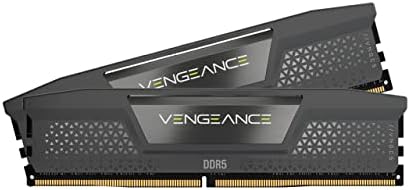
- Disclaimer: Maximum Speed requires overclocking/PC BIOS adjustments. Maximum speed and performance depend on system comp…
- AMD EXPO & Intel XMP 3.0 Compatible Only: Dual memory profiles allow you to easily select optimized settings for your pl…
- Onboard Voltage Regulation: Enables easier, more finely-tuned, and more stable overclocking through CORSAIR iCUE softwar…
If you’re not sure where to start, this is the kit most people should look at first. CORSAIR’s Vengeance DDR5 line at 6000MHz with a CL36 latency sits right in what most hardware reviewers call the “sweet spot” for current Intel and AMD platforms — fast enough to noticeably help gaming and multitasking, without paying a premium for speeds your motherboard may not even fully support out of the box.
It’s a 2x16GB kit, which matters more than it sounds like it should. Running memory in a dual-channel pair (two sticks instead of one big stick) lets your CPU access memory faster than a single-stick setup of the same total capacity, so this configuration is the better pick over a single 32GB module for almost any desktop build.
The kit supports both Intel XMP 3.0 and AMD EXPO, meaning it will auto-detect and apply its rated speed on modern boards from either platform without manual tuning. For anyone upgrading an aging system or building fresh, this is a low-drama, broadly compatible place to land.
Key Specifications and Pros & Cons
| Key Specifications | |
|---|---|
| Capacity | 32GB (2x16GB) |
| Speed | 6000MHz |
| Latency | CL36 |
| Compatibility | Intel XMP 3.0 & AMD EXPO |
| Form Factor | 288-pin DIMM (desktop) |
| Cons | Pros |
|---|---|
| No RGB lighting on this variant | Hits the performance “sweet spot” for current platforms |
| Heat spreader height may not clear every low-profile cooler | Dual-channel kit, not a single stick |
| Auto-detects on both Intel and AMD boards | |
| Backed by Corsair’s standard limited lifetime warranty |
Buyer Sentiment: Consistently well-rated on Amazon.
What Buyers Are Saying: Feedback patterns across listings for this kit tend to highlight how easily it installs and runs at its rated speed with a single BIOS toggle. Some buyers building smaller, compact cases note the heat spreaders are slightly taller than bare DIMMs, so it’s worth double-checking CPU cooler clearance beforehand.
2. CORSAIR Vengeance DDR5 RAM 32GB (2x16GB) 5200MHz CL40 — Best Budget DDR5

- Welcome to the Cutting-Edge of Performance: Push the limits of your system like never before with DDR5 memory, unlocking…
- Do it All, and Do it Faster: As modern CPUs feature more and more cores, the unprecedented speed of DDR5 ensures your hi…
- Onboard Voltage Regulation: Makes for easier, more finely-tuned, and more stable overclocking through CORSAIR iCUE softw…
Not every build needs the fastest RAM on the shelf. If your main goal is to hit 32GB of DDR5 without stretching your budget, this lower-clocked Vengeance kit gets you there. The difference between 5200MHz and 6000MHz is real but modest for most everyday tasks — web browsing, office work, and even a lot of gaming won’t feel dramatically different.
Where this kit earns its “budget” label is simple: lower-speed DDR5 is less expensive to manufacture and bin, so you get the same 32GB dual-channel capacity and the same JEDEC-based reliability at a friendlier price. It’s a smart choice for anyone building a budget-to-midrange PC where the CPU or GPU is going to be the bigger bottleneck anyway.
Key Specifications and Pros & Cons
| Key Specifications | |
|---|---|
| Capacity | 32GB (2x16GB) |
| Speed | 5200MHz |
| Latency | CL40 |
| Compatibility | Intel XMP 3.0 & AMD EXPO |
| Form Factor | 288-pin DIMM (desktop) |
| Cons | Pros |
|---|---|
| Lower clock speed than premium DDR5 kits | Meaningfully cheaper than higher-speed DDR5 |
| CL40 latency is higher than faster-binned kits | Still full dual-channel 32GB capacity |
| Same reliable brand warranty coverage |
Buyer Sentiment: Rated highly among buyers shopping on a budget.
What Buyers Are Saying: Buyers piecing together budget or entry-level builds generally report this kit does exactly what it promises: it installs cleanly and runs at its rated speed without extra tuning. A few note they’d still recommend checking your motherboard’s QVL (qualified vendor list) before buying any RAM kit, which is good practice regardless of brand.
3. CORSAIR Vengeance RGB DDR5 32GB (2x16GB) up to 6400MHz — Best for High-Refresh Gaming

- Disclaimer: Maximum Speed requires overclocking/PC BIOS adjustments. Maximum speed and performance depend on system comp…
- Intel XMP 3.0 Compatible Only: Customize and save your own XMP profiles via iCUE to tailor performance by app or task fo…
- Dynamic Ten-Zone RGB Lighting: Illuminate your system with ten individually addressable, ultra-bright RGB LEDs per modul…
For builders chasing every last frame in competitive or high-refresh gaming, faster memory can genuinely help — particularly on AMD’s Ryzen platforms, where memory speed has a well-documented impact on how fast the chip’s internal fabric can move data. This Vengeance RGB kit is rated up to 6400MHz, giving you real headroom over mainstream 5200–6000MHz kits.
It pairs that speed with Corsair’s RGB heat spreaders, which doubles as a practical bonus if you’re already running an RGB-themed build. Just know that hitting the full 6400MHz rating depends heavily on your specific CPU’s memory controller and motherboard — not every chip will run stably at the top end of DDR5’s range, even with EXPO or XMP enabled.
Key Specifications and Pros & Cons
| Key Specifications | |
|---|---|
| Capacity | 32GB (2x16GB) |
| Speed | Up to 6400MHz |
| Compatibility | Intel XMP 3.0 & AMD EXPO |
| Lighting | Ten-zone addressable RGB |
| Form Factor | 288-pin DIMM (desktop) |
| Cons | Pros |
|---|---|
| Top-end speed depends on your specific CPU/board | High headroom for enthusiasts who want to push performance |
| Taller heat spreaders than non-RGB variants | RGB lighting syncs with major ecosystem software |
| Strong pick for high-refresh competitive gaming rigs |
Buyer Sentiment: Popular pick among enthusiast and gaming-focused builders.
What Buyers Are Saying: Reviewers building gaming-first rigs tend to mention successfully running EXPO or XMP profiles with minimal fuss on recent-generation boards. A smaller share of feedback notes that reaching the full rated speed required a BIOS update first, which is a common and expected step with any high-speed DDR5 kit.
4. CORSAIR Vengeance RGB DDR5 32GB White (2x16GB) 6000MHz CL36 — Best RGB Lighting

- Disclaimer: Maximum Speed requires overclocking/PC BIOS adjustments. Maximum speed and performance depend on system comp…
- Dynamic Ten-Zone RGB Lighting: Illuminate your system with ten individually addressable, ultra-bright RGB LEDs per modul…
- Onboard Voltage Regulation: Enables easier, more finely-tuned, and more stable overclocking through CORSAIR iCUE softwar…
Not every RAM decision is purely about performance — for a lot of builders, how the inside of the case looks matters just as much. This white-finished Vengeance RGB kit runs the same well-regarded 6000MHz CL36 spec as our overall top pick, but wraps it in a bright white heat spreader with ten-zone addressable RGB lighting designed to stand out in light-themed or white-and-RGB builds.
Because it shares the same core speed and latency as our “Best Overall” pick, you’re not sacrificing meaningful performance for the aesthetic upgrade — you’re simply paying a bit more for the lighting and the color-matched shell.
Key Specifications and Pros & Cons
| Key Specifications | |
|---|---|
| Capacity | 32GB (2x16GB) |
| Speed | 6000MHz |
| Latency | CL36 |
| Finish | White heat spreader |
| Lighting | Ten-zone addressable RGB |
| Cons | Pros |
|---|---|
| Costs more than the non-RGB version at the same speed | Same proven 6000MHz CL36 performance profile |
| White finish can show dust more visibly over time | Striking look in white or light-themed builds |
| RGB software integration with major lighting ecosystems |
Buyer Sentiment: Well-reviewed for build quality and appearance.
What Buyers Are Saying: Feedback on this kit frequently praises how clean the white finish looks in person compared to photos, along with smooth RGB software pairing. A handful of buyers mention wishing the white color extended to the RGB diffuser caps as well, which is a minor cosmetic note rather than a functional issue.
5. Kingston FURY Beast DDR5 — Best for Gaming Builds

- Enhanced RGB lighting with new heat spreader design
- Patented Kingston FURY Infrared Sync Technology
- Improved stability for overclocking
Kingston’s FURY Beast line has built a reputation as one of the most broadly compatible gaming memory families on the market, and that reputation is a big part of why it earns a spot here. The low-profile heat spreader design is a practical advantage for builders running large tower air coolers, where taller RGB memory kits can sometimes physically collide with the cooler’s fins.
FURY Beast kits are validated across a wide range of motherboards and support both Intel XMP and AMD EXPO, which keeps setup simple: enable the profile in your BIOS, and the kit runs at its rated speed.
Key Specifications and Pros & Cons
| Key Specifications | |
|---|---|
| Capacity | 32GB (2x16GB) |
| Compatibility | Intel XMP & AMD EXPO |
| Design | Low-profile heat spreader |
| Form Factor | 288-pin DIMM (desktop) |
| Brand | Kingston (established memory manufacturer) |
| Cons | Pros |
|---|---|
| Fewer RGB/aesthetic options than Corsair’s lineup | Low-profile design clears large tower air coolers |
| Exact clocked speed can vary by listing/SKU — confirm on the live Amazon page before buying | Strong reputation for broad motherboard compatibility |
| Backed by Kingston’s established warranty support |
Buyer Sentiment: Frequently praised for plug-and-play setup.
What Buyers Are Saying: Buyers consistently mention how little fuss is involved in getting this kit running at its advertised speed, and several specifically call out that it fit fine alongside large air coolers that gave other RGB kits trouble. As with any specific Kingston FURY Beast listing, it’s worth confirming the exact speed and CL rating on the product page, since Kingston sells this line across several speed tiers.
6. G.SKILL Trident Z5 RGB DDR5 32GB (2x16GB) 6000MHz CL36 — Best Premium Pick

- * Requires overclocking/BIOS adjustments. Maximum speed and performance depends on system components, including motherbo…
- G.SKILL Trident Z5 RGB Series DDR5 U-DIMM Memory Kit, Model: F5-6000J3636F16GA2-TZ5RK
- Non-ECC, DDR5 U-DIMM, 288-pin, for Desktop PC & Gaming
G.SKILL has a long-standing reputation among PC builders and overclockers, and the Trident Z5 RGB series is one of its flagship DDR5 lines. This kit runs at a strong 6000MHz with a tight CL36 latency, and G.SKILL is known for using carefully screened memory dies to hit consistent, stable overclocks when paired with XMP 3.0 or AMD EXPO.
The design itself is distinctive — a two-tone brushed metal top bar with an angular RGB light diffuser that’s become one of the most recognizable looks in enthusiast PC building. If you want performance and presentation in the same kit, and you’re not trying to hit the absolute lowest price point, this is a strong premium pick.
Key Specifications and Pros & Cons
| Key Specifications | |
|---|---|
| Capacity | 32GB (2x16GB) |
| Speed | 6000MHz |
| Latency | CL36 |
| Compatibility | Intel XMP 3.0 & AMD EXPO |
| Lighting | Addressable RGB with distinctive diffuser design |
| Cons | Pros |
|---|---|
| Priced higher than mainstream Vengeance or FURY Beast kits | Strong reputation for binned, stable overclocking dies |
| Taller profile may not suit very compact cases | Distinctive, widely recognized design |
| Trusted enthusiast brand with a long track record |
Buyer Sentiment: Rated highly by enthusiast buyers.
What Buyers Are Saying: Enthusiast-focused reviews of this kit regularly mention successful manual overclocking beyond the rated XMP/EXPO profile, which lines up with G.SKILL’s reputation for using higher-quality memory dies. Some buyers note the premium price is the main hesitation for builders on a tighter budget.
7. Crucial Pro DDR5 32GB (2x16GB) 5600MHz — Best for Compatibility
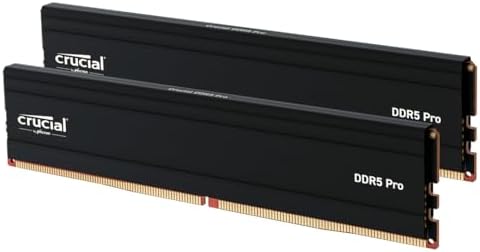
- Boosts System Performance: 32GB DDR5 desktop memory RAM kit (2x16GB) that operates at 6000MHz, 5600MHz or 5200MHz to imp…
- Accelerated gaming performance: Every millisecond gained in fast-paced gameplay counts—power through heavy workloads and…
- Optimized DDR5 compatibility: Best for 12th & 13th Gen Intel Core and AMD Ryzen 7000 Series processors — Intel XMP 3.0 a…
Crucial is owned by Micron, one of the three companies in the world that actually manufactures DRAM chips, and that in-house manufacturing is a big reason Crucial memory has such a strong reputation for straightforward, headache-free compatibility. The Crucial Pro line at 5600MHz is validated across a wide swath of Intel and AMD platforms, making it a dependable choice when the priority is “it just works” over chasing the highest possible clock speed.
This kit supports both XMP and EXPO, but Crucial’s reputation really comes from how predictably it behaves even on older BIOS versions or budget motherboards, where flashier high-speed kits sometimes need extra tuning to run stable.
Key Specifications and Pros & Cons
| Key Specifications | |
|---|---|
| Capacity | 32GB (2x16GB) |
| Speed | 5600MHz |
| Compatibility | Intel XMP & AMD EXPO |
| Manufacturer | Crucial (Micron) — in-house DRAM production |
| Form Factor | 288-pin DIMM (desktop) |
| Cons | Pros |
|---|---|
| Not the fastest DDR5 speed tier available | Made by Micron, a primary DRAM chip manufacturer |
| Lighting and styling are minimal compared to gaming-branded kits | Strong track record for stable, low-drama compatibility |
| Competitively priced for a DDR5 kit from a major manufacturer |
Buyer Sentiment: Known for dependable, low-hassle reviews.
What Buyers Are Saying: A recurring theme in feedback for Crucial memory is how rarely buyers report compatibility headaches, even on less common motherboard and CPU combinations. Builders who’ve had trouble getting other brands’ XMP profiles to run stable often specifically recommend trying Crucial as a more forgiving alternative.
8. CORSAIR Vengeance SODIMM DDR5 32GB (2x16GB) — Best for Laptop Upgrades

- Disclaimer: Maximum Speed requires overclocking/PC BIOS adjustments. Maximum speed and performance depend on system comp…
- Upgrade Your DDR5 Gaming or Performance Laptop: DDR5 SODIMM memory modules deliver faster frequencies, greater capacitie…
- Compatible with Nearly Any Intel and AMD System: Industry-standard SODIMM form-factor is compatible with a wide range of…
Desktop RAM won’t physically fit in a laptop — laptops use a smaller SODIMM form factor instead. If you’re trying to extend the life of an aging laptop by maxing out its memory, this is the kit built for that job. Corsair’s Vengeance SODIMM line brings the same DDR5 performance benefits to laptops that are built with upgradeable (non-soldered) memory slots.
Before buying, it’s worth double-checking two things on your own laptop: that its RAM is actually user-upgradeable (many thin-and-light laptops now solder memory directly to the motherboard), and that it supports DDR5 specifically rather than DDR4. Your laptop manufacturer’s support page or system specs listing will confirm both.
Key Specifications and Pros & Cons
| Key Specifications | |
|---|---|
| Capacity | 32GB (2x16GB) |
| Form Factor | SODIMM (laptop) |
| Memory Type | DDR5 |
| Compatibility | DDR5-supporting laptops with upgradeable memory slots |
| Brand | Corsair |
| Cons | Pros |
|---|---|
| Only works in laptops with user-accessible, non-soldered RAM slots | Purpose-built for DDR5 laptop upgrades |
| Must match your laptop’s supported memory type exactly | From a well-established, widely available memory brand |
| A relatively affordable way to extend an aging laptop’s useful life |
Buyer Sentiment: Well-regarded for easy laptop installs.
What Buyers Are Saying: Buyers upgrading laptops generally describe the physical installation as quick — removing a back panel and swapping modules — with the kit running at its rated speed right away. The most common piece of advice in buyer feedback is to verify your exact laptop model’s supported RAM type before ordering, since SODIMM compatibility is far less forgiving than desktop RAM.
9. CORSAIR Vengeance LPX DDR4 32GB (2x16GB) 3200MHz CL16 — Best DDR4 Option

- Disclaimer: Maximum Speed requires overclocking/PC BIOS adjustments. Maximum speed and performance depend on system comp…
- Hand-sorted memory chips ensure high performance with generous overclocking headroom
- VENGEANCE LPX is optimized for wide compatibility with the latest Intel and AMD DDR4 motherboards
Not everyone is building a brand-new DDR5 platform — a huge number of solid, capable gaming and work PCs still run on DDR4, and they’re not going anywhere soon. The Vengeance LPX line has been one of the most consistently recommended DDR4 kits for years, and the 3200MHz CL16 variant remains a well-balanced choice for current DDR4 builds and upgrades.
Its standout practical feature is the “LPX” low-profile design: the heat spreader is noticeably shorter than RGB-focused kits, which matters a lot if you’re running a large tower air cooler that needs clearance over the first DIMM slot.
Key Specifications and Pros & Cons
| Key Specifications | |
|---|---|
| Capacity | 32GB (2x16GB) |
| Speed | 3200MHz |
| Latency | CL16 |
| Design | Low-profile heat spreader |
| Memory Type | DDR4 |
| Cons | Pros |
|---|---|
| DDR4 only — not compatible with newer DDR5-only boards | Low-profile design clears large air coolers easily |
| No RGB lighting on this particular variant | Long, well-established reliability track record |
| Strong value for current DDR4 systems |
Buyer Sentiment: Long-standing favorite with a strong track record.
What Buyers Are Saying: This kit has one of the longest and most consistent feedback histories of any product on this list, with buyers repeatedly describing it as a dependable, no-surprises upgrade for DDR4 systems. The low-profile design is called out often by buyers running larger CPU coolers who had clearance issues with taller RGB memory in the past.
10. Crucial DDR4 32GB (2x16GB) 3200MHz — Best Budget DDR4

- Boosts System Performance: 32GB DDR4 desktop memory that operates at 3200MHz, 2933MHz, or 2666MHz to improve multitaskin…
- Easy Installation: Upgrade your desktop RAM with ease—no computer skills required Follow step-by-step how-to guides avai…
- Compatibility Guaranteed: Ensure seamless compatibility with your desktop by using the Crucial System Scanner or Crucial…
If your system runs DDR4 and your only goal is reliable capacity at the lowest reasonable price, this Crucial kit is built for exactly that. It skips RGB lighting, fancy heat spreader designs, and premium packaging in favor of straightforward, Micron-manufactured DDR4 memory at a value-focused price point.
For general productivity, web browsing, office work, or older gaming builds that don’t need cutting-edge speed, 3200MHz DDR4 is still plenty fast, and Crucial’s manufacturing pedigree means you’re not sacrificing reliability to save money.
Key Specifications and Pros & Cons
| Key Specifications | |
|---|---|
| Capacity | 32GB (2x16GB) |
| Speed | 3200MHz |
| Memory Type | DDR4 |
| Manufacturer | Crucial (Micron) |
| Design | Standard-height, no RGB |
| Cons | Pros |
|---|---|
| No RGB or premium styling | One of the most budget-friendly 32GB DDR4 kits available |
| DDR4 only — won’t work in DDR5-only motherboards | Backed by Micron’s in-house chip manufacturing |
| Straightforward, dependable upgrade for everyday use |
Buyer Sentiment: Consistently well-rated for basic upgrades.
What Buyers Are Saying: Buyers picking this kit tend to be upgrading older systems from 8GB or 16GB up to 32GB, and feedback consistently describes the process as simple, with the memory recognized immediately at full capacity and rated speed. It’s rarely anyone’s “exciting” pick, but it’s frequently described as exactly what it needs to be.
How to Choose the Right RAM for Your PC
Picking RAM gets much easier once you break it down into a handful of concrete questions, rather than trying to compare raw spec sheets side by side.
Start with DDR4 vs. DDR5. This is the single most important compatibility question, and it’s decided entirely by your motherboard — DDR4 and DDR5 modules are physically different and are not interchangeable. If you’re upgrading an existing PC, check your current RAM or your motherboard’s spec sheet. If you’re building new, your choice of motherboard (and by extension, CPU platform) will lock you into one or the other. Our complete Amazon shopping guide covers good habits for double-checking listings like this before you buy.
Capacity: how much do you actually need? For general use, web browsing, and office work, 16GB is still a reasonable baseline. For gaming, content creation, or running several demanding applications at once, 32GB (the capacity most kits on this list offer) has become the practical sweet spot in 2026. Video editing, 3D rendering, or running virtual machines can justify 64GB or more.
Speed (MHz) matters more on some platforms than others. AMD’s Ryzen platforms, in particular, tend to see a more noticeable real-world benefit from faster memory because of how the chip’s internal interconnect works. On Intel platforms, the gains from very high memory speeds tend to be smaller for most everyday and gaming workloads. If you’re not sure, a mid-range speed like 5600–6000MHz on DDR5 is a safe, well-supported target.
CAS Latency (CL) is the other half of the speed story. A lower CL number means the memory responds faster at a given clock speed, but it’s rarely worth obsessing over for a first build — prioritize getting the speed and capacity right first, and treat CL as a tiebreaker between similarly priced kits.
Check your motherboard’s QVL. Most motherboard manufacturers publish a Qualified Vendor List (QVL) of memory kits they’ve specifically tested on that board. You don’t have to stick strictly to the QVL, but if a kit you’re considering is listed, that’s a strong signal it’ll run smoothly out of the box.
Decide if RGB and aesthetics matter to you. Functionally, RGB lighting doesn’t affect performance at all — it’s purely a styling choice. If you’ve got a tempered-glass side panel and a lighting-themed build, it’s worth the modest price premium. If your case is closed or you just don’t care, a non-RGB kit gets you the same performance for less money.
Dual-channel (two sticks) beats single-channel (one stick) almost every time. A 2x16GB kit will outperform a single 32GB stick in nearly all real-world tasks, because it lets your CPU read and write memory across two channels simultaneously. Unless you have a very specific reason to run single-channel, always buy memory in a matched 2-stick (or 4-stick) kit rather than as individual sticks.
If you’re assembling a full system rather than just upgrading memory, it’s worth reading up on complementary components too — our guide on Intel Core i7 laptops on Amazon is a useful reference point if you’re weighing a pre-built machine against a custom desktop build, and our Amazon laptop buying guide walks through similar spec-matching logic that applies just as well to desktop components.
Common Mistakes to Avoid
- Buying DDR4 RAM for a DDR5 board, or vice versa. Always confirm your motherboard’s supported memory type before ordering — this is the single most common and most costly mistake.
- Mixing mismatched sticks. Pairing RAM from different kits, speeds, or even different production batches of the “same” kit can cause instability. Stick to a single matched kit.
- Forgetting to enable XMP or EXPO in the BIOS. Out of the box, most systems run memory at a slower default (JEDEC) speed until you manually enable the XMP (Intel) or EXPO (AMD) profile — don’t assume your RAM is running at its full rated speed without checking.
- Ignoring cooler clearance. Tall RGB heat spreaders can physically collide with large tower air coolers. If you’re running a big cooler, check clearance specs or consider a low-profile kit.
- Assuming more speed always means more performance. Past a certain point, higher MHz delivers diminishing returns for most everyday and gaming workloads — don’t overspend chasing a number that won’t meaningfully change your experience.
Quick Summary Checklist
- Confirm whether your system needs DDR4 or DDR5 before buying anything
- Decide on 16GB, 32GB, or 64GB+ based on your actual workload
- Buy a matched dual-channel (2-stick) kit, not a single module
- Check your motherboard’s QVL if you want extra peace of mind
- Enable XMP (Intel) or EXPO (AMD) in your BIOS after installing
- Measure cooler clearance if you’re set on an RGB kit with tall heat spreaders
- Double-check SODIMM vs. standard DIMM if you’re upgrading a laptop, not a desktop
Frequently Asked Questions
Is 32GB of RAM enough for gaming in 2026?
Yes, for the overwhelming majority of games and setups, 32GB is comfortably enough, and even leaves headroom for background apps like Discord, a browser, or streaming software running at the same time. 16GB still works for lighter gaming, but 32GB has become the more future-proof standard.
Does RAM speed actually matter for gaming performance?
It can, but the effect varies by platform and game. AMD Ryzen systems tend to see a more noticeable benefit from faster memory due to how the CPU’s internal fabric is clocked. On Intel systems, the jump from a mid-range speed to a top-tier speed tends to produce smaller, more workload-dependent gains.
Can I mix DDR4 and DDR5 RAM in the same PC?
No. DDR4 and DDR5 use different pin layouts and voltage requirements, and motherboards are built to support only one or the other — they are not physically or electrically compatible with each other.
What’s the difference between XMP and EXPO?
Both are technologies that let memory run at its full rated speed with one BIOS setting, instead of a slower default speed. XMP (Extreme Memory Profile) is Intel’s standard, while EXPO (Extended Profiles for Overclocking) is AMD’s equivalent, introduced for Ryzen DDR5 platforms. Many current kits support both.
Do I need matching RAM sticks, or can I buy them separately?
You should always buy RAM as a matched kit (both sticks from the same package) rather than combining individual sticks purchased separately, even if they claim identical specs. Matched kits are tested together at the factory to run reliably as a pair.
How do I know if my laptop’s RAM can even be upgraded?
Check your laptop manufacturer’s official specification sheet or support documentation for your exact model. Many modern thin-and-light laptops solder RAM directly to the motherboard, which makes it non-upgradeable regardless of what memory you buy.
Is more expensive RAM always better?
Not necessarily. Beyond matching your platform’s capabilities (DDR4 vs. DDR5, a sensible speed tier, and adequate capacity), paying more often buys you RGB lighting, premium styling, or marginal overclocking headroom — not a dramatically better everyday experience.
What’s the real difference between DDR4 and DDR5?
DDR5 offers higher potential speeds, improved power efficiency, and architectural changes (like on-module voltage regulation) compared to DDR4. The catch is that DDR4 and DDR5 are not interchangeable, so your choice is dictated entirely by which type your motherboard supports.
Conclusion
For most PC builders in 2026, the CORSAIR Vengeance DDR5 32GB 6000MHz CL36 kit is the easiest recommendation on this list — it lands squarely in the performance sweet spot for current Intel and AMD platforms, installs with minimal fuss, and doesn’t ask you to pay a premium for speed your system can’t fully use anyway. If budget is the deciding factor, the Crucial DDR4 32GB kit or the CORSAIR Vengeance DDR5 5200MHz kit are both dependable ways to hit a solid capacity without overspending.
Whichever kit you land on, the real decision isn’t about chasing the single “best” number on a spec sheet — it’s about matching the RAM to what your motherboard supports, how you actually use your PC, and how much headroom you want for the next few years. Use the comparison table above as your starting point, double-check compatibility with your specific board, and you’ll have the best RAM for your PC ordered in a few minutes.
As an Amazon Associate I earn from qualifying purchases.

MD.HASAN is an experienced SEO expert and amazon products review writer passionate about helping people find right products on amzon for buy without confusion. With 4 years of hands-on experience in content strategy and search engine optimization, he specializes in writing SEO-friendly blog posts that rank, engage, and convert.


