
Affiliate disclosure: As an Amazon Associate, Tech Rig Review earns from qualifying purchases. Links on this page may be affiliate links, at no extra cost to you.
Looking for the 10 best WiFi extenders on Amazon? We compared specs for Wi-Fi 5, 6, and 7 picks from TP-Link, NETGEAR, and ASUS to help you kill dead zones.
You pay for fast internet. Then you walk to the back bedroom, the garage, or your home office, and the signal falls apart. Video calls freeze. Pages crawl. It is a frustrating way to work.
A WiFi extender is one of the cheapest ways to fix that. It picks up your router’s signal and sends it further. This guide covers the 10 best WiFi extenders on Amazon right now, from low-cost Wi-Fi 5 plug-ins to premium Wi-Fi 7 models.
Here is how we built the list. We compared manufacturer specs, Amazon listing details, and patterns in published buyer and expert feedback. We did not buy or test these devices ourselves. This is a research-based comparison, and we say so on purpose. Every product below is a real Amazon.com listing that was live when we checked. Even so, stock can change, so confirm availability on the page before you buy.
If you work from home, a stable connection matters as much as a good screen. After you fix your signal, you may want to look at our guide to the 10 best Amazon computer monitors for remote work to finish your setup.
A note on prices and ratings: Amazon does not allow fixed prices in affiliate content, so you will see “Check Price on Amazon” instead. Star ratings and review counts change daily, so we describe buyer sentiment in words. Always check the live listing.
Table of Contents
Quick Comparison Table
| Product | Best For | Key Feature | Buyer Sentiment | Link |
|---|---|---|---|---|
| TP-Link RE715X | Best Overall | AX3000 Wi-Fi 6, gigabit port | Well-regarded among Wi-Fi 6 buyers | Check Price |
| TP-Link RE235BE | Best Wi-Fi 7 Value | BE3600 with 2.5G Ethernet port | Newer model, positive early feedback | Check Price |
| NETGEAR EXS27 | Best NETGEAR Wi-Fi 7 | BE5000, up to 45 devices | Newer listing, shorter review history | Check Price |
| TP-Link RE653BE | Best Premium Pick | Tri-band Wi-Fi 7 with 6 GHz | Positive among high-end buyers | Check Price |
| NETGEAR EAX17 | Best NETGEAR Wi-Fi 6 Speed | AX3000 with smart roaming | Established brand, steady feedback | Check Price |
| ASUS RP-AX58 | Best for ASUS AiMesh | AiMesh node, 160 MHz channels | Favored by ASUS router owners | Check Price |
| NETGEAR EAX15 | Best for Easy Setup | One network name, wall-plug design | Reliable, easy-setup reputation | Check Price |
| TP-Link RE500X | Best Value Wi-Fi 6 | AX1500 at a friendly tier | Popular, high-volume seller | Check Price |
| TP-Link RE550 | Best Wi-Fi 5 Coverage | AC1900, three antennas | Long-running, well-known model | Check Price |
| TP-Link RE315 | Best Budget Pick | AC1200 plug-in, simple setup | Popular budget favorite | Check Price |
How We Picked These 10 WiFi Extenders
We started with a simple question: which extenders do independent experts and large groups of buyers keep coming back to? Then we narrowed the field in four steps.
Step 1: Real, current listings only. Each pick has a live product page on Amazon.com. We dropped any model that showed as out of stock or only had used and renewed offers. One high-end NETGEAR model, the Nighthawk EAX80, was cut for that reason.
Step 2: A mix of Wi-Fi generations. We included Wi-Fi 5, Wi-Fi 6, and Wi-Fi 7 so every budget has an option.
Step 3: Clear differences. Each pick earns its place with a specific strength. We did not want ten copies of the same device.
Step 4: Honest weak points. Every product has real downsides listed. Extenders are a fix, not magic, and you deserve to know the trade-offs.
We checked specs against manufacturer pages and Amazon listing text. Where listing details disagreed, we used cautious wording and told you to confirm on the live page.
1. TP-Link RE715X — Best Overall WiFi Extender
Best For: Most homes with a Wi-Fi 6 router that need strong, reliable coverage

- 𝐃𝐮𝐚𝐥-𝐁𝐚𝐧𝐝 𝐖𝐢𝐅𝐢 𝟔 𝐄𝐱𝐭𝐞𝐧𝐝𝐞𝐫 𝐰𝐢𝐭𝐡 𝟑 𝐆𝐛𝐩𝐬 𝐓𝐨𝐭𝐚𝐥 𝐁𝐚𝐧𝐝𝐰𝐢𝐝𝐭𝐡 – Extend your WiFi coverage with speeds up to 2404 Mbps (5 GHz ban…
- 𝐌𝐚𝐱𝐢𝐦𝐢𝐳𝐞𝐝 𝐂𝐨𝐯𝐞𝐫𝐚𝐠𝐞 𝐮𝐩 𝐭𝐨 𝟐𝟒𝟎𝟎 𝐒𝐪. 𝐅𝐭. – Two high-gain directional antennas with Beamforming technology enhance signal st…
- 𝐎𝐮𝐫 𝐂𝐲𝐛𝐞𝐫𝐬𝐞𝐜𝐮𝐫𝐢𝐭𝐲 𝐂𝐨𝐦𝐦𝐢𝐭𝐦𝐞𝐧𝐭 – TP-Link is a signatory of the U.S. Cybersecurity and Infrastructure Security Agency’s (CI…
The TP-Link RE715X is our top pick because it balances speed, range, and features better than the rest. It is a dual-band Wi-Fi 6 extender rated AX3000, which means a combined speed of up to about 3 Gbps across its two bands. Amazon’s listing says it covers up to 2,400 square feet and supports up to 64 devices.
It has a gigabit Ethernet port. You can plug in a smart TV, a game console, or a desktop PC and get a wired connection. You can also use the port to turn the extender into an access point.
Setup runs through the TP-Link app. It works with any standard router, and it supports TP-Link’s mesh features so you can add it to a compatible network. Independent reviewers have called it a solid fix for two-story homes with a dead zone upstairs. One published test in a two-story house saw download speeds rise by about 14 percent, which shows that gains are real but modest. That is normal for extenders.
Key Specifications
| Spec | Detail |
|---|---|
| Wi-Fi standard | Wi-Fi 6 (AX3000), dual-band |
| Listed coverage | Up to 2,400 sq. ft. |
| Device capacity | Up to 64 devices (per listing) |
| Ethernet | 1 gigabit port, supports access point mode |
| Mesh support | OneMesh / EasyMesh compatible |
| Setup | TP-Link app or WPS button |
Cons and Pros
| Cons | Pros |
|---|---|
| Costs more than Wi-Fi 5 models | Strong AX3000 speed for a Wi-Fi 6 extender |
| Gains are modest in some homes | Gigabit Ethernet port for wired devices |
| OneMesh uses wireless backhaul only, per one independent review | Large listed coverage and device count |
| Easy app setup |
Buyer Sentiment: Well-regarded among Wi-Fi 6 buyers.
What Buyers Are Saying: Reviews often praise easy setup and a noticeable boost in far rooms. Some buyers say the speed gain is smaller than they hoped, especially when the extender sits too far from the router.
2. TP-Link RE235BE — Best Wi-Fi 7 Value
Best For: Anyone with a Wi-Fi 7 router who wants next-gen speed without a flagship price

- Ultra-fast 7-three-band Wi-Fi up to 5.4Gbps * Enjoy flash speeds for all your devices with wider channels (320MHz) and 4…
- Multi-Link Operation (MLO): combines WiFi bands to improve throughput, reduce latency, and provide a more reliable conne…
- 2.5G Multi-Gigabit Ethernet Port: Connect a PC, console, or TV directly to the repeater for an ultra-fast wired connecti…
The TP-Link RE235BE is TP-Link’s entry into Wi-Fi 7 extenders. It is a dual-band model rated BE3600. That breaks down to up to 2,882 Mbps on the 5 GHz band and 688 Mbps on the 2.4 GHz band.
The headline feature is the 2.5G Ethernet port. Most extenders have a one-gig port, which can hold back fast wired devices. A 2.5G port gives a game console or work PC more room to breathe. The RE235BE also supports Multi-Link Operation (MLO), a Wi-Fi 7 feature that lets compatible devices use more than one band at once for steadier connections.
It supports EasyMesh and OneMesh, and it has an access point mode. It also has smart roaming, so your devices can move between the router and extender more smoothly. If you have a Wi-Fi 7 router, this is a sensible way to carry that speed further into your home.
Key Specifications
| Spec | Detail |
|---|---|
| Wi-Fi standard | Wi-Fi 7 (BE3600), dual-band |
| Speeds | 2882 Mbps (5 GHz) + 688 Mbps (2.4 GHz) |
| Ethernet | 1 x 2.5G port |
| Special features | MLO, smart roaming, access point mode |
| Mesh support | EasyMesh / OneMesh |
| Compatibility | Works with any router |
Cons and Pros
| Cons | Pros |
|---|---|
| Dual-band only, no 6 GHz band | Wi-Fi 7 speeds at a mid-range tier |
| Best results need a Wi-Fi 7 router | 2.5G Ethernet port |
| Newer model with a shorter track record | MLO and smart roaming support |
| Works with older routers too |
Buyer Sentiment: Newer model with positive early feedback.
What Buyers Are Saying: Early feedback points to simple setup and a faster wired port. As with every extender, buyers say that placement matters. Put it where your router signal is still strong.
3. NETGEAR EXS27 — Best NETGEAR Wi-Fi 7 Extender
Best For: Smart homes with many connected devices and a Wi-Fi 7 router

- FUTURE-PROOF WIFI 7 COVERAGE: Bring WiFi 7 to the rooms your router cannot reach – bedrooms, garage, basement, and backy…
- ONE WIFI NAME ACROSS YOUR HOME: Smart Roaming keeps your existing network name and moves each device to the strongest si…
- EASY SET UP: Use the NETGEAR Nighthawk app for guided setup, or press WPS on your router and the extender
The NETGEAR Nighthawk EXS27 is NETGEAR’s answer to Wi-Fi 7 range extending. It is rated BE5000, with speeds listed up to 5 Gbps. NETGEAR says it adds up to 1,500 square feet of coverage.
What stands out is the device count. The listing says it supports up to 45 devices. That is helpful in a home full of phones, laptops, cameras, plugs, and speakers. It also has WPA3 security and smart roaming. Smart roaming lets your devices switch between the router and extender under one network name.
The listing also shows a 2.5G Ethernet port. That pairs well with a fast wired device. NETGEAR’s Nighthawk app handles setup, and you can also use the WPS button.
Because this is a newer product, it has a shorter review history than older picks. Read the latest reviews before you buy.
Key Specifications
| Spec | Detail |
|---|---|
| Wi-Fi standard | Wi-Fi 7 (BE5000), dual-band |
| Listed speed | Up to 5 Gbps |
| Listed coverage | Up to 1,500 sq. ft. |
| Device capacity | Up to 45 devices |
| Security | WPA3 |
| Ethernet | 2.5G port (per listing) |
Cons and Pros
| Cons | Pros |
|---|---|
| Smaller listed coverage than TP-Link’s larger models | Handles many devices well |
| Dual-band, so no 6 GHz band | Fast BE5000 rating |
| Shorter review history | Smart roaming under one network name |
| Trusted brand with an easy app |
Buyer Sentiment: Newer listing with a shorter review history.
What Buyers Are Saying: Because it is new, we could not confirm firm feedback patterns. Check the most recent reviews. Look for comments about setup, roaming, and real-world speeds.
4. TP-Link RE653BE — Best Premium Tri-Band Extender
Best For: Large homes and power users with a tri-band Wi-Fi 7 router

- 𝐍𝐞𝐱𝐭-𝐆𝐞𝐧 𝐖𝐢-𝐅𝐢 𝟕 𝐰𝐢𝐭𝐡 𝟔 𝐆𝐇𝐳 𝐛𝐚𝐧𝐝 𝐚𝐧𝐝 𝐮𝐥𝐭𝐫𝐚-𝐰𝐢𝐝𝐞 𝟑𝟐𝟎𝐌𝐇𝐳 𝐂𝐡𝐚𝐧𝐧𝐞𝐥𝐬 – Pair with a WiFi 7 router and achieve the benefits of …
- 𝟔-𝐒𝐭𝐫𝐞𝐚𝐦, 𝐓𝐫𝐢-𝐁𝐚𝐧𝐝 𝐖𝐢𝐅𝐢 𝐰𝐢𝐭𝐡 𝟏𝟎 𝐆𝐛𝐩𝐬 𝐓𝐨𝐭𝐚𝐥 𝐁𝐚𝐧𝐝𝐰𝐢𝐝𝐭𝐡 – Achieve full speeds of 5188 Mbps (6 GHz band), 4320 (5 GHz band),…
- 𝐌𝐚𝐱𝐢𝐦𝐢𝐳𝐞𝐝 𝐂𝐨𝐯𝐞𝐫𝐚𝐠𝐞 𝐮𝐩 𝐭𝐨 𝟐𝟖𝟎𝟎 𝐬𝐪.𝐟𝐭 – Four high-gain directional antennas with Beamforming technology boosts signal stre…
The TP-Link RE653BE is the most powerful extender in this guide. It is a tri-band Wi-Fi 7 model rated BE10000. That means a dedicated 6 GHz band alongside 5 GHz and 2.4 GHz, with combined speeds listed up to 10 Gbps.
The 6 GHz band is a big deal. It is less crowded than older bands, so it can carry faster, cleaner traffic. The Wi-Fi Alliance notes that Wi-Fi 7 supports ultra-wide 320 MHz channels in the 6 GHz band, which double the channel size of Wi-Fi 6. You can read more in the Wi-Fi Alliance’s Wi-Fi CERTIFIED 7 overview.
The listing shows a 2.5 Gbps Ethernet port, coverage up to 2,800 square feet, and support for up to 128 devices. It supports MLO and EasyMesh.
Buyer tip: The Amazon listing’s box contents mention a related TP-Link model name. Confirm that the model number on the page matches the RE653BE before you order.
Key Specifications
| Spec | Detail |
|---|---|
| Wi-Fi standard | Wi-Fi 7 (BE10000), tri-band with 6 GHz |
| Listed speed | Up to 10 Gbps combined |
| Listed coverage | Up to 2,800 sq. ft. |
| Device capacity | Up to 128 devices (per listing) |
| Ethernet | 2.5 Gbps port |
| Mesh support | EasyMesh |
Cons and Pros
| Cons | Pros |
|---|---|
| Premium tier cost | Dedicated 6 GHz band for fast, clean speeds |
| Overkill for small homes | Large coverage and device capacity |
| Needs a tri-band Wi-Fi 7 router to shine | 2.5 Gbps Ethernet port |
| MLO and EasyMesh support |
Buyer Sentiment: Positive among high-end buyers.
What Buyers Are Saying: Buyers who own matching Wi-Fi 7 routers say it keeps speeds high far from the router. Others note that you only see the full benefit if your router and devices support the same bands.
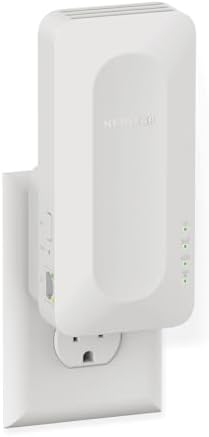
5. NETGEAR EAX17 — Best NETGEAR Wi-Fi 6 for Speed
Best For: Homes with a Wi-Fi 6 router that want faster speeds from a trusted brand
- DEAD ZONES, ELIMINATED: Bring WiFi 6 to the rooms your router cannot reach – bedrooms, garage, basement, and backyard – …
- ONE WIFI NAME ACROSS YOUR HOME: Smart Roaming keeps your existing network name and moves each device to the strongest si…
- EASY SET UP: Use the NETGEAR Nighthawk app for guided setup, or press WPS on your router and the extender
The NETGEAR Nighthawk EAX17 is an AX3000 Wi-Fi 6 extender. It carries speeds up to 3 Gbps, and NETGEAR lists coverage of up to 1,500 square feet with capacity for 20 devices.
It fits into the wall outlet and stays out of the way. It has a 1G Ethernet port for one wired device. It also supports smart roaming, so a phone or laptop can move between the router and extender without you reconnecting.
Setup is simple. Use the Nighthawk app or press WPS on your router and the extender. NETGEAR says it works with any router, and you get the best results with a Wi-Fi 6 router.
Compared with the TP-Link RE715X, this model lists a smaller coverage area and fewer devices. In return, you get a well-known brand and a clean, compact design that many people like for small to mid-sized homes.
Key Specifications
| Spec | Detail |
|---|---|
| Wi-Fi standard | Wi-Fi 6 (AX3000), dual-band |
| Listed speed | Up to 3 Gbps |
| Listed coverage | Up to 1,500 sq. ft. |
| Device capacity | 20 devices |
| Ethernet | 1G port |
| Setup | Nighthawk app or WPS |
Cons and Pros
| Cons | Pros |
|---|---|
| Lower device count than rivals | Fast AX3000 rating |
| Smaller listed coverage | Compact wall-plug design |
| 1G port, not multi-gig | Smart roaming |
| Simple setup with the Nighthawk app |
Buyer Sentiment: Established brand with steady feedback.
What Buyers Are Saying: Typical comments focus on easy setup and a clear signal boost in nearby rooms. Some buyers say it works best when placed about halfway between the router and the dead zone.
6. ASUS RP-AX58 — Best for ASUS AiMesh Routers
Best For: People who already own an ASUS router and want a seamless mesh-style network

- High Efficiency WiFi 6 – Enjoy fast speeds up to 3000 Mbps with WiFi 6 (802.11ax)
- Commercial-grade Network Security – Lifetime free ASUS AiProtection Pro, powered by Trend Micro, with WPA3 to protect yo…
- More Privacy, Anywhere – Instant Guard gives you one-click secure internet access via RT-AX68U from anywhere in the worl…
The ASUS RP-AX58 is a Wi-Fi 6 extender with a clever extra. It can join an ASUS AiMesh network as a node. That means your router and extender work together as one system, which can feel closer to true mesh than a standard extender.
According to ASUS, it delivers AX3000 speeds, with up to 574 Mbps on 2.4 GHz and up to 2,402 Mbps on 5 GHz. It supports 160 MHz channels and can cover up to 2,200 square feet. ASUS also says it works with a wide variety of non-ASUS routers, which makes it a flexible choice. See the full details on the ASUS RP-AX58 product page.
You can set it up with the ASUS Router app or the ASUS Extender app. It has one gigabit LAN port. For the best signal, you can also run an Ethernet cable from your AiMesh router to the extender. This is called wired backhaul.
Key Specifications
| Spec | Detail |
|---|---|
| Wi-Fi standard | Wi-Fi 6 (AX3000), dual-band |
| Speeds | 574 Mbps (2.4 GHz) + 2402 Mbps (5 GHz) |
| Listed coverage | Up to 2,200 sq. ft. (per ASUS) |
| Ethernet | 1 gigabit LAN port |
| Mesh support | ASUS AiMesh node |
| Setup | ASUS Router app or ASUS Extender app |
Cons and Pros
| Cons | Pros |
|---|---|
| AiMesh works best with an ASUS router | Joins AiMesh for a unified network |
| Some setup options differ in AiMesh mode | Supports 160 MHz channels |
| Larger body than slim plug-in models | Works with many non-ASUS routers |
| Wired backhaul option for better speed |
Buyer Sentiment: Favored by ASUS router owners.
What Buyers Are Saying: Owners of ASUS routers tend to like how smoothly it joins their network. Buyers with other routers should read the setup notes, since some features apply only in AiMesh mode.
7. NETGEAR EAX15 — Best for Easy Setup
Best For: Beginners who want a simple, seamless Wi-Fi 6 boost under one network name

- DEAD ZONES, ELIMINATED: Bring WiFi 6 to the rooms your router cannot reach – bedrooms, garage, basement, and backyard – …
- ONE WIFI NAME ACROSS YOUR HOME: Smart Roaming keeps your existing network name and moves each device to the strongest si…
- EASY SET UP: Use the NETGEAR Nighthawk app for guided setup, or press WPS on your router and the extender
The NETGEAR Nighthawk EAX15 is built for people who do not want to fuss with settings. It is an AX1800 Wi-Fi 6 extender with speeds up to 1.8 Gbps. NETGEAR says it adds up to 1,500 square feet and supports around 20 devices.
Its best trick is one network name. The extender uses your existing WiFi name and password. Your phone moves between the router and the extender without you picking a new network. NETGEAR calls this smart roaming.
It plugs into a wall outlet and uses internal antennas, so there is nothing to adjust. It has a 1G Ethernet port and supports WPA3 security. The Nighthawk app walks you through setup, or you can use WPS.
It is slower than the AX3000 picks on this list. But for a small home, an apartment, or a single dead zone, that is often plenty.
Key Specifications
| Spec | Detail |
|---|---|
| Wi-Fi standard | Wi-Fi 6 (AX1800), dual-band |
| Listed speed | Up to 1.8 Gbps |
| Listed coverage | Up to 1,500 sq. ft. |
| Device capacity | About 20 devices |
| Ethernet | 1G port |
| Design | Wall-plug with internal antennas |
Cons and Pros
| Cons | Pros |
|---|---|
| Slower than AX3000 models | Easy setup with the Nighthawk app |
| Modest device count | One network name with smart roaming |
| Not ideal for large homes | Compact wall-plug design |
| WPA3 security |
Buyer Sentiment: Reliable, easy-setup reputation.
What Buyers Are Saying: Feedback for this style of extender often highlights painless setup and a steady signal in nearby rooms. Buyers with large homes sometimes want more range.
8. TP-Link RE500X — Best Value Wi-Fi 6 Extender
Best For: Budget shoppers who still want Wi-Fi 6

- WIFI EXTENDERS SIGNAL BOOSTER FOR HOME: Extend high-performance WiFi with RE500X featuring high-gain antennas that are s…
- DUAL-BAND WI-FI EXTENDER WITH 1.5 GBPS TOTAL BANDWIDTH: Extend your router’s WiFi coverage with speeds up to 1201 Mbps o…
- DOES NOT INCREASE SPEEDS: Please note that all Wireless Extenders are designed to improve WiFi coverage and not increase…
The TP-Link RE500X is a popular, no-nonsense Wi-Fi 6 extender. It is rated AX1500 and covers up to about 1,500 square feet, with support for around 25 devices. It is a dual-band model and works with any router.
It includes a gigabit Ethernet port and an access point mode. That gives you a way to turn a wired connection into WiFi. It also works with TP-Link’s OneMesh, so a compatible TP-Link router can treat it as part of a mesh.
You set it up through the TP-Link app. The antennas are built to push signal into dead zones. This model has been a frequent top seller in the Amazon repeaters category, which says a lot about how many people see it as a smart, simple buy.
The trade-off is speed. It is slower than the AX3000 picks. If you have a basic internet plan and a mid-sized space, though, that may be all you need.
Key Specifications
| Spec | Detail |
|---|---|
| Wi-Fi standard | Wi-Fi 6 (AX1500), dual-band |
| Listed coverage | Up to 1,500 sq. ft. |
| Device capacity | About 25 devices |
| Ethernet | 1 gigabit port, access point mode |
| Mesh support | OneMesh compatible |
| Setup | TP-Link app |
Cons and Pros
| Cons | Pros |
|---|---|
| Lower top speed than AX3000 models | Wi-Fi 6 at a value tier |
| Smaller coverage and device count | Gigabit Ethernet port |
| Does not support the 6 GHz band | OneMesh compatible |
| Simple app setup |
Buyer Sentiment: Popular, high-volume seller.
What Buyers Are Saying: Many buyers like the easy setup and low cost. A common note is that speeds drop when the extender is too far from the router, so placement matters.
9. TP-Link RE550 — Best Wi-Fi 5 Extender for Coverage
Best For: Larger spaces with older Wi-Fi 5 devices and a router that is not Wi-Fi 6

- 𝐃𝐮𝐚𝐥-𝐁𝐚𝐧𝐝 𝐖𝐢𝐅𝐢 𝐄𝐱𝐭𝐞𝐧𝐝𝐞𝐫 𝐰𝐢𝐭𝐡 𝟏.𝟗 𝐆𝐛𝐩𝐬 𝐓𝐨𝐭𝐚𝐥 𝐁𝐚𝐧𝐝𝐰𝐢𝐝𝐭𝐡 – Extend your home network with speeds of up to 1300 Mbps (5 GHz) …
- 𝐌𝐚𝐱𝐢𝐦𝐢𝐳𝐞𝐝 𝐂𝐨𝐯𝐞𝐫𝐚𝐠𝐞 𝐮𝐩 𝐭𝐨 𝟐𝟏𝟎𝟎 𝐒𝐪. 𝐅𝐭 – Three adjustable external antennas provide reliable connections for eliminating d…
- 𝐎𝐮𝐫 𝐂𝐲𝐛𝐞𝐫𝐬𝐞𝐜𝐮𝐫𝐢𝐭𝐲 𝐂𝐨𝐦𝐦𝐢𝐭𝐦𝐞𝐧𝐭 – TP-Link is a signatory of the U.S. Cybersecurity and Infrastructure Security Agency’s (CI…
Not everyone needs the newest standard. If your router is Wi-Fi 5 and most of your devices are a few years old, the TP-Link RE550 can still do a great job. It is an AC1900 extender with speeds up to 600 Mbps on 2.4 GHz and 1,300 Mbps on 5 GHz.
Amazon’s listing says it covers up to 2,200 square feet and supports around 32 devices. It has three external antennas, which help push the signal further than small internal antennas on some plug-in models. It also has a gigabit Ethernet port and supports an access point mode.
Setup runs through the TP-Link app, and the extender supports EasyMesh. TP-Link notes that it is not compatible with mesh systems like Deco, so check that before buying.
This is an older design. It is bigger than wall-plug models. In return, you get a lot of reach and a low entry cost for people who do not need Wi-Fi 6.
Key Specifications
| Spec | Detail |
|---|---|
| Wi-Fi standard | Wi-Fi 5 (AC1900), dual-band |
| Speeds | 600 Mbps (2.4 GHz) + 1300 Mbps (5 GHz) |
| Listed coverage | Up to 2,200 sq. ft. |
| Device capacity | About 32 devices |
| Ethernet | 1 gigabit port |
| Antennas | 3 external antennas |
Cons and Pros
| Cons | Pros |
|---|---|
| Wi-Fi 5, an older standard | Strong listed coverage |
| Not compatible with Deco mesh systems | Three external antennas |
| Bulkier than wall-plug models | Gigabit Ethernet port |
| Budget-friendly entry point |
Buyer Sentiment: Long-running, well-known model.
What Buyers Are Saying: Buyers of this class of extender often like the reach and the low cost. Some say it is bulkier than they expected, and a few wish it supported Wi-Fi 6.
10. TP-Link RE315 — Best Budget WiFi Extender
Best For: Small homes, apartments, and anyone who wants the lowest cost fix

- 𝐒𝐭𝐫𝐨𝐧𝐠𝐞𝐫 𝐖𝐢-𝐅𝐢 𝐢𝐧 𝐄𝐯𝐞𝐫𝐲 𝐂𝐨𝐫𝐧𝐞𝐫 – Enjoy extended coverage with strong performance powered by Adaptive Path Selection and …
- 𝐃𝐮𝐚𝐥-𝐁𝐚𝐧𝐝 𝐖𝐢𝐅𝐢 𝐄𝐱𝐭𝐞𝐧𝐝𝐞𝐫 𝐰𝐢𝐭𝐡 𝟏.𝟐 𝐆𝐛𝐩𝐬 𝐓𝐨𝐭𝐚𝐥 𝐁𝐚𝐧𝐝𝐰𝐢𝐝𝐭𝐡 – Extend your home network with full speeds of 867 Mbps (5 GHz) an…
- 𝐌𝐚𝐱𝐢𝐦𝐢𝐳𝐞𝐝 𝐂𝐨𝐯𝐞𝐫𝐚𝐠𝐞 𝐮𝐩 𝐭𝐨 𝟏𝟓𝟎𝟎 𝐒𝐪. 𝐅𝐭 – Two adjustable external antennas provide reliable connections for eliminating dea…
The TP-Link RE315 is a simple plug-in extender for people who want to spend as little as possible. It is a Wi-Fi 5 AC1200 model, with speeds of up to 300 Mbps on 2.4 GHz and 867 Mbps on 5 GHz.
TP-Link’s listing says it covers roughly 1,500 square feet. Different versions of the listing quote slightly different coverage and device numbers, so treat the exact figures as a guide. It has one Ethernet port and supports OneMesh and EasyMesh, so it can join a compatible TP-Link network.
Setup is quick. Plug it in, follow the app or press the WPS button, and move it to a spot about halfway between your router and the weak area. Reviewers have long singled out this model as a go-to budget pick for small homes.
The Ethernet port is described as Fast Ethernet in some listing text, which would limit wired speeds. Check the spec sheet if wired speed matters to you. For simple dead zones like a bedroom or a patio, this is a very low-risk buy.
Key Specifications
| Spec | Detail |
|---|---|
| Wi-Fi standard | Wi-Fi 5 (AC1200), dual-band |
| Speeds | 300 Mbps (2.4 GHz) + 867 Mbps (5 GHz) |
| Listed coverage | Roughly 1,500 sq. ft. |
| Ethernet | 1 port (confirm speed on the listing) |
| Mesh support | OneMesh / EasyMesh compatible |
| Design | Compact wall-plug |
Cons and Pros
| Cons | Pros |
|---|---|
| Wi-Fi 5 only | Very low cost of entry |
| Ethernet port may not be gigabit | Compact and easy to place |
| Not for large homes or fast plans | OneMesh / EasyMesh support |
| Quick, simple setup |
Buyer Sentiment: Popular budget favorite.
What Buyers Are Saying: Buyers commonly praise the price and the easy setup. Reviews also note that speeds are best for browsing and streaming, not for heavy downloads.
How to Choose the Right WiFi Extender
The right extender depends on your router, your home, and how you use the internet. Here is what to weigh.
Extender or Mesh System?
An extender picks up your router’s signal and sends it again. A mesh system uses several units that work as one network. NETGEAR explains it this way: an extender rebroadcasts your existing signal to reach weak spots, which is an easy way to fill dead zones without replacing your network. You can read that overview on NETGEAR’s WiFi extender page.
If you have one or two dead zones, an extender is usually enough. If your whole home has weak spots, a mesh system may serve you better.
Match the Wi-Fi Standard
Pick an extender that fits your router. A Wi-Fi 5 router will not benefit much from a Wi-Fi 7 extender. A Wi-Fi 7 router, on the other hand, will waste its speed with a Wi-Fi 5 extender. The links in your network are only as fast as the weakest one.
- Wi-Fi 5 (AC): Fine for basic browsing and streaming.
- Wi-Fi 6 (AX): A strong all-round choice for most homes today.
- Wi-Fi 7 (BE): Best if you have a Wi-Fi 7 router and fast devices.
Dual-Band or Tri-Band
Dual-band extenders use 2.4 GHz and 5 GHz. Tri-band models add a third band, such as 6 GHz. A tri-band extender can use one band to talk to your router and another to talk to your devices. That helps protect your speed.
Understand Speed Loss
Most extenders that use a single band to link to the router and serve devices can lose a good share of speed. Tri-band models and wired backhaul reduce that loss. If you can run an Ethernet cable from the router to the extender, do it. It is the best way to keep speeds high.
Check the Coverage Claims
Coverage numbers on the box are best-case figures. Walls, floors, and appliances shrink them. Treat the listed square footage as a ceiling, not a promise.
Look at the Ethernet Port
A wired port is handy for a console, a TV, or a work PC. A gigabit port is common. A 2.5G port is a nice upgrade if your device and router can use it.
Check Mesh Compatibility
Some extenders join your router’s mesh system. TP-Link uses OneMesh and EasyMesh, and ASUS uses AiMesh. If you have a matching router, these features make the network feel more unified. If you do not, a standard extender still works.
Think About Security
Look for WPA3 support when you can. It is the newer security standard for WiFi, and it adds extra protection for your network.
If you are also fixing your desk setup, small ergonomics changes help too. Our guide on how to use a laptop stand for better posture is a good next read for any home office.
How to Set Up Your WiFi Extender for the Best Results
Even a great extender performs poorly in the wrong spot. Follow these steps.
- Start near your router. Plug the extender in close to the router and run the first setup there.
- Use the app or WPS. The brand’s app is often the easiest path. WPS is a good backup.
- Move it halfway. Place it about midway between the router and the dead zone. It needs a strong signal to pass along.
- Avoid obstacles. Keep it away from thick walls, metal, microwaves, and large appliances.
- Check the signal light. Many extenders have an indicator that shows whether the spot is good.
- Update the firmware. Updates often fix bugs and improve stability.
- Test your speed. Run a speed test near the extender and in the dead zone. Move it if needed.
Common Mistakes to Avoid
- Placing the extender in the dead zone. It cannot extend a signal it does not receive. Put it where the signal is still good.
- Buying the wrong Wi-Fi generation. Match the extender to your router and devices.
- Expecting router-level speed. Extenders add reach, but speeds can drop a bit. This is normal.
- Ignoring the Ethernet option. If you can use a cable, you will get more stable results.
- Forgetting about firmware. Old firmware can cause drops and slow speeds.
- Skipping the specs on the live listing. Amazon listings can change. Confirm the model number, ports, and features before you pay.
Quick Summary Checklist
- Pick an extender that matches your router’s Wi-Fi standard.
- Choose tri-band or wired backhaul if speed is a priority.
- Treat coverage claims as best-case numbers.
- Use the app or WPS for setup, then place the extender halfway.
- Match mesh features (OneMesh, EasyMesh, AiMesh) to your router brand.
- Confirm the model number and stock on the live Amazon page.
- If your whole home has weak spots, consider a mesh system instead.
Frequently Asked Questions
Do WiFi extenders really work?
Yes, they can. They help most when you have a few weak spots and a decent signal at the extender’s location. They are less helpful if your router signal is already poor where you plug them in.
Will a WiFi extender slow down my internet?
It can. Many extenders lose some speed because they pass data back and forth. Tri-band models and wired backhaul reduce this loss. Placement also makes a big difference.
What is the difference between a WiFi extender and a mesh system?
An extender rebroadcasts your router’s signal from a second spot. A mesh system uses several units that act as one network. Mesh is often smoother in large homes, but it costs more and replaces your router.
Where should I place my WiFi extender?
Place it about halfway between your router and the dead zone. It must receive a strong signal to send a strong one. Keep it away from walls, metal, and appliances.
Do I need a Wi-Fi 7 extender?
Only if you have a Wi-Fi 7 router and devices that support it. Otherwise, a Wi-Fi 6 model offers better value. The Wi-Fi Alliance says Wi-Fi 7 adds features like 320 MHz channels in the 6 GHz band and 4K QAM for higher speeds.
Can I use a WiFi extender with any router?
Most extenders work with standard routers. Mesh features like OneMesh, EasyMesh, and AiMesh work best when your router supports the same system.
Can I use the Ethernet port on an extender?
Yes. Most models have a port you can use for a wired device like a TV or console. Some also let you use the port in access point mode to create WiFi from a wired connection.
How many devices can a WiFi extender support?
It depends on the model. The picks in this guide list anywhere from about 20 to 128 devices. Those numbers are best-case, so expect fewer in busy homes.
Conclusion
Dead zones do not have to be a way of life. A good extender can bring a weak room back online without a big investment. For most homes, the TP-Link RE715X is the best all-around choice. It offers Wi-Fi 6 speed, a gigabit port, and large listed coverage. If you own a Wi-Fi 7 router, the TP-Link RE235BE is a smart value pick, while the RE653BE is the power move for big homes. If you just want the cheapest fix, the TP-Link RE315 is hard to beat.
Whichever one you choose, match it to your router, place it halfway, and check the live Amazon listing for stock and specs. With the right extender in the right spot, the best WiFi extenders on Amazon can turn a frustrating dead zone into a solid work-from-home corner. When your signal is sorted, you can finish your home office with a standing desk that fits your space.
As an Amazon Associate I earn from qualifying purchases.

MD.HASAN is an experienced SEO expert and amazon products review writer passionate about helping people find right products on amzon for buy without confusion. With 4 years of hands-on experience in content strategy and search engine optimization, he specializes in writing SEO-friendly blog posts that rank, engage, and convert.


