
Affiliate disclosure: As an Amazon Associate, Tech Rig Review earns from qualifying purchases. Links on this page may be affiliate links, at no extra cost to you.
If you spend hours every day at a computer, your mouse is one of the biggest sources of hidden strain on your body. Traditional flat mice force your hand into a palm-down position that twists the forearm and presses the wrist against the desk. Over time this posture contributes to discomfort, fatigue, and conditions linked to repetitive strain.
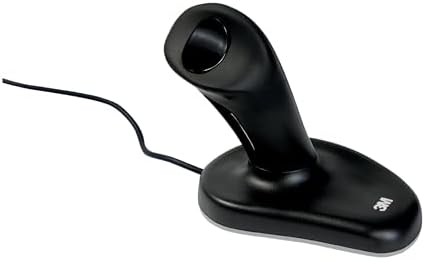
- The 3M Ergonomic Mouse has earned an Ease-of-Use Commendation from the Arthritis Foundation for its patented
- Grip the handle and rest your hand on the base
- Use your thumb to left and right click
3M’s ergonomic mouse design changed the conversation. Its upright, handshake-style grip keeps the hand and wrist in a more neutral position. Even though the original line is no longer actively produced by 3M in the same way, the design principles it popularized remain highly relevant. Shoppers still look for “3M ergonomic mouse” options on Amazon because the concept delivers real relief for many people.
This guide focuses on the information you need before buying: what makes the design effective, the benefits you can expect, exactly what to evaluate, and how to choose the right option for your hand and work style. Product listings and current availability will appear through affiliate tools, so the emphasis here stays on knowledge that helps you decide wisely and quickly.
Table of Contents
Understanding the 3M Ergonomic Mouse Design
A conventional mouse requires the hand to rest flat, rotating the forearm (pronation) and often resting the heel of the hand on the desk surface. That position can compress the carpal tunnel area and force smaller muscles in the forearm and hand to work harder for prolonged periods.
The 3M approach uses a vertical handle. You grip it the way you would shake someone’s hand. The wrist stays closer to neutral, the forearm rotates less, and larger muscle groups handle more of the movement. Left and right clicks are typically controlled by the thumb on top of the handle, and a side button often handles scrolling. The base of the device rests on the desk while the hand floats in a more relaxed posture.
This design earned recognition from the Arthritis Foundation for ease of use. Clinical observations and long-term user reports have consistently pointed to reduced muscle strain and less pressure on the median nerve when the hand stays in the handshake position. The concept influenced many modern vertical and semi-vertical mice that followed.
Key characteristics of the original design philosophy include:
- Vertical or near-vertical orientation
- Thumb-operated primary buttons
- Support for right-handed users (the classic versions were right-hand only)
- Availability in different sizes so the grip matches hand length
- Optical tracking and plug-and-play connectivity (wired or wireless)
Even if you are looking at current Amazon listings that follow this style, these foundational principles remain the reference point for evaluating comfort and effectiveness.
Major Benefits of a 3M-Style Ergonomic Mouse

Switching to a properly fitted vertical ergonomic mouse can deliver several practical advantages, especially for people who mouse for long stretches.
Reduced forearm and wrist strain
Keeping the hand in a neutral “handshake” posture decreases the constant twist that traditional mice demand. Many users notice less tightness in the forearm and less pressure at the base of the wrist within the first few days or weeks of consistent use.
Lower risk of repetitive stress issues
By reducing pronation and limiting pressure on the carpal tunnel region, the design supports healthier long-term computer use. It is not a medical treatment, but it removes one common contributing factor to discomfort associated with prolonged mouse work.
Less fatigue during extended sessions
Because larger muscle groups take on more of the work of moving the cursor, smaller muscles in the hand and wrist fatigue more slowly. People who work with spreadsheets, design tools, coding, or heavy document navigation often report they can stay productive longer before needing breaks.
Support for users with limited finger mobility or existing discomfort
The grip style allows some people to “hook” the hand onto the device rather than relying on precise finger extension. Combined with the neutral wrist angle, this can make daily computer tasks more manageable for those dealing with joint stiffness or residual strain.
Improved overall posture awareness
An upright mouse encourages better shoulder and arm positioning. When the hand is no longer forced into an awkward twist, many users naturally keep the elbow closer to the body and the shoulder more relaxed.
These benefits appear most clearly when the mouse fits the user’s hand size and when it is paired with good desk setup, regular movement breaks, and proper monitor height. The mouse alone is not a complete solution, but it is one of the highest-leverage changes many people can make.
How to Choose the Best Option for Your Needs
Selecting the right ergonomic mouse is highly individual. Use the following criteria to narrow choices efficiently.
1. Hand size and fit
This is the single most important factor. A mouse that is too large or too small forces the hand into compensatory positions that undo the ergonomic benefits.
Measure from the base of your palm (where it meets the wrist) to the tip of your middle finger or use the palm-width guidance often provided with these designs. Original 3M sizing roughly corresponded to smaller hands in one range and larger hands in another. When reviewing current options, look for clear size recommendations and, if possible, dimensions. The grip should feel secure without requiring a tight squeeze or excessive reaching for buttons.
2. Wired versus wireless
Wired versions eliminate battery concerns and can feel slightly more responsive for some users. Wireless options reduce desk clutter and allow freer movement, which is valuable if you switch between a laptop and desktop or work in different locations. Check battery life expectations and whether the device uses replaceable batteries or a rechargeable system. Reliability of the wireless connection (2.4 GHz dongle or Bluetooth) also matters for uninterrupted work.
3. Button layout and scrolling
Confirm how left-click, right-click, and scrolling are handled. Thumb-operated primary buttons are standard in this design family. Some versions include a dedicated scroll button or wheel. Consider whether you need programmable extra buttons for your software. Simple, reliable controls usually serve everyday productivity better than overly complex button arrangements that require a long learning period.
4. Tracking performance and surface compatibility
Optical sensors work well on most desks and mouse pads. Higher DPI settings can feel smoother for detailed work, but extreme sensitivity is less critical for office use than consistent, lag-free tracking. Test (or read carefully about) performance on the surfaces you actually use.
5. Compatibility
Most modern devices work with Windows and macOS via USB or wireless. Verify plug-and-play support if you prefer not to install software. Some people need multi-device pairing or the ability to switch between a computer and tablet. Check operating system requirements before purchasing.
6. Build quality and surface feel
Look for a soft-touch finish that does not become slippery with extended use. The device should feel stable on the desk and solid in the hand. Weight preference is personal—some users like a heavier base for stability, while others prefer lighter movement.
7. Right-hand versus any left-hand considerations
Classic 3M-style mice were designed for right-handed use. If you are left-handed, you will need to evaluate whether a specific listing offers a left-hand version or whether a different ergonomic approach (trackball, centered roller, or ambidextrous design) better suits you.
8. Return policy and trial period
Because fit is personal, a flexible return window is valuable. Amazon’s policies make it relatively easy to try a device and return it if the grip does not feel right after a few days of real work.
What to Check on Amazon Listings
- The 3M Ergonomic Mouse has earned an Ease-of-Use Commendation from the Arthritis Foundation for its patented
- Grip the handle and rest your hand on the base
- Use your thumb to left and right click
When you open a product page, scan these details in order:
- Size guidance and actual measurements
- Connectivity type (wired length or wireless method)
- Hand orientation (right-handed is most common for this style)
- Button description and scrolling method
- Sensor type and any DPI information
- Battery details if wireless
- Compatibility notes
- Warranty length
- Recent customer photos and feedback focused on comfort and fit rather than pure star ratings
- Current price relative to similar designs
Avoid focusing solely on the lowest price. A poorly fitting mouse that causes new strain is more expensive in the long run than a correctly sized option that supports comfortable work.
Making the Transition Smooth
Most people need a short adjustment period when moving from a flat mouse to a vertical grip. The movement pattern feels different at first, and precision can temporarily decrease.
Tips for a successful switch:
- Start with shorter sessions and gradually increase time.
- Keep your elbow close to your body and your shoulder relaxed.
- Use a mouse pad with enough space so you are not constantly lifting the device.
- Combine the new mouse with regular micro-breaks—stand, stretch the hands and forearms, and look away from the screen.
- Pair it with an adjustable chair, keyboard at the correct height, and monitor at eye level. The mouse works best as part of an overall ergonomic setup.
If discomfort increases rather than decreases after two weeks of consistent use, re-evaluate size or consider whether a different ergonomic category (such as a trackball or centered input device) might suit your specific needs better.
Broader Context: Building Sustainable Computer Habits
An ergonomic mouse addresses one major stress point, but lasting comfort comes from multiple habits:
- Take short movement breaks every 30–45 minutes.
- Keep wrists neutral while typing as well as mousing.
- Position the mouse close enough that you do not reach forward or sideways.
- Strengthen the supporting muscles of the shoulder and upper back through simple exercises.
- Adjust lighting and screen distance to reduce overall tension.
People who treat the mouse change as one piece of a larger system usually experience the strongest and most lasting improvement.
Final Thoughts on Finding the Right Match
The 3M ergonomic mouse concept remains valuable because it prioritizes a neutral hand and wrist position over the traditional flat design. When you evaluate options on Amazon, focus first on fit for your hand size, then on connectivity, button layout, and build quality that match how you actually work.
The information above equips you to read product details critically and decide quickly. Current listings that follow this design philosophy will appear through the affiliate tools integrated into the article. Choose the size and configuration that align with your measurements and daily demands, give yourself a reasonable adjustment window, and support the change with good overall workstation habits.
A well-chosen vertical ergonomic mouse can turn hours of computer work from a source of accumulating strain into a more sustainable and comfortable part of the day. Take the measurements, apply the selection criteria, and select the option that best matches your needs.

MD.HASAN is an experienced SEO expert and amazon products review writer passionate about helping people find right products on amzon for buy without confusion. With 4 years of hands-on experience in content strategy and search engine optimization, he specializes in writing SEO-friendly blog posts that rank, engage, and convert.


