
Affiliate disclosure: As an Amazon Associate, Tech Rig Review earns from qualifying purchases. Links on this page may be affiliate links, at no extra cost to you.
Laptop stand vs monitor arm — which actually helps your neck more? We compare ergonomics, cost, and real Amazon products to help you decide.
If your neck aches by the end of a workday, the question of laptop stand vs monitor arm is probably more relevant to you than any other desk purchase you’ll make this year. Both products solve the same core problem — a screen sitting too low, forcing your neck to bend forward for hours — but they solve it in different ways, at different costs, with different tradeoffs.


This guide compares laptop stands and monitor arms directly: how each one affects your neck position, what they cost, how they fit different work setups, and which one actually makes sense for you. We researched real, currently available products on Amazon rather than guessing at specs, and we’re upfront about where the two options are genuinely similar, since a lot of comparison content exaggerates the difference to make a more dramatic recommendation.
Short version, before we get into the details: both a laptop stand and a monitor arm can bring your screen up to eye level, and eye level is what actually matters for your neck. The real differences are around setup, portability, and cost — not which one is “better for your neck” in isolation. We’ll walk through exactly why below.
Table of Contents
Why Screen Height Affects Your Neck in the First Place
Your neck is built to support your head in a roughly neutral position — ears stacked over shoulders, chin level. The moment you tilt your head forward to look down at a screen, that changes.
Research on posture and cervical spine load has consistently shown that the effective weight your neck muscles support increases substantially as your head tilts forward, since the further your head moves from that neutral position, the more leverage gravity has on your neck. A head tilted forward at a moderate angle can place meaningfully more load on the neck and upper back than a head held upright, and that load is held for hours at a time during a typical workday.
A laptop sitting flat on a desk puts the screen roughly 6 to 8 inches below where your eyes naturally rest when looking straight ahead. To see it clearly, your head tips forward, and that small tilt, repeated for hours, adds up to the neck and shoulder tension a lot of remote workers know well.
Both a laptop stand and a monitor arm exist to fix the same root cause: they raise the screen so your eyes can meet it without your head tipping forward.

As the diagram shows, a laptop sitting flat on the desk is the outlier here — both a properly set up laptop stand and a monitor arm get you to roughly the same neutral neck position. The meaningful differences between the two options show up elsewhere.
What a Laptop Stand Actually Does
A laptop stand raises your existing laptop off the desk surface, tilting and lifting the screen closer to eye level. It’s a physically simple product — usually aluminum or a folding frame — that requires no installation beyond setting it on your desk.
The catch is that raising your laptop also raises its built-in keyboard and trackpad, which puts your wrists in an awkward, elevated typing position. That’s why a laptop stand is really a two-part solution: the stand itself, plus a separate external keyboard and mouse so you can keep typing at a comfortable, lower height while the screen stays raised.
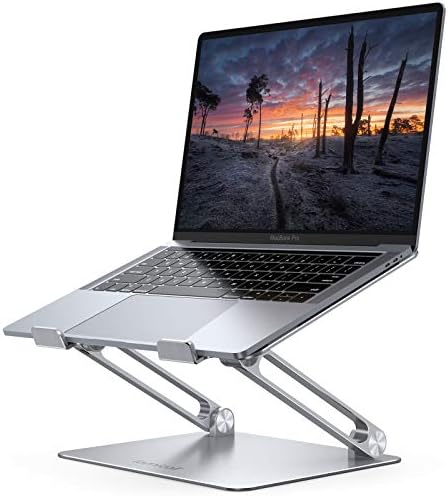
- Wide Compatibility: The laptop stand for desk is compatible with all laptops from 10″ up to 17.3″, including popular mod…
- Adjustable & Portable Design: The laptop riser can be easily adjusted to comfortable height and angle based on your actu…
- Upgrade Large Base: Made of high-quality aluminum alloy, the larger heavier base greatly improves the stability of the n…
For a solid, well-reviewed option in this category, the Lamicall Adjustable Laptop Stand is a straightforward aluminum riser that folds flat for storage or travel, adjusts across a range of height and angle settings, and fits laptops from 10 to 17.3 inches. It doesn’t require any assembly or hardware — you set your laptop on it, adjust the angle, and you’re done.

- Precision Typing: An instantly familiar experience, type with ease and comfort on this full-size wireless keyboard, feat…
- Built For Comfort: The sleek combo’s wireless mouse features an ambidextrous shape and soft rubber side grips that fit c…
- Long-Lasting Autonomy: The wireless keyboard and mouse set come with long-lasting battery life, with the keyboard lastin…
To complete the setup properly, you’ll also want an external keyboard and mouse. The Logitech MK540 Advanced Wireless Keyboard and Mouse Combo is a reliable, full-size option with a spill-resistant keyboard, an integrated palm rest, and a single USB receiver for both devices — letting you type at desk height while your laptop screen sits raised on the stand in front of you.
This combination — stand plus external keyboard — is really the complete laptop stand solution, not just the riser on its own. Skipping the keyboard and typing directly on a raised laptop just trades a neck problem for a wrist problem.
What a Monitor Arm Actually Does
A monitor arm is a mechanical mount, usually with a gas spring or counterbalance mechanism, that attaches to your desk via a clamp or a hole (grommet) mount and holds an external monitor in the air instead of on a stand or stack of books.
Unlike a laptop stand, a monitor arm doesn’t require you to buy a separate keyboard, because it’s holding a monitor, not your laptop — your laptop (if you’re also using one) or desktop tower stays at desk level, keyboard included, while the screen floats above at whatever height and angle you set.

- Great Adaptability: This HUANUO single monitor arm fits 13-32 inch monitors, holds 4.4-19.8 lbs, suitable for VESA patte…
- Full Adjustable: This PC monitor stand can remain completely stable at any angle without any extra work. Compared with o…
- 80% Sturdier Than Others: At HUANUO, we focus on improving the strength and stability of our single monitor stand. The s…
The HUANUO Single Monitor Mount is a well-established option in this category, fitting 13 to 32-inch monitors and supporting 4.4 to 19.8 pounds, with both C-clamp and grommet mounting options depending on your desk setup. It offers a wide adjustment range — tilt, swivel, height, and rotation — so once it’s installed, dialing in the exact eye-level height takes just a few seconds of adjustment.
The tradeoff is installation and permanence. A monitor arm needs to be clamped or mounted to your specific desk, and it stays there — it’s not something you fold up and take with you to a coffee shop the way a laptop stand is.
Head-to-Head: The Real Differences

The decision mostly comes down to one question: do you already use, or plan to use, an external monitor at your desk?
If you work purely off your laptop screen, a laptop stand paired with an external keyboard is the more direct fix. It’s less expensive, requires no permanent installation, and if you travel or move between rooms, it packs away in seconds.
If you already have (or want) an external monitor, a monitor arm makes more sense, since it’s built specifically to hold and position a monitor, not a laptop. It also frees up significantly more desk space than any stand, because the monitor floats above the desk surface instead of sitting on a stand or riser.
If you use both — laptop screen and an external monitor together, a common setup for people who want a second screen for reference material or a video call — a laptop stand and a monitor arm actually work well side by side, letting you match both screens to a similar eye-level height for a two-screen setup that doesn’t force your neck to swing between two different heights.
Comparing the Two Directly

A few points from that comparison are worth expanding on.
Adjustment range genuinely favors monitor arms. A gas-spring monitor arm like the HUANUO model above typically offers a much wider range of height, tilt, swivel, and forward/back depth adjustment than a laptop stand, which usually has a handful of fixed angle and height settings. If you share a desk with someone else, switch frequently between sitting and standing, or just like fine-tuning your setup, that flexibility matters.
Portability genuinely favors laptop stands. A folding aluminum stand fits in a backpack and sets up on any flat surface in seconds. A monitor arm, once clamped to a desk, isn’t something you’re taking to a co-working space or moving between rooms on a regular basis.
Cost typically favors laptop stands, especially once you factor in that a monitor arm assumes you already own (or are separately buying) an external monitor, which is a much larger expense than the arm itself. A laptop stand plus a keyboard and mouse combo is usually a smaller total investment than a monitor arm plus a monitor.
Neck benefit is roughly equal when both are set up correctly. This is the point most comparison articles get wrong by declaring one option definitively “better for your neck.” The actual ergonomic benefit comes from screen height and eye-level alignment, not from which mechanism gets you there. A poorly adjusted monitor arm left at the wrong height helps your neck exactly as little as a poorly adjusted laptop stand.
If you’re weighing a monitor arm and want a deeper look at specific models across different budgets and desk setups, our full breakdown of the best Amazon monitor stands covers a wider range of options, from simple risers to fully adjustable arms.
How to Set Either One Up Correctly
Buying the right product is only half the equation — a laptop stand or monitor arm set at the wrong height still leaves you looking down or, just as commonly, tilting your head back to look up.
Top of the screen at or slightly below eye level. When you look straight ahead without tilting your head up or down, the top third of your screen should be roughly where your eyes land. This is the single most important adjustment on either a stand or an arm.
Screen an arm’s length away. Roughly 20 to 28 inches from your eyes is a comfortable range for most people, close enough to read text clearly without leaning forward, far enough to avoid eye strain.
Elbows at roughly 90 degrees when typing. This applies specifically to the laptop stand setup, since your external keyboard height, not the screen, determines your elbow angle. If your desk doesn’t let your elbows sit near 90 degrees with the keyboard at a comfortable height, that’s a separate desk-height problem no stand or arm can fix on its own.
Recheck the height after any change to your chair or desk. If you switch chairs, adjust a standing desk, or change shoes (yes, this genuinely shifts your seated eye height slightly), it’s worth a quick recheck rather than assuming the old height still lines up.
For a broader reference on workstation ergonomics beyond screen height specifically, OSHA’s Computer Workstations eTool walks through recommended positioning for monitors, keyboards, and chairs together, and the Mayo Clinic Health System’s guidance on office ergonomics covers posture fundamentals that apply regardless of which product you choose. If you want the technical detail behind VESA mounting standards — the spec that determines whether a monitor arm will fit your specific monitor — the VESA (Video Electronics Standards Association) mounting overview explains the 75x75mm and 100x100mm patterns referenced throughout this guide.
Frequently Asked Questions
Is a laptop stand or a monitor arm better for neck pain specifically?
Both can meaningfully help if your neck pain comes from looking down at a low screen, since they solve the same underlying problem — screen height. Neither is inherently better for your neck; the right choice depends on whether you’re working from a laptop screen alone or an external monitor, and which fits your budget and space better.
Do I need an external keyboard if I get a laptop stand?
Yes, this matters a lot. Raising your laptop without an external keyboard just moves the built-in keyboard up with the screen, forcing your wrists into an awkward elevated typing position. A laptop stand is only a complete ergonomic fix when paired with a separate keyboard and mouse.
Can I use a laptop stand and a monitor arm together?
Yes, and it’s a common setup for people using a laptop alongside an external monitor. Matching both screens to a similar eye-level height keeps your neck from swinging between two different positions as you glance between screens.
Do monitor arms work with any monitor?
Only monitors with VESA mounting holes on the back (typically 75x75mm or 100x100mm patterns) can attach directly to a monitor arm. Most monitors sold in the last decade include this, but it’s worth checking your specific monitor’s spec sheet before buying an arm, since older or budget models sometimes lack VESA compatibility.
How much height adjustment do I actually need?
Enough to bring the top of your screen to eye level while you’re sitting in your normal working position — for most people, that’s a few inches of adjustment from a typical desk-level starting point. Monitor arms generally offer more total range than laptop stands, but most people only use a small portion of that range once it’s dialed in correctly.
Is a monitor arm worth it if I already have a simple monitor stand or riser?
It depends on what your current stand lacks. If a fixed riser already gets your screen to eye level and you don’t need to frequently adjust the angle or free up desk space, a monitor arm may not add much. Arms are most valuable when you need more adjustment range than a fixed stand offers, or when desk space is tight and you want the monitor’s footprint off the desk surface entirely.
Will a laptop stand work if I don’t have a flat, hard desk surface?
Most laptop stands are designed for flat, stable surfaces and can wobble on soft or uneven ones. If you’re working from a couch, bed, or similarly soft surface regularly, that’s a different use case than what a standard desk laptop stand is built for, and it’s worth looking specifically for a stand rated for that kind of flexible use.
Do I need both a laptop stand and a monitor arm, or is one enough?
For most single-screen setups, one is enough — the choice comes down to whether you’re raising a laptop screen or an external monitor. You only need both if you’re actively using two screens (laptop plus external monitor) at the same time and want them at a matched height.
Final Thoughts
The laptop stand vs monitor arm question isn’t really about which one helps your neck more — set up correctly, both get your screen to the same eye-level position, and that’s what your neck actually responds to. The real decision comes down to what you’re raising: your laptop’s own screen, or a separate external monitor.
If you’re working purely from a laptop, a stand paired with an external keyboard is the more direct, less expensive fix, and one that travels with you. If you already have or want an external monitor, a monitor arm gives you a wider adjustment range and frees up more desk space, at a higher total cost once you factor in the monitor itself. And if you’re running both screens together, there’s nothing wrong with using both products side by side.
Whichever you choose, the height adjustment afterward matters just as much as the product itself — a stand or arm left at the wrong height won’t do your neck any favors, no matter how well-built it is.
As an Amazon Associate, I earn from qualifying purchases.

MD.HASAN is an experienced SEO expert and amazon products review writer passionate about helping people find right products on amzon for buy without confusion. With 4 years of hands-on experience in content strategy and search engine optimization, he specializes in writing SEO-friendly blog posts that rank, engage, and convert.


