
Affiliate disclosure: As an Amazon Associate, Tech Rig Review earns from qualifying purchases. Links on this page may be affiliate links, at no extra cost to you.
Find the best Intel Core i5 laptops on Amazon in 2026. Compare verified Core i5 laptops for school, work, gaming, large screens, and daily use.
The best Intel Core i5 laptops on Amazon offer a strong balance of speed, battery efficiency, storage, and everyday performance. But there is one mistake many shoppers make: assuming every Core i5 laptop performs about the same. It does not.
Intel has released many generations and different Core i5 models. For example, Intel’s 12th-generation mobile lineup includes processors such as the i5-1235U and i5-12450HX, while the 13th-generation lineup includes the i5-1335U. That means the processor name is only the starting point.
For this guide, I researched Amazon listings and focused on specific configurations that could be verified, rather than simply copying old laptop lists. I also excluded products when the researched Amazon page clearly showed that the item was unavailable.
Table of Contents
Quick Comparison Table
| Laptop | Best For | Key Feature | Affiliate Link |
|---|---|---|---|
| HP 17t-cn300 | Large-screen productivity | 17.3″ FHD IPS display | Check Amazon → |
| Acer Aspire 5 17 | Large screen + dedicated GPU | RTX 2050 + 16GB RAM | Check Amazon → |
| ASUS Vivobook 15 | Everyday work | 16GB RAM + 512GB SSD | Check Amazon → |
| Lenovo V15 G4 IRU | Storage + multitasking | Core i5-1335U + 1TB SSD | Check Amazon → |
Note: The Acer Aspire 5 17 showed a limited-stock offer at the time of research. Verify availability before purchasing.
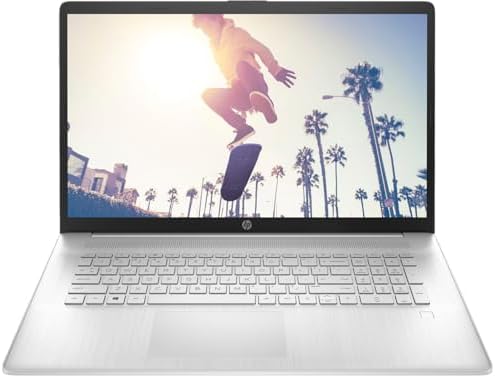
1. HP 17t-cn300 — Best for Large-Screen Productivity
The HP 17t-cn300 is an excellent choice for shoppers who want a big screen without moving to a desktop computer.
What the Amazon listing confirms: 17.3-inch Full HD IPS display, Intel Core i5-1334U processor, 8GB DDR4 memory, 256GB SSD, Intel Iris Xe graphics, Wi-Fi 6, backlit keyboard, and a fingerprint reader.
Why the Large Screen Matters
A 17.3-inch display makes a real difference when you spend time reading documents, working in spreadsheets, managing multiple windows, or watching video content. The Full HD 1920 × 1080 panel keeps text sharp and visuals clear.
The Core i5-1334U is a 13th-generation Intel processor, confirmed in Intel’s official 13th Gen Core i5 lineup (Intel). Paired with Intel Iris Xe integrated graphics, this laptop handles normal computing and light graphics work — but is not a gaming machine.
Key Specs
| Spec | Detail |
|---|---|
| Screen | 17.3″ Full HD (1920×1080) IPS |
| Processor | Intel Core i5-1334U (13th Gen) |
| RAM | 8GB DDR4 |
| Storage | 256GB SSD |
| Graphics | Intel Iris Xe (integrated) |
| Wireless | Wi-Fi 6 |
| Extras | Backlit keyboard, fingerprint reader |
| OS | Windows 10 Pro (verify before purchase) |
| ASIN | B0DQCN97D3 |
Pros and Cons
Pros
- Large 17.3-inch IPS display
- 13th-generation Core i5
- Wi-Fi 6
- Backlit keyboard and fingerprint reader
- SSD storage — faster than a hard drive
Cons
- 8GB RAM is modest for heavy multitasking
- 256GB storage fills quickly with large media files
- Integrated graphics — not for gaming
- Less portable due to size and weight
- Verify the Windows version before ordering
Who Should Buy This?
This laptop suits someone who wants a large screen for home, office, or school use — documents, spreadsheets, online learning, or streaming. It is not the right choice for users who need portability or dedicated graphics.
→ Check Current Price: HP 17t-cn300 on Amazon
2. Acer Aspire 5 17 — Best Large-Screen Laptop With Dedicated Graphics
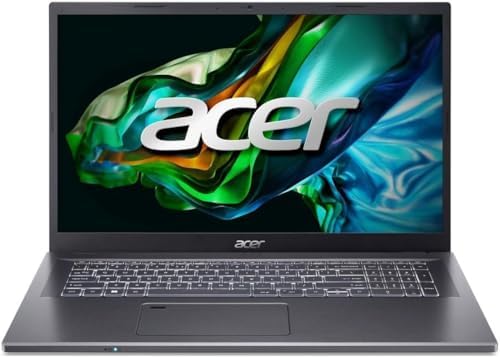
- (Memory Disk and System): 16GB 3200 MHz DDR4 SDRAM, 512GB PCI-E NVMe M.2 SSD for Storage, Pre-install Windows 10 Pro
- (Processor): Intel Core i5-1335U 10-Core Processor (Up to 4.6 GHz with Intel Turbo Boost Technology, 12 MB Intel Smart c…
- (Screen and Graphics): Brilliant 17.3″ FHD (1920 x 1080) IPS 300 nits Anti-glare 45% NTSC Thin Bezel LCD Display powered…
If you want a big screen and a dedicated graphics card, the Acer Aspire 5 17 is the standout option in this group.
What the Amazon listing confirms: 17.3-inch Full HD IPS display, Intel Core i5-1335U processor, 16GB DDR4 RAM, 512GB NVMe SSD, and NVIDIA GeForce RTX 2050 graphics (Amazon).
What Makes This One Different
The RTX 2050 is the defining feature. Every other laptop in this guide uses integrated Intel graphics. Dedicated NVIDIA graphics opens up a wider range of workloads — lighter gaming, GPU-assisted creative software, and video rendering tasks that would strain an integrated chip.
The Core i5-1335U has 10 cores and 12 threads (confirmed on the Amazon listing and Intel’s 13th Gen specification page). The 16GB DDR4 RAM is a strong configuration for modern Windows multitasking, and the 512GB NVMe SSD gives you meaningfully more storage flexibility than a 256GB drive.
Key Specs
| Spec | Detail |
|---|---|
| Screen | 17.3″ Full HD (1920×1080) IPS |
| Processor | Intel Core i5-1335U (13th Gen, 10-core) |
| RAM | 16GB DDR4 |
| Storage | 512GB PCIe NVMe SSD |
| Graphics | NVIDIA GeForce RTX 2050 (dedicated) |
| Wireless | Wi-Fi 6E |
| Connectivity | Thunderbolt 4 / USB4, HDMI 2.1 |
| Webcam | 1080p |
| Keyboard | Backlit with numeric keypad |
| Weight | ~5.29 lbs |
| ASIN | B0DYD1P4S6 |
Pros and Cons
Pros
- Dedicated RTX 2050 graphics
- 16GB RAM
- 512GB NVMe SSD
- Large 17.3-inch FHD IPS display
- Thunderbolt 4 and Wi-Fi 6E
- 1080p webcam and numeric keypad
Cons
- Heavy — not a travel laptop
- Dedicated GPU increases power consumption
- Limited review history at time of research
- Listed as limited stock — availability should be checked
- Verify OS version before purchasing
Who Should Buy This?
This is the best pick for someone who wants a large display, strong RAM and storage, and dedicated graphics for work and some gaming — all without moving up to a gaming laptop’s price tag.
→ Check Current Price: Acer Aspire 5 17 on Amazon
3. ASUS Vivobook 15 — Best for Everyday Work and Productivity

- Powerful 12th Generation Intel i5-1235U 10-Core (Base Clock 2.1GHz, Up to 4.4 GHz with Intel Turbo Boost Technology, 12 …
- [[ Customization ]] Upgraded to 16GB DDR4 SDRAM 3200 MHz | 512GB NVMe M.2 Solid State Drive | Windows 11 Pro
- Brilliant 15.6″ FHD (1920 x 1080) IPS 250 nits Anti-glare, 45% NTSC, 60Hz, Thin Bezel LCD Display. Powered by Intel Iris…
The ASUS Vivobook 15 is the most balanced all-rounder in this guide — a solid everyday laptop with a configuration that suits students, office workers, and remote workers without overcomplicating the purchase.
What the Amazon listing confirms: 15.6-inch Full HD IPS display, Intel Core i5-1235U processor, 16GB DDR4 RAM, 512GB SSD, Intel Iris Xe graphics, and Windows 11 Pro.
What Makes This Configuration Work
Two things stand out: 16GB RAM and Windows 11 Pro out of the box.
Most budget-range laptops ship with 8GB RAM. Sixteen gigabytes means you can have multiple browser tabs, a video call, a Word document, and an email client all running simultaneously without the system slowing down noticeably.
The Core i5-1235U is part of Intel’s 12th-generation U-series family, confirmed in Intel’s official 12th Gen Core i5 processor list. U-series chips are designed for the efficiency-versus-performance balance that suits everyday laptop use — not raw power, but comfortable, sustained performance for typical workloads.
At approximately 3.75 lbs, this is also a more portable machine than either of the 17-inch options above.
Key Specs
| Spec | Detail |
|---|---|
| Screen | 15.6″ Full HD (1920×1080) IPS |
| Processor | Intel Core i5-1235U (12th Gen) |
| RAM | 16GB DDR4 |
| Storage | 512GB SSD |
| Graphics | Intel Iris Xe (integrated) |
| OS | Windows 11 Pro |
| Wireless | Wi-Fi 5 |
| Keyboard | Full-size with numeric keypad |
| Battery | 42Wh |
| Weight | ~3.75 lbs |
| ASIN | B0DS5CCK29 |
Pros and Cons
Pros
- 16GB RAM — a meaningful advantage over 8GB models
- Windows 11 Pro included
- Lightweight at ~3.75 lbs
- Full HD IPS display
- Numeric keypad
Cons
- Wi-Fi 5 (not Wi-Fi 6)
- Integrated graphics only
- Modest 42Wh battery
- Limited listing-specific review history
- Verify exact configuration (RAM + SSD) before ordering
Who Should Buy This?
Students, remote workers, freelancers, and anyone who needs a reliable everyday laptop with 16GB RAM at a manageable price point. If portability matters and you do not need dedicated graphics, this is the most well-rounded choice in this guide.
→ Check Current Price: ASUS Vivobook 15 on Amazon
4. Lenovo V15 G4 IRU — Best for Storage and Heavy Local Files

- (Memory Disk and System): 16GB 3200 MHz DDR4 SDRAM, 512GB PCI-E NVMe M.2 SSD for Storage, Pre-install Windows 11 Pro
- (Processor): Intel Core i5-13420H 8-Core Processor (Up to 4.6 GHz with Intel Turbo Boost Technology, 12 MB Intel Smart c…
- (Screen and Graphics): Brilliant 15.6″ FHD (1920 x 1080) 250 nits Anti-glare 45% NTSC Thin Bezel LCD Display powered by …
The Lenovo V15 G4 IRU earns its place in this guide for one reason above the others: a 1TB SSD in a mainstream Core i5 laptop — giving you double the local storage of most comparable configurations.
What the Amazon listing confirms: 15.6-inch Full HD non-touch display, Intel Core i5-1335U processor, 16GB DDR4 RAM, 1TB PCIe NVMe SSD, and Windows 11 Pro.
Why Storage Matters Here
Most affordable laptops in this class ship with 256GB or 512GB storage. If you regularly work with large files — design projects, raw photos, downloaded video, extensive document archives — running out of local space is a constant friction point.
A 1TB SSD removes that pressure. You can store your full working file library, multiple project folders, and system applications without immediately needing an external drive.
The Core i5-1335U is a 13th-generation Intel chip. Intel’s specification page lists this processor with 10 cores, 12 threads, and a maximum turbo frequency of 4.6GHz — a capable foundation for document work, research, and multitasking.
Key Specs
| Spec | Detail |
|---|---|
| Screen | 15.6″ Full HD (1920×1080), non-touch |
| Processor | Intel Core i5-1335U (13th Gen, 4.6GHz max) |
| RAM | 16GB DDR4 |
| Storage | 1TB PCIe NVMe SSD |
| Graphics | Intel integrated graphics |
| OS | Windows 11 Pro |
| ASIN | B0D785Q19B |
Pros and Cons
Pros
- 1TB SSD — the largest storage in this guide
- 16GB RAM
- 13th-generation Core i5-1335U
- Windows 11 Pro
- Good for data-heavy workflows
Cons
- Integrated graphics only
- Non-touch display
- Not designed for gaming
- Important: The listing notes the machine may have been opened by the seller to upgrade RAM and storage — verify seller, warranty, and condition carefully before ordering
Who Should Buy This?
Office workers, researchers, students with large project libraries, and anyone who keeps substantial files locally and does not want to manage storage constantly. The 1TB SSD is the defining reason to choose this model.
→ Check Current Price: Lenovo V15 G4 IRU on Amazon
Which Laptop Should You Choose?
Use this quick guide to match your priorities to the right pick:
| Your Priority | Best Choice |
|---|---|
| Largest possible screen | HP 17t-cn300 |
| Large screen + dedicated graphics | Acer Aspire 5 17 |
| Balanced everyday performance | ASUS Vivobook 15 |
| Maximum local storage | Lenovo V15 G4 IRU |
Buyer’s Guide: What to Know Before You Buy
What Does “Core i5” Actually Mean?
Core i5 is Intel’s mainstream processor family — positioned above Core i3 and below Core i7. But “Core i5” alone tells you very little. The generation and model suffix matter far more than the i5 name.
For example, the four processors in this guide — the i5-1235U, i5-1334U, i5-1335U — are meaningfully different in generation, architecture, and capability. Intel’s official processor database confirms that Core i5 chips vary significantly in core count, clock frequency, cache size, and power class (Intel).
Always look at the full processor model number, not just the Core i5 label.
U vs. H vs. HX: What the Suffix Means
The letters at the end of Intel’s processor names indicate the chip’s power class and intended use:
U-Series (e.g., i5-1335U, i5-1334U) Optimised for efficiency. Used in thin laptops, office machines, student notebooks, and everyday productivity laptops. This is the type used in all four laptops in this guide.
H-Series (e.g., i5-12500H) Higher sustained performance. Found in gaming laptops, creator workstations, and performance-focused notebooks.
HX-Series (e.g., i5-12450HX) Maximum performance tier for laptops. A very different machine from a U-series chip — closer to a desktop processor in a laptop body.
A quick note on the Lenovo LOQ with the i5-12450HX: although researched for this guide, the Amazon listing for that configuration showed as unavailable, so it has not been included as a current recommendation. Always verify availability before publishing or purchasing.
How Much RAM Do You Actually Need?
8GB RAM is workable for:
- Basic web browsing
- Email and word processing
- Light student use
- Simple multitasking
16GB RAM is better for:
- Multiple browser tabs open simultaneously
- Office applications + video calls running together
- Photo editing
- Freelance and research workflows
- Laptops you plan to keep for 3–5 years
Three of the four laptops in this guide ship with 16GB RAM. The HP 17t-cn300 ships with 8GB — acceptable for lighter use, but worth noting if you multitask heavily.
How Much SSD Storage Do You Need?
| Storage | Best For |
|---|---|
| 256GB | Basic users, cloud-first workflows |
| 512GB | Most everyday users — a practical balance |
| 1TB | Users with large local file libraries |
The Lenovo V15 G4 IRU is the only laptop in this guide with a 1TB SSD — a genuine advantage for users who store lots of files locally.
Do You Need Dedicated Graphics?
No, for most everyday use. Integrated Intel Iris Xe graphics handles comfortably:
- Web browsing
- Microsoft Office applications
- Video streaming
- Video calls
- Online learning
- General productivity
Yes, if you need:
- Gaming (even lighter gaming)
- 3D modelling or rendering
- GPU-accelerated video editing
- Some creative software workloads
The Acer Aspire 5 17 is the only laptop in this guide with a dedicated GPU (NVIDIA RTX 2050) — which is why it stands out for users who want graphics capability alongside a large screen.
15.6-Inch vs. 17.3-Inch: Which Screen Size Is Right?
Choose 17.3 inches if:
- Your laptop lives on a desk most of the time
- You work with spreadsheets, documents, or multiple windows
- Screen real estate matters more than portability
Choose 15.6 inches if:
- You carry your laptop regularly
- Portability is a priority
- You want a lighter, more compact machine
A Note on Seller-Upgraded Laptops
Some Amazon marketplace sellers sell laptops they have opened and upgraded — typically adding RAM or replacing the SSD with a larger model.
The Lenovo V15 G4 IRU listing explicitly notes this. It is not automatically a bad thing — the resulting specs can be excellent — but it introduces variables you need to check:
- Who is the seller, and what is their rating?
- What does the return and warranty policy cover?
- Are the listed RAM and SSD amounts confirmed in the current listing?
- Is the laptop listed as “New” or another condition?
Always verify these details before completing a purchase of a seller-upgraded configuration.
Intel Core i5 Laptop Buying Checklist
Before you click Buy Now, run through this list:
- [ ] Full processor model number confirmed (not just “Core i5”)
- [ ] RAM amount verified — 16GB is the recommended target
- [ ] SSD size confirmed — 512GB for general use; 1TB if you store lots locally
- [ ] Display resolution — Full HD (1920×1080) as a minimum baseline
- [ ] Graphics type — integrated for everyday use; dedicated if you need GPU workloads
- [ ] Operating system — Windows 11 preferred for a new 2026 purchase
- [ ] Seller checked — especially important for marketplace and seller-upgraded listings
- [ ] Return policy reviewed
- [ ] Current availability confirmed — Amazon listings can change quickly
Related Guides on Tech Rig Review
If you’re building a full desk setup around your new laptop, these related guides are worth reading:
- 10 Best Adjustable Laptop Stands on Amazon — raise your screen to eye level and improve your posture
- Top 10 Amazon Desk Accessories for Work From Home — complete your home-office setup
- 10 Best Amazon Document Holders for Desk — useful if you work alongside printed materials
Frequently Asked Questions
Are Intel Core i5 laptops good?
Yes — a good Core i5 configuration handles everyday work, school, web browsing, video calls, and streaming comfortably. The generation and model number matter more than the i5 label alone.
Is Core i5 better than Core i3?
Core i5 generally targets higher performance than Core i3. That said, comparing by exact generation and processor model is always more reliable than comparing by tier name alone.
Is Core i5 good for students?
Yes. For documents, web research, presentations, video meetings, and online learning, a suitable Core i5 laptop is more than sufficient.
Is 16GB RAM necessary?
Not essential for everyone — but it is the better choice if you multitask heavily or want the laptop to remain comfortable for several years. Three of the four laptops in this guide include 16GB.
Is 512GB SSD enough?
For most everyday users, yes. It balances capacity with convenience. If you store large video or photo files locally, consider the 1TB option in the Lenovo V15.
Can a Core i5 laptop run games?
It depends on the graphics. A Core i5 with integrated Intel Iris Xe graphics is not a gaming machine. A Core i5 with a dedicated NVIDIA GPU — like the Acer Aspire 5 17 with its RTX 2050 — can handle lighter gaming titles.
Should I buy a 17-inch laptop?
Choose a 17-inch model if screen size matters more than portability, and your laptop mostly stays on a desk. Choose 15.6 inches if you carry it regularly.
Is Core i5 good for office work?
Yes. Core i5 handles Microsoft Word, Excel, PowerPoint, email, web browsing, and video meetings without difficulty.
What should I check before buying a Core i5 laptop on Amazon?
Verify the full processor model, RAM, SSD, display resolution, GPU, operating system, seller identity, return policy, and current availability. Never assume the listing shown during research still matches what’s available when you purchase.
Final Verdict
The best Intel Core i5 laptop on Amazon depends entirely on what you need from it.
For the largest screen — the HP 17t-cn300 at 17.3 inches.
For a large screen with dedicated graphics — the Acer Aspire 5 17 with its RTX 2050, 16GB RAM, and 512GB SSD.
For the best all-around everyday laptop — the ASUS Vivobook 15 with 16GB RAM and Windows 11 Pro.
For maximum local storage — the Lenovo V15 G4 IRU with its 1TB SSD and 16GB RAM combination.
The single most important advice in this guide: do not shop by “Core i5” alone. Always read the complete processor model, RAM, storage, display type, graphics, and seller information before purchasing. Then check the live Amazon listing one more time — availability changes, and a listing that was in stock during research may not be in stock when you buy.
Research Sources
- Intel Processor Names and Generation List — processor naming and suffix information
- 12th Generation Intel Core i5 Processors — full 12th Gen i5 specification database
- 13th Generation Intel Core i5 Processors — full 13th Gen i5 specification database
This article is research-based. I did not purchase or personally test these laptops. Product specifications, availability, configurations, sellers, and buyer feedback can change. Always verify the live Amazon listing before purchasing.

MD.HASAN is an experienced SEO expert and amazon products review writer passionate about helping people find right products on amzon for buy without confusion. With 4 years of hands-on experience in content strategy and search engine optimization, he specializes in writing SEO-friendly blog posts that rank, engage, and convert.


