Affiliate disclosure: As an Amazon Associate, Tech Rig Review earns from qualifying purchases. Links on this page may be affiliate links, at no extra cost to you.
Looking for the best Dell 17 inch laptop on Amazon? Compare five researched Dell 17.3-inch laptops for work, design, gaming, and heavy use.
Finding a Dell 17 inch laptop on Amazon isn’t as simple as searching for a current Dell consumer model and picking the first result. Dell’s 17-inch options are now much more focused on large-screen professional workstations and older premium models that continue to appear through marketplace sellers and renewed listings.
That changes how you should shop. A large laptop can be excellent for spreadsheets, photo editing, engineering software, coding, video work, and other tasks where screen space matters — but a 17.3-inch machine can also be heavy and expensive, and older models may offer excellent hardware value while using processors and graphics technology from previous generations.
For this guide, I researched Dell 17-inch and 17.3-inch models that have appeared on Amazon and compared their screen options, processors, graphics capabilities, memory potential, storage options, and intended use — checking Dell’s official documentation where possible rather than relying only on marketplace descriptions.
Table of Contents
Research note: These are research-based recommendations. I did not personally buy or test these laptops, and I’ve avoided publishing temporary Amazon prices since listings can change.
For a broader Dell comparison, see 5 Best Dell Laptops on Amazon Right Now — 2026 and 5 Best HP 17-Inch Laptops on Amazon in 2026.
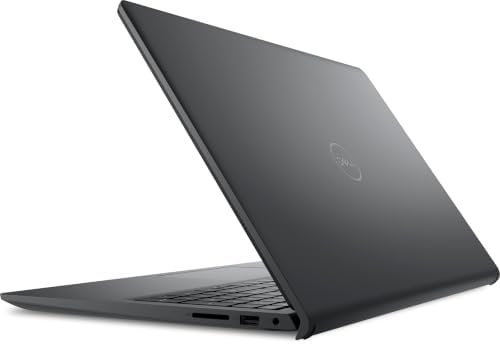

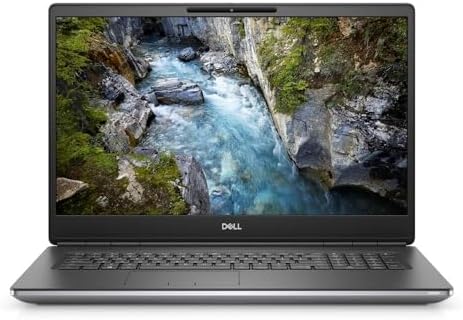

Quick Comparison
| Product | Best For | Key Feature | Buyer Sentiment |
|---|---|---|---|
| Dell XPS 17 9720 | Premium productivity and creative work | Large UHD+ display option | Established premium-model feedback |
| Dell Precision 7720 | Budget workstation buyers | 17.3″ workstation platform | Established older-model feedback |
| Dell Precision 7740 | Professional workstation use | 17.3″ workstation design | Established workstation feedback |
| Dell Precision 7760 | Heavy professional workloads | 17.3″ display + workstation GPUs | Positive feedback on some listings |
| Dell Precision 7780 | High-end professional work | Modern 17.3″ workstation platform | Strong current-listing presence |
Important: Amazon product availability, seller, condition, configuration, and warranty can change. Always confirm the exact configuration on the live listing before ordering.
1. Dell XPS 17 9720
Best Premium Dell 17-Inch Laptop
The pick to look at first if your priority is a large premium display rather than a traditional mobile workstation. The XPS 17 9720 belongs to Dell’s XPS family, designed as a large-screen premium laptop. One configuration associated with Amazon (ASIN B09PHBDT7K) pairs an Intel Core i9-12900HK, 32GB memory, a 1TB SSD, NVIDIA GeForce RTX 3060 graphics, and a 17-inch UHD+ touchscreen.
The important difference between the XPS 17 and the Precision models below is the audience: the XPS line is a premium consumer and creator laptop, while the Precision line is built around professional workstation workloads. For someone editing photos, working with large spreadsheets, writing code, managing many browser windows, or doing occasional video editing, that distinction matters — a 17-inch screen gives you more room to work without constantly switching windows, whether that’s a browser beside a document, a visible timeline while editing, or comfortable work with large spreadsheets.
The downside is age — this isn’t a current-generation laptop, which doesn’t automatically make it a bad purchase, but means paying close attention to the exact configuration and seller, since processor, GPU, RAM, SSD, display, and condition can all vary between listings.
Key specs (referenced configuration): 17″ class display, UHD+ resolution option · Intel Core i9-12900HK · 32GB RAM · 1TB SSD · NVIDIA GeForce RTX 3060 Laptop GPU · Windows 11 Pro · premium XPS chassis
| ✅ Pros | ❌ Cons |
|---|---|
| Large screen excellent for multitasking | Older generation |
| Premium XPS design | Can be expensive depending on configuration |
| Strong processor options | Larger and less portable than smaller XPS models |
| Dedicated NVIDIA graphics available | Listings may be sold by third-party sellers |
| High-resolution display configurations | Exact specifications can differ between listings |
Who should buy it: anyone who wants a large premium Dell laptop, a big screen for multitasking, dedicated graphics, or a premium alternative to a workstation — especially buyers who want a Dell 17-inch laptop without needing workstation certification.
Who should skip it: anyone needing the newest CPU platform, the easiest warranty experience, or the lowest possible weight — and avoid any listing where the exact RAM, SSD, display, and GPU configuration isn’t clear.
2. Dell Precision 7720
Best Older Budget Workstation
A very different type of 17-inch Dell laptop — an older mobile workstation designed for professional workloads, not a machine to recommend to someone who simply wants the newest everyday computer. It makes sense for buyers who specifically want a large workstation and are comfortable with an older or renewed machine.
A recently tracked Amazon deal showed a Dell Precision 7720 17.3-inch FHD configuration with an Intel Core i7-6820HQ, 32GB RAM, 512GB SSD, and Windows 11 Pro, listed as renewed. The Precision 7720 was built for professional users — older Precision workstations were commonly configured with dedicated professional graphics and large amounts of memory. The advantage today is potential value: a lot of hardware for buyers who don’t care about having the newest CPU generation.
The disadvantage is equally clear: the Core i7-6820HQ belongs to an old processor generation and shouldn’t be compared directly with current high-end laptop CPUs. Battery life is another area where an older 17-inch workstation won’t compete with a modern thin laptop — but if your goal is a large screen for desk-based work, that limitation may matter less.
Key specs (tracked configuration): 17.3″ FHD display · Intel Core i7-6820HQ · 32GB RAM · 512GB SSD · Windows 11 Pro · renewed condition · Dell Precision workstation chassis (other configurations exist)
| ✅ Pros | ❌ Cons |
|---|---|
| Large 17.3″ display | Very old CPU platform |
| Workstation-oriented design | Heavy compared with modern laptops |
| Can be found with substantial RAM | Battery technology and condition matter |
| SSD configurations available | Renewed listings vary in condition |
| Windows 11 Pro configurations exist | Not ideal if you want current-gen performance |
Why it stands out: the combination of large display + workstation design + potentially large RAM + lower cost than newer workstations makes it more interesting as a secondary desk workstation than a general-purpose laptop.
Who should buy it: home-office workstation users, buyers who want a large screen, technical users comfortable with renewed hardware, and anyone who values RAM and workstation features over portability.
Who should skip it: anyone needing long battery life, modern integrated AI features, current-generation CPU performance, a lightweight laptop, or a premium modern display.
🔗 Search current Dell Precision 7720 listings on Amazon
3. Dell Precision 7740
Best for Professional Workstation Value
Another older 17.3-inch mobile workstation, sitting in an interesting position because it can offer substantially more professional hardware than a typical consumer laptop from the same period. Amazon-associated configurations include a Precision 7740 with an Intel Core i7-9850H, 16GB RAM, and 512GB SSD (ASIN B0832DBXWH). Other configurations have been documented with Core i9 processors and professional NVIDIA Quadro graphics, including the Quadro RTX 3000 or RTX 4000.
This makes the Precision 7740 more interesting for professional software than an ordinary office laptop — think CAD, engineering, 3D applications, and professional graphics workloads. The exact GPU is very important, though — don’t buy a Precision 7740 simply because the listing title says “workstation.” Check the exact graphics card.
Key specs (varies by configuration): 17.3″ display (some FHD, some higher-resolution — verify) · Intel Core i7/Xeon options · up to high-capacity DDR4 memory · NVIDIA Quadro professional graphics · SSD storage · Windows 10 Pro or 11 Pro depending on listing · large workstation chassis
Display options — read carefully: not every Precision 7740 has the same screen; some documented configurations use Full HD panels, others use higher-resolution displays. The model number alone isn’t enough — read the exact Amazon title and specification section before purchasing.
| ✅ Pros | ❌ Cons |
|---|---|
| Large 17.3″ display | Older platform |
| Professional workstation platform | Heavy |
| Multiple CPU options | Not designed primarily for travel |
| Professional NVIDIA graphics options | Battery condition matters on renewed units |
| Suitable for demanding technical software | Configuration differences can be substantial |
Why it stands out: useful for buyers who want workstation hardware without necessarily paying for the newest workstation generation. Professional GPU options matter more than simply having a high-end consumer GPU, since professional graphics cards are designed with workstation software in mind.
Who should buy it: CAD users, engineers, technical professionals, developers who want a large screen, creative professionals needing dedicated graphics, and buyers comfortable with renewed hardware.
Who should skip it: anyone whose main needs are casual web browsing, school work, maximum battery life, easy portability, or the latest CPU technology.
4. Dell Precision 7760
Best Balance of Workstation Power and Large Display
One of the more interesting choices here — newer than the Precision 7720 and 7740, with a much more modern workstation platform. Dell’s official documentation confirms the Precision 7760 was offered with 17.3-inch displays, including FHD (1920×1080) and UHD (3840×2160) options, plus professional NVIDIA graphics such as the RTX A3000, RTX A4000, and RTX A5000.
That gives the Precision 7760 a very clear purpose — for people who need more than a normal laptop, built around professional workloads with a screen size many engineers, designers, analysts, and creators appreciate. Tracked Amazon listings vary widely: one recent record showed a 17.3-inch FHD configuration with an Intel Core i7-11850H, 32GB RAM, 512GB SSD, and NVIDIA RTX A3000; another used a Xeon W-11955M processor, 128GB RAM, multiple SSDs, and RTX A5000 graphics. These are very different machines with the same model name — that’s the key point.
Key specs (varies by configuration): 17.3″ FHD or UHD display · Intel Core or Xeon processors · DDR4 memory, large configurations available · NVIDIA professional RTX graphics · multiple SSD configurations · Windows 11 Pro on some listings
| ✅ Pros | ❌ Cons |
|---|---|
| Excellent 17.3″ display size | Large and heavy |
| FHD and UHD options | Renewed configurations are common |
| Professional NVIDIA RTX graphics | Specifications vary significantly |
| Strong CPU choices, large memory configs | Battery life is not its main strength |
| Good fit for engineering and creative workloads | Some configurations can be very expensive |
Why it stands out: a good middle ground — newer workstation architecture than the 7720/7740, while old enough that buyers may find interesting renewed configurations, sitting between the older Precisions and the more modern (and pricier) 7780.
Who should buy it: engineers, architects, CAD users, 3D professionals, developers, video professionals, technical users, and power users who want a large screen.
Who should skip it: frequent travelers, students who carry a laptop all day, buyers focused on battery life, anyone who only needs basic office software, or anyone uncomfortable buying renewed hardware.
5. Dell Precision 7780
Best High-End Dell 17-Inch Workstation
The most capable workstation platform in this group. Dell’s official specifications show the Precision 7780 supports 13th-generation Intel Core i5, i7, and i9 processors — the Core i7-13850HX has 20 cores, and the Core i9-13950HX has 24 cores. The display is properly large too: Dell lists both 17.3-inch FHD (1920×1080, 60Hz) and 17.3-inch UHD (3840×2160, 120Hz refresh rate) options.
The graphics options are another major reason to consider this machine — Dell lists professional NVIDIA options ranging from RTX A1000 through RTX 5000 Ada Generation, depending on configuration. This is genuine workstation territory, not just a large laptop. A recently tracked Amazon listing (ASIN B09KCPXPPR) included a 13th-gen Intel Core i7-13850HX, 32GB DDR5 memory, 2TB SSD storage, and an NVIDIA RTX 4000 Ada GPU — again, the exact configuration matters.
Key specs: 17.3″ FHD or UHD (120Hz) display · 13th-gen Intel Core i5/i7/i9 · DDR5 memory, up to 128GB CAMM on supported configurations · NVIDIA RTX professional graphics (A1000 through RTX 5000 Ada Generation) · multiple storage configurations · Windows 11 Pro options · mobile workstation design
| ✅ Pros | ❌ Cons |
|---|---|
| Modern 13th-gen Intel CPU options | Large and heavy |
| 17.3″ display with UHD option | Expensive configurations can be hard to justify for basic work |
| Professional NVIDIA RTX graphics | Not ideal for casual users |
| Large DDR5 memory capacity | Battery life is less important than performance here |
| Strong workstation platform, multiple configs | Amazon configurations may differ significantly |
Why it stands out: the combination of a large screen, high-core-count processor options, large memory capacity, and professional NVIDIA graphics makes it suitable for workloads that overwhelm ordinary laptops — CAD, 3D work, engineering software, demanding development, and content-production workflows. The major trade-off: this isn’t a laptop designed around minimal weight. If you travel daily, a smaller laptop plus an external monitor may make more sense.
Who should buy it: anyone needing professional workstation graphics, a large display, high-end CPU performance, large amounts of RAM, engineering or CAD work, 3D design, professional content creation, or heavy multitasking.
Who should skip it: anyone needing a lightweight laptop, long battery life, a budget computer, a basic school laptop, or a machine mainly for web browsing.
How to Choose the Right Dell 17-Inch Laptop
Buying a Dell 17-inch laptop requires a different approach from buying a small everyday laptop — the larger screen is useful, but it usually comes with extra weight and size.
1. Decide what you actually need the laptop to do. If you mostly use Microsoft Office, email, Chrome, Zoom, YouTube, basic accounting, or WordPress, you probably don’t need a high-end Precision workstation — a large screen can still help, but workstation-class hardware would be excessive. If you work with CAD, 3D modeling, architecture, engineering, video editing, professional graphics, or large datasets, a Precision workstation makes much more sense.
2. Think about screen resolution. A 17.3-inch screen can come in different resolutions — Full HD (1920×1080) or UHD (3840×2160). Higher resolution gives you more pixels and can make detailed images and text look sharper, but it can also use more power. A good FHD panel is enough for many office users; UHD is more attractive for photo editing, design, video, and detailed technical work.
3. Check the exact processor. Don’t buy based only on “Core i7” or “Core i9” — the generation matters enormously. The Precision 7780 supports 13th-generation Core processors (i7-13850HX, i9-13950HX); the Precision 7720 can appear with much older processors like the Core i7-6820HQ. Both say “Core i7” — they are not remotely the same generation. Always check the complete processor model.
4. Pay attention to the GPU. For basic work, integrated graphics may be enough. For professional workloads, the GPU becomes much more important — the Precision 7760 can be configured with the RTX A3000, A4000, or A5000; the Precision 7780 goes further with RTX A1000 through RTX 5000 Ada Generation. That’s why these machines suit professional workloads better than an ordinary large-screen office laptop.
5. Check RAM. 16GB is a comfortable starting point for basic work; more RAM helps with many browser tabs, Photoshop, video editors, virtual machines, large datasets, or CAD applications. The Precision 7780 is especially notable — Dell documents memory configurations up to 128GB using CAMM on supported configurations. But don’t pay for 128GB if your workload only needs 16–32GB.
6. Check SSD capacity. 512GB is a practical starting point for many users; 1TB gives more room for photos, videos, games, software, and project files. Professional users may want more — some Precision 7760/7780 configurations include multiple drives or large SSD capacities. Check the exact listing.
7. Think about weight. One of the biggest mistakes buyers make. A 17-inch laptop is large; a 17-inch workstation is even larger — not necessarily bad if it stays on a desk, but a real factor if you carry it between classes, offices, meetings, or coffee shops. Check the dimensions and weight of the exact model before purchasing.
8. Be careful with renewed Amazon laptops. Several Dell 17-inch models on Amazon are older or renewed — not automatically a reason to avoid them, but a reason to inspect condition, seller, warranty, return policy, battery condition, charger, and the exact CPU, GPU, RAM, SSD, and display resolution. A renewed Precision workstation with strong specifications can make sense; a poorly described listing can be a headache.
9. Compare the exact Amazon configuration — the most important rule here. Don’t buy a laptop simply because the model name matches this article. Amazon sellers sometimes use the same model name for wildly different configurations — one Precision 7760 could have 16GB RAM, 512GB SSD, and an FHD display; another could have 128GB RAM, multiple SSDs, a 4K display, and an RTX A5000. Always click through and check the current listing.
Dell 17-Inch vs. 16-Inch Laptop
For desk work, the larger screen can be excellent — more physical screen area helps with spreadsheets, video editing, CAD, large documents, side-by-side applications, coding, and research. But a 16-inch laptop is easier to carry. If portability matters, compare both sizes before deciding.
See also: Amazon laptop buying guide on TechRigReview for more ideas outside Dell’s 17-inch range.
Are Dell 17-Inch Laptops Good for Gaming?
Some can be — it depends on the GPU. A Dell XPS 17 configuration with an NVIDIA GeForce RTX GPU can handle gaming better than a machine with only integrated graphics, and Precision workstations can also have powerful NVIDIA GPUs. However, a professional GPU doesn’t automatically make a workstation the best gaming laptop — gaming laptops are often designed specifically around high refresh-rate displays, gaming GPU power limits, cooling, keyboard features, and gaming software. If gaming is your primary goal, compare dedicated gaming laptops before buying a workstation.
Are Dell 17-Inch Laptops Good for Students?
They can be, but size matters. Great for students studying engineering, architecture, computer science, design, or video production — the extra screen area makes technical software much easier to use. But carrying a large workstation around campus every day can get tiring. For a student who mostly writes papers and browses the web, a smaller Dell laptop is likely a better choice; for engineering or design students, the larger display is genuinely useful.
Are Dell Precision Workstations Worth Buying Used or Renewed?
Sometimes, yes — one of the more interesting reasons to look at older Dell Precision laptops. Professional workstations often have hardware that stays useful for years; a Precision with 32GB RAM, a capable SSD, dedicated graphics, and a good display can still handle many workloads. But buying used or renewed requires more research: check the seller, return policy, battery, display, keyboard, charger, and — most importantly — the exact configuration.
XPS vs. Precision: Which Dell 17-Inch Laptop Is Better?
Choose XPS if you want: premium design, a large high-resolution screen, a more consumer-friendly laptop, creative work, general productivity, or occasional graphics work. The XPS 17 9720 is the obvious example.
Choose Precision if you want: professional workstation hardware, professional NVIDIA graphics, large memory options, CAD, engineering, 3D applications, or heavy professional workloads. The Precision 7760 and 7780 are stronger examples.
FAQ
What is the best Dell 17 inch laptop on Amazon?
For premium everyday and creative use, the Dell XPS 17 9720 is the most attractive option here. For serious professional workstation work, the Dell Precision 7780 is the stronger choice because of its newer processor platform, large memory support, and professional NVIDIA graphics options.
Does Dell still make 17 inch laptops?
Dell’s large-screen lineup is now more focused on professional workstation models than the old mainstream 17-inch consumer laptop market. The Precision 7780 is a good example — officially listed as a 17.3-inch workstation with multiple professional hardware configurations.
Is a 17 inch laptop better than a 15 or 16 inch laptop?
Not necessarily. A 17-inch laptop is better if you value screen space; a smaller laptop is better if portability matters more. For desk-based productivity, a 17-inch model can be excellent; for frequent travel, smaller is usually easier.
Is Dell Precision better than Dell XPS?
Neither is universally better. XPS is more focused on premium consumer and creative use; Precision is focused on professional workstation workloads. If you use CAD or professional 3D software, Precision is usually the more appropriate family. If you want a premium everyday laptop with a large screen, XPS may be more appealing.
Is the Dell Precision 7780 good for engineering?
It can be an excellent fit when configured with suitable professional graphics and enough RAM. Dell offers professional NVIDIA GPU options for the Precision 7780, including RTX A-series and Ada-generation workstation graphics — always match the GPU and CPU to the specific engineering software you use.
Can a Dell 17 inch laptop replace a desktop?
For many people, yes — a powerful Precision workstation can handle serious professional workloads without staying permanently on a desk. But desktops still offer more upgrade flexibility, larger cooling systems, more storage, larger graphics cards, and easier repairs. The advantage of the Dell workstation is mobility.
Should I buy a renewed Dell laptop on Amazon?
A renewed Dell laptop can be worth considering if the configuration is strong and the seller offers a reasonable return policy. Older Precision workstations are particularly interesting since they can provide strong professional hardware — but check the exact condition and warranty before buying.
How much RAM should a Dell 17 inch laptop have?
16GB is a sensible target for basic work; 32GB or more makes sense for heavier professional work. If you use virtual machines, large datasets, professional creative software, or complex engineering applications, higher memory can be worthwhile — the Precision 7780 supports up to 128GB CAMM on supported configurations.
Is the Dell XPS 17 9720 still worth buying?
It can be, especially with a configuration featuring a strong CPU, dedicated graphics, enough RAM, and a good display. It’s an older model, though — don’t pay a premium simply because the laptop carries the XPS name. Compare the exact configuration with newer laptops before purchasing.
Final Verdict
The best Dell 17-inch laptop on Amazon depends heavily on what you plan to do.
For a premium large-screen laptop that combines productivity and creative capability, the Dell XPS 17 9720 is the most natural choice — its large display and available dedicated graphics make it more versatile than a basic office laptop.
For professional work, the Dell Precision 7780 is the strongest overall choice — its 17.3-inch display, 13th-generation Intel processor options, large memory capacity, and professional NVIDIA graphics give it a much more workstation-focused design.
The Precision 7760 is also worth considering if you want a capable workstation but are open to an older generation — its 17.3-inch display options and professional GPU configurations make it strong for engineering, design, and other demanding work.
The older Precision 7720 and 7740 are more specialized choices — they can make sense with a good renewed configuration, but buyers need to pay close attention to processor generation, battery condition, display, GPU, seller, and warranty.
Most importantly, don’t buy based on the model name alone. Amazon sellers can change the available RAM, storage, GPU, display, condition, and warranty while keeping the same basic model name — always check the exact configuration before ordering.
Our Picks at a Glance
- Best Premium: Dell XPS 17 9720
- Best Professional Workstation: Dell Precision 7780
- Best Workstation Value: Dell Precision 7760
- Best Older Budget Workstation: Dell Precision 7720
- Best Older Professional Workstation: Dell Precision 7740
🔗 Shop Dell 17 Inch Laptops on Amazon
Amazon Associates Disclosure: As an Amazon Associate I earn from qualifying purchases.

MD.HASAN is an experienced SEO expert and amazon products review writer passionate about helping people find right products on amzon for buy without confusion. With 4 years of hands-on experience in content strategy and search engine optimization, he specializes in writing SEO-friendly blog posts that rank, engage, and convert.


