
Affiliate disclosure: As an Amazon Associate, Tech Rig Review earns from qualifying purchases. Links on this page may be affiliate links, at no extra cost to you.
Shopping for the best Razer wireless mouse in 2026? We compared specs, grip styles, and verified buyer feedback to find the right Razer mouse for every use case.
Razer has spent years building a reputation as one of the most trusted names in gaming peripherals, and its wireless mouse lineup is a big part of that reputation. But “Razer wireless mouse” isn’t one product — it’s an entire family, ranging from feather-light esports mice to feature-packed everyday mice with a dozen programmable buttons. Picking the right one depends entirely on what you actually do with your mouse all day.
This guide breaks down the best Razer wireless mouse options currently available, based on a research-backed comparison of official specifications, platform and sensor technology, and patterns in verified buyer feedback across current Amazon listings. We didn’t physically test every unit ourselves — instead, we compared what Razer publishes about each mouse against what real buyers consistently report, so you get an honest, research-grounded view rather than marketing copy.
Below, you’ll find picks for competitive gaming, everyday productivity, travel, MMO and MOBA gaming, and tight budgets. Each one is currently sold on Amazon, confirmed through direct research rather than pulled from an old list. By the end of this guide, you’ll know exactly which Razer wireless mouse fits your grip style, your games, and your budget.
One thing worth setting straight before diving in: there is no single “best Razer wireless mouse” that’s objectively correct for every buyer. A mouse built to shave milliseconds off a competitive FPS player’s reaction time is, by design, a poor fit for an MMO player juggling a twelve-slot hotbar — and neither of those mice is the right choice for someone who just wants a comfortable, reliable wireless mouse for work and casual browsing. That’s exactly why this guide covers six distinct picks instead of crowning one universal winner, each chosen because it does a specific job better than the rest of Razer’s current lineup, not because it topped a generic popularity list.
Table of Contents
Quick Comparison Table
| Product Name | Best For | Key Feature | Buyer Sentiment | Affiliate Link |
|---|---|---|---|---|
| Razer Viper V3 Pro | Best Overall / Esports | Ultra-light symmetrical shell with HyperPolling wireless | Consistently well-rated among competitive players | Check Price |
| Razer Basilisk V3 Pro | Best Feature-Rich All-Rounder | HyperScroll tilt wheel with 13-zone Chroma RGB | Rated highly for everyday-to-gaming versatility | Check Price |
| Razer Naga V2 Pro | Best for MMO & MOBA | Swappable magnetic side plates (2, 6, or 12 buttons) | Popular pick among MMO and strategy gamers | Check Price |
| Razer Orochi V2 | Best for Travel | Dual wireless modes, runs on AA/AAA battery | Well-reviewed for portability and battery life | Check Price |
| Razer Basilisk V3 X HyperSpeed | Best Budget Pick | Full-size ergonomic shape at an entry-level price | Rated well among buyers new to wireless gaming mice | Check Price |
| Razer DeathAdder V3 HyperSpeed | Best Lightweight Ergonomic | Classic ergonomic shell at a fraction of Pro-tier weight | Frequently praised for comfort during long sessions | Check Price |
1. Razer Viper V3 Pro — Best Overall / Best for Competitive Esports
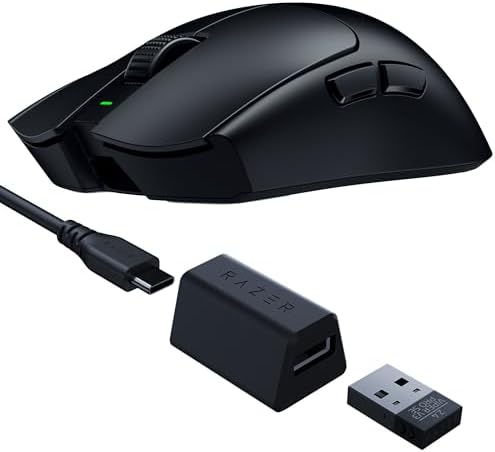
- 54 G ULTRA LIGHTWEIGHT DESIGN — Designed in collaboration with world-class esports pros, the Viper V3 Pro SE’s perfectly…
- FOCUS PRO 35K OPTICAL SENSOR GEN-2 — Experience pro grade tracking performance on a wider variety of surfaces including …
- HYPERSPEED WIRELESS — With an optimized 1000 Hz polling rate USB-A dongle design that makes zero compromises on connecti…
About the Product
The Viper V3 Pro sits at the top of Razer’s esports-focused lineup, and it earns the “best overall” spot on this list because it genuinely tries to do one thing as well as physically possible: get out of your way during competitive play. It uses a symmetrical shell designed to suit both claw and fingertip grips, which is the preferred setup among a large share of competitive FPS players.
Under the hood, it runs Razer’s Focus Pro 35K optical sensor, among the highest-resolution sensors Razer currently offers, paired with Gen-3 optical switches that register clicks using a beam of light instead of a physical metal contact — a design intended to reduce click latency and avoid the accidental double-clicks that can develop in mechanical switches over years of use.
What really sets the V3 Pro apart from older Razer flagships is HyperPolling wireless technology, which allows the mouse to report its position to your PC up to thousands of times per second over its 2.4GHz wireless dongle — a feature that used to require a wired connection. For competitive players who’ve been reluctant to go wireless over latency concerns, this is the mouse built to remove that excuse entirely.
Razer also lists an extended battery life figure for this generation, something worth confirming on the live Amazon listing since exact runtime depends on polling rate and RGB settings (the V3 Pro line has no onboard RGB lighting, which helps conserve battery).
Like most of Razer’s current-generation mice, the Viper V3 Pro is configured through Razer Synapse, the brand’s companion software. Synapse lets you fine-tune polling rate, DPI stages, button assignments, and on-the-fly sensitivity adjustments, and it syncs settings to the mouse’s onboard memory so your configuration travels with the mouse rather than staying tied to one PC. For competitive players who practice on multiple machines — a home PC and a LAN event setup, for example — that onboard memory profile is a genuinely practical feature, not just a marketing checkbox.
It’s also worth being upfront about who this mouse isn’t for. If your priorities lean toward all-day desk comfort, extensive button counts for macros, or RGB lighting as a visual centerpiece, the Viper V3 Pro will feel like a deliberately minimal tool rather than a well-rounded daily driver — because that’s exactly what it’s designed to be. Razer built this mouse around a single job: competitive responsiveness with as little in the way as possible. For the audience it’s built for, that single-minded focus is the whole point, not a limitation.
This isn’t a mouse built for comfort-first, all-day productivity use — it’s built for speed, precision, and minimal weight. If that’s what you’re shopping for, it’s hard to find a more complete package in Razer’s current wireless lineup.
Key Specifications and Pros & Cons
| Key Specifications | |
|---|---|
| Connectivity | HyperPolling Wireless (2.4GHz dongle) |
| Sensor | Focus Pro 35K optical sensor |
| Switches | Gen-3 optical switches |
| Shape | Symmetrical, ambidextrous-friendly shell |
| Lighting | No onboard RGB (weight and battery optimized) |
| Pros | Cons |
|---|---|
| Extremely lightweight shell built for fast flicks | Premium price point compared to mid-range Razer mice |
| HyperPolling wireless narrows the gap with wired latency | No onboard RGB lighting |
| Symmetrical shape works for multiple grip styles | Minimal button count — not built for MMO/MOBA use |
| Gen-3 optical switches resist long-term double-click wear |
Buyer Sentiment: Consistently well-rated among competitive and esports-focused buyers.
What Buyers Are Saying: Feedback patterns for this mouse frequently highlight how close the wireless experience feels to a wired connection, particularly among buyers who play fast-paced shooters. A smaller share of reviews mention the lack of RGB as a minor trade-off, though most buyers in this category say they’d rather have the weight savings. Several reviewers who upgraded from wired competitive mice specifically mention not noticing any perceptible input delay after switching, which tends to be the deciding factor for skeptical buyers considering a wireless mouse for the first time.
Best for: Competitive and ranked FPS players who prioritize low weight and minimal input latency above everything else, and who use claw or fingertip grips. Consider skipping if: You want a large button count for MMO-style macros, built-in RGB lighting, or a plush ergonomic shell for all-day desk comfort.
2. Razer Basilisk V3 Pro — Best Feature-Rich All-Rounder

- CONFIGURABLE HYPERSCROLL TILT WHEEL — Choose between tactile cycling and smooth, free-spin scrolling, or auto-switch bet…
- RAZER FOCUS PRO 35K OPTICAL SENSOR GEN-2 — Experience best-in-class tracking performance on a wider variety of surfaces …
- UP TO 140 HOUR BATTERY ON RAZER HYPERSPEED WIRELESS — Enjoy smooth, lag-free performance for non-stop play or unlock a t…
About the Product
Not everyone wants a stripped-down esports mouse. The Basilisk V3 Pro is Razer’s answer for buyers who want a wireless mouse that handles competitive gaming, everyday browsing, and content consumption equally well — without sacrificing features to save a few grams.
Its standout feature is the HyperScroll tilt wheel, a free-spinning scroll wheel that can switch between a tactile, notched scroll (useful for precise in-game weapon switching) and a smooth, friction-free scroll (useful for flying through long documents or web pages) at the press of a button. It’s one of the more genuinely useful scroll wheel designs on the market, and it’s a feature you won’t find on Razer’s lighter esports mice.
The Basilisk V3 Pro also carries 13 individually programmable Chroma RGB zones, letting you build out detailed lighting profiles that sync with other Razer Chroma peripherals. It runs the same 30K-DPI-class optical sensor family found in several of Razer’s higher-end mice, giving it plenty of tracking precision even though it’s not marketed purely as an esports tool.
Where this mouse differs most from the Viper V3 Pro is its shape: it uses a right-handed ergonomic shell rather than a symmetrical one, with a pronounced thumb rest and a more substantial body. That makes it a better fit for palm and relaxed-claw grips, and a less ideal fit for fingertip-grip players who prefer a smaller, lighter shell.
Connectivity is another area where the Basilisk V3 Pro pulls ahead of more specialized mice on this list. It supports Razer’s HyperSpeed Wireless dongle, Bluetooth, and a wired USB-C connection, which means it can pair with a gaming desktop over the dongle, switch to Bluetooth for a laptop, and fall back to a wired connection if the battery runs low mid-session — all without buying a second mouse. That flexibility is a big part of why this model tends to appeal to buyers who use one mouse across multiple devices throughout the day rather than a single dedicated gaming rig.
The extra weight and larger shell are genuine trade-offs, not hidden flaws — Razer is explicit that this is a full-featured mouse rather than a lightweight one, and the specs reflect that design choice. If your main use case is long work sessions punctuated by gaming breaks, rather than purely competitive play, that trade-off tends to work in your favor rather than against you.
Key Specifications and Pros & Cons
| Key Specifications | |
|---|---|
| Connectivity | Razer HyperSpeed Wireless, Bluetooth, and wired USB-C |
| Sensor | Focus Pro optical sensor (30K-DPI class) |
| Scroll Wheel | HyperScroll free-spin/tactile tilt wheel |
| Lighting | 13-zone Chroma RGB |
| Shape | Right-handed ergonomic with thumb rest |
| Pros | Cons |
|---|---|
| Versatile HyperScroll wheel suits both gaming and productivity | Heavier than Razer’s dedicated esports mice |
| Triple connectivity: wireless dongle, Bluetooth, and wired | Right-handed shape only — not ambidextrous |
| 13-zone Chroma RGB for detailed lighting customization | RGB usage will reduce battery life versus lighting-off use |
| Comfortable ergonomic shell for long sessions |
Buyer Sentiment: Rated highly for everyday-to-gaming versatility.
What Buyers Are Saying: A common theme in feedback for this mouse is how often buyers mention using it for both work and gaming without feeling like they’re compromising on either. The HyperScroll wheel comes up frequently as a favorite feature, especially among buyers who also use the mouse for office or browsing tasks. Buyers switching from purely gaming-focused mice also tend to mention the added comfort of the thumb rest during multi-hour work sessions, which is a less common talking point among more stripped-down esports mice.
Best for: Buyers who want one mouse to cover both gaming and everyday productivity, and who value a versatile scroll wheel and triple connectivity over minimal weight. Consider skipping if: You’re chasing the absolute lowest weight for competitive play, or you specifically need a left-handed or fully symmetrical shape.
3. Razer Naga V2 Pro — Best for MMO & MOBA Gaming

- ABSOLUTE ADAPTABILITY AND CONTROL — This mouse comes with a set of 12, 6 and 2-button magnetic side plates, allowing to …
- RAZER HYPERSCROLL PRO WHEEL — With adjustable tactility, resistance, and steps, create firmer, more distinct scrolls for…
- RAZER HYPERSPEED WIRELESS — With a connection 25% faster than any other wireless tech available, enjoy high-performance,…
About the Product
MMO and MOBA players have very different needs than FPS players — instead of minimal weight, they need lots of accessible buttons for ability rotations, macros, and hotbars. The Naga V2 Pro is Razer’s purpose-built answer, and its headline feature is a set of magnetic, swappable side plates that let one mouse function as three different tools.
Out of the box, it ships with a 2-button plate (for general use), a 6-button plate (for MOBAs and action games with moderate ability counts), and a 12-button numbered plate (for full MMO hotbar access). Each plate snaps on magnetically and is automatically detected by Razer’s software, so switching between a MOBA session and an MMO raid doesn’t require any manual reconfiguration beyond clicking the new plate into place.
Underneath that modularity, the Naga V2 Pro still runs a high-end optical sensor and Razer’s wireless technology, so you’re not sacrificing tracking performance for button count. It’s a heavier, larger mouse than the esports-focused options on this list, which fits its purpose — MMO and MOBA play tends to favor a relaxed palm grip over fast, light flicking motions.
If you’ve ever tried to bind a full MMO ability bar to a standard 2-button mouse using keyboard modifiers, the appeal of the Naga V2 Pro’s approach is immediate. It’s a genuinely different tool from the rest of Razer’s wireless lineup, built around a specific kind of player rather than trying to be universally lightweight.
The 12-button plate deserves a closer look on its own, since it’s the feature most likely to sell someone on this mouse. The buttons are arranged in a slightly concave, numbered grid designed to be navigated by feel, with your thumb resting naturally near the center — the goal is letting you hit the right ability under pressure without glancing down at the mouse mid-fight. It’s a design Razer has refined across several Naga generations, and the V2 Pro’s version benefits from that iteration rather than being a first attempt.
Because this mouse is built around flexibility rather than minimal weight, it also tends to appeal to buyers outside pure MMO play — some buyers use the 6-button plate for general productivity, binding shortcuts like copy, paste, and tab-switching to the extra side buttons for everyday computer use. That’s a reasonable secondary use case, even though the mouse is clearly designed with MMO and MOBA players as the primary audience.
Key Specifications and Pros & Cons
| Key Specifications | |
|---|---|
| Connectivity | Razer HyperSpeed Wireless and wired USB-C |
| Side Plates | Swappable 2-, 6-, and 12-button magnetic plates (included) |
| Sensor | Focus Pro optical sensor |
| Grip Style | Palm grip, right-handed ergonomic shell |
| Software | Automatic plate detection via Razer Synapse |
| Pros | Cons |
|---|---|
| Three swappable button plates cover MOBA, MMO, and general use | Noticeably heavier than esports-focused mice |
| No manual reconfiguration needed when switching plates | Large shell may not suit smaller hands or claw/fingertip grips |
| High button count without external macro pads | Price reflects the added hardware and plate accessories |
| Still uses a high-end optical sensor despite the added bulk |
Buyer Sentiment: Popular pick among MMO and strategy-game-focused buyers.
What Buyers Are Saying: Buyers who play MMOs or hotbar-heavy games consistently mention the swappable plates as the deciding factor in choosing this mouse over lighter alternatives. Some buyers note the larger shell takes a short adjustment period if they’re used to smaller esports mice, but most describe that trade-off as worthwhile for the added functionality. A number of reviews also mention using the plate system to keep one mouse configured for raiding and another quick-swapped profile for general browsing, rather than owning separate mice for each purpose.
Best for: MMO, MOBA, and strategy-game players who need fast access to many abilities or hotbar slots, and who use a relaxed palm grip. Consider skipping if: You play primarily fast-paced shooters, prefer the lightest possible shell, or have smaller hands that favor a compact mouse.
4. Razer Orochi V2 — Best for Travel & Portability

- OUTLAST THE COMPETITION – Up to 950 hours of battery life on Bluetooth and up to 425 hours on Razer HyperSpeed Wireless …
- PLAY FASTER WITH LOW-LATENCY WIRELESS – Dual wireless connectivity gives you efficient Bluetooth for everyday productivi…
- LAND EVERY SHOT WITH PIXEL-PRECISE ACCURACY – Razer 5G Advanced 18K DPI Optical Sensor delivers responsive tracking with…
About the Product
Most high-end wireless gaming mice are built around rechargeable batteries and dongles optimized for a stationary desk setup. The Orochi V2 takes a different approach, built specifically around portability — making it the standout pick for anyone who regularly works or games on the move, like laptop users, students, or hybrid office workers.
Its most distinctive feature is power flexibility: rather than requiring a proprietary rechargeable battery, it runs on a single standard AA or AAA battery, giving it an exceptionally long runtime and making a dead battery a non-issue when you’re traveling, since replacements are available virtually anywhere. Razer pairs that with dual wireless connectivity — both a 2.4GHz HyperSpeed dongle and Bluetooth — so you can connect to a gaming PC with the dongle for lower latency, or pair directly with a laptop over Bluetooth without carrying the dongle at all.
Despite its travel-first focus, the Orochi V2 isn’t a stripped-down afterthought. It still uses a genuine optical gaming sensor and a compact, lightweight shell that fits easily into a laptop bag alongside a charger and a few cables. It’s not trying to compete with the Viper V3 Pro on raw esports performance, and it shouldn’t be judged on that basis — its job is being the wireless mouse you don’t have to think about charging or packing.
For buyers whose primary complaint about other wireless mice is “I forgot to charge it,” the Orochi V2’s battery-powered design solves that problem directly, rather than just offering a longer battery life number.
The dual-mode switch is a physical toggle on the underside of the mouse, so swapping between the HyperSpeed dongle (best for a gaming desktop where the dongle can stay plugged in permanently) and Bluetooth (best for a laptop you don’t want to dedicate a USB port to) takes a couple of seconds and no software required, though Razer Synapse is still available if you want to customize button assignments or DPI stages.
It’s worth setting expectations correctly here: the Orochi V2 is not trying to be a scaled-down Viper V3 Pro, and comparing the two on pure sensor performance misses the point of the product. Its entire value proposition is removing friction from day-to-day carry and charging, and on that specific job, it does something none of the other mice on this list are designed to do.
Key Specifications and Pros & Cons
| Key Specifications | |
|---|---|
| Connectivity | Dual wireless: 2.4GHz HyperSpeed dongle and Bluetooth |
| Power | Single AA or AAA battery (not proprietary rechargeable) |
| Sensor | Optical gaming sensor |
| Form Factor | Compact, lightweight, travel-friendly shell |
| Shape | Ambidextrous-leaning compact design |
| Pros | Cons |
|---|---|
| Runs on standard AA/AAA batteries — easy to replace anywhere | Sensor and feature set are a step below flagship esports mice |
| Dual wireless modes for both PC and laptop use | Compact shell may feel small for larger hands |
| Compact shape is genuinely travel-friendly | Fewer programmable buttons than MMO-focused models |
| No proprietary charging cable required |
Buyer Sentiment: Well-reviewed for portability and battery convenience.
What Buyers Are Saying: Feedback for this mouse often comes from buyers who specifically searched for a wireless mouse they wouldn’t need to remember to charge, and the AA/AAA battery design is mentioned repeatedly as the reason they chose it. Some reviews note the compact shell suits smaller to medium hand sizes better than larger ones. Buyers who travel for work or school frequently cite the ease of grabbing a replacement battery from any convenience store as a meaningful advantage over proprietary rechargeable mice when traveling.
Best for: Laptop users, students, and anyone who regularly travels with their mouse and wants to avoid proprietary rechargeable batteries entirely. Consider skipping if: You want flagship-level sensor performance or a high button count for MMO-style gaming.
5. Razer Basilisk V3 X HyperSpeed — Best Budget Pick

- ICONIC ERGONOMIC FORM WITH 9 CUSTOMIZABLE CONTROLS — Favored by millions worldwide, the mouse’s signature shape perfectl…
- RAZER HYPERSPEED WIRELESS AND BLUETOOTH — Unleash seamless, low-latency performance that’s faster than other wireless te…
- UP TO 285 HOURS OF BATTERY LIFE — With up to 535 hours on Bluetooth and 285 hours on Razer HyperSpeed Wireless, last lon…
About the Product
Wireless gaming mice have a reputation for being expensive, and Razer’s flagship Pro-tier mice don’t do much to dispel that. The Basilisk V3 X HyperSpeed exists to counter that reputation directly — it’s built to bring Razer’s wireless technology and a comfortable, full-size ergonomic shape down to a genuinely entry-level price point.
It uses Razer’s HyperSpeed Wireless connection (the same underlying 2.4GHz technology found in pricier Razer mice, just without the HyperPolling enhancement reserved for Pro-tier models), along with Bluetooth as a secondary connection option. That combination means you’re not getting a watered-down wireless experience — you’re getting the core technology with a few of the most expensive extras trimmed away.
The shell follows Razer’s familiar ergonomic, right-handed Basilisk design, with a comfortable thumb rest and a shape built for palm and relaxed-claw grips rather than fast competitive flicking. It includes RGB lighting as well, which is a notable inclusion at this price tier, since many budget wireless mice skip lighting entirely to cut costs.
This is the mouse to recommend to someone buying their first wireless gaming mouse, upgrading from a basic wired office mouse, or simply unwilling to pay flagship prices for day-to-day gaming and browsing. It won’t out-perform the Viper V3 Pro in a competitive FPS match, but for the overwhelming majority of everyday gaming and general computer use, it covers the fundamentals well.
It’s also a sensible starting point for buyers who aren’t yet sure which Razer shape or feature set they’ll prefer long-term. Because it shares the same general ergonomic Basilisk shell as the pricier V3 Pro, trying this model first is a reasonably low-risk way to find out whether that shape suits your hand before committing to a more expensive version of the same basic design. If it turns out you do want HyperPolling or the HyperScroll wheel down the line, the step up to the Basilisk V3 Pro will feel like a familiar shape with added capability, rather than an entirely new mouse to adjust to.
Key Specifications and Pros & Cons
| Key Specifications | |
|---|---|
| Connectivity | Razer HyperSpeed Wireless and Bluetooth |
| Shape | Right-handed ergonomic with thumb rest |
| Lighting | RGB included (uncommon at this price tier) |
| Sensor | Optical gaming sensor |
| Target Use | Everyday gaming, browsing, general productivity |
| Pros | Cons |
|---|---|
| Most affordable wireless entry point in Razer’s current lineup | Lacks the HyperPolling feature found on Pro-tier mice |
| Includes RGB lighting despite the lower price | Not optimized for competitive esports-level precision |
| Comfortable ergonomic shape for everyday use | Right-handed shape only |
| Dual wireless (dongle + Bluetooth) flexibility |
Buyer Sentiment: Rated well among buyers new to wireless gaming mice.
What Buyers Are Saying: Buyers picking this mouse as a first wireless upgrade frequently mention being surprised by how solid the wireless connection feels given the price point. The included RGB lighting is mentioned as a pleasant bonus by several reviewers who expected to skip lighting entirely at this budget tier. Several reviews also compare it favorably to wired mice they previously used at a similar price, noting the jump to wireless didn’t come with the connection drops or lag they worried about beforehand.
Best for: First-time wireless gaming mouse buyers, upgraders from basic wired office mice, and anyone wanting Razer’s wireless tech without flagship pricing. Consider skipping if: You need competitive-grade polling rates or the absolute lightest shell available.
6. Razer DeathAdder V3 HyperSpeed — Best Lightweight Ergonomic

- 55G ULTRA LIGHTWEIGHT — Get the perfect mix of speed and control with one of our lightest esports mouse tested and valid…
- ERGONOMIC DESIGN WITH SMOOTH TOUCH TEXTURE — The mouse’s shape has been optimized with the aid of top esports pros to pr…
- UP TO 100 HOURS OF BATTERY LIFE — Featuring a USB Type C rechargeable design, power through the most intense scrimming a…
About the Product
The DeathAdder name is one of the longest-running and most recognized in Razer’s entire catalog, and the DeathAdder V3 HyperSpeed brings that familiar ergonomic shape to a lighter, more affordable wireless package than the flagship DeathAdder V3 Pro.
Its shell is the classic DeathAdder ergonomic shape — a gently curved, right-handed design with a pronounced palm swell that’s been refined across multiple generations specifically for comfort during long sessions. If you’ve used a DeathAdder before, in any generation, this one will feel immediately familiar in the hand.
What makes this “HyperSpeed” variant notable is the combination of that comfort-first shape with a genuinely lightweight build — a meaningful departure from older DeathAdder generations, which tended to be heavier, comfort-focused mice rather than lightweight ones. It uses Razer’s HyperSpeed Wireless connection for low-latency play, and like several mice on this list, it skips some of the Pro-tier extras (like HyperPolling or the most premium sensor grade) to hit a friendlier price.
This is the pick for buyers who’ve always liked the DeathAdder’s shape but found older wireless versions too heavy, or who want ergonomic comfort for long gaming or work sessions without stepping up to Pro-tier pricing. It’s a genuinely different trade-off than the Basilisk V3 X HyperSpeed above — less about being the cheapest option, and more about pairing a proven ergonomic shape with modern lightweight construction.
Razer’s HyperSpeed Wireless connection on this model uses the same core 2.4GHz dongle technology found throughout the brand’s current lineup, so day-to-day responsiveness holds up well even though this model sits a tier below the DeathAdder V3 Pro on sensor grade and lacks HyperPolling. For the kind of player who notices and cares about that difference, the Pro version remains the better choice — but for most buyers, the gap is far less noticeable in practice than the spec sheet alone might suggest.
One detail worth checking directly on the live Amazon listing before buying: Razer sells multiple DeathAdder variants side by side (V3, V3 Pro, V3 HyperSpeed, and older V2-generation models), and the naming between them is easy to mix up at a glance. Confirming you’re looking at the specific “DeathAdder V3 HyperSpeed” listing — not a similarly named wired or Pro-tier version — will save you from ordering the wrong configuration.
Key Specifications and Pros & Cons
| Key Specifications | |
|---|---|
| Connectivity | Razer HyperSpeed Wireless |
| Shape | Classic DeathAdder ergonomic shell, right-handed |
| Build | Lightweight construction relative to earlier DeathAdder generations |
| Sensor | Optical gaming sensor |
| Target Use | Long gaming or work sessions with an ergonomic grip |
| Pros | Cons |
|---|---|
| Proven, comfort-tested DeathAdder ergonomic shape | Right-handed shape only — not ambidextrous |
| Noticeably lighter than older DeathAdder wireless generations | Sits below the DeathAdder V3 Pro on sensor and feature tier |
| HyperSpeed Wireless keeps latency low for the price point | Fewer programmable buttons than MMO-focused mice |
| Strong fit for palm-grip users and longer sessions |
Buyer Sentiment: Frequently praised for comfort during long sessions.
What Buyers Are Saying: Long-time DeathAdder users commonly mention this version finally delivers the lightweight feel they wanted without abandoning the shape they’re used to. Buyers with larger hands and a palm-grip preference consistently rate the ergonomics as a strong point compared to smaller esports-style mice. A recurring comment among reviewers is reduced hand and wrist fatigue during extended sessions compared to older, heavier DeathAdder wireless models, which several buyers specifically cite as the reason they upgraded.
Best for: Palm-grip users and anyone who’s liked the DeathAdder shape in the past but wants a genuinely lighter, wireless version of it. Consider skipping if: You prefer a symmetrical or left-handed shell, or you need the extra buttons found on the Naga V2 Pro.
How to Choose the Right Razer Wireless Mouse
With six genuinely different mice on this list, picking the right one comes down to a few practical questions rather than chasing the highest spec number.
Start with your grip style. Most players use one of three grips: palm grip (the whole hand rests on the mouse), claw grip (fingertips and palm heel touch, with arched fingers), or fingertip grip (only fingertips make contact, hand mostly hovering). Palm-grip players tend to prefer larger, ergonomic shapes like the Basilisk V3 Pro or DeathAdder V3 HyperSpeed. Claw and fingertip players usually prefer smaller, lighter, symmetrical shapes like the Viper V3 Pro.
Think about what you actually play. Competitive shooters reward low weight and minimal distractions — the Viper V3 Pro line is purpose-built for that. MMOs and MOBAs reward extra buttons you can reach without looking — the Naga V2 Pro’s swappable plates solve that directly. If you split your time between gaming and general productivity, a versatile all-rounder like the Basilisk V3 Pro makes more sense than a specialized esports mouse.
Decide how much you value portability. If your mouse travels with a laptop regularly, the Orochi V2’s AA/AAA battery design and dual wireless modes solve problems that rechargeable flagship mice don’t address well — namely, dead batteries at the worst possible time and one more charging cable to pack.
Weight matters more than most buyers expect. A lighter mouse reduces wrist and arm fatigue during long sessions and allows faster, more controlled movements in fast-paced games. If you’re coming from a heavier office mouse, even a mid-weight gaming mouse like the Basilisk V3 X HyperSpeed will likely feel like a significant upgrade.
Don’t overlook connection type. Razer’s HyperSpeed Wireless (a proprietary 2.4GHz dongle connection) generally offers the lowest latency, while Bluetooth is more convenient for connecting to multiple devices without a dongle but typically introduces slightly more latency. Several mice on this list, including the Basilisk V3 Pro and Orochi V2, support both, letting you choose per situation. You can read more about how 2.4GHz wireless gaming connections work on Razer’s own HyperSpeed Wireless technology page.
Set a realistic budget tier. Flagship mice like the Viper V3 Pro and Naga V2 Pro deliver the most complete feature sets, but mice like the Basilisk V3 X HyperSpeed prove you don’t need flagship pricing to get a comfortable, genuinely wireless Razer mouse. Decide which features (HyperPolling, swappable plates, RGB, battery type) actually matter for how you’ll use the mouse before paying extra for ones that don’t.
Consider hand size alongside grip style. Grip style and hand size interact more than most buyers expect — a claw-grip player with large hands may actually be more comfortable on a mid-size mouse than a genuinely tiny one, since smaller shells can force fingers into a cramped position regardless of grip technique. If you have the option, comparing physical dimensions (length, width, height) listed on the Amazon product page against a mouse you already own and like is a more reliable method than grip-style labels alone.
Check software requirements before you buy. Every mouse on this list is configured through Razer Synapse for full customization (DPI stages, button remapping, lighting, onboard profiles), which requires a Windows or macOS installation. The mice will still function at a basic level without it, but you’ll lose access to advanced settings, so factor that into your decision if you’re using an unsupported operating system.
Don’t ignore the mouse feet and surface pairing. Every mouse on this list ships with PTFE (often marketed as “100% PTFE”) mouse feet, which glide smoothly across most desk mats and hard surfaces. If you’re using a particularly rough or textured mousepad, feet wear down faster, and replacement feet are sold separately by Razer and third parties — a minor maintenance detail that’s easy to overlook until it affects glide quality months into ownership.
Factor in left-handed versus right-handed shapes. With the exception of the Viper V3 Pro’s symmetrical shell and the Orochi V2’s ambidextrous-leaning compact design, most mice on this list use a right-handed ergonomic shape with a pronounced thumb rest. Left-handed players have fewer options within Razer’s wireless lineup specifically, so if that applies to you, the Viper V3 Pro is worth prioritizing over the ergonomic-shell options regardless of your preferred grip style.
If you’re building out a broader wireless desk setup, it’s worth pairing your mouse choice with the rest of your peripherals — our guides on wireless keyboards on Amazon and mechanical keyboards on Amazon cover similar comfort and connectivity trade-offs. And if Razer’s shapes don’t end up fitting your hand, our breakdowns of wireless mice on Amazon generally and Logitech’s wireless mouse lineup are useful points of comparison, alongside our look at Lenovo’s wireless mouse options for a budget-focused alternative brand.
Grip comfort over long sessions isn’t just a gaming concern, either — it’s a genuine ergonomic one. The OSHA Computer Workstations eTool’s section on pointing devices is a useful, non-promotional resource if you want general guidance on mouse positioning and hand strain, regardless of which brand or model you end up choosing.
Factor in warranty and long-term support. Razer backs its mice with a standard limited warranty, and the brand has a long operating history, which matters for a wireless peripheral you’ll likely keep for a few years. If you’re deciding between a current-generation mouse and an older, discounted model still in stock, check how recently that model was released — older hardware nearing the end of its support lifecycle may see fewer software updates through Razer Synapse over time. Always confirm the current warranty terms on the specific Amazon listing or Razer’s own site, since coverage details can vary by region and retailer.
Think about the broader ecosystem, not just the mouse in isolation. If you already own other Razer peripherals — a Chroma-enabled keyboard, headset, or mousepad — picking a mouse that supports Chroma RGB (like the Basilisk V3 Pro or Basilisk V3 X HyperSpeed) lets you sync lighting effects across your whole setup through one piece of software. That’s a nice-to-have rather than a necessity, but it’s a real factor for buyers already invested in the Razer ecosystem, since Synapse can apply a single lighting profile across every connected Chroma-enabled device rather than configuring each one separately.
Common Mistakes to Avoid
- Buying a symmetrical esports mouse for MMO play. The Viper V3 Pro’s minimal button count isn’t a flaw — it’s intentional. Don’t buy it expecting Naga-level macro access; you’ll end up fighting the hardware instead of your opponents.
- Ignoring grip style entirely. A mouse that’s perfect for someone with a palm grip can feel awkward and uncomfortable for a fingertip-grip user, regardless of how good the specs look on paper. Spend a moment identifying your own grip before comparing shells.
- Assuming all “wireless” connections perform identically. HyperSpeed’s 2.4GHz dongle connection and Bluetooth aren’t interchangeable in terms of latency — pick the right one for competitive play versus everyday convenience, and don’t assume Bluetooth alone will feel identical to a dedicated gaming dongle in fast-paced titles.
- Overpaying for features you won’t use. If you don’t play competitive shooters, HyperPolling’s ultra-high report rate may not be worth the price premium over a mid-range Razer mouse. Match the feature set to how you’ll actually use the mouse, not to the longest spec sheet.
- Forgetting battery type preferences. If you dislike managing rechargeable batteries, the Orochi V2’s AA/AAA design is worth prioritizing over flagship mice that require a proprietary charging cable.
- Skipping the Razer Synapse software setup. Several of this mouse’s most useful features — onboard memory profiles, custom DPI stages, and button remapping — live inside Razer Synapse rather than the mouse itself. Buyers who never install the software miss out on a meaningful chunk of what they paid for.
- Not confirming the exact model variant before buying. Razer’s naming conventions (V2, V3, Pro, HyperSpeed, X) can look similar at a glance but describe genuinely different hardware. Always double-check the specific listing title and confirm it matches the model you intend to buy before completing the order.
Frequently Asked Questions
What does DPI mean on a gaming mouse, and does higher always mean better?
DPI (dots per inch) measures how far the cursor moves on screen relative to how far you physically move the mouse — higher DPI means more sensitivity. Higher isn’t automatically better; most players use far lower DPI settings than a mouse’s maximum rating, since extremely high sensitivity can make precise aiming harder, not easier. Lenovo’s glossary explainer on mouse sensitivity breaks this down in more detail.
Is Razer’s HyperSpeed Wireless as fast as a wired connection?
For the vast majority of players, yes — modern 2.4GHz wireless gaming connections like HyperSpeed introduce latency that’s effectively imperceptible in regular play. HyperPolling, available on select Pro-tier mice, narrows that gap even further for competitive-level precision.
Which Razer wireless mouse is best for small hands?
The Orochi V2’s compact shell and the Viper V3 Pro’s smaller symmetrical shape tend to suit smaller hands better than the larger Basilisk or Naga V2 Pro shells, which are built around palm grips and larger hand sizes.
Do I need RGB lighting on a wireless mouse?
No — RGB lighting is purely cosmetic and doesn’t affect performance. It does use additional battery power on wireless mice, so buyers focused on maximizing battery life sometimes prefer non-RGB or RGB-off configurations.
Can I use a Razer wireless mouse with a laptop as well as a desktop PC?
Yes. Most Razer wireless mice work with any computer that accepts a USB wireless dongle or supports Bluetooth, making them equally usable with laptops and desktops.
How long does the battery last on Razer’s wireless mice?
Battery life varies significantly by model and depends heavily on polling rate, RGB usage, and connection type (HyperSpeed dongle versus Bluetooth). Always check the specific battery life listed on the current Amazon listing for the exact model and configuration you’re considering, since this detail can change between hardware revisions.
What’s the difference between the Naga V2 Pro and a standard gaming mouse with extra buttons?
Most gaming mice with extra buttons have them fixed in place. The Naga V2 Pro’s side plates are swappable and magnetically attached, letting a single mouse switch between a minimal 2-button layout and a full 12-button MMO layout depending on what you’re playing.
Is a more expensive Razer mouse always a better choice?
Not necessarily. The right mouse depends on your grip style, your games, and your priorities — a budget-friendly option like the Basilisk V3 X HyperSpeed may suit a casual or everyday gamer better than a Pro-tier esports mouse with features they’ll never use.
How often do I need to charge a Razer wireless mouse?
It depends heavily on the specific model, connection mode, RGB usage, and polling rate — lighter esports mice with RGB disabled tend to run longer between charges than feature-rich mice running RGB lighting at a high polling rate. The Orochi V2 sidesteps the charging question entirely by running on a replaceable AA or AAA battery instead. Always check the specific battery life figure listed on the current Amazon listing for your chosen model.
Can I remap buttons on a Razer wireless mouse without installing extra software?
Most basic functions work out of the box, but remapping buttons, adjusting DPI stages, and creating onboard memory profiles all require Razer Synapse. Without it, you’ll still get a functional wireless mouse, just without the deeper customization these models are designed to offer.
Are left-handed Razer wireless mice available?
Options are more limited than right-handed models. The Viper V3 Pro’s symmetrical shell and the Orochi V2’s compact, ambidextrous-leaning design are the most left-hand-friendly choices on this list, while the Basilisk, Naga, and DeathAdder lines use right-handed ergonomic shapes built around a thumb rest.
Do Razer wireless mice work on both Windows and Mac?
Yes, the mice themselves connect and function on either operating system. However, Razer Synapse, the software used for deep customization like DPI stages, button remapping, and onboard profiles, has historically had stronger and more frequently updated support on Windows, so confirm current Mac compatibility on Razer’s own site if that’s your primary setup.
What’s the practical difference between claw, palm, and fingertip grip for choosing a mouse?
Palm grip rests your whole hand on the mouse and generally favors larger, ergonomic shells like the Basilisk or DeathAdder lines. Claw grip arches the fingers with only the fingertips and palm heel touching, working well with mid-size symmetrical shells. Fingertip grip keeps the hand mostly hovering with only fingertips in contact, and tends to favor the smallest, lightest shells, like the Viper V3 Pro. Trying a mouse in person, where possible, remains the most reliable way to confirm which grip you naturally use.
Conclusion
If you only take one recommendation from this guide, make it this: the Razer Viper V3 Pro is the strongest all-around pick for most buyers who want a genuinely high-performance wireless gaming mouse, thanks to its HyperPolling wireless technology and competitive-grade sensor. For buyers who want more buttons and comfort for everyday use alongside gaming, the Razer Basilisk V3 Pro is the more versatile choice, while the Razer Naga V2 Pro stands alone for MMO and MOBA players who need serious button real estate. And for anyone whose hand simply doesn’t suit Razer’s more ergonomic, right-handed shells, the Razer DeathAdder V3 HyperSpeed remains one of the most comfortable, time-tested shapes the brand currently sells in a wireless configuration.
Buyers who travel often or split time between a laptop and desktop should take a close look at the Razer Orochi V2, since its AA/AAA battery design and dual wireless modes solve a problem none of the rechargeable flagship mice address. And if budget is the main constraint, the Razer Basilisk V3 X HyperSpeed delivers genuine Razer wireless technology and a comfortable ergonomic shell without flagship-tier pricing.
Whichever Razer wireless mouse you land on, match it to your grip style and how you actually use your computer, not just the spec sheet. A mouse that looks impressive on paper but doesn’t fit your hand or your games will underperform a less flashy pick that actually suits how you play and work day to day. Use the comparison table above as your shortcut, double-check the live listing for the latest stock and battery details, and you’ll have the best Razer wireless mouse for your setup ready to order in a few minutes.
As an Amazon Associate I earn from qualifying purchases.

MD.HASAN is an experienced SEO expert and amazon products review writer passionate about helping people find right products on amzon for buy without confusion. With 4 years of hands-on experience in content strategy and search engine optimization, he specializes in writing SEO-friendly blog posts that rank, engage, and convert.


