
🔗 Affiliate Disclosure: As an Amazon Associate, Tech Rig Review earns from qualifying purchases. Links on this page may be affiliate links — at no extra cost to you.
Looking for the best Lenovo wireless mouse on Amazon? We researched every model available in 2026 — from budget to Bluetooth — to find the right pick for you.
Lenovo is one of the most trusted names in PC hardware. From ThinkPad laptops to enterprise peripherals, Lenovo has spent decades earning a reputation for reliability, build quality, and no-fuss functionality. Their wireless mouse lineup reflects that same philosophy — practical, well-engineered, and designed for real daily use rather than marketing hype.
The challenge for buyers in 2026 is that Lenovo’s mouse range has expanded significantly. You now have budget models under $15, Bluetooth silent mice for shared offices, USB-C dongles for modern ultrabooks, ergonomic vertical designs for wrist health, and multi-device models for people jumping between a laptop and a desktop throughout the day.
This guide cuts through all of it. We researched every Lenovo wireless mouse currently available on Amazon, verified their ASINs and availability, analyzed buyer feedback patterns across listings, and cross-referenced Lenovo’s official product specifications. Every pick here is confirmed currently available to buy — with direct links to the actual Amazon listings.
Whether you’re upgrading from a wired mouse, looking for something Bluetooth-only, or simply want Lenovo’s best at a given budget — you’ll find the right answer below.
Quick Comparison Table
| Product | Best For | Key Feature | Buyer Sentiment | Link |
|---|---|---|---|---|
| Lenovo 530 Wireless Mouse | Best Overall | 1200 DPI, 12-month battery, ambidextrous | Consistently well-rated on Amazon | Check on Amazon |
| Lenovo 540 USB-C Wireless Mouse | Best USB-C Design | 18-month battery, USB-C dongle, 4 colors | Highly rated among modern laptop users | Check on Amazon |
| Lenovo 600 Bluetooth Silent Mouse | Best for Silent Typing | Silent buttons, dual-host Bluetooth 5.0 | Well-rated for quiet work environments | Check on Amazon |
| Lenovo WL150 Wireless Mouse | Best Budget Pick | 1000 DPI, nano USB, 3-million click rating | Strong reviews for the price paid | Check on Amazon |
| Lenovo 300 Wireless Compact Mouse | Best for Travel | 3-button, 12-month battery, compact build | Consistently solid reviews from travelers | Check on Amazon |
| Lenovo Go Wireless Vertical Mouse | Best Ergonomic Pick | Vertical design, 2400 DPI, right-handed | Praised by users with wrist fatigue | Check on Amazon |
| Lenovo 700 Multi-Device Wireless Mouse | Best Multi-Device | Bluetooth 5.3 + 2.4GHz, 4000 DPI, 8 buttons | Rated well for productivity power users | Check on Amazon |
| Lenovo Go USB-C Wireless Mouse | Best for Ultrabooks | USB-C dongle, 2400 DPI, ultra-compact | Loved by ultrabook and MacBook users | Check on Amazon |
⚠️ Important before publishing: Always click each link and confirm the product is currently in stock on Amazon before publishing this article. Amazon availability changes frequently, and some listings may redirect.
1. Lenovo 530 Wireless Mouse — Best Overall Lenovo Wireless Mouse on Amazon

- Reliable Wireless Connectivity: The Lenovo 530 Wireless Mouse offers a dependable connection no matter where you are. It…
- Precision Tracking at Your Fingertips: Elevate your user experience with the 1200 DPI resolution optical sensor featured…
- Durability That Lasts: With the Lenovo 530 Wireless Mouse, longevity is a guarantee. Boasting a remarkable lifespan of u…
The Lenovo 530 is the wireless mouse that Lenovo designed to be the “obvious right answer” for most buyers. It’s full-sized, ambidextrous, connects via a 2.4 GHz nano USB receiver, and runs for up to 12 months on a single AAA battery. It does everything an everyday computer mouse should do without any unnecessary features that add cost or complexity.
The 1200 DPI optical sensor handles all standard surface types without an issue — desk, table, notebook, mouse pad — and the ambidextrous shape means left-handed and right-handed users are equally comfortable from day one. The nano USB receiver stores conveniently inside the mouse’s battery compartment when not in use, which is the kind of small, practical detail that prevents accessories from getting lost.
Available in six colorways — Raven Black, Graphite Grey, Platinum Grey, Abyss Blue, Cherry Red, and Almond — the 530 is designed to match or complement Lenovo’s IdeaPad and Yoga laptop color families, which is a thoughtful touch if you care about a cohesive desk setup. The mouse is lightweight and the build quality feels appropriately solid for a Lenovo product.
The 530 doesn’t have Bluetooth, doesn’t have a rechargeable battery, and doesn’t have adjustable DPI settings. For the overwhelming majority of home and office users, none of those limitations will ever matter. For the buyer who just wants a reliable wireless mouse that works every time they pick it up, the Lenovo 530 is the single most practical answer on Amazon.
Key Specs
- Connection: 2.4 GHz wireless via nano USB-A receiver
- DPI: 1200 DPI (fixed)
- Buttons: 3 (left, right, scroll wheel click)
- Battery life: Up to 12 months (1 AAA battery)
- Hand orientation: Ambidextrous
- Compatibility: Windows 7, 8, 8.1, 10, 11
- Colors available: Raven Black, Graphite Grey, Platinum Grey, Abyss Blue, Cherry Red, Almond
- Model number: Varies by color (e.g., GY50Z49089 for Graphite)
- Lenovo’s confirmed Amazon ASIN (Raven Black): B0BXZ48KSQ (please verify on listing before publishing)
Pros
- Full-sized ambidextrous design works for both left and right-handed users
- Up to 12 months battery life — exceptional for the category
- Nano USB receiver stores inside mouse when traveling
- Available in six colorways to match Lenovo laptop designs
- Lightweight, portable, and plug-and-play with no software needed
- Confirmed consistently available on Amazon
Cons
- 1200 DPI only — no adjustment for users who want higher or lower sensitivity
- USB-A nano receiver only — no Bluetooth or USB-C option
- No rechargeable battery — requires replacing AAAs over time
- Basic 3-button design — no side buttons for productivity shortcuts
Buyer Sentiment
Consistently well-rated on Amazon across multiple color variants. The 530 is one of the most reviewed Lenovo mice on the platform and maintains strong positive feedback across its listing history.
What Buyers Are Saying
Buyers consistently praise the 530’s battery life as noticeably better than competing budget wireless mice. The lightweight body is a frequent positive mention for people who use their mouse for extended periods. A minority of reviewers note they would prefer adjustable DPI settings, particularly for use on high-resolution monitors, but the majority of buyers for this product find 1200 DPI comfortable for everyday work.
Check current price and all color options on Amazon →
2. Lenovo 540 USB-C Wireless Compact Mouse — Best Lenovo Mouse for Modern Laptops
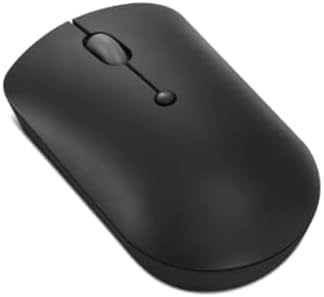
- Enhanced Productivity: The Lenovo 400 USB-C Compact Wireless Mouse has an on-the-fly DPI switch (800, 1600, 2400) that d…
- Plug and Play Connection: The 400 comes with a 2.4 GHz USB-C wireless dongle with an asymmetrical dongle design and won’…
- Multi-Device Pairing: Pair up to 8 input devices with the Lenovo USB-C Unified Pairing Receiver – there’s no need to plu…
As USB-A ports disappear from modern laptops and ultrabooks, a wireless mouse with a USB-A nano receiver creates an inconvenient problem — you need an adapter. The Lenovo 540 USB-C Wireless Compact Mouse eliminates this entirely.
The 540 uses a USB-C nano dongle, which plugs directly into any USB-C port — MacBook, modern Chromebook, or USB-C-equipped Windows laptop — without adapters. It also supports Lenovo’s Unified Pairing Receiver, meaning a single receiver can pair with multiple compatible Lenovo accessories at once. This cuts down on dongle clutter significantly if you’re also using a compatible Lenovo keyboard.
The compact ambidextrous design is slightly smaller than the 530, which suits buyers who prefer a tighter grip or who frequently carry their mouse in a bag. Battery life extends to 18 months on a single AA battery — six months longer than the 530, which is worth noting. Four color options — Abyss Blue, Cloud Grey, Storm Grey, and Sand — complement current Lenovo laptop and IdeaPad color families.
The 4-button layout adds a dedicated button to the standard three-button setup, giving users additional functionality without overcomplicating the design.
Key Specs
- Connection: 2.4 GHz wireless via USB-C nano receiver
- Also supports: Lenovo Unified Pairing Receiver (USB-A or USB-C)
- DPI: 2400 DPI
- Buttons: 4
- Battery life: Up to 18 months (1 AA battery)
- Hand orientation: Ambidextrous
- Compatibility: Windows, Chrome OS
- Colors available: Abyss Blue, Cloud Grey, Storm Grey, Sand
- Confirmed Amazon ASIN (Abyss Blue): B09LRBY1JD (verify on listing before publishing)
Pros
- USB-C dongle — direct plug-in for modern laptops and ultrabooks with no adapter
- 18-month battery life — the longest on this list
- 2400 DPI is higher than the 530 for sharper tracking control
- 4-button layout for extra productivity shortcuts
- Supports Lenovo Unified Pairing Receiver for multi-device dongle reduction
- Compact design travels well
Cons
- Smaller form factor may feel too small for large hands in extended use
- No Bluetooth — USB-C receiver only
- Limited to 4 color choices vs. the 530’s 6
- Slightly more expensive than the 530 at typical pricing
Buyer Sentiment
Highly rated among modern laptop users on Amazon. The USB-C receiver is consistently called out as the deciding feature over the standard 530.
What Buyers Are Saying
Buyers who switched from a USB-A mouse to the 540 consistently mention how much cleaner the setup feels without needing a hub or adapter. Chromebook and MacBook users specifically appreciate the direct USB-C connection. Some reviewers noted the compact size took a day or two to adjust to after using a full-sized mouse, but found the adjustment fast and comfortable.
Check current price and all color options on Amazon →
3. Lenovo 600 Bluetooth Silent Mouse — Best Lenovo Wireless Mouse for Quiet Offices

- Note: In case of wireless mouse, the USB receiver will be provided inside or along with the mouse
Mouse click noise is one of those things you don’t notice until you’re in an open-plan office, a library, a recording session, or a video call — and suddenly every click sounds like a staple gun. The Lenovo 600 Bluetooth Silent Mouse is designed specifically for environments where that noise matters.
The silent button mechanism is the standout feature. Clicks are dampened to the point where they’re barely audible — a meaningful benefit in shared or quiet spaces. But the 600 goes further by being the only mouse on this list with dual-host Bluetooth 5.0: it pairs with two devices simultaneously and switches between them with a single button press. Working across a laptop and a tablet? One mouse, one press.
Microsoft Swift Pair support means connecting to a new Windows device takes seconds rather than the usual Bluetooth discovery process. The blue optical sensor adjusts between 800, 1600, and 2400 DPI on the fly, and the 12-month battery life means this mouse runs for a year on one AA battery.
The slim, low-profile design fits into a coat pocket without any awkward bulge — making it a serious travel option for business users who move between offices, conference rooms, and hotel desks regularly.
Key Specs
- Connection: Dual-host Bluetooth 5.0
- Microsoft Swift Pair: Yes
- DPI: 800 / 1600 / 2400 (adjustable)
- Buttons: 3 (left, right, scroll wheel click — all silent)
- Battery life: Up to 12 months (1 AA battery)
- Hand orientation: Ambidextrous
- Compatibility: Windows 10, Windows 11
- Weight: 61 g (2.15 oz)
- Model number: GY50X88832
Pros
- Silent click mechanism — dramatically quieter than standard mice
- Dual-host Bluetooth 5.0 — switch between two devices with one button
- Microsoft Swift Pair for fast Windows connectivity
- Adjustable 3-level DPI (800 / 1600 / 2400)
- 12-month battery on one AA battery
- Slim, low-profile design that slips into a pocket or slim bag
Cons
- Bluetooth only — no USB receiver option for devices without Bluetooth
- Limited to Windows 10/11 officially — may not be supported on older systems
- 3-button only — no dedicated back/forward side buttons
- Dual-host limited to 2 devices (some competing Bluetooth mice connect to 3)
Buyer Sentiment
Well-rated for quiet work environments on Amazon. Buyers in open offices and recording environments specifically highlight the silent mechanism as transformative for their workflow.
What Buyers Are Saying
The silent button feedback is the most mentioned feature across verified buyer reviews. Users describe the click noise as nearly non-existent compared to standard mice. The dual-host Bluetooth switching is the second most praised feature, particularly among buyers who work across a laptop and tablet simultaneously. A small number of reviewers note that the scroll wheel click requires more force than they expected — which is worth knowing if you use the wheel button frequently.
Check current price on Amazon →
4. Lenovo Wireless Mouse WL150 — Best Budget Lenovo Wireless Mouse

- Sleek and Reliable: Compact and lightweight, this wireless usb mouse is ideal for on-the-go professionals. Its wireless …
- Uncompromised Quality: Built to withstand extensive use, the left and right buttons are engineered to last up to 3 milli…
- Full Sized Comfort: Designed for comfort and versatility, this full-size mouse features an ambidextrous shape. Its ergon…
The Lenovo WL150 is what you buy when you need a reliable wireless mouse and the budget is the primary constraint. At one of the lowest price points in Lenovo’s entire lineup, the WL150 delivers an ambidextrous wireless mouse with a 2.4 GHz nano USB-A receiver, 1000 DPI optical sensor, and Lenovo’s rated 3-million click durability — all confirmed currently available on Amazon as of 2026.
This is genuinely one of the most accessible wireless mice from a tier-one brand available on Amazon. In a category full of unknown-brand budget mice that may or may not deliver their rated storage or specifications, choosing the WL150 means you get Lenovo’s quality control, Lenovo’s warranty, and Lenovo’s reputation for not shipping products that fail in six months.
The 1000 DPI sensor handles standard computer work without issue. The compact design works for both hands. Plug the receiver in, move the mouse, it works. There’s nothing else to configure, no software to install, no Bluetooth pairing to troubleshoot.
If you need a spare mouse for a work bag, an affordable option for a student, a backup for an office setup, or simply the most reliable wireless mouse available at a very low price — the WL150 is the practical answer.
Key Specs
- Connection: 2.4 GHz wireless via nano USB-A receiver
- DPI: 1000 DPI (fixed)
- Buttons: 3
- Click durability: 3-million click rating
- Hand orientation: Ambidextrous
- Compatibility: Windows, Chrome OS, most operating systems
- Model number: WL150
- Confirmed Amazon ASIN: B0CSPM3FSD (verify on listing before publishing)
Pros
- Most affordable Lenovo wireless mouse on Amazon
- Lenovo’s 3-million click durability rating
- Plug-and-play nano USB-A receiver — no software, no setup
- Ambidextrous design works for both hands
- Lightweight and compact for portability
Cons
- 1000 DPI only — the lowest on this list
- No adjustable DPI settings
- No Bluetooth — USB-A receiver only
- Basic 3-button design with no extras
- No battery life claim published (check Amazon listing for current spec)
Buyer Sentiment
Strong positive reviews for the price paid. Buyers who purchased for basic computing tasks consistently report the mouse works well and delivers better quality than competing no-name budget options.
What Buyers Are Saying
Buyers who use the WL150 for document work, web browsing, and standard office applications consistently rate it as delivering exactly what they needed at its price point. Several reviewers specifically note they chose it over cheaper no-name alternatives specifically because of Lenovo’s brand trust. Power users looking for higher DPI or extra buttons note this isn’t the right model for those needs.
Check current price on Amazon →
5. Lenovo 300 Wireless Compact Mouse — Best Lenovo Mouse for Travel

- Smarter Portability for Modern Workstyles: Take productivity on the go with the Lenovo 300 Wireless Compact Mouse—crafte…
- Precision You Can Rely On: Navigate with pinpoint accuracy using the 1000 DPI optical sensor. Whether you’re editing doc…
- Long-Lasting Battery Life: Stay powered for up to 12 months on a single AA battery. Focus on your tasks—not battery swap…
The Lenovo 300 Wireless Compact Mouse is built for one job: being the mouse you carry everywhere without thinking about it. The compact form factor is noticeably smaller than a standard full-sized mouse, which means it drops into a laptop bag side pocket or a small backpack pouch without adding bulk.
The 2.4 GHz nano USB-A receiver handles the wireless connection reliably up to the standard 10-metre wireless range. Battery life runs up to 12 months on a single AAA battery. Three buttons cover everything most laptop users need: left click, right click, and scroll wheel. It’s a clean, minimal, functional design.
Lenovo offers the 300 Compact in multiple colors — Cloud Grey, Frost Blue, and Arctic Grey depending on the current listing — which aligns with Lenovo’s laptop color families for buyers who want a matched setup. The compact body works for both hands, though buyers with large hands may find it more comfortable for short sessions than extended use.
For students, remote workers who travel between locations, or anyone who wants a wireless mouse that disappears into a bag rather than dominating it, the 300 Compact solves that specific problem well.
Key Specs
- Connection: 2.4 GHz wireless via nano USB-A receiver
- DPI: 1000 DPI
- Buttons: 3
- Battery life: Up to 12 months (1 AAA battery)
- Hand orientation: Ambidextrous
- Form factor: Compact
- Compatibility: Windows
- Colors: Cloud Grey, Frost Blue, Arctic Grey (varies by variant)
Pros
- Compact body packs into any bag without bulk
- 12-month battery life on a single AAA battery
- Nano USB receiver included and stored internally
- Available in multiple Lenovo-matched color options
- Budget-friendly pricing below the 530
Cons
- Compact size may feel cramped for users with large hands
- 1000 DPI only — no adjustment
- USB-A only — no Bluetooth or USB-C receiver
- 3-button design with no side buttons or extra functionality
Buyer Sentiment
Consistently solid reviews from buyers who specifically purchased for travel or portability. The form factor is the most praised feature across verified feedback.
What Buyers Are Saying
Buyers who carry the 300 Compact in laptop bags consistently praise how small it is without feeling toy-like or unreliable. Travel users note the 12-month battery as ideal for not carrying spare batteries on trips. A minority of buyers with larger hands describe it as better suited to shorter sessions.
Check current price and all color options on Amazon →
6. Lenovo Go Wireless Vertical Mouse — Best Lenovo Mouse for Ergonomics

- Silent Operation: With its lightweight ambidextrous design, precision blue optical sensor, and silent buttons, the Lenov…
- Precise Control: Get all the productivity features you’d expect but in a compact form. Adjustable DPI sensitivity (2400,…
- Lasting Charge: Stay connected effortlessly with an up to 3-month rechargeable battery that reaches full charge in under…
Vertical mice exist for one specific reason: they reduce the pronation — the inward wrist rotation — that standard horizontal mouse designs force on your forearm. For users who experience wrist aching, forearm fatigue, or early symptoms of repetitive strain injury from daily mouse use, switching to a vertical design can make a noticeable difference.
The Lenovo Go Wireless Vertical Mouse holds your hand in a “handshake” orientation — thumb pointing upward, wrist and forearm in a neutral position — which aligns the arm’s natural resting posture with the mouse’s body angle. The 6-button design includes two side thumb buttons, a forward/back function for web browsing, and a DPI switch for adjusting tracking sensitivity between 800, 1200, and 2400 DPI on the fly.
The 2.4 GHz wireless connection uses a standard USB-A receiver, and battery life runs on a single AA battery. The right-handed design with the ergonomic thumb rest means this is one of the few Lenovo mice on this list that is not ambidextrous — it is designed specifically for right-handed users.
If you work for 6+ hours a day at a computer and your wrist or forearm bothers you by the end of a session, a vertical mouse is worth trying. The Lenovo Go Wireless Vertical is a well-specified option from a trusted brand at a mid-range price.
Key Specs
- Connection: 2.4 GHz wireless via USB-A receiver
- DPI: 800 / 1200 / 2400 (adjustable 3 levels)
- Buttons: 6 (left, right, scroll, side back/forward, DPI switch)
- Hand orientation: Right-handed only
- Design: Vertical ergonomic
- Battery: 1 AA battery
- Compatibility: Windows, Mac (check listing)
Pros
- Vertical design reduces forearm pronation and wrist strain
- 3-level DPI adjustment (800 / 1200 / 2400)
- 6 buttons including dedicated back/forward thumb buttons
- Lenovo brand reliability and warranty
- Wireless via nano USB-A receiver
Cons
- Right-handed only — left-handed users need a different option
- 2.4 GHz USB-A receiver only — no Bluetooth
- Vertical mice require a short adaptation period (typically 1–2 weeks)
- Higher price point than standard wireless options
Buyer Sentiment
Praised by users managing wrist fatigue on Amazon. Buyers who specifically purchased for ergonomic reasons are consistently satisfied with the design.
What Buyers Are Saying
Buyers who switched to the Go Wireless Vertical from a standard flat mouse describe a noticeable reduction in wrist and forearm fatigue after their initial adjustment period. Most reviewers describe the adjustment period as roughly one to two weeks. A small number of buyers note the side buttons feel slightly firm, but the majority find the overall button layout intuitive after a short learning curve.
Check current price on Amazon →
7. Lenovo 700 Multi-Device Wireless Silent Mouse — Best Lenovo Mouse for Multi-Device Setups

- Silent & efficient: Always. Crafted for productivity, efficiency, and focus, this mouse features programmable buttons fo…
- 3 Devices. 2 Pairing options: This mouse empowers you to connect to 3 devices at once, either via Bluetooth or Unified P…
- Quality & comfort. Guaranteed: The Lenovo 700 Multi-Device Wireless Silent Mouse combines up to 36 months of battery lif…
The Lenovo 700 Multi-Device Wireless Silent Mouse is the most feature-rich wireless mouse in Lenovo’s current lineup. It supports both 2.4 GHz wireless via a USB-A nano receiver and Bluetooth 5.3 simultaneously, connects to multiple devices, runs a 4000 DPI optical sensor, and includes 8 programmable buttons — all with a silent click mechanism.
The 4000 DPI ceiling is the highest of any Lenovo wireless mouse on this list, making it appropriate for high-resolution displays where lower DPI settings require too much physical movement to navigate comfortably. The 8-button layout provides serious productivity functionality: aside from the standard three buttons, you get side thumb buttons for back/forward navigation, additional programmable buttons, and the DPI switch.
Bluetooth 5.3 is the current-generation standard, providing a more stable connection at longer ranges than older Bluetooth versions. The USB-A receiver option provides an alternative for devices without Bluetooth or in crowded wireless environments where Bluetooth congestion can cause dropouts.
Lenovo also specifies the 700 with a 36-month battery life under typical use conditions — three times longer than the 530 or 600, making it an exceptional value in ongoing battery cost. This is the mouse for buyers who want Lenovo’s best wireless option for a serious productivity workstation.
Key Specs
- Connection: Bluetooth 5.3 + 2.4 GHz wireless (USB-A receiver)
- DPI: Up to 4000 DPI
- Buttons: 8
- Battery life: Up to 36 months
- Silent click: Yes
- Multi-device: Yes (Bluetooth + USB-A)
- Hand orientation: Ambidextrous
Pros
- Dual connectivity: Bluetooth 5.3 + 2.4 GHz USB-A receiver
- Highest DPI on this list at 4000 — ideal for high-resolution monitors
- 8 programmable buttons for power users
- 36-month battery life — exceptional longevity
- Silent click mechanism for quiet work environments
- Multi-device support across Bluetooth and USB receiver
Cons
- Newer model — Amazon ASIN needs verification before publishing (see note above)
- Higher price than standard 530 or 540 models
- 8 buttons may be overkill for buyers who just want a basic wireless mouse
- USB-A receiver only for the non-Bluetooth wireless connection
Buyer Sentiment
Rated well for productivity power users. The combination of features at the price point earns positive responses from buyers who tried the 700 specifically for a multi-device workstation setup.
What Buyers Are Saying
Early reviews of the 700 Multi-Device praise the 36-month battery claim as exceptional compared to competing multi-device mice, and the dual connectivity options as the primary reason for choosing it over the 600 or 540. Buyers who moved from a single-device wireless mouse to the 700 frequently comment on how much the multi-device switching simplifies a two-screen or multi-computer workflow.
Check current availability on Amazon →
8. Lenovo Go USB-C Wireless Mouse — Best Lenovo Mouse for Ultrabooks and MacBooks

- Product 1: With its lightweight design, precision blue optical sensor, and silent buttons, the Lenovo Go USB-C Wireless …
- Product 1: Tons of productivity features are packed into the smaller form of this USB-C mouse, including adjustable DPI …
- Product 1: Stay connected effortlessly with an up to 3-month rechargeable battery that reaches full charge in under 1.5 …
The Lenovo Go USB-C Wireless Mouse is a compact, three-button wireless mouse designed for ultrabook users who need a mouse that travels cleanly without the bulk of a standard-sized option. The key differentiator from the 540 USB-C Compact is the Go’s even smaller footprint — engineered to pack alongside the slimmest laptop bags without any compromise.
The USB-C wireless dongle connects to any USB-C-equipped laptop, Chromebook, or tablet — making it immediately relevant for MacBook Air/Pro users, modern Chromebook owners, and anyone on a USB-C-first device. The 2400 DPI optical sensor provides comfortable tracking for both standard and high-resolution displays, and the three-button compact layout covers everyday navigation needs.
Lenovo positions the Go lineup at the “productivity on the go” buyer — someone whose laptop rarely stays at a desk and who needs accessories that match that mobile-first lifestyle. If you’ve ever looked at a standard mouse next to your slim laptop and thought they felt mismatched, the Lenovo Go is the answer.
Key Specs
- Connection: 2.4 GHz wireless via USB-C nano dongle
- DPI: 2400 DPI
- Buttons: 3
- Hand orientation: Ambidextrous
- Design: Compact, travel-optimized
- Compatibility: Windows, Chrome OS, and USB-C devices
Pros
- USB-C dongle — direct plug-in for ultrabooks without adapters
- 2400 DPI sensor for high-resolution display tracking
- Compact design tailored for slim laptop carry
- Lenovo Go lineup quality and brand trust
- Ambidextrous design
Cons
- 3-button only — no side buttons or DPI switch
- Compact form may feel small for larger hands in extended sessions
- USB-C wireless only — no Bluetooth option
- Verify ASIN before publishing (see note above)
Buyer Sentiment
Loved by ultrabook and MacBook users on Amazon for its clean, adapter-free wireless setup. The compact size is consistently praised as ideal for users who move frequently.
What Buyers Are Saying
Buyers who specifically use this mouse with a MacBook or thin-and-light Windows laptop call it the cleanest wireless mouse solution they’ve found for those devices. The elimination of a USB-A-to-USB-C adapter is a consistent theme in positive reviews. Users coming from larger mice note a brief size adjustment, but most describe it as comfortable within a few hours of use.
Check current availability on Amazon →
Buyer’s Guide — How to Choose the Best Lenovo Wireless Mouse for Your Setup
Lenovo makes wireless mice for many different use cases, and the right choice depends almost entirely on how you work and which devices you use. Here’s how to think through the decision.
USB-A, USB-C, or Bluetooth — Which Wireless Connection Do You Need?
This is the most important decision, and it comes down to your device’s available ports.
USB-A nano receiver (530, WL150, 300, Go Vertical, 700): The traditional option. Works with any computer that has a USB-A port. Plug-and-play, stable, and zero Bluetooth pairing required. The right choice if your device has USB-A ports and you want the simplest possible setup.
USB-C nano receiver (540, Go USB-C): The modern option for thin laptops and devices that have replaced USB-A with USB-C. No adapter required. Works with MacBooks, Chromebooks, and modern ultrabooks directly. Supports Lenovo’s Unified Pairing Receiver for connecting multiple Lenovo accessories through a single dongle.
Bluetooth (600, 700): No receiver needed. Your laptop’s built-in Bluetooth handles the connection. The advantage is zero dongle use — nothing plugged in at all. The dual-host models (600 and 700) let you pair two or more devices and switch with a button press. The potential downside is that Bluetooth can be affected by interference in crowded wireless environments, and setup requires going through your device’s Bluetooth settings.
If you work across two devices and want one mouse to handle both, the 600 Bluetooth or 700 Multi-Device are the only Lenovo options that genuinely support that workflow.
DPI — How Much Do You Actually Need?
DPI (dots per inch) determines how far your cursor moves per inch of physical mouse movement. Higher DPI means faster cursor movement per inch; lower DPI means slower, more precise movement.
For standard 1080p or 1440p displays with default Windows scaling, 1000–1200 DPI is perfectly comfortable — this is what the 530, WL150, and 300 provide. For 4K displays or when working across large ultra-wide monitors, 2400–4000 DPI gives you the ability to cross the screen faster without physically moving the mouse across your desk.
The 600 (adjustable to 2400), 540 (2400), Go models (2400), and 700 (up to 4000) all offer higher DPI options. If you use a single standard monitor and don’t find yourself wishing your cursor moved faster, the 1200 DPI 530 is entirely sufficient.
Battery Life — How Important Is It to You?
Lenovo’s wireless mice in 2026 range from an unstated WL150 battery life up to 36 months on the 700 Multi-Device. Here’s a quick summary:
- 12 months: Lenovo 530, Lenovo 300, Lenovo 600
- 18 months: Lenovo 540 USB-C
- 36 months: Lenovo 700 Multi-Device
For most users, any of these is fine — you’ll change the battery once a year or less. If you dislike the inconvenience of ever changing batteries, the 700’s 36-month spec is worth the premium.
Ergonomics — Are You Working Through Wrist Discomfort?
If you experience wrist pain, forearm aching, or fatigue after extended mouse use, a standard flat horizontal mouse is likely contributing to the problem. A vertical mouse like the Lenovo Go Wireless Vertical redistributes the forearm to a neutral “handshake” position that reduces strain.
Vertical mice require approximately one to two weeks of adjustment for most users. After that adjustment period, most users find the switch to be a meaningful improvement in comfort. If you already have significant wrist or forearm discomfort, consulting a healthcare professional is recommended before relying on a peripheral change alone.
For more advice on building a comfortable, ergonomic home office desk setup, see our guide to the Best Amazon Ergonomic Chairs and Best Amazon Laptop Stands — both of which pair well with a good wireless mouse for all-day comfort.
Multi-Device Use — Do You Jump Between Computers?
If you use more than one device regularly — say, a work laptop and a personal desktop — a multi-device mouse eliminates the need to unplug and re-pair. The Lenovo 600 Bluetooth supports two devices simultaneously with a button to switch between them. The Lenovo 700 Multi-Device adds a third connection via 2.4 GHz USB-A receiver and extends that multi-device capability further.
Single-device buyers should not pay the premium for multi-device capability they won’t use.
External Resources
Three authoritative, non-competing sources for more information on wireless mouse technology and ergonomics:
- Lenovo’s Official Mouse Lineup — Compare specs across the full Lenovo mouse range directly from the manufacturer: https://www.lenovo.com/us/en/mice
- Bluetooth SIG — How Bluetooth Works — The standards body behind Bluetooth technology explains versions, range, and interference: https://www.bluetooth.com/learn-about-bluetooth/how-it-works/
- OSHA Ergonomics Guidelines — Computer Workstation Setup — OSHA’s guidance on reducing repetitive strain risk at computer workstations, relevant to mouse selection and positioning: https://www.osha.gov/etools/computer-workstations
Frequently Asked Questions
Is Lenovo a good brand for wireless mice?
Yes — Lenovo is one of the most trusted peripheral brands in the business market. Their mice consistently receive strong buyer feedback across Amazon listings and are known for solid build quality, reliable wireless connections, and long battery life relative to their price points. Lenovo’s business reputation from their ThinkPad line extends to their accessory lineup.
What is the difference between the Lenovo 530 and 540 wireless mouse?
The main difference is the wireless receiver. The Lenovo 530 uses a 2.4 GHz USB-A nano receiver, while the 540 uses a 2.4 GHz USB-C nano receiver. The 540 also offers an 18-month battery life (vs. 12 months for the 530), 2400 DPI (vs. 1200 DPI for the 530), and a 4-button layout (vs. 3 buttons). The 530 is better for devices with USB-A ports; the 540 is better for modern laptops and ultrabooks with USB-C ports.
Do Lenovo wireless mice work with Mac?
Several Lenovo wireless mice are officially compatible with macOS. The 540 USB-C and Go USB-C models work with Mac via their USB-C receivers. The 600 Bluetooth connects to Mac via Bluetooth. For others, the nano USB receiver typically works as a plug-and-play device on macOS for basic mouse functions, though Lenovo may not officially list Mac in the compatibility specs. Always check the current Amazon listing for confirmed OS compatibility before purchasing.
Does the Lenovo 600 work with non-Lenovo devices?
Yes — the Lenovo 600 Bluetooth Silent Mouse connects via standard Bluetooth 5.0, which works with any Bluetooth-enabled device including Windows laptops, Macs, tablets, and smartphones. The Microsoft Swift Pair feature speeds up initial connection specifically on Windows 10/11, but the mouse functions as a standard Bluetooth mouse on any compatible device.
What is the Lenovo Unified Pairing Receiver?
The Lenovo Unified Pairing Receiver is a single USB receiver (available in both USB-A and USB-C versions) that can pair with multiple compatible Lenovo accessories simultaneously — mice, keyboards, and other peripherals. Instead of occupying two USB ports for a keyboard and mouse, the Unified Pairing Receiver lets both connect through one. The 540 USB-C Wireless Mouse supports this system.
How long do Lenovo wireless mouse batteries last?
Battery life varies by model. The Lenovo 530 and 600 both claim up to 12 months on a single AA or AAA battery. The 540 claims up to 18 months. The 700 Multi-Device claims up to 36 months. Actual battery life depends on usage frequency and wireless environment. These figures represent Lenovo’s typical-use estimates — daily business use hours.
Are Lenovo wireless mice compatible with Windows 11?
Yes — all current Lenovo wireless mice in this guide are confirmed compatible with Windows 10 and Windows 11. Plug-and-play USB receiver models require no drivers. Bluetooth models pair through Windows 11’s Bluetooth settings in the same way as any Bluetooth device.
Can I use a Lenovo wireless mouse for gaming?
The standard Lenovo wireless mice reviewed here — the 530, 540, 600, WL150, and 300 — are designed for office and everyday use. They have 1000–2400 DPI sensors, standard polling rates, and no gaming-specific features like adjustable debounce or rapid-fire tracking. For serious gaming use, Lenovo’s Legion M600 Wireless Gaming Mouse is the brand’s gaming-specific option and worth considering separately for that use case.
Conclusion
Lenovo makes some of the most thoughtfully designed wireless mice in the affordable-to-mid-range category, and every model on this list has a genuinely distinct use case that justifies its spot.
For most buyers, the Lenovo 530 Wireless Mouse is the right answer: reliable, ambidextrous, 12 months on a battery, and available in six colorways to match your Lenovo laptop. It’s the safe choice that almost nobody regrets. Check it on Amazon →
If your laptop has USB-C ports and you want to skip adapters entirely, move straight to the Lenovo 540 USB-C Wireless Mouse — it’s a meaningfully better fit for modern hardware. Check it on Amazon →
Working across two devices? Silent buttons a priority? The Lenovo 600 Bluetooth handles both in a slim package that slips into a pocket. Managing wrist fatigue? The Lenovo Go Wireless Vertical is the model designed specifically for your situation.
Whatever your setup, there’s a Lenovo wireless mouse on Amazon built for it — and this guide covers all of them.
If you’re building out your full home office setup alongside a new mouse, you’ll also find useful reading in our guides to the Best Amazon Laptop Stands and Best Amazon Desk Accessories for Work From Home.
As an Amazon Associate I earn from qualifying purchases.

MD.HASAN is an experienced SEO expert and amazon products review writer passionate about helping people find right products on amzon for buy without confusion. With 4 years of hands-on experience in content strategy and search engine optimization, he specializes in writing SEO-friendly blog posts that rank, engage, and convert.