
Affiliate disclosure: As an Amazon Associate, Tech Rig Review earns from qualifying purchases. Links on this page may be affiliate links, at no extra cost to you.
Looking for the best Intel Core i7 processor laptops on Amazon under $600? Compare 3 researched options, key specs, pros, cons, and buying tips.
Finding a good laptop with an Intel Core i7 processor under $600 can be harder than it sounds. The Core i7 name covers many different generations — a newer i7 can be very different from an older i7, even when both carry the same “Core i7” label. That matters a lot with this list.
I researched three Amazon laptops and compared their processor generation, memory, storage, display, operating system, connectivity, and intended use, cross-checking against Intel’s own processor specifications and manufacturer information where available. The result is a short list rather than a padded one: the NIAKUN 15.6-inch, SAGAWHALE 15.6-inch, and ASUS Vivobook 14.
There’s an important difference between them. The NIAKUN and SAGAWHALE use the much older Intel Core i7-7600U, while the ASUS uses the newer 13th-generation Intel Core i7-1355U. Intel lists the i7-7600U as a 7th-generation processor launched in 2016, while the i7-1355U launched in 2023. So don’t choose based only on the words “Core i7.”
For most buyers, the ASUS is the more interesting option because of its much newer processor. The two i7-7600U laptops can still make sense for basic work if the live Amazon deal is attractive, but buyers should understand exactly what they’re getting.
Research note: This comparison is based on publicly available Amazon listing information and manufacturer specifications. I did not personally buy or test these laptops. Product details and Amazon availability can change, so check the live Amazon listing before purchasing. Amazon prices also change often — I’ve intentionally not displayed exact prices. Use the Amazon links below to check current pricing and availability.
Table of Contents
Quick Comparison
| Product | Best For | Key Feature | Buyer Sentiment |
|---|---|---|---|
| NIAKUN 15.6″ Laptop | Students and basic business work | 16GB RAM + 1TB SSD | Worth considering for basic everyday use |
| SAGAWHALE 15.6″ Laptop | Budget home-office users | 16GB RAM + 512GB SSD + FHD IPS | Well-rated on the current Amazon listing |
| ASUS Vivobook 14 | Buyers wanting a newer i7 platform | 13th-gen i7-1355U | Established-brand option with a newer processor |
1. NIAKUN Laptop Computer

- 【HIGH PERFORMANCE & MASSIVE STORAGE】 Featuring a 7th Gen Intel Core i7-7600U processor (up to 3.9 GHz Turbo) with 2 core…
- 【Windows 11 Pro WITH OFFICE 365 INCLUDED】 Ready to use right out of the box—your laptop comes with Windows 11 Pro fully …
- 【VIBRANT DISPLAY & USER-FRIENDLY DESIGN】 Enjoy stunning visuals on the 15.6-inch Full HD IPS display with 1920×1080 reso…
Best for: Basic Business and Student Work
The NIAKUN 15.6-inch is the most storage-focused option of the three. Its Amazon listing specifies an Intel Core i7-7600U processor, 16GB of RAM, a 1TB SSD, Windows 11 Pro, and a 15.6-inch display, plus Office 365 and a backlit keyboard.
At first glance, the spec sheet looks appealing — 16GB of RAM and a 1TB SSD are useful for anyone who stores lots of documents, photos, school files, downloaded media, or work files locally. The big thing to understand, though, is the processor. The i7-7600U is not a modern Core i7 — Intel identifies it as a 7th-generation mobile processor based on Kaby Lake architecture, with two cores and four threads, a 2.80GHz base frequency, and a maximum turbo frequency of 3.90GHz. Intel also lists its servicing status as End of Servicing Lifetime, with an end-of-servicing date of December 31, 2024.
That doesn’t automatically make the laptop useless — it means you need to buy it for the right reason. For simple work like web browsing, Office work, email, school assignments, online research, and document editing, the combination of 16GB RAM and a 1TB SSD can be attractive. It’s not the laptop to choose if your main goal is modern CPU performance.
Key specs: 15.6″ display · Core i7-7600U (7th gen, 2 cores/4 threads, up to 3.90GHz) · 16GB RAM · 1TB SSD · Windows 11 Pro · Office 365 listed · backlit keyboard · ASIN: B0FZRWK9B2
| ✅ What I like | ❌ What I don’t like |
|---|---|
| 16GB RAM useful for normal multitasking | i7-7600U is very old by 2026 standards |
| 1TB SSD gives plenty of local storage | Only two CPU cores and four threads |
| 15.6-inch screen is practical for desk work | Intel lists it as End of Servicing Lifetime |
| Windows 11 Pro listed on the product page | Not a sensible choice for demanding modern workloads |
| Backlit keyboard useful in dim conditions | Don’t confuse the i7 badge with 12th/13th-gen performance |
Who should buy it: buyers who want lots of storage, plenty of RAM, a large screen, and a low-cost Windows 11 Pro system for basic business or school use. It makes less sense for anyone shopping specifically for modern i7 performance — if you edit large videos, use demanding dev tools, run virtual machines, or work with heavy creative applications, look at the ASUS instead.
🔗 Check the NIAKUN Laptop on Amazon
2. SAGAWHALE 15.6-inch Traditional Laptop

- 【Reliable Support & Warranty】Enjoy peace of mind with 2-year warranty and 6-month return policy for this traditional lap…
- 【Core i7 7600U Performance】Powerful Core i7-7600U processor (up to 3.9GHz) delivers exceptional speed for demanding busi…
- 【16GB RAM Multitasking】16GB RAM ensures smooth operation across multiple applications and browser tabs in this laptop co…
Best for: Budget Home-Office Use
The SAGAWHALE takes a similar approach to the NIAKUN but changes the storage and display configuration. Amazon lists an Intel Core i7-7600U processor, 16GB RAM, 512GB SSD, FHD IPS display, Windows 11 Pro, Office 365, Type-C charging, a backlit keyboard, and a listed weight of 3.5 pounds.
This is a particularly interesting option for a simple home-office setup. The 15.6-inch display gives more screen area than the ASUS Vivobook 14, and the listing specifies an FHD IPS display — a useful detail when comparing it against cheaper laptops with lower-resolution screens. Memory is another strength: 16GB RAM paired with a 512GB SSD is enough for many users who mainly work with office files and cloud storage.
Again, though, there’s a major caveat: the processor is the same Intel Core i7-7600U used in the NIAKUN — two cores, four threads, 2.80GHz base, up to 3.90GHz turbo. This is not a modern performance laptop simply because it has an i7 badge.
Key specs: 15.6″ FHD IPS display · Core i7-7600U (7th gen, 2 cores/4 threads, up to 3.90GHz) · 16GB RAM · 512GB SSD · Windows 11 Pro · Office 365 listed · Type-C charging · backlit keyboard · ~3.5 lbs · ASIN: B0GVY59ZJF
| ✅ What I like | ❌ What I don’t like |
|---|---|
| 16GB RAM strong for everyday productivity | i7-7600U is an older 7th-generation processor |
| 512GB SSD enough for many users | Only two cores and four threads |
| 15.6″ FHD IPS display is a genuine plus | No longer in Intel’s active servicing lifetime |
| Windows 11 Pro and Type-C charging listed | Less storage than NIAKUN’s 1TB SSD |
| Backlit keyboard adds convenience | Confirm exact configuration on the live listing |
Is it good for home-office work? It can be. A home-office laptop often spends most of its day on simple tasks — a browser, Word, Google Docs, email, Zoom, spreadsheets. For that kind of work, 16GB RAM and an SSD are genuinely useful. The limitation shows up once the workload gets CPU-heavy, like large video exports or big software projects — that calls for a newer processor platform.
SAGAWHALE vs. NIAKUN: both use the same i7-7600U CPU. The difference is in the rest of the system — NIAKUN gives you 1TB of storage, while SAGAWHALE offers an FHD IPS display and Type-C charging with 512GB. Choose NIAKUN if storage is your priority; choose SAGAWHALE if the display and charging setup matter more to you.
🔗 Check the SAGAWHALE Laptop on Amazon
3. ASUS Vivobook 14
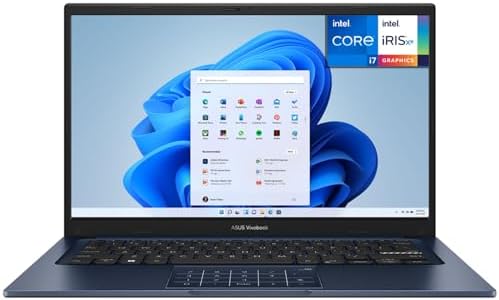
- CPU: Powerful 13th Generation Intel i7-1355U 10-Core (Base Clock 1.7GHz, Up to 5.0 GHz with Intel Turbo Boost Technology…
- Screen: 14″ FHD (1920 x 1080) 250 nits Anti-glare, 45% NTSC color gamut, 16:9 aspect ratio, 60Hz.
- RAM & Storage: 12GB DDR4; 512GB NVMe M.2 SSD
Best for: Modern i7 Performance
If you care most about the processor generation, the ASUS Vivobook 14 is the clear standout in this group. The listing identifies this configuration as the ASUS Vivobook 14 X1404VA-I712512, with an Intel Core i7-1355U, 12GB RAM, 512GB SSD, Windows 11 Home, a 14-inch FHD display, Intel graphics, Wi-Fi, and Bluetooth.
This laptop differs from the first two picks in a very important way: it uses a 13th-generation Intel Core i7-1355U. Intel lists this chip with 10 total cores and 12 threads — two performance cores and eight efficient cores — with a maximum turbo frequency of up to 5GHz and 12MB of Intel Smart Cache. That’s a fundamentally different processor design from the two-core, four-thread i7-7600U in the other two laptops. ASUS’s own specifications for the X1404VA family confirm the same 10-core, 12-thread configuration.
The trade-off: this configuration has 12GB RAM, not 16GB, storage is 512GB rather than the NIAKUN’s 1TB, and the screen is smaller at 14 inches. So it isn’t automatically the best choice for every buyer — but from a CPU-generation perspective, it’s in another class entirely.
Key specs: Model X1404VA-I712512 · 14″ FHD (1920×1080) · Core i7-1355U (13th gen, 10 cores/12 threads, up to 5GHz, 12MB cache) · 12GB RAM · 512GB SSD · Intel integrated graphics · Wi-Fi, Bluetooth, HDMI, multiple USB · Windows 11 Home · ASIN: B0FKGBY2F7
| ✅ What I like | ❌ What I don’t like |
|---|---|
| 13th-gen i7-1355U is far newer than the i7-7600U | 12GB RAM, not 16GB |
| 10 cores/12 threads — a much stronger platform | Smaller screen than the 15.6″ NIAKUN/SAGAWHALE |
| 14″ FHD display balances workspace and portability | Integrated graphics, not a dedicated GPU |
| 512GB SSD suitable for many everyday users | NIAKUN offers more storage if you need 1TB now |
| HDMI + USB connectivity, good for a desk setup | Check the exact live configuration before ordering |
What makes the i7-1355U different? The i7-7600U has 2 cores and 4 threads; the i7-1355U has 10 cores and 12 threads, with two performance cores and eight efficient cores and up to 5GHz turbo. That doesn’t mean every i7-1355U laptop runs five times faster — cooling, power limits, memory, and storage all affect real-world performance — but it does show why processor generations shouldn’t be treated as equal just because they share the “i7” name.
Display and connectivity: the 14-inch, 1920×1080 display is a good middle ground for students and remote workers — small enough to fit easily in a backpack, with enough resolution for normal office work. HDMI, USB, Bluetooth, and Wi-Fi give you solid options for an external monitor, mouse, keyboard, or other desk accessories.
🔗 Check the ASUS Vivobook 14 on Amazon
Why the ASUS Is Different From the Other Two
All three products use the words “Intel Core i7” — but the processors are not from the same generation, and the gap is large enough that it changes the whole comparison.
| i7-7600U (NIAKUN, SAGAWHALE) | i7-1355U (ASUS) | |
|---|---|---|
| Launch | Q3 2016 | Q1 2023 |
| Generation | 7th | 13th |
| Cores / Threads | 2 / 4 | 10 / 12 |
| Max turbo | 3.90GHz | 5GHz |
| Servicing status | End of Servicing Lifetime | Actively supported |
This is why I wouldn’t rank these laptops simply by RAM or SSD size. A laptop with 1TB of storage isn’t automatically better than one with 512GB, and a laptop with an “i7” badge isn’t automatically faster than another “i7.” Processor generation matters more than either of those specs.
Buyer’s Guide: How to Choose an Intel Core i7 Laptop Under $600
Choosing a laptop by CPU name alone is one of the easiest mistakes to make — the “Core i7” label tells you the processor family, not the full performance story. Here’s what to check before buying.
1. Check the exact processor number. Look past “Intel Core i7” to the actual model — e.g., i7-7600U vs. i7-1355U. Those two are separated by several generations, and in this comparison, that difference is huge.
2. Don’t judge a laptop by RAM alone. More RAM doesn’t fix an old CPU. NIAKUN and SAGAWHALE both list 16GB RAM, which might make them look better on paper than the ASUS’s 12GB — but the ASUS’s newer processor platform is a major advantage. For normal office work, 12GB can still be enough for many users.
3. Check SSD capacity. NIAKUN lists 1TB; SAGAWHALE and ASUS list 512GB. More storage matters if you keep large video files, photos, games, or software libraries locally. If you mainly use web apps, documents, and cloud storage, 512GB may be enough.
4. Think about screen size. NIAKUN and SAGAWHALE are 15.6-inch; the ASUS is 14-inch. A larger screen is more comfortable for long desk sessions; a smaller one is easier to carry. Neither is universally better.
5. Look at resolution, not just size. The ASUS specifies 1920×1080; the SAGAWHALE listing identifies an FHD IPS panel specifically. Check the actual resolution and panel type, not just the screen size.
6. Think about your actual workload. For school: battery life, a comfortable keyboard, enough RAM, SSD storage, reliable Wi-Fi, reasonable weight. For office work: comfortable screen size, 8GB+ RAM, SSD storage, HDMI or other display output, a good keyboard. For heavy creative work: be far more careful — a Core i7 label doesn’t automatically mean a laptop suits professional video editing, 3D work, or demanding graphics applications. Check processor generation, GPU, cooling, RAM, storage, and software requirements specifically.
7. Check the operating system. NIAKUN and SAGAWHALE list Windows 11 Pro; the ASUS lists Windows 11 Home. Most home users don’t need Pro-specific features — don’t pay extra for something you won’t use.
8. Check the ports. The ASUS lists USB, HDMI, Bluetooth, and Wi-Fi. If you plan to connect a monitor, keyboard, mouse, USB drive, or printer, check the exact port layout before buying — a laptop can have a great processor and still be frustrating without the right connections.
9. Check the live Amazon listing before ordering. Sellers, configurations, prices, and availability all change. That’s why the links in this article point directly to the Amazon pages rather than a fixed price — always confirm the exact model number and configuration on the live listing.
10. Don’t assume “i7” means new. The single biggest lesson from this comparison: the i7-7600U is a 7th-generation processor from 2016, and the i7-1355U is a 13th-generation processor from 2023. Both are called Core i7. They are not comparable simply because of the name.
Which One Should You Buy?
Best Overall: ASUS Vivobook 14 Takes the top spot because it uses the 13th-generation Core i7-1355U — 10 cores, 12 threads, a 14-inch FHD display, 12GB RAM, and 512GB SSD storage. The best choice for someone who wants the newest processor platform among these three. 🔗 Check ASUS Vivobook 14 on Amazon
Best for Storage: NIAKUN Stands out for its 1TB SSD and 16GB RAM — interesting for buyers who keep lots of files locally. The main compromise is the old i7-7600U processor. 🔗 Check NIAKUN on Amazon
Best Alternative: SAGAWHALE A solid alternative if you want a 15.6-inch FHD IPS display, 16GB RAM, 512GB SSD, and the listed Windows 11 Pro configuration. Like the NIAKUN, its biggest weakness is the same older i7-7600U. 🔗 Check SAGAWHALE on Amazon
Full Specs: NIAKUN vs. SAGAWHALE vs. ASUS
| Feature | NIAKUN | SAGAWHALE | ASUS Vivobook 14 |
|---|---|---|---|
| Processor | Core i7-7600U | Core i7-7600U | Core i7-1355U |
| Generation | 7th | 7th | 13th |
| CPU Cores | 2 | 2 | 10 |
| CPU Threads | 4 | 4 | 12 |
| RAM | 16GB | 16GB | 12GB |
| SSD | 1TB | 512GB | 512GB |
| Display | 15.6″ | 15.6″ FHD IPS | 14″ FHD |
| Windows | 11 Pro | 11 Pro | 11 Home |
| Best for | Storage | Home office | Modern i7 performance |
CPU specifications come from Intel’s official processor pages; laptop configurations come from the respective Amazon listings and ASUS’s own specifications.
FAQ
Are Core i7 laptops good for everyday work?
Yes. A Core i7 laptop can be excellent for everyday work, but the exact processor generation matters a great deal. The i7-1355U, for example, is a much newer processor than the i7-7600U, with a very different core and thread configuration.
Is the Intel Core i7-7600U still good?
It can handle basic tasks, but it’s an old processor. Intel identifies it as a 7th-generation chip launched in 2016 and lists its servicing status as End of Servicing Lifetime. Only consider a laptop with this processor if the price and overall configuration make sense for basic use.
Is the ASUS Vivobook 14 better than the NIAKUN?
For processor generation and CPU capability, yes — the ASUS uses the 13th-generation i7-1355U with 10 cores and 12 threads, versus the NIAKUN’s older i7-7600U with two cores and four threads. The NIAKUN does have advantages in listed RAM and storage.
Is 12GB RAM enough for a laptop?
For many everyday users, yes. Web browsing, documents, email, school work, streaming, and normal office applications don’t always require 16GB. Heavier multitasking benefits from more memory, so check the exact configuration and upgrade options before buying.
Is 512GB SSD enough?
For many users, yes — it covers Windows, applications, documents, photos, and other files comfortably. If you keep large video libraries or many large applications locally, 1TB may be more comfortable.
Is a 14-inch laptop better than a 15.6-inch laptop?
Neither is automatically better. A 14-inch laptop is usually easier to carry; a 15.6-inch laptop gives more physical screen area. Choose based on how you plan to use the computer.
Can these laptops be used for gaming?
Don’t assume a Core i7 laptop is a gaming laptop. CPU model, graphics hardware, cooling, RAM configuration, and specific game requirements all matter. The ASUS configuration uses Intel integrated graphics, and the other two laptops should be evaluated by their exact graphics configuration before being considered for modern games.
Should I buy an old i7 laptop just because it’s cheaper?
Not necessarily. An older i7 can be fine for simple tasks if the price is attractive, but a newer Core i5 can sometimes outperform an old Core i7. Processor generation, architecture, cores, threads, graphics, RAM, storage, and overall laptop design all matter more than the “i7” label alone.
Final Verdict
The three laptops in this comparison are not equal, even though all three qualifying models use the Intel Core i7 name.
My overall pick is the ASUS Vivobook 14. Its 13th-generation Intel Core i7-1355U is dramatically newer than the i7-7600U found in the NIAKUN and SAGAWHALE — Intel lists the i7-1355U with 10 cores and 12 threads, versus the i7-7600U’s two cores and four threads. The ASUS also gives you a 14-inch 1080p display, 12GB RAM, and 512GB SSD storage.
The NIAKUN is more interesting if storage is your main concern — its listed 1TB SSD and 16GB RAM make it attractive for everyday users who keep many files locally. The SAGAWHALE is another budget option with 16GB RAM, 512GB SSD, and a 15.6-inch FHD IPS display.
But there’s one rule to follow before buying any of them: don’t choose a laptop because the title says “Core i7.” Check the exact processor model and generation first.
Amazon pricing and availability can change — use the live product pages below to check the current offer before purchasing.
Amazon Associates Disclosure: As an Amazon Associate, I earn from qualifying purchases.

MD.HASAN is an experienced SEO expert and amazon products review writer passionate about helping people find right products on amzon for buy without confusion. With 4 years of hands-on experience in content strategy and search engine optimization, he specializes in writing SEO-friendly blog posts that rank, engage, and convert.


