
Affiliate disclosure: As an Amazon Associate, Tech Rig Review earns from qualifying purchases. Links on this page may be affiliate links, at no extra cost to you.
Scroll through any “best laptop stand” list published in the last decade — TechRadar, Wirecutter, iMore, CNET, it doesn’t matter which — and you’ll find the same name appearing again and again: the Rain Design mStand.
That’s unusual in the tech accessory world, where most products get replaced by a “new and improved” version every 18 months. The mStand has been on the market since 2009, and it’s still one of Amazon’s best-selling laptop stands today. That kind of staying power doesn’t happen by accident — it happens because the product genuinely works, and customers keep recommending it years after their purchase.
I dug into the full mStand lineup, cross-referenced verified Amazon customer reviews spanning multiple color variants, compared expert opinions from iMore and HighTechDad, and pulled the engineering specifications directly from Rain Design’s own documentation. This review covers everything you need to know before buying — including which variant in the mStand family is actually right for you, because “the mStand” isn’t just one product. It’s a small family of laptop stands (mStand, mStand360, mBar Pro, mBar Pro+, and iLevel2) that often gets confused as a single item.
If you’re searching for “Rain Design mStand laptop stand review” because you’re tired of hunching over your laptop screen all day, this is the deep dive you’ve been looking for.
Table of Contents
Why a Laptop Stand Matters More Than You Think
Before getting into the specifics, it’s worth explaining why this product category exists at all — and why physical therapists keep recommending it.
When you use a laptop on a flat desk without any elevation, the screen sits roughly 4 to 6 inches below natural eye level. To see it clearly, your neck tilts forward and down for hours at a time. This posture, sometimes called “tech neck,” puts dramatically more load on your cervical spine than an upright neutral position — some studies suggest the effective weight your neck muscles support can double or even triple at a 45-degree forward tilt compared to neutral posture.
Over months and years, this contributes to chronic neck tension, upper back pain, and headaches — exactly what one iMore reviewer described when her chiropractor traced her back pain directly to laptop posture. A laptop stand solves this by raising the screen toward eye level, restoring a more neutral neck position. The trade-off is that you then need an external keyboard and mouse, since typing directly on an elevated laptop keyboard becomes uncomfortable. That’s a detail several reviewers mention, and it’s worth knowing before you buy.
Rain Design mStand: Full Product Overview

What Is the mStand, Exactly?
The mStand is a single, solid piece of aluminum, cold-forged (not cast or stamped) into a curved shape that lifts your laptop’s rear edge while creating an open platform underneath for airflow and a small storage gap for your keyboard when not in use. There are no moving parts, no hinges, no folding mechanisms — just one continuous piece of metal engineered into the right shape.
That single-piece construction is the entire reason this stand has such a devoted following. Hinges and joints are where cheap laptop stands fail — they loosen, wobble, and eventually break. The mStand has nothing to loosen.
Core Specifications
- Material: Single-piece cold-forged aluminum, sand-blasted and anodized finish
- Height raised: 5.9 inches (150mm) screen elevation
- Base footprint: 7.5″ x 10″ (190mm x 253mm)
- Thickness: 1/10 inch (2.5mm) — comparable to a dinner plate, but aluminum-strength
- Weight: Approximately 3 lbs
- Compatibility: Apple MacBook, MacBook Pro, MacBook Air, and most PC laptops with a depth under 10.4 inches
- Cable management: 2-inch diameter cable routing hole at the rear
- Feet: Thick rubber padding so the laptop’s surface never directly contacts the aluminum
How It Performs in Real Use
According to verified Amazon buyers, the stand’s biggest strength is its complete rigidity. One reviewer described it as a sturdy 1/4-inch aluminum stand that holds the laptop at a perfect height, with the aluminum dissipating some of the laptop’s heat. This heat-sink effect is a genuine engineering benefit — aluminum is an excellent thermal conductor, so resting a hot laptop chassis against it does pull some heat away, which can modestly help fan-based cooling systems work less hard during demanding tasks.
Another buyer who owns multiple units across both their office and home setup called it the best purchase they’d made, highlighting how the tilt angle creates a comfortable hand position for typing and writing posture.
The independent review from iMore echoes this from a posture-specific angle. The reviewer noted that the mStand raised their MacBook to eye level, preventing the hunching that had been causing real back pain, on the recommendation of their chiropractor. They specifically credited the stand with helping them sit up straighter and look forward rather than down, describing noticeable improvement in upper back pain after switching to it.
The One Honest Limitation
No product is perfect, and the mStand has one consistent critique across both expert and customer reviews: it doesn’t adjust. The iMore review specifically notes it would be nice if the stand offered height adjustability, flagging this as the main drawback worth knowing about before buying.
This single 5.9-inch elevation works extremely well for most desk heights and most users’ eye levels, but if you’re particularly tall, particularly short, or you switch between sitting and standing desk configurations throughout the day, a fixed-height stand may not be the perfect fit for every scenario. (We cover the adjustable alternative — the iLevel2 — further down for exactly this use case.)
Another minor consideration some reviewers raise: typing directly on the laptop’s own keyboard while it’s elevated can feel slightly awkward for extended sessions, since your wrists end up at a higher angle than a flat desk position. The mStand is designed around the assumption that you’ll pair it with an external keyboard and mouse — which is also the ergonomically correct setup anyway, since it lets you position your hands at a comfortable, lower angle while your eyes look at the elevated screen.
Detailed Review: Every mStand Variant on Amazon
This is where most reviews online fall short — they review “the mStand” as if it’s one product, when in reality Rain Design sells several distinct models under the mStand family name, plus color editions of the original. Here’s the breakdown of what’s actually available, so you order the right one.
1. Rain Design mStand (Original) — Silver, 10032

- Raises notebook screen height to eye level for better ergonomics (5.9 inches).
- Single piece aluminum design provides solid stability and acts as a heat sink to cool laptop
- The back cable management hole is 2 inches in diameter. Cable organizer behind routes wires neatly
Price: ~$38.99–$49.99 | Rating: ★★★★★ | Best For: The classic, most widely reviewed version
This is the original mStand and the one most reviewers are referring to when they talk about “the mStand.” The single-piece aluminum design provides solid stability and acts as a heat sink to cool the laptop, with a 2-inch diameter back cable management hole and a sand-blasted, silver anodized finish that matches Apple notebooks. It’s compatible with MacBook Pro, MacBook Air, and other laptops with a depth under 10.4 inches, and the keyboard stash space underneath clears desk clutter when the external keyboard isn’t in use.
Pros:
- The most tested and reviewed version, with thousands of verified Amazon ratings
- Silver anodized finish matches silver MacBooks and most PC laptops perfectly
- Single-piece construction means zero wobble, zero moving parts to fail
Cons:
- Fixed height — no adjustability
- At nearly $50, it’s priced above most generic competitors
- Not foldable, so less ideal for travel
Verdict: The benchmark version. If you’re buying your first mStand and don’t have a specific reason to choose a different variant, this silver original is the safe, well-proven choice.
2. Rain Design mStand — Space Gray, 10072

- Raises notebook screen height to eye level for better ergonomics (5.9 inches). Single piece aluminum design provides sol…
Price: ~$44.99–$49.99 | Rating: ★★★★★ | Best For: Space Gray MacBook and MacBook Pro owners
Functionally identical to the silver original, this version exists purely to color-match Apple’s Space Gray laptop line. One verified reviewer specifically noted that the space gray finish matches their MacBook Pro perfectly, saying it honestly looks like it was made by Apple to go with the laptop.
Pros:
- Seamless color match for Space Gray MacBook Pro and MacBook Air owners
- Same proven single-piece aluminum build as the original
- Anti-scratch rubber feet protect both the stand and your desk surface
Cons:
- Identical functionality to the silver version — purely an aesthetic choice
- Same fixed-height limitation
- Premium pricing for what is fundamentally the same engineering as the base model
Verdict: If aesthetics matter to you and you own a Space Gray Apple device, this is the obvious pick. There’s no functional reason to choose silver over space gray or vice versa — it’s purely about what matches your setup.
3. Rain Design mStand — Black, 10075

- Raises notebook screen height to eye level for better ergonomics (5.9 inches). Single piece aluminum design provides sol…
Price: ~$44.99–$49.99 | Rating: ★★★★★ | Best For: Dark desk setups and non-Apple laptop users
The black finish version gives you the same engineering in a more neutral, universally matching color — a popular pick for users with Windows laptops or darker desk aesthetics where silver or gold finishes look out of place.
Pros:
- Matte black finish works with virtually any laptop brand or color
- Identical core construction and stability to the original
- Less prone to showing fingerprints than the silver/gold finishes
Cons:
- Same fixed-height design as all standard mStand variants
- No functional advantage over other colors beyond aesthetics
Verdict: The best choice if you’re not using an Apple device, or if your desk setup leans toward an all-black aesthetic. Functionally indistinguishable from the silver and space gray versions.
4. Rain Design mStand — Gold, 10071
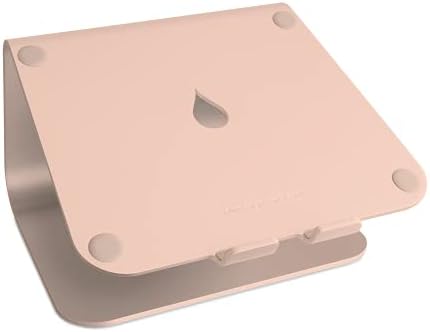
- Raises notebook screen height to eye level for better ergonomics (5.9 inches). Single piece aluminum design provides sol…
Price: ~$44.99–$49.99 | Rating: ★★★★★ | Best For: Gold MacBook owners and warm-toned desk setups
The gold edition rounds out the original Apple-matching color trio (silver, space gray, gold), aimed specifically at owners of gold-finish MacBooks and MacBook Airs.
Pros:
- Matches gold MacBook and MacBook Air models precisely
- Same engineering, durability, and heat-dissipation benefits as every other mStand color
- A standout, premium look for visible desk setups and video calls
Cons:
- Gold finish may show fine scratches more visibly over years of use compared to darker finishes
- Same fixed-height limitation across the line
Verdict: A great pick for anyone running a gold Apple setup who wants their accessories to look intentional and color-coordinated rather than mismatched.
5. Rain Design mStand — Starlight, 10092

- Raises notebook screen height to eye level for better ergonomics (5.9 inches). Single piece aluminum design provides sol…
Price: ~$49.99–$54.99 | Rating: ★★★★★ | Best For: Newer MacBook Air (Starlight) owners
Apple introduced the Starlight finish with newer MacBook Air models, and Rain Design followed with a matching mStand edition. This is the newest color addition to the lineup and tends to run slightly higher in price as the most recently released variant.
Pros:
- Matches the newest MacBook Air Starlight color precisely
- Same proven single-aluminum-piece engineering as the rest of the family
- A reviewer with five years of ownership on an earlier mStand model confirmed the build remains “rock solid” — a strong signal for long-term durability across the whole product line
Cons:
- Slightly higher price point as the newest color release
- Limited availability compared to the original silver, black, and space gray versions
Verdict: If you own a newer Starlight MacBook Air, this is the color-matched option. Functionally there’s nothing different from the rest of the lineup, but it completes the look for newer Apple hardware.
6. Rain Design mStand360 — Silver, 10036

- Better ergonomics is achieved with higher screen height. Tilt design brings screen closer and improves airflow around la…
Price: ~$64.99–$69.99 | Rating: ★★★★½ | Best For: Presentations, screen-sharing, and collaborative workspaces
The mStand360 takes the exact same core design and adds a low-profile rotating base with embedded ball bearings, allowing a full 360-degree swivel. Unlike the standard mStand, the mStand360 has a very low-profile 360-degree swivel base hidden at the bottom, allowing the laptop screen to be easily shared between two people — useful for business co-workers or clients. Importantly, Rain Design notes the base construction is genuinely different between the two models — the mStand360 has ball bearings embedded into the body, so a standard mStand cannot be converted into a 360 version and vice versa; they are separate manufacturing builds.
One verified Amazon reviewer specifically praised this model, noting it allowed them to rotate their MacBook Pro 360 degrees, which they found extremely convenient for meetings where they needed to show their screen to someone else, while still offering a non-slip rubber base for stability.
Pros:
- Genuinely useful 360-degree rotation for screen-sharing in meetings or with clients
- Same single-piece aluminum quality and stability as the original mStand
- Slim rotating base barely adds bulk to the overall design
Cons:
- Higher price than the standard mStand for the added rotation feature
- Very slightly less rock-solid than the fixed original due to the rotating mechanism, though still extremely stable for typing
- Overkill if you never need to share your screen with someone sitting beside you
Verdict: A smart upgrade specifically for consultants, sales professionals, designers presenting work, or anyone who regularly needs to spin their laptop screen toward another person. If that’s not a regular need, the standard mStand is the better value.
Quick Comparison Table
| Model | Price | Rating | Adjustable? | Best For |
|---|---|---|---|---|
| mStand Silver (10032) | ~$38.99–$49.99 | ★★★★★ | No | Classic, universal pick |
| mStand Space Gray (10072) | ~$45–$50 | ★★★★★ | No | Space Gray MacBook match |
| mStand Black (10075) | ~$45–$50 | ★★★★★ | No | Non-Apple/dark setups |
| mStand Gold (10071) | ~$45–$50 | ★★★★★ | No | Gold MacBook match |
| mStand Starlight (10092) | ~$50–$55 | ★★★★★ | No | Newest MacBook Air color |
| mStand360 Silver (10036) | ~$65–$70 | ★★★★½ | Rotates 360° | Presentations & screen-sharing |
How to Choose the Right mStand for You
If this is your first laptop stand purchase: Go with the original mStand in whatever color matches your laptop. It’s the most tested, most reviewed, and most proven version in the lineup, with thousands of verified five-star Amazon reviews behind it.
If you regularly present or share your screen with colleagues or clients: The mStand360 is worth the extra cost. The 360-degree swivel solves a real, specific problem that the standard mStand cannot.
If a fixed 5.9-inch height doesn’t match your desk and chair setup, or you switch between sitting and standing: Skip straight to the iLevel2. Paying more upfront for adjustability is cheaper than buying the wrong stand twice.
If you’re matching a specific MacBook color: Choose space gray, gold, or starlight to match your device exactly — there is zero functional difference between colors, so this decision comes down purely to aesthetics.
Is the Rain Design mStand Worth the Price?
This is the question every potential buyer is really asking, since at $45-plus, the mStand costs significantly more than generic plastic or folding aluminum stands that sell for $15–$20 on Amazon.
Having reviewed the engineering, the customer feedback, and the expert opinions, the honest answer is: yes, for most people, it’s worth it — and here’s the reasoning.
Durability is the differentiator. One Amazon review titled “5 years later” confirms the stand remains rock solid after half a decade of regular use — a claim that’s extremely rare in the laptop accessory category, where most budget stands show wobble or wear within a year. The single-piece forged aluminum construction genuinely has no parts to loosen, which is the root cause of nearly every laptop stand failure on the market.
The ergonomic benefit is real, not marketing. Multiple independent users and at least one professional review (backed by a chiropractor’s recommendation) confirm meaningful improvement in posture and reduced back/neck pain after switching to an elevated laptop position.
Resale and long-term value hold up. Because the mStand doesn’t rely on batteries, motors, or electronics that become obsolete, a unit bought today will function exactly the same in a decade as it does on day one.
The trade-off is upfront cost and the lack of adjustability on the standard model — both of which are addressed by choosing the iLevel2 if those matter to your specific setup.
Frequently Asked Questions
Does the Rain Design mStand work with Windows laptops, or only MacBooks?
The mStand is compatible with most laptops that have a depth of less than 10.4 inches, which covers the vast majority of Windows ultrabooks and laptops on the market today, not just Apple devices. The silver, black, space gray, and gold finishes were originally designed to color-match MacBooks, but the stand functions identically with any compatible laptop regardless of brand.
Will the mStand scratch my laptop?
No. The mStand is fully padded with thick rubber feet so that no part of the laptop’s actual chassis touches the aluminum surface directly, which protects the laptop’s finish during use.
Can I type directly on my laptop’s keyboard while it’s on the mStand?
You can, but it’s not the most comfortable long-term setup. Because the stand elevates the rear of the laptop, the keyboard sits at an angled, raised position that some users find puts unwanted strain on the wrists during extended typing. Most reviewers and the manufacturer recommend pairing the mStand with a separate external keyboard and mouse for daily use, reserving direct typing on the laptop for quick tasks.
What’s the actual difference between the mStand and the mStand360?
The base construction itself is different — the mStand360 has ball bearings embedded into the body for rotation, meaning a standard mStand physically cannot be converted into a 360 model. Beyond the swivel function, the core elevation, materials, and stability are the same across both models.
Is the mStand portable enough to carry to a coffee shop or office daily?
The mStand weighs about 3 pounds and measures 10 inches wide by 5.9 inches high, which makes it stable on a desk but genuinely heavier than folding aluminum alternatives designed specifically for daily carry. If you need a stand for a permanent desk setup, this is a non-issue. If you need something to throw in a bag every day, Rain Design’s own foldable mBar Pro+ line is built for that use case instead.
How much height does the mStand actually add?
The mStand raises the laptop screen by 5.9 inches (150mm), which is calibrated to bring most laptop screens close to natural eye level for users of average height sitting at a standard desk height.
Final Verdict
The Rain Design mStand has earned its reputation as one of Amazon’s best-selling laptop stands through more than a decade of consistent, proven performance — not through aggressive marketing or gimmicky features. It does one job extremely well: elevating your laptop to a healthier eye-level position using a design so simple and solidly built that there’s almost nothing left to break.
For most buyers, the original mStand in your matching color is the right call. If you regularly present to others, the mStand360’s swivel base earns its premium. And if a fixed height doesn’t suit your setup, the iLevel2 removes that one limitation entirely.
Whichever version you choose, you’re buying into a product line with an unusually long track record of real-world durability — confirmed by users still recommending it five years after purchase.
Prices shown are approximate at the time of writing and subject to change on Amazon. This article contains editorial recommendations only — no sponsored placements.

MD.HASAN is an experienced SEO expert and amazon products review writer passionate about helping people find right products on amzon for buy without confusion. With 4 years of hands-on experience in content strategy and search engine optimization, he specializes in writing SEO-friendly blog posts that rank, engage, and convert.


