🔗 Affiliate Disclosure: As an Amazon Associate, Tech Rig Review earns from qualifying purchases. Links on this page may be affiliate links — at no extra cost to you.
Learn how to reduce eye strain from long computer days with simple habits, ergonomic fixes, and real Amazon products that actually help — no fluff.
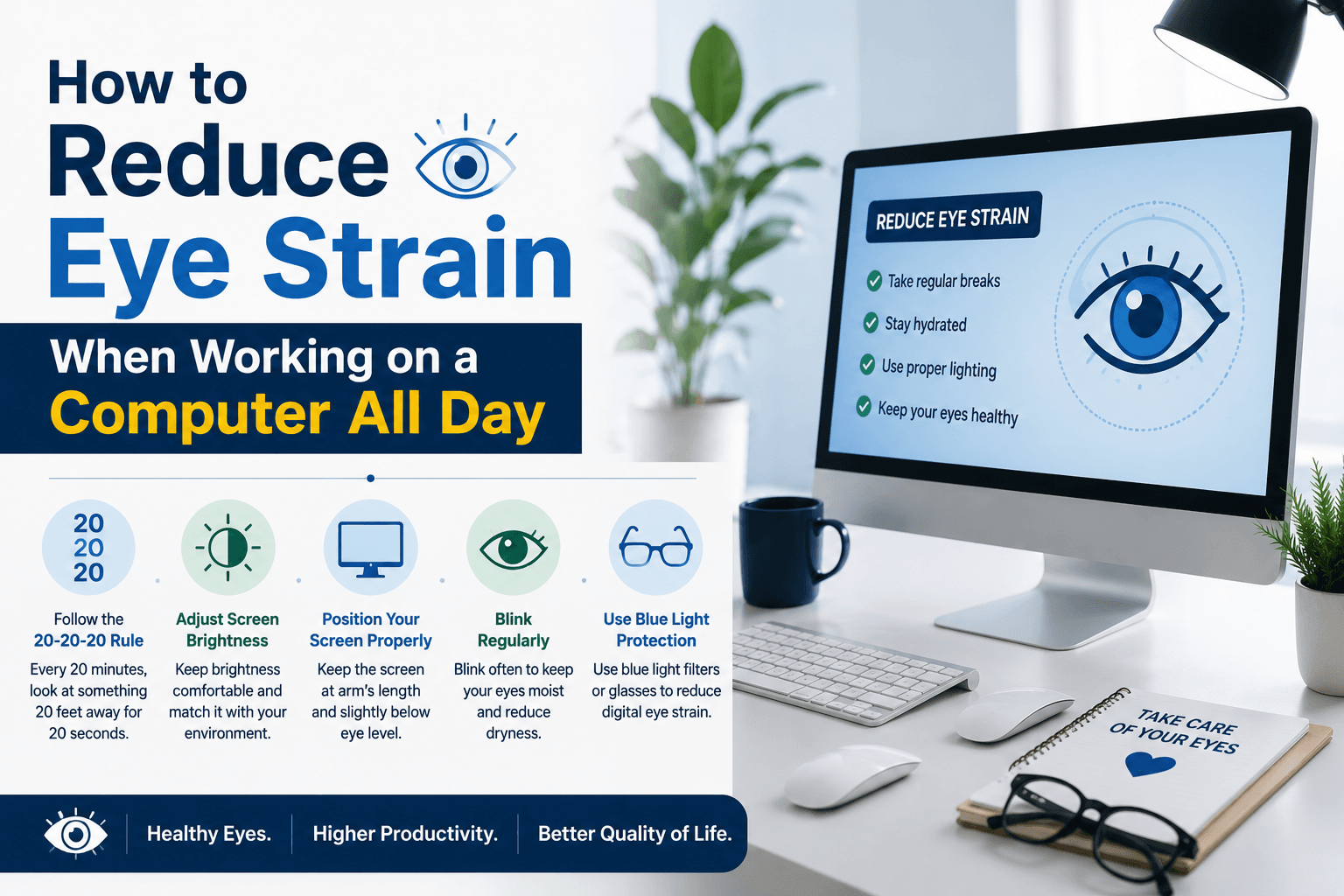
If your eyes feel tired, dry, or achy by mid-afternoon, you’re not imagining it. Learning how to reduce eye strain when working on a computer is one of the most searched health questions among remote workers, students, and anyone glued to a screen for 8+ hours a day — and for good reason. Digital eye strain, also called computer vision syndrome, is one of the most common complaints tied to modern desk work, and it only gets more common the longer your workday stretches on.
The good news is that most of the fixes are simple, and a few of them cost nothing at all. This guide walks through the habits and small setup changes that make the biggest difference, along with real products that support each one. We’ve compared official product specs and manufacturer listings against verified buyer feedback patterns rather than claiming hands-on lab testing, so you can trust what’s here without wading through hype or invented claims.
By the end, you’ll have a clear, practical plan: what to change about your habits, what to change about your desk setup, and which products are genuinely worth adding to your cart versus which ones are more about personal comfort than proven necessity. We’ll also walk through why your eyes get tired in the first place, since understanding the cause makes it a lot easier to pick the right fix instead of guessing.
Table of Contents
Quick Answer: The Short Version
If you only take five things from this guide, make it these:
- Every 20 minutes, look at something 20 feet away for 20 seconds (the 20-20-20 rule).
- Position your monitor an arm’s length away with the top of the screen at or just below eye level.
- Balance your lighting so there isn’t a big brightness gap between your screen and the room around it.
- Blink on purpose and keep lubricating eye drops nearby for when your eyes feel dry.
- Take real breaks — stand up, move, and look at something far away at least once an hour.
The rest of this guide walks through each of these in more depth, plus the specific products that make them easier to stick to.
Why Your Eyes Feel So Tired After a Full Day at the Computer
Staring at a screen for hours isn’t natural for your eyes. You blink less often when focused on a screen — sometimes by half — which dries out the surface of your eyes faster than normal. Add in glare, poor lighting, an awkwardly positioned monitor, and small text, and your eye muscles end up working overtime just to keep things in focus. The American Optometric Association refers to this whole cluster of symptoms as computer vision syndrome, and notes it tends to get worse the longer someone spends on digital screens in a day.
There’s also a visual comfort factor that’s easy to overlook: screens are made of tiny pixels, and your eyes are constantly making micro-adjustments to keep text and images sharp, especially with smaller fonts or lower-resolution displays. Combine that with a fixed, close focal distance held for hours at a time, and the small muscles controlling your eye’s lens simply get fatigued the same way any muscle would after sustained, repetitive use.
None of this causes permanent eye damage, but it absolutely causes the headaches, blurry vision, and neck stiffness that make the last two hours of a workday feel miserable. It’s also worth noting that eye strain rarely shows up alone — it tends to travel with poor posture, since people instinctively lean toward a screen when they’re struggling to focus on it, which then drags neck and shoulder pain into the mix too.
A few other factors quietly make things worse without most people realizing it. Low screen resolution or small font sizes force your eyes to work harder to resolve fine detail. A screen refresh rate that’s too low can introduce a subtle flicker that some people are more sensitive to than others. And simply sitting closer to your screen than you need to — something a lot of people do without thinking about it, especially on laptops — shortens your focal distance and increases strain compared to sitting back at a more relaxed distance. None of these are dealbreakers on their own, but they stack on top of the bigger factors like lighting and blink rate, and fixing them together tends to produce a bigger improvement than fixing just one.
Here’s what those symptoms actually look like:
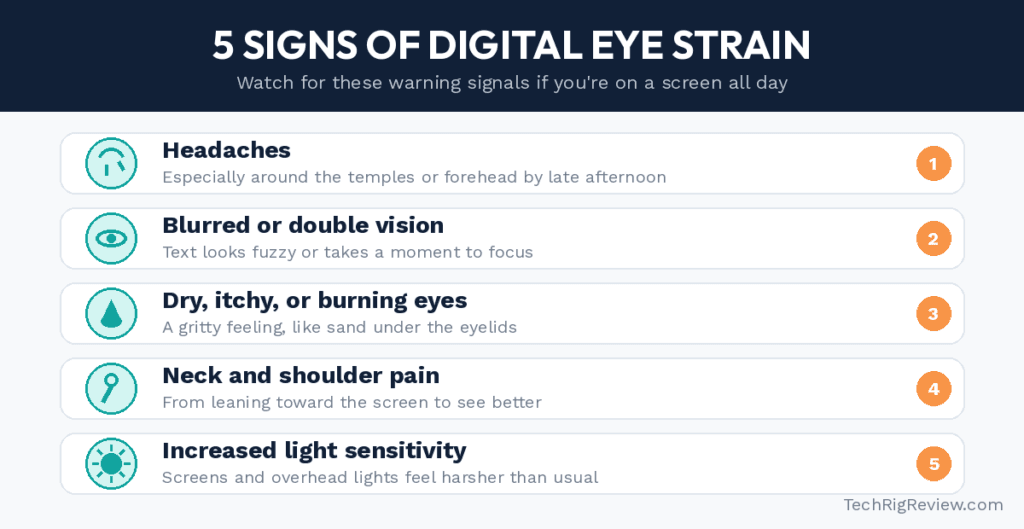
If two or more of these sound familiar by the end of a workday, the fixes below are worth building into your routine. The order below roughly follows what tends to make the biggest difference for the least effort, so start from the top if you’re not sure where to begin.
1. Follow the 20-20-20 Rule
This is the single most recommended habit for digital eye strain, and it costs nothing. Every 20 minutes, look at something at least 20 feet away for 20 seconds. It gives your eye muscles a chance to relax from the constant near-focus that screens demand.
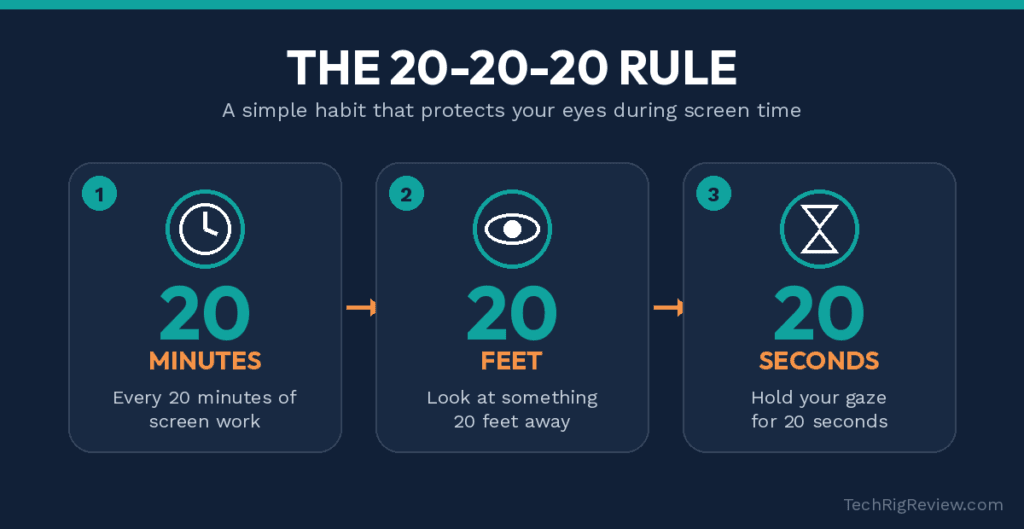
It sounds too simple to matter, but the habit works because it directly counters the main mechanism behind eye strain — your focusing muscles staying locked in one position for too long. Twenty feet is roughly “look out the window at the yard, the parking lot, or the far wall of a large room” — anything past arm’s reach and then some. Twenty seconds is longer than most people naturally pause, which is exactly the point: it’s enough time for the eye’s focusing muscle to genuinely relax rather than just blink and snap right back to the screen.
Set a recurring phone alarm or a sticky note on your monitor until it becomes automatic. Some people also tie it to something they’re already doing regularly — glancing away every time a Slack notification pops up, or every time a song changes — so it doesn’t feel like one more thing to remember. The habit tends to stick faster than you’d expect once it’s linked to an existing routine instead of a standalone reminder.
2. Fix Your Desk Lighting
A huge amount of eye strain comes down to contrast, not just screen time. Working in a dark room with only your monitor lit up forces your pupils to constantly readjust between the bright screen and the dim surroundings. The same goes for harsh overhead lighting that reflects straight off your display, or a bright window positioned right behind or in front of your monitor.
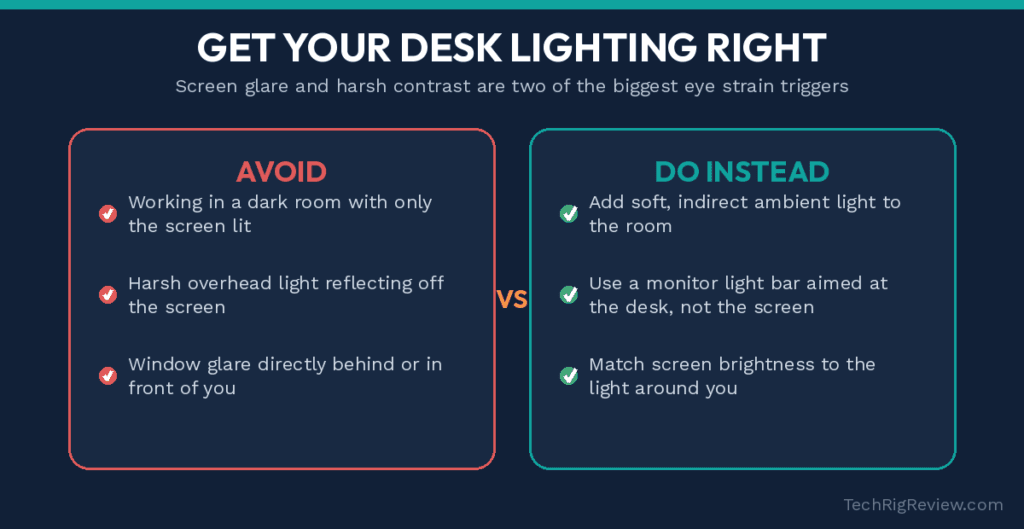
The underlying principle is contrast management: your eyes work hardest when there’s a big brightness gap between what they’re focused on and everything around it. That’s the same reason watching a bright phone screen in a pitch-dark bedroom feels harsh, or why staring at a laptop screen in a dim conference room during a video call leaves you squinting. The fix isn’t necessarily “more light” — it’s “more balanced light.”
One of the most effective fixes here is a monitor light bar, which sits on top of your screen and lights your desk without shining into your eyes or reflecting off the display. The BenQ ScreenBar LED Monitor Light Bar is the best-known option in this category, and for good reason — it’s specifically engineered with asymmetric optics so the light falls on your desk and keyboard, not back into your eyes off the screen. It also auto-adjusts brightness based on the room’s ambient light through a built-in sensor, so you’re not fumbling with settings throughout the day, and it clips onto the top of most monitors without taking up any desk space.
If you don’t want to add a light bar, simply adding any soft ambient light source behind or beside your monitor — a lamp, a bias light, even a dim overhead light — gets you most of the same benefit for less money. The goal either way is the same: soften the contrast between your bright screen and a dark room, and keep any light source from reflecting directly toward your eyes off the glass.
3. Cut Down on Screen Glare
Glare isn’t just annoying — it makes your eyes squint and strain to see past the reflection, which adds up over a full day. If your desk faces a window or sits under overhead lighting, you’ve probably noticed reflections on your screen already, whether it’s a bright patch washing out part of your display or a faint mirror-image of the window or ceiling light behind you.
A matte anti-glare screen protector is a cheap, permanent fix. The F FORITO 24 Inch Anti Glare Matte Screen Protector (also available in other sizes to match your specific monitor) uses a textured matte finish that scatters reflected light instead of bouncing it straight back at your eyes, while still keeping the screen clear enough for text and detail work. Make sure to measure your monitor’s diagonal screen size before ordering, since these protectors are cut to fit specific dimensions, and double-check the aspect ratio (16:9 versus 16:10) listed on the product page against your own monitor.
Repositioning your monitor perpendicular to windows, rather than facing or backing onto them, is the free version of this same fix, and it’s worth doing even if you also add a screen protector — the two solve slightly different parts of the glare problem. A protector handles reflections that hit the glass directly; repositioning handles the bigger issue of a bright window competing with your screen for your eyes’ attention in the first place.
4. Get Your Monitor Position Right
Screen position affects both your eyes and your neck. If your monitor sits too low, too high, too close, or too far, your eyes and posture both compensate — and both end up sore by the end of the day.
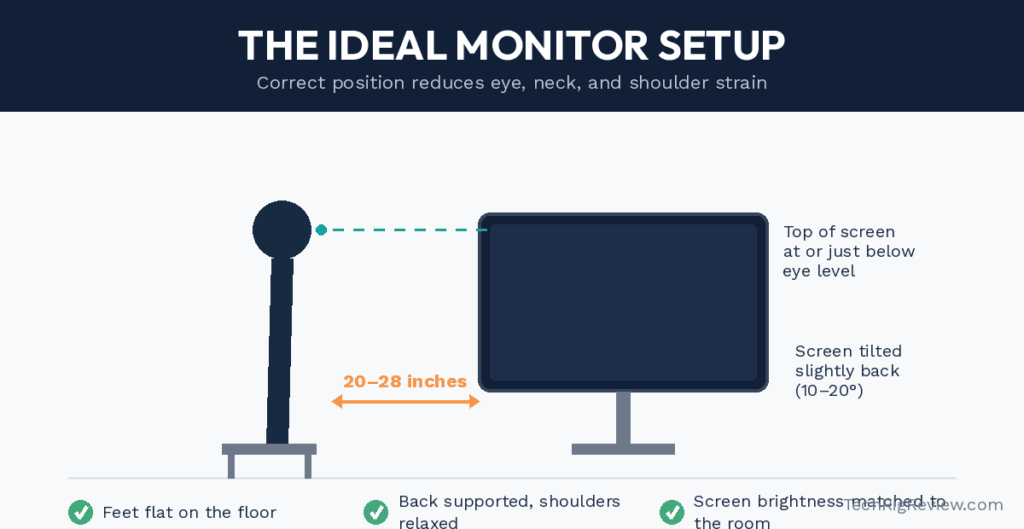
The general guidance from optometrists is to sit with the monitor an arm’s length away (roughly 20 to 28 inches), with the top of the screen at or just below eye level so you’re looking slightly downward rather than up or straight ahead. A screen positioned too low forces you to tilt your head down and crane your neck forward over time, which is a common source of the neck and shoulder pain that so often accompanies eye strain. A screen positioned too high does the opposite, straining your neck backward and drying your eyes out faster since your eyelids open wider when looking upward.
If your monitor is sitting flat on a desk and doesn’t naturally hit that height, a monitor arm solves it instantly. The HUANUO Single Monitor Mount lets you adjust tilt, height, and swivel with one hand, so you can dial in the exact position that keeps your neck neutral and your eyes at the right distance — and it also frees up desk space since the monitor is no longer sitting on a separate stand. It clamps or mounts through a grommet hole onto most desks and works with the VESA mounting pattern found on the back of most standard monitors, so it’s worth checking your monitor’s spec sheet for VESA compatibility before ordering.
If a monitor arm isn’t in the budget right now, a stack of sturdy books or a simple laptop stand can get you most of the way to the right height for free — the specific tool matters less than actually hitting the right eye-level position. If you want to double-check your full setup rather than just your monitor height, OSHA’s interactive computer workstation eTool walks through chair height, keyboard position, and monitor placement together, since all three interact with each other more than people expect.
5. Keep Your Eyes Lubricated
Since screen use cuts your blink rate roughly in half, dryness is one of the most common complaints tied to long computer sessions. Consciously blinking more often helps, but if your eyes still feel gritty or irritated by the afternoon, lubricating eye drops (often called artificial tears) can offer quick relief.
Systane Ultra Lubricant Eye Drops are one of the most widely used over-the-counter options for this, formulated specifically to add moisture back to the eye’s surface. Keeping a bottle in your desk drawer means relief is available the moment your eyes start feeling irritated, rather than waiting it out until you get home. If dryness is a daily, persistent problem rather than an occasional afternoon annoyance, that’s worth mentioning to an eye doctor rather than just managing it with drops indefinitely — persistent dry eye can have several different underlying causes, and an eye care professional can identify which type you’re dealing with and whether a different treatment would serve you better.
6. Add Some Humidity to Your Workspace
Dry indoor air — especially common in air-conditioned or heated offices — speeds up how quickly your eyes dry out during the day. If you’ve noticed your eyes (and maybe your skin and sinuses) feel worse in winter or in a heavily air-conditioned room, humidity is likely part of the problem, since dry air pulls moisture from the surface of your eyes faster than your natural blink rate can replace it.
A small desktop humidifier is an easy add near your workspace. The Fancii UltraMist Personal Desktop Humidifier is sized for a desk rather than a whole room, with a built-in water tank and cool mist output, so it adds moisture right where you’re sitting instead of trying to humidify an entire office. This matters if you work in a shared space where a full-room humidifier isn’t practical or wouldn’t be appreciated by everyone around you — a personal unit solves the problem for your specific desk without affecting anyone else’s setup.
7. Consider Blue Light Blocking Glasses (With Realistic Expectations)
Blue light glasses are one of the most talked-about eye strain products, so they’re worth addressing honestly. The current scientific consensus, summarized in EyeWiki’s overview of computer vision syndrome, is that there’s no strong evidence blue light from screens causes lasting eye damage, so these glasses shouldn’t be treated as a magic fix for eye strain itself.
That said, many people find them genuinely helpful for a different reason: reduced glare sensitivity and, for some, better sleep if used in the evening, since blue light exposure late at night can interfere with your body’s natural wind-down signals. If you want to try a pair, livho High Tech Blue Light Glasses are a widely purchased, affordable option to test whether they make a difference for you personally.
Treat them as a possible comfort add-on, not a replacement for the habits and setup changes above. If you had to pick just one or two things from this whole list to prioritize, blue light glasses would be near the bottom — lighting, monitor position, and the 20-20-20 rule matter more.
8. Don’t Ignore Your Overall Posture
Eye strain and body posture are more connected than most people realize. When your eyes are working hard to focus on something, it’s natural to lean in closer, hunch your shoulders forward, or crane your neck — all of which then create their own separate aches that compound how miserable a long screen day feels. It works the other way too: a chair that’s too low, an armrest that forces one shoulder up, or a keyboard positioned too far away can all push your head and torso into positions that make it harder to keep your eyes level with your screen the way they’re supposed to be.
Beyond fixing your monitor height, it’s worth checking your chair height, keyboard position, and overall desk setup periodically throughout the day. Standing up, stretching, and walking around for even a couple of minutes every hour gives both your eyes and the rest of your body a genuine reset, not just a change of visual focus. Combining a movement break with your 20-20-20 eye break is an efficient way to cover both at once — get up, walk to a window or another room, and look at something far away before sitting back down. It takes less than a minute and addresses two problems with one habit instead of trying to remember two separate routines throughout the day.
9. Get a Yearly Eye Exam (Even If Your Vision Seems Fine)
It’s easy to assume digital eye strain is purely about habits and desk setup, but sometimes it’s a sign of an underlying vision issue that hasn’t been corrected yet. Slight, uncorrected nearsightedness, farsightedness, or astigmatism can all make screen work feel more exhausting than it should, since your eyes are quietly overworking to compensate for a focus issue you might not even notice in everyday life.
An annual eye exam catches these issues early and lets your eye doctor rule out anything beyond simple digital fatigue. It’s also worth mentioning your screen habits specifically during the exam — how many hours a day you’re on a computer, how far away your monitor sits, and what symptoms you’re noticing — since an eye doctor can tailor recommendations (including whether computer-specific glasses would help you personally) far better with that context than without it.
How Long Before You Notice a Difference?
Most people notice at least some improvement within a few days of making these changes, especially with the quick wins — better lighting, monitor position, and the 20-20-20 rule. Dryness and grittiness tend to improve fastest since eye drops and humidity changes work almost immediately. Headaches and the more diffuse “tired eyes” feeling usually take a bit longer, often a week or two of consistent habit changes, since your eye muscles need time to stop compensating for whatever strain pattern they’d settled into.
If you make several of these changes at once and still aren’t seeing improvement after a couple of weeks, that’s a reasonable point to loop in an eye doctor rather than continuing to troubleshoot on your own. Persistent symptoms that don’t respond to basic ergonomic and habit fixes are exactly the kind of thing worth getting checked rather than assuming it will eventually resolve itself.
Your Daily Eye Care Checklist
Between habits, lighting, positioning, and products, that’s a lot to take in at once. Here’s the full list pulled together into one routine you can actually stick to, roughly in the order that tends to matter most:
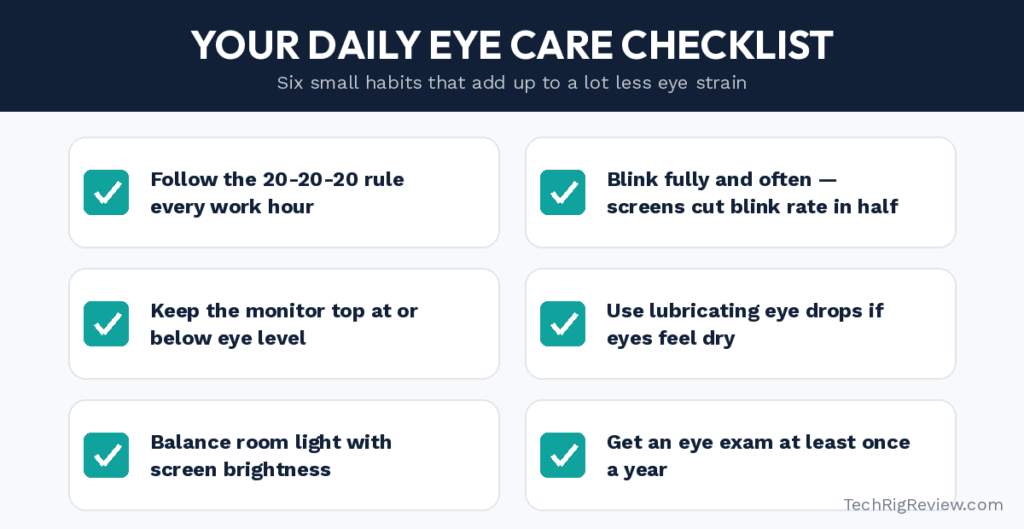
Building even three or four of these into your daily routine tends to make a noticeable difference within a week or two. Print this list out and stick it near your monitor if you think you’ll forget — the habit-forming part is usually the hardest part, not the actions themselves.
Frequently Asked Questions
1. How do I reduce eye strain when working on a computer all day?
Follow the 20-20-20 rule, fix your lighting and glare, position your monitor at the right height and distance, blink consciously and often, and use lubricating eye drops if your eyes feel dry. Most eye strain comes from a combination of these factors, not just one.
2. Do blue light glasses actually work for eye strain?
The evidence for blue light specifically causing eye strain is weak, according to major eye health organizations. Some people still find the glasses subjectively more comfortable, particularly for glare sensitivity, but they shouldn’t replace basic habits like the 20-20-20 rule and proper monitor positioning.
3. How far should my monitor be from my eyes?
Most eye care guidance recommends roughly an arm’s length, around 20 to 28 inches, with the top of the screen at or just below eye level.
4. Can digital eye strain cause permanent damage?
No. Digital eye strain causes real discomfort — headaches, dryness, blurred vision, neck pain — but current research doesn’t show it causes permanent damage to the eyes.
5. Why do my eyes feel dry after using a computer?
You blink significantly less often when focused on a screen, which lets the eye’s tear film evaporate faster than it’s replenished. This is one of the most common and well-documented causes of computer-related eye discomfort.
6. Does screen brightness matter for eye strain?
Yes. A screen that’s much brighter or dimmer than the room around it forces your eyes to keep readjusting, which contributes to fatigue. Try to keep your screen brightness reasonably close to your room’s ambient light level.
7. How often should I take breaks from my computer?
Beyond the 20-20-20 rule for your eyes specifically, most ergonomic guidance also recommends standing up and moving for a few minutes every hour to help with the neck, shoulder, and back strain that often accompanies eye strain.
8. Is it bad to work with dry eyes without treating them?
Occasional mild dryness is common and not usually serious, but if it’s a daily, persistent issue, it’s worth mentioning to an eye doctor rather than relying only on over-the-counter drops indefinitely, since ongoing dry eye can have several different causes worth checking.
9. Does font size on my screen make a difference?
Yes. Straining to read small text is a direct contributor to eye fatigue. Increasing your operating system’s default text size or your browser’s zoom level slightly is a free, immediate way to reduce how hard your eyes have to work on every page you read.
10. Are gaming monitors or higher refresh rates better for eye strain?
A higher refresh rate can reduce the flicker and motion blur some people are sensitive to, which may help with comfort during fast-moving content, but it isn’t a substitute for the fundamentals — proper lighting, distance, and screen height matter far more for most people’s day-to-day eye strain than the refresh rate of the monitor itself.
11. Should I use night mode or a warm color filter in the evening?
Many operating systems and monitors include a built-in warm-tone or “night light” mode that reduces blue-heavy light output in the evening. It won’t fix daytime eye strain, but some people find it makes evening screen use feel less harsh on the eyes and easier to wind down from before bed. It costs nothing to try since the setting is usually built into your device already.
Conclusion
Reducing eye strain when you’re on a computer all day comes down to a handful of habits and a few smart setup changes, not some complicated fix. Start with the free stuff: the 20-20-20 rule, better lighting, and correct monitor positioning. From there, small product additions — an anti-glare screen protector, a monitor light bar, a properly adjusted monitor arm, or lubricating eye drops for dry days — round out the routine and address whatever’s still bothering you.
It helps to think of this as troubleshooting rather than a one-size-fits-all checklist. If your main complaint is dryness, start with drops and humidity before spending money on a monitor arm. If it’s headaches and blurry vision by afternoon, look hardest at your lighting and monitor distance first. Matching the fix to your actual symptom gets you results faster than trying to overhaul everything about your desk at once.
You don’t need to do everything on this list at once. Pick the one or two symptoms that bother you most, fix those first, and build from there. Give any change at least a few days before deciding whether it’s helping — some of these, like better lighting, tend to show results almost immediately, while others, like retraining your blink rate, take a little longer to become second nature. Either way, the goal is the same: get through a full workday without your eyes being the thing that wears out first. Your eyes will thank you by the end of the workday.
As an Amazon Associate, I earn from qualifying purchases.

MD.HASAN is an experienced SEO expert and amazon products review writer passionate about helping people find right products on amzon for buy without confusion. With 4 years of hands-on experience in content strategy and search engine optimization, he specializes in writing SEO-friendly blog posts that rank, engage, and convert.