
Affiliate disclosure: As an Amazon Associate, Tech Rig Review earns from qualifying purchases. Links on this page may be affiliate links, at no extra cost to you.
If you spend more than a few hours a day staring at a screen, you’ve probably felt that slow burn behind your eyes by late afternoon. You dim your monitor, adjust your chair, maybe grab a coffee — but the real culprit is often the lighting around your screen, not the screen itself.
A monitor light bar fixes this problem quietly and elegantly. It sits on top of your display, casts light downward onto your desk and keyboard, and — unlike a traditional desk lamp — never throws glare back onto your screen. No shadows. No reflections. No wasted desk space. Just clean, focused light exactly where you need it.
The market has exploded with options in 2026. From $20 budget bars that do the basics well to $199 premium models with wireless controllers and motion sensors, choosing the right one for your setup is harder than it looks.
I’ve researched every major option currently on Amazon, dug into real user reviews, and compared specs side by side. This guide gives you an honest, detailed look at the 10 best Amazon monitor light bars for desk use in 2026 — so you can make the right call for your budget, monitor type, and working style.
Table of Contents
What Is a Monitor Light Bar and Why Do You Need One?
A monitor light bar is a slim LED lamp that clips onto the top edge of your monitor using a weighted counterbalance. Unlike standard desk lamps, it uses an asymmetrical optical design — meaning it directs light forward and downward onto your desk rather than bouncing it back at your eyes or onto your screen.
The result is a workspace that feels dramatically more balanced. Your eyes no longer have to constantly adjust between a bright screen and a darker surrounding environment, which is the core cause of digital eye strain during long sessions.
Key benefits at a glance:
- Zero screen glare — well-designed bars direct light away from the display entirely
- Zero desk footprint — mounts on the monitor, freeing up your workspace
- Adjustable lighting — most models offer both brightness and color temperature control
- Eye strain reduction — balanced ambient light reduces contrast fatigue over long sessions
- Better keyboard visibility — illuminates your keys without lighting up the room
Whether you’re a developer pulling long nights, a remote worker on back-to-back video calls, a student reading dense PDFs, or a gamer who wants RGB ambiance without eye burn — a monitor light bar will likely become one of those upgrades you wonder how you lived without.
Quick Comparison: Which Monitor Light Bar Should You Buy?
| Need | Best Pick |
|---|---|
| Absolute best, money no object | BenQ ScreenBar Halo 2 |
| Best physical dial control | BenQ ScreenBar Plus |
| Best value under $50 | Quntis Computer Monitor Light Bar |
| Best mid-range with wireless puck | Xiaomi Mi Monitor Light Bar |
| Best for gaming RGB + eye-care | Quntis RGB Pro+ |
| Best entry-level budget | Baseus i-Wok |
| Best for smart home / Alexa | Yeelight Monitor Light Bar |
| Best budget for curved monitors | Colorpanda Monitor Light Bar |
| Best cheapest option | LYMAX Monitor Light Bar |
| Best for dual monitor desks | ONEMIX 42″ LED Desk Lamp |
How to Choose the Right Monitor Light Bar
Before jumping to the list, here are the key factors worth understanding:
Asymmetrical optics — This is the most important feature. It determines whether the light stays off your screen. Budget bars sometimes skip proper asymmetrical design and cause visible screen bleed. Always look for this listed as a feature.
Color temperature range — Measured in Kelvin. Lower numbers (2700K–3000K) are warm and relaxing, ideal for evenings. Higher numbers (5000K–6500K) are cool and sharp, better for focused daytime work. Models with stepless dimming between the full range give you the most flexibility.
CRI (Color Rendering Index) — How accurately the light reproduces colors. Ra95+ is excellent. Ra98 is exceptional, approaching natural sunlight. This matters most for designers and photo editors.
Controls — Touch controls on the bar itself are the most basic (and mean reaching up to adjust). A wireless desk puck or remote is far more convenient, especially on larger monitors. Some premium models add auto-dimming sensors that adjust brightness based on ambient conditions.
Monitor compatibility — Most bars work on flat monitors. If you have a curved panel (especially 1000R to 1800R), you need to check specifically that the model supports curved monitors, as most budget options don’t.
Power input — Almost all monitor light bars draw power via USB (USB-A or USB-C). No adapter needed — they plug directly into a port on your monitor or a USB hub.
10 Best Amazon Monitor Light Bars for Desk in 2026
1. BenQ ScreenBar Halo 2 — Best Overall
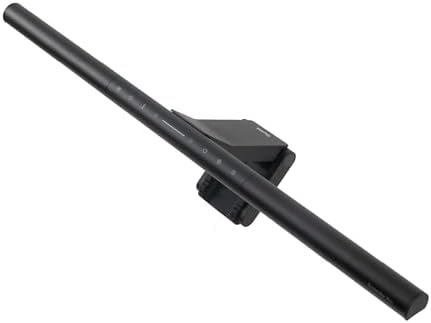


Best for: Professionals, creators, and anyone who spends long hours at their desk in a dim environment
If there’s one monitor light bar that the entire industry measures itself against in 2026, it’s the BenQ ScreenBar Halo 2. This is not a marginal upgrade over cheaper options — it’s a fundamentally different product.
The Halo 2’s standout feature is its tri-zone backlight system, which delivers 423% wider rear coverage than the original Halo. This means a wide, soft ambient glow fills the wall behind your monitor, dramatically reducing the contrast between your bright screen and the darker room around it. That contrast reduction is the scientific basis for eye strain relief, and no other bar on this list does it as well.
The front light uses BenQ’s proprietary ASYM-Light technology with an 18° cut-off angle, an 8-section reflector, and 12 precision lenses. It delivers a consistent 500 lux across a wide 85 × 50 cm area with zero screen glare. Color temperature runs from 2700K to 6500K on both the front and rear lights independently — the only light bar that offers full color tuning on the backlight, not just a fixed warm glow.
The wireless controller is a premium addition that makes the Halo 2 a joy to use daily. It sits on your desk, features an OLED display showing current settings, and includes an ultrasonic presence detection system that automatically turns the light on when you sit down and off when you leave. Color accuracy is excellent at Ra≥95 CRI with Rf≥96 color fidelity index.
Build quality is exceptional — co-designed with MINIMAL, a Chicago industrial design studio, and stress-tested to withstand 10,000 lamp rotations and 10,000 clamp cycles. The universal clamp fits monitors from 0.43 cm to 6 cm thick and curved panels from 1000R to 1800R, covering essentially every modern display on the market.
What we love:
- 423% wider backlight than previous generation
- Full 2700K–6500K color temperature on both front and rear lights
- Wireless controller with OLED display and presence detection
- Compatible with curved monitors up to 1000R
- Exceptional build quality designed to last years
Worth knowing:
- Premium price point — check Amazon for current pricing
- The presence detection covers a 60 × 10 cm cone at 50 cm height, so it won’t trigger from far across the room
Verdict: The undisputed best monitor light bar available in 2026. If budget allows, this is the one to get.
2. BenQ ScreenBar Plus — Best with Physical Dial Controller

- DESKTOP DIAL: Built-in ambient light sensor in the Desktop Dial enables you with simply one touch for the best brightnes…
- SPACE SAVING: Breakthrough design mounts on top of the monitor, saving valuable space on your desk
- USB POWERED: ScreenBar Plus e-Reading Lamp can be powered by USB port with power supply 5V/1A, ScreenBar Plus resumes yo…
Best for: Users who want the gold-standard BenQ light quality with the most intuitive desk controller
The ScreenBar Plus sits in an interesting position in BenQ’s lineup. It doesn’t have the Halo 2’s rear ambient light, but it delivers the same excellent front-facing ASYM-Light technology with one key upgrade over the standard ScreenBar: a physical dial controller with a built-in ambient light sensor.
That dial is genuinely excellent to use. It sits naturally on your desk, lets you adjust brightness and color temperature with a smooth turn, and the built-in light sensor reads your environment and auto-adjusts to a comfortable 500 lux. For people who make frequent lighting adjustments throughout the day — shifting from morning to afternoon to evening, or switching between video calls and focused reading — this level of control is a genuine quality-of-life upgrade.
Light quality is top tier. BenQ’s patented asymmetric optics ensure zero screen glare, and the light distribution is even from edge to edge. Color temperature ranges from 2700K warm to 6500K cool with stepless adjustment throughout, and the CRI is certified high enough for color-sensitive work.
The mounting system is robust and has been refined through multiple generations. It works on flat monitors and handles a wide range of monitor thicknesses. If you don’t need rear ambient lighting but want the best everyday ergonomics, the Plus is arguably more practical than the Halo 2 for well-lit rooms.
What we love:
- Physical dial controller is one of the best interfaces in the category
- Built-in ambient light sensor for intelligent auto-dimming
- Same excellent ASYM-Light optics as the flagship lineup
- Proven, reliable mounting system
Worth knowing:
- Front-light only — no rear ambient backlight like the Halo 2
- Works best on flat monitors; check compatibility for curved panels
Verdict: If you want BenQ quality without the Halo 2’s premium and don’t need ambient backlighting, the ScreenBar Plus is a fantastic choice.
3. Quntis Computer Monitor Light Bar — Best Value with Auto-Dimming

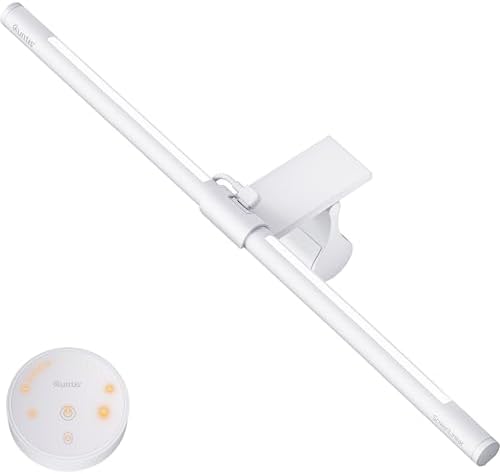

Best for: Budget-conscious buyers who want flagship-level features without the flagship price
The Quntis ScreenLinear has built one of the best reputations on Amazon in this category, and after looking at what it offers, it’s easy to see why. It holds a 4.6-star average across over 13,000 verified reviews — a number that reflects sustained real-world satisfaction, not a launch spike.
The headline feature is the Ra98 CRI, which is exceptional for a product at this price point. Ra98 approaches natural daylight quality, meaning colors in your workspace look accurate and natural rather than washed out. Most competitors at this price tier deliver Ra90 or lower.
The built-in ambient light sensor continuously measures surrounding brightness and adjusts output to maintain a consistent 900 lux environment. This is true automatic dimming, not a preset toggle. Combined with manual stepless control over both brightness and color temperature (3000K–6500K), you get a genuinely flexible lighting experience.
The optical design is properly asymmetrical — the light goes onto your desk, not onto your screen. The weighted counterbalance clip mounts stably on most standard flat monitors. Build quality is solid for the price.
The main consideration is control: the base model uses touch controls on the bar itself, meaning you reach up to make adjustments. Quntis also offers a version with a wireless remote for a little more, which brings it closer to the Xiaomi in convenience.
What we love:
- Ra98 CRI — outstanding color accuracy at this price
- Genuine auto-dimming via ambient light sensor
- Stepless brightness and color temperature control (3000K–6500K)
- Strong customer satisfaction history (13,000+ Amazon reviews)
Worth knowing:
- Base model uses touch controls on the bar; look for the remote version if you prefer desk-side adjustments
- Works best on flat monitors
Verdict: The best value monitor light bar on Amazon in 2026. An easy recommendation for anyone who wants quality lighting on a budget.
4. Xiaomi Mi Computer Monitor Light Bar — Best Mid-Range Pick


Best for: Flat monitor users who want premium build quality and a wireless dial at a mid-range price
The Xiaomi Mi Monitor Light Bar punches well above its price class. It was the product that first demonstrated you don’t have to spend BenQ money to get a quality light bar experience, and it remains one of the strongest mid-range options in 2026.
The magnetic mount is a standout feature. The light bar docks onto its base magnetically, which makes installation and removal effortless and gives you approximately 25 degrees of rotation to precisely angle the light exactly where you want it. The build uses a metal body that feels premium in a way that most competitors at this tier simply don’t.
The wireless remote puck sits on your desk and controls brightness and color temperature through smooth, stepless adjustments from 2700K to 6500K — the full range you need for day-to-night comfort. Color rendering is Ra95, which is strong at this price. The light output is consistent across the desk, with reviewers consistently noting how even the illumination looks compared to competitors.
One thing worth noting is that the Xiaomi does not include auto-dimming. This sounds like a limitation, but many users who have tried auto-dimming on other bars find it overshoots in dark environments. Manual control via the puck is arguably more reliable.
The mounting system works reliably on 27-inch and most standard-sized monitors, though the counterweight design may be less stable on monitors with unusual back profiles.
What we love:
- Magnetic mount allows easy installation and precise angle adjustment
- Wireless puck controller for desk-side adjustments
- Ra95 CRI and even, well-distributed light output
- Premium metal build quality
Worth knowing:
- No auto-dimming sensor
- Best suited for flat monitors; compatibility with curved panels varies
- Remote requires AAA batteries (not included)
Verdict: The best mid-range monitor light bar on Amazon. The wireless puck and magnetic mount make it a genuine joy to use daily.
5. Quntis RGB Pro+ Monitor Light Bar — Best for Gaming with Backlight


Best for: Gamers and content creators who want eye-care lighting plus immersive RGB ambiance
The Quntis RGB Pro+ takes everything the standard Quntis ScreenLinear does well and adds a 15-mode RGB backlight that transforms the ambiance of your entire setup. If you game or stream and want a monitor bar that does double duty as atmospheric lighting, this is the one to look at.
The front-facing light maintains Ra95 CRI quality with the same asymmetrical optics that keep glare off your screen. Brightness and color temperature are steplessly adjustable from 3000K to 6500K — warm for late-night sessions, crisp and cool for competitive play. The wireless remote handles all adjustments from your desk.
The rear RGB backlight adds a dynamic glow to the wall behind your monitor with 15 preset modes — breathing effects, color cycling, static colors, and more. While it’s not as sophisticated as the Halo 2’s full tunable backlight, it adds genuine visual character to a gaming or streaming setup at a much lower price point.
The mounting system includes an upgraded clip design that Quntis states fits a wider range of monitors, including some curved models — check the specific listing for compatibility with your display.
What we love:
- Front eye-care light + 15-mode RGB backlight in one product
- Ra95 CRI with stepless brightness and color temperature
- Wireless remote included
- Strong value for dual-function lighting
Worth knowing:
- RGB backlight is decorative, not full tunable ambient lighting
- Check curved monitor compatibility before purchasing
Verdict: A smart choice if you want functional desk lighting and gaming ambiance in a single affordable package.
6. Baseus i-Wok Monitor Light Bar — Best Budget Option

- 【Protect Your Eyes – No Screen Glare & Flicker】The asymmetrical light design only illuminates the keyboard and desktop a…
- 【Stepless Dimming & 3 Color Temperature】Touch the sensor on the monitor light bar to adjust the brightness and color tem…
- 【More Space For You – Space Saving Design】The breakthrough design clamps onto the top of the monitor, more valuable spac…
Best for: Anyone trying a monitor light bar for the first time on a tight budget
The Baseus i-Wok is the product that answers the question: “What’s the least I can spend and still get a real monitor light bar experience?” At its price point, it delivers the core benefit — asymmetric optics that keep light on your desk and off your screen — without unnecessary extras.
The aluminum alloy construction feels more substantial than most products in this price range. Installation is straightforward: the counterweight clamp clips onto your monitor in seconds with no tools, and the USB-C power cable connects directly to your monitor or hub. Ra97 LED quality is strong for the price, and three color temperature presets (warm, neutral, cool) handle most everyday needs.
Controls are capacitive touch buttons on the bar itself. This means reaching up to make adjustments, which is less convenient than a desk puck. The presets rather than stepless dimming are the other main limitation — you have distinct settings rather than a smooth continuous range.
The one compatibility caveat: the Baseus clamp works best on standard flat monitors with thinner bezels. It may not sit stably on thicker or curved displays, so check your monitor specs before ordering.
What we love:
- Solid aluminum build quality for the price
- True asymmetric optics with Ra97 LED quality
- USB-C powered, easy installation
- Affordable entry point to monitor lighting
Worth knowing:
- Touch controls are on the bar itself, not a desk controller
- Three preset color temperatures rather than stepless adjustment
- Best on flat monitors with standard bezels
Verdict: If you want to try a monitor light bar without significant investment, the Baseus i-Wok is the most sensible starting point on Amazon.
7. Yeelight Monitor Light Bar — Best for Smart Home Integration


Best for: Smart home users and gamers who want Alexa, Google Assistant, or Razer Chroma integration
The Yeelight Monitor Light Bar occupies a unique position in the category. In terms of pure front lighting, it performs comparably to the Xiaomi Mi bar — both share similar LED specs and light quality. Where the Yeelight earns its higher price is in its smart home connectivity.
This is the only monitor light bar that works directly with Google Home, Amazon Alexa, Samsung SmartThings, and Razer Chroma. If you already have a smart home setup and use routines, scenes, or voice commands to control your lighting, the Yeelight slots into that ecosystem naturally. Ask Alexa to turn off your desk light. Build a “work mode” scene that includes your monitor bar. Sync it with Razer Chroma for dynamic RGB effects that respond to game events.
The front light delivers 250 lumens with adjustable color temperature from warm to cool, and the 486 mm length provides slightly wider coverage than the Xiaomi’s 448 mm — useful for larger monitors. The wireless knob controller handles daily adjustments smoothly, though there is a slight latency (~0.5–1 second) when adjusting through the app.
The app integration is genuinely useful for automation, though third-party RGB syncing beyond Razer Chroma is limited.
What we love:
- Works with Alexa, Google Home, Samsung SmartThings, and Razer Chroma
- Wi-Fi connected for smart home automation and voice control
- Wireless desk controller included
- Slightly longer than Xiaomi for better wide-monitor coverage
Worth knowing:
- Requires 2.4GHz Wi-Fi — 5GHz-only routers will need adjustment
- Smart home integration requires Xiaomi Home app setup
- Third-party RGB sync (beyond Razer) is limited
Verdict: The clear choice for smart home enthusiasts. If Alexa or Google routines are part of your daily workflow, the Yeelight is the monitor bar for your desk.
8. Colorpanda Monitor Light Bar — Best Budget Pick for Curved Monitors
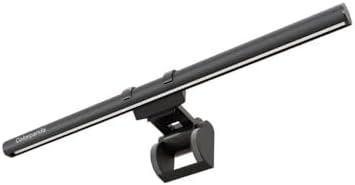


Best for: Curved monitor users on a budget who can’t justify premium pricing
Finding a monitor light bar that genuinely works on a curved monitor without slipping, wobbling, or causing screen glare is harder than it should be at the budget end of the market. The Colorpanda Monitor Light Bar addresses this with a counterweight design specifically built to handle both flat and curved monitors.
The patented clip-on design installs in seconds without tools and handles screen thicknesses from 0.12 to 2.2 inches (0.3 cm to 5 cm). Three touch controls on the top of the bar give you access to three color temperature modes (2700K, 4000K, and 6500K) and brightness adjustment, which covers most everyday needs without complication.
The asymmetrical optical design keeps light directed downward at your desk rather than onto your screen — fundamental for a usable light bar. The counterweight design is noted by users as more stable on curved displays than comparable budget options.
It holds a 4.4-star average across over 500 Amazon reviews, with particular praise for its ease of installation and value for money.
What we love:
- Works on both curved and flat monitors — rare at this price
- Tool-free installation in seconds
- Asymmetrical optics with no screen glare
- Compact, portable, easy to move between setups
Worth knowing:
- Three color temperature presets rather than stepless adjustment
- Touch controls only — no wireless remote
- Light output is modest compared to mid-range options
Verdict: If you have a curved monitor and don’t want to spend premium money, the Colorpanda is a solid, fuss-free option that gets the job done.
9. LYMAX Computer Monitor Light Bar — Best Under $30


Best for: Absolute beginners to monitor lighting who want a reliable, no-frills introduction
The LYMAX Computer Monitor Light Bar sits at the very accessible end of the market and does what a monitor light bar should do: eliminates screen glare, lights your desk, and disappears into your setup.
Touch controls on the bar handle brightness adjustment and color temperature switching. The USB-powered design means no adapter to deal with — plug into any free USB port and you’re up and running. The counterbalance mounting system clips to standard monitors without tools.
Where the LYMAX earns its spot on this list is its straightforward reliability. At this price, some buyers are rightfully cautious about build quality and light output — the LYMAX holds up well in both areas based on its Amazon review history.
Color temperature is adjustable between warm and cool modes, and brightness is dimmable to suit different environments. It’s not going to match the output or precision of a Quntis or Xiaomi, but for someone who just wants to reduce eye strain without spending much, it’s a perfectly reasonable entry point.
What we love:
- Very accessible price point
- Simple, reliable operation
- USB powered — no adapter
- Easy tool-free installation on standard flat monitors
Worth knowing:
- Touch controls only — no desk-side adjustment
- Best for flat monitors with standard bezels
- Output and feature set reflects the price point
Verdict: A sensible buy if you’re on a tight budget and want to experience what monitor lighting can do before investing in something more premium.
10. ONEMIX 42″ LED Desk Lamp with Monitor Light Bar — Best for Dual Monitor Setups


Best for: Dual monitor users, wide desk setups, and anyone who needs full-width lighting coverage
Most monitor light bars are designed for single screens. The ONEMIX takes a different approach with a 42-inch, 4-segment architect-style light bar that delivers full coverage across wide desks and dual monitor configurations.
This is technically a desk lamp with light bar characteristics rather than a clip-on bar, but it deserves its place on this list because it solves a real problem: standard monitor bars, even wide ones, simply don’t cover the full desk surface for dual-screen users, resulting in uneven lighting across your workspace.
The ONEMIX provides 5 brightness levels and 5 color temperatures ranging from 3200K to 6500K, with both a wireless remote and on-unit button controls. An adjustable clamp arm positions the bar above your monitors without wobbling — reviewers specifically note how stable it is compared to other dual-monitor solutions.
The ONEMIX holds a 4.7-star average across nearly 1,500 Amazon reviews, with consistent praise for the brightness, coverage, and stability of the arm.
What we love:
- 42-inch light bar — covers full dual-monitor desk setups
- 5 brightness levels and 5 color temperatures (3200K–6500K)
- Wireless remote plus on-unit button controls
- 4.7 stars across 1,400+ Amazon reviews
Worth knowing:
- This is a clamp-style desk lamp, not a clip-on bar — different installation approach
- Takes up more visual space than standard monitor-mounted bars
- Best for larger desks (the 42-inch size is significant)
Verdict: If you run dual monitors and want consistent lighting across your whole desk without uneven coverage, the ONEMIX is the smart solution that standard monitor bars simply can’t match.
Are Monitor Light Bars Actually Worth It?
Yes — and the impact tends to surprise people who try one for the first time.
The benefit isn’t dramatic in the way that a new monitor or faster CPU is dramatic. It’s subtle. After a few days with proper monitor lighting, you notice that you’re not rubbing your eyes by mid-afternoon. Your headaches ease. Late-night work feels less punishing. Your keyboard is easier to see without turning on the overhead light.
That said, a monitor light bar is not a replacement for ambient room lighting. It works best as a supplement. If your room is completely dark, adding a light bar helps significantly — but proper overhead or bias lighting will improve things further.
Also important: OLED monitor users should be cautious. A light bar that’s not properly positioned can create reflections on OLED panels that significantly impact color accuracy and contrast. If you have an OLED display, check specific compatibility for any bar you’re considering.
Also Check:
10 Best Amazon Desk Lamps for Night Working Setup
Frequently Asked Questions
Do monitor light bars work with curved monitors?
Most budget options don’t work well with curved panels. The BenQ ScreenBar Halo 2 supports curves from 1000R to 1800R. The Colorpanda handles moderate curves at a lower price. Always check the spec sheet before buying if you have a curved display.
How do I install a monitor light bar?
All bars on this list clip onto the top edge of your monitor using a counterbalance weight. No tools required. Plug the USB cable into your monitor’s USB port or a hub, and the bar is powered. Total setup is under two minutes.
Can I use a monitor light bar on an ultrawide monitor?
Yes, but the standard 17–20 inch bar won’t reach the full width of a 34-inch or 49-inch ultrawide. The ONEMIX 42-inch option covers wider setups. The BenQ Halo 2 and ScreenBar Pro are also designed with ultrawide compatibility in mind.
Do monitor light bars reduce eye strain?
They reduce a specific type of eye strain caused by the contrast between a bright screen and a dimmer surrounding environment. By illuminating the desk and — in backlit models — the wall behind the monitor, they bring the overall environment into balance. Most regular users report noticeable improvement.
Which monitor light bar is best for video calls?
Any bar that illuminates your face evenly is good for video calls. The BenQ ScreenBar Plus and Quntis models with higher brightness output are particularly well suited. The light reflects off your desk and subtly fills your face for camera, which is a nice bonus beyond the ergonomic benefits.
Final Verdict
For most people, the Quntis Computer Monitor Light Bar offers the best combination of quality, features, and value — Ra98 CRI, auto-dimming, and stepless control at an accessible price point. If you want to step up, the Xiaomi Mi adds a premium feel and wireless puck. If budget is no concern, the BenQ ScreenBar Halo 2 is in a class of its own.
Start with your budget, check your monitor type (flat vs. curved), and decide whether you want a wireless desk controller or are comfortable with on-bar touch controls. Any of the 10 options on this list are worth buying — the differences come down to how much control and convenience you want.
Check current prices on Amazon before purchasing, as pricing changes frequently and deals appear regularly on all the models listed above.
Disclosure: As an Amazon Associate, we earn from qualifying purchases at no extra cost to you. Our recommendations are based on research, user review analysis, and published testing data — not paid promotion.

MD.HASAN is an experienced SEO expert and amazon products review writer passionate about helping people find right products on amzon for buy without confusion. With 4 years of hands-on experience in content strategy and search engine optimization, he specializes in writing SEO-friendly blog posts that rank, engage, and convert.

