
Affiliate disclosure: As an Amazon Associate, Tech Rig Review earns from qualifying purchases. Links on this page may be affiliate links, at no extra cost to you.
Which HP laptop is best for students in 2026? We compare five real, in-stock HP models by RAM, battery life, and price to help you pick the right one.
Picking a laptop for school feels harder than it should. You’re not just buying a computer. You’re buying something that has to survive four years of lecture notes, late-night papers, Zoom calls, and a backpack that gets thrown around way too much.
HP makes a huge range of laptops, and that’s part of the problem. Walk into Amazon and search “HP laptop,” and you’ll see dozens of models that all look the same at a glance. Some are great for students. Some are not. The specs sheet alone won’t tell you which is which.
This guide compares five real HP laptops that are currently sold on Amazon. We looked at processor speed, RAM, storage, battery life, weight, and price. We also looked at patterns in verified buyer feedback across listings, because specs on paper don’t always match how a laptop behaves after six months of daily use.
We did not physically test these units ourselves. Instead, we built this guide by comparing manufacturer specs, official HP documentation, and the buying patterns of actual student shoppers. You’ll see that noted clearly in each section, so you know exactly what this recommendation is based on.
By the end, you’ll know which HP laptop fits your major, your budget, and your daily routine.
Quick Answer


Short on time? Here’s the one-line version. The HP Pavilion 15.6″ (16GB RAM) is the best all-around pick for most students. If you’re on a tight budget, the HP Chromebook 14″ gets the job done for under $300. If you’re studying engineering, design, or you just want serious power, look at the HP Victus gaming laptop or the HP 2026 Edition 15.6″ with a Core i7 chip. Keep reading for the full breakdown, real specs, and honest trade-offs for each one.
How We Chose These Laptops
Before we get to the picks, here’s what we actually weighed.
Battery life. A student laptop needs to survive a full day of classes without hunting for an outlet. We favored models with 8+ hours of real-world battery life.
RAM. Most college coursework today means ten browser tabs, a PDF reader, a note-taking app, and a video call, all open at once. 8GB is the bare minimum. 16GB is where things stop feeling sluggish.
Storage type. Every laptop on this list uses an SSD, not an old-style hard drive. SSDs boot faster and handle large files, like video projects or CAD software, far better.
Weight and size. You’ll be carrying this thing across campus. We factored in how portable each option actually is.
Price versus what you get. We’re not just ranking the cheapest or the most expensive. We’re ranking the best value at each price point.
If you want a deeper technical breakdown of what specs actually matter for college coursework, the University of Minnesota’s College of Science and Engineering laptop guide is a solid, independent resource. It’s aimed at students, not laptop sales, so the advice is refreshingly neutral.
Quick Comparison Table
| Laptop | Processor | RAM | Storage | Best For |
|---|---|---|---|---|
| HP Pavilion 15.6″ (16GB) | Intel Core i5-1235U | 16GB | 1TB SSD | Best overall student laptop |
| HP Victus 15.6″ Gaming | Intel Core i5-13420H | 8GB | 512GB SSD | Gaming, CAD, STEM majors |
| HP 15.6″ (2026 Edition, i7) | Intel Core i7-1255U | 16GB | 1TB SSD | Power users, heavy multitasking |
| HP Chromebook 14″ | Intel Celeron N4120 | 4GB | eMMC storage | Ultra-budget, browser-based work |
The 4 Best HP Laptops for Students in 2026
1. HP Pavilion 15.6″ Touchscreen (16GB RAM) — Best Overall
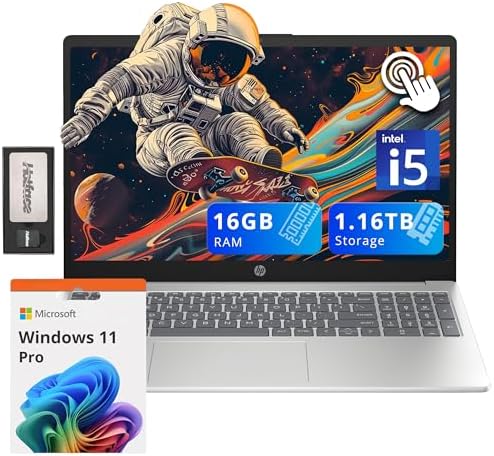
- 【Upgraded】Seal is opened for upgrade only, 1-Year warranty on Upgraded RAM/SSD from Snowbell, and original 1-Year Manufa…
- 【Intel Core i5-1235U Processor】Discover this 10-core, 12-way process, a powerful and efficient choice for everyday compu…
- 【16GB RAM】Plenty of high bandwidth to run multiple programs simultaneously without any slowdowns.【1.16TB Storage】1TB SSD…
This is the laptop we’d point most students toward first. It hits the sweet spot between price, power, and everyday comfort.
The Intel Core i5-1235U processor is a 10-core chip that handles normal student workloads without breaking a sweat. Word processing, spreadsheet work, browser-heavy research, and streaming lectures all run smoothly. It won’t win any benchmark awards against gaming laptops, but that’s not the job it’s built for.
16GB of RAM is the real star here. This is the amount that keeps a laptop feeling fast two years from now, not just on day one. You can have a dozen tabs open, a Zoom call running, and a Word document active, all at the same time, without the fan spinning up in protest.
The 1TB SSD gives you plenty of room for four years of class notes, photos, downloaded textbooks, and the inevitable pile of apps you install and forget about. You won’t be deleting old semesters to make space for new ones.
The 15.6-inch touchscreen is a nice bonus for students who like to annotate PDFs directly or prefer tapping over trackpad scrolling. It’s not required, but it’s genuinely useful for note-heavy majors like nursing or law.
Who this is for: Business, humanities, nursing, education, and general undergrad majors who want one laptop that handles everything without hiccups.
Who should skip it: Students doing heavy video editing, 3D rendering, or gaming. This laptop uses integrated graphics, not a dedicated GPU, so demanding creative or gaming software will feel slow.
Pros
- 16GB RAM keeps multitasking smooth for years, not months
- 1TB of storage means you won’t run out of space
- Touchscreen adds flexibility for note-taking
- Windows 11 Pro included, useful if your school requires domain login features
- Backed by HP, a brand most campus IT departments already support
Cons
- Integrated graphics only, not built for gaming or video editing
- 15.6-inch size is less portable than a 13 or 14-inch laptop
- Standard IPS display, not the sharpest screen on this list
2. HP Victus 15.6″ Gaming Laptop — Best for Gaming & STEM Students
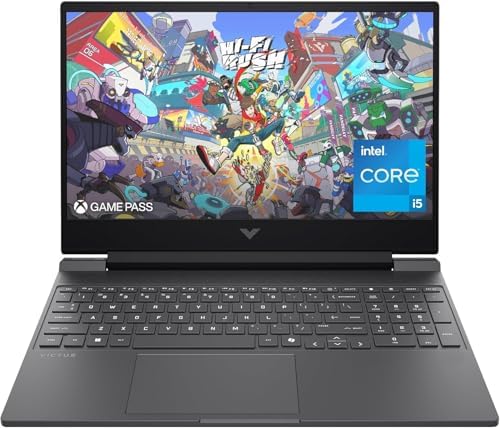
- FAST PROCESSING POWER – Experience seamless multitasking and superior gaming performance with the 13th Gen Intel Core i5…
- HIGH-RESOLUTION DISPLAY – Immerse yourself in vibrant visuals on the 15.6″ Full HD (1920×1080) 144Hz IPS micro-edge anti…
- DEDICATED GRAPHICS CARD – Unleash exceptional gaming and creative power with the NVIDIA GeForce RTX 3050 Laptop GPU, fea…
Not every student just needs email and Google Docs. If you’re in computer science, engineering, architecture, or game design, or you just want to game between classes, this is the HP to look at.
The dedicated NVIDIA GeForce RTX 3050 graphics card is the headline feature. This isn’t a top-tier gaming GPU, but it’s a legitimate step up from the integrated graphics on every other laptop in this guide. It handles CAD software, Blender, Unity, and most modern games at reasonable settings. For coding bootcamps or compiling large projects, the extra GPU horsepower also speeds up certain workloads beyond gaming.
The Core i5-13420H processor is a mobile gaming-tier chip, noticeably faster for demanding tasks than the U-series chips in the Pavilion lineup above. The 144Hz display refresh rate is a gaming feature, but it also makes everyday scrolling and video playback feel smoother.
The trade-off is battery life and weight. Gaming laptops run hotter and drain faster than thin-and-light everyday laptops. If your daily routine is class-to-class with charging breaks in between, that’s fine. If you need all-day battery with zero outlet access, this isn’t the laptop for that.
8GB RAM is on the lower end for a machine this capable, so if your budget allows, check for a 16GB configuration when you shop, since this model is often available in multiple memory configurations.
Who this is for: Computer science, engineering, game design, architecture students, and anyone who games regularly and doesn’t want a separate gaming PC.
Who should skip it: Students who prioritize battery life and portability above raw performance. This is a heavier laptop built for performance first.
Pros
- Dedicated RTX 3050 GPU handles CAD, 3D modeling, and gaming
- 144Hz display is noticeably smoother for everyday use too
- Core i5-13420H is a genuinely fast processor for its price class
- Backlit keyboard, a nice touch for late-night study sessions
Cons
- Heavier and bulkier than a standard student laptop
- Shorter battery life than non-gaming models
- 8GB RAM is the bottleneck on this configuration; look for a 16GB version if available
- Fan noise under load, a common trait of gaming laptops in general
3. HP 15.6″ Laptop (2026 Edition, Core i7) — Best for Power Users
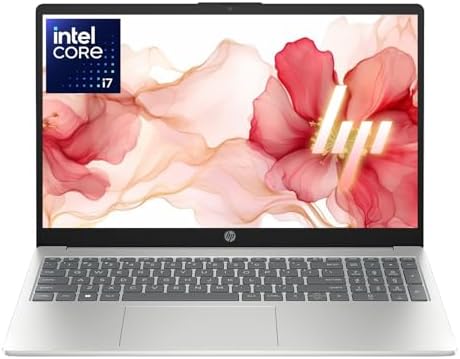
- 【12th Gen Intel Powerhouse】 Equipped with the 10-core Intel Core i7-1255U processor (up to 4.7GHz with Turbo Boost and 1…
- 【Maximized Speed & Storage】 With upgraded DDR4 RAM and a massive up to 2TB PCIe NVMe SSD, enjoy ultra-fast boot times, s…
- 【Crisp Full HD Display】 The 15.6″ FHD (1920×1080) anti-glare display offers 250 nits brightness, a micro-edge bezel, and…
If you want the most processing power on this list without stepping into gaming-laptop territory, this is it.
The Intel Core i7-1255U is a genuine step up from the i5 chips in the Pavilion models. It boosts up to 4.7GHz and handles heavier workloads, like running a virtual machine, working with large datasets, or editing photos in Lightroom, more comfortably than the i5 options.
Paired with 16GB of RAM and a 1TB PCIe SSD, this configuration is built for students who do more than write papers and browse the web. Think double majors juggling multiple demanding applications, pre-med students running simulation software, or anyone doing freelance work on the side that needs real processing power.
It keeps the thin-and-light form factor of a standard laptop, so you’re not hauling around gaming-laptop bulk. Battery life sits in the middle: better than a gaming laptop, not quite as long as the most battery-optimized ultrabooks.
Who this is for: Pre-med, data science, computer science students not doing heavy graphics work, and anyone who wants headroom for the next four years without gaming-laptop weight.
Who should skip it: If your coursework is mostly writing and browsing, this is more laptop than you need. Save the money and go with the Pavilion 16GB pick instead.
Pros
- Core i7 processor outpaces the i5 options on this list for CPU-heavy tasks
- 16GB RAM and 1TB SSD, both generous for the price point
- Thin-and-light design despite the power upgrade
- Good middle ground between everyday laptop and gaming laptop
Cons
- No dedicated graphics card, so it’s not for gaming or 3D work
- Priced higher than the standard Pavilion configurations
- Battery life is solid but not class-leading
4. HP Chromebook 14″ — Best Ultra-Budget Pick

- 【14″ HD Display】14.0-inch diagonal, HD (1366 x 768), micro-edge, anti-glare. The captivating clarity and brilliance will…
- 【Intel Celeron N4120 Processor】The low voltage design optimizes energy usage, allowing you to stay productive and entert…
- 【4GB LPDDR4 RAM】Seamlessly tackle resource-intensive tasks, smoothly run multiple applications simultaneously, and enjoy…
HP Chromebook 14″ HD Laptop for Business & Students, Intel Celeron N4120, 4GB RAM, Chrome OS
Sometimes the right laptop is the cheapest one that still does the job. If your coursework lives almost entirely in Google Docs, Canvas, or a browser-based learning platform, a Chromebook might be all you need.
This HP Chromebook runs Chrome OS instead of Windows. That’s a real difference to understand before buying. You won’t be installing traditional desktop software like the full Microsoft Office suite, Photoshop, or most engineering tools. Instead, you’re working through browser-based apps and Android apps from the Google Play Store.
For what it is, it’s a capable little machine. The Intel Celeron N4120 processor and 4GB of RAM are modest, but Chrome OS is a lightweight operating system that doesn’t demand much from the hardware to feel responsive. Boot times are fast, battery life tends to be long, and the whole thing is light enough to carry without noticing it’s in your bag.
Security is also worth mentioning. Chrome OS automatically updates in the background and has built-in virus protection, which appeals to students who don’t want to think about laptop maintenance.
Who this is for: Students whose coursework is primarily browser-based, high schoolers, students needing a secondary laptop, or anyone on a strict budget who mainly needs word processing, web research, and video calls.
Who should skip it: Engineering, computer science, video editing, or any major requiring specific Windows or Mac software. Also skip this if you need to run desktop Microsoft Office or Adobe applications offline.
Pros
- Extremely affordable, often the cheapest HP laptop on Amazon
- Long battery life thanks to the lightweight Chrome OS
- Lightweight and easy to carry all day
- Low-maintenance, automatic updates and built-in security
Cons
- Can’t run traditional Windows or Mac desktop software
- 4GB RAM is limiting if you have many browser tabs open
- Not suitable for STEM majors needing specialized software
- Smaller 1366×768 display resolution on this configuration
What to Look For in a Student Laptop
If none of the five picks above feel like a perfect fit, here’s how to evaluate any HP laptop on your own.
RAM Matters More Than You Think
8GB is the floor, not the goal. If you can afford the jump to 16GB, take it. RAM is usually not upgradeable after purchase on thin laptops, so you’re stuck with whatever you buy on day one.
Check the Storage Type, Not Just the Size
Always confirm it’s an SSD, not an HDD. SSDs are dramatically faster for booting, opening apps, and transferring files. A 256GB SSD will usually feel faster day-to-day than a 1TB HDD.
Battery Life Claims Are Often Optimistic
Manufacturers test battery life under ideal, low-brightness, minimal-use conditions. Real-world use, with a bright screen, Wi-Fi active, and multiple apps open, usually cuts that number down. If HP claims 10 hours, plan for closer to 6-7 in daily use.
Weight Adds Up Over a Semester
A laptop that feels fine in a store can feel heavy after carrying it across campus five days a week. Anything under 4 pounds is comfortable for most students. Gaming laptops often exceed 5 pounds.
Energy Efficiency Is Worth a Glance
If you’re environmentally minded or just want lower electricity costs in a dorm, look for ENERGY STAR certification. You can check which specific HP models currently carry this certification directly through the ENERGY STAR product finder, which lists verified energy-efficient laptops across all brands, including HP.
Windows Version Matters for IT Compatibility
Some campus networks and software licenses are built around specific Windows versions. If your school issues software requirements, it’s worth checking HP’s official lineup directly on HP’s Pavilion laptop page to confirm the exact OS version and specs before buying, since configurations can change over time.
Frequently Asked Questions
What should I consider when choosing an HP laptop for school?
Start with RAM and storage type before anything else. 16GB of RAM and an SSD will keep a laptop feeling fast for your entire degree. After that, think about weight if you’re walking across campus daily, and battery life if your classes run back-to-back without charging breaks.
Is 8GB of RAM enough for college?
For writing, browsing, and basic coursework, yes, 8GB works fine. If you’re planning to run multiple heavy programs at once, like coding environments, design software, or several browser tabs plus video calls simultaneously, 16GB will feel noticeably smoother and will stay usable for longer.
Do I need a laptop with a dedicated graphics card?
Only if you’re doing gaming, video editing, 3D modeling, or CAD work. Most majors, including business, humanities, and general sciences, run fine on integrated graphics. A dedicated GPU adds cost, weight, and shorter battery life, so skip it unless your coursework specifically needs it.
Are HP laptops reliable for college use?
HP is one of the most widely used laptop brands on college campuses, and most IT departments are familiar with troubleshooting them. Reliability varies by model and how well the laptop is cared for, but HP’s mid-range Pavilion and higher-end lines generally hold up well across a typical four-year degree when paired with reasonable care.
Should I buy a Chromebook or a Windows laptop for school?
It depends entirely on what software your coursework requires. If your classes run through Google Docs, Canvas, or other browser-based tools, a Chromebook can save you real money. If you need desktop Microsoft Office, Adobe software, or major-specific applications like engineering or statistics programs, go with a Windows laptop instead.
How much storage do I actually need as a student?
256GB is a reasonable minimum for most students who save most files to cloud storage. 512GB gives more breathing room for offline files, downloaded media, and software installs. 1TB is worth it if you work with large files regularly, like video projects, large datasets, or extensive offline media libraries.
What’s the difference between HP Pavilion and HP Victus laptops?
Pavilion laptops are everyday, general-purpose machines built for writing, browsing, and typical coursework. Victus laptops are HP’s budget gaming line, built around dedicated graphics cards for gaming, 3D rendering, and CAD work. If you don’t need a GPU, Pavilion is the lighter, longer-battery-life, usually cheaper choice.
How long should a student laptop realistically last?
With reasonable care, a mid-range HP laptop like the Pavilion models in this guide should comfortably last 4-5 years of regular college use. Battery capacity will naturally decline over time, which is normal for any laptop, but the core hardware should keep up with typical coursework for the length of a degree.
Final Thoughts
There’s no single “best” HP laptop for every student. The right pick depends on your major, your budget, and how you actually use a computer day to day.
If you want one safe, reliable answer, the HP Pavilion 15.6″ with 16GB of RAM is the one we’d point most students toward. It balances power, storage, and price better than anything else on this list, and 16GB of RAM means you won’t be fighting a sluggish laptop by your junior year.
If money is tight, the HP Chromebook 14″ is a genuinely smart choice, as long as your coursework fits within what Chrome OS can do. If you’re in a STEM or creative major that needs real processing muscle, the HP Victus or the HP 2026 Edition with a Core i7 chip will serve you much better than a standard laptop ever could.
Whichever one you choose, double-check the current price and configuration on the Amazon listing before you buy. Prices, stock, and exact specs on these listings can shift, and the specific RAM or storage configuration available can vary by color or seller.
As an Amazon Associate I earn from qualifying purchases.

MD.HASAN is an experienced SEO expert and amazon products review writer passionate about helping people find right products on amzon for buy without confusion. With 4 years of hands-on experience in content strategy and search engine optimization, he specializes in writing SEO-friendly blog posts that rank, engage, and convert.


