
Affiliate disclosure: As an Amazon Associate, Tech Rig Review earns from qualifying purchases. Links on this page may be affiliate links, at no extra cost to you.
Looking for the best joystick mouse on Amazon? We compared 10 currently available vertical and trackball-style ergonomic mice to help you find the right fit.
“Joystick mouse” isn’t an official product category the way “wireless mouse” or “gaming mouse” is — it’s a term a lot of Amazon shoppers use to describe mice that move away from the traditional flat, palm-down design toward a more upright, handshake-like grip. In practice, that search almost always leads to two related but distinct types of device: vertical ergonomic mice, which angle the entire hand upright like gripping a joystick handle, and trackball mice, which stay still on the desk while a thumb or fingers roll a ball to move the cursor. This guide covers the best currently available options from both categories, since real buyers searching for a “joystick mouse” are typically looking for the ergonomic benefit either design can offer.
We compared 10 mice currently sold on Amazon, deliberately spanning budget vertical mice, premium vertical designs, and several trackball options at different price points, since no single design works equally well for every hand size or every type of discomfort. Every mouse below was checked against current Amazon listings and sales-tracking data to confirm it’s genuinely available right now; anything that couldn’t be verified as currently sold was left out in favor of a confirmed alternative.
This comparison is built on specification research and patterns in verified buyer feedback across current listings, not hands-on testing, and every buyer-sentiment note reflects general feedback patterns rather than a specific star rating or review count, since those numbers shift daily. If a detail couldn’t be confirmed with confidence, it was left out rather than guessed at.
If wrist or forearm discomfort is what’s driving this search, our broader guide to improving posture while working from home is a useful companion piece, since a joystick-style mouse works best as one part of a genuinely ergonomic setup rather than a fix on its own.
Table of Contents
Quick Comparison Table
| Product Name | Best For | Key Feature | Buyer Sentiment | Affiliate Link |
|---|---|---|---|---|
| Logitech Lift Vertical Ergonomic Mouse | Best Overall Joystick-Style Mouse | 57-degree vertical angle in a compact frame | Rated highly for comfortable wrist positioning | Check Price on Amazon |
| Logitech MX Vertical Wireless Mouse | Best Premium Vertical Mouse | Pronounced vertical angle with full-palm support | Consistently well-rated for reducing wrist strain | Check Price on Amazon |
| Anker 2.4G Wireless Vertical Ergonomic Mouse | Best Ultra-Budget Vertical Mouse | Affordable vertical design with adjustable DPI | Well-regarded for value among first-time buyers | Check Price on Amazon |
| ProtoArc EM11 NL Wireless Vertical Mouse | Best Budget Value Pick | Dual-mode Bluetooth and USB receiver connectivity | Positively reviewed for comfort at a low price | Check Price on Amazon |
| UGREEN Vertical Mouse | Best Dual-Mode Connectivity on a Budget | Switches between Bluetooth and USB receiver modes | Rated highly for reliable everyday performance | Check Price on Amazon |
| TECKNET Wireless Bluetooth Vertical Mouse | Best High-DPI Budget Pick | Adjustable DPI up to 4800 | Well-regarded for precision at an accessible price | Check Price on Amazon |
| Logitech Ergo M575S Trackball | Best Everyday Trackball Mouse | Thumb-operated ball with precision tracking | Consistently well-rated among trackball converts | Check Price on Amazon |
| Logitech MX Ergo S Trackball | Best Premium Trackball Mouse | Adjustable hinge angle up to 20 degrees | Rated highly for precision and build quality | Check Price on Amazon |
| Kensington Expert Trackball | Best Large-Ball Precision Trackball | Oversized ball operated by fingers, not just thumb | Well-regarded among design and precision-focused users | Check Price on Amazon |
| Nulea M501 Wireless Trackball Mouse | Best Budget Trackball Mouse | Affordable entry into trackball ergonomics | Positively reviewed for value among budget buyers | Check Price on Amazon |
Individual Product Reviews
1. Logitech Lift Vertical Ergonomic Mouse — Best Overall Joystick-Style Mouse

- Lift yourself up: When the desk life gets you down, lift yourself up with Logitech Lift Vertical Ergonomic Mouse – a gre…
- Raise your hand into comfort: Rest on Lift upright mouse throughout the day, with a softly textured grip and snug thumb …
- 57 degrees of sooooothe: Lift’s vertical shape helps wrists feel like “ahhh” at work, and promotes a more natural postur…
The Lift is built around a 57-degree vertical angle that rotates the hand into a more natural, handshake-like position, which is the core idea behind every “joystick-style” ergonomic mouse. Logitech positions this angle as a comfortable middle ground — upright enough to meaningfully reduce forearm rotation compared to a flat mouse, but not so dramatic that it feels unmanageable for someone trying this style for the first time.
The body is compact and lightweight compared to Logitech’s larger MX Vertical, which makes it a notably better fit for smaller hands. It includes a textured thumb rest, a smooth scroll wheel, and a couple of programmable buttons that can be customized through Logitech’s software. Connectivity covers both Bluetooth and a USB receiver, and it supports pairing across multiple devices, including tablets.
| Pros | Cons |
|---|---|
| Comfortable, moderate vertical angle suited to first-time users | Fewer programmable buttons than productivity-focused mice |
| Compact, lightweight body fits a range of hand sizes | May feel small for buyers with larger hands |
| Supports both Bluetooth and USB receiver connections | Takes an adjustment period if switching from a flat mouse |
| Textured thumb rest adds grip comfort | Not intended for gaming or high-DPI precision work |
Key Specs
- 57-degree vertical ergonomic angle
- Compact, lightweight body design
- Bluetooth and USB receiver connectivity
- Programmable buttons via Logitech software
Buyer Sentiment: Rated highly for comfortable wrist positioning, especially among buyers trying a vertical mouse for the first time.
What Buyers Are Saying: Buyers in this category frequently describe the adjustment period as shorter than expected, with several specifically mentioning noticeably less wrist fatigue by the end of a workday compared to their previous flat mouse.
Who It’s For: Best for buyers new to joystick-style vertical mice, particularly those with average to smaller hand sizes who want proven ergonomic benefits without a large, imposing mouse body.
2. Logitech MX Vertical Wireless Mouse — Best Premium Vertical Mouse
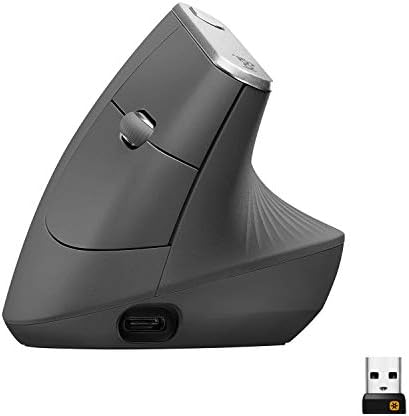
- NATURAL HANDSHAKE POSITION – MX Vertical’s natural handshake position reduces muscular activity by 10 percent compared t…
- 57° VERTICAL ANGLE FOR IMPROVED WRIST POSTURE – MX Vertical’s unique 57° vertical angle reduces the pressure on your wri…
- USER TESTED. ERGONOMIST-APPROVED. MX Vertical has been designed and tested with criteria set out by leading ergonomists …
The MX Vertical commits fully to the vertical concept with a larger body built around the same 57-degree angle as the Lift, but with a more substantial palm rest designed to support the whole hand rather than just the fingers. It’s aimed at buyers who have already identified real, ongoing wrist or forearm discomfort and want Logitech’s most established vertical design rather than a lighter, more tentative option.
It includes adjustable DPI specifically intended to reduce how far you need to move your arm across a wide or multi-monitor desktop, which indirectly supports the ergonomic goal by cutting down on repetitive sweeping motions. Connectivity includes both Bluetooth and a USB receiver, and while it includes a few programmable buttons, it doesn’t match the extensive software customization of Logitech’s MX Master productivity line.
| Pros | Cons |
|---|---|
| Pronounced vertical angle built for serious wrist-strain relief | Larger size may feel bulky for smaller hands |
| Full-palm supportive body shape for extended use | Premium price point for a single-purpose ergonomic design |
| Adjustable DPI reduces arm movement across wide desktops | Fewer software customization options than Logitech’s MX Master line |
| Well-established design with a long ergonomic track record | Adjustment period required when switching from a flat mouse |
Key Specs
- 57-degree vertical ergonomic angle
- Full-palm supportive body design
- Adjustable DPI settings
- Bluetooth and USB receiver connectivity
Buyer Sentiment: Consistently well-rated for reducing wrist strain among buyers dealing with ongoing discomfort from traditional mice.
What Buyers Are Saying: Buyers in this category frequently mention switching to the MX Vertical specifically after researching repetitive strain discomfort or on a doctor’s recommendation, with many reporting noticeable relief after an adjustment period of a week or two.
Who It’s For: Best for buyers experiencing genuine wrist or forearm discomfort who want the most established, fully committed vertical ergonomic design rather than a lighter entry-level option.
3. Anker 2.4G Wireless Vertical Ergonomic Mouse — Best Ultra-Budget Vertical Mouse

- Experience enhanced comfort and productivity with the Anker 2.4G Wireless Vertical Ergonomic Optical Mouse. Its scientif…
- Enjoy superior sensitivity and precision with this wireless mouse. It boasts 800/1200/1600 DPI Resolution Optical Tracki…
- The Anker Ergonomic Mouse is not only convenient but also user-friendly. It comes with next/previous buttons for effortl…
Anker’s vertical mouse brings the core ergonomic concept — an upright, joystick-like grip angle — down to one of the most accessible price points in this entire comparison. It’s aimed at buyers who are curious about whether a vertical mouse will actually help their comfort but don’t want to commit serious money before finding out.
It includes adjustable DPI settings through a button on the mouse itself, letting you switch between sensitivity levels for different tasks without needing separate software. It connects via a 2.4GHz wireless USB receiver rather than Bluetooth, which keeps setup simple. Build materials and overall refinement reflect the budget price point, but the core ergonomic shape is intact.
| Pros | Cons |
|---|---|
| Very affordable entry point into vertical mouse ergonomics | Build materials are basic compared to premium options |
| On-mouse DPI adjustment without needing software | Uses a USB receiver rather than Bluetooth |
| Simple plug-and-play setup | Fewer programmable buttons than pricier models |
| Reasonable choice for testing whether vertical mice suit you | Less refined click and scroll feel than premium mice |
Key Specs
- Vertical ergonomic body design
- 2.4GHz wireless USB receiver
- On-mouse adjustable DPI settings
- Multiple buttons with basic customization
Buyer Sentiment: Well-regarded for value among buyers trying a vertical mouse for the first time without a large upfront investment.
What Buyers Are Saying: Buyers in this category frequently mention buying it specifically to test whether a vertical mouse would help their wrist discomfort before committing to a pricier option, with many reporting it performed well enough that they didn’t feel the need to upgrade.
Who It’s For: Best for budget-conscious buyers who want to try a vertical, joystick-style mouse for the first time before deciding whether to invest in a premium option.
4. ProtoArc EM11 NL Wireless Vertical Mouse — Best Budget Value Pick

- Perfect Fit for Small to Medium Hands: Designed specifically for hand lengths under 7.5 inches (19.05 cm), the EM11 NL r…
- Connect up to 3 Devices: This ergonomic wireless mouse features dual Bluetooth connectivity and 2.4G USB-A connectivity …
- Rechargeable Ergonomic Mouse: The Bluetooth Vertical Mouse has a built-in 500mAh Li-Ion battery that can be conveniently…
The ProtoArc EM11 NL sits a small step above the most basic budget vertical mice by offering dual-mode connectivity — both Bluetooth and a USB receiver — at a price that remains firmly in budget territory. This added flexibility means it can pair with laptops, tablets, and desktops without being limited to devices with a free USB port.
The body follows the familiar upright vertical shape, with a moderate angle designed for comfortable use without feeling as dramatic as larger premium designs. It includes basic DPI adjustment and a handful of buttons, aimed at buyers who want solid everyday ergonomic performance without paying for extensive customization features they won’t use.
| Pros | Cons |
|---|---|
| Dual-mode Bluetooth and USB receiver connectivity | Fewer programmable buttons than premium ergonomic mice |
| Affordable price relative to its connectivity flexibility | Build quality reflects its budget-friendly positioning |
| Moderate vertical angle suitable for everyday comfort | Software customization options are limited |
| Reasonable battery life for the price tier | Less refined scroll wheel feel than Logitech’s premium models |
Key Specs
- Vertical ergonomic body design
- Dual-mode Bluetooth and USB receiver connectivity
- Adjustable DPI settings
- Multiple buttons for basic customization
Buyer Sentiment: Positively reviewed for offering genuine comfort and connectivity flexibility at a low price point.
What Buyers Are Saying: Buyers in this category frequently highlight the dual connectivity options as better than expected for the price, along with general satisfaction with comfort levels during extended use.
Who It’s For: Best for budget-focused buyers who specifically want the flexibility of both Bluetooth and USB receiver connectivity without stepping up to premium pricing.
5. UGREEN Vertical Mouse — Best Dual-Mode Connectivity on a Budget

- Ergonomic Vertical Design for Natural Comfort: Designed with a natural vertical handshake position that reduces wrist ro…
- Silent Click & 5-Button Layout for Better Productivity: Quiet-click buttons help keep your workspace peaceful, while the…
- 4 Adjustable DPI Levels (1000/1600/2000/4000): Easily switch DPI settings to match different tasks — from precise docume…
UGREEN’s entry into the vertical mouse space focuses on keeping the price extremely accessible while still including dual-mode Bluetooth and USB receiver connectivity, a feature that often disappears entirely at this price tier from other brands. It’s a straightforward vertical design without extra frills, built for buyers who want the ergonomic shape without paying for anything beyond the essentials.
The body uses a moderate vertical angle and a relatively lightweight construction, and it includes basic DPI switching for adjusting sensitivity between tasks. As with most mice at this price point, the focus is squarely on delivering the core ergonomic benefit affordably rather than adding premium materials or extensive software features.
| Pros | Cons |
|---|---|
| Very low price point for dual-mode connectivity | Basic build quality compared to premium options |
| Switches easily between Bluetooth and USB receiver | Limited programmable button options |
| Lightweight, comfortable body for everyday use | Less refined click feel than pricier mice |
| Straightforward setup with no software required for basic use | Fewer customization features for advanced users |
Key Specs
- Vertical ergonomic body design
- Dual-mode Bluetooth and USB receiver connectivity
- Adjustable DPI settings
- Lightweight construction
Buyer Sentiment: Rated highly for reliable everyday performance relative to its low price point.
What Buyers Are Saying: Buyers in this category commonly mention being satisfied with the dual connectivity modes working smoothly across multiple devices, with several specifically calling out the low price as a pleasant surprise given the included features.
Who It’s For: Best for extremely budget-conscious buyers who still want the convenience of switching between Bluetooth and a USB receiver without paying a premium for it.
6. TECKNET Wireless Bluetooth Vertical Mouse — Best High-DPI Budget Pick

- 【Seamless Switching Between Three Devices】The ergonomic mouse features Bluetooth (5.0/3.0) and 2.4GHz USB A modes for co…
- 【Higher DPI & 6 Adjustable Levels】This vertical ergonomic mouse is equipped with a high-performance chip and features 6 …
- 【Silent Mouse】This computer mouse operates quietly, allowing for usage even in quiet environments like libraries. Additi…
TECKNET’s vertical mouse stands out at the budget tier by offering adjustable DPI up to 4800, a notably high ceiling for this price range that gives buyers more flexibility to fine-tune sensitivity for different tasks, from detailed document work to faster browsing. It uses the same core vertical, joystick-style angle as other entries in this guide, aimed at reducing forearm strain during everyday computer use.
It connects via Bluetooth, which avoids the need for a separate USB receiver and works well with laptops and tablets that have built-in Bluetooth. The body is lightweight and includes a handful of buttons with on-mouse DPI switching, letting you adjust sensitivity on the fly without installing additional software.
| Pros | Cons |
|---|---|
| High adjustable DPI ceiling for a budget-tier mouse | Build materials reflect the budget price point |
| Bluetooth connectivity avoids needing a USB receiver | Limited programmable button options |
| On-mouse DPI switching without software | Less refined scroll wheel feel than premium mice |
| Lightweight, comfortable body for everyday use | Battery life claims should be verified on the current listing |
Key Specs
- Vertical ergonomic body design
- Bluetooth connectivity
- Adjustable DPI up to 4800
- On-mouse DPI switching button
Buyer Sentiment: Well-regarded for precision relative to its accessible price point.
What Buyers Are Saying: Buyers in this category frequently mention the high DPI ceiling as more useful than expected at this price, along with general satisfaction with the Bluetooth connection’s reliability across different devices.
Who It’s For: Best for budget-focused buyers who specifically want a wider range of DPI sensitivity options than most entry-level vertical mice typically offer.
7. Logitech Ergo M575S Trackball — Best Everyday Trackball Mouse

- Less Movement, More Comfort: The sculpted shape of the ERGO M575S wireless trackball mouse keeps your hand relaxed for h…
- 25% less muscle strain in your forearm (1): This wireless ergonomic mouse has been developed with Logi Ergo Lab experts,…
- Improved forearm posture (1): The ergonomic shape of the ERGO M575S supports your hand and realigns your forearm into a …
Trackball mice take a different approach to the same ergonomic goal: instead of tilting your whole hand upright, the mouse itself stays still on the desk while your thumb rolls a ball to move the cursor, eliminating the repetitive arm-sweeping motion a traditional mouse requires entirely. The Ergo M575S is Logitech’s mainstream trackball option, designed for buyers who want to try this style of ergonomics without a steep price jump.
The thumb-operated ball sits within a contoured, right-hand-shaped body that’s designed to rest comfortably during extended use. It connects via both Bluetooth and a USB receiver, and includes a few programmable buttons that can be customized through Logitech’s software. Precision tracking is tuned for everyday productivity tasks rather than specialized design or gaming work.
| Pros | Cons |
|---|---|
| Eliminates arm movement entirely by keeping the mouse stationary | Right-hand-only contoured shape, not ambidextrous |
| Supports both Bluetooth and USB receiver connections | Thumb-only ball operation may feel limiting for some users |
| Comfortable body shape for extended desk use | Takes a real adjustment period switching from a standard mouse |
| More affordable than Logitech’s premium MX Ergo S trackball | Fewer buttons than the premium trackball tier |
Key Specs
- Thumb-operated trackball design
- Bluetooth and USB receiver connectivity
- Contoured, right-hand-specific body
- Programmable buttons via Logitech software
Buyer Sentiment Consistently well-rated among buyers who successfully transitioned from a standard mouse to a trackball design.
What Buyers Are Saying: Buyers in this category frequently describe an initial adjustment period of one to two weeks, after which many report a genuinely more comfortable experience, particularly citing reduced shoulder and forearm fatigue from no longer having to move the entire mouse across the desk.
Who It’s For: Best for buyers curious about trackball ergonomics who want a comfortable, mainstream-priced option before considering Logitech’s more premium MX Ergo S.
8. Logitech MX Ergo S Trackball — Best Premium Trackball Mouse

- Advanced thumb control: The MX Ergo S Advanced wireless trackball mouse gives more control with less movement; switch be…
- 20-degree tilt: A wireless ergonomic mouse with a tilt angle for better forearm posture, reducing muscle strain by 27% (…
- Contoured for your hand: The MX Ergo S is certified by ergonomists for improved comfort, with a sculpted ergonomic desig…
The MX Ergo S sits at the top of Logitech’s trackball lineup, adding a distinctive hinge mechanism that lets you adjust the mouse’s angle by up to 20 degrees, fine-tuning the wrist position beyond what a fixed-angle trackball like the M575S offers. This adjustability is the main feature that separates it from more basic trackball designs, letting buyers dial in the exact angle that feels most comfortable for their specific hand and wrist.
It uses a precision sensor tuned for detailed cursor control, which appeals to buyers doing design work, detailed editing, or any task where fine cursor precision matters alongside ergonomic comfort. Connectivity includes both Bluetooth and a USB receiver, and the body includes a more refined build quality and additional programmable buttons compared to the mainstream M575S.
| Pros | Cons |
|---|---|
| Adjustable hinge angle up to 20 degrees for a customized fit | Premium price point well above mainstream trackball options |
| Precision sensor well-suited to detailed cursor work | Larger investment if you’re unsure trackballs will suit you |
| Refined build quality and additional programmable buttons | Adjustment period required when switching from a standard mouse |
| Supports both Bluetooth and USB receiver connections | Right-hand-specific shape, not ambidextrous |
Key Specs
- Thumb-operated trackball with precision sensor
- Adjustable hinge angle up to 20 degrees
- Bluetooth and USB receiver connectivity
- Programmable buttons via Logitech software
Buyer Sentiment: Rated highly for precision and build quality among buyers who already knew they preferred trackball ergonomics.
What Buyers Are Saying: Buyers in this category frequently mention upgrading from the M575S or another basic trackball specifically for the adjustable hinge angle, with several describing it as meaningfully more comfortable once dialed in to their preferred position.
Who It’s For: Best for buyers who already know they prefer trackball ergonomics and want the most refined, adjustable option for detailed precision work.
9. Kensington Expert Trackball — Best Large-Ball Precision Trackball

- Large 55mm ball design and Diamond Eye optical tracking for precise cursor control; Patented scroll ring lets you scan u…
- Detachable, ergonomic wrist rest supports hand and wrist for improved comfort; Ambidextrous design
- Customizable 4-button design, scroll speed and cursor speed via *KensingtonKonnect software. *Windows ARM-based computer…
The Kensington Expert Trackball takes a distinctly different approach from the thumb-operated designs above: it uses a large ball operated by multiple fingers rather than just the thumb, which many long-term trackball users consider more precise and less fatiguing over extended sessions. It’s a design that’s been refined over many years and remains a frequently recommended option among buyers who do detailed design, photo editing, or CAD-style work.
The body is fully ambidextrous, which sets it apart from the right-hand-specific Logitech trackballs in this guide, and it includes customizable buttons along with a scroll ring around the ball itself for additional control without needing a separate scroll wheel. Because it’s a wired connection in most configurations, it avoids any battery or wireless latency considerations entirely, which some precision-focused users specifically prefer.
| Pros | Cons |
|---|---|
| Large ball operated by multiple fingers for precision control | Wired connection means less portability than wireless options |
| Fully ambidextrous design suits both left- and right-handed users | Larger footprint takes up more desk space |
| Scroll ring built into the ball assembly for added control | Higher price point than basic thumb-operated trackballs |
| Long-standing, well-established design in the trackball category | Significant adjustment period for users new to large-ball trackballs |
Key Specs
- Large, finger-operated trackball
- Fully ambidextrous body design
- Scroll ring integrated around the ball
- Customizable buttons
Buyer Sentiment: Well-regarded among design and precision-focused buyers specifically seeking an alternative to thumb-operated trackballs.
What Buyers Are Saying: Buyers in this category frequently mention using it for detailed design, photo editing, or drafting work, citing the multi-finger ball control as noticeably more precise than thumb-operated alternatives once they adjusted to the design.
Who It’s For: Best for left-handed buyers, ambidextrous households, or precision-focused professionals who prefer multi-finger ball control over a thumb-operated trackball.
10. Nulea M501 Wireless Trackball Mouse — Best Budget Trackball Mouse

- Ergonomic Design with Smooth Thumb Control: Move your cursor by the smooth trackball instead of moving your wrist and ar…
- Precise Tracking with Adjustable DPI: Nulea trackball mouse provides precise cursor movement for exceptional accuracy an…
- True Wireless Freedom: Connect up to 3 devices by either bluetooth or USB dongle. Switch easily between them by the butt…
The Nulea M501 offers a genuinely accessible entry point into trackball ergonomics, bringing the core thumb-operated design down to a price well below Logitech’s trackball lineup. It’s aimed at buyers who are curious whether a trackball will suit them but don’t want to invest in a premium option before finding out.
The body follows a similar contoured, thumb-operated shape to mainstream trackballs, with basic DPI adjustment and a handful of buttons. It connects via a wireless USB receiver, keeping setup simple without requiring Bluetooth pairing. Build quality and refinement reflect the budget price point, but the core ergonomic concept — a stationary mouse body with thumb-driven cursor control — is fully intact.
| Pros | Cons |
|---|---|
| Affordable entry point into trackball ergonomics | Build materials are basic compared to premium trackballs |
| Thumb-operated design eliminates arm movement | Uses a USB receiver rather than Bluetooth |
| Simple wireless setup with no pairing menus | Fewer programmable buttons than premium options |
| Reasonable choice for testing trackball ergonomics | Less refined precision than the Kensington Expert or MX Ergo S |
Key Specs
- Thumb-operated trackball design
- Wireless USB receiver connectivity
- Adjustable DPI settings
- Contoured body for extended comfort
Buyer Sentiment: Positively reviewed for value among buyers testing trackball ergonomics for the first time.
What Buyers Are Saying: Buyers in this category frequently mention purchasing it specifically to try trackball ergonomics affordably, with several reporting it performed well enough that they didn’t feel a need to upgrade to a pricier option.
Who It’s For: Best for budget-conscious buyers who want to try trackball ergonomics for the first time before committing to a premium option like the MX Ergo S or Kensington Expert.
Buyer’s Guide: How to Choose the Right Joystick-Style Mouse
Since “joystick mouse” covers both vertical mice and trackballs, the first real decision is which of these two ergonomic approaches actually fits how you work.
Understand the core difference between vertical mice and trackballs before anything else. A vertical mouse keeps the same basic point-and-move motion as a traditional mouse but rotates your hand into an upright grip to reduce forearm rotation. A trackball removes the arm movement entirely, since the mouse body stays still while your thumb or fingers roll a ball to move the cursor. Both approaches target the same underlying problem — repetitive strain from traditional mouse use — through genuinely different mechanisms, and some buyers find one noticeably more comfortable than the other.
If you’re new to ergonomic mice, start with a moderate design rather than the most extreme option. The Logitech Lift’s more compact, moderate vertical angle is generally an easier adjustment than the larger MX Vertical, and a mainstream trackball like the Ergo M575S is a gentler introduction than committing to a premium, highly adjustable option right away. You can always upgrade to a more specialized design once you’ve confirmed which general approach actually helps your comfort.
Consider your hand size and grip style. Larger vertical mice like the MX Vertical provide more palm support, which larger hands often find more comfortable, while compact designs like the Lift or budget vertical options tend to suit smaller hands better. For trackballs, thumb-operated designs like the Logitech options are generally easier for most users to adopt quickly, while large-ball, finger-operated designs like the Kensington Expert typically require a longer adjustment period but are often described as more precise once mastered.
Think about whether you need ambidextrous support. Most vertical and trackball mice in this guide, including every Logitech option, are designed specifically for right-hand use. If you’re left-handed or need a mouse that can be shared between left- and right-handed users, the Kensington Expert Trackball’s fully ambidextrous design is a notable exception worth prioritizing.
Factor in connectivity based on your devices. Mice with dual Bluetooth and USB receiver support, like several budget vertical options in this guide, offer more flexibility across different devices, while a dedicated USB receiver tends to be slightly more consistent for a single, stationary desktop setup. If portability across multiple devices matters, prioritize Bluetooth-capable options.
Don’t underestimate the adjustment period, whichever design you choose. Every ergonomic mouse in this guide requires some amount of relearning muscle memory, and buyer feedback consistently points to an adjustment window of roughly one to two weeks before the new grip or motion starts to feel natural. Expect a temporary dip in speed and precision during that period rather than treating it as a sign the mouse isn’t working for you. For a deeper look at the research behind why mouse grip angle affects strain in the first place, a CDC-funded study on the effect of mouse design on cumulative trauma disorder risk is a useful technical reference, and OSHA’s own computer workstation ergonomics guidance covers the broader context of setting up a workstation that supports whichever mouse you choose.
Finally, pair your new mouse with the rest of an ergonomic setup, not just a single accessory swap. A joystick-style mouse addresses one specific part of repetitive strain, but wrist support, keyboard positioning, and overall posture all contribute to the bigger picture. Our guide to the best wrist rests for keyboard and mouse use and our best Logitech wireless mice roundup are both useful next reads if you’re building out a more complete ergonomic desk setup, and Logitech’s own mice product page is a reliable source for checking current specifications on any Logitech model mentioned here.
Frequently Asked Questions
1. What’s the actual difference between a vertical mouse and a trackball mouse?
A vertical mouse keeps the same basic hand-and-arm motion as a traditional mouse but rotates your grip into an upright, handshake-like position to reduce forearm rotation. A trackball mouse stays stationary on the desk entirely, with a ball you roll using your thumb or fingers to move the cursor, eliminating arm movement rather than just repositioning it.
2. Do joystick-style ergonomic mice actually help with wrist pain?
Research into mouse design, including CDC-funded studies on mouse grip angle, has found that reducing forearm pronation and wrist deviation can lower certain risk factors associated with repetitive strain. Individual results vary, and buyers with persistent or severe pain should consult a medical professional, but a substantial amount of user-reported experience supports genuine comfort improvements after an adjustment period.
3. How long does it take to get used to a vertical or trackball mouse?
Most buyer feedback points to an adjustment period of roughly one to two weeks before the new grip or motion feels natural. During that window, it’s common to experience temporarily reduced speed and precision, which isn’t a sign the mouse is a poor fit — it typically resolves as muscle memory adjusts.
4. Should I start with a vertical mouse or a trackball?
If you’re unsure which style will suit you, a moderate vertical mouse like the Logitech Lift is generally considered a slightly easier first step, since it preserves the familiar point-and-move motion while adding the ergonomic angle. A mainstream trackball like the Ergo M575S is a reasonable second option to try if a vertical mouse doesn’t fully resolve your discomfort.
5. Are trackball mice good for precision work like design or photo editing?
Yes, particularly large-ball, finger-operated trackballs like the Kensington Expert, which many design and editing professionals specifically prefer for fine cursor control once they’ve adjusted to the design. Thumb-operated trackballs can also offer strong precision, though some users find finger-operated designs slightly more exact for detailed work.
6. Can left-handed users find a good joystick-style mouse?
Most vertical and trackball mice, including every Logitech option in this guide, are designed specifically for right-hand use. The Kensington Expert Trackball is a notable exception, since its fully ambidextrous design works equally well for left- and right-handed users without needing a mirrored version.
7. Is it worth paying more for a premium vertical or trackball mouse?
It depends on how much the specific premium features matter to you. The MX Ergo S’s adjustable hinge angle and the MX Vertical’s larger, more supportive body genuinely improve the experience for buyers who know they need those specific benefits, but a budget option is often a smarter way to first confirm that a vertical or trackball design helps your comfort before investing more.
8. Will switching to a joystick-style mouse slow me down at work?
Expect a temporary slowdown during the adjustment period, typically lasting one to two weeks, as you build new muscle memory for the different grip or motion. Most buyers who stick with the transition report returning to their normal speed, or sometimes exceeding it, once the new design feels natural.
Conclusion
There’s no single best joystick-style mouse for every buyer — the right choice depends on whether a vertical mouse or a trackball design actually suits your hand and your specific discomfort. For most buyers trying this category for the first time, the Logitech Lift Vertical Ergonomic Mouse offers the easiest entry point, while buyers with more established wrist or forearm discomfort should look closely at the Logitech MX Vertical for its more committed ergonomic design.
If a stationary trackball appeals to you more than a vertical grip, the Logitech Ergo M575S is a sensible mainstream starting point, with the Logitech MX Ergo S and Kensington Expert Trackball available as more specialized upgrades for buyers who already know trackball ergonomics work for them. Whichever joystick-style mouse fits your needs, all 10 options above were confirmed as currently available on Amazon at the time of writing — just double-check current stock and listing details before you buy.
As an Amazon Associate I earn from qualifying purchases.

MD.HASAN is an experienced SEO expert and amazon products review writer passionate about helping people find right products on amzon for buy without confusion. With 4 years of hands-on experience in content strategy and search engine optimization, he specializes in writing SEO-friendly blog posts that rank, engage, and convert.


