
🔗 Affiliate Disclosure: As an Amazon Associate, Tech Rig Review earns from qualifying purchases. Links on this page may be affiliate links — at no extra cost to you.
Looking for the best HP laptops with Intel Core i7 processors on Amazon? Compare three researched HP laptops for work, school, multitasking, and gaming.
If you are looking for one of the best HP laptops with Intel Core i7 processors on Amazon, it is easy to get overwhelmed. Amazon has many HP configurations, and two laptops can look almost identical in a search result while offering very different hardware.
That is why this guide focuses on three specific HP Core i7 laptops and looks closely at what each one is actually designed to do.
The first is a compact 14-inch HP laptop with a 13th Gen Intel Core i7-1355U processor, 16GB of RAM, and a 512GB SSD. The second is a newer 15.6-inch HP business-style laptop built around the Intel Core i7-1255U with 16GB RAM and a 1TB SSD. The third takes a very different approach: the HP Victus 15 combines an Intel Core i7 processor with dedicated NVIDIA GeForce RTX 4050 graphics, making it the clear performance-focused option.
These are not hands-on reviews. This comparison is based on product-listing information, manufacturer processor specifications, Amazon listing data, and buyer-feedback patterns that can be verified from the available listings.
Table of Contents
Note: Amazon inventory, sellers, configurations, and availability can change quickly. Always check the live Amazon listing before placing an order.
Quick Comparison: HP Core i7 Laptops
| Product | Best For | Key Feature | Buyer Sentiment | Affiliate Link |
|---|---|---|---|---|
| HP 14 14-ep0199nr | Everyday work, school, portability | 13th Gen Intel Core i7-1355U + 16GB RAM | Generally well received for everyday performance | Check on Amazon |
| HP 15.6″ Core i7 Business Laptop | Office work, study, multitasking | Intel Core i7-1255U + 16GB RAM + 1TB SSD | Strong fit for productivity-focused buyers | Check on Amazon |
| HP Victus 15-FA11 | Gaming and demanding workloads | Intel Core i7-12650H + RTX 4050 | Positive choice for buyers wanting dedicated graphics | Check on Amazon |
1. HP 14 14-ep0199nr — Best for Everyday Work and Portability

- FULL HD DISPLAY – 2 million pixels for crystal-clear visuals and vibrant image quality with a non-reflective, low gloss …
- INTEL CORE PROCESSOR – Let your PC do even more with Intel Core i7 processors. Offering more than just a performance sco…
- STUNNING GRAPHICS – Intel Iris Xe Graphics gives you impressive performance for creating, gaming, and entertainment with…
The HP 14 14-ep0199nr is the most straightforward choice in this comparison for buyers who want a reasonably compact HP laptop with an Intel Core i7 processor. Its main appeal is balance: a 14-inch form factor, a 13th Generation Intel Core i7-1355U processor, 16GB of RAM, and a 512GB SSD — a combination that makes much more sense for everyday productivity than a large gaming laptop if you mainly need a machine for documents, browsing, research, schoolwork, meetings, and general multitasking.
The Core i7-1355U is an interesting processor for this type of machine. Intel lists it as a 13th Gen mobile processor with 10 cores and 12 threads, a maximum turbo frequency of 5 GHz, and 12MB of Intel Smart Cache. It’s a low-power mobile chip rather than a high-wattage gaming CPU — a laptop built around a U-series processor is generally aimed at portable everyday computing rather than sustained heavy gaming or workstation workloads.
Key Specifications
| Spec | Detail |
|---|---|
| Model | 14-ep0199nr |
| Processor | Intel Core i7-1355U (13th Gen) |
| Cores / Threads | 10 / 12 |
| Max turbo frequency | Up to 5 GHz |
| Memory | 16GB RAM |
| Storage | 512GB SSD |
| Graphics | Intel Iris Xe |
| OS | Windows 11 Home |
| Display | 14″ |
| ASIN | B0CVM9WLCW |
Pros
- 13th Gen Core i7 processor
- 16GB RAM suitable for serious multitasking
- 512GB SSD provides useful local storage
- Compact 14-inch format
- Good match for school and office work
Cons
- Integrated graphics not intended for serious gaming
- 512GB may feel limited for large video libraries
- U-series processor favors efficiency over sustained heavy workloads
- Buyers wanting dedicated graphics should look at the Victus instead
Who Should Buy It?
Choose the HP 14 if your priority is a portable everyday laptop with strong multitasking performance — especially if you want an Intel Core i7 laptop without moving into a large gaming chassis.
2. HP 15.6″ Core i7 Business Laptop — Best for Office Work and Storage
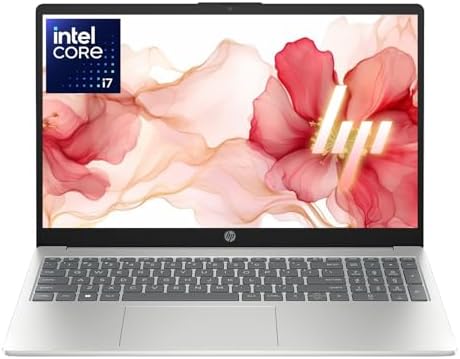
- 【12th Gen Intel Powerhouse】 Equipped with the 10-core Intel Core i7-1255U processor (up to 4.7GHz with Turbo Boost and 1…
- 【Maximized Speed & Storage】 With upgraded DDR4 RAM and a massive up to 2TB PCIe NVMe SSD, enjoy ultra-fast boot times, s…
- 【Crisp Full HD Display】 The 15.6″ FHD (1920×1080) anti-glare display offers 250 nits brightness, a micro-edge bezel, and…
This model uses a larger 15.6-inch display and the Intel Core i7-1255U processor. The researched configuration includes 16GB DDR4 memory and a 1TB PCIe SSD, making it especially interesting for buyers who care about storage. It’s positioned as a 2026 edition business and academic laptop, with a 12th Gen Intel Core i7-1255U rated up to 4.7GHz turbo.
The larger screen and 1TB storage change who this laptop makes sense for. Someone who keeps lecture recordings, documents, PDFs, photos, software installers, and other study material locally — or a freelancer keeping project folders, client documents, and design assets on-device — will get more practical value from the extra storage than from a marginally faster processor.
Key Specifications
| Spec | Detail |
|---|---|
| Screen | 15.6″ Full HD |
| Processor | Intel Core i7-1255U (12th Gen) |
| Cores | 10 |
| Max turbo frequency | Up to 4.7GHz |
| RAM | 16GB DDR4 |
| Storage | 1TB PCIe SSD |
| Graphics | Intel Iris Xe |
| Wireless | Wi-Fi 6, Bluetooth 5.3 |
| Camera | HP True Vision 720p HD, privacy shutter |
| OS | Windows 11 |
| ASIN | B0G67PB8HM |
Pros
- 16GB RAM
- 1TB SSD — generous storage
- 15.6″ Full HD display
- Wi-Fi 6 and Bluetooth 5.3
- Privacy-focused camera and mic controls
- Suitable for office and academic workloads
Cons
- Older 12th Gen processor vs. the HP 14’s 13th Gen chip
- Larger body, less travel-friendly
- Integrated graphics, not aimed at gaming
- Confirm exact display brightness/color coverage on the live listing
What to Check Before Buying
Amazon listings sometimes group several RAM/storage variants under one product page. Always confirm: Processor → RAM → SSD capacity → Display resolution → OS → Seller → Return terms.
Who Should Buy It?
Best choice of the three if your goal is office productivity, schoolwork, multitasking, and ample storage without moving to a gaming laptop — especially if you rarely travel with your computer.
3. HP Victus 15-FA11 — Best for Gaming and Graphics-Heavy Work

- 15.6″ FHD 1920 x 1080 pixels, IPS, 250 nits, Anti-glare, 45% NTSC, 144Hz, Thin Bezel LCD;Display powered by NVIDIA GeFor…
- Intel 10-Core i7-12650H Processor Latest powerful and efficient 12th Generation Intel 10-Core i7-12650H Processor (Up to…
- Fullsize Backlit Keyboard with Numpa 720p HD Camera; 70Whr 4-Cell Lithium-Ion battery (up to 6 hours battery life); 14.0…
The HP Victus 15-FA11 moves into a completely different category. It pairs an Intel Core i7-12650H processor with an NVIDIA GeForce RTX 4050 Laptop GPU (6GB GDDR6) — a dedicated GPU that’s the main reason this model earns a place on the list. The listing (researched as an Amazon Renewed unit) shows a 15.6″ Full HD display, 16GB DDR4 RAM, 512GB NVMe SSD, and Windows 11 Home.
Key Specifications
| Spec | Detail |
|---|---|
| Model | HP VICTUS-15-FA1163DX |
| Processor | Intel Core i7-12650H (12th Gen) |
| CPU cores / threads | 10 / 16 |
| Max turbo frequency | Up to 4.7GHz |
| RAM | 16GB DDR4 |
| Storage | 512GB NVMe SSD |
| Graphics | NVIDIA GeForce RTX 4050, 6GB GDDR6 |
| Display | 15.6″ Full HD, 144Hz |
| OS | Windows 11 Home |
| Wireless | Wi-Fi 6, Bluetooth 5.3 |
| Webcam | 720p HD |
| Battery | 70Wh |
| Weight | ~5.06 lbs |
| ASIN | B0DVCFDZK4 |
Why the Victus Is So Different
The HP 14 and HP 15.6″ business laptop rely on integrated Intel graphics — fine for everyday computing. The Victus’s dedicated NVIDIA GPU is a major step up for PC gaming, GPU-accelerated creative apps, video editing, 3D work, and other graphics-heavy tasks. The “H” in Core i7-12650H also signals a higher-performance processor class than the U-series chips in the other two laptops — the trade-off being more size, weight, heat, and shorter battery life.
Pros
- Intel Core i7-12650H (H-series performance chip)
- Dedicated NVIDIA RTX 4050, 6GB GDDR6
- 16GB RAM, 512GB NVMe SSD
- 144Hz Full HD display suited to gaming
- Wi-Fi 6, Bluetooth 5.3
- Backlit full-size keyboard with numeric keypad
Cons
- Heavier than the other two options
- Higher power draw, shorter battery life
- Amazon Renewed condition — check details before buying
- 512GB storage may be limiting for a large game library
Important: This Is an Amazon Renewed Product
The researched Victus listing is identified as Amazon Renewed. Amazon describes Renewed products as inspected, tested, cleaned, and refurbished as necessary by qualified suppliers. That can make stronger specs more accessible, but confirm the exact condition, warranty, return terms, seller, and included accessories on the live page before ordering.
Who Should Buy It?
Choose the Victus if you want the strongest graphics performance of these three laptops — the clear choice for gaming, and a solid option for GPU-accelerated creative work. If you only use Office, browse the web, and stream video, the extra gaming hardware isn’t worth carrying around.
Which One Should You Choose?
Choose the HP 14 if:
- You want a smaller, more portable laptop
- You travel often
- You mainly work with documents and web apps
- You want 16GB RAM without needing dedicated graphics
Choose the HP 15.6″ Core i7 if:
- You prefer a larger screen
- You store many files locally and want a 1TB SSD
- You mainly work from a desk
- You need a machine for school or business, not gaming
Choose the HP Victus if:
- Gaming is important
- You need dedicated NVIDIA graphics
- You edit video or use graphics-heavy applications
- You’re comfortable with an Amazon Renewed configuration
What Does “Intel Core i7” Actually Mean?
Many buyers search for “Core i7” as if it’s one specific performance tier — it isn’t. Intel has used the Core i7 name across many generations and power classes. The i7-1355U (HP 14) and the i7-12650H (Victus) are both Core i7 processors, but they’re designed for very different laptop types:
- i7-1355U — low-power mobile processor, 10 cores/12 threads, 15W base power
- i7-12650H — higher-performance laptop processor for performance-oriented systems
Never buy a laptop simply because the title says “Core i7.” Check the full processor number — it tells you far more about the laptop’s intended use than the family name alone.
Why RAM Matters
RAM is the laptop’s short-term working memory. For modern Windows use, 16GB is a sensible target if it fits your budget — especially useful if you regularly keep several applications open at once (browser tabs, Word, Excel, Zoom, Photoshop, etc.). All three laptops in this comparison offer 16GB in their researched configurations.
Is 512GB SSD Enough?
For most everyday use — Windows, Office apps, browsers, documents, photos — yes. Gamers and content creators fill 512GB much faster, which is why the 1TB configuration of the second HP laptop is particularly attractive for buyers who don’t want to manage storage every few months. The Victus ships with 512GB but leans on GPU performance rather than storage capacity — check for upgrade options on the live listing if that matters to you.
Integrated vs. Dedicated Graphics
The HP 14 and HP 15.6″ laptop use integrated Intel graphics — appropriate for web browsing, streaming, office work, light photo work, and casual games. The Victus adds a dedicated NVIDIA RTX 4050 GPU with 6GB GDDR6, a major step up for graphics-heavy workloads, at the cost of higher power needs and a larger, heavier chassis.
How to Choose the Right HP Core i7 Laptop
- Start with your workload, not the processor. Docs, email, browsing, Zoom, YouTube? You don’t need a gaming laptop. Demanding games or GPU-heavy software? The Victus makes more sense.
- Decide on screen size. 14″ is easier to carry; 15.6″ gives more physical screen space for desk-based work.
- Look beyond the “Core i7” label. Check the exact CPU model, generation, U/P/H/HX class, RAM, SSD, graphics, display, weight, battery, and ports.
- Check the exact Amazon configuration. Verify: Processor → RAM → SSD → Display → GPU → OS, every time — listings often group multiple variants on one page.
- Check new vs. renewed. The Victus configuration researched here is Amazon Renewed — read the condition and coverage details carefully.
Internal Resources From TechRigReview
- 7 Best HP Laptops on Amazon 2026 — a broader look at HP models across categories, useful if you’re not committed to a Core i7 model specifically.
- 10 Best Amazon Monitor Stands for Home Office — pair a monitor stand with your new laptop for a complete home-office setup.
- Browse the TechRigReview website for more laptop, home-office, and technology buying guides.
External Resources Worth Checking
- Intel’s official spec page for the Core i7-1355U
- Intel’s 13th Gen Core i7 processor reference
- Microsoft’s official Windows 11 system requirements
Frequently Asked Questions
Are HP laptops with Intel Core i7 processors good?
Yes, but the exact model matters. Core i7 laptops range from thin everyday machines to powerful gaming laptops, as this comparison shows.
Which HP Core i7 laptop is best for students?
For students who carry their laptop around often, the HP 14 is the most natural choice. If it’ll mostly stay on a desk and storage matters more, the 15.6″ HP with its 1TB SSD is more attractive.
Which HP Core i7 laptop is best for gaming?
The HP Victus 15-FA11, clearly — its Core i7-12650H and dedicated RTX 4050 GPU put it in a different class from the other two integrated-graphics models.
Is the HP Victus 15 good for video editing?
It’s a much better choice than the other two thanks to its dedicated GPU, though actual performance still depends on software, project resolution, codecs, and cooling.
Is 16GB RAM enough for an HP Core i7 laptop?
For most everyday users, yes — office work, browsing, schoolwork, video calls, and normal multitasking. Heavy video, VM, or 3D workloads may want more.
Is a 1TB SSD better than a 512GB SSD?
It doubles your storage capacity, which matters if you keep lots of photos, videos, games, or project files locally.
Should I buy an HP Core i7 laptop in 2026?
It can still be a good purchase, but don’t buy on branding alone — compare the full hardware configuration against your actual workload. A newer Core i5 or Core Ultra laptop can sometimes beat an older Core i7 machine.
What should I check before buying an HP laptop on Amazon?
Processor model, RAM, SSD capacity, GPU, display resolution/refresh rate, OS, condition, seller, return policy, warranty, and current availability — listings can change, so don’t rely on older cached information.
Final Verdict
- Portable everyday work → HP 14 14-ep0199nr. 13th Gen Core i7-1355U, 16GB RAM, compact 14″ format — a balanced fit for school, office work, and general productivity.
- Office work and storage → HP 15.6″ Core i7 laptop. 16GB RAM plus a 1TB SSD and larger screen make it the pick for desk-based productivity.
- Gaming and graphics-heavy work → HP Victus 15-FA11. Core i7-12650H and dedicated RTX 4050 graphics put it in its own performance class — just confirm the Renewed condition, seller, and warranty before ordering.
Most importantly: don’t buy just because a laptop has an Intel Core i7 badge. Check the complete configuration and match it to the work you actually plan to do.
Check the Current Amazon Listings
- HP 14 14-ep0199nr — ASIN B0CVM9WLCW
- HP 15.6″ Core i7 Laptop — ASIN B0G67PB8HM
- HP Victus 15-FA11 — ASIN B0DVCFDZK4
Amazon Associates Disclosure: As an Amazon Associate I earn from qualifying purchases.

MD.HASAN is an experienced SEO expert and amazon products review writer passionate about helping people find right products on amzon for buy without confusion. With 4 years of hands-on experience in content strategy and search engine optimization, he specializes in writing SEO-friendly blog posts that rank, engage, and convert.