🔗 Affiliate Disclosure: As an Amazon Associate, Tech Rig Review earns from qualifying purchases. Links on this page may be affiliate links — at no extra cost to you.
Discover the 10 best Amazon computer keyboard trays for under-desk use. Compare features, ergonomics, and value to create a more comfortable workspace.
If you spend more than a couple of hours a day typing, your desk height is probably working against you. Most desks are built around a “standard” sitting position that puts the keyboard several inches too high for neutral wrist posture — which is exactly why so many people develop wrist, shoulder, and neck strain without ever touching a keyboard tray. A well-chosen under-desk keyboard tray fixes that in a single afternoon, dropping your typing surface to the correct height and angle while also freeing up valuable desktop real estate.
I dug through the current 2026 lineup of the best-reviewed, most-tested under-desk keyboard trays to put together this guide — comparing mounting systems, adjustability, desk compatibility, weight capacity, and real owner feedback. Below are ten trays that consistently perform well across different desk types: fixed-height desks, standing desks with center crossbars, thick vintage wood desks, and everything in between.
One quick note before we start: Amazon pricing on these products fluctuates constantly with deals and stock changes, so rather than quoting numbers that will be outdated within weeks, I’ll point you to check the current price directly on each product’s Amazon page.
Let’s get into the list.
Table of Contents
1. VIVO Large Keyboard Tray (MOUNT-KB05E) — Best Overall

- Saves Desk Space: This 26.8” (32.5″ including clamps) x 11” under-desk keyboard tray holds your keyboard, mouse, and oth…
- Comfortable Typing Angles: Easily slide the tray in and out and enjoy ergonomic typing angles that relieve stress on you…
- Compatibility: Before purchasing, please make sure that your desk surface does not exceed a thickness of 1.25″. Note the…
The MOUNT-KB05E has become something of a default recommendation among ergonomics reviewers, and after comparing it against a dozen competitors, it’s easy to see why. It uses a heavy-duty C-clamp mounting system that grips the underside of your desk without drilling a single hole — a big deal if you’re renting or don’t want to damage an expensive desk surface.
The 27-inch platform is large enough to hold a full-size keyboard and a full mouse pad with room to spare, and the ball-bearing glide mechanism slides in and out smoothly even after months of daily use. Reviewers consistently point to its stability under vigorous typing as a standout feature — there’s no wobble or shifting once it’s mounted.
Why it stands out:
- No-drill C-clamp installation protects your desk surface
- Spacious 27-inch platform fits a full keyboard, mouse, and notepad
- Smooth ball-bearing slide mechanism for daily in-and-out use
- Backed by tens of thousands of verified positive reviews
- Available in multiple sizes and colors
Things to consider:
- Requires roughly 32.5 inches of desk width once clamps are included
- Maximum desk thickness compatibility is more limited than premium alternatives — check your desk thickness before ordering
Best for: Anyone who wants a reliable, no-drama tray that just works — this is the safest first purchase for most home offices.
2. HUANUO 360 Adjustable Keyboard Tray — Best for Full Adjustability
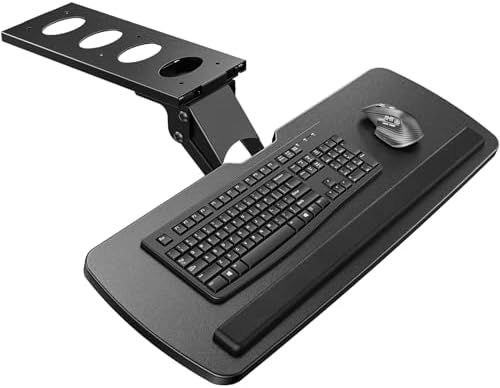
- Large & Perfect Size – Full size keyboard drawer with a 25” x 9.84” , please kindly confirm the product size is what you…
- Full Motion Under Desk Computer Keyboard Platform – The platform can swivel left and right 180 degrees. It can also tilt…
- Height Adjustable Keyboard Tray – The keyboard tray with a total of 6.3 inches of height adjustment, this under desk key…
If you switch positions throughout the day — leaning back, sitting upright, occasionally standing — the HUANUO 360 is built specifically for that kind of flexibility. It swivels a full 180 degrees and tilts down to 22 degrees, letting you angle your keyboard exactly where your wrists want it rather than settling for a single fixed position.
This model also includes a padded wrist rest along the front edge, which reviewers frequently mention as noticeably reducing wrist soreness during long sessions. The height adjustment range (roughly 6.3 inches) makes it genuinely usable across both seated and standing desk setups.
Why it stands out:
- 180-degree swivel and 22-degree tilt for highly personalized positioning
- Roughly 6.3 inches of height adjustment covers sitting and standing use
- Built-in padded wrist rest included at no extra cost
- Full-size platform (25″ W x 9.84″ D) fits standard keyboards and mice
Things to consider:
- More moving parts means slightly more assembly during installation
- The extensive adjustability can introduce minor wobble if hardware isn’t fully tightened
Best for: Sit-stand desk owners and anyone who wants maximum control over tilt, swivel, and height rather than a fixed one-size-fits-all position.
3. EUREKA ERGONOMIC Keyboard Tray — Best Premium, Spacious Option

- Ergonomic Full Motion Keyboard Tray: The height adjustable keyboard tray is designed to provide a comfortable typing exp…
- Perfectly Sized to Free Up Space: The maple keyboard tray for desk measures 25×9.13 inches and fits most keyboards and m…
- Durable Support & Stable Mechanism: The one-piece swivel keyboard tray is designed with a stable mechanical structure ma…
The EUREKA ERGONOMIC tray sits at the top of the price range on this list, and the extra investment shows up in the details. Its 28-inch platform is the largest of any tray we researched, giving you generous room for a full-size mechanical keyboard, a large mouse pad, and accessories without feeling cramped.
What genuinely sets it apart is its compatibility with standing desks that have a center crossbar — a common installation blocker that rules out many cheaper trays. Its mechanical design routes around the crossbar entirely, and a gravity self-locking mechanism keeps the tray securely in position once you’ve found your ideal spot, preventing accidental sliding.
Why it stands out:
- Massive 28-inch platform, the largest in this roundup
- Works around standing desk center crossbars that block other trays
- Gravity self-locking mechanism prevents accidental sliding
- Sturdy steel construction with a premium carbon-fiber-style finish
- Higher weight capacity handles heavier mechanical keyboards
Things to consider:
- Noticeably heavier than other trays (nearly 14 lbs), which may affect stability on lightweight standing desks
- Requires significant under-desk clearance (roughly 17.8 inches of mounting bracket depth)
- Premium price point compared to budget alternatives
Best for: Standing desk owners with a center crossbar, or anyone who wants the largest, sturdiest platform available and is willing to pay for it.
4. BONTEC KMT01 Sliding Keyboard Tray — Best Budget Pick
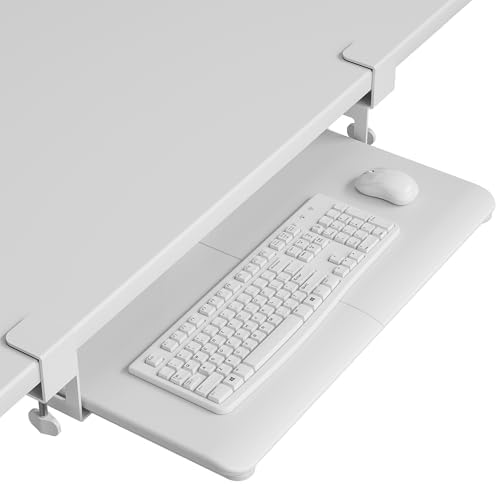
- ❗️ CHECK DESK COMPATIBILITY BEFORE PURCHASE – This under-desk keyboard tray won’t work with desks that have curved, beve…
- ✅ MEASURE YOUR DESK BEFORE ORDERING – The tray requires at least 31.3″ of width and 11.8″ of depth underneath your desk …
- ✅ MAXIMIZE YOUR DESK SPACE – Free up your desktop by placing your keyboard and mouse on this smooth slide-out tray. The …
You don’t need to spend big to get a functional, sturdy tray, and the BONTEC KMT01 proves it. At a noticeably lower price point than most competitors, it still delivers the core features that matter most: a secure metal clamp system, a smooth sliding mechanism, and genuinely solid build quality.
One detail that stands out here is desk thickness compatibility — while many budget clamp-on trays top out around 1.25 inches of desk thickness, the BONTEC accommodates desks up to nearly 2 inches thick. That opens the door for people with older solid wood desks or thicker commercial office furniture that other budget trays simply can’t clamp onto.
Why it stands out:
- One of the most affordable trays that still feels genuinely sturdy
- Handles desks up to nearly 2 inches thick — well above the budget-tray average
- Metal clamps grip firmly without marking the desk
- Smooth sliding action after a short break-in period
Things to consider:
- The platform ships in two pieces that connect in the middle, which can cause minor alignment issues for some buyers
- Sliding motion may feel slightly stiff during the first week of use before it loosens up
Best for: Budget-conscious buyers and anyone with a thicker desk that ruled out other clamp-on trays.
5. Klearlook Adjustable Keyboard Tray with Drawer — Best for Storage & Organization
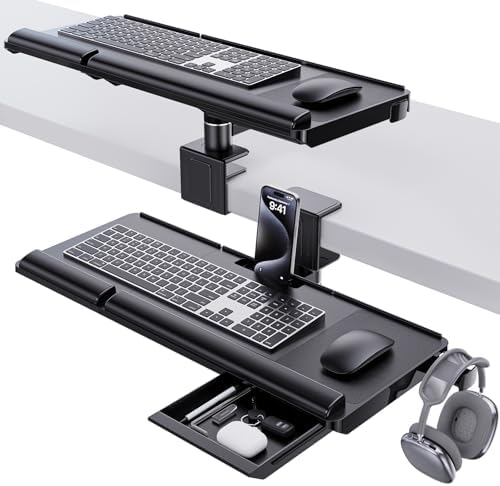
- Dual Installation Options: The All-in-1 Keyboard Tray offers great flexibility in its design, allowing for both above-de…
- Ergonomic Comfort: Featuring an Ergonomic Keyboard Riser with adjustable typing angles, this setup reduces neck strain a…
- All-in-One Workspace Organizer: This Keyboard Stand comes equipped with a convenient drawer for organizing small items a…
The Klearlook tray does something most competitors don’t: it doubles as a small storage hub. Along with the sliding keyboard platform, it includes a built-in drawer, a phone slot, and a headphone hanger — genuinely useful additions if your desk currently looks like a tangle of cables and loose accessories.
Beyond the storage extras, this is also one of the most flexible trays on the list in terms of installation, supporting both above-desk and under-desk mounting. Its tilt and rotation range (up to 237 degrees vertical and 180 degrees of tilt) is among the widest of any tray we found, making it a strong option for people who frequently shift between sitting and standing.
Why it stands out:
- Built-in drawer, phone slot, and headphone hanger keep your desk clutter-free
- Flexible installation — mounts above or under the desk
- Exceptional adjustability with up to 237° vertical rotation and 180° tilt
- Fits a wide range of keyboard and mouse sizes (24.4″ x 10″ platform)
Things to consider:
- The extensive adjustability can introduce minor wobble if bolts aren’t fully tightened
- More features mean a slightly more involved initial setup than a basic fixed tray
Best for: Anyone who wants their keyboard tray to double as a mini organizational station, hiding cables, phones, and headphones out of sight.
6. VIVO MOUNT-KB03B Height-Adjustable Tray — Best for Sit-Stand Flexibility

- Ergonomic Keyboard and Mouse Tray: Installs underneath a standard desk for comfortable typing angles –Patent Pending–
- Compatibility: If installing to a height adjustable desk, you will need a spacer bracket for the track to fit over the f…
- Deluxe Universal 25″ x 10″ Tray: Fits most keyboards and mice. The keyboard slides forward and back on a 14.25″ long and…
A close sibling to VIVO’s flagship model above, the MOUNT-KB03B focuses specifically on height adjustability, offering roughly 5 inches of vertical range along with full side-to-side rotation and tilt. That combination makes it a strong pick for anyone who frequently switches between sitting and standing throughout the day but doesn’t need the absolute largest platform on the market.
The included rubber padding along the platform edge is a small but appreciated touch, reducing wrist soreness during extended typing sessions. It’s a genuinely practical middle-ground option between the budget BONTEC and the premium EUREKA ERGONOMIC.
Why it stands out:
- 5 inches of height adjustment supports both sitting and standing use
- Full side-to-side rotation plus tilt for personalized positioning
- Rubber padding along the platform reduces wrist fatigue
- Comfortably fits most keyboards and mice (25″ x 10″ platform)
Things to consider:
- Assembly is slightly more involved due to spacers required for adjustable desks
- At over 12 lbs, thinner desks may need extra stability checks after installation
Best for: Sit-stand desk users who want solid height adjustability without paying premium prices.
7. Mount-It! Keyboard & Mouse Drawer — Best for Left-Handed Users

- Reclaim desk space and improve comfort – Store your keyboard and mouse underneath the desk to free up surface space whil…
- Adjust for personalized ergonomics – Easily fine-tune height and tilt with a simple control knob, then swivel the tray l…
- Extra-wide one-piece keyboard platform – The 26.5″ W × 10″ D solid under desk keyboard drawer provides ample room for fu…
Most keyboard trays are designed with a right-handed mouse position baked in, which quietly inconveniences left-handed users every single day. The Mount-It! Keyboard & Mouse Drawer stands out specifically because of its ambidextrous mouse tray design, giving left-handed typists the same comfortable setup right-handed users take for granted.
It’s also a lightweight, low-fuss option overall — the adjustable mounting height gives you some flexibility without the complexity of a fully articulating system, making it a solid choice for anyone who wants simplicity without sacrificing comfort.
Why it stands out:
- Ambidextrous mouse tray genuinely accommodates left-handed users
- Adjustable mounting height for a customized fit
- Lightweight design that’s simple to install and reposition
- Straightforward, no-frills mounting hardware
Things to consider:
- Fewer adjustability features (tilt, swivel) compared to premium articulating trays
- Platform size is more modest than the larger VIVO or EUREKA options
Best for: Left-handed users who are tired of retrofitting right-handed keyboard tray designs.
8. AX WABER Under Desk Keyboard Tray — Best for Thick or Vintage Desks


Older solid-wood desks and heavy-duty commercial office furniture often have thicker desktops than modern trays are designed to clamp onto. The AX WABER tray solves this directly, with sturdy C-clamps rated for desks up to 1.9 inches thick — noticeably above what many competing trays can handle.
At 27.3 inches long (32.5 inches including clamps) and 11 inches wide, it comfortably fits a full keyboard, mouse, and small accessories, while the smooth sliding mechanism keeps daily use frustration-free.
Why it stands out:
- C-clamps accommodate desks up to 1.9 inches thick
- Ample 27.3-inch platform for keyboard, mouse, and extras
- Smooth in-and-out sliding motion for daily use
- Sturdy construction that resists wobble under normal typing pressure
Things to consider:
- Total clamp-to-clamp width (32.5 inches) requires adequate desk space — measure before buying
- Weight capacity (around 11 lbs) is standard, not heavy-duty, so it suits typical keyboard and mouse combos rather than oversized mechanical setups
Best for: Owners of older, thicker wood desks or commercial furniture that other trays can’t physically clamp onto.
9. ErgoActive Extra Wide Keyboard Tray — Best No-Drill Clamp-On Tray

- EXTRA LARGE SURFACE: The computer keyboard mount measures 27” x 12” and fits a full-size keyboard and mouse. An anti-sli…
- ERGONOMIC KEYBOARD TRAY: Using an under desk keyboard holder helps create an ergonomically correct workspace. It helps r…
- EASY TO INSTALL: Installing the keyboard slider will not damage the desk at all. No screws or tools needed. The keyboard…
The ErgoActive tray is built for people who want ergonomic benefits without any permanent commitment to their desk. Its padded clamps grip gently onto the desk edge without scratching the surface, and because it doesn’t require screws, it works on desk materials that other trays can’t — including glass and metal surfaces where drilling isn’t an option at all.
It’s also genuinely portable: since nothing is permanently mounted, you can relocate it to a different desk in just a few minutes, which is a real advantage for renters or anyone who rearranges their home office periodically.
Why it stands out:
- Fully clamp-based installation — no screws, no drilling
- Compatible with glass, metal, and other non-wood desk surfaces
- Padded clamps protect your desk finish
- Easy to relocate between desks in minutes
Things to consider:
- Lightweight construction trades off some heavy-duty stability compared to bolted-in options
- Best suited for standard keyboards and mice rather than oversized gaming setups
Best for: Renters, glass or metal desk owners, and anyone who wants a fully reversible, damage-free installation.
10. iMovR SteadyType Keyboard Tray — Best for Standing Desks with a Center Crossbar
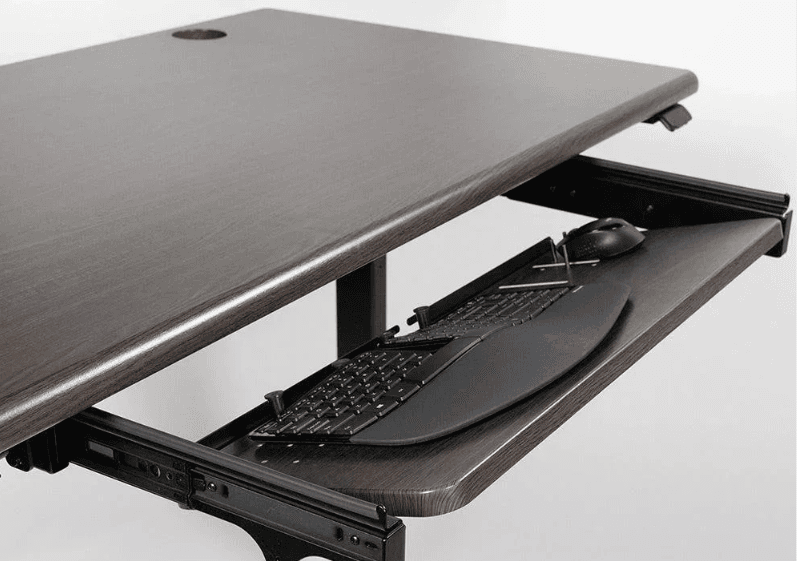
Standing desks pose a specific installation headache: nearly all of them have a center crossbar running underneath the desktop that blocks the long mounting track most keyboard trays require. The iMovR SteadyType line was engineered specifically around this problem, using a mechanical design that installs cleanly around the crossbar rather than fighting it.
It’s also built with treadmill desk users in mind, addressing the unique challenge of typing while walking — where the natural instinct to press down harder on the keyboard for stability can lead to wrist strain over time. If you’re using (or considering) a treadmill desk, this is one of the few trays engineered with that scenario specifically in mind.
Why it stands out:
- Purpose-built to install around standing desk center crossbars
- Supports the deep negative tilt (up to 30°) needed for comfortable standing typing
- Engineered with treadmill desk ergonomics specifically in mind
- Backed by a company that specializes exclusively in standing desk ergonomics
Things to consider:
- Premium pricing reflects its specialized engineering
- Overkill for a simple fixed-height desk setup — this tray earns its price on standing and treadmill desks specifically
Best for: Standing desk owners whose desk has a center crossbar, and treadmill desk users who need serious negative tilt for safe typing while walking.
How to Choose the Right Keyboard Tray for Your Desk (Buyer’s Guide)
With ten strong options above, here’s how to actually narrow it down to the right one for your setup.
Measure your desk before you buy anything
This is the single most common mistake buyers make. Check three numbers before ordering: your desk’s thickness (most clamp-on trays top out between 1.25″ and 1.97″), the available width on your desk (many trays need 30+ inches including clamps), and the clearance underneath your desk (you need enough depth for the tray to slide in and out freely).
Check for a center crossbar if you own a standing desk
Nearly all standing desks have a metal crossbar running underneath for structural support, and it blocks the mounting track on many standard keyboard trays. If you own a standing desk, look specifically for trays — like the EUREKA ERGONOMIC or iMovR SteadyType — that are explicitly designed to work around this obstacle.
Prioritize negative tilt if you stand while typing
Ergonomists generally recommend up to 15 degrees of negative tilt while seated, and as much as 30 degrees while standing. If you switch between sitting and standing throughout the day, make sure whatever tray you choose offers enough tilt range to support both positions comfortably.
Don’t underestimate weight capacity
Most trays are rated between 11 and 15 lbs, which comfortably covers a standard keyboard and mouse. If you use a heavier mechanical keyboard with an aluminum case, or you plan to rest additional accessories on the tray, lean toward higher-capacity options like the EUREKA ERGONOMIC.
Decide whether you want drilled or clamp-only installation
C-clamp mounting is reversible and desk-safe, making it the better choice for renters or anyone using furniture they don’t want to modify. If you own your desk permanently and want maximum stability, a drilled mounting plate can offer slightly more rigidity, though most modern C-clamp trays are sturdy enough for daily use.
Consider what else you want the tray to do
If desk clutter is a real problem for you, trays with a built-in drawer, phone slot, or headphone hanger — like the Klearlook model — solve two problems in a single purchase rather than requiring separate desk organizers.
Also Check:
10 Best Amazon Wireless Keyboard for Writers in 2026
6 Best Rain Design mStand Laptop Stand Reviews on Amazon
How to Use a Laptop Stand: The Complete Guide to Better Posture
Frequently Asked Questions
Will a keyboard tray damage my desk?
Most modern trays use padded C-clamps that grip the underside of your desk without drilling holes or scratching the surface. As long as you follow the desk thickness guidelines listed for your specific tray, installation should be fully reversible and damage-free.
How much clearance do I need under my desk for a keyboard tray?
This varies by model, but you generally need enough depth for the tray to slide fully in and out — often between 8 and 12 inches of extension, plus a few inches of vertical clearance for your knees once the tray is in use. Check the specific product listing for exact extension measurements.
Can I install a keyboard tray on a standing desk with a crossbar?
Yes, but not with every tray. A standing desk’s center crossbar often blocks standard mounting tracks. Look specifically for trays engineered to work around this — the EUREKA ERGONOMIC and iMovR SteadyType are both built with this exact scenario in mind.
What’s the difference between a fixed tray and an adjustable one?
A fixed tray sets your keyboard at one height and angle, while an adjustable tray lets you customize height, tilt, and often swivel to match your body and chair setup. Adjustable trays cost more but offer noticeably better ergonomics, especially if you switch between sitting and standing.
Are keyboard trays worth it if I don’t currently have wrist pain?
Yes — ergonomists generally frame keyboard trays as a preventative upgrade rather than a treatment for existing pain. Correcting keyboard height and wrist angle before strain develops is far easier than reversing repetitive strain injuries after the fact.
Final Thoughts
A keyboard tray is one of the cheapest, highest-impact upgrades you can make to a desk setup, whether you’re dealing with existing wrist strain or simply want to future-proof your workspace. Start by measuring your desk thickness and available clearance, decide whether you need standing-desk compatibility, and then match your priorities — budget, storage, adjustability, or left-handed support — against the picks above. Any of these ten trays will get your keyboard off the desktop and into a genuinely healthier typing position.
Prices, availability, and deals on Amazon change frequently — always check the product page for the most current price before purchasing.

MD.HASAN is an experienced SEO expert and amazon products review writer passionate about helping people find right products on amzon for buy without confusion. With 4 years of hands-on experience in content strategy and search engine optimization, he specializes in writing SEO-friendly blog posts that rank, engage, and convert.