
Affiliate disclosure: As an Amazon Associate, Tech Rig Review earns from qualifying purchases. Links on this page may be affiliate links, at no extra cost to you.
If you’ve ever stood up from your desk at 6 p.m. and felt your lower back seize up like a rusted hinge, you already know that a cheap chair isn’t “just a chair.” It’s a daily decision about your spine. After spending years working remotely — and burning through three bad chairs before I understood what actually mattered — I put together this guide to save you that trial and error.
Below, I break down the 10 best Amazon office chairs for back pain, based on lumbar support design, adjustability, materials, weight capacity, and real verified buyer feedback. Every pick here is something you can order today, and I’ll walk you through exactly what makes each one worth (or not worth) your money.
Table of Contents
How I Evaluated These Chairs

This list isn’t a random scrape of Amazon’s search results. Each chair below was selected using five criteria that matter specifically for people dealing with back pain, not just general comfort:
- Lumbar support design — Is it a fixed pad, a height/depth-adjustable pad, or a dynamic multi-zone system that moves with your spine?
- Adjustability points — Seat height, seat depth, backrest angle, armrest position, and headrest, where applicable.
- Materials and build quality — Breathable mesh vs. foam, frame material, and BIFMA safety certification where available.
- Weight capacity and sizing — Because a chair that’s uncomfortable for your body type will never help your back, regardless of its features.
- Verified buyer feedback patterns — I looked specifically for recurring comments about lower back relief, sciatica, or long-hour comfort, not just star ratings.
I also cross-referenced ergonomic guidance from spine specialists, who generally recommend chairs that allow a recline range of about 100–110 degrees, armrests that let your elbows rest near a 90-degree angle, and lumbar support that can be adjusted to match your natural lower-back curve. Chairs that hit most of these marks made the cut; chairs that relied on a flimsy strap-on pillow instead of real adjustability did not.
What Actually Causes Back Pain From Sitting
Before jumping into the reviews, it helps to understand why your chair matters so much. Sitting for long stretches — especially with poor posture — increases pressure on your spinal discs significantly compared to standing. Over a typical workday, small postural compromises (slouching to reach a monitor, sitting too far forward, arms unsupported at your keyboard) add up into chronic strain on your lower back, hips, and neck.
The fix isn’t just “sit up straight.” It’s having a chair that actively supports your spine’s natural S-curve, encourages small movements throughout the day, and adjusts to your specific height and body shape. That’s the whole premise behind ergonomic seating — and it’s why the chairs below are built so differently from a standard $60 desk chair.
Comparison Table
| Chair | Best For | Lumbar Support Type | Weight Capacity | Headrest |
|---|---|---|---|---|
| SIHOO Doro C300 | Overall back pain relief | Dynamic dual-back | ~300+ lbs | Yes |
| SIHOO M57 | Big & tall users | Adjustable pad | 330 lbs | Yes, adjustable |
| HBADA E3 Pro | Twisting/asymmetrical pain | 3-zone dynamic | Big & tall rated | 4D adjustable |
| GABRYLLY | Neck + back pain combo | Adjustable curve | Standard | Yes |
| Duramont | Long-term daily reliability | Height-adjustable | Standard | No |
| FlexiSpot C7 | Fidgeters / frequent movers | Self-adaptive | 350 lbs | Optional |
| Autonomous ErgoChair Pro | Maximum customization | 6″ sliding range | 300 lbs | Yes |
| Mimoglad | Budget + real support | Adjustable pad | Standard | Wide headrest |
| Amazon Basics 3D Lumbar | First upgrade / tight budget | 3D molded pad | Standard | No |
| SIHOO M18 | Best overall value | Adjustable | 330 lbs | Yes |
Always check the current price and available color/size options directly on the product’s Amazon page, as these change frequently.
Features That Matter Most for Back Pain Relief
If you only remember five things from this guide, make it these:
- Adjustable lumbar support (height and depth) — A pad that doesn’t move to match your spine is nearly useless.
- Seat depth adjustment — You want a 2–4 finger gap between the edge of the seat and the back of your knees. Too deep, and it cuts circulation and pulls you away from lumbar support.
- Recline with tension control — A locked, upright-only chair forces static load onto your lower back all day. A chair that reclines 15+ degrees lets you shift load dynamically.
- Armrests you can actually adjust — Height, width, and ideally pivot/depth. Elbows should rest near 90 degrees without shrugging your shoulders.
- Breathable material — Mesh backs help with airflow during long sitting sessions and tend to hold their shape longer than foam.
Now, let’s get into the picks.
The 10 Best Amazon Office Chairs for Back Pain
1. SIHOO Doro C300 Ergonomic Office Chair

- 【Innovative Ergonomic Chair】SIHOO’s latest office chair has been developed using the latest technology to provide comfor…
- 【Wide Angle Adjustable Headrest and Trackable Backrest】The SIHOO A3 office chair features a 3D headrest with automatic m…
- 【Domino auto-adaptive lumbar support and 3D linkage armrest】The SIHOO A3 office chair features a 3D automatic macro-adju…
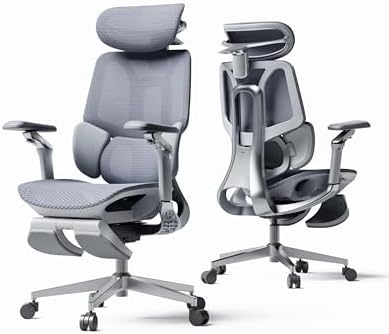
The Doro C300 is SIHOO’s flagship model, and it’s built specifically around the idea of “dynamic” lumbar support rather than a single fixed pad. The backrest splits into upper and lower sections that move somewhat independently, so the lower portion can track your spine as you shift between upright typing and a relaxed recline.
Why it’s good for back pain: The dual-back design keeps consistent contact with your lower spine even when you lean back, which is where a lot of cheaper chairs fall short — they only support you well when you’re sitting bolt upright.
Pros:
- Adjustable dual-back lumbar system
- 3D or 6D armrests depending on configuration, so you can angle them to your exact desk height
- Breathable mesh keeps you cool during long sessions
- Premium build quality that holds up well over time
Cons:
- Taller users (6’3″+) sometimes find the headrest and seat depth a bit tight
- Assembly takes longer than simpler chairs due to the number of moving parts
2. SIHOO M57 Ergonomic Mesh Office Chair

- ADJUSTS TO YOU, FROM BOTTOM TO TOP – Whether you’re working, gaming, or just relaxing, SIHOO ergonomic chair adapts to y…
- ERGONOMIC SUPPORT WHERE YOU NEED IT MOST – Recommended by the Ergonomics Application Association, the SIHOO ergonomic of…
- STABLE, DURABLE, AND QUIET – Built with a reinforced aluminum base and a dual-frame backrest, our desk chair holds up to…
The M57 is SIHOO’s most popular mid-range chair, and it’s an easy recommendation if you want strong lumbar support without stepping up to flagship pricing. It uses a large, adjustable lumbar pad combined with a high-back mesh design that supports the full length of your spine, not just your lower back.
Why it’s good for back pain: The lumbar pad adjusts both up-and-down and in-and-out, so you can dial in support that actually matches where your pain sits, rather than guessing.
Pros:
- Wide seat cushion, comfortable for extended big-and-tall use (holds up to 330 lbs)
- 3D armrests adjust in multiple directions
- Adjustable headrest reduces neck strain, which often accompanies upper back pain
- Reliable mid-range value
Cons:
- Mesh seat (on some versions) isn’t as plush as foam for very long sitting sessions
- Recline tension can feel a bit stiff out of the box
3. HBADA E3 Pro Ergonomic Office Chair
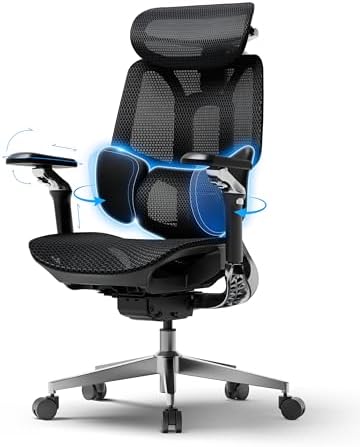
The HBADA E3 Pro takes a genuinely different approach to lumbar support with what the brand calls a “three-zone dynamic lumbar” system. Instead of one pad, the backrest has a central support zone plus two side “wings” that rotate to keep contact with your lower back as you twist to grab something or reach for a second monitor.
Why it’s good for back pain: If your pain is asymmetrical (worse on one side, or aggravated by twisting to reach things), the multi-zone design does a noticeably better job than a single static pad at maintaining support through movement.
Pros:
- Multi-zone lumbar tracks your spine through rotation and recline
- 4D headrest accommodates a wider range of body sizes
- Aluminum alloy five-star base feels sturdy and BIFMA-tested on most models
- Strong recline range for alternating between focused work and relaxed posture
Cons:
- Takes a few days to properly calibrate all the adjustment points to your body
- Not the fastest chair to assemble
4. GABRYLLY Ergonomic Office Chair
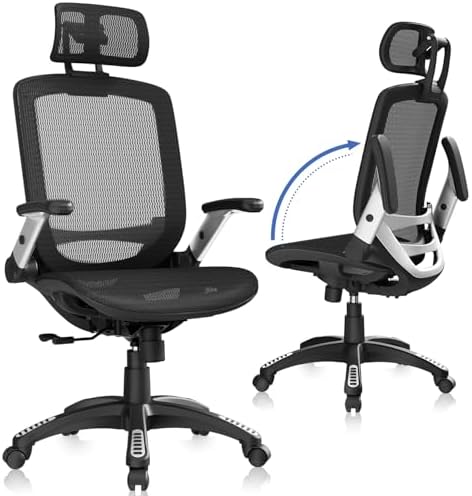
- 【ERGONOMIC OFFICE CHAIR】- The ergonomic chair provides 4 supporting points(head/ back/ hips/ hands) and a proper lumbar …
- 【COMFORTABLE MESH SEAT】- The office chair is larger than other chairs, and it could accommodate different body build. Th…
- 【ADJUSTABLE FLIP-UP ARMREST】- Folding the armrests up 45°, you can push the executive office chairs directly under the d…
GABRYLLY has built a loyal following on Amazon specifically among people looking for accessible, budget-friendly relief for neck and back pain. The chair pairs a high-back mesh design with a well-padded, contoured headrest, which is worth calling out — a lot of “back pain” chairs completely ignore the neck.
Why it’s good for back pain: The combination of an adjustable headrest and a solid lumbar curve in the backrest addresses both ends of the problem, which matters if your desk pain radiates from your neck down into your shoulders.
Pros:
- Flip-up armrests, useful if you also use the chair for reading or want to tuck it under a desk
- Wide cushion for comfort during 6+ hour sitting stretches
- 90–120° tilt lock gives you flexibility between upright and reclined work
- Frequently praised in verified reviews specifically for lower back relief
Cons:
- No independent seat depth adjustment
- Armrest padding can feel firm for some users
5. Duramont Ergonomic Office Chair
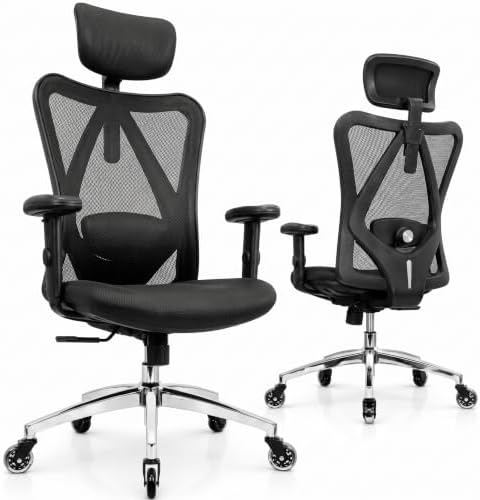
- FULLY ADJUSTABLE LUMBAR SUPPORT FOR OPTIMAL POSTURE – Suffering from back pain or want to prevent it? Our ergonomic desk…
- MORE ADJUSTABLE THAN ANY OTHER CHAIR IN ITS CLASS -Unlike competitor home office desk chairs that only allow you to full…
- BREATHABLE MESH & THICK MEMORY FOAM CUSHION FOR ALL-DAY COMFORT -The high-density breathable mesh back provides superior…
Duramont has been a steady Amazon bestseller for years, and it earns its reputation through consistency rather than flashy features. It’s a high-back mesh chair with adjustable lumbar support and rollerblade-style wheels that glide smoothly on both carpet and hardwood.
Why it’s good for back pain: The lumbar support height-adjusts to sit exactly where your lower back curves in, and the thick seat cushion helps distribute weight evenly, reducing the tailbone and hip pressure that often compounds lower back discomfort.
Pros:
- Reliable, no-nonsense adjustable lumbar support
- Breathable mesh backrest for long sitting sessions
- Rollerblade wheels are quieter and smoother than standard casters
- Strong reputation for durability over years of daily use
Cons:
- Armrests are only height-adjustable, not width or depth
- Some users want a bit more recline range than it offers
6. FlexiSpot C7 Ergonomic Office Chair

The FlexiSpot C7 sits in that sweet mid-range spot reviewers keep pointing to — enough real ergonomic engineering to matter, without flagship pricing. It features self-adaptive lumbar support, meaning the backrest naturally follows your spine’s movement as you shift position, rather than requiring constant manual readjustment.
Why it’s good for back pain: Self-adaptive lumbar support is genuinely useful for people who fidget or change position frequently throughout the day, since you’re not stuck re-tuning a manual pad every time you shift.
Pros:
- Self-adaptive lumbar mechanism reduces manual fiddling
- Seat depth adjustment (17″–20″) accommodates different leg lengths
- Recline range of roughly 90°–128°
- High weight capacity on the mesh version (up to 350 lbs)
Cons:
- Self-adaptive support means less precise manual control than a dial-based system
- Assembly instructions could be clearer for the number of parts involved
7. Autonomous ErgoChair Pro

- 【ERGONOMIC OFFICE CHAIR FOR LONG HOURS & BACK PAIN RELIEF】After sitting 2–3 hours, lower back pain, neck stiffness, and …
- 【BREATHABLE MESH OFFICE CHAIR WITH FOAM SEAT】If your back feels hot or sweaty after long desk work, traditional padded c…
- 【BIG AND TALL OFFICE CHAIR 300 LBS HEAVY DUTY】A chair that wobbles or feels weak quickly breaks your focus. Designed as …
The ErgoChair Pro is aimed squarely at people who sit 8+ hours a day and want maximum control over every point of contact. It has nine distinct adjustment points, including a notable 6-inch vertical sliding lumbar range — one of the widest ranges of motion available in this price tier — plus 4D armrests.
Why it’s good for back pain: That 6-inch sliding lumbar range means the pad can genuinely reach wherever your pain is, whether you’re short or tall, rather than being fixed to a single manufacturer-assumed “average” spine position.
Pros:
- Best-in-class lumbar height adjustment range
- 4D armrests adjust in nearly every direction
- Smooth synchro-tilt recline that doesn’t pull you away from your desk
- Solid frame rated for up to 300 lbs
Cons:
- The sheer number of adjustments takes time to dial in, especially for smaller-framed users
- On the pricier end of this list
8. Mimoglad Ergonomic Office Chair

- [Ergonomic Office Chair That Supports You!] Designed to maintain a natural S-curve in your spine, reducing back pain and…
- [Comfort That Lasts-No More Numbness!] Choose sufficient padding and breathable material. The breathable mesh office cha…
- [Tailored Adjustments for a Perfect Fit] Personalize your seating experience with an adjustable headrest, lumbar support…
Mimoglad has become a favorite for people who want real lumbar support without the price tag of premium brands. It comes with a noticeably thick foam cushion (around 4 inches) and an adjustable lumbar pad, and testers specifically call out that lower back stiffness noticeably decreases after weeks of regular use.
Why it’s good for back pain: For a budget-tier chair, it doesn’t cut corners on the two things that matter most — a real adjustable lumbar system and a thick, supportive seat cushion that doesn’t flatten out quickly.
Pros:
- Genuinely effective adjustable lumbar support for the price
- Wide headrest reduces neck tension
- Thick 4-inch cushion holds up well over time
- Praised specifically by users with a documented history of back problems
Cons:
- Fewer armrest adjustment axes than premium options
- Not rated for extended 10+ hour daily use as confidently as pricier chairs
9. Amazon Basics 3D Lumbar Support Office Chair

- STYLE AND DURABILITY: Bonded leather executive office chair
- ENHANCED LUMBAR SUPPORT: Featuring 3D incite lumbar, this ergonomic desk chair allows you to adjust your seating positio…
- FLEXIBLE ARMRESTS: The broad range of motion featured in the design of the flip-up armrests allows for use as an office …
If you’re not ready to spend big on a chair yet but still want a real improvement over a flat desk chair, Amazon Basics’ ergonomic model is a legitimately solid starting point. It includes 3D lumbar support and flip-up armrests, wrapped in a professional-looking bonded leather finish.
Why it’s good for back pain: The 3D lumbar pad molds to your lower back rather than sitting as a flat, static cushion, which is the single biggest upgrade over entry-level desk chairs that skip lumbar support entirely.
Pros:
- Most accessible price point on this list
- 3D lumbar support genuinely helps with mild-to-moderate discomfort
- Flip-up armrests are handy for tight desk spaces
- Quick assembly, typically under 20 minutes
Cons:
- Build quality won’t match higher-end models over years of heavy use
- Best suited for moderate rather than chronic/severe back pain
10. SIHOO M18 Ergonomic Office Chair

- 【ERGONOMICE OFFICE CHAIR】- The ergonomic chair provides 4 support points (head/back/hip/hands) and proper lumbar support…
- 【For Home and Work】 SIHOO chairs can be applied in different scenarios according to the needs of different consumers in …
- 【Breathable Mesh】 Mesh Office Chair Premium Backrest features flexible non-pattern mesh fabric while keeping your back c…
Rounding out the list is another SIHOO model, and for good reason — the M18 punches well above its price point on comfort and ergonomics. It offers four points of support (head, back, hip, and hands) with adjustable seat height, headrest, and lumbar/back support, and it’s BIFMA tested for durability.
Why it’s good for back pain: It hits nearly every ergonomic checkbox — adjustable lumbar, adjustable headrest, and 2D armrests — at a genuinely budget-friendly price, making it one of the best value options if you’re outfitting a home office without breaking the bank.
Pros:
- Excellent value relative to feature set
- 330 lbs weight capacity
- BIFMA-tested and pressure-tested frame
- Comfortable for users roughly 5’6″ to 6’2″
Cons:
- Less ideal for users outside that height range
- Mesh quality is good but not premium-grade
How to Choose the Right One for You
Instead of picking the “top-rated” option blindly, run through this quick checklist:
- If your pain is in your lower back specifically: Look for a chair with an independently adjustable lumbar pad (SIHOO Doro C300, M57, or Autonomous ErgoChair Pro).
- If your pain includes your neck and shoulders: Prioritize an adjustable headrest (GABRYLLY or Mimoglad).
- If you twist a lot to reach a second monitor or shared desk items: A multi-zone dynamic backrest like the HBADA E3 Pro will track your spine better than a fixed pad.
- If you’re tall (6’2″+) or broader-framed: Check listed weight capacities and seat dimensions carefully — the SIHOO M57 and FlexiSpot C7 tend to accommodate larger frames well.
- If this is your first ergonomic chair and you’re testing the waters: Start with the Amazon Basics 3D Lumbar chair or SIHOO M18 before investing in a premium model.
- If you sit 8–10 hours daily, every day: It’s worth stretching toward the Autonomous ErgoChair Pro or SIHOO Doro C300 — the extra adjustability pays for itself over years of use.
And regardless of which chair you choose, remember what spine specialists consistently emphasize: no chair fully substitutes for movement. Set a timer to stand, stretch, or walk for a couple of minutes every hour. Even the best ergonomic chair works best as part of a routine that includes regular movement breaks.
Frequently Asked Questions
Do mesh chairs help with back pain more than foam chairs?
Generally, yes, for long sitting sessions. Mesh backs allow airflow, which reduces the temporary numbness and heat buildup that can make you shift into slouched positions to get relief. That said, foam seat cushions (as opposed to backs) are often more comfortable for pressure distribution — many of the best chairs combine a mesh back with a foam seat.
How much should I expect to spend on a good ergonomic chair?
You don’t need to spend a fortune to get real lumbar support — options like the Amazon Basics 3D Lumbar chair or SIHOO M18 offer genuine ergonomic features at accessible price points. Mid-range options (SIHOO M57, FlexiSpot C7, GABRYLLY) tend to offer the best overall value with more adjustability. Premium picks like the Autonomous ErgoChair Pro or SIHOO Doro C300 make sense if you sit long hours every single day. Prices change often with Amazon deals and coupons, so it’s worth checking the current listed price directly on each product page.
Can an office chair actually fix chronic back pain?
An ergonomic chair can meaningfully reduce strain and discomfort caused by poor sitting posture, but it isn’t a substitute for medical care. If you’re dealing with persistent or severe back pain, it’s worth speaking with a doctor or physical therapist, who can rule out underlying issues and recommend a treatment plan alongside your seating setup.
How long does it typically take to assemble these chairs?
Simpler models like the Amazon Basics chair or SIHOO M18 usually take under 30 minutes. More feature-dense chairs with multiple lumbar zones and armrest axes (HBADA E3 Pro, SIHOO Doro C300) can take closer to 45–60 minutes due to the higher part count.
What’s the ideal recline angle for reducing back strain?
Spine specialists commonly recommend a recline range of roughly 100–110 degrees for reducing spinal disc pressure during long sitting sessions, combined with the ability to lock or adjust tension so the chair doesn’t feel unstable.
Final Verdict
If you want the single best all-around pick, the SIHOO Doro C300 and HBADA E3 Pro stand out for genuinely dynamic lumbar support that tracks your spine rather than just propping up against it. If you’re working with a tighter budget, the SIHOO M18 and Amazon Basics 3D Lumbar chair prove you don’t need to spend a fortune to get real relief. And if you sit long hours every day and want maximum control, the Autonomous ErgoChair Pro is worth the investment.
Whichever you choose, click through to Amazon to check the current price, available colors, and any active deals before you buy — pricing and promotions on these listings change frequently.
This article is for general informational purposes and reflects independent research and product analysis. It is not medical advice. If you’re experiencing persistent back pain, please consult a healthcare professional.

MD.HASAN is an experienced SEO expert and amazon products review writer passionate about helping people find right products on amzon for buy without confusion. With 4 years of hands-on experience in content strategy and search engine optimization, he specializes in writing SEO-friendly blog posts that rank, engage, and convert.


