
Affiliate disclosure: As an Amazon Associate, Tech Rig Review earns from qualifying purchases. Links on this page may be affiliate links, at no extra cost to you.
Compare ergonomic chair vs gaming chair for working from home. Learn the key differences, comfort, support, and which chair is best for long workdays.
If you work from home, your chair is arguably more important than your desk, your monitor, or even your laptop. You sit in it for six, eight, sometimes ten hours a day, and the wrong choice can leave you with a stiff lower back, sore shoulders, and a productivity slump by 3 p.m.
Two categories dominate the conversation: the ergonomic office chair, built around adjustability and long-term spinal support, and the gaming chair, known for its bold design, bucket-seat shape, and reclining features. Both claim to be comfortable. Both are marketed as “great for long hours at a desk.” But they’re built on very different design philosophies, and choosing the wrong one for your body and your work style can genuinely affect your health.
![CleverSeat Ergonomic Office Chair Comfy [#1 in Tests] Ergonomic C...](https://m.media-amazon.com/images/I/41JS9ui5LYL._AC_.jpg)

![SmartSeat Ergonomic Office Chair Comfy [#1 in Tests] Ergonomic Ch...](https://m.media-amazon.com/images/I/41ZKEPpqkQL._AC_.jpg)
This guide breaks down the real differences between ergonomic chairs and gaming chairs — not just the marketing claims — so you can decide which one actually deserves a spot in your home office.
Table of Contents
Why Your Chair Choice Matters More Than You Think
Sitting for extended periods puts continuous load on your spine, hips, and shoulders. Physiotherapists and ergonomics researchers have long pointed out that static, poorly supported sitting posture is one of the leading contributors to chronic lower back pain among office workers. A chair that doesn’t support your spine’s natural curve, or that forces your hips and knees into an unnatural angle, compounds this problem hour after hour.
Since remote work often means longer, less-interrupted sitting sessions than a traditional office environment (with no walk to the meeting room, no commute breaking up the day), the chair you choose has an outsized impact on your physical comfort and long-term posture health.
What Is an Ergonomic Chair?
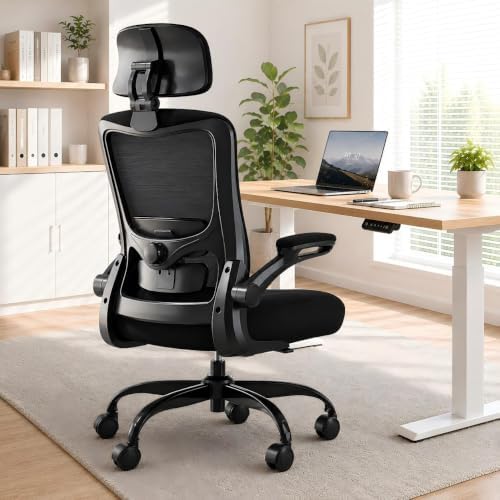
An ergonomic chair is designed primarily around adjustability and spinal support. The goal isn’t to look impressive — it’s to adapt to your specific body dimensions and sitting habits so that your spine, hips, and arms stay in a neutral, low-strain position for extended periods.
Core Features of Ergonomic Chairs
- Adjustable lumbar support that can be moved up, down, or in depth to match the curve of your lower back
- Seat height and depth adjustment, so your knees sit at roughly 90 degrees with feet flat on the floor
- Adjustable armrests (height, width, and sometimes angle) to keep shoulders relaxed
- Breathable mesh or textured fabric backing, which helps regulate temperature during long sitting sessions
- Recline tension control, allowing controlled backward movement without losing lumbar contact
- Headrest (on higher-end models) to support the neck during recline
Ergonomic chairs are typically designed by teams that include physiotherapists, occupational health specialists, or industrial designers focused specifically on musculoskeletal health. Many popular ergonomic chair brands publish research or clinical partnerships behind their design choices, which is a meaningful signal of genuine expertise rather than just marketing.


What Is a Gaming Chair?
A gaming chair borrows its shape from motorsport racing seats — a bucket-style seat with high, wraparound side bolsters meant to keep a driver stable during sharp turns. When adapted for gaming and later for general desk use, this shape was kept largely for aesthetic and brand appeal.
Core Features of Gaming Chairs
- High-back bucket seat with pronounced side bolsters for the shoulders and hips
- PU leather or leatherette upholstery, often in bold two-tone color schemes
- Deep recline (sometimes 180 degrees) with a footrest extension on some models
- Fixed or minimally adjustable lumbar support, frequently in the form of a strap-on pillow rather than an integrated mechanism
- Armrests that range from fixed to multi-directional (4D) depending on price tier
- Steel or metal frame designed to handle rocking and reclining motion
Gaming chairs are primarily designed by gaming peripheral companies, with comfort during long gaming sessions as a secondary consideration behind visual branding and marketing appeal to gamers and streamers.

Ergonomic Chair vs Gaming Chair: Head-to-Head Comparison
1. Lumbar and Spinal Support
Ergonomic chairs generally win this category decisively. Their lumbar support systems are engineered to be adjusted precisely to an individual’s lower back curve, and many allow both height and depth adjustment independently.
Gaming chairs typically rely on an attached lumbar pillow or a curved backrest shape. This can offer some support initially, but it’s rarely adjustable with the same precision, and the pillow can shift out of place during the workday, leaving your lower back without proper contact.
Verdict: Ergonomic chairs offer more precise, adjustable lumbar support.
2. Sitting Posture for Desk Work
Desk work — typing, using a mouse, looking at a monitor — requires an upright, engaged sitting posture with your feet flat, hips level with or slightly above your knees, and your spine maintaining its natural S-curve.
Ergonomic chairs are built around this exact posture. Their seat depth, height, and backrest angle are all tunable to support prolonged upright sitting.
Gaming chairs are built around a reclined, semi-relaxed posture more suited to console or controller-based gaming, where you might lean back and use a controller rather than type at a keyboard. This reclined-friendly design doesn’t align as well with the upright posture that most desk work demands.
Verdict: Ergonomic chairs are better suited to sustained desk-based posture.
3. Material and Breathability
Ergonomic chairs frequently use mesh backing, which allows airflow and helps prevent the sweaty-back feeling that comes from sitting for hours in warm rooms or climates.
Gaming chairs are usually upholstered in PU leather or leatherette, which looks sleek but tends to trap heat and can feel warm or sticky during long sessions, especially in humid climates.
Verdict: Ergonomic chairs (mesh-backed models) offer better breathability; gaming chairs may feel warmer over long sessions.
4. Adjustability
This is where the philosophies diverge most clearly. Ergonomic chairs are built around the idea that every body is different, so the chair should adapt extensively: seat depth, lumbar position, armrest height and width, recline tension, and sometimes even seat tilt.
Gaming chairs generally offer fewer true ergonomic adjustments. Many focus adjustability on recline angle and armrest position, with less attention to seat depth or lumbar height — the two adjustments that matter most for spinal alignment.
Verdict: Ergonomic chairs typically offer more targeted, health-focused adjustability.
5. Aesthetics and Personal Preference
Gaming chairs clearly win in visual boldness. Racing-inspired shapes, vibrant color schemes, and brand-name badges give a home office a distinct, energetic look that many people genuinely enjoy, especially if their workspace doubles as a gaming or streaming setup.
Ergonomic chairs tend to favor a neutral, professional appearance — black or gray mesh, understated lines — designed to blend into an office rather than stand out.
Verdict: This category comes down to personal taste rather than a functional winner.
6. Price Range
Both categories span a wide price range, but the value proposition differs.
- Entry-level gaming chairs ($150–$300) often look impressive for the price but use lower-quality foam and minimal true ergonomic adjustment.
- Entry-level ergonomic chairs ($150–$400) may look plainer but tend to prioritize functional adjustability over aesthetics, even at lower price points.
- High-end gaming chairs ($400–$800) improve material quality and add features like 4D armrests, but the underlying bucket-seat shape remains.
- High-end ergonomic chairs ($600–$1,500+) are often backed by biomechanical research and long warranties, reflecting their positioning as long-term health investments.
Verdict: At every price tier, ergonomic chairs tend to prioritize functional posture support; gaming chairs tend to prioritize material quality and visual design.
7. Long-Term Durability
Ergonomic chairs, particularly from established office furniture brands, are often built for heavy daily use across many years, sometimes backed by 10-year or even lifetime warranties on core mechanisms.
Gaming chairs, while sturdy, often use PU leather that can crack or peel after a couple of years of daily use, and foam padding that compresses faster under continuous desk-sitting (as opposed to the shorter, more varied sitting sessions typical of gaming).
Verdict: Ergonomic chairs generally offer better long-term durability for daily 8-hour use.
Who Should Choose an Ergonomic Chair?
An ergonomic chair is likely the better choice if:
- You work from home 5+ days a week for extended hours
- You’ve experienced back, neck, or shoulder discomfort from sitting
- Your workspace is separate from your gaming or leisure setup
- You value adjustability and long-term spinal health over visual branding
- You want a chair that blends into a professional-looking home office, especially for video calls
Who Should Choose a Gaming Chair?
A gaming chair might be the better fit if:
- Your desk doubles as both a work and gaming/streaming setup
- You want a chair with strong visual identity that matches a gaming room aesthetic
- Your daily desk sessions are shorter or more varied (mixing sitting with breaks, standing, or moving to other rooms)
- Budget matters and you want the look of a “serious” chair without paying ergonomic-office-furniture prices
- You enjoy reclining further back during breaks between tasks
Common Myths About Ergonomic and Gaming Chairs
Myth 1: “A gaming chair with a headrest and lumbar pillow is just as ergonomic as an office chair.”
Attachable pillows can help temporarily, but they don’t replace an integrated, adjustable lumbar mechanism. Pillows shift position throughout the day, and their support level isn’t fine-tunable the way a mechanical lumbar system is.
Myth 2: “Ergonomic chairs are always more expensive.”
Not necessarily. There are budget-friendly ergonomic chairs in the same price range as mid-tier gaming chairs. The key is looking for adjustable lumbar support and seat depth rather than assuming a high price tag is required.
Myth 3: “Gaming chairs are bad for your back.”
This oversells the case. A gaming chair isn’t inherently harmful, but its design priorities (recline comfort, visual branding, bolstered sides) aren’t optimized around the upright, sustained posture most desk work requires. For short sessions or mixed-use setups, a gaming chair is not a health hazard — it’s simply less optimized for 8-hour desk ergonomics.
Myth 4: “Any chair is fine if you have good posture habits.”
Posture habits matter, but a poorly designed chair actively works against good habits by failing to support the spine’s natural curve. Even people with strong postural awareness will fatigue faster in a chair that doesn’t provide proper lumbar contact.
How to Test a Chair Before Committing (Ergonomic or Gaming)
Whichever category you’re leaning toward, run through this checklist when trying a chair in person or evaluating reviews and product specs online:
- [ ] Can the lumbar support be adjusted to match your lower back curve?
- [ ] Can the seat height be adjusted so your feet sit flat with knees at roughly 90 degrees?
- [ ] Is the seat depth appropriate, leaving 2–4 finger-widths between the seat edge and the back of your knees?
- [ ] Do the armrests allow your shoulders to stay relaxed rather than shrugged?
- [ ] Does the backrest support your spine’s natural curve when sitting upright, not just when reclined?
- [ ] Is the material breathable enough for your climate and typical room temperature?
- [ ] Does the chair feel stable when leaning slightly side to side or reclining?
Setting Up Either Chair for Maximum Comfort
Regardless of which chair you choose, correct setup makes a significant difference:
- Adjust seat height first so your feet are flat on the floor or a footrest, with knees roughly level with your hips.
- Set the lumbar support to sit in the curve of your lower back, not your mid-back.
- Position armrests so your shoulders stay relaxed and elbows sit close to your body at roughly 90 degrees.
- Check seat depth so there’s a small gap between the back of your knees and the seat edge.
- Pair the chair with proper monitor height (eye level with the top third of the screen) so you’re not compensating with neck posture even if your chair setup is perfect.
- Move regularly — no chair, no matter how well designed, replaces the benefit of standing and stretching every 45–60 minutes.
Ergonomic Chair vs Gaming Chair: Quick Comparison Table
| Feature | Ergonomic Chair | Gaming Chair |
|---|---|---|
| Lumbar support | Adjustable, mechanism-based | Often a strap-on pillow |
| Ideal posture | Upright, desk-focused | Reclined, leisure-focused |
| Material | Mesh (breathable) common | PU leather (less breathable) common |
| Adjustability | High (seat depth, lumbar, tilt) | Moderate (mostly recline, armrests) |
| Aesthetic | Neutral, professional | Bold, gaming-branded |
| Best for | Long daily desk sessions | Mixed work/gaming setups |
| Long-term durability | Generally higher | Can degrade faster with daily desk use |
Frequently Asked Questions
Is a gaming chair bad for working from home?
Not inherently bad, but it’s generally less optimized for long, upright desk sessions compared to a purpose-built ergonomic chair. It can still be a reasonable choice for mixed-use setups or shorter work sessions.
Can I make a gaming chair more ergonomic?
Yes, to an extent. Adding a proper adjustable lumbar cushion, ensuring correct seat height, and taking frequent breaks can improve comfort, though it won’t fully replace the precision of a dedicated ergonomic chair’s built-in adjustments.
Do ergonomic chairs help with existing back pain?
Many people report improved comfort after switching to a well-adjusted ergonomic chair, but if you have ongoing back pain, it’s worth combining a proper chair setup with advice from a physiotherapist or doctor rather than relying on the chair alone.
Which is better for tall or plus-size individuals?
Both categories offer specialized models, but ergonomic chair brands more commonly offer a wider range of seat depth, width, and weight-capacity options tailored to different body types.
Is it worth spending more on an ergonomic chair if I only work from home a few days a week?
If your in-office days already use a proper ergonomic chair, a mid-range option for home may be sufficient. The investment matters most for people spending the majority of their work hours in one chair.
Final Verdict: Which Is Better for Work From Home?
For the specific use case of prolonged, upright desk work — the kind most remote employees do day in and day out — an ergonomic chair is generally the better choice. Its adjustable lumbar support, breathable materials, and posture-focused design directly address the physical demands of sitting for six or more hours a day.
A gaming chair isn’t a bad option, especially if your home office doubles as a gaming space or if you value its distinct aesthetic. But if your primary goal is long-term comfort and spinal health while working, the ergonomic chair’s design philosophy is simply better aligned with what your body needs during a typical workday.
The best approach is to identify your actual sitting habits — how many hours, how upright, how varied your day is — and match the chair’s design strengths to those habits rather than choosing based on appearance alone. Either way, taking the time to properly adjust whichever chair you choose will have a bigger impact on your comfort than the brand name on the backrest.

MD.HASAN is an experienced SEO expert and amazon products review writer passionate about helping people find right products on amzon for buy without confusion. With 4 years of hands-on experience in content strategy and search engine optimization, he specializes in writing SEO-friendly blog posts that rank, engage, and convert.


