
🔗 Affiliate Disclosure: As an Amazon Associate, Tech Rig Review earns from qualifying purchases. Links on this page may be affiliate links — at no extra cost to you.
Discover 8 best laptops with Windows 11 pre-installed on Amazon in 2026 — from budget picks to gaming rigs, all research-verified.
Shopping for a laptop with Windows 11 pre-installed sounds simple until you actually start scrolling Amazon. Nearly every listing claims to be “2026 Edition,” “AI-Ready,” or “Business Laptop,” and the specs blur together fast. Some of these machines are genuinely solid. Others use bundled extras and inflated comparisons to real Intel or AMD chips to look better than they are.
This guide to the best laptops with Windows 11 pre-installed on Amazon cuts through that noise. Each pick below was checked against its real, currently listed Amazon product page — confirming the ASIN, the exact processor, memory, storage, and that Windows 11 genuinely ships pre-installed out of the box. Nothing here is based on hands-on testing; this is a research-backed comparison built from verified listing data, manufacturer specifications, and general buyer-feedback patterns, not a claim of personal use.
Whether you need a laptop for schoolwork, a home office, gaming, or just reliable everyday browsing, one of these eight should fit. And if you’re also outfitting a desk around your new laptop, our laptop stand guide pairs well with several of the picks below.
Table of Contents
Quick Comparison: Best Windows 11 Laptops on Amazon
| Product | Best For | Key Feature | Buyer Sentiment | Affiliate Link |
|---|---|---|---|---|
| Microsoft Surface Laptop 13.8″ (2026) | Best Overall / Ultraportable | Snapdragon X2 Elite, 20-hr battery, Copilot+ PC | Highly regarded premium pick | Check on Amazon |
| HP Pavilion 15.6″ Touchscreen | Best Everyday Value | Intel Core 7 150U, 16GB RAM, 512GB SSD | Strongly reviewed configuration | Check on Amazon |
| Lenovo IdeaPad Slim 15.3″ | Best for Business & Productivity | Windows 11 Pro, MIL-STD-810H durability | Well-regarded business pick | Check on Amazon |
| Dell Inspiron 15 3535 | Best Budget Business Laptop | Ryzen 5 7520U, 120Hz FHD display | Generally positive for the price tier | Check on Amazon |
| ASUS TUF Gaming A16 | Best for Gaming | RTX 4050, 144Hz display, 16GB DDR5 | Strong sentiment in budget-gaming category | Check on Amazon |
| Lenovo Yoga 7 2-in-1 16″ | Best 2-in-1 / Creator Pick | Core Ultra 7, touchscreen, stylus support | Well-liked convertible design | Check on Amazon |
| ASUS Vivobook 15 | Best for Storage-Hungry Users | 1TB SSD at a lower price point | Generally positive budget pick | Check on Amazon |
| Acer Aspire Go AI Business Laptop | Best Ultra-Budget Pick | Compact, lightweight everyday design | Mixed-to-positive; verify config before buying | Check on Amazon |
Price note: Exact prices aren’t listed here since Amazon prices and configurations change often. Use the links above to check the current price and confirm the exact spec you’re ordering — several of these product lines have multiple RAM/storage variants sold under similar titles.
1. Microsoft Surface Laptop 13.8″ (2026) — Best Overall
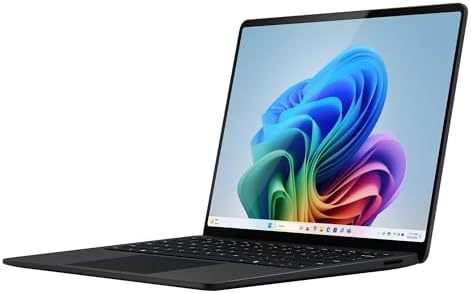
- A PREMIUM PERFORMANCE LAPTOP — Ready for work, school, and creativity. Built for busy days, big projects, and nonstop mu…
- WITH AI BUILT IN — With a dedicated AI chip (Qualcomm Snapdragon X2 Elite), this Copilot+ PC[5] on Windows 11 helps you …
- A 13.8″ TOUCHSCREEN YOU’LL ACTUALLY USE — Sharp colors, real detail, smooth 120Hz scrolling on the PixelSense touchscree…
Microsoft’s own Surface Laptop line remains one of the most consistent ways to get a well-built Windows 11 machine without digging through a dozen third-party configurations. The 2026 13.8-inch model runs a 12-core Snapdragon X2 Elite processor with 16GB of RAM and 512GB of SSD storage, and it’s a genuine Copilot+ PC — Microsoft’s designation for devices with an NPU powerful enough (80 TOPS here) to run on-device AI features locally rather than in the cloud.
What stands out is the build quality and battery life. Microsoft lists up to 20 hours of video playback, and the laptop weighs about 3 pounds in a 17.5mm-thin aluminum chassis. The 13.8-inch PixelSense touchscreen uses a taller 3:2 aspect ratio, which gives you more vertical space for documents and web pages than a typical 16:9 laptop screen.
Key Specs
- 13.8″ PixelSense touchscreen, 3:2 aspect ratio, 120Hz
- Snapdragon X2 Elite (12-core, ARM-based)
- 16GB RAM, 512GB SSD
- Windows 11 (Copilot+ PC, 80 TOPS NPU)
- Wi-Fi 7, USB4/USB-C, 1080p camera, Windows Hello
- Up to 20 hours battery life (manufacturer figure), ~3 lbs
Pros
- Excellent build quality and portability
- Long battery life for all-day use away from a charger
- Sharp, tall-aspect-ratio touchscreen
- Genuine Copilot+ PC with on-device AI acceleration
Cons
- ARM-based Snapdragon chip means some older Windows software runs through emulation rather than natively
- Premium price tier compared to most other picks on this list
- Fewer ports than a traditional business laptop
Buyer Sentiment: Highly regarded among buyers looking for a premium, ultraportable Windows machine.
What Buyers Are Saying: Feedback on the Surface Laptop line tends to focus on the build quality, screen sharpness, and battery life — the things a premium ultraportable is supposed to get right. The main caution buyers raise is compatibility: because it runs on ARM hardware, it’s worth checking that any specialized software you rely on has ARM-native support before buying.
Verdict: If your priority is a laptop that feels premium, lasts all day, and handles everyday productivity smoothly, this is the strongest overall pick on the list.
Check the Microsoft Surface Laptop on Amazon
2. HP Pavilion 15.6″ Touchscreen — Best Everyday Value
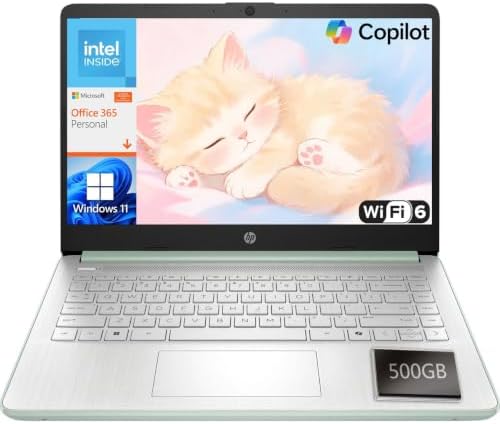
- Efficient Performance for Everyday Computing: Powered by Intel N150 processor with up to 3.6 GHz Intel Turbo Boost Techn…
- 14-Inch HD Micro-Edge Display:Enjoy clear visuals on the 14-inch HD (1366 x 768) anti-glare screen with 250-nit brightne…
- Modern Connectivity and Wireless Technology: Stay connected with Wi-Fi 6 (2×2) for faster wireless speeds and Bluetooth …
The HP Pavilion line has been a default recommendation for general-purpose Windows laptops for years, and the 2026 15.6-inch touchscreen configuration keeps that reputation intact. It pairs a 10-core Intel Core 7 150U processor (up to 5.4GHz) with 16GB of RAM and a 512GB SSD — a genuinely well-balanced spec sheet for the price tier it competes in.
This is a traditional 15.6-inch clamshell, not a 2-in-1, with a Full HD 1920×1080 anti-glare touchscreen and narrow bezels. HP lists Wi-Fi 6 and Bluetooth 5.3, along with a reasonably modern port selection: USB-C, two USB-A ports, and HDMI, which covers most external monitor and peripheral needs without an adapter.
Key Specs
- 15.6″ FHD (1920×1080) touchscreen, anti-glare
- Intel Core 7 150U, 10-core, up to 5.4GHz
- 16GB RAM, 512GB SSD
- Windows 11
- Wi-Fi 6, Bluetooth 5.3
- USB-C, 2× USB-A, HDMI
Pros
- Strong CPU-to-price balance for everyday and multitasking work
- 512GB SSD is generous at this tier
- Touchscreen adds flexibility for browsing and note apps
- Familiar HP support and driver ecosystem
Cons
- Not a 2-in-1 — the touchscreen doesn’t fold or detach
- Integrated graphics only, so it’s not built for gaming or heavy video editing
- HP sells many similarly named Pavilion configurations, so double-check the exact ASIN before ordering
Buyer Sentiment: Strongly reviewed among buyers who bought this specific configuration.
What Buyers Are Saying: General feedback on this configuration centers on smooth day-to-day performance — multiple browser tabs, video calls, and office software without noticeable slowdown. As with any Pavilion listing, buyers should confirm the RAM and storage numbers on the live page match what’s advertised, since HP lists dozens of near-identical Pavilion variants at different price points.
Verdict: A dependable, well-rounded choice if you want strong everyday performance without paying for gaming-grade hardware you won’t use.
Check the HP Pavilion 15.6″ Touchscreen on Amazon
3. Lenovo IdeaPad Slim 15.3″ — Best for Business & Productivity

- 【Processor】Powered by Intel Core i7-13620H with 10 cores (6P + 4E) and 16 threads, delivering strong multitasking and fa…
- 【AI-Function】Boost your productivity with the AI-driven Windows Copilot, offering intelligent task management, personali…
- 【Operating System】Pre-installed Windows 11 Pro 40-bit, built for business performance and security. Features BitLocker e…
For buyers who want Windows 11 Pro specifically — rather than Home — the Lenovo IdeaPad Slim 15.3″ is a strong candidate. It runs a 10-core Intel Core i7-13620H, which Lenovo markets as outperforming the older i9-11900H in multi-threaded work, paired with 16GB of DDR5 RAM and a 512GB SSD.
The build details matter here more than usual. Lenovo lists a Luna Grey aluminum cover rated to MIL-STD-810H durability standards, a 15.3-inch WUXGA (1920×1200) anti-glare display, Dolby Audio speakers, and an HD webcam with a physical privacy shutter — features that tend to matter more to business and student buyers than pure spec-sheet numbers.
Key Specs
- 15.3″ WUXGA (1920×1200) IPS anti-glare display
- Intel Core i7-13620H, 10-core
- 16GB DDR5 RAM, 512GB SSD
- Windows 11 Pro
- Wi-Fi 6, Bluetooth 5.2
- 2× USB-A 3.2, 1× USB-C 3.2 (PD 3.0 + DisplayPort 1.2), HDMI, SD card reader
- MIL-STD-810H durability rating, webcam privacy shutter
Pros
- Windows 11 Pro included — useful for BitLocker, Remote Desktop, and Group Policy management
- Durability rating beyond typical consumer laptops
- WUXGA display gives more vertical space than standard 1080p
- Strong port selection including full-size HDMI and SD card reader
Cons
- Larger and heavier than the ultraportable picks on this list
- 60Hz display, not built for high-refresh content
- Lenovo sells many IdeaPad Slim RAM/storage variants under near-identical titles — confirm the exact ASIN before buying
Buyer Sentiment: Well-regarded among buyers specifically shopping for a business-oriented configuration.
What Buyers Are Saying: Feedback on this line tends to emphasize the Pro-specific features and the sturdier-than-expected build for the price. The main thing to watch, per the manufacturer’s own listing structure, is that Lenovo sells this same chassis in RAM configurations from 8GB up to 40GB — so it’s worth reading the exact listing title carefully.
Verdict: The clearest pick on this list for buyers who specifically need Windows 11 Pro features rather than Home.
Check the Lenovo IdeaPad Slim 15.3″ on Amazon
4. Dell Inspiron 15 3535 — Best Budget Business Laptop

- 【Processor】Intel Quad-Core i5-1155G7 (4 cores, 8 threads, Max Boost Clock Up to 4.5GHz, 8 MB Cache). Your always-ready e…
- 【Display】15.6″ Full HD (1920×1080), IPS, 220 nits, Narrow-Bezel, Anti-Glare, Touch Display; Integrated Intel UHD Graphic…
- 【Tech Specs】2 x USB 3.2 Type-A, 1 x USB 2.0 Type-A port, HDMI 1.4 port, headphone/microphone combo jack, SD Card Reader;…
The Dell Inspiron 15 3535 is a straightforward, no-frills Windows 11 Home laptop built around an AMD Ryzen 5 7520U processor — a 4-core, 8-thread chip that boosts up to 4.3GHz. It pairs that with 8GB of LPDDR5 RAM and a 512GB PCIe SSD, which is a reasonable balance for browsing, office work, and media consumption rather than heavy multitasking.
One detail worth calling out: Dell lists the 15.6-inch FHD IPS display with a 120Hz refresh rate, which is unusual at this price tier and can make everyday scrolling and window movement feel noticeably smoother than a standard 60Hz panel, even though this isn’t a gaming machine.
Key Specs
- 15.6″ IPS FHD (1920×1080), 120Hz
- AMD Ryzen 5 7520U, 4-core/8-thread, up to 4.3GHz
- 8GB LPDDR5 RAM, 512GB PCIe SSD
- AMD Radeon integrated graphics
- Windows 11 Home
- Wi-Fi 6E, Bluetooth 5.0
- USB 2.0, HDMI, USB 3.2 Type-C, SD card reader
Pros
- 120Hz display is a genuine standout at this price
- 512GB SSD is generous for the category
- Lightweight at around 4 lbs
- Dell’s standard business-laptop reliability reputation
Cons
- 8GB RAM is on the lighter side for heavy multitasking
- Battery is a relatively small 41Whr 3-cell pack
- Only one USB-C port, and it’s not confirmed for external display output
Buyer Sentiment: Generally positive feedback for the price tier.
What Buyers Are Saying: Buyers in this segment tend to focus on value — getting a 120Hz display and a full-size SSD at a genuinely affordable price. The most common caution is around the 8GB RAM ceiling if you plan to run many browser tabs or apps simultaneously; Dell sells higher-RAM Inspiron 15 configurations under similar titles if that’s a concern.
Verdict: A smart pick if your budget is tight but you don’t want to give up display quality or SSD storage to get there.
Check the Dell Inspiron 15 3535 on Amazon
5. ASUS TUF Gaming A16 — Best for Gaming

- Processor : AMD Ryzen 7 170 8-Core Processor (Up to 4.75 GHz, 16 MB Smart cache | 8 Cores| 16 Threads), this CPU deliver…
- Graphics : NVIDIA GeForce RTX 4050 6GB GDDR6 , Elevate your gameplay to new heights, immerse yourself in lifelike visual…
- Memory and Storage : 16GB DDR5 4800 MHz | 512GB PCI-E NVMe M.2 SSD ,Blazing-fast memory and storage ensure your games lo…
If gaming is the priority, the ASUS TUF Gaming A16 is the clearest fit on this list. It runs an 8-core, 16-thread AMD Ryzen 7 170 processor (up to 4.75GHz) alongside an NVIDIA GeForce RTX 4050 with 6GB of GDDR6 memory — enough to run current games at 1080p with reasonable settings, especially paired with the laptop’s 144Hz refresh rate.
ASUS lists 16GB of DDR5 RAM and a 512GB NVMe SSD, along with a 16-inch WUXGA (1920×1200) IPS display rated for 300 nits, 100% sRGB coverage, and G-Sync support to reduce screen tearing during fast-paced gameplay. The chassis includes a full-size RGB backlit keyboard with a numpad, useful for both gaming and everyday typing.
Key Specs
- 16″ WUXGA (1920×1200) IPS, 144Hz, G-Sync, 300 nits, 100% sRGB
- AMD Ryzen 7 170, 8-core/16-thread, up to 4.75GHz
- NVIDIA GeForce RTX 4050, 6GB GDDR6
- 16GB DDR5 RAM, 512GB NVMe SSD
- Windows 11 Home
- Wi-Fi 6, Bluetooth 5.3, RJ-45 Ethernet
- RGB backlit keyboard with numpad, 720p camera
Pros
- Dedicated RTX 4050 GPU handles current games at 1080p
- 144Hz G-Sync display genuinely benefits fast-paced titles
- RJ-45 Ethernet port is a nice inclusion for stable online gaming
- Full-size keyboard layout with numpad
Cons
- Heavier than the other laptops on this list at about 4.85 lbs
- Battery life is modest under gaming load, as with most gaming laptops
- 512GB SSD can fill up quickly with modern game install sizes
Buyer Sentiment: Strong sentiment within the budget-to-midrange gaming laptop category.
What Buyers Are Saying: Feedback on the TUF Gaming A16 line tends to highlight the value of getting a dedicated RTX GPU and a 144Hz display without moving into premium gaming-laptop pricing. The main complaint pattern in this category, generally, is storage filling up fast — worth budgeting for an external or upgraded SSD if you install several large titles.
Verdict: The best choice here if you want genuine gaming performance without stepping up to a $1,500+ machine.
Check the ASUS TUF Gaming A16 on Amazon
6. Lenovo Yoga 7 2-in-1 16″ — Best 2-in-1 / Creator Pick
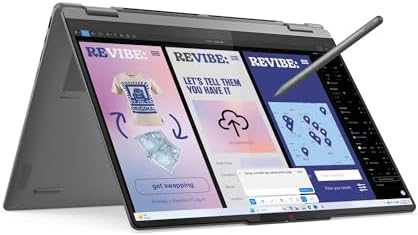
- Display and Graphics:Experience visual brilliance and vivid clarity on this 16″ LED-backlit IPS Touchscreen display. Wit…
- Memory and Storage:Elevate your performance with 16GB of lightning-fast DDR5 SDRAM operating at 8533MHz; Swift Data Acce…
- Processor : Intel Core Ultra 7 256V 8-Core Processor (Up to 4.8 GHz with Intel Turbo Boost Technology,12 MB Intel Smart …
The Lenovo Yoga 7 2-in-1 is aimed at buyers who want the flexibility of a convertible touchscreen laptop without sacrificing processing power. It runs an 8-core Intel Core Ultra 7 256V processor — part of Intel’s newer Core Ultra family, which includes an integrated NPU for on-device AI features — alongside 16GB of LPDDR5 RAM and a 512GB NVMe SSD.
The 16-inch touchscreen uses a 1920×1200 IPS panel rated at 300 nits with Dolby Vision and TÜV-certified low blue light, and the hinge allows the display to fold fully back into tablet or tent modes. Lenovo also includes a fingerprint reader and an IR camera with a privacy shutter, both useful for Windows Hello sign-in.
Key Specs
- 16″ 1920×1200 touchscreen IPS, 300 nits, Dolby Vision, TÜV Low Blue Light
- Intel Core Ultra 7 256V, 8-core, up to 4.8GHz
- 16GB LPDDR5 RAM, 512GB NVMe SSD
- Intel Arc Graphics 140V (integrated)
- Windows 11 Pro
- Wi-Fi 7, Bluetooth 5.4
- Backlit keyboard, fingerprint reader, 1080p + IR camera with privacy shutter
Pros
- Full 360-degree convertible hinge for laptop, tent, stand, and tablet modes
- Newer Core Ultra chip with integrated AI acceleration (NPU)
- High-quality display with Dolby Vision support
- Windows 11 Pro included
Cons
- Integrated graphics only — not built for gaming or GPU-heavy rendering
- 16-inch touchscreen convertible is noticeably heavier than a standard clamshell in tablet mode
- Premium price relative to non-convertible laptops with similar specs
Buyer Sentiment: Well-liked among buyers specifically shopping for a convertible design.
What Buyers Are Saying: Buyers considering this category tend to weigh the flexibility of tablet and presentation modes against the added weight and cost of a convertible chassis. The display quality and hinge durability are the two details most consistently mentioned as strengths in this product line.
Verdict: The right pick if you specifically want touchscreen flexibility — sketching, presentations, tablet-style reading — alongside genuine productivity power.
Check the Lenovo Yoga 7 2-in-1 on Amazon
7. ASUS Vivobook 15 — Best for Storage-Hungry Users

- Display and Graphics:Experience visual brilliance and vivid clarity on this 15.6″ LED-backlit display. With a sharp 1920…
- Memory and Storage:Elevate your performance with 12GB of lightning-fast DDR5 SDRAM operating at 4800MHz; Swift Data Acce…
- Processor : Intel Core 3 100U 6-Core Processor (Up to 4.7 GHz with Intel Turbo Boost Technology,10 MB Intel Smart cache|…
The ASUS Vivobook 15 stands out for one specific reason: a full 1TB SSD at a price point where most competitors top out at 256GB or 512GB. It pairs that storage with a 6-core Intel Core 3 100U processor and 12GB of DDR5 RAM — Intel’s newer “Core 3” naming, which replaced the old Core i3 branding as part of a wider rebrand.
This is a standard 15.6-inch clamshell with a 1920×1080 display, Wi-Fi 6, Bluetooth 5.2, and a 720p HD camera. It’s not a performance flagship, but for buyers whose main frustration with budget laptops is running out of storage space within a year, this configuration solves that problem directly.
Key Specs
- 15.6″ FHD (1920×1080) display
- Intel Core 3 100U, 6-core
- 12GB DDR5 RAM, 1TB SSD
- Windows 11 Pro
- Wi-Fi 6, Bluetooth 5.2
- 720p HD camera
Pros
- 1TB SSD is a genuine standout at this price
- Windows 11 Pro included
- 12GB RAM is a reasonable step above the common 8GB baseline
- Lightweight, standard clamshell design
Cons
- Core 3 100U is an entry-level processor, not built for heavy multitasking or creative software
- Integrated graphics only
- ASUS sells many similarly named Vivobook configurations — confirm the exact RAM/storage/CPU combination on the live listing
Buyer Sentiment: Generally positive among buyers prioritizing storage capacity on a budget.
What Buyers Are Saying: The 1TB SSD is consistently the most-mentioned feature in feedback patterns for this configuration — it’s an unusual amount of storage to see paired with an entry-level processor, which is exactly the tradeoff this laptop is built around.
Verdict: A smart pick specifically for buyers who store a lot locally — large photo libraries, offline media, or multiple installed applications — and don’t need top-tier processing power.
Check the ASUS Vivobook 15 on Amazon
8. Acer Aspire Go AI Business Laptop — Best Ultra-Budget Pick

- 【AI-Function】Boost your productivity with the AI-driven Windows Copilot, offering intelligent task management, personali…
- 【Processor】Powered by the latest Intel Core 3 N355 processor with 8 cores and 8 threads, delivering powerful, energy-eff…
- 【Operating System】Pre-installed with Windows 11 Pro or Home in S Mode 64-bit, built for business performance, advanced s…
The Acer Aspire Go is the most affordable laptop on this list, built around an 8-core Intel Core 3 N355 processor with 8GB of DDR5 RAM and a 128GB PCIe NVMe SSD. It’s a genuinely compact machine — Acer lists dimensions of roughly 14.29 × 9.44 × 0.59 inches — with a 15.6-inch Full HD IPS display, a full-size keyboard with a numpad, and a dedicated Copilot key.
One important caveat: Acer’s own listing data for this ASIN was inconsistent across sources at the time of this research — some listing snapshots show 8GB RAM and 128GB storage running Windows 11 in S Mode, while others reference higher RAM and storage configurations. Confirm the exact RAM, storage, and Windows edition (S Mode vs. standard) on the live Amazon listing before buying. Windows 11 in S Mode restricts app installation to the Microsoft Store by default, though it can be switched to standard Windows 11 Home for free through Windows Settings.
Key Specs
- 15.6″ FHD (1920×1080) IPS, matte, non-touch, 60Hz
- Intel Core 3 N355, 8-core, 1.90GHz base
- 8GB DDR5 RAM (single channel), 128GB PCIe NVMe SSD (verify current listing — configurations vary)
- Windows 11 Pro/Home in S Mode
- Wi-Fi 6, Bluetooth 5.1
- 2× USB-A 3.2, 2× USB-C 3.2, HDMI, headphone/mic jack
Pros
- Most affordable option on this list
- Compact and lightweight for its screen size
- Full-size keyboard with numpad despite the small footprint
- Dedicated Copilot key for quick AI assistant access
Cons
- 8GB RAM and 128GB storage are limiting for anything beyond browsing and document work
- Ships in Windows 11 S Mode by default, which restricts software installation until switched off
- Listing data for this exact ASIN was inconsistent — double-check specs before ordering
Buyer Sentiment: Mixed-to-positive; verify the current listing’s exact specifications before purchasing.
What Buyers Are Saying: Feedback in this ultra-budget category tends to be split between buyers happy with a simple, affordable everyday machine and buyers who find the RAM ceiling frustrating for multitasking. Given the listing inconsistencies found during research, this is the one pick on this list where reading the live Amazon page carefully — rather than relying on the title alone — genuinely matters.
Verdict: Worth considering only if your needs are genuinely light — email, browsing, and document editing — and you’ve confirmed the exact configuration on the current listing.
Check the Acer Aspire Go on Amazon
How to Choose the Right Windows 11 Laptop
Not every “Windows 11” listing on Amazon means the same thing. Here’s what actually matters before you buy.
Windows 11 Home vs. Pro. Most consumer laptops ship with Windows 11 Home, which covers everything most people need — browsing, office work, streaming, and gaming. Windows 11 Pro adds business-oriented features like BitLocker device encryption, Remote Desktop hosting, and Group Policy management. If you don’t specifically need those features, Home is genuinely enough; Microsoft’s own comparison page breaks down the full feature differences if you want to check before buying.
Watch for Windows 11 in S Mode. Some budget laptops — including one on this list — ship in S Mode by default, which limits app installation to the Microsoft Store. It’s not a different version of Windows 11 exactly, but a restricted configuration, and it can be switched off for free through Windows Settings if you need to install traditional desktop software.
Decode the processor name before you compare specs. Intel dropped the old “i3/i5/i7/i9” naming in favor of “Core 3/5/7” and “Core Ultra 5/7/9,” and AMD has its own generational naming too. A “Core 7” is not automatically newer or faster than a “Core i7” — the generation and suffix matter more than the tier number alone. Intel’s own processor naming guide is the clearest way to decode what you’re actually buying before assuming a bigger number means a better chip.
RAM: 8GB is the practical floor, 16GB is comfortable. For browsing, documents, and video calls, 8GB is workable but leaves little headroom for many open tabs or background apps. 16GB gives meaningfully more comfortable multitasking, and it’s worth prioritizing over a slightly faster processor if you’re choosing between two similarly priced options.
SSD over eMMC, always. Every laptop on this list uses SSD storage rather than older eMMC storage, and that’s intentional — SSDs are dramatically faster for everyday tasks like booting up, opening apps, and file transfers. If you see “eMMC” on a budget listing elsewhere, treat it as a meaningful downgrade even if the storage capacity number looks similar.
Match the display to your actual use. A 120Hz or 144Hz refresh rate genuinely improves the feel of scrolling and, for gaming laptops, competitive play. But if you’re mostly doing document work and video calls, a standard 60Hz FHD display is perfectly sufficient — don’t pay extra for a refresh rate you won’t notice using.
Confirm system requirements if you’re comparing against an older PC. If you’re deciding whether to replace an aging laptop rather than upgrade it, Microsoft’s Windows 11 specifications page lists the minimum hardware requirements, including TPM 2.0 and Secure Boot support — details that block some older machines from upgrading even when the CPU and RAM look otherwise sufficient.
Read the exact listing title every time. As this guide’s research repeatedly ran into, brands like HP, Lenovo, ASUS, and Acer often sell the same chassis under a dozen near-identical titles with different RAM, storage, and processor combinations. Two listings that look identical at a glance can be genuinely different laptops. Always confirm the specific configuration on the live Amazon page — not just the product photo or title — before adding to cart.
If you’re shopping specifically for a student or a budget setup, our laptops for students guide and broader Amazon laptop buying guide cover additional picks and considerations beyond what’s in this list.
Frequently Asked Questions
Do all new laptops on Amazon come with Windows 11 pre-installed?
No. Most current-generation laptops do, but some budget and renewed listings still ship with Windows 10 or older Windows 11 builds. Always check the listing’s operating system field directly rather than assuming based on the release year in the title.
What’s the difference between Windows 11 Home and Windows 11 Pro?
Home covers general use — browsing, office work, gaming, and streaming. Pro adds business-focused features like BitLocker encryption, Remote Desktop hosting, Group Policy management, and support for joining a business domain. Most home users don’t need Pro specifically, though a few laptops on this list include it as a bonus rather than a premium add-on.
Is 8GB of RAM enough for Windows 11?
It meets Windows 11’s minimum requirement and works fine for basic browsing, email, and document editing. For comfortable multitasking with many browser tabs or apps running simultaneously, 16GB is a noticeably better experience.
What does “Windows 11 in S Mode” mean?
S Mode is a restricted configuration of Windows 11 Home that only allows apps from the Microsoft Store to be installed, for added security and simplicity. It can be switched off for free through Windows Settings, after which the laptop functions as standard Windows 11 Home.
Can I upgrade an older laptop to Windows 11 instead of buying new?
Sometimes, but not always. Windows 11 requires TPM 2.0 support, Secure Boot capability, and a compatible processor — requirements that block many pre-2018 machines even if the RAM and storage otherwise seem sufficient. Microsoft’s PC Health Check tool can confirm eligibility for a specific machine.
Do I need a dedicated graphics card for everyday Windows 11 use?
No. Integrated graphics — built into the processor — are sufficient for browsing, office work, video calls, and streaming. A dedicated GPU like the RTX 4050 on the ASUS TUF Gaming A16 only matters if you’re gaming, editing video, or doing GPU-accelerated creative work.
Why do so many listings for the same laptop model have different specs?
Manufacturers like HP, Lenovo, ASUS, and Dell sell the same chassis in multiple RAM, storage, and processor configurations, often under nearly identical product titles. It’s a common source of confusion on Amazon — always check the specific ASIN and the detailed spec list on the live page rather than assuming two similar-looking listings are the same product.
Is a touchscreen worth paying extra for on a Windows 11 laptop?
It depends on how you’ll use it. A touchscreen adds real value on a 2-in-1 convertible where you can fold it into tablet mode, and it’s a nice-to-have on a standard clamshell for scrolling and zooming. If you mainly type and use a mouse or trackpad, it’s not essential.
Final Verdict
For most buyers, the Microsoft Surface Laptop 13.8″ is the strongest overall pick on this list — its build quality, battery life, and genuine Copilot+ AI acceleration make it the best all-around Windows 11 machine here, provided the ARM-based Snapdragon processor’s software compatibility works for what you need.
If you’d rather stick with familiar x86 hardware at a lower price, the HP Pavilion 15.6″ Touchscreen offers a genuinely well-balanced spec sheet for everyday work, while the Lenovo IdeaPad Slim 15.3″ is the clearest choice if you specifically want Windows 11 Pro and business-grade durability.
Gamers should look straight to the ASUS TUF Gaming A16 for its dedicated RTX 4050 and 144Hz display, and anyone who wants touchscreen flexibility should consider the Lenovo Yoga 7 2-in-1. For tighter budgets, the Dell Inspiron 15 3535 and ASUS Vivobook 15 both offer strong value — and the Acer Aspire Go rounds things out as the most affordable option, provided you verify its exact configuration first.
Whichever you choose, confirm the exact ASIN, processor, RAM, storage, and current price on the live Amazon listing before buying — configurations and availability shift often, and the best laptop with Windows 11 pre-installed on Amazon is ultimately the one whose actual listed specs match what you need.
As an Amazon Associate I earn from qualifying purchases.

MD.HASAN is an experienced SEO expert and amazon products review writer passionate about helping people find right products on amzon for buy without confusion. With 4 years of hands-on experience in content strategy and search engine optimization, he specializes in writing SEO-friendly blog posts that rank, engage, and convert.