
🔗 Affiliate Disclosure: As an Amazon Associate, Tech Rig Review earns from qualifying purchases. Links on this page may be affiliate links — at no extra cost to you.
Looking for a 4K monitor under $300? We compared 10 real Amazon picks — Dell, LG, ASUS, KTC, and more — for home office, gaming, and everyday use.
A few years ago, a genuine 4K monitor under $300 basically didn’t exist. You either paid a premium for the resolution or you settled for 1080p and squinted at your spreadsheets. That’s changed. In 2026, the sub-$300 category is packed with real 27-inch 4K IPS panels — some with USB-C power delivery, some with 120Hz+ refresh rates, and a few built specifically for gaming on a budget.
We put together this list by researching specs, connectivity, panel quality, and how each monitor stacks up against its closest competitors in this exact price bracket — not by guessing which brand names sound familiar. Every monitor below is a real, currently listed product on Amazon, and every price we mention should be double-checked at checkout, since Amazon pricing shifts daily (more on that below).
Whether you want the single best all-around 4K monitor, the cheapest one that still looks great, or a high-refresh option for light gaming, there’s a pick here for you. If you’re building out a full remote-work setup, our guide to the 10 Best Amazon Computer Monitors for Remote Work is a good companion read alongside this one.
A quick note on pricing and ratings: Amazon doesn’t allow affiliate content to display fixed prices, since they change constantly — so instead of a dollar figure, you’ll see “Check price on Amazon” throughout this guide. Similarly, star ratings and review counts change daily, so we describe general buyer sentiment in words rather than quoting a specific number that might be outdated by the time you read this. Always check the live listing before buying.
Table of Contents
How We Picked These 10 Monitors
Rather than repeating whichever list ranks highest on Google, we built this roundup around a specific constraint: every monitor had to be a genuine 3840 x 2160 (4K UHD) panel that has recently sold under the $300 mark on Amazon.com. We cross-referenced manufacturer spec sheets, historical Amazon pricing data, and retailer listings to confirm each model’s resolution, panel type, and connectivity before it made the cut.
We also deliberately avoided listing ten near-identical 60Hz office monitors. Instead, each pick earns its spot for a specific reason — fastest refresh rate, lowest typical price, best USB-C implementation, best warranty, and so on — so that whatever you’re optimizing for (budget, gaming speed, laptop convenience, or simple reliability), there’s a clear answer here rather than ten interchangeable options. Because pricing on Amazon shifts daily and even hourly during sales events, we can’t guarantee every single monitor will be under $300 at the exact moment you read this — which is exactly why we recommend checking the live listing before you buy rather than relying on a number printed in an article.
Quick Comparison Table
| Monitor | Best For | Key Feature | Buyer Sentiment | Link |
|---|---|---|---|---|
| Dell S2725QC | Best Overall | 120Hz USB-C, 65W PD | Consistently well-rated on Amazon | Check Price |
| LG 27UL500-W | Best Value | HDR10 + FreeSync | Rated highly among budget buyers | Check Price |
| ASUS TUF VG289Q1A | Best for Console Gaming | 28″ screen, HDR10, FreeSync | Popular pick for console 4K gaming | Check Price |
| KTC H27P22S | Best High-Refresh Gaming | 144Hz Fast IPS | Strong reputation among PC gamers | Check Price |
| KOORUI G2741L | Best Dual-Mode | 4K/160Hz or FHD/320Hz switchable | Well-reviewed newer release | Check Price |
| Sceptre U275W-UPT | Best Budget Pick | Lowest typical price in this list | Frequently cited as a top-value 4K monitor | Check Price |
| AOC U27B3A | Best for Office Productivity | 163 PPI sharpness, frameless | Well-regarded for everyday office use | Check Price |
| ViewSonic VX2776-4K-MHDU | Best USB-C Single-Cable Setup | 65W USB-C charging | Solid reputation for laptop docking | Check Price |
| Acer Nitro VG270K | Best for Multi-Monitor Setups | ZeroFrame bezel-less design | Long-standing, well-reviewed model | Check Price |
| Philips 27E1N1800A | Best for Simple Home Use | Built-in speakers, HDR | Reliable, no-frills reputation | Check Price |
1. Dell S2725QC — Best Overall 4K Monitor Under $300

- Low blue light: The improved ComfortView Plus reduces harmful blue light emissions to ≤35%, for all-day comfort without …
- Refresh rate: A smooth, tear-free experience with AMD FreeSync Premium (refresh rate up to 120Hz) and an ultra-low 0.03m…
- Vivid colors: Immerse yourself in breathtaking 4K visuals with in-plane switching technology. Enjoy vibrant colors with …
The Dell S2725QC is the closest thing to a “no compromises” pick in this price range, which is why it tops our list. It’s a 27-inch, 4K IPS panel with a genuinely fast 120Hz refresh rate — a spec you rarely see on a 4K monitor this affordable, since most budget 4K panels cap out at 60Hz. On top of that, it includes a USB-C port with power delivery, meaning you can connect a laptop with a single cable that carries video, data, and charging power simultaneously. That single feature can eliminate an entire drawer of separate charging cables and video adapters for anyone running a laptop-based home office.
Dell also backs the S2725QC with TÜV Rheinland eye-comfort certification and a reduced blue-light mode, so it’s built with long work sessions in mind rather than just spec-sheet bragging rights. The IPS panel covers 99% sRGB, which is more than enough for everyday productivity, photo browsing, and casual creative work. It isn’t a color-critical reference monitor, but for a general home office or hybrid work-and-play setup, it’s hard to beat at this price.
Key Specs
- 27-inch IPS panel, 3840 x 2160 (4K UHD) resolution
- 120Hz refresh rate, 4ms response time
- AMD FreeSync Premium
- USB-C with power delivery, HDMI, DisplayPort
- 99% sRGB color coverage, 1500:1 contrast ratio
- TÜV Rheinland 4-star eye comfort certification
Pros
- Rare 120Hz refresh rate for a sub-$300 4K monitor
- Single-cable USB-C laptop charging and video
- Strong eye-comfort features for all-day use
- Solid color accuracy for everyday work
Cons
- Built-in speakers are basic, as expected at this price
- Stand offers tilt but limited height range on some variants
- Not a professional color-grading monitor
What Buyers Are Saying
Feedback generally points to the sharpness of the 4K panel and the convenience of USB-C charging as the standout features. Some buyers note the stand’s ergonomics are functional but not premium, which tracks with the price point.
2. LG 27UL500-W — Best Value 4K Monitor

- With four times the resolution of Full HD, enjoy breathtaking image clarity with this 4K UHD (3840×2160) monitor support…
- Versatile monitor delivers shorter response times and wider viewing angles with IPS (In-Plane Switching) technology. Col…
- With supported video cards such as the AMD Radeon series, AMD FreeSync manages refresh rate, reducing screen tearing, fl…
The LG 27UL500-W has been a go-to budget 4K recommendation for several years now, and it’s held up well. It’s a straightforward 27-inch IPS panel with HDR10 support and AMD FreeSync, meaning it can handle both work and casual gaming without screen tearing. LG rates the panel at 98% sRGB coverage, which is genuinely good for the price and puts it ahead of many similarly priced competitors on color accuracy.
What makes this one a “value” pick rather than just “budget” is that it doesn’t feel like it’s cutting corners anywhere obvious. The connectivity is basic — two HDMI ports and one DisplayPort — but that covers the vast majority of home office and casual gaming setups. If you want 4K clarity for spreadsheets, browsing, and light photo work without paying for features you won’t use, this is one of the safest picks on the list.
Key Specs
- 27-inch IPS panel, 3840 x 2160 resolution
- 60Hz refresh rate, 5ms response time
- AMD FreeSync, HDR10 support
- 98% sRGB color gamut
- 2x HDMI, 1x DisplayPort
- On-Screen Control software support
Pros
- Excellent color accuracy for the price
- HDR10 and FreeSync both included
- Reputable brand with widely available support
- Frequently one of the lowest-priced genuine 4K IPS panels on Amazon
Cons
- 60Hz refresh rate, not ideal for fast-paced gaming
- No USB-C connectivity
- Stand has limited ergonomic adjustment
What Buyers Are Saying
Buyers frequently mention this as a “no-brainer” pick for anyone who just wants sharp 4K text and images without gaming-monitor pricing. A recurring theme is surprise at how good the color looks for the price.
3. ASUS TUF Gaming VG289Q1A — Best for Console Gaming

- World’s First 1440P 480Hz OLED Gaming Monitor: Experience unprecedented gaming performance with the industry’s first 144…
- Ultra-Fast Response Time and High Refresh Rate: 26.5-inch QHD 480Hz WOLED gaming monitor delivers 0.03ms response time f…
- Exclusive Gaming AI Assistant: Advanced AI technology helps you better navigate your gaming experience with intelligent …
If you’re connecting a PS5, Xbox Series X, or a gaming PC to a 4K display and want something console-friendly, the ASUS TUF Gaming VG289Q1A is a strong fit. It’s slightly larger than most monitors on this list at 28 inches, which suits the “sit a bit further back” viewing distance that console gaming on a desk often involves. The IPS panel supports HDR10 and covers 90% DCI-P3, giving games a noticeably richer color range than a standard SDR panel.
ASUS built this with FreeSync/Adaptive-Sync support, which smooths out frame pacing during fast-moving scenes, and added their “Shadow Boost” feature that brightens dark areas without blowing out highlights — useful in games with a lot of dark environments. It won’t compete with a dedicated high-refresh gaming monitor on raw speed, but for native 4K console gaming, it hits a sweet spot of size, color, and price.
Key Specs
- 28-inch IPS panel, 3840 x 2160 resolution
- 60Hz refresh rate, 5ms response time
- FreeSync/Adaptive-Sync, HDR10
- 90% DCI-P3 color space
- 2x HDMI, DisplayPort, built-in speakers
- ASUS Shadow Boost and Eye Care technology
Pros
- Larger 28-inch screen ideal for console gaming distance
- HDR10 with wide color gamut for richer game visuals
- FreeSync reduces screen tearing
- Competitively priced for a gaming-oriented 4K panel
Cons
- 60Hz cap limits use for competitive PC gaming
- Larger size may not suit smaller desks
- Built-in speakers are supplementary at best
What Buyers Are Saying
Console gamers commonly highlight the size-to-price ratio and HDR color as reasons they chose this over smaller competitors. A few reviews mention wishing for a higher refresh rate, which is expected at this price tier.
4. KTC H27P22S — Best High-Refresh 4K Gaming Monitor

- 【24.5-inch Smart Portable TV】1080P FHD touch screen TV(1920×1080 resolution), 400 nits brightness,60Hz refresh rate,the …
For PC gamers who want actual high-refresh 4K gaming without spending $500+, the KTC H27P22S is the standout on this list. It’s a 27-inch Fast IPS panel running at 144Hz — genuinely fast for a 4K resolution monitor at any price, let alone under $300. KTC has built a reputation over the past few years as a value-focused monitor brand that doesn’t skimp on panel quality to hit aggressive pricing, and the H27P22S is a good example of that approach.
It supports Adaptive Sync and includes HDR, with a wide color gamut that goes beyond basic sRGB coverage. If your GPU can actually push 4K at higher frame rates, this monitor will make the most of it in a way that 60Hz panels simply can’t. It’s a great fit for anyone treating their 4K monitor as a dual-purpose work-and-gaming display where gaming performance genuinely matters.
Key Specs
- 27-inch Fast IPS panel, 3840 x 2160 resolution
- 144Hz refresh rate, 1ms response time
- Adaptive Sync (FreeSync/G-Sync compatible)
- HDR support, wide sRGB color gamut
- HDMI, DisplayPort, USB connectivity
- Height, tilt, swivel adjustable stand
Pros
- 144Hz at 4K is exceptional for the price tier
- Fast IPS panel keeps fast motion clear
- Full ergonomic stand adjustability
- Strong value for hybrid work/gaming use
Cons
- Requires a capable GPU to actually hit 144Hz at 4K
- Lesser-known brand compared to Dell or LG
- HDR implementation is entry-level, not a premium HDR standard
What Buyers Are Saying
Gamers frequently comment on being surprised that a 144Hz 4K monitor exists at this price point at all. The adjustable stand also gets consistent praise, since many competitors at this price use a fixed-tilt-only stand.
5. KOORUI G2741L — Best Dual-Mode Monitor

- Dual Mode for Every Game Style: Switch between 4K UHD 160Hz for immersive AAA games 🎮 and FHD 320Hz for ultra-fast espor…
- Ultra-Fast 320Hz Performance: Designed for competitive gamers, the 320Hz refresh rate delivers smoother motion and reduc…
- 4K Clarity with Rich Colors: Experience detailed 4K resolution with 95% DCI-P3 color for vibrant visuals, making it perf…
The KOORUI G2741L solves a problem a lot of gamers run into: 4K looks better, but high refresh rates feel better, and you often can’t have both at once. This monitor lets you switch between 4K UHD at 160Hz and 1080p at 320Hz on the fly, so you can drop to 1080p for competitive shooters where every frame matters, then switch back to 4K for single-player or creative work. It’s one of the more interesting technical features on this entire list.
Built with a Fast IPS panel and a 1ms response time, it holds up well in both modes rather than treating one as an afterthought. It also includes HDR400 and covers 95% DCI-P3, giving it genuinely good color output for a monitor primarily marketed around speed. For anyone who plays a mix of fast competitive games and slower, visually rich titles, this dual-mode approach is a genuinely useful feature rather than a marketing gimmick.
Key Specs
- 27-inch Fast IPS panel, dual mode: 4K @ 160Hz or 1080p @ 320Hz
- 1ms response time
- FreeSync Premium & G-Sync compatible
- HDR400, 95% DCI-P3 color gamut
- HDMI 2.1, DisplayPort 1.4
- Height, pivot, and tilt adjustable stand
Pros
- Genuine dual-mode flexibility between resolution and refresh rate
- Strong color coverage for a gaming-focused monitor
- HDMI 2.1 support for next-gen console bandwidth
- Fully adjustable ergonomic stand
Cons
- Newer brand with a shorter reputation track record
- Switching modes requires a manual menu toggle, not automatic
- Price sits close to the $300 ceiling, so watch for fluctuations
What Buyers Are Saying
Early buyer feedback centers heavily on the dual-mode feature as the reason for purchase, with many describing it as solving the “which monitor do I buy” dilemma between a 4K panel and a high-refresh gaming panel.
6. Sceptre U275W-UPT — Best Budget 4K Monitor
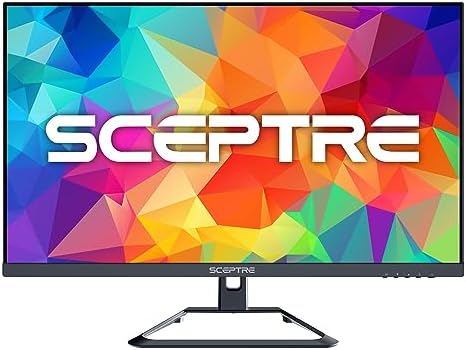
- Superior 4K Picture: Delivering 4x the pixels (8 million) of FHD, 4K (3840 x 2160) resolution offers an extraordinary la…
- IPS (In-Plane Switching)
- Up to 70Hz Refresh Rate
If your main priority is spending as little as possible while still getting a real 4K IPS panel, the Sceptre U275W-UPT is consistently one of the most affordable genuine 4K monitors sold on Amazon. Sceptre has built its brand specifically around stripping monitors down to the essentials — no elaborate marketing features, no premium materials — while still hitting solid core specs like 99% sRGB coverage and an IPS panel for wide viewing angles.
It includes built-in speakers, anti-flicker technology, and a blue-light reduction mode, covering the basics that matter for daily comfort. The tradeoff is a lower typical refresh rate ceiling and a more basic stand than pricier options on this list. But if you’re outfitting a secondary monitor, a kid’s homework station, or a first home office setup on a tight budget, this is usually the cheapest way into genuine 4K on Amazon.
Key Specs
- 27-inch IPS panel, 3840 x 2160 resolution
- Up to 70Hz refresh rate, 5ms response time
- 99% sRGB color gamut
- DisplayPort, HDMI connectivity
- Built-in speakers
- Anti-flicker and blue-light reduction
Pros
- Typically the lowest price point for real 4K on this list
- Solid sRGB color accuracy despite the low price
- Built-in speakers save desk space
- IPS panel offers wide viewing angles
Cons
- Lower refresh rate ceiling than gaming-oriented picks
- More basic stand with limited adjustability
- Fewer premium features (no USB-C, no HDR10)
What Buyers Are Saying
The recurring theme in feedback is disbelief at how much monitor you get for the price. Some buyers do note the stand feels less sturdy than pricier alternatives, which is a fair tradeoff at this price point.
7. AOC U27B3A — Best for Everyday Office Productivity
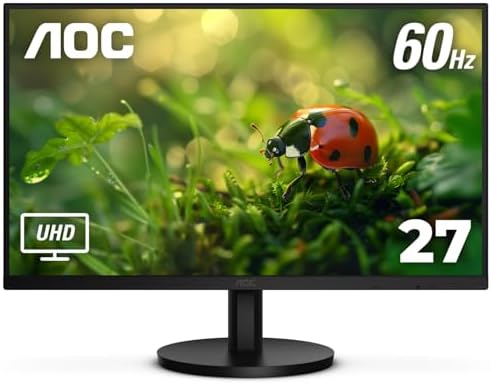
- AOC 27” 4K UHD 3840 x 2160 UHD LED monitor.Specific uses for product – Multimedia
- IPS panel with wide Viewing angles and produces over 1 billion colors for rich details
- 3-Sided frameless design, ideal for seamless setup. Brightness (typical) – 350 cd/m²
The AOC U27B3A is built for exactly one job: making office work look sharp and comfortable, without extra gaming features driving up the price. It’s a 27-inch IPS panel with a pixel density of 163 PPI, which translates to noticeably crisp text — a meaningful upgrade if you spend your day reading documents, spreadsheets, or code. The 3-sided frameless design also makes it a clean choice if you’re planning to add a second monitor later, since the bezels won’t create a distracting gap between screens.
AOC includes flicker-free technology and a low blue-light mode as standard, both aimed squarely at reducing eye fatigue during long work sessions rather than boosting gaming performance. With over 1 billion supported colors and solid sRGB coverage, it’s more than capable for light photo editing and design work too, even though it’s marketed primarily as an office monitor.
Key Specs
- 27-inch IPS panel, 3840 x 2160 resolution
- 60Hz refresh rate, 4ms (GtG) response time
- 163 PPI pixel density
- Adaptive Sync, HDR support
- HDMI 2.0, DisplayPort 1.4, built-in speaker
- Flicker-free and low blue-light technology
Pros
- Exceptional text sharpness for office work
- Frameless design ideal for multi-monitor setups
- Strong eye-comfort feature set
- Straightforward, no-fuss setup
Cons
- Not built for high-refresh gaming
- Basic stand with tilt-only adjustment on the base model
- Speakers are functional but not a highlight
What Buyers Are Saying
Office and remote workers frequently mention the text clarity as the reason they’d recommend this monitor, along with appreciation for the frameless design when paired with a second display.
8. ViewSonic VX2776-4K-MHDU — Best USB-C Single-Cable Setup

- VERSATILE MONITOR: 27 Inch 4K UHD (3840x2160p) IPS monitor with thin bezels and 60Hz refresh rate
- LESS CABLE CLUTTER: 60W USB-C connectivity for fast data, audio and video transfer, and 65W charging over one cable
- HDR10 CONTENT SUPPORT: For deep contrast, rich color, and vibrant details
The ViewSonic VX2776-4K-MHDU is aimed at people who want to declutter their desk as much as improve their display. Its standout feature is 65W USB-C connectivity, which delivers video, data, and laptop charging power over a single cable — genuinely useful if you’re using a MacBook or a modern Windows Ultrabook and want to avoid a tangle of separate charger and video cables every time you sit down to work.
Beyond the USB-C convenience, it’s a solid all-around 4K IPS panel with HDR10 support and a thin-bezel, frameless design that looks clean on a desk. ViewSonic has a long track record in the monitor space, and this model reflects that experience — it’s not flashy, but it covers the fundamentals of a good work-from-home 4K display reliably.
Key Specs
- 27-inch IPS panel, 3840 x 2160 resolution
- 60Hz refresh rate
- 65W USB-C with charging, HDMI, DisplayPort
- HDR10 content support
- Flicker-free technology, blue-light filter
- Ultra-thin bezel, frameless design
Pros
- 65W USB-C power delivery is genuinely useful for laptop users
- HDR10 support adds visual depth for media
- Clean, frameless design
- Reputable brand with established support
Cons
- 60Hz refresh rate, not built for gaming
- USB-C wattage may not fully charge larger power-hungry laptops
- Limited stand ergonomics on the base model
What Buyers Are Saying
The most consistent praise centers on the single-cable USB-C setup, with many reviewers specifically mentioning it as their reason for choosing this over HDMI-only competitors.
9. Acer Nitro VG270K — Best for Multi-Monitor Setups

- 27″ 4K UHD (3840 x 2160) Widescreen IPS Monitor with AMD Radeon FreeSync Technology
- Zero frame | HDR Ready | Response time: 1ms VRB
- Refresh Rate: 60Hz
Acer’s Nitro VG270K has been a long-running favorite specifically because of its “ZeroFrame” design — bezels thin enough that placing two or three of these side by side creates a nearly seamless multi-monitor wall. If your home office plan involves more than one screen, that detail matters more than most spec-sheet numbers, since a bulky bezel breaks up your field of view exactly where you don’t want it.
Beyond the design, it’s a competent 4K IPS panel with FreeSync support and HDR10 readiness, plus Acer’s built-in game modes that adjust the picture profile depending on what you’re doing — a genre-specific setting for competitive shooters, another for cinematic content, and so on. It’s a well-rounded, dependable pick that’s been refined across several hardware generations.
Key Specs
- 27-inch IPS panel, 3840 x 2160 resolution
- Up to 75Hz refresh rate depending on variant, 1ms VRB
- AMD FreeSync, HDR-ready
- ZeroFrame near-bezel-less design
- 2x HDMI, 1x DisplayPort
- Multiple Acer Game Mode presets
Pros
- ZeroFrame bezels ideal for multi-monitor setups
- Long-established, well-refined product line
- FreeSync reduces tearing during casual gaming
- Multiple picture presets for different content types
Cons
- Refresh rate varies by specific model variant — check the listing carefully
- Stand ergonomics are basic
- HDR is “ready” rather than a certified high-brightness standard
What Buyers Are Saying
Multi-monitor users consistently cite the thin bezels as the deciding factor, describing the side-by-side look as close to a true seamless display wall.
10. Philips 27E1N1800A — Best for Simple, No-Fuss Home Use

- ULTRA HIGH DEFINITION: Experience crisp, detailed visuals in 4K UHD (3840 x 2160) resolution, ideal for professional and…
- VIBRANT COLOR DISPLAY: IPS panel technology provides wide viewing angles and delivers rich colors with excellent accurac…
- SMOOTH PERFORMANCE: Adaptive-Sync technology offers smooth, artifact-free performance at virtually any framerate.
Not everyone wants to think about refresh rates, color gamuts, or gaming features — some people just want a sharp, reliable 4K screen that works out of the box. The Philips 27E1N1800A is built for exactly that audience. It’s a 27-inch IPS panel with HDR support and built-in speakers, backed by Philips’ notably long 4-year advance replacement warranty, which is longer coverage than most competitors offer at this price.
It includes the eye-comfort basics — flicker-free technology and a low blue-light mode — without trying to be a gaming monitor or a professional color-grading display. For a home office, a kids’ computer, a kitchen media display, or a simple secondary screen, it’s a dependable, low-maintenance choice backed by a company with decades of monitor manufacturing experience.
Key Specs
- 27-inch IPS panel, 3840 x 2160 resolution
- HDR support
- HDMI 2.0, DisplayPort 1.4
- Built-in speakers
- Flicker-free, low blue-light technology
- 4-year advance replacement warranty
Pros
- Exceptionally long 4-year warranty for this price range
- Built-in speakers reduce desk clutter
- Straightforward setup, no learning curve
- Trusted, long-established monitor manufacturer
Cons
- No standout gaming or productivity-specific features
- Refresh rate and connectivity are basic
- Less exciting than more feature-packed competitors on this list
What Buyers Are Saying
Buyers frequently mention the warranty length as a deciding factor over similarly priced competitors, along with general satisfaction at the simplicity of setup and use.
How to Choose the Right 4K Monitor Under $300
Picking a 4K monitor at this price point comes down to a handful of tradeoffs, since no monitor under $300 does absolutely everything well. Here’s what actually matters when comparing your options.
Panel type. Nearly every monitor in this price range uses an IPS panel, and that’s a good thing — IPS panels offer wide, consistent viewing angles and accurate color, which matters far more for office work and general use than for pure gaming speed. Avoid budget TN panels if you see them; the color and viewing-angle compromises aren’t worth the small savings.
Refresh rate. Most budget 4K monitors run at 60Hz, which is completely fine for office work, web browsing, and media. If you plan to game — especially competitive, fast-paced titles — look specifically for the higher-refresh options on this list, since 4K at higher refresh rates is still relatively rare below $300.
Connectivity. If you’re connecting a modern laptop, USB-C with power delivery is worth prioritizing, since it eliminates a separate charging cable entirely. If you’re connecting a desktop PC or console, HDMI 2.0/2.1 and DisplayPort coverage matter more than USB-C.
HDR support. Take “HDR” labels with a grain of salt at this price point. True HDR with meaningful brightness and contrast typically requires certification tiers like VESA’s DisplayHDR standard, and most sub-$300 monitors support only basic HDR10 signal compatibility rather than the brightness levels needed for a dramatic HDR effect. It’s a nice bonus, not a primary reason to buy.
Size and desk space. 27 inches is the sweet spot for 4K at a normal desk viewing distance — large enough to make the extra resolution worthwhile, small enough that text doesn’t become physically too large to be useful. The 28-inch options on this list lean slightly larger, which some people prefer for console gaming from a bit further back.
Eye comfort features. If you’re on your monitor for eight-plus hours a day, flicker-free backlighting and a low blue-light mode are worth prioritizing over marginal spec differences. If eye strain is a specific concern for you, our dedicated guide on monitors for eye strain and blue light filtering goes deeper into that topic. Energy efficiency is also worth a glance if you’re running a monitor all day — ENERGY STAR’s computer monitor certification page explains what that labeling actually means.
Single vs. dual monitor. If you’re debating between one large 4K screen and two smaller monitors side by side, it’s worth reading through the tradeoffs before buying — our Ultrawide vs. Dual Monitor comparison covers that decision in more detail, and applies just as well to “one 4K screen vs. two smaller ones.”
Frequently Asked Questions
Is a 4K monitor worth it for a home office under $300?
Yes, for most people. The jump in text sharpness and screen real estate compared to a 1080p or even 1440p monitor is immediately noticeable, especially for multitasking with multiple windows open side by side. At this price point you’re not sacrificing much to get there anymore.
Can I game well on a $300 4K monitor?
It depends on the monitor and your GPU. Standard 60Hz options handle casual gaming and console gaming fine. If you want smoother, more competitive gaming at 4K, look specifically at the higher-refresh picks on this list, and make sure your graphics card can actually push frame rates that take advantage of them.
Do I need USB-C on my 4K monitor?
Only if you’re connecting a laptop that supports USB-C video and charging. It’s a genuine convenience feature — one cable instead of two or three — but it’s not essential if you’re using a desktop PC or console, which will connect via HDMI or DisplayPort regardless.
What’s the difference between HDR and HDR10 on a budget monitor?
“HDR” alone is often just a signal-compatibility label meaning the monitor can accept an HDR video signal, without necessarily displaying better contrast or brightness dramatically. HDR10 is a specific, more defined standard, but even HDR10 support on a budget panel usually delivers a modest improvement rather than the dramatic effect you’d see on a premium HDR-certified TV or monitor.
Is 60Hz refresh rate a dealbreaker for a 4K monitor?
Not for office work, web browsing, video playback, or casual gaming — 60Hz is smooth and standard for those use cases. It only becomes a limitation for fast-paced competitive gaming, where a higher refresh rate genuinely improves responsiveness and clarity during quick motion.
Should I buy a renewed or refurbished 4K monitor to save money?
It can be a reasonable way to get a pricier monitor under budget, provided it’s sold through Amazon’s official Renewed program, which includes inspection and a return window. Just confirm the specific listing is Amazon Renewed rather than a generic third-party “refurbished” listing with unclear quality standards.
Why don’t you list exact prices in this article?
Amazon’s affiliate program prohibits displaying fixed prices in content, since prices update constantly and a static number in an article can quickly become inaccurate or misleading. Every “Check Price on Amazon” link takes you to the live, current listing.
Final Verdict
For most people setting up a home office, the Dell S2725QC is the strongest overall pick on this list — a rare combination of 120Hz refresh rate, USB-C charging, and genuinely good color accuracy, all within budget. If your main goal is simply spending as little as possible while still getting a real 4K IPS panel, the Sceptre U275W-UPT is the most consistently affordable option here and still delivers where it counts.
Whichever you choose, remember to verify the current price, rating, and review count directly on the Amazon listing before buying, since all three can shift day to day. If you’re building out the rest of your setup, take a look at our guides on monitor stands and reducing eye strain during long computer sessions to round things out.
As an Amazon Associate, I earn from qualifying purchases.

MD.HASAN is an experienced SEO expert and amazon products review writer passionate about helping people find right products on amzon for buy without confusion. With 4 years of hands-on experience in content strategy and search engine optimization, he specializes in writing SEO-friendly blog posts that rank, engage, and convert.