
Affiliate disclosure: As an Amazon Associate, Tech Rig Review earns from qualifying purchases. Links on this page may be affiliate links, at no extra cost to you.
Looking for the best touchscreen laptops under $500 on Amazon? Compare five budget picks for school, work, travel, and everyday use.
A touchscreen laptop can make everyday computer work feel more natural.
You can tap a button, scroll through a page, zoom into an image, or use the display without reaching for the mouse. For students, commuters, remote workers, and casual users, that extra flexibility can be useful.
The hard part is finding a good touchscreen laptop without spending a lot.
That’s why this list of the 5 best touchscreen laptops under $500 on Amazon covers only Amazon products — checking ASINs, comparing listed hardware, and looking for key differences between Windows laptops and Chromebooks.
There’s a big lesson here: not every cheap touchscreen laptop is designed for the same job.
The HP 15 is a straightforward Windows laptop for everyday tasks. The ASUS Chromebook Flip is a compact 2-in-1 built around ChromeOS. The Lenovo Chromebook 2-in-1 focuses on flexibility and Google services. The YOZISUAN is much smaller and more tablet-like. The Exilapsire takes a different route with a high-resolution touchscreen and 2-in-1 design.
Screen quality, RAM, storage, operating system, ports, and portability all matter here — not just the processor name.
If you’re building a home-office setup around a touchscreen laptop, you may also want to see the Amazon desk accessories guide and Amazon laptop stand guide.
Research note: This is a research-based comparison, not a hands-on review. These laptops were not purchased or personally tested. The supplied Amazon listings were compared against manufacturer and processor specifications, and available buyer-feedback patterns were reviewed. Amazon prices, availability, sellers, configurations, and customer feedback can change, so check the live listing before buying.
Table of Contents
Quick Comparison: Best Touchscreen Laptops Under $500
| Product | Best For | Key Feature | Buyer Sentiment | Affiliate Link |
|---|---|---|---|---|
| HP 15.6-inch Touchscreen Laptop | Everyday Windows use | Ryzen 3 7320U, 8GB RAM, 256GB SSD | Strongly reviewed among buyers of this configuration | Check Price on Amazon |
| ASUS Chromebook Flip CX1 | Students and simple 2-in-1 use | 14-inch FHD touchscreen, 360° hinge | Consistently well-rated for a budget Chromebook | Check Price on Amazon |
| Lenovo Chromebook 2-in-1 14 | Google-based productivity | Convertible design and WUXGA touchscreen | Positive buyer interest and recent Amazon activity | Check Price on Amazon |
| YOZISUAN 2-in-1 Touchscreen Laptop | Ultra-compact use | 10.1-inch touchscreen and Core m3-8100Y | Niche budget option; check current listing feedback | Check Price on Amazon |
| Exilapsire Touchscreen 2-in-1 | Portable Windows work | High-resolution touchscreen and convertible design | Niche option; verify current seller feedback | Check Price on Amazon |
Price note: Exact Amazon prices are intentionally not displayed. Use the links above to see the current price, seller, shipping, and availability.
1. HP 15.6-inch Touchscreen Laptop — Best Overall for Everyday Windows Use

- MICRO-EDGE HD TOUCHSCREEN DISPLAY – Reach out and control your PC with just pinch, tap, or swipe, for a totally intuitiv…
- AMD RYZEN PROCESSOR – Experience acceleration for your work and creativity in a laptop powered by an AMD Ryzen 3 process…
- AMD RADEON GRAPHICS – Experience high performance for all your entertainment whether it’s games or movies
The HP 15.6-inch Touchscreen Laptop, model 15-fc0399nr, is the easiest recommendation for buyers who want a familiar Windows laptop without moving into the Chromebook world.
The supplied Amazon ASIN is B0DWMLHYJ5. The listing identifies an AMD Ryzen 3 7320U processor, 8GB RAM, 256GB PCIe NVMe SSD, AMD Radeon graphics, Windows 11 Home, and a 15.6-inch touchscreen display. Independent Amazon price tracking also shows this exact ASIN as an Amazon product and has recently recorded it below the $500 category limit.
The processor is a useful part of this configuration. The Ryzen 3 7320U has four cores and eight threads and can boost to 4.1GHz — a more modern platform than some very old budget laptops that still appear on Amazon with attractive-sounding specifications.
The display is worth noting too. The listing describes a 15.6-inch HD touchscreen with 1366 × 768 resolution. It’s not a premium high-resolution panel, but it gives you the basic touchscreen experience on a large display — a sensible combination for a student, parent, remote worker, or casual home user.
Key Specs
- Brand: HP | Model: 15-fc0399nr | ASIN: B0DWMLHYJ5
- Display: 15.6-inch touchscreen, 1366 × 768
- Processor: AMD Ryzen 3 7320U (4 cores / 8 threads, up to 4.1GHz boost)
- RAM: 8GB LPDDR5
- Storage: 256GB PCIe NVMe M.2 SSD
- Graphics: AMD Radeon integrated graphics
- Operating system: Windows 11 Home
- Ports: USB-C, USB-A, HDMI, and headphone/microphone combo jack
- Weight: About 3.52 lbs
About the Product
The main advantage of the HP is balance. It doesn’t try to be everything — not a gaming laptop, not a professional workstation, not a premium 2-in-1. Instead, it’s a basic Windows computer with a large touchscreen, suitable for web browsing, email, Microsoft Office, Google Docs, school assignments, video streaming, online meetings, and light multitasking.
The 8GB RAM is reasonable for this workload, and the 256GB SSD is much better suited to everyday use than an old mechanical hard drive.
The biggest compromise is the display resolution. A 1366 × 768 screen isn’t as sharp as a modern 1080p panel — worth considering if you spend many hours editing photos, reading small text, or working with large spreadsheets. Still, for a budget touchscreen laptop, the HP has a strong practical advantage: it runs Windows 11 and comes from an established laptop manufacturer.
Pros
- Modern Ryzen 3 7320U processor
- 8GB LPDDR5 RAM and 256GB NVMe SSD
- Large 15.6-inch touchscreen
- Windows 11 Home
- HDMI connectivity
- Established HP laptop platform
Cons
- Screen resolution is only 1366 × 768
- 256GB storage may feel small for large media collections
- 8GB RAM is less comfortable for heavy multitasking
- Integrated graphics aren’t intended for demanding gaming
Buyer Sentiment: This configuration has a strong overall buyer-feedback profile in available Amazon-linked data, but the numerical rating and review count can change, so check the live listing before publishing or purchasing.
What Buyers Are Saying: Feedback centers on everyday usability, value, and basic performance — startup speed, screen usability, keyboard comfort, and general Windows performance matter more here than high-end graphics. That’s exactly where this laptop belongs: an affordable daily computer rather than a performance machine.
Who should buy it: Anyone wanting Windows 11, a large touchscreen, a familiar brand, a modern low-power AMD processor, or a simple computer for school, office, or home use.
Who should skip it: Buyers needing a high-resolution display, a dedicated GPU, heavy video editing, modern gaming, or very large local storage.
Verdict: The HP 15.6-inch Touchscreen Laptop is the best overall choice for most buyers in this list — a good balance of CPU, RAM, SSD storage, screen size, and everyday usability. The display resolution is its biggest weakness, but the rest of the package is practical.
Check the HP 15.6-inch Touchscreen Laptop on Amazon
2. ASUS Chromebook Flip CX1 — Best Budget 2-in-1 Chromebook

- FREE GOOGLE ONE AI PREMIUM PLAN — Get Gemini Advanced, 2TB of cloud storage, and more for 3 months at no cost*
- SMOOTH MULTITASKING — Powered by the Intel Celeron N4500 Processor, enabling decent multitasking experience
- TOUCHSCREEN VERSATILITY — 14-inch FHD 1920×1080 NanoEdge 360-degree flippable touchscreen display
The ASUS Chromebook Flip CX1 is a very different kind of laptop. Instead of Windows, it runs ChromeOS, and instead of a traditional fixed laptop design, it uses a convertible hinge that lets the display flip into different positions.
The Amazon ASIN is B0DZZVLF6N. Amazon-linked market data identifies this exact model as the ASUS Chromebook Flip CX1 with a 14-inch FHD touchscreen, Intel Celeron N4500 processor, 8GB RAM, and 128GB eMMC storage, recently tracked well below the $500 ceiling. ASUS’s official specifications confirm the CX1400 family uses ChromeOS, a touchscreen display, Intel Celeron N4500 options, up to 8GB onboard memory, and 128GB eMMC storage for this configuration family.
Key Specs
- Brand: ASUS | Model: Chromebook Flip CX1 (CX1400 family) | ASIN: B0DZZVLF6N
- Display: 14-inch touchscreen, 1920 × 1080
- Processor: Intel Celeron N4500 (2 cores / 2 threads)
- RAM: 8GB LPDDR4X | Storage: 128GB eMMC
- Operating system: ChromeOS | Graphics: Intel UHD Graphics
- Wireless: Wi-Fi 6 and Bluetooth 5.2
- Ports: USB Type-A, USB Type-C, audio jack, microSD (configuration-dependent)
- Weight: About 3.59 lbs | Design: Convertible 2-in-1 | Color: Transparent Silver
About the Product
The ASUS is a good example of why you should decide what operating system you need before buying a cheap laptop. ChromeOS is not Windows — and that’s not a bad thing. For many students and casual users, ChromeOS is simple and easy to manage. If most of your work happens inside a browser, Google Docs, Gmail, Google Drive, YouTube, and other web apps, ChromeOS can be enough.
The convertible design adds another advantage: use it as a traditional laptop, or fold the display into stand or tablet-style positions for watching videos, reading, and casual touchscreen interaction.
The 14-inch FHD display is one of the best parts of this laptop. Compared with the HP’s 1366 × 768 panel, 1920 × 1080 gives you a sharper image and more usable screen space.
Pros
- 14-inch FHD touchscreen
- 360-degree convertible design
- ChromeOS is simple for web-based work
- 8GB RAM, Wi-Fi 6, Bluetooth 5.2
- Compact, established ASUS Chromebook platform
Cons
- 128GB eMMC is limited compared with an SSD
- Celeron N4500 is an entry-level processor
- ChromeOS won’t run Windows-only software
- RAM is onboard and not expandable
Buyer Sentiment: Consistently well-rated among buyers in the budget Chromebook category, with current market data showing strong recent sales activity.
What Buyers Are Saying: Feedback tends to focus on simple operation, touchscreen flexibility, compact design, and suitability for school or basic home use. Complaints are usually tied to the limits of a budget Chromebook rather than the touchscreen itself — if you expect Windows applications or large local files, the 128GB eMMC storage and ChromeOS platform may be restrictive.
Is ChromeOS right for you? Ask yourself: do I need Windows software? If mainly Gmail, Google Docs, Sheets, Drive, YouTube, web apps, or online classes — ChromeOS is a very practical choice. If you need Windows-only software, look at the HP instead.
Verdict: The ASUS Chromebook Flip CX1 is the standout 2-in-1 Chromebook in this comparison. The FHD touchscreen and convertible design give it a lot of flexibility, especially for students and casual users who spend most of their time online.
Check the ASUS Chromebook Flip CX1 on Amazon
3. Lenovo Chromebook 2-in-1 14-inch — Best for Flexible Google-Based Work
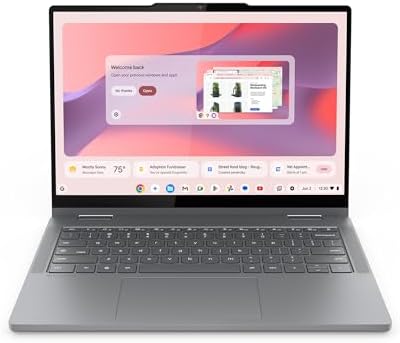
- THE BETTER WAY TO LAPTOP – Imagine a Chromebook that’s as flexible as your day: thin and lightweight with built-in Googl…
- TAKE HITS KEEP MOVING – Sleek, light, and built to last- the Chromebook 2-in-1 is just 0.69” thick and 3.3lbs. Enjoy lon…
- PERFORMANCE THAT MATCHES YOUR HUSTLE – Fuel your ideas with an Intel Core processor and 128GB storage. Boot up in under …
The Lenovo Chromebook 2-in-1 14-inch is another ChromeOS option, but it takes a more modern approach to the convertible laptop idea.
The supplied ASIN is B0GJ6QGPHQ. Current Amazon page data confirms the exact ASIN has an active purchase path and was showing a limited-time deal when checked, with more than 100 purchases in the previous month — useful evidence that the listing is active rather than an abandoned product page. Independent product data describes the model as a 14-inch Chromebook 2-in-1 with a touchscreen, WUXGA display, Intel Core processor configuration, 128GB storage, and convertible design.
Key Specs
- Brand: Lenovo | ASIN: B0GJ6QGPHQ
- Display: 14-inch WUXGA touchscreen | Design: Convertible 2-in-1
- Operating system: ChromeOS
- Storage: 128GB (per current product data)
- Processor: Intel Core configuration listed for this product
- Wireless: Wi-Fi and Bluetooth
- Ports: USB-C, USB-A, HDMI, and others per available product information
- Webcam: FHD webcam with privacy shutter
About the Product
Lenovo’s Chromebook 2-in-1 is aimed at buyers who want more flexibility than a traditional clamshell laptop. The hinge is the key — use it as a normal laptop for typing, or position it for watching content or touchscreen use in a more tablet-like way. That’s useful for students and for anyone who moves frequently between desk work and casual browsing.
One interesting detail in the available product description is the FHD webcam with a physical privacy shutter — a small but useful feature for students and remote workers. The product information also describes multiple USB-C and USB-A ports plus HDMI, helpful for connecting an external display or other accessories.
Pros
- Flexible 2-in-1 design with touchscreen and WUXGA display
- ChromeOS with USB-C, USB-A, and HDMI connectivity
- FHD webcam with privacy shutter
- Good option for students and browser-based work
Cons
- ChromeOS is not Windows
- 128GB storage is not huge
- Exact configurations can vary — verify processor and memory on the live listing
- Not designed for demanding desktop applications
Buyer Sentiment: The current Amazon listing shows strong recent shopping activity, including 100+ purchases in the past month at the time of checking — useful evidence of buyer interest, though not a substitute for reading the latest customer reviews.
What Buyers Are Saying: Available feedback and product descriptions point to flexibility, ease of use, and the 2-in-1 form factor as major draws. This is a ChromeOS machine — buy it for browser-based work and portability, not for the same software compatibility as a Windows laptop.
Lenovo vs. ASUS Chromebook: Both are convertible touch laptops. The ASUS has a clear advantage if you want a 14-inch FHD display with a known Celeron N4500 configuration and a very established Chromebook design. The Lenovo is more interesting if the specific Amazon configuration gives you the processor, webcam, ports, and WUXGA display features you prefer.
Verdict: A good choice for someone who wants a flexible ChromeOS 2-in-1. Its convertible design makes it more useful than a basic Chromebook for people who enjoy touchscreen interaction — just check the exact configuration before ordering.
Check the Lenovo Chromebook 2-in-1 on Amazon
4. YOZISUAN 2-in-1 Touchscreen Laptop — Best Ultra-Compact Option

- 【Reliable Performance for Everyday Tasks】 Laptop with the m3-8100Y Processor, this device handles multitasking with ease…
- 【Stay Responsive & Store More】 Traditional laptop Featuring high-efficiency 16GB RAM for seamless multitasking (student …
- 【Immersive 15.6″ IPS FHD Screen】 Featuring a 15.6 inch Full HD (1920*1080) anti-glare screen with a 16:9 widescreen aspe…
The YOZISUAN touchscreen laptop is the most unusual product on this list. Its Amazon ASIN is B0H3NL4QNC. The Amazon listing title identifies an Intel Core m3-8100Y processor and a 1920 × 1200 display; the same processor and memory/storage configuration can be cross-checked through other product records identifying a 10.1-inch touchscreen design with 12GB RAM and 256GB SSD storage.
This isn’t the laptop to recommend to everyone — but it’s interesting for a very specific buyer.
Key Specs
- Brand: YOZISUAN | ASIN: B0H3NL4QNC | Design: 2-in-1 touchscreen
- Display: ~10.1 inches (per matching product records); Amazon title lists 1920 × 1200
- Processor: Intel Core m3-8100Y (2 cores / 4 threads, up to 3.40GHz turbo) — launched 2018, now discontinued by Intel
- RAM: 12GB | Storage: 256GB SSD
- Graphics: Intel UHD Graphics 615
About the Product
The first thing to understand is its size — much closer to a small tablet-laptop hybrid than a traditional 15.6-inch notebook. That’s a major advantage if portability is your top priority.
The second point is the processor. The Core m3-8100Y is an 8th-generation Intel Core m3 chip: two cores, four threads, a 1.10GHz base frequency, and up to 3.40GHz turbo, with Intel UHD Graphics 615 and support for up to 16GB of memory depending on the system. Intel now lists the processor as discontinued, so this laptop shouldn’t be treated as a modern high-performance Windows computer — it’s better suited to light workloads. The 12GB RAM and 256GB SSD give the small system more breathing room than many entry-level machines.
Pros
- Very compact, touchscreen, 2-in-1 flexibility
- 12GB RAM and 256GB SSD
- High-resolution display listed
- Core m3 is more capable than many older Atom-class chips
Cons
- Very old, discontinued processor platform
- Only two CPU cores
- Small display may not suit long office sessions
- Buyers should carefully check the current configuration before purchasing
Buyer Sentiment: A niche budget option — weigh the latest Amazon customer feedback for the exact ASIN more heavily than broad reviews of other YOZISUAN models.
What buyers should consider: The size is both the biggest advantage and the biggest limitation. A 10.1-inch display can be great when portability matters, but can feel cramped over eight hours of spreadsheet work. This makes more sense as a portable secondary computer than a main workstation for most users.
Who should buy it: Anyone wanting a very small, touchscreen, 2-in-1 device for travel, light web work, documents, and basic productivity.
Who should skip it: Buyers who need modern CPU performance, heavy multitasking, large-screen productivity, gaming, or professional editing.
A note on the processor: The words “Core m3” can sound newer than they are. The m3-8100Y launched in 2018 and Intel now marks it discontinued. That doesn’t make a laptop using it unusable — buy it for its small size and specific use case, not for modern CPU performance.
Verdict: The best ultra-compact choice in this comparison. Its small touchscreen design is interesting for travelers and light users, but the old processor means the HP, ASUS, or Lenovo make more sense as a primary everyday computer unless portability is the main goal.
Check the YOZISUAN Touchscreen Laptop on Amazon
5. Exilapsire Touchscreen 2-in-1 — Best High-Resolution Portable Design

- 【Convertible 2-in-1 Touchscreen latop】: This laptop features a flexible 360 degrees convertible hinge and responsive tou…
- 【Smooth Performance for Daily Tasks】: Powered by an AMD A9 CPU (up to 3.2GHz) with Radeon R5 graphics, this notebook del…
- 【15.6″ Full HD IPS Touch screen Display】: The 1920×1080 IPS touchscreen provides clear visuals, vibrant colors, and wide…
The Exilapsire touchscreen laptop is another niche product. The supplied Amazon ASIN is B0H9K9NJBF, and the Amazon product page is currently live with a new-product purchasing option in the page data.
Matching product records for Exilapsire’s compact touchscreen line identify configurations built around Intel low-power processors, 16GB RAM, 512GB SSD storage, and high-resolution 3K IPS touchscreen displays. Other records identify the LeadBook family as a convertible 2-in-1 design. Because Exilapsire has several similar models and configurations, this is the product to verify most carefully against the live Amazon page before publishing.
Key Specs
- Brand: Exilapsire | ASIN: B0H9K9NJBF | Design: Touchscreen convertible laptop
- Display: High-resolution IPS touchscreen configuration
- Processor: Verify exact configuration on the live Amazon listing
- RAM: Matching configurations commonly list 16GB | Storage: Commonly 512GB SSD
- Operating system: Windows 11 configurations available in this product family
- Keyboard: Backlit (on matching models) | Security: Fingerprint reader (on matching configurations)
The matching Exilapsire LeadBook T6 documentation describes a 13.5-inch 3000 × 2000 IPS touchscreen, 16GB RAM, 512GB SSD, Celeron N95 processor, backlit keyboard, and fingerprint unlocking.
About the Product
The main reason to consider Exilapsire is the feature mix. A high-resolution touchscreen can look much sharper than a basic budget display — the 3K (3000 × 2000) panel found in matching LeadBook configurations uses a taller 3:2-style workspace, useful for documents and web pages since you see more vertical content.
The 2-in-1 hinge adds flexibility: use it normally, then fold it for presentations, reading, or touchscreen interaction. The 16GB RAM and 512GB SSD listed on matching configurations are also attractive for a budget machine.
The important caution: Exilapsire sells several similar laptop models, and the processor and storage can differ between ASINs. Don’t copy specifications from a different Exilapsire listing into coverage of B0H9K9NJBF without checking the live page.
Pros
- Convertible touchscreen design
- High-resolution display available in the matching product family
- 16GB RAM / 512GB SSD on matching configurations
- Backlit keyboard and fingerprint reader on matching configurations
Cons
- Exilapsire has multiple similar configurations
- Exact B0H9K9NJBF specifications should be checked before publishing
- Processor performance depends on the exact configuration
- Less mainstream brand recognition than HP, ASUS, or Lenovo
Buyer Sentiment: A niche option — check current Amazon reviews for ASIN B0H9K9NJBF rather than relying on reviews from another Exilapsire model.
What buyers should look for: Touchscreen responsiveness, keyboard quality, battery behavior, hinge movement, Windows setup, Wi-Fi performance, charging, display quality, and seller support — these details matter more with a lesser-known laptop brand.
Who should buy it: Buyers prioritizing touchscreen, convertible design, high-resolution display, lots of RAM, SSD storage, and portable Windows computing.
Who should skip it: Buyers who want brand support, a widely established laptop ecosystem, demanding professional applications, or the safest mainstream choice — go with HP, ASUS, or Lenovo instead.
Verdict: The feature-focused alternative. It can be interesting if the exact Amazon configuration gives you the high-resolution touchscreen, 16GB RAM, and SSD combination you want — but because the brand has several closely related models, verify the exact B0H9K9NJBF configuration before publishing.
Check the Exilapsire Touchscreen Laptop on Amazon
How These Five Touchscreen Laptops Are Different
At first glance, all five products seem to solve the same problem. They don’t. Here’s the simplest way to separate them.
- Choose the HP if you want Windows — the safest all-around option for people who need a normal Windows laptop.
- Choose the ASUS if you want a Chromebook — a compact 2-in-1 design, FHD touchscreen, and ChromeOS.
- Choose the Lenovo if you want a flexible Chromebook — another 2-in-1 ChromeOS option focused on Google-based productivity.
- Choose the YOZISUAN if you want the smallest design — for buyers who care about portability more than raw performance.
- Choose Exilapsire if display features matter most — a high-resolution touchscreen and feature-rich 2-in-1 concept.
Buyer’s Guide: How to Choose a Touchscreen Laptop Under $500
A cheap touchscreen laptop can be a great purchase — or a frustrating one if you focus on the wrong specification. Here’s what to check.
1. Decide Between Windows and ChromeOS
This should be your first decision.
Windows is the better choice if you need Microsoft desktop applications, Windows-specific software, traditional file management, or compatibility with specialized programs. The HP is the obvious Windows choice in this list.
ChromeOS is ideal if you mostly use Chrome, Google Docs, Sheets, Gmail, Drive, YouTube, web applications, or online learning tools. The ASUS and Lenovo are the main ChromeOS options here. Don’t buy a Chromebook expecting it to behave exactly like Windows.
2. Look at the Screen Resolution
Touchscreen alone doesn’t tell you whether the screen is good — resolution matters. The HP has a 1366 × 768 touchscreen configuration; the ASUS Chromebook Flip CX1 family includes a 1920 × 1080 touchscreen configuration. That’s a noticeable difference. If you read lots of text or work with multiple windows, a higher-resolution display can be much more pleasant.
3. Think About Screen Size
A larger screen isn’t always better. A 15.6-inch laptop is comfortable at a desk; a 14-inch laptop is easier to carry; a 10.1-inch device is extremely portable but can feel cramped.
Mostly desk use? Choose a larger screen. Mostly travel? A smaller laptop may be better. Both? A 13- or 14-inch 2-in-1 can be a useful compromise.
4. Check RAM
RAM affects multitasking. For basic work, 8GB can be enough; for heavier multitasking, 16GB gives you more breathing room. The HP and ASUS both list 8GB, matching Exilapsire configurations can offer 16GB, and the YOZISUAN configuration has been documented with 12GB. More RAM doesn’t automatically make one laptop better — it depends on the processor, operating system, storage, and workload.
5. Check Storage Type
Storage matters in two ways: capacity and speed. An SSD is generally preferable to an old hard drive for a modern Windows laptop — the HP uses a 256GB PCIe NVMe SSD, while the ASUS Chromebook uses eMMC storage. Those aren’t the same. A Chromebook can work well with eMMC because ChromeOS is designed for a different workflow; for Windows, an NVMe SSD is more attractive.
6. Do You Need a 2-in-1?
A 2-in-1 laptop lets you switch between laptop and tablet-style positions — useful for reading, watching videos, presentations, touchscreen browsing, casual drawing, classroom use, and travel. But it also adds complexity. If you never plan to use tablet mode, a traditional laptop may offer better value.
7. Check the Processor Generation
One of the most important lessons from this list: the YOZISUAN uses the Intel Core m3-8100Y, which Intel says launched in 2018 with two cores and four threads and is now discontinued. That doesn’t make the YOZISUAN unusable — it means you shouldn’t compare it directly with modern processors based only on the word “Core.” The HP’s Ryzen 3 7320U is a much newer mobile platform; the ASUS’s Celeron N4500 is designed for entry-level Chromebook use; the Lenovo configuration should be judged by the exact processor listed on the current Amazon page.
8. Consider Battery Needs
Budget laptops can have very different battery behavior — don’t rely only on a manufacturer’s “up to” figure. Actual battery life depends on screen brightness, Wi-Fi use, browser tabs, video playback, background applications, processor load, battery age, and power settings. If you travel frequently, read recent buyer comments about battery life.
9. Check the Ports
Before buying, check whether you need HDMI, USB-A, USB-C, a headphone jack, microSD, or external monitor support. The ASUS CX1400 family, for example, lists USB Type-A, USB Type-C, audio, and microSD support, with USB-C supporting power delivery and display functions on specified configurations.
10. Check the Exact Amazon Configuration
This is critical. Laptop listings often have several configurations — one version may have 8GB RAM, another 16GB; one may have 128GB storage, another 256GB or 512GB. Always confirm the exact ASIN, processor, RAM, storage, display, operating system, seller, and warranty before ordering.
Touchscreen Laptop vs. Traditional Laptop
Is a touchscreen actually worth having? For some people, yes. For others, no.
Advantages: A touchscreen can make scrolling and zooming easier, casual browsing more natural, presentations more flexible, and some creative tasks more intuitive — especially useful when paired with a 360-degree hinge.
Disadvantages: Touchscreens can add cost, consume more power in some designs, show fingerprints, add complexity, and be unnecessary for keyboard-heavy work. If you spend most of your day typing, a good keyboard may matter more than touchscreen capability.
Are Cheap Touchscreen Laptops Good for Students?
Yes, but choose carefully. A student may need browser access, Google Docs, word processing, video calls, online learning, PDF reading, email, and research — a Chromebook can be excellent for that. The ASUS Chromebook Flip CX1 is particularly interesting because of its 14-inch FHD touchscreen and convertible design; ASUS officially lists ChromeOS, 8GB memory, 128GB storage, Wi-Fi 6, and Bluetooth 5.2 for the CX1400 family. A Windows laptop like the HP is better if the student needs Windows-specific software.
Are These Touchscreen Laptops Good for Remote Work?
For basic remote work, yes — the best choice depends on the tools you use. If your job is based around browser applications, Google Workspace, email, Slack, Microsoft 365 web apps, or video meetings, a Chromebook may be enough. If your job requires desktop Windows applications, choose the HP or another Windows laptop. Also consider an external keyboard and mouse if you work at a desk all day — see the Amazon laptop stand guide for related options.
Are These Laptops Good for Gaming?
Most buyers shouldn’t purchase these models primarily for gaming — they use integrated or entry-level graphics. That’s fine for browser games, basic games, older games, and casual entertainment, but demanding modern PC games need much stronger graphics hardware.
Are Touchscreen Laptops Good for Watching Movies?
Yes. A touchscreen isn’t essential for watching movies, but a good display can improve the experience. The ASUS Chromebook Flip is particularly interesting because the 14-inch display can be placed in different positions thanks to its convertible design.
Which Is Best for Travel?
Best mainstream travel choice: ASUS Chromebook Flip CX1 — 14-inch display and convertible design.
Best ultra-compact choice: YOZISUAN — a much smaller form factor for maximum portability, though smaller screens are harder to work on for long periods.
Which Is Best for Home Office Use?
The HP is the strongest overall choice — Windows gives you broad software compatibility, and the 15.6-inch display is useful at a desk. You can connect an external monitor through HDMI and add a keyboard, mouse, or other accessories. For more setup ideas, see the Amazon monitor stands guide.
Which Is Best for Students?
Best Windows option: HP — choose it if your school requires Windows software.
Best Chromebook option: ASUS — choose it if your school work is mainly browser-based.
The Lenovo is also worth considering if you prefer its specific 2-in-1 configuration.
Frequently Asked Questions
What is the best touchscreen laptop under $500 on Amazon?
For most buyers in this comparison, the HP 15.6-inch Touchscreen Laptop is the best overall choice because it combines Windows 11, a modern Ryzen processor, 8GB RAM, an SSD, and a large touchscreen. The ASUS Chromebook Flip CX1 is the better choice if you specifically want ChromeOS and a convertible design.
Are touchscreen laptops worth buying?
Yes, if you’ll actually use the touchscreen — useful for scrolling, zooming, presentations, reading, and tablet-style interaction. If you mainly type and use a mouse, you may get more value from a traditional laptop.
Is a Chromebook the same as a Windows laptop?
No. A Chromebook runs ChromeOS; a Windows laptop runs Microsoft Windows. Chromebooks are often excellent for browser-based work, while Windows offers broader desktop software compatibility.
Is 8GB RAM enough for a touchscreen laptop?
For basic work, yes — browsing, documents, email, streaming, and many school tasks. If you frequently run many demanding applications at once, more RAM helps.
Is 128GB storage enough?
It depends on the operating system and how you work. A Chromebook with 128GB can be fine if you use cloud storage. A Windows user who stores lots of photos, videos, games, and applications may want more.
Is a 2-in-1 laptop better than a normal laptop?
Not automatically. A 2-in-1 is more flexible; a normal laptop can sometimes offer better value for people who never use tablet mode.
Can I use Microsoft Office on a Chromebook?
You can use Microsoft 365 web applications on a Chromebook, but Windows desktop applications are different. If your work depends on a specific Windows-only program, choose a Windows laptop instead.
What should I check before buying a cheap touchscreen laptop?
Processor, RAM, storage, display resolution, screen size, operating system, ports, battery, weight, seller, warranty, and current customer feedback. Most importantly, verify the exact configuration on the Amazon page.
Final Ranking
1. Best Overall: HP 15.6-inch Touchscreen Laptop
Best for: Everyday Windows use. The HP offers the safest combination of familiar Windows software, modern AMD hardware, SSD storage, and a large touchscreen. Its main weakness is the 1366 × 768 display.
2. Best 2-in-1 Chromebook: ASUS Chromebook Flip CX1
Best for: Students, web users, and casual 2-in-1 use. A strong combination of FHD touchscreen, convertible design, 8GB memory, ChromeOS, Wi-Fi 6, and a compact 14-inch form factor.
Check the ASUS Chromebook Flip CX1 on Amazon
3. Best Flexible Chromebook Alternative: Lenovo Chromebook 2-in-1
Best for: Google-based productivity. A good alternative if you want a 2-in-1 ChromeOS laptop with a touchscreen and flexible port selection.
Check the Lenovo Chromebook 2-in-1 on Amazon
4. Best Ultra-Compact: YOZISUAN
Best for: Portability. Stands out because of its tiny form factor and touchscreen design — just remember that the Core m3-8100Y is an older, discontinued processor.
5. Best Feature-Focused Alternative: Exilapsire
Best for: Buyers who want a high-resolution touchscreen 2-in-1. Matching configurations offer 16GB RAM, 512GB SSD storage, a high-resolution IPS touchscreen, backlit keyboard, and fingerprint security. Verify the exact configuration of ASIN B0H9K9NJBF before purchasing.
Check the Exilapsire on Amazon
Final Verdict
The best touchscreen laptop under $500 isn’t necessarily the one with the longest specification list — it’s the one that fits your actual work.
For most people who need a normal Windows computer, start with the HP 15.6-inch Touchscreen Laptop. It has a modern Ryzen 3 7320U processor, 8GB RAM, 256GB NVMe SSD, Windows 11 Home, and a large touchscreen.
If you mainly use web apps and want a flexible 2-in-1, the ASUS Chromebook Flip CX1 is a strong alternative. Its 14-inch FHD touchscreen, 8GB RAM, ChromeOS, Wi-Fi 6, and convertible design make it well suited to students and casual users.
The Lenovo Chromebook 2-in-1 is another good choice for Google-based work.
The YOZISUAN is more specialized. Its small size is attractive, but the Core m3-8100Y is an older discontinued processor, so it makes more sense as a compact light-use machine than as a performance laptop.
The Exilapsire is the feature-focused option. Its high-resolution touchscreen and 2-in-1 concept are interesting, but buyers should verify the exact Amazon configuration because Exilapsire has several similar models.
Before you buy, always open the live Amazon listing and confirm the exact ASIN, processor, RAM, storage, display, operating system, seller, and current availability. That final check is especially important with budget laptops because Amazon configurations and offers can change.
Amazon Associates Disclosure: As an Amazon Associate, I earn from qualifying purchases.

MD.HASAN is an experienced SEO expert and amazon products review writer passionate about helping people find right products on amzon for buy without confusion. With 4 years of hands-on experience in content strategy and search engine optimization, he specializes in writing SEO-friendly blog posts that rank, engage, and convert.


