
Affiliate disclosure: As an Amazon Associate, Tech Rig Review earns from qualifying purchases. Links on this page may be affiliate links, at no extra cost to you.
A reliable wireless router is essential for enjoying a fast, stable, and secure internet connection at home or in the office. Whether you use the internet for streaming movies, online gaming, remote work, video calls, or connecting smart home devices, the right router can make a noticeable difference in your daily experience.
However, choosing a wireless router is not always easy. There are many options available, each offering different WiFi standards, speeds, coverage areas, security features, and connectivity options. Some routers are designed for smaller apartments, while others are better suited for large homes with multiple users and connected devices.
If you are planning to upgrade your home network, exploring the 10 best wireless routers on Amazon can help you compare different options and find a suitable solution for your needs.
Before purchasing, it is important to understand which features actually matter. A router with impressive advertised speeds may not necessarily provide the best experience if it does not match your internet plan, home layout, or connected devices.
This guide explains the benefits of wireless routers, important features to compare, and what to consider before choosing one.
10 Best Wireless Routers on Amazon


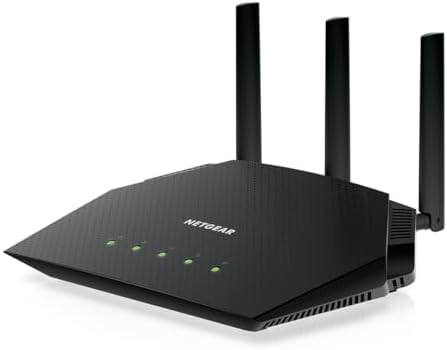


Why Do You Need a Good Wireless Router?
A wireless router connects your devices to your home network and distributes your internet connection through WiFi. It allows smartphones, laptops, tablets, televisions, gaming consoles, and other compatible devices to access the internet without requiring separate wired connections.
An outdated or low-performance router can create problems such as slow connections, inconsistent signals, frequent disconnections, and poor coverage in certain rooms.
Upgrading to a modern wireless router can help improve your home networking experience.
Here are some reasons to consider investing in a better router.
1. More Reliable Internet Connectivity
A quality router can provide a more consistent wireless connection for everyday activities. This is particularly useful when several people share the same internet connection.
You can browse websites, attend online meetings, stream videos, and download files without unnecessarily competing with older networking hardware.
Actual performance will still depend on your internet service, connected devices, network interference, and router placement.
2. Better Support for Multiple Devices
Modern households often connect numerous devices to the same network. Smartphones, laptops, smart televisions, security cameras, speakers, and smart appliances can all use WiFi simultaneously.
Newer routers are designed to manage multiple connections more efficiently. Technologies such as MU-MIMO and OFDMA help compatible routers communicate with multiple devices and manage network traffic more effectively.
This can be especially beneficial for busy households.
3. Improved Wireless Coverage
Router placement and antenna design can affect how well WiFi reaches different areas of your home.
A suitable router can provide better coverage for bedrooms, home offices, living rooms, and other frequently used spaces.
For larger properties, a mesh WiFi system may be more appropriate than relying on a single wireless router.
4. Better Network Security
Your router is an important part of your home network’s security.
Modern models may include WPA3 encryption, guest networks, automatic firmware updates, parental controls, and additional security features.
These tools help protect your connected devices and give you more control over who can access your network.
5. Better Performance for Entertainment and Work
A reliable connection is important for video conferencing, online gaming, 4K streaming, cloud applications, and large downloads.
A router with suitable wireless technology and enough network capacity can help reduce congestion and provide a smoother experience when several devices are active.
Different Types of Wireless Routers
Before comparing available options, understand the main types of wireless networking equipment.
Single-Band Routers
Single-band routers operate on the 2.4 GHz frequency band. They are generally older or more basic networking options.
The 2.4 GHz band offers relatively good coverage and can work well with many smart home devices. However, it is more likely to experience interference because many nearby networks and household devices use the same frequency.
For most new home networks, dual-band or newer technology is a better long-term choice.
Dual-Band Routers
Dual-band routers operate on both 2.4 GHz and 5 GHz frequency bands.
The 2.4 GHz band generally provides better range, while 5 GHz can offer faster connections over shorter distances.
This combination makes dual-band routers suitable for many homes, apartments, and small offices.
Tri-Band Routers
Tri-band routers add another wireless band to the traditional dual-band configuration.
Depending on the model, this may include an additional 5 GHz band or a 6 GHz band.
The extra capacity can help manage network traffic and support more demanding environments. Some mesh systems also use an additional band for communication between networking units.
Tri-band models are worth considering when you have many connected devices or compatible high-performance equipment.
Mesh WiFi Systems
Mesh WiFi systems use multiple networking units to provide wireless coverage across a larger area.
Instead of relying on one central router, the units work together to distribute the connection throughout your home.
They are particularly useful for multi-story houses, larger properties, and layouts with rooms that receive weak signals.
How to Choose the Best Wireless Router
Choosing the right router involves more than comparing advertised speeds. You should consider your internet connection, home size, connected devices, and the features you actually need.
Here are the most important factors to evaluate before purchasing.
1. Check the WiFi Standard
WiFi technology has evolved through several generations, bringing improvements in speed, efficiency, and network capacity.
The main standards you will encounter include:
- WiFi 5 (802.11ac): An older generation that can still support basic browsing, streaming, and everyday internet activities.
- WiFi 6 (802.11ax): Offers improved network efficiency and better support for multiple connected devices.
- WiFi 6E: Extends compatible WiFi 6 technology into the 6 GHz band.
- WiFi 7 (802.11be): Introduces newer technologies designed to improve speed, responsiveness, and network capacity.
For a new purchase, WiFi 6 is a sensible starting point for many households. WiFi 7 may be worth considering if you have compatible devices, a fast internet connection, and want newer networking capabilities.
Remember that your devices must support the relevant standard to benefit fully from its features.
2. Match Router Speed to Your Internet Plan
Router manufacturers advertise maximum theoretical wireless speeds, but these numbers do not represent the speed every connected device will experience.
Your actual internet performance depends on several factors, including your broadband plan, device capabilities, distance from the router, and wireless interference.
Before purchasing, check your internet subscription.
If your broadband connection is relatively modest, an expensive high-speed router may not provide meaningful improvements.
On the other hand, households with gigabit internet or faster fiber connections should consider routers with suitable wireless capabilities and multi-gigabit Ethernet ports.
Choose a router that can handle your current internet speed without unnecessarily limiting future upgrades.
3. Consider Your Home’s Size and Layout
Wireless coverage is one of the most important factors when choosing a router.
A router that works well in a small apartment may struggle to provide consistent connectivity throughout a large house.
Consider:
- Total floor area.
- Number of rooms.
- Number of floors.
- Wall thickness and building materials.
- Router placement.
- Distance between connected devices and the router.
For smaller homes, a single router may be sufficient.
For larger homes or properties with multiple floors, consider a mesh WiFi system or a router that supports compatible mesh expansion.
Do not rely entirely on advertised coverage figures because real-world results vary depending on the building and surrounding wireless environment.
4. Look for Dual-Band or Tri-Band Support
The number of wireless bands affects how a router manages connected devices.
Dual-band routers provide 2.4 GHz and 5 GHz connectivity, which is sufficient for many households.
Tri-band models offer an additional band that can provide more capacity for demanding networks.
If you have multiple laptops, gaming devices, smart televisions, and other connected equipment, tri-band connectivity may be worth considering.
However, additional bands do not automatically guarantee better performance. Your devices must also support the relevant frequencies.
5. Check Ethernet Port Availability
Although wireless connectivity is convenient, wired Ethernet connections remain useful for devices that need consistent network performance.
For example, desktop computers, gaming consoles, smart televisions, and network storage devices may benefit from wired connections.
Before purchasing, check:
- Number of available LAN ports.
- WAN port speed.
- Gigabit Ethernet support.
- Availability of 2.5Gbps or faster ports.
- USB connectivity, if needed.
If you have a broadband connection faster than 1Gbps, make sure the router has an appropriate multi-gigabit WAN port.
Also check the LAN port specifications if you want to connect high-speed wired devices.
6. Consider Security Features
Network security should be a priority when selecting a wireless router.
Look for modern security features such as:
- WPA3 wireless encryption.
- Guest network functionality.
- Automatic firmware updates.
- Parental controls.
- Connected-device monitoring.
- Firewall and network protection features.
WPA3 is a particularly useful feature to look for when purchasing modern networking equipment.
Also check whether advanced security services require a separate subscription.
7. Look for Useful Network Management Features
A good router should make it relatively easy to manage your home network.
Many modern models include smartphone applications or browser-based dashboards.
These tools may allow you to:
- Change your WiFi password.
- Monitor connected devices.
- Create guest networks.
- Set parental controls.
- Prioritize selected devices.
- Update router firmware.
- Troubleshoot connectivity problems.
Quality of Service (QoS) is another useful feature. It allows compatible routers to prioritize certain types of network traffic or devices.
This can help manage bandwidth when several people are using the internet simultaneously.
What to Consider Before Buying a Wireless Router
Even after comparing specifications, there are a few practical details worth checking.
Internet provider compatibility: Confirm that the router works with your existing internet equipment. Some internet connections require a separate modem or an ISP-provided gateway.
Installation process: Look for straightforward setup instructions and a management application if you prefer configuring your network through a smartphone.
Firmware support: Regular firmware updates are important for maintaining security and resolving software problems.
Warranty and customer support: Check the manufacturer’s warranty, return policy, and availability of technical support.
Long-term requirements: Think about your future internet speed, the number of devices you expect to connect, and whether you might need mesh expansion.
Additional subscription costs: Some routers offer premium parental controls or security features through paid plans. Check which functions are included without an additional subscription.
Common Mistakes to Avoid When Buying a Wireless Router
Avoiding a few common mistakes can help you make a more informed purchase.
- Choosing based only on advertised speed: Maximum theoretical speed does not guarantee better real-world performance.
- Ignoring coverage requirements: A powerful router may still struggle with thick walls or multiple floors.
- Buying outdated technology: Consider newer WiFi standards if you want a router that can support modern devices.
- Ignoring Ethernet ports: Insufficient wired connectivity can become inconvenient as your network grows.
- Overlooking security: Check encryption, firmware support, and network management features.
- Paying for unnecessary features: Expensive gaming or enterprise-level networking capabilities may not benefit ordinary home users.
The best approach is to prioritize features that match your actual internet usage instead of paying extra for specifications you may never need.
Who Should Buy a Wireless Router?
Different households have different networking requirements.
- Students: A reliable router can support online classes, research, video calls, and everyday browsing.
- Remote workers: Stable connectivity is important for virtual meetings, cloud applications, and transferring work files.
- Gamers: Look for low-latency networking features, sufficient capacity, and wired Ethernet connectivity.
- Families: Multi-device support, parental controls, and reliable coverage can improve everyday internet use.
- Smart home users: Consider compatibility with connected appliances, cameras, speakers, and other smart devices.
- Large households: Mesh WiFi or a suitable high-performance networking setup may provide better coverage across multiple rooms.
Frequently Asked Questions
1. Which WiFi standard should I choose for a new router?
WiFi 6 is a good starting point for many households because it offers improved efficiency and better support for multiple devices. WiFi 7 is worth considering if you have compatible devices and want newer networking technology.
2. Is a dual-band router enough for home use?
Yes. A dual-band router is sufficient for many apartments and ordinary households. It provides both 2.4 GHz and 5 GHz connectivity for different devices and usage requirements.
3. Is a tri-band router better than a dual-band router?
Tri-band routers provide an additional frequency band, which can improve network capacity in demanding environments. However, dual-band models can still deliver excellent performance for smaller households.
4. How many devices can connect to a wireless router?
The supported number varies by router model, hardware, and network conditions. However, the practical limit is often lower than the manufacturer’s advertised maximum. Consider your household’s actual number of active devices when choosing.
5. Do I need a mesh WiFi system instead of a regular router?
Not necessarily. A regular router may be enough for smaller homes. Mesh systems are more useful when you need consistent coverage across larger properties, multiple floors, or areas where a single router cannot provide a reliable signal.
6. How long does a wireless router usually last?
A router’s useful lifespan depends on its hardware, software support, and changing network requirements. Consider upgrading when your current device no longer receives security updates, struggles with your internet plan, or cannot reliably support your connected devices.
Final Thoughts
Choosing the right wireless router can improve how you use the internet every day. However, the best option depends on your household size, broadband speed, connected devices, and networking requirements.
Before making a purchase, compare WiFi standards, wireless bands, coverage capabilities, Ethernet ports, security features, and management options.
If you only need reliable connectivity for everyday browsing and streaming, a suitable dual-band router may be enough. For busy households with many devices, newer WiFi standards and additional wireless capacity may provide more flexibility. Larger homes may benefit from a mesh networking solution.
Take time to compare the available options, check their specifications, and consider your long-term requirements. By focusing on the features that matter most, you can choose a wireless router that provides a reliable connection without spending money on unnecessary capabilities.

MD.HASAN is an experienced SEO expert and amazon products review writer passionate about helping people find right products on amzon for buy without confusion. With 4 years of hands-on experience in content strategy and search engine optimization, he specializes in writing SEO-friendly blog posts that rank, engage, and convert.


