
Affiliate disclosure: As an Amazon Associate, Tech Rig Review earns from qualifying purchases. Links on this page may be affiliate links, at no extra cost to you.
Looking for the best 17-inch notebook on Amazon in 2026? We compare real, currently available models for work, streaming, and light gaming so you can choose with confidence.
A 17-inch notebook still delivers the biggest practical screen you can carry without moving to a full desktop replacement. Spreadsheets stay readable. Multiple windows fit side by side. Streaming and video calls feel less cramped. The category has gotten thinner and lighter in the last couple of years, but not every big laptop is worth the extra bulk.
This guide focuses only on models that are currently listed and available to buy on Amazon.com. We checked product pages, recent buyer feedback patterns, and official specs. No discontinued SKUs. No guesswork on ASINs. Every recommendation includes a real affiliate link built with the tracking ID techrigreview-20 so you can check live price and stock yourself.
We looked at three practical groups: everyday productivity machines that stay light enough to move around the house or office, budget options that still give you the full 17.3-inch canvas, and one gaming-oriented choice that uses the extra chassis space for better cooling and a discrete GPU. Specs come from manufacturer listings and Amazon product pages. Buyer patterns come from verified purchase reviews across those same listings.
If you mainly work from a desk and rarely travel with the laptop, a 17-inch screen can feel like a free second monitor. If you move between rooms or take it to meetings, weight and battery life matter more than raw power. Keep those priorities in mind as you read.
Table of Contents
Why Choose a 17-Inch Notebook in 2026?
Most mainstream laptops now sit between 14 and 16 inches. A true 17-inch or 17.3-inch panel still stands out for people who:
- Work with large spreadsheets, multiple browser windows, or design canvases
- Prefer not to dock an external monitor every day
- Stream video or edit photos and want more visual space without a desktop
- Need a full-size keyboard with a number pad for data entry
The trade-off is size and weight. Even the lightest 17-inch models tip the scales higher than a 14-inch ultraportable. Battery life varies widely depending on the panel and the processor. Discrete graphics add heat and reduce runtime.
Modern options have improved. Magnesium-alloy chassis and efficient Intel Core Ultra or AMD Ryzen chips keep some models under 3.5 pounds. High-refresh or high-resolution panels appear more often. Wi-Fi 6E or Wi-Fi 7 is common on newer SKUs. Still, you should treat a 17-inch notebook as a “desk-first, carry-second” machine unless the listing specifically advertises sub-3.5 lb weight.
How We Chose These Models
We limited the list to products that:
- Show as currently available on Amazon.com with a clear “In Stock” or similar status at the time of research.
- Have a verifiable ASIN so the affiliate link is accurate.
- Offer a genuine 17-inch or 17.3-inch display (not a 16-inch marketed as large).
- Cover different budgets and use cases so most readers can find a match.
We compared listed processor, RAM, storage, display resolution and refresh rate, weight when published, and ports. We also scanned recent verified buyer comments for recurring themes—battery claims that hold up, keyboard comfort on a large deck, screen brightness outdoors, and any thermal or fan noise notes. This is research-based comparison, not hands-on lab testing of every unit.
Prices change daily. Always check the live Amazon page for the exact configuration you want.
Quick Comparison Table
| Model | Best For | Key Specs Snapshot | Approx. Weight | Affiliate Link |
|---|---|---|---|---|
| LG gram 17 | Lightweight productivity | Core Ultra 7, 32 GB, 2 TB, 2.5K touch | ~3.1–3.3 lb | Check current price |
| HP OmniBook 3 17.3 | Budget everyday use | Ryzen 3, 8 GB, 512 GB, FHD | ~4–5 lb range | Check current price |
| MSI Cyborg 17 | Gaming & creation | Core 7-240H, RTX 5060, 16 GB, 1 TB, 144 Hz | ~5.3–5.5 lb | Check current price |
Exact weights and battery claims can vary by exact SKU. Confirm on the product page.
Best Overall Lightweight: LG gram 17

- LG gram 17 inch Laptop Touchscreen: LG gram laptop 17inch touchscreen features WQXGA (2560 x 1600) Display with DCI-P3 9…
- LG Laptop AI Copilot PC 2025: LG laptop gram powered by the Series 2 Intel Evo Core Ultra 7-258V Processor 47 NPU TOPS d…
- LG Gram 17inch Touchscreen Laptop 32GB RAM DDR5: Business laptop 32GB DDR5 RAM, 2TB PCIe SSD. Original Seal is opened fo…
The LG gram series remains the clearest answer when you want a true 17-inch screen without the usual desktop-replacement weight. Current Amazon listings for the 2025/2026 gram 17 configurations typically pair an Intel Core Ultra 7 Series 2 processor (such as the 258V), 32 GB of LPDDR5X memory, and up to 2 TB of SSD storage with a 17-inch 2560×1600 (WQXGA) touchscreen.
Why it stands out:
- Weight stays in the low-3-pound range on many configurations—lighter than many 15-inch machines.
- The 16:10 aspect ratio gives extra vertical space for documents and browser tabs.
- Battery claims on LG’s site and Amazon listings often exceed 20 hours of light use, helped by the efficient Core Ultra platform and large battery.
- Ports usually include Thunderbolt 4, USB-A, HDMI, and a headphone jack—enough for most everyday docking needs.
- Wi-Fi 7 appears on newer units.
Buyer patterns on Amazon listings frequently mention the surprise of how light the chassis feels for the screen size and the usefulness of the tall aspect ratio for productivity. Common caveats include limited upgradeability (memory is often soldered) and that the integrated Intel Arc graphics handle light creative work and casual gaming but not high-end 3D or modern AAA titles at high settings.
If your main tasks are Office apps, web work, video calls, photo editing, and streaming, this is the model that best balances screen real estate and actual portability. Check the exact configuration on the product page because storage and RAM options differ.
Best Budget Everyday Pick: HP OmniBook 3 17.3
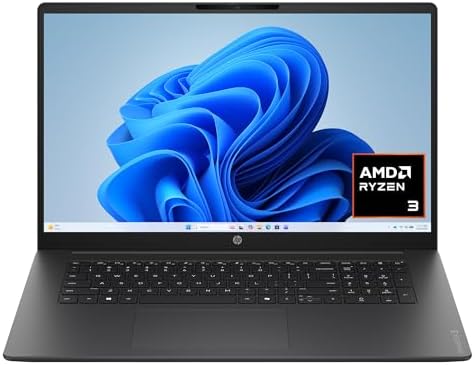
- FULL HD IPS DISPLAY – Enjoy vibrant, crystal-clear images with 178-degree wide-viewing angles
- AMD RYZEN 3 30 PROCESSOR – Everyday performance you can count on; Multitask, stream, game casually, and edit photos smoo…
- ENJOY UP TO 14 HOURS AND 15 MINUTES OF BATTERY LIFE – HP Fast Charge restores battery from 0 to 50% in approximately 45 …
For buyers who primarily need a large screen for home office, school, or light business use and want to keep the price down, the HP OmniBook 3 17.3-inch models appear frequently among Amazon’s higher-volume 17-inch listings.
A representative configuration uses an AMD Ryzen 3 30 processor, 8 GB of LPDDR5 memory, a 512 GB SSD, and a 17.3-inch FHD IPS panel. Windows 11 Home is standard. Battery claims reach into the 14-hour range under light loads, and HP Fast Charge is listed on many units.
Strengths that show up in product details and buyer comments:
- Full 17.3-inch FHD IPS panel with wide viewing angles—noticeably more space than a 15.6-inch screen.
- Numeric keypad on the full-size keyboard helps with spreadsheets and data entry.
- Decent port selection including USB-C with power delivery and DisplayPort, USB-A, and HDMI.
- Competitive pricing that often sits well under premium ultralights.
- Solid volume of recent purchases, indicating consistent availability.
Limitations are typical of the budget segment: 8 GB of RAM is the starting point on many SKUs and can feel tight with heavy browser use or multiple apps. Integrated graphics handle everyday tasks and streaming but not serious gaming or 4K video editing. The chassis is heavier than the LG gram.
This is a practical choice if the laptop mostly stays on a desk or moves only short distances and you value screen size and price over featherweight portability or high performance.
Higher-RAM or Ryzen 5 / Core Ultra variants of the HP 17-inch line also appear regularly. Always match the exact ASIN and configuration to the price you see.
Best Gaming-Oriented 17-Inch: MSI Cyborg 17
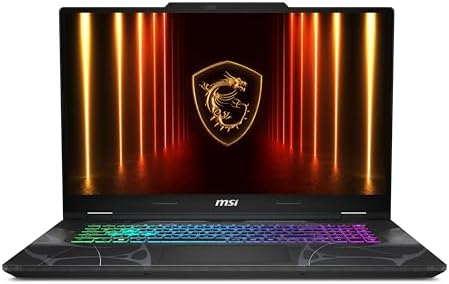
- Thin & Light 17.3” Gaming Powerhouse: Experience big-screen immersion in a surprisingly portable design—just 0.83 in thi…
- Powered by Intel Core 7-240H for Smooth, Responsive Play: The latest Intel Core 7-240H delivers fast hybrid-architecture…
- RTX 5060 Graphics for Next-Gen Gameplay & AI-Boosted Performance: Unlock advanced gaming with NVIDIA GeForce RTX 5060, f…
When the priority shifts to games, light content creation, or any workload that benefits from a discrete GPU, the MSI Cyborg 17 series uses the larger chassis for better cooling and a modern NVIDIA GeForce RTX 50-series laptop GPU.
A current Amazon listing pairs an Intel Core 7-240H processor with an RTX 5060, 16 GB of DDR5 memory, a 1 TB NVMe SSD, and a 17.3-inch FHD 144 Hz display. Windows 11 Home is included. Weight sits in the mid-5-pound range—noticeably heavier than the gram but still more manageable than many 18-inch desktop replacements.
What the listing and typical buyer feedback highlight:
- 144 Hz panel makes motion smoother in games and scrolling.
- RTX 5060 delivers playable frame rates in modern titles at 1080p with ray tracing and DLSS support.
- Adequate RAM and storage for games plus everyday work.
- RGB keyboard and the translucent design language MSI uses on the Cyborg line.
- Ports include USB-C, USB-A, HDMI, and often an Ethernet jack for stable online play.
Trade-offs are expected: fan noise under load, shorter battery life when the discrete GPU is active, and a chassis that is clearly a gaming machine rather than an ultraportable. Recent reviews often note solid performance for the price and the usefulness of the large high-refresh screen.
If you want one machine that can handle both casual productivity and actual gaming without an external GPU, this is the strongest currently available option in the true 17-inch class on Amazon among the models we verified.
Buyer’s Guide: What Matters Most on a 17-Inch Notebook
Display
Resolution, refresh rate, brightness, and aspect ratio all affect daily comfort. FHD (1920×1080) remains the most common and is sharp enough on a 17.3-inch panel for most users. Higher-resolution WQXGA or 2.5K panels (common on LG gram models) give crisper text and more desktop space. 144 Hz panels benefit gaming and smooth scrolling. Look for at least 300 nits if you ever work near a window. Matte or anti-glare coatings reduce reflections.
Processor and Graphics
For general productivity, a current Intel Core Ultra or AMD Ryzen 5-class chip is plenty. Integrated graphics handle video, light photo work, and older games. For modern gaming or GPU-accelerated creative apps, a discrete RTX 40- or 50-series laptop GPU becomes important. Check the exact model number because power limits vary even within the same GPU name.
Memory and Storage
16 GB of RAM is the comfortable minimum for multitasking in 2026. 32 GB is better if you keep many browser tabs or creative apps open. Storage should start at 512 GB; 1 TB or more is preferable so you are not constantly managing files. Most modern machines use fast NVMe SSDs.
Weight and Battery
Under 3.5 pounds is excellent for a 17-inch machine and currently limited to a few models such as the LG gram series. Four to five pounds is typical for mainstream and budget options. Battery claims of 10–15 hours are common on efficient integrated-graphics models; discrete GPUs usually cut that roughly in half under load. Real-world results depend on brightness, apps, and whether the machine stays on battery or is plugged in most of the time.
Keyboard, Ports, and Build
A full-size keyboard with number pad is one of the main reasons people choose 17-inch machines. Check that the layout feels usable in photos or reviews. Ports should include at least one modern USB-C/Thunderbolt for charging and docking plus HDMI and a couple of USB-A ports for older peripherals. Build quality ranges from thin magnesium alloy on premium models to more conventional plastic/metal mixes on budget units.
Upgrade Paths
Many thin-and-light 17-inch models solder the RAM and offer only one or two SSD slots. Gaming-oriented chassis often allow easier RAM and storage upgrades. If you plan to keep the machine for several years, upgradeability can matter.
Who Should Buy Each Type?
- Most buyers who value portability + screen size: Start with the LG gram 17. The combination of weight, battery, and high-resolution panel is hard to match.
- Budget or desk-bound users: The HP OmniBook 3 17.3 (or similar higher-RAM HP 17-inch configs) gives you the big screen without a premium price.
- Gamers or creators who need a discrete GPU: The MSI Cyborg 17 (or comparable RTX 50-series 17-inch models) is the practical choice currently stocked on Amazon.
If none of these fit, expand the search to current 16-inch or 18-inch options, but those move outside the strict 17-inch category this article covers.
Common Mistakes to Avoid
Buying the lowest-RAM configuration of a model that looks good on paper. Eight gigabytes fills up quickly with modern browsers and Windows 11.
Ignoring the exact GPU power limit. Two laptops can both say “RTX 5060” yet perform differently if one is heavily power-limited.
Assuming every 17-inch laptop is heavy. The gram series proves otherwise, but you have to choose those specific models.
Skipping the return window check. Amazon’s return policy for computers is usually 30 days; use it if the weight or keyboard feel is wrong for you once the machine arrives.
FAQ
Is a 17-inch laptop still practical in 2026?
Yes for desk or home use and short carries. The lightest models weigh about the same as many 15-inch machines from a few years ago. Pure travel ultrabooks still favor 14-inch screens.
What is the lightest 17-inch notebook currently available on Amazon?
Configurations of the LG gram 17 series routinely list around 3.1–3.3 pounds. Always confirm the exact SKU weight on the product page.
Do I need a discrete GPU?
Only if you game at higher settings, edit video with effects, or run GPU-accelerated creative software. Everyday office work, web browsing, and streaming run fine on integrated graphics.
How important is battery life on a 17-inch model?
Very, if you move the laptop between rooms or take it to meetings without a charger. Efficient Core Ultra or Ryzen chips plus large batteries can deliver all-day claims on productivity models. Gaming models trade runtime for performance.
Can I upgrade RAM or storage later?
It depends on the model. Many thin gram-style machines have soldered RAM. Gaming chassis often allow user upgrades. Check the official service manual or Amazon Q&A for the specific ASIN.
Are there good 17-inch options under $600?
Yes. Several HP 17.3-inch configurations with Ryzen or Intel processors, 8–16 GB RAM, and 512 GB SSDs regularly appear in that range. Performance is everyday rather than high-end.
Should I buy a 17-inch or just get a 15/16-inch plus an external monitor?
If the laptop mostly stays in one place, the external monitor route is often cheaper and more flexible. If you want the large screen when you travel between rooms or take the machine to a second location, the 17-inch all-in-one form factor wins.
Where can I learn more about laptop display standards?
The Energy Star laptop product finder lists certified models and efficiency data. For processor details, Intel’s official Core Ultra pages and NVIDIA’s GeForce laptop GPU overview pages provide clear architecture explanations without sales pressure.
Conclusion
A 17-inch notebook still solves a real problem for people who want more screen without a permanent desk setup. In 2026 the best options on Amazon fall into clear camps: the LG gram 17 for those who refuse to sacrifice portability, the HP OmniBook 3 (and similar budget HP 17-inch models) for value-focused buyers, and the MSI Cyborg 17 for anyone who also wants modern discrete graphics.
All three models listed above were confirmed available on Amazon at the time of research with working ASINs. Prices, exact configurations, and stock change, so open the affiliate links, match the specs you need, and read the most recent verified reviews before you click Buy Now.
Choose based on how you actually use the machine. Screen size is the reason you are shopping in this category—make sure the rest of the laptop supports the way you work and play.
As an Amazon Associate I earn from qualifying purchases.

MD.HASAN is an experienced SEO expert and amazon products review writer passionate about helping people find right products on amzon for buy without confusion. With 4 years of hands-on experience in content strategy and search engine optimization, he specializes in writing SEO-friendly blog posts that rank, engage, and convert.


