
Affiliate disclosure: As an Amazon Associate, Tech Rig Review earns from qualifying purchases. Links on this page may be affiliate links, at no extra cost to you.
Your laptop camera is lying to you.
Every morning you join a Zoom call, your colleagues see a grainy, washed-out version of you — flat lighting, soft focus, and audio that sounds like you’re calling from a tunnel. You look fine on your end. On their end, you look like a barely-lit, blurry blob.
A dedicated webcam changes all of that. And the good news? You don’t need to spend a fortune. Under $80, there are webcams on Amazon right now that deliver sharp 1080p or even 2K video, built-in noise-canceling microphones, fast autofocus, and physical privacy shutters — everything you actually need for professional-looking Zoom calls, Teams meetings, and Google Meet sessions.
I’ve researched every major webcam currently available on Amazon under $80, cross-referenced hundreds of verified buyer reviews, and compared real-world performance data across the most popular models. This guide gives you an honest, detailed breakdown of the 10 best webcams for home office on Amazon under $80 in 2026.
No fluff. No filler. Just clear, practical recommendations you can use right now.
Table of Contents
Why Your Built-In Laptop Camera Isn’t Good Enough
Laptop cameras are engineered with one goal: keep the cost down. The sensors are tiny, the lenses are plastic, the apertures are narrow, and there’s almost no software processing to compensate for poor lighting.
The result is predictable. Dark rooms make you look shadowy. Bright windows behind you blow out the exposure. Autofocus hunts and shifts during calls. The built-in mic picks up everything — your keyboard, your HVAC system, the dog three rooms over.
A dedicated webcam costs $40 to $80 and fixes every one of these problems. Larger sensors capture more light. Glass lenses resolve more detail. Dual microphones with noise cancellation filter background noise. Autofocus with proper locking keeps you in sharp focus even when you move.
For remote workers, the upgrade is visible and immediate — not just to you, but to everyone on every call you join.
What to Look for in a Home Office Webcam Under $80
Resolution — For Zoom and Teams calls, 1080p (Full HD) is the practical ceiling. Both platforms cap live video at 1080p, meaning a 4K webcam delivers zero benefit during calls. Prioritize 1080p with good optics over chasing resolution numbers.
Autofocus — Fixed-focus webcams are set to a specific distance and don’t adjust. Autofocus tracks your face as you move, keeping the image sharp throughout the call. For anyone who moves during meetings or sits at varying distances, autofocus matters.
Low-light performance — This comes down to sensor size and aperture (f-number). Lower f-numbers (f/2.0 vs f/2.8) let in more light. Better sensors handle dim conditions without producing excessive grain. If your home office isn’t perfectly lit, this spec matters more than resolution.
Built-in microphone quality — All webcams on this list include microphones. The quality varies significantly. Noise-canceling dual mics will sound dramatically better on calls than a single omnidirectional pickup. If audio is critical, consider a dedicated USB mic — but for everyday Zoom calls, webcam mics have improved substantially in 2026.
If audio is your main concern, check out our guide to the best Amazon microphones for computers for dedicated USB mic options.
Field of view (FOV) — Standard FOV for solo calls is 65°–78°. Wider angles (90°–110°) are good for group setups or showing your workspace. Some models offer adjustable FOV, which is the most flexible option.
Privacy shutter — A physical lens cover you can slide closed when not in use. This is a simple but meaningful feature for anyone who keeps their webcam mounted all day. Look for it in the specs — not all webcams include it.
Plug-and-play compatibility — Every webcam on this list works with Zoom, Teams, Google Meet, and FaceTime on Windows and Mac without drivers. Some offer software for additional control. Neither should require significant setup.
Quick Comparison: Which Webcam Should You Buy?
| Your Situation | Best Pick |
|---|---|
| Best overall under $80 | Logitech C920x HD Pro |
| Best with privacy shutter | Logitech C920S HD Pro |
| Sharpest image under $80 | Anker PowerConf C200 (2K) |
| Modern laptop / USB-C | Logitech Brio 300 |
| Poor lighting / dim room | Razer Kiyo |
| Best audio on a budget | EMEET C960 |
| Wide FOV + software control | NexiGo N60 |
| Absolute tightest budget | Logitech C270 |
| Microsoft Teams power user | Microsoft Modern Webcam |
| Simple first webcam | Logitech Brio 101 |
10 Best Webcams for Home Office Zoom Calls on Amazon Under $80
1. Logitech C920x HD Pro — Best Overall Under $80


Best for: Remote workers who want a proven, reliable 1080p webcam with no setup required
The Logitech C920x has been earning its place at the top of webcam recommendation lists for years — and in 2026, with over 21,000 Amazon reviews averaging 4.6 stars, it remains the default recommendation for good reason. This is the webcam that consistently performs well in real-world home office conditions.
The C920x captures Full HD 1080p video at 30fps through a glass lens — not plastic, which makes a visible difference in sharpness and clarity, especially in lower-light conditions. The Carl Zeiss optics Logitech uses across its Pro line are a big part of what separates the C920x from similarly priced competitors that use plastic lenses and get noticeably softer results.
Autofocus is one of the C920x’s strengths. It locks quickly and stays consistent during calls without the hunting or drifting behavior that plagues cheaper models. Color reproduction is accurate and natural under standard office lighting, and the exposure handling is reliable across a wide range of conditions.
The dual stereo microphones are more than capable for everyday Zoom calls. They capture voice clearly with a natural presence, and the stereo separation adds some dimensionality that single-mic webcams lack.
The C920x clips securely to any monitor, laptop, or can be tripod-mounted for more flexible positioning. Setup is genuinely plug-and-play — connect the USB-A cable and you’re in a Zoom call within seconds.
The one notable limitation: the C920x doesn’t include a physical privacy shutter. If that’s important to you, look at the C920S (below) which adds that feature, or consider the Anker C200 which includes one at a similar price.
Key specs: 1080p/30fps, glass Carl Zeiss lens, dual stereo microphones, autofocus, universal clip mount, USB-A
What we love:
- 21,000+ Amazon reviews averaging 4.6 stars — proven reliability
- Glass Carl Zeiss lens produces noticeably sharper, more accurate images than plastic-lens competitors
- Fast, consistent autofocus that doesn’t hunt during calls
- Dual stereo mics perform well for Zoom without a separate microphone
- Genuine plug-and-play — works instantly with Zoom, Teams, Meet, and FaceTime
Worth knowing:
- No physical privacy shutter — lens is always exposed when mounted
- 1080p/30fps only; no 60fps mode
- USB-A only; no USB-C option
Verdict: The most trusted sub-$80 webcam on Amazon in 2026. If you want one camera that just works — every time, on every platform — the C920x is the pick.
👉 Check price and availability on Amazon
2. Logitech C920S HD Pro — Best with Privacy Shutter


Best for: Remote workers who keep their webcam mounted all day and want physical lens privacy
The C920S is the C920x with one meaningful upgrade: a built-in physical privacy shutter. If you leave your webcam clipped to your monitor all day through meetings, lunch breaks, and everything in between, that sliding lens cover is a genuinely useful addition — and it’s one of the most requested features among remote workers.
Everything else carries over from the C920x. The same Carl Zeiss glass lens, the same reliable 1080p/30fps autofocus performance, the same dual stereo microphones, the same universal clip mount. The core imaging quality is identical between the two models.
In terms of image quality, the C920S delivers sharp, color-accurate video in standard office lighting and handles mixed lighting reasonably well. The autofocus is responsive and consistent. The dual mics capture clear voice audio suitable for professional Zoom calls without additional equipment.
The privacy shutter slides smoothly over the lens when you don’t need the camera. It’s a simple mechanical feature, but it eliminates the low-level concern of having an always-exposed lens pointed at you throughout your workday.
At its price point, the C920S represents excellent value. It’s one of the few webcams under $80 that combines a glass lens, reliable autofocus, stereo mics, and a physical privacy shutter in one package.
Key specs: 1080p/30fps, Carl Zeiss glass lens, dual stereo microphones, autofocus, physical privacy shutter, universal clip, USB-A
What we love:
- Physical privacy shutter — a simple but meaningful upgrade over the C920x
- Same proven Carl Zeiss glass lens and autofocus as the C920x
- Dual stereo mics handle everyday Zoom call audio well
- Clippy mount works on any monitor or laptop without adapters
Worth knowing:
- No 60fps mode; 30fps only
- USB-A only — no USB-C
- Low-light performance is adequate but not exceptional compared to larger-sensor alternatives
Verdict: If the C920x is the baseline, the C920S is the smarter buy for anyone who values privacy. The shutter alone justifies the small price difference.
👉 Check price and availability on Amazon
3. Anker PowerConf C200 — Best Value 2K Webcam


Best for: Home office workers who want sharper-than-1080p video, adjustable FOV, and AI noise reduction on a budget
The Anker PowerConf C200 is the most interesting webcam story under $80 in 2026. It delivers 2K resolution — a noticeable step up from standard 1080p — along with an adjustable field of view, AI microphone noise reduction, and a built-in privacy shutter, all at a price that often lands below $70.
The 2K sensor produces images with meaningfully more detail than 1080p webcams at similar distances. When your face fills the frame on a Zoom call, the extra resolution shows up as sharper skin texture, cleaner edge definition, and better overall clarity. The larger f/2.0 aperture also helps the C200 pull more light in dimmer conditions.
The adjustable field of view is a feature most webcams at this price skip entirely. The C200 lets you choose between 65°, 78°, and 95° (via the AnkerWork software), giving you real flexibility to control how much of your background appears on calls. This is particularly useful if you move between different desk setups or if your background changes.
The AI microphone noise reduction genuinely works in moderately noisy home office environments. It filters out keyboard noise, HVAC rumble, and background sounds effectively. The caveat noted by multiple reviewers is that the noise cancellation can sometimes over-process audio, giving it a slightly artificial quality — but for everyday video calls this isn’t a dealbreaker.
The built-in privacy shutter slides cleanly over the lens. Setup is plug-and-play via USB-A.
Key specs: 2K/30fps, f/2.0 aperture, adjustable FOV (65°/78°/95°), dual stereo mics with AI noise reduction, built-in privacy shutter, USB-A
What we love:
- 2K resolution is a visible upgrade over 1080p at similar prices
- Adjustable FOV via AnkerWork software — rare under $80
- f/2.0 aperture handles dim office environments better than most competitors
- AI mic noise reduction works well for moderately noisy home offices
- Physical privacy shutter included
Worth knowing:
- 2K can occasionally downgrade to 1080p on some platforms
- Microphone noise cancellation can sound slightly over-processed
- USB-A only; cable is shorter than average
- Body lacks a separate adjustable neck — angle adjustment requires repositioning the entire unit
Verdict: The best value 2K webcam on Amazon under $80. If image sharpness is your priority and you can live with the slightly chunky design, the C200 is hard to beat on specs per dollar.
👉 Check price and availability on Amazon
4. Logitech Brio 300 — Best USB-C Webcam Under $80


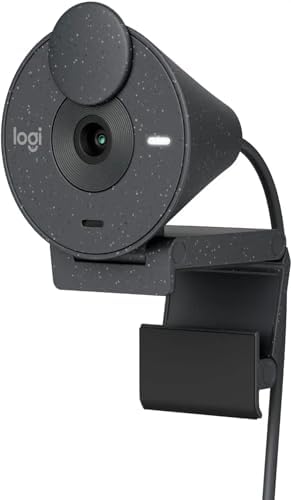
Best for: Mac users, modern laptop owners, and anyone who wants certified Zoom, Teams, and Google Meet compatibility via USB-C
The Logitech Brio 300 is the webcam that resolves one of the most common frustrations of the current laptop era: USB-C connectivity. As MacBooks and modern Windows laptops increasingly ship with only USB-C ports, the majority of webcams — which still use USB-A — become an adapter headache. The Brio 300 connects via USB-C natively, using the same cable as your MacBook charger.
Beyond the connectivity, the Brio 300 delivers solid 1080p at 30fps with Logitech’s RightLight auto-correction technology, which handles the classic “bright window behind you” problem better than most webcams at this price. The auto exposure is responsive and does a good job balancing faces against challenging background lighting.
The Brio 300 is certified for Zoom, Teams, and Google Meet — meaning it’s been tested and approved at the software level for all three major platforms. It includes a physical privacy shutter and a noise-reducing microphone tuned specifically for voice clarity in home office environments.
The field of view is 70°, which is a comfortable standard for solo video calls and strikes the right balance between capturing your face and showing too much of your room.
Key specs: 1080p/30fps, 70° FOV, RightLight auto-correction, USB-C, physical privacy shutter, noise-reducing microphone, certified for Zoom/Teams/Meet
What we love:
- USB-C native connection — no adapter needed for modern MacBooks and laptops
- Certified for Zoom, Teams, and Google Meet at the software level
- RightLight auto-correction handles backlit window scenarios well
- Physical privacy shutter included
- Reliable Logitech build quality and long-term driver support
Worth knowing:
- 1080p/30fps only — no higher resolution or frame rate options
- No adjustable FOV
- Noise-reducing mic (not dual stereo like C920x models)
Verdict: If you have a modern laptop and USB-C is your primary connection, the Brio 300 is the cleanest solution under $80. No adapters, no compatibility worries, certified for every major platform.
👉 Check price and availability on Amazon
5. Razer Kiyo — Best for Dim Home Offices


Best for: Anyone working in a poorly lit room who doesn’t want to buy a separate ring light
The Razer Kiyo takes a different approach to the home office lighting problem than every other webcam on this list. Instead of fighting poor lighting with a bigger sensor or software processing, it simply solves the problem at the source with a built-in adjustable ring light mounted around the lens.
That ring light is the Kiyo’s defining feature. If your home office is dim, east-facing, or relies entirely on overhead lighting that casts unflattering shadows on your face, the Kiyo eliminates the need to purchase a separate ring light, key light, or softbox. The ring light is mounted at lens level, which is the most flattering angle for face illumination — it fills in shadows and keeps your face evenly lit regardless of ambient conditions.
The webcam itself captures 1080p video at 30fps using fixed focus. The image quality is solid for its price, and the f/2.0 aperture combined with the ring light means you’ll look well-lit even in near-dark environments. The autofocus is fixed rather than continuous — it’s calibrated for standard desk distance and works reliably at that range without hunting.
The built-in microphone is adequate for everyday Zoom calls, though it sits behind the ring assembly which limits some of the directional pickup quality. For users with significant audio requirements, a separate microphone is worth considering.
The ring light brightness is adjustable directly on the unit, and the USB-A connection is plug-and-play across all major platforms.
Key specs: 1080p/30fps, built-in adjustable ring light, f/2.0 aperture, fixed focus, USB-A, compatible with Zoom/Teams/Meet
What we love:
- Built-in ring light solves the poor lighting problem without additional hardware
- f/2.0 aperture captures noticeably more light than standard webcams
- Ring light brightness is adjustable for different environment needs
- No need to buy a separate ring light — saves money and desk space
- Reliable performance for standard home office distances
Worth knowing:
- Fixed focus rather than continuous autofocus
- Ring light at full brightness can be quite intense — start lower
- Microphone quality is adequate but behind some competitors
- Heavier than most webcams due to the ring light assembly
Verdict: The single most efficient solution for home office users with dim rooms or poor ambient lighting. If bad lighting is your primary webcam problem, the Kiyo addresses it more directly than anything else under $80.
👉 Check price and availability on Amazon
6. EMEET C960 — Best Budget 1080p with Dual Mics


Best for: Budget-conscious buyers who want reliable 1080p video and strong microphone performance without spending much
The EMEET C960 has emerged as one of the most recommended budget webcams for home office Zoom calls in 2026, and the combination of features it offers at its price makes the appeal easy to understand.
The C960 captures Full HD 1080p video through a 5-layer anti-glare glass lens at 90° field of view — wider than most competitors in this price range, which is useful for group setups or showing a wider workspace. Automatic low-light correction and color adjustment help maintain a consistent, natural-looking image across different lighting conditions.
The dual omnidirectional microphones are a highlight. They capture clear voice audio and include noise cancellation that handles the typical home office background sounds — typing, traffic noise, HVAC — effectively. For a webcam in this price range, the audio quality regularly exceeds expectations.
The C960 includes both USB-A and USB-C connections (via an included adapter), making it one of the most versatile connectivity options at this price point. Plug-and-play setup works instantly with Zoom, Teams, FaceTime, and Google Meet across Windows and Mac.
One consideration: the C960 does not include a physical privacy shutter. The fixed-focus design also means it’s calibrated for a set distance — it performs best when you’re a consistent distance from the camera, which covers most standard desk setups.
Key specs: 1080p/30fps, 90° FOV, 5-layer anti-glare glass lens, dual omnidirectional mics with noise cancellation, USB-A + USB-C adapter, fixed focus
What we love:
- Dual omnidirectional noise-canceling mics outperform many competitors in audio clarity
- 90° wide-angle FOV is generous for group setups or wider workspace shots
- Includes both USB-A and USB-C adapter for flexible connectivity
- Strong value: performance well above its price point
- Plug-and-play across all major platforms
Worth knowing:
- No physical privacy shutter (lens always exposed)
- Fixed focus rather than continuous autofocus
- Low-light performance is decent but not exceptional
Verdict: If budget is your primary constraint, the EMEET C960 is where you start. Strong dual mics, wide FOV, and solid 1080p quality make it one of the best-value webcams on Amazon under $80.
👉 Check price and availability on Amazon
7. NexiGo N60 — Best Plug-and-Play with Software Control


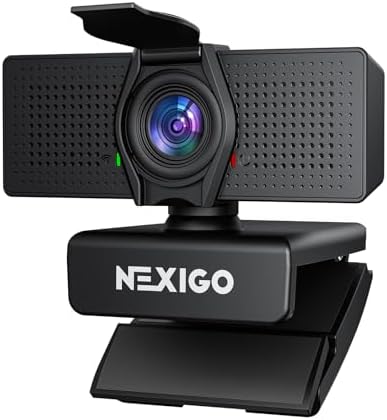
Best for: Users who want a simple, reliable 1080p webcam with optional software customization and privacy cover
The NexiGo N60 is one of those quietly reliable webcams that consistently earns strong Amazon reviews not through spectacular specs, but through solid execution across every basic requirement. It’s the webcam equivalent of a tool that just works.
The N60 captures 1080p video with up to 110° field of view — one of the widest angles on this list at its price point, which is particularly useful if you present with documents or share a frame with another person during calls. The built-in noise-canceling microphone handles background sounds effectively for everyday Zoom call use.
The privacy cover is a physical lens cap rather than a sliding shutter — it attaches over the lens when not in use, providing the same peace of mind as a shutter but in a slightly different form. The included NexiGo software allows for customization of brightness, contrast, saturation, and zoom level without altering global system settings.
Setup is genuinely instant — plug into a USB port and it works with Zoom, Teams, Skype, Google Meet, and most major platforms immediately. The flexible mounting clip handles standard monitors and laptops securely.
The N60 is particularly recommended for users who aren’t looking to overthink the decision and simply want a dependable 1080p camera at an accessible price with useful extras like software control and a privacy cover included.
Key specs: 1080p/30fps, up to 110° FOV, built-in noise-canceling mic, NexiGo software control, privacy lens cover, USB-A, plug-and-play
What we love:
- 110° wide field of view covers multi-person setups and document sharing
- Software allows fine-grained control over image and zoom settings
- Privacy lens cover included out of the box
- True plug-and-play — no driver installation required
- Works across Windows, Mac, and major conferencing platforms
Worth knowing:
- Fixed focus rather than continuous autofocus
- Privacy cover is a cap, not a sliding shutter
- 1080p/30fps standard — no higher frame rate option
Verdict: A solid, no-hassle 1080p webcam that covers all the basics well. The wide FOV and software control make it a flexible option for a variety of home office setups.
👉 Check price and availability on Amazon
8. Logitech C270 HD Webcam — Best Under $30


Best for: Occasional video callers on an absolute budget who just need something functional
Not everyone needs a full-featured 1080p webcam with autofocus and dual mics. If you’re on a very tight budget and Zoom calls are a once-a-week occurrence rather than a daily necessity, the Logitech C270 is the most sensible entry point on this list.
The C270 captures 720p video at 30fps — lower than the 1080p field but still a significant improvement over most built-in laptop cameras. Logitech’s RightLight 2 technology handles automatic exposure correction, which does a solid job balancing the image when your office window throws afternoon light across your face.
The built-in microphone is basic but functional for casual calls. The mounting clip is flexible and attaches to monitors and laptops without trouble. And as with all Logitech webcams, driver support is long-term and reliable — you won’t be left without software compatibility after a Windows update.
The main limitation is simply resolution. For daily professional Zoom calls where image quality matters, 720p will feel dated compared to 1080p alternatives at $20–$30 more. For casual calls, family video chats, or a backup camera, it does the job without complaint.
Key specs: 720p/30fps, RightLight 2 auto-correction, built-in microphone, universal clip, USB-A
What we love:
- Very accessible entry price
- RightLight 2 manages exposure correction effectively
- Long-term Logitech driver support
- Lightweight and compact — easy to move between setups
Worth knowing:
- 720p resolution — noticeable step below 1080p in professional call settings
- No autofocus; fixed focus only
- Single microphone rather than stereo or dual pickup
Verdict: The most sensible option if budget is the overriding factor. Occasional callers and backup use cases are where this earns its spot.
👉 Check price and availability on Amazon
9. Microsoft Modern Webcam — Best for Microsoft Teams Users


Best for: Professionals in Microsoft-centric workplaces who want certified Teams performance with a clean, minimalist design
If your working life revolves around Microsoft Teams — and for many enterprise workers in 2026, it does — the Microsoft Modern Webcam deserves serious consideration. It’s designed from the ground up for Teams compatibility, and that shows up in how seamlessly it integrates with the platform compared to third-party alternatives.
The webcam captures 1080p at 30fps through an autofocus lens that handles standard desk distances reliably. Microsoft’s True Look technology delivers automatic exposure and color correction that’s calibrated specifically for video calls — not content creation, not streaming, but the scenario you actually use it for. The result is a consistently natural, accurate image that needs almost no adjustment.
The design is strikingly clean — more so than any other webcam on this list. A minimalist cylinder with a fabric wrap and a built-in privacy shutter that physically covers the lens. It looks good on a monitor and fits the aesthetic of a professional home office better than most rectangular webcams.
The included microphone with noise cancellation handles everyday call audio well. The USB-A connection is plug-and-play, though you’ll want a USB-C adapter for modern MacBooks.
Key specs: 1080p/30fps, Microsoft True Look auto-correction, autofocus, USB-A, built-in privacy shutter, certified for Microsoft Teams
What we love:
- Purpose-built for Teams with Microsoft-certified driver integration
- True Look technology delivers accurate, natural colors on calls without adjustment
- Premium minimalist design with fabric exterior — aesthetically distinctive
- Physical privacy shutter built in
- Reliable autofocus for standard desk setups
Worth knowing:
- USB-A only — no native USB-C
- Optimized primarily for Teams; performs fine on other platforms but no special certification
- 1080p/30fps standard — no higher resolution option
Verdict: If Teams is your primary platform and design matters to you, the Microsoft Modern Webcam is the cleanest, most purpose-built option under $80 for that use case.
👉 Check price and availability on Amazon
10. Logitech Brio 101 — Best Simple 1080p for Beginners

Best for: First-time webcam buyers who want reliable 1080p from a trusted brand with the simplest possible setup
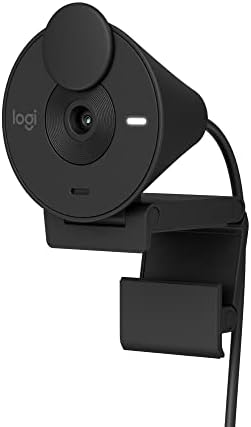
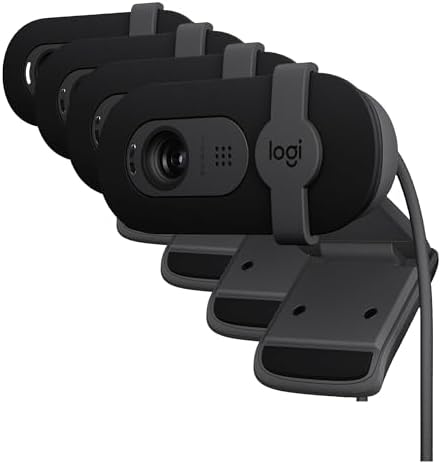
The Logitech Brio 101 sits at the accessible end of Logitech’s current lineup and serves a clear purpose: deliver reliable 1080p video with automatic light correction and a physical privacy shutter, at the lowest price in the Brio family.
The camera captures Full HD 1080p at 30fps with RightLight auto-exposure that adjusts to your lighting conditions automatically. There’s no manual adjustment required — it calibrates itself for the environment. The built-in noise-reducing microphone handles standard home office audio without picking up excessive background noise.
The physical privacy shutter is a notable inclusion at this price point — many webcams skip it entirely, making the Brio 101 worth considering over competitors that skip this feature. The USB-A connection is plug-and-play with full platform compatibility.
The Brio 101 is recommended for users who want a step up from their laptop camera without overthinking the decision. It lacks the glass optics of the C920x and the 2K resolution of the Anker C200, but for everyday Zoom calls in a reasonably lit home office, it delivers reliable, respectable performance from a brand with proven long-term support.
Key specs: 1080p/30fps, RightLight auto-correction, noise-reducing microphone, physical privacy shutter, USB-A, plug-and-play
What we love:
- Physical privacy shutter at an accessible price — a thoughtful inclusion
- RightLight auto-correction handles varied lighting without manual adjustment
- Proven Logitech reliability and long-term driver support
- True plug-and-play — zero configuration required
Worth knowing:
- Not the sharpest optics at this price compared to the C920x glass lens
- Standard field of view; no adjustment
- 1080p/30fps only
Verdict: The right choice for first-time webcam buyers who want Logitech reliability and a privacy shutter without spending much. A clean, no-nonsense entry point.
👉 Check price and availability on Amazon
Do You Actually Need More Than 1080p for Zoom Calls?
This question comes up constantly, so let’s be direct: no.
Zoom, Microsoft Teams, and Google Meet all cap live video delivery at 1080p. A 2K or 4K webcam will not appear higher resolution than a 1080p webcam to people on your calls. What a higher-resolution sensor can do is capture more detail that’s then displayed at 1080p — sometimes resulting in a slightly sharper, cleaner image — but the visible difference in a video call context is minor.
Where resolution does matter is local recording. If you record your own video locally for YouTube, course content, or presentations that will be viewed in full quality, 2K or 4K matters more. For daily Zoom calls only, 1080p is all you need.
The bigger image quality factors for video calls are lighting, autofocus quality, and sensor size — not resolution.
Tips for Better Zoom Calls Regardless of Your Webcam
Even the best webcam can only do so much if the fundamentals aren’t in place. These quick adjustments will improve your video call quality immediately:
Light your face, not your background. The most common mistake is having a bright window behind you, which makes the camera expose for the bright background and turns your face dark. Move so windows are in front of you or to your side. Even a basic LED desk lamp positioned to face you makes a dramatic difference.
Position the camera at eye level. Most built-in laptop cameras shoot upward at your face because the laptop sits on your desk. A webcam on your monitor at eye level is a more flattering, professional angle. If your monitor is low, a monitor stand or laptop riser can help.
Clean your background. Virtual backgrounds have become familiar but can look artificial and create artifacts around moving edges. A clean, neutral real background always looks more professional. Even a bookshelf or a plain wall works well.
Use your webcam’s native app. Most webcams ship with companion software (Logitech Options, AnkerWork, NexiGo app) that lets you adjust exposure, contrast, saturation, and field of view beyond Zoom’s own settings. A few minutes tuning these often produces noticeably better results than default auto settings.
Check your internet connection. A great webcam on a congested Wi-Fi connection will still look poor on the other end. For important calls, wired Ethernet or sitting close to your router significantly improves video stability.
Also Check:
10 Best Amazon Monitor Stands for Home Office Setup
Top 10 Amazon Desk Accessories for Work From Home
How to Order from Amazon: Complete Step-by-Step Guide in 2026
Frequently Asked Questions
Are all these webcams compatible with Zoom and Microsoft Teams?
Yes. Every webcam on this list is plug-and-play compatible with Zoom, Microsoft Teams, Google Meet, and FaceTime on both Windows and Mac. Some (Logitech C920S, Brio 300, Microsoft Modern Webcam) are specifically certified by those platforms, meaning they’ve been tested and verified for optimal performance.
Do I need a separate microphone for Zoom calls?
Not necessarily. The webcams on this list include built-in microphones that handle everyday Zoom calls adequately. If you’re in a quiet, well-treated space, a webcam mic is sufficient. For important client meetings, recorded content, or loud home environments, a dedicated USB microphone ($40–$80) will deliver noticeably better audio — typically cleaner, more natural voice reproduction without background noise.
Which webcam is best for a home office with poor lighting?
The Razer Kiyo is the most direct solution — its built-in ring light compensates for dim environments at the source. If you prefer not to use a ring light, the Anker PowerConf C200’s f/2.0 aperture handles low-light conditions better than most 1080p competitors.
Can I use these webcams on a Mac?
Yes. Every webcam on this list works on Mac without driver installation. The Logitech Brio 300’s USB-C connection is particularly convenient for MacBook users who want to avoid a USB-A adapter.
Should I buy a 4K webcam for Zoom calls?
There’s no practical benefit for live Zoom calls — the platform caps at 1080p. Save the money and put it toward better lighting or a dedicated microphone, which will produce more visible improvements for call quality.
Final Verdict
For most home office workers, the Logitech C920x or C920S remains the safest, most reliable choice under $80 — proven performance, glass optics, and broad compatibility without any configuration headaches.
If image sharpness is your priority and you want to squeeze extra quality out of your budget, the Anker PowerConf C200 is the 2K value leader. If you’re a Mac or USB-C user, the Logitech Brio 300 removes the adapter friction entirely. And if your home office is poorly lit, the Razer Kiyo’s built-in ring light is the most efficient fix for that specific problem.
Any of the 10 webcams on this list will produce dramatically better Zoom call quality than your built-in laptop camera. Start with your specific situation — lighting, connectivity, platform, and budget — and the right pick becomes clear.
Check current prices on Amazon before purchasing, as they fluctuate regularly and deals appear often on these popular models.
Disclosure: As an Amazon Associate, we earn from qualifying purchases at no extra cost to you. Our recommendations are based on research, verified buyer review analysis, and published testing data — not paid promotion.

MD.HASAN is an experienced SEO expert and amazon products review writer passionate about helping people find right products on amzon for buy without confusion. With 4 years of hands-on experience in content strategy and search engine optimization, he specializes in writing SEO-friendly blog posts that rank, engage, and convert.