
Affiliate disclosure: As an Amazon Associate, Tech Rig Review earns from qualifying purchases. Links on this page may be affiliate links, at no extra cost to you.
If you’ve ever ended a workday with a stiff neck, tight shoulders, or tired eyes, your monitor position is likely the culprit. Sitting too low, too high, or at the wrong angle puts chronic strain on your cervical spine — and most factory monitor stands simply don’t offer the adjustability you need. That’s where Amazon monitor stands come in.
The good news? Amazon has one of the widest selections of monitor stands on the planet — from simple $20 risers with storage drawers to fully articulating gas-spring arms that cost over $200. The challenge is cutting through the noise and finding the one that genuinely suits your desk size, monitor weight, workflow, and budget.
I spent dozens of hours cross-referencing user reviews, expert ratings, and product specifications to build this definitive 2026 list. Whether you’re outfitting a minimalist home office, a dual-screen developer setup, or a gamer’s battle station, one of these ten stands will transform how you work.
Table of Contents
How to Choose the Right Amazon Monitor Stand
Before jumping into the reviews, it helps to understand the key factors that separate a great monitor stand from one that ends up back in the box.
1. Type: Riser vs. Monitor Arm
Monitor risers sit directly on your desk surface, lifting your screen a fixed or adjustable distance. They’re usually more affordable, require no clamping, and often double as desk organizers with storage shelves or drawers. They’re the right choice for most casual users and renters who can’t drill into walls.
Monitor arms clamp or bolt to the back of your desk and offer full articulation — tilt, swivel, rotate, and move the screen in three dimensions. They free up significant desk real estate and allow truly ergonomic positioning, but they’re pricier, require a sturdy desk edge, and take longer to set up.
2. Weight and Screen Size Compatibility
Every stand has a maximum weight capacity and a screen size range. Modern 27-inch monitors can weigh anywhere from 8 to 14 lbs. Ultrawide 34-inch curved panels can push 16–20 lbs. Always match the stand’s rated capacity to your monitor’s actual weight — going over the limit causes sag, instability, and potential damage.
3. Height Adjustability Range
Ergonomics experts recommend the top of your monitor be at or slightly below eye level when sitting with a straight back. A stand with a wider height range gives you more flexibility, especially if you share the desk, switch between sitting and standing, or are building around an ergonomic chair.
4. VESA Compatibility
Most modern monitors have VESA mounting holes on the back — typically 75×75mm or 100×100mm patterns. Monitor arms require VESA compatibility. Risers do not. If you’re buying an arm, confirm your monitor supports VESA mounting before ordering.
5. Build Material and Stability
Steel and aluminum builds last longer and wobble less than plastic. For arms, a gas-spring or pneumatic mechanism holds your monitor in place without creeping downward over time. For risers, rubber or silicone feet prevent sliding. Weight matters — a heavier base generally means better stability.
6. Cable Management
Built-in cable clips and channels keep your workspace tidy. This is especially important for monitor arms, where loose cables can look messy and create tension on ports. Premium arms like Ergotron route cables along the arm cleanly.
7. Setup Difficulty
Some risers require no assembly — just unbox and place. Dual monitor arms can take 20–40 minutes. If you’re not comfortable with hex keys and tension adjustments, lean toward simpler risers or single-arm mounts.
Side-by-Side Comparison Table
| # | Product | Type | Max Screen | Max Weight | Best For |
|---|---|---|---|---|---|
| 1 | Ergotron LX | Monitor Arm | 34″ | 25 lbs | Premium / Standing Desk |
| 2 | Amazon Basics Riser | Riser | Any | 22 lbs | Budget / Students |
| 3 | VIVO STAND-V002O | Dual Arm | 32″ each | 19.8 lbs/arm | Dual-Screen Productivity |
| 4 | BONTEC Wooden Riser | Dual Riser | Dual monitors | 66 lbs total | Aesthetics / Styled Desks |
| 5 | HUANUO FlowLift | Monitor Arm | 32″ | 19.8 lbs | Best Value Arm |
| 6 | OPNICE Riser + Drawer | Riser + Organizer | Standard | Standard | Desk Organization |
| 7 | WALI GSMP001N | Monitor Arm | 34″ | 26.4 lbs | Large/Heavy Monitors |
| 8 | MOUNTUP Dual Stand | Dual Arm | 32″ each | 17.6 lbs/arm | Gaming / Dual Screen |
| 9 | WESTREE Rustic Riser | Dual Riser | Dual monitors | Large | Natural Aesthetic |
| 10 | NIFBANG Adjustable Riser | Adjustable Riser | Standard | Standard | Flexible Height + Storage |
The 10 Best Amazon Monitor Stands for Home Office
#1 — Ergotron LX Single Monitor Desk Mount Arm

- Broad compatibility: Fits single screens up to 34 inches diagonal and 7 to 25 pounds; compatible with VESA patterns 75×7…
- Versatile mounting options: Includes two-piece desk clamp and grommet mount to fit a variety of desk types; desk clamp a…
- Improved comfort: Easily raise your monitor up to 17.3 inches above your worksurface with 13 inches of lift; find your b…
🏆 Best Overall
Screen Size: Up to 34″ | Weight Capacity: 7–25 lbs | VESA: 75×75 / 100×100 | Warranty: 10 Years
If you’re willing to invest in the best, the Ergotron LX is the gold standard for single-monitor home office arms — and it has been for over a decade. This is the arm that professionals, standing desk enthusiasts, and ergonomics geeks consistently recommend above everything else.
The Ergotron LX offers an extraordinary range of motion: 25.7 inches of horizontal extension, 13 inches of vertical lift, full 360-degree rotation, and 75 degrees of tilt. That means you can position your screen at virtually any angle imaginable — directly facing you while sitting, pulled up higher when you’re at a standing desk, or rotated into portrait mode for coding or reading long documents.
The build quality is instantly noticeable. The polished aluminum construction feels premium compared to the plastic-heavy budget competition. Movements are smooth and controlled thanks to Ergotron’s patented Constant Force technology, which maintains tension without slipping. Setup takes about 20 minutes. Backed by a 10-year warranty, this is a buy-once-and-keep-forever piece of home office equipment.
✅ Pros:
- Exceptional range of motion and precision
- Premium polished aluminum build
- Supports monitors up to 34″ and 25 lbs
- Industry-leading 10-year warranty
- Smooth, tool-free repositioning after setup
❌ Cons:
- Premium price point (~$150–$200)
- Polished aluminum shows fingerprints
- Requires a sturdy desk edge
Best for: Professionals, standing desk users, anyone who wants the best ergonomic arm money can buy.
#2 — Amazon Basics Height Adjustable Monitor Stand Riser

- Clear Dimensions with Tapered Design: Top surface measures approx. 11.6 inches x 11 inches (W at center), with slightly …
- 3-Level Stackable Height Adjustment: Customize your setup with adjustable heights of 2.87 inches, 4.2 inches, and 4.8 in…
- Lightweight Yet Durable ABS Construction: Made from high-quality ABS plastic for a balance of strength and portability. …
💰 Best Budget Pick
Height Options: 3 Levels | Weight Capacity: Up to 22 lbs | Price: Under $20
For anyone who wants a no-fuss, wallet-friendly solution that still makes a real ergonomic difference, the Amazon Basics Monitor Stand Riser is the most sensible starting point. It’s not flashy — it’s functional, durable, and gets the job done at a price that’s impossible to argue with.
The stand features a 3-level stackable design, letting you choose from multiple height settings. Two sturdy columns with non-skid feet keep everything firmly in place even on smooth desktops. Beneath the platform sits an open storage area — perfect for parking your keyboard and mouse when not in use, storing a portable hard drive, or tucking away charging cables.
It’s made from ABS plastic, which won’t win any aesthetic awards, but the construction is solid and smooth-edged. It supports up to 22 lbs, covering the vast majority of consumer displays. Assembly takes about five minutes, making this ideal for students, first-time remote workers, or anyone who wants instant ergonomic improvement on a tight budget.
✅ Pros:
- Extremely affordable (under $20)
- Quick 5-minute setup — no tools needed
- Built-in keyboard and mouse storage shelf
- Non-skid feet for stability
- Supports up to 22 lbs
❌ Cons:
- Plastic construction feels less premium
- Only 3 fixed height positions
- No VESA mounting option
Best for: Students, budget-conscious remote workers, first-time home office setups.
#3 — VIVO Dual Monitor Desk Mount Stand (STAND-V002O)
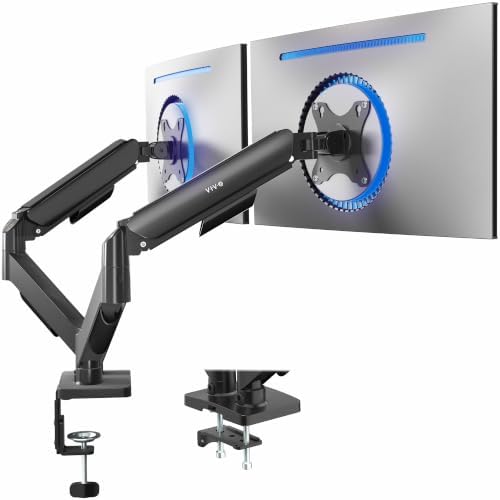
- Screen Compatibility: Universally compatible with most 17-inch to 32-inch flat and curved screens weighing from 4.4 lbs …
- Mechanical Spring Adjustment: Toolless monitor placement with perfect counterbalance presentation in all directions. Ple…
- Articulation, Swivel, & Tilt: The mounting brackets offer +90° to -90° tilt, 180° swivel, and 360° rotation for convenie…
🖥️🖥️ Best Dual Monitor Arm
Screen Size: 17″–32″ per arm | Weight Capacity: Up to 19.8 lbs per arm | VESA: 75×75 / 100×100 | Mounting: C-Clamp + Grommet
Running two monitors is one of the most impactful productivity upgrades you can make — but two monitors on a cramped desk quickly becomes a nightmare of dead angles, awkward heights, and cable tangles. The VIVO Dual Monitor Arm solves all of that cleanly.
Each independently articulating arm holds screens from 17 to 32 inches and up to 19.8 lbs, handling the vast majority of home office displays. Both arms offer full tilt, swivel, and 360-degree rotation, so you can set one monitor in landscape and one in portrait, or angle both inward for immersive viewing.
The steel construction is noticeably heavy-duty — this is not a flimsy arm that’ll sag after a few weeks. The dual C-clamp base also supports grommet installation and works with desks up to 3.5 inches thick. VIVO is one of the most trusted names in budget-to-mid-range monitor mounting hardware on Amazon, backed by tens of thousands of verified reviews.
✅ Pros:
- Full independent articulation on each arm
- Heavy-duty steel — no sag over time
- Frees up significant desk space
- Supports large 32″ monitors per arm
- Excellent value for a dual-arm setup
❌ Cons:
- Longer setup than a riser (30–40 min)
- Requires VESA-compatible monitors
- Not ideal for ultrawide screens
Best for: Dual-screen productivity setups, developers, and content creators.
#4 — BONTEC Dual Monitor Stand Riser with Storage

- DUAL MONITOR STAND WITH ADJUSTABLE LENGTH & ANGLE – This dual monitor stand riser adjusts from 31.5″ to 42.5″ to fit sma…
- ERGONOMIC MONITOR RISER FOR BETTER POSTURE – Raise two monitors to a more comfortable eye level with this monitor riser,…
- MULTIFUNCTIONAL DESKTOP ORGANIZER WITH LARGE STORAGE – This monitor stand with storage includes 3 spacious open compartm…
🪵 Best Wood Design
Capacity: Up to 66 lbs total | Build: Wood + Steel | Features: Adjustable length, angle, smartphone holder
If you’ve invested in a beautiful desk setup, a black plastic riser is going to look completely out of place. The BONTEC Dual Monitor Stand Riser is the solution — a genuinely attractive piece of desk furniture that also happens to be a serious, functional monitor stand.
The combination of warm wood surfaces and clean steel structural elements gives this riser a modern-minimal look that works equally well in home offices, creative studios, and corporate desks. It holds two monitors side by side, with adjustable length to accommodate setups of varying widths. A built-in smartphone holder keeps your phone propped at a glanceable angle, and the generous lower shelf holds keyboards, notebooks, and accessories neatly out of sight.
The impressive 66 lb capacity rating means it handles large 32-inch monitors and even small printers without any concern. The adjustable swivel angle on the surface lets you angle each side slightly toward your line of sight — meaningfully better than a perfectly flat fixed riser.
✅ Pros:
- Premium wood and steel aesthetic
- Generous 66 lb weight capacity
- Large storage shelf underneath
- Built-in smartphone holder
- Adjustable width and angle
❌ Cons:
- Fixed height (no vertical adjustment)
- Larger footprint needs a wide desk
- Pricier than basic plastic risers
Best for: Aesthetics-focused setups, styled home offices, creative professionals.
#5 — HUANUO FlowLift Single Monitor Arm

- Great Adaptability: This HUANUO single monitor arm fits 13-32 inch monitors, holds 4.4-19.8 lbs, suitable for VESA patte…
- Full Adjustable: This PC monitor stand can remain completely stable at any angle without any extra work. Compared with o…
- 80% Sturdier Than Others: At HUANUO, we focus on improving the strength and stability of our single monitor stand. The s…
⚡ Best Value Monitor Arm
Screen Size: 13″–32″ | Weight Capacity: 4.4–19.8 lbs | VESA: 75×75 / 100×100 | Mechanism: Gas Spring
HUANUO has quietly built one of the best reputations for mid-range monitor arms on Amazon, and the FlowLift Single Monitor Arm is their flagship single-screen offering. It delivers gas-spring adjustability and full articulation at roughly half the price of the Ergotron LX — making it the best value arm on this entire list.
The gas-spring mechanism makes height adjustment genuinely effortless: push your monitor up or pull it down with one finger, and it holds position reliably. Tilt, swivel, and rotation are all available, giving you nearly the same positional range as the Ergotron. Both C-clamp and grommet base options are included in the box.
HUANUO has earned the #1 Best Seller tag on Amazon in the monitor arm category, backed by close to 20,000 ratings averaging 4.6 out of 5 stars. At its price point, the FlowLift is nearly impossible to beat.
✅ Pros:
- Gas spring for effortless height adjustment
- Full tilt, swivel, and rotation
- Both C-clamp and the grommet included
- Amazon #1 Best Seller
- Half the cost of Ergotron LX
❌ Cons:
- Cable management not internal
- Plastic components on arm joints
- Not rated for monitors over 19.8 lbs
Best for: Budget-conscious users who want real arm flexibility without paying premium prices.
#6 — OPNICE Computer Monitor Stand Riser with Drawer & Pen Holders

- 【Ergonomic Design】:OPNICE newly releases the monitor stand for desk organizer! This computer stand elevates your monitor…
- 【Save Space】:This 2-Tier monitor stand with drawer and 2 hanging pen holders provides ample storage space to keep your o…
- 【Durable and Stable】:The metal computer stand is made of high quality material with sturdy construction, it can easily c…
🗂️ Best with Built-In Storage
Build: Wood + Metal | Features: Sliding drawer, 2 pen holders, keyboard shelf
Not every home office needs an articulating arm. If your goals are lifting your screen to a comfortable height AND eliminating desk clutter, the OPNICE Monitor Stand Riser is a hard-to-beat all-in-one package: monitor riser, drawer organizer, pen caddy, and keyboard shelf combined.
The sliding drawer underneath is deep enough to store sticky notes, earbuds, cables, or personal items you want off your desk but within reach. Two integrated pen holders sit on either side, keeping writing tools upright and accessible. The lower shelf creates a natural home for your keyboard when pushed back, instantly making your desk feel twice as large.
The wood and metal combination looks more expensive than it is. Available in black, it integrates cleanly into modern and industrial-style setups. For anyone who keeps losing their pen, has a cluttered desk, or wants a tidier workspace, this is an outstanding all-in-one upgrade.
✅ Pros:
- Built-in storage drawer for small items
- Two pen/pencil holders included
- Keyboard storage shelf underneath
- Clean wood and metal aesthetic
- Very affordable price
❌ Cons:
- Fixed height — no adjustment
- Drawer is shallow (not for large items)
- Single monitor only
Best for: People who want desk organization and monitor elevation in one purchase.
#7 — WALI Single Monitor Arm Mount (GSMP001N)

- Keep Your Desk Organized: By lifting screen off the desktop, this monitor arm opens up valuable space for your keyboard,…
- Wide Compatibility: WALI single monitor arm is designed to fit most flat or curved LCD/LED screens up to 34″, regular sc…
- Full Motion for Ergonomic Comfort: WALI single vesa monitor mount allows to extend your screen out by 19.3″ and raise th…
🔭 Best for Large & Heavy Screens
Screen Size: 13″–34″ | Weight Capacity: Up to 26.4 lbs | VESA: 75×75 / 100×100 | Motion: Full tilt, swivel, rotation
Large monitors are increasingly common in home offices — 32-inch 4K panels, wide-format curved screens, and ultrawide setups are all growing in popularity. Most budget arms aren’t rated to handle them safely. The WALI GSMP001N is one of the few affordable arms supporting screens up to 34 inches and 26.4 lbs — noticeably higher capacity than most competitors at this price.
WALI is a trusted brand in the mount category with a massive following on Amazon. This model offers full motion — tilt, swivel, and rotation — and works with standard VESA patterns. The arm installs via either desk clamp or grommet base and adjusts height along a central post. The arm maintains position well after tension is tuned, and cable management clips run along the arm to keep wires tidy.
✅ Pros:
- Supports heavy screens up to 26.4 lbs
- Compatible with monitors up to 34″
- Full tilt, swivel, rotation
- Highly reviewed WALI brand
- Budget-friendly for its weight capacity
❌ Cons:
- Not a gas spring (manual post adjustment)
- Cable management is basic clips only
- Not suited for very thin desktop edges
Best for: Users with large 27″–34″ monitors or heavier displays who need reliable arm support.
#8 — MOUNTUP Dual Monitor Stand for Desk

- Universal Monitor Desk Mount – The dual monitor mount fits flat and curved screens 4.4lbs – 17.6 lbs in weight and 17-32…
- Full Motion Monitor Arm – Provides flexible, independent positioning of both monitors in a clean aesthetic to complement…
- Quick Installation – MOUNTUP Dual Monitor Stand comes with assembly instructions. All hardware needed for installation. …
🎮 Best for Gaming Setups
Screen Size: Up to 32″ per arm | Weight Capacity: 4.4–17.6 lbs per arm | Mounting: C-Clamp + Grommet
Gaming setups demand a different kind of monitor stand. You need screens that can be repositioned quickly for different games, angled precisely for competitive viewing, or swept aside to make room for a controller or mousepad. The MOUNTUP Dual Monitor Stand delivers all of that with independent full-motion arms for two screens.
Each arm holds monitors from 22 to 32 inches and up to 17.6 lbs. The independent arm design means each screen can be positioned completely differently — one eye-level landscape for gameplay, one slightly lower for reference or streaming. Both C-clamp and grommet base options are included. Cable management clips run along each arm to help tame the cable chaos gaming setups are notorious for.
✅ Pros:
- Independent arms for each monitor
- Great for gaming or productivity dual setups
- Both clamp and grommet included
- Supports up to 32″ per arm
- Competitive price for a dual-arm setup
❌ Cons:
- Max 17.6 lbs per arm (not for very heavy panels)
- VESA compatibility required
- Setup takes 30–45 minutes
Best for: Gamers, streamers, and dual-screen home office users.
#9 — WESTREE Dual Monitor Stand Riser – Rustic Brown

- 【Monitor Stand for 2 Monitors】This stand is an ideal choice when you need computers to work together. Unique original de…
- 【Heavy Duty Stand for Computer】Monitor riser is designed with thick solid steel legs, its bearing load is very strong. W…
- 【Multifunctional Monitor Riser 】The monitor stand has powerful storage function of keeping the table clean.It can be use…
🌿 Best Natural / Warm Aesthetic
Build: Wood + Steel Frame | Finish: Rustic Brown | Features: Large storage shelf, holds 2 monitors
The biophilic design trend — bringing natural materials into workspaces to reduce stress and increase focus — is firmly mainstream now. The WESTREE Dual Monitor Riser leans into this aesthetic with a rustic brown wood finish and steel frame that immediately warms up any desk space.
Built to hold two monitors side by side, the wide platform provides a stable base for screens up to about 27 inches each. The large lower shelf accommodates a full-size keyboard, a trackpad, a small plant, or any combination of desk accessories. The rustic brown finish pairs especially well with natural wood desk surfaces, bamboo accessories, and dark-themed minimalist setups.
This is a fixed-height riser, but for users who already know their ideal monitor height and want something beautiful and stable, the WESTREE is one of the most visually appealing monitor risers on Amazon at this price.
✅ Pros:
- Warm rustic aesthetic — stands out from generic risers
- Holds two monitors comfortably
- Very large lower storage shelf
- Sturdy wood and steel construction
❌ Cons:
- No height adjustment
- Rustic style won’t suit all aesthetics
- Larger footprint needs a wide desk
Best for: Natural, warm, or rustic-themed home office setups.
#10 — NIFBANG Adjustable Monitor Stand Riser with Drawer & Phone Holder

- FOUR ADJUSTABLE HEIGHTS, NO INSTALLATION REQUIRED: This monitor stand can be adjusted to 4 heights with the buttons on b…
- 50LBS WEIGHT BEARING, WIDELY APPLICABLE:The desktop riser is designed with solid wood thickened panel and thickened supp…
- HIDDEN PHONE/TABLET STAND: We thoughtfully designed a hidden phone and tablet holder on the computer screen stand for de…
🔧 Best Adjustable Riser
Height Range: 5.7″–6.5″ | Features: Continuous adjustment, storage drawer, phone holder
Most risers offer fixed height positions. The NIFBANG Adjustable Monitor Stand Riser bridges the gap between a basic riser and a full arm by offering continuous height adjustment — a meaningful range that lets you fine-tune your monitor’s position to exactly where you want it, rather than settling for the closest fixed step.
Beyond height adjustment, the NIFBANG includes a sliding storage drawer for small items and a built-in phone holder that keeps your device propped up at a convenient angle. The platform handles monitors up to about 27–32 inches and feels more substantial than budget plastic risers.
This is a great option for users who want more flexibility than a fixed riser but aren’t ready to commit to a clamp-style arm — or who work at a desk where clamping isn’t practical.
✅ Pros:
- Continuous height adjustment — not fixed steps
- Built-in drawer for small storage
- Integrated phone/tablet holder
- No clamping or installation required
- Good value for the feature set
❌ Cons:
- Narrower height range than a full arm
- Single monitor only
- Not VESA compatible
Best for: Users who want adjustable height plus storage without installing a clamp arm.
Which Amazon Monitor Stand Is Right for You?
🏠 First-time Home Office Worker
Start with the Amazon Basics Monitor Stand Riser (#2). It’s cheap, effective, and delivers instant ergonomic improvement. If you find yourself wanting more flexibility after a few weeks, upgrade to the HUANUO FlowLift arm.
💼 Serious Remote Work / Long Hours
Go straight to the Ergotron LX (#1). If you’re spending 6–10 hours a day at a desk and you value precision ergonomics, the investment pays for itself in comfort. Pair it with a standing desk for the ultimate setup.
🖥️🖥️ Dual Monitor Power User
The VIVO Dual Arm (#3) is the practical choice for most two-screen setups. If budget is a concern, the BONTEC wooden riser (#4) holds two monitors without any installation overhead.
🎨 Aesthetics-Focused Setup
The BONTEC Wooden Stand (#4) and WESTREE Rustic Riser (#9) are your best options. Both look like intentional design choices rather than office supply afterthoughts.
🎮 Gaming Setup
The MOUNTUP Dual Arm (#8) gives you two independently articulating screens with enough range for every genre of game.
🗂️ Cluttered Desk Problem
The OPNICE Riser with Drawer (#6) or the NIFBANG Adjustable Riser (#10) both double as desk organizers — lifted monitor and hidden storage in one purchase.
Frequently Asked Questions
What is the difference between a monitor stand riser and a monitor arm?
A monitor stand riser sits on your desk surface and lifts your screen by a fixed or limited adjustable height with no installation needed. A monitor arm clamps to the back of your desk and offers full 3D articulation — tilt, swivel, height, and reach. Arms are more flexible and free up more desk space but cost more and require VESA-compatible monitors.
How do I know if my monitor is VESA compatible?
Check the back of your monitor for a grid of four threaded holes. If they exist, measure the distance between them — most are either 75×75mm or 100×100mm. You can also check your monitor’s manual or its product page. Monitors without these holes cannot use a VESA arm mount.
What height should my monitor be at?
The general ergonomic guideline is to position the top of your monitor screen at or just slightly below your eye level when sitting with a straight back and your feet flat on the floor. This reduces neck flexion and long-term strain. If you use bifocals, position the monitor 1–2 inches lower than standard recommendations.
Can monitor stands hold ultrawide monitors?
Most standard risers can physically support ultrawide monitors as long as the weight is within rated capacity. For monitor arms, you specifically need models rated for ultrawide screens. The WALI GSMP001N (#7) supports screens up to 34 inches and 26.4 lbs, making it suitable for most ultrawides. For 49-inch super-ultrawides, look for specialized heavy-duty arms.
Is the Ergotron LX worth the price?
For daily home office use, yes — especially if you use a standing desk or spend long hours at your screen. The Ergotron LX’s 10-year warranty, precision build, and smooth motion make it a long-term investment that outlasts multiple desk setups. If budget is tight, the HUANUO FlowLift offers similar functionality for significantly less.
Can I use a monitor stand on a glass desk?
Monitor risers can be placed on glass desks since they simply sit on the surface. Clamp-style monitor arms are generally not recommended for glass desktops as clamping pressure can crack or chip glass. Some arms offer grommet mounting as an alternative, which requires drilling a hole in the desk.
Do monitor arms work with standing desks?
Yes — monitor arms pair exceptionally well with sit-stand desks. When you raise the desk to standing height, the arm allows you to simultaneously reposition your monitor for the new eye level. This is a primary reason ergonomists recommend pairing a quality arm like the Ergotron LX with a height-adjustable standing desk.
Also Check:
Top 10 Amazon Desk Accessories for Work From Home
7 Best Amazon Laptop Stands for Better Posture in Under 20$
How to Order from Amazon: Complete Step-by-Step Guide in 2026
Final Verdict
The right Amazon monitor stand depends entirely on your budget, workspace, and how much flexibility you actually need day-to-day.
For most home office workers, the Ergotron LX is the best single investment you can make in long-term desk ergonomics. Its build quality, range of motion, and decade-long warranty are unmatched. If that’s out of range, the HUANUO FlowLift delivers 90% of the experience at half the cost.
For the simplest possible upgrade without installation complexity, the Amazon Basics Riser is the most accessible starting point. If you want that same concept with better aesthetics and storage, the OPNICE Riser with Drawer or the BONTEC Wooden Stand step things up beautifully.
Running two screens? The VIVO Dual Arm is the most versatile full-motion option, while the WESTREE or BONTEC risers handle dual-screen setups without any desk installation at all.
Whatever your setup, one thing is clear: your posture, your focus, and your comfort all improve meaningfully when your monitor is at the right height. Any of the ten options above will get you there.

MD.HASAN is an experienced SEO expert and amazon products review writer passionate about helping people find right products on amzon for buy without confusion. With 4 years of hands-on experience in content strategy and search engine optimization, he specializes in writing SEO-friendly blog posts that rank, engage, and convert.


