
Affiliate disclosure: As an Amazon Associate, Tech Rig Review earns from qualifying purchases. Links on this page may be affiliate links, at no extra cost to you.
Looking for the best scanners on Amazon? We compared 10 document and photo scanners by specs, features, and buyer feedback to help you pick the right one.
Paper piles up fast. Tax forms, receipts, contracts, school papers, and old family photos all end up in drawers and boxes. A good scanner turns that clutter into files you can search, back up, and share in seconds.
The hard part is choosing one. The best scanners on Amazon range from tiny USB-powered models to fast office machines with 100-sheet feeders. Some are built for documents. Others are built for photos. Pick the wrong type and scanning becomes a chore.
This guide compares 10 scanners that were listed on Amazon at the time of writing. We looked at speed, feeder size, connection type, size, software, and the patterns that show up in buyer feedback. Then we matched each scanner to the person who will get the most from it.
One honest note: we did not buy or hand-test these scanners. This is a research-based comparison built from product listings, manufacturer specs, and feedback patterns on retail pages. That way, we only tell you what we can back up.
If you are building a home office around your new scanner, our guides to choosing the best standing desk and the best USB flash drives on Amazon can help you finish the setup. Prefer a laptop that handles scanning software smoothly? See our look at the best Intel Core i5 Lenovo laptops on Amazon.
Table of Contents
Quick Comparison Table
| Product Name | Best For | Key Feature | Buyer Sentiment | Affiliate Link |
|---|---|---|---|---|
| ScanSnap iX1300 | Best overall for small home offices | Compact, two-sided, Wi-Fi or USB | Consistently well-rated on Amazon | Check Price on Amazon |
| Epson WorkForce ES-580W | Best wireless scanner for busy offices | 100-sheet feeder and touchscreen | Rated highly among buyers in this category | Check Price on Amazon |
| ScanSnap iX2500 | Best premium pick | Fast 45 ppm scanning and large touchscreen | Well-regarded newer flagship | Check Price on Amazon |
| Epson WorkForce ES-400 II | Best wired desk scanner | 50-sheet feeder with double-feed detection | Well-established and trusted | Check Price on Amazon |
| Canon imageFORMULA R30 | Best plug-and-scan setup | Scans with no software install | Positive feedback on easy setup | Check Price on Amazon |
| Epson WorkForce ES-C220 | Best compact two-sided scanner | Small footprint with vertical paper path | Positive feedback on size and speed | Check Price on Amazon |
| Brother DS-740D | Best portable two-sided scanner | USB-powered duplex scanning | Positive feedback on portability | Check Price on Amazon |
| Brother DS-640 | Best budget-friendly portable | Light, pocket-size, USB-powered | Popular choice for travel | Check Price on Amazon |
| Epson Perfection V39 II | Best flatbed for photos and books | 4800 dpi optical resolution | Well-regarded for photo detail | Check Price on Amazon |
| Epson FastFoto FF-680W | Best for big photo archives | One photo per second at 300 dpi | Praised for speed on clean photos | Check Price on Amazon |
How We Picked These 10 Scanners
We wanted a list that covers real needs, not ten copies of the same device. Each pick had to pass a few simple checks:
- Listed on Amazon.com with a current product page
- From a known brand with solid support and software
- Different from the others in size, speed, scan type, or price tier
- Clear specs that we could confirm from the listing or the maker
We also dropped models that appeared discontinued or hard to find. Stock changes often on Amazon, so always check the live listing before you buy.
1. ScanSnap iX1300 — Best Overall for Small Home Offices

- FITS SMALL SPACES AND STAYS OUT OF THE WAY. Innovative space-saving design to free up desk space, even when it’s being u…
- SCAN DOCUMENTS, PHOTOS, CARDS, AND MORE. Handles most document types, including thick items and plastic cards. Exclusive…
- GREAT IMAGES EVERY TIME, NO EXPERIENCE REQUIRED. A single touch starts fast, up to 30ppm duplex scanning with automatic …
Best For: Home offices that want a small, fast, two-sided scanner without a big setup.
The ScanSnap iX1300 is a compact document scanner that fits on a crowded desk. It scans both sides of a page in one pass. You can connect it by Wi-Fi or by USB, so it works with a laptop or on its own network.
It also handles more than plain paper. The listing says it scans documents, photos, and receipts. A feeder holds a small stack, and a manual feed path handles odd items.
For most people, this is the sweet spot. It is quick enough for weekly paperwork, small enough to store in a drawer, and simple enough that you will actually use it. If you want a no-fuss scanner for bills, forms, and receipts, start here.
Key Specs
| Feature | Details |
|---|---|
| Scan type | Two-sided, color document, photo, and receipt |
| Speed | 30 ppm / 60 ipm (per manufacturer comparison) |
| Connection | Wi-Fi and USB (USB cable included) |
| Feeder | Auto document feeder plus manual feeder |
| Sheet capacity | 20 sheets (per listing) |
| Resolution | 600 dpi, 48-bit color (per listing) |
| Size and weight | About 4.5″ x 11.7″ x 3.3″, 4.4 lb |
Pros and Cons
| Cons | Pros |
|---|---|
| • Small 20-sheet feeder means stopping for big stacks • Not the fastest scanner on this list • Higher price tier than basic portable models | • Compact and easy to store • Wi-Fi and USB connection • Two-sided scanning in one pass • Handles receipts and photos too |
Buyer Sentiment: Consistently well-rated on Amazon.
What Buyers Are Saying
The iX1300 has been a regular on Amazon’s document scanner best-seller lists. Feedback tends to praise the small size and simple one-touch scanning. Some buyers mention that very large batches feel slow because of the small feeder.
2. Epson WorkForce ES-580W — Best Wireless Scanner for Busy Offices

Best For: Busy home offices that scan large stacks and want to scan without a computer.
The Epson WorkForce ES-580W is built for volume. Its feeder holds 100 sheets, so you can load a thick pile of paperwork and walk away. It scans both sides at once and connects by Wi-Fi or USB.
The 4.3-inch touchscreen is the real selling point. You can scan straight to a USB drive or a cloud account without opening your computer. That makes it handy in a shared office or a home where several people scan.
This model suits people who scan often. If you handle client files, tax paperwork, or school forms every week, the big feeder saves time. It costs more than small portable models, but it handles heavier use.
Key Specs
| Feature | Details |
|---|---|
| Scan type | Two-sided color document scanning |
| Speed | 35 ppm / 70 ipm |
| Connection | Wi-Fi and USB |
| Feeder | 100-sheet auto document feeder |
| Screen | 4.3-inch touchscreen |
| Resolution | 600 dpi optical |
| Extras | Scan to USB drive and cloud; TWAIN driver included |
Pros and Cons
| Cons | Pros |
|---|---|
| • Bigger and heavier than compact scanners • Needs more desk space • Overkill for light, occasional scanning | • Large 100-sheet feeder • Touchscreen lets you scan without a PC • Fast two-sided scanning • Scan to USB or cloud |
Buyer Sentiment: Rated highly among buyers in this category.
What Buyers Are Saying
Reviews we found often point to the large feeder, fast speed, and easy touchscreen. Buyers who scan large batches say it saves a lot of time. A few note that it takes up more room than a compact model.
3. ScanSnap iX2500 — Best Premium Pick

- OUR MOST ADVANCED SCANSNAP. Large touchscreen, fast 45ppm double-sided scanning, 100-sheet document feeder, Wi-Fi and US…
- CUSTOMIZABLE. SHARABLE. Select personalized profiles from the touchscreen. Send to PC, Mac, mobile devices, and clouds. …
- STABLE WIRELESS OR USB CONNECTION. Built-in Wi-Fi 6 for the fastest and most secure scanning. Connect to smart devices o…
Best For: Power users who want speed, a big screen, and cloud scanning in one machine.
The ScanSnap iX2500 is the top ScanSnap model. The listing calls it the upgraded replacement for the older iX1600, which is now discontinued. It scans up to 45 pages per minute, both sides at once, and holds 100 sheets.
A 5-inch touchscreen sits on the front. You can pick a scan profile and send files to the cloud without a computer. It connects by Wi-Fi or USB-C, so you can place it where it fits best.
This scanner is for people who scan every day. A small law office, a bookkeeper, or a family with years of paper to clear will all feel the speed. If you only scan a few pages a month, a smaller model will do the job for less.
Key Specs
| Feature | Details |
|---|---|
| Scan type | Two-sided color documents, photos, receipts |
| Speed | 45 ppm / 90 ipm |
| Connection | Wi-Fi and USB-C |
| Feeder | 100-sheet auto document feeder |
| Screen | 5-inch touchscreen |
| Extras | ScanSnap Cloud; receipt guide included |
| Software | Kofax Power PDF license (per manual) |
Pros and Cons
| Cons | Pros |
|---|---|
| • Premium price tier • More machine than light users need • Larger footprint than compact models | • Very fast two-sided scanning • Large 5-inch touchscreen • 100-sheet feeder • Cloud scanning without a computer |
Buyer Sentiment: Well-regarded newer flagship from a respected brand.
What Buyers Are Saying
This is a newer listing, so long-term feedback is still growing. Early patterns point to speed and the clear touchscreen as the main wins. Check recent reviews on the live page for the latest software notes.
4. Epson WorkForce ES-400 II — Best Wired Desk Scanner

- FAST DOCUMENT SCANNING — Document scanner with feeder allows you to speed through stacks with a 50-sheet Auto Document F…
- INTUITIVE, HIGH-SPEED SOFTWARE — Quickly scan with this desktop document scanner; Epson ScanSmart Software lets you easi…
- SEAMLESS INTEGRATION — Easily incorporate your data into most document management software with the included TWAIN drive…
Best For: Offices that want a steady, wired scanner with smart paper handling.
The Epson WorkForce ES-400 II is a reliable desktop scanner for steady work. It has a 50-sheet feeder and scans both sides in one pass. It connects by USB, which keeps setup simple and stable.
One feature stands out: ultrasonic double-feed detection. It helps catch two sheets that stick together, so you do not lose pages in a batch. The scanner also uses auto-crop, blank page skip, and skew correction to clean up each scan.
It can scan long pages too. Epson lists a maximum length of 240 inches at 200 dpi. If you want a no-frills wired scanner that handles daily work, this is a strong pick. It lacks Wi-Fi and a touchscreen, which keeps it simpler and a bit easier on the budget than the ES-580W.
Key Specs
| Feature | Details |
|---|---|
| Scan type | Two-sided color document scanning |
| Speed | 35 ppm / 70 ipm |
| Connection | USB 3.0 |
| Feeder | 50-sheet auto document feeder |
| Resolution | 600 dpi optical, 1200 dpi interpolated |
| Paper handling | Ultrasonic double-feed detection |
| Software | Epson ScanSmart; TWAIN driver included |
Pros and Cons
| Cons | Pros |
|---|---|
| • No Wi-Fi or touchscreen • Needs a computer to scan • Bulkier than compact scanners | • Smart double-feed detection • Fast two-sided scanning • 50-sheet feeder • Image clean-up tools built in |
Buyer Sentiment: Well-established and trusted in this category.
What Buyers Are Saying
Feedback on Epson’s ES series often praises steady paper feeding and easy software. Buyers who want a plain desk scanner tend to like the simple USB setup. Some wish it had wireless scanning, which is why the ES-580W exists.
5. Canon imageFORMULA R30 — Best Plug-and-Scan Setup

- Stay organized: Easily convert your paper documents into searchable digital formats
- Device Embedded Software: Scan with ease using powerful software embedded directly in the device. It requires no install…
- Easy Setup: Simply connect to your computer using the supplied USB cable
Best For: People who want to plug in and scan with almost no setup.
The Canon imageFORMULA R30 is made for people who dislike software installs. Canon says it works with plug-and-scan. You connect the USB cable, and built-in software called CaptureOnTouch Lite lets you start.
It scans both sides in one pass and has a 60-sheet feeder. That is a solid size for home offices and small businesses. It also handles different items in one batch, like business cards and regular paper.
The R30 is compact for a feeder scanner, at about 9.65 by 11.54 inches. That helps on a small desk. If you share a computer or move between machines, the plug-and-scan style is a big plus.
Key Specs
| Feature | Details |
|---|---|
| Scan type | Two-sided color document scanning |
| Speed | Up to 25 ppm duplex (per B&H listing) |
| Connection | USB |
| Feeder | 60-sheet auto document feeder |
| Resolution | 600 dpi |
| Setup | Plug-and-scan; software built in |
| Size | About 9.65″ x 11.54″ x 9.88″ |
Pros and Cons
| Cons | Pros |
|---|---|
| • No Wi-Fi or touchscreen • Slower than the fastest models here • Upright design needs some vertical space | • Easy plug-and-scan setup • 60-sheet feeder • Handles mixed paper types • Compact desk footprint |
Buyer Sentiment: Positive feedback on easy setup.
What Buyers Are Saying
Reviews we found highlight how fast it is to get started. Buyers like that scanning works without a long software install. Some want faster speeds or wireless, which are not part of this model.
6. Epson WorkForce ES-C220 — Best Compact Two-Sided Scanner

- Ultra compact space-saving design — saves 60% of desk space (1) in virtually any environment
- Quickly scan two sides at once — single-step technology captures both sides of a sheet of paper in one pass as fast as 3…
- Easily scan in batches — robust 20-page Auto Document Feeder accommodates stacks of paper of varying sizes
Best For: Tight desks that still need two-sided scanning.
The Epson WorkForce ES-C220 is small, but it does not feel like a toy. It has a 20-page feeder and scans both sides at once at up to 30 pages per minute. A vertical paper path keeps the footprint small.
It handles many item types. Epson says it can scan standard paper, cards, and passports. Maximum page length is 120 inches. It connects by USB-C, which is handy if your laptop only has USB-C ports.
Think of it as the middle ground. It is smaller than the ES-400 II and faster than basic portable scanners. Retailers list a daily duty cycle of 3,500 pages, which suggests it can handle regular use in a small office.
Key Specs
| Feature | Details |
|---|---|
| Scan type | Two-sided color document scanning |
| Speed | 30 ppm / 60 ipm |
| Connection | USB 2.0 Type-C |
| Feeder | 20-page auto document feeder |
| Resolution | 600 dpi optical, 1200 dpi interpolated |
| Page size | Up to 8.5″ x 120″ |
| Software | Epson ScanSmart |
Pros and Cons
| Cons | Pros |
|---|---|
| • Only a 20-page feeder • No Wi-Fi • Not a photo scanner | • Very small footprint • Two-sided scanning in one pass • USB-C connection • Scans cards and passports too |
Buyer Sentiment: Positive feedback on size and speed.
What Buyers Are Saying
One retailer review called it a compact and fast document scanner, but not a high-resolution photo scanner. That matches the listing. Buyers who need small size and speed seem to like it.
7. Brother DS-740D — Best Portable Two-Sided Scanner

- FAST SPEED AND DUPLEX SCANNING – Scan single and double-sided documents in a single pass at up to 16 ppm(1). Color scann…
- ULTRA COMPACT – At less than 1 foot in length you can fit this device virtually anywhere (a bag, a purse, a pocket). The…
- READY WHENEVER YOU ARE – The DS-740D is powered via an included micro USB 3. 0 cable allowing you to use it even where t…
Best For: Travelers and mobile workers who need two-sided scanning on the go.
The Brother DS-740D is a small scanner that scans both sides of a page in one pass. It weighs about 1.4 pounds and runs on USB power, so you do not need a wall outlet. That makes it easy to toss in a laptop bag.
Brother adds a Desk Saving Design lid. You open it to cut the space needed on your desk. The scanner can also handle receipts, business cards, plastic ID cards, and long pages.
It scans at up to 16 pages per minute. That is slower than desktop models, but it is fine for light jobs. Note that it feeds one sheet at a time, so it is not the best choice for big stacks. B&H also says it is not recommended for scanning photos.
Key Specs
| Feature | Details |
|---|---|
| Scan type | Two-sided color document scanning |
| Speed | Up to 16 ppm |
| Connection | USB (micro USB 3.0 cable included) |
| Feeder | Single-sheet feed |
| Resolution | 600 x 600 dpi optical |
| Weight | About 1.4 lb |
| Software | Document management and OCR suite included |
Pros and Cons
| Cons | Pros |
|---|---|
| • Feeds one sheet at a time • Slower than desktop models • Not made for photos | • Two-sided scanning in a small body • USB-powered and light • Desk Saving Design lid • Scans cards and receipts |
Buyer Sentiment: Positive feedback on portability.
What Buyers Are Saying
Retailer reviews call it compact and easy to use. Buyers like that duplex scanning saves them from flipping pages. Some say a single-sheet feed is the main limit for bigger jobs.
8. Brother DS-640 — Best Budget-Friendly Portable

- FAST SPEEDS – Scans color and black and white documents a blazing speed up to 16ppm (1). Color scanning won’t slow you d…
- ULTRA COMPACT – At less than 1 foot in length and only about 1. 5lbs in weight you can fit this device virtually anywher…
- READY WHENEVER YOU ARE – The DS-640 mobile scanner is powered via an included micro USB 3. 0 cable allowing you to use i…
Best For: Light scanning on the go, like receipts, forms, and ID cards.
The Brother DS-640 is the simpler sibling of the DS-740D. It is less than a foot long and weighs about 1.5 pounds. It runs from a USB cable, so it needs no power adapter.
Brother says it scans color and black-and-white pages at up to 16 pages per minute. It scans one side at a time, which is why it sits lower in price and complexity. It also comes with a software suite for OCR and document management.
This is a good pick for students, field workers, and anyone who scans a few pages at a time. If you often scan both sides of a page, step up to the DS-740D. Our research also found a similar Brother model with USB-C called the DS-640e. Check the listing to see which version fits your cables.
Key Specs
| Feature | Details |
|---|---|
| Scan type | One-sided color and mono scanning |
| Speed | Up to 16 ppm |
| Connection | USB (micro USB 3.0 cable) |
| Feeder | Single-sheet feed |
| Size and weight | Under 1 ft long, about 1.5 lb |
| Software | OCR and document management suite included |
| Check on listing | Exact resolution and seller details |
Pros and Cons
| Cons | Pros |
|---|---|
| • One-sided scanning only • Single-sheet feed • Not suited to big batches | • Pocket-size and light • USB-powered • Simple to use • Budget-friendly portable option |
Buyer Sentiment: A popular choice for travel and light use.
What Buyers Are Saying
The Amazon page has shown strong recent sales activity, which points to steady demand. Feedback patterns we found focus on small size and easy USB power. As always, check recent reviews and the seller on the live listing before you buy.
9. Epson Perfection V39 II — Best Flatbed for Photos and Books

- CLEAR, DETAILED PHOTO SCANS — Achieve stand-out image clarity and detail with the Epson Perfection Scanner’s 4800 dpi op…
- IMAGE AND DOCUMENT SCANNER — The versatility you need; Jumpstart your home and office projects with this compact and lig…
- ENHANCED SCANNING — Boost your scanning capability and creative projects by seamlessly stitching oversized images togeth…
Best For: Scanning photos, artwork, books, and thick items that cannot go through a feeder.
The Epson Perfection V39 II is a flatbed scanner. You lift the lid, place your item on the glass, and scan. That is the gentle way to scan photos, old letters, or pages in a bound book.
It offers 4800 dpi optical resolution, which helps when you want to enlarge a photo. A high-rise, removable lid fits thick items. The scanner is USB-powered, includes a kickstand for upright storage, and weighs about 3.1 pounds.
It also has Easy Photo Fix for faded color. It can turn scans into editable Word, Excel, or PowerPoint files with OCR. The trade-off is speed and workflow. There is no feeder, so scanning a long document means placing each page by hand.
Key Specs
| Feature | Details |
|---|---|
| Scan type | Flatbed color photo and document |
| Optical resolution | 4800 dpi |
| Scan area | Up to 8.5″ x 11.7″ |
| Connection | USB (also powers the scanner) |
| Speed | About 10 seconds for a letter page at 300 dpi |
| Extras | Easy Photo Fix, kickstand, removable lid |
| Software | Epson ScanSmart |
Pros and Cons
| Cons | Pros |
|---|---|
| • No feeder for stacks of paper • Slower for long documents • Scans one side at a time | • High detail for photos • Gentle on delicate items • Handles books and thick items • USB-powered and compact |
Buyer Sentiment: Well-regarded for photo detail and ease of use.
What Buyers Are Saying
A lab-style review we found praised its photo clarity and color accuracy. The same review said it is best for small, occasional jobs because it has no feeder. Buyers who need only a few photo scans per month seem to like it most.
10. Epson FastFoto FF-680W — Best for Big Photo Archives
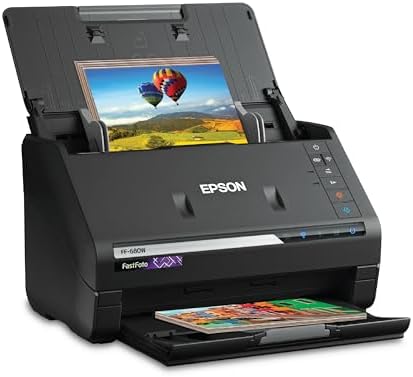
- HIGH-SPEED PERSONAL PHOTO SCANNER¹ — Scan thousands of photos as quickly as 1 photo per second at 300 dpi ²; Further inc…
- PRESERVE YOUR PRICELESS PHOTOS — Photo scanner for transforming old pictures to digital fast; Restore, organize, protect…
- SHARE STORES FOR FUTURE GENERATIONS — After scanning your photos with this Epson FastFoto scanner, use the Epson FastFot…
Best For: Families with hundreds or thousands of printed photos to digitize.
The Epson FastFoto FF-680W is built for photo piles. Epson says it scans about one photo per second at 300 dpi. You load a stack in the feeder, and it scans fast, front and back.
It connects by Wi-Fi or USB 3.0. FastFoto software can auto-enhance photos, restore color, and fix red-eye. It also handles photos up to 8 by 10 inches, including Polaroid prints, and panoramic items up to 36 inches long.
It scans documents too, at up to 45 pages per minute. But its real strength is the photo feeder. One caution from retailer reviews: it works best with clean photos in good shape. Fragile or sticky photos may jam, and one reviewer said USB works better than wireless.
Key Specs
| Feature | Details |
|---|---|
| Scan type | Two-sided photo and document scanning |
| Photo speed | About 1 photo per second at 300 dpi |
| Document speed | 45 ppm / 90 ipm |
| Connection | Wi-Fi and USB 3.0 |
| Resolution | 600 dpi optical, 1200 dpi interpolated |
| Photo handling | Up to 8″ x 10″, including Polaroid prints |
| Software | FastFoto with auto-enhance and color restoration |
Pros and Cons
| Cons | Pros |
|---|---|
| • Premium price tier • Fragile photos may jam • Wireless can be less reliable than USB | • Very fast photo scanning • Scans both sides of photos • Auto-enhance and color restore • Also scans documents quickly |
Buyer Sentiment: Praised for speed on clean, standard photos.
What Buyers Are Saying
Retailer reviews describe it as a time saver for large photo collections. One buyer reported scanning thousands of photos with ease. Others advise using USB and starting with photos in good condition.
How to Choose the Right Scanner
Picking a scanner is easier when you answer a few plain questions first. Here is what to weigh.
1. What will you scan most?
This is the biggest decision. Documents like bills, forms, and contracts do best on a sheet-fed scanner with a feeder. Photos, books, and fragile items do best on a flatbed. If you have a large photo archive, a photo feeder like the FastFoto saves hours.
2. How many pages at a time?
Look at the feeder size. A 20-sheet feeder suits light use. A 50- to 100-sheet feeder suits weekly batches. If you scan one page at a time, a single-sheet portable scanner is enough.
3. One side or both sides?
Two-sided, or duplex, scanning captures both sides in one pass. It saves time and prevents missed pages. If most of your papers are two-sided, make duplex a must-have.
4. How do you want to connect?
USB is simple and steady. Wi-Fi lets you place the scanner anywhere and scan from several devices. A touchscreen lets you scan to a USB drive or the cloud without a computer.
5. How much desk space do you have?
Compact models like the ScanSnap iX1300 and Epson ES-C220 fit tight desks. Portable models like the Brother DS-740D slide into a bag. Bigger feeder scanners need more room.
6. What does the software do?
Good software turns paper into searchable PDFs with OCR. It can also name files, crop pages, and remove blank pages. Check which apps are included and whether they work on your Windows or Mac system.
7. Where will you save and back up files?
Scanning is only half the job. Save files in a clear folder system and keep a backup. A fast USB drive, a cloud account, or both will do. For long-term photo saving, the Library of Congress offers helpful advice on personal digital archiving.
8. Do you need records for taxes or business?
Many people scan receipts and tax papers. The IRS explains how long to keep records, which helps you decide what to scan and keep. For exact specs on a top-tier model, the maker’s page for the ScanSnap iX2500 lists details like speed and connections.
Quick match guide
- Small home office, mixed paperwork: ScanSnap iX1300
- Big stacks, wireless, touchscreen: Epson ES-580W or ScanSnap iX2500
- Simple wired desk scanner: Epson ES-400 II
- No-software setup: Canon imageFORMULA R30
- Tight desk: Epson ES-C220
- Travel and mobile work: Brother DS-740D or DS-640
- Photos and books: Epson Perfection V39 II
- Large photo collections: Epson FastFoto FF-680W
Simple Tips for Better Scans
A good scanner helps, but a few habits make every scan cleaner. These tips apply to almost every model on this list.
Prep your pages first
Remove staples, paper clips, and sticky notes before you scan. Small metal pieces can scratch the scanner or jam the feeder. Flatten folded corners, too. Smooth pages feed more evenly and scan straighter.
Start with 300 dpi for documents
Most paperwork looks sharp at 300 dpi. Higher settings make bigger files and slow the scan, with little gain for plain text. Save the higher settings for photos you plan to enlarge or print.
Keep the glass and rollers clean
Dust and ink can leave lines on your scans. Wipe the scan glass with a soft, dry cloth, and follow the maker’s steps for cleaning feeder rollers. Many scanners also show a dirt warning in their software, so watch for it.
Use a clear file name system
Name files so you can find them in seconds. A simple pattern works well, such as year, month, and subject. For example, use “2026-10-electric-bill” instead of “scan0001.” Search is easier, and so is sharing with an accountant or a family member.
Back up your scans
A scanned file is only safe if it lives in more than one place. Save one copy on your computer and another in the cloud or on an external drive. If you scan tax papers or legal forms, a second backup is worth the few extra minutes.
Match the scanner to the batch
Do not push a fragile photo through a document feeder. Use a flatbed or a photo feeder for old prints. Likewise, do not scan 200 pages one by one on a flatbed when a feeder scanner can do it in minutes. Choosing the right tool for each job saves time and protects your items.
Consider a small desk upgrade
Scanners work best on a stable, level surface with room around them for paper to feed in and out. If your desk feels crowded, a stand or a tidy layout can help. Our guide to the best Amazon monitor stands shows ways to free up desk space.
Frequently Asked Questions
What is the best scanner for a home office?
For most home offices, a compact two-sided scanner with a small feeder works best. The ScanSnap iX1300 is our top pick in this guide for that reason. If you scan large stacks every week, step up to the Epson ES-580W or the ScanSnap iX2500.
What is the difference between a flatbed scanner and a sheet-fed scanner?
A flatbed scanner has a glass bed. You place one item at a time, which is gentle on photos and books. A sheet-fed scanner pulls pages through a feeder, which is much faster for stacks of paper.
Is a document scanner good for scanning photos?
Some can scan photos, but they are not all made for it. Photo feeders like the FastFoto and flatbeds like the V39 II are better for old or fragile prints. Document scanners work best on regular paper.
What does duplex scanning mean?
Duplex scanning means the scanner captures both sides of a page. Many models do this in one pass. It saves time when you scan two-sided documents.
Do I need Wi-Fi on my scanner?
Not always. USB is steady and simple. Wi-Fi helps if several people share one scanner, or if you want to scan from a phone or tablet. Models with a touchscreen can also scan straight to the cloud.
What is OCR, and do I need it?
OCR turns scanned pages into text you can search and copy. It is very helpful for contracts, invoices, and school papers. Most scanners in this guide include software with OCR, but check the listing for details.
How many dpi do I need for scanning?
For standard documents, 300 dpi is usually enough. For photos you plan to enlarge, higher resolution helps. That is why flatbeds like the V39 II list 4800 dpi optical resolution.
Are portable scanners good enough for daily use?
They work well for light jobs like receipts and forms. They feed one sheet at a time, though, so they slow down with big stacks. For daily heavy use, a desktop scanner with a feeder is a better fit.
Final Thoughts
The best scanners on Amazon are the ones that fit your paper, your desk, and your habits. For most people, the ScanSnap iX1300 is the easiest all-around choice. It is compact, two-sided, and simple to set up. If you scan a lot, the Epson ES-580W and ScanSnap iX2500 bring bigger feeders and touchscreens.
Need to travel light? The Brother DS-740D gives you two-sided scanning in a small, USB-powered body. Have a shoebox of photos? Pair the Epson V39 II for delicate prints or the FastFoto FF-680W for big batches.
Before you buy, check the live Amazon listing for current price, stock, and the latest reviews. Then pick the scanner that matches your daily routine, and start clearing the paper pile.
Prices, stock, and specs can change on Amazon. Always confirm details on the live listing before you buy.
As an Amazon Associate I earn from qualifying purchases.

MD.HASAN is an experienced SEO expert and amazon products review writer passionate about helping people find right products on amzon for buy without confusion. With 4 years of hands-on experience in content strategy and search engine optimization, he specializes in writing SEO-friendly blog posts that rank, engage, and convert.


