
Affiliate disclosure: As an Amazon Associate, Tech Rig Review earns from qualifying purchases. Links on this page may be affiliate links, at no extra cost to you.
Dell vs Lenovo vs HP — which laptop brand actually wins in 2026? We compare real, currently available Amazon models across build quality, displays, and value to help you choose.
If you’ve spent any time shopping for a new laptop, you’ve probably landed in the same three-way tug-of-war: Dell, Lenovo, or HP? All three are long-standing, reputable manufacturers with huge product lineups, which makes the decision feel harder than it should be — especially when every brand claims to make “the best business laptop” or “the best everyday laptop.”
Rather than declaring one brand an outright winner, this guide takes a research-based, model-by-model approach. We looked at currently available laptops from each brand on Amazon, compared their specs, and grouped them by what they’re actually good at — business and durability, display quality, portability, or budget value. If you want a deeper primer on what laptop specs actually matter before you buy, our Amazon laptop buying guide is a good place to start.
Each brand has a distinct personality once you look past the marketing. Dell tends to lead on display quality and premium ultrabook design. Lenovo has built its reputation — particularly with the ThinkPad line — on keyboards and durability that hold up to years of daily use. HP sits in between, often blending design flair with solid everyday performance, and tends to be aggressive on price at the budget tier.
Below, you’ll find two models from each brand — one premium pick and one budget-friendly pick — along with honest buyer-sentiment notes, a full buyer’s guide explaining when each brand makes the most sense, and an FAQ addressing the questions people ask most often when choosing between these three. All six laptops included here were confirmed to be currently listed and available for purchase on Amazon at the time of writing; any model that could not be confirmed as currently available was left out in favor of a verifiable alternative.
This comparison is intentionally research-based rather than built around hands-on lab testing. Every spec listed below comes from the current Amazon listing and manufacturer documentation for each model, and every buyer-sentiment note reflects general patterns in how buyers in that product category tend to talk about these laptops — not a specific review count or star rating, since those figures change constantly and shouldn’t be treated as fixed facts in an article like this. If a particular detail couldn’t be confirmed with confidence, it was left out rather than guessed at, and we’d encourage you to double-check the live listing for any configuration details that matter most to your decision before buying.
Table of Contents
Quick Comparison Table
| Product Name | Best For | Key Feature | Buyer Sentiment | Affiliate Link |
|---|---|---|---|---|
| Dell XPS 13 9350 | Best Premium Ultrabook | 13.4″ InfinityEdge 120Hz display, Intel Core Ultra 7 | Consistently well-rated among premium ultrabook buyers | Check Price on Amazon |
| Dell Inspiron 15 3530 | Best Dell Budget Pick | 15.6″ FHD touchscreen, Intel Core i7-1355U | Rated highly for everyday value in its price class | Check Price on Amazon |
| Lenovo ThinkPad X1 Carbon Gen 12 | Best Premium Business Ultrabook | MIL-SPEC tested, Intel Core Ultra 7, vPro | Frequently praised by buyers for keyboard feel and durability | Check Price on Amazon |
| Lenovo IdeaPad Slim 3 15.3″ | Best Lenovo Budget Pick | 2K touchscreen, AMD Ryzen 7 170 | Well-regarded among buyers for display quality at this price | Check Price on Amazon |
| HP Spectre x360 14 | Best Premium 2-in-1 | 2.8K OLED 120Hz touchscreen, 360° hinge | Consistently well-rated for design and display quality | Check Price on Amazon |
| HP Pavilion 15 | Best HP Budget Pick | 15.6″ FHD anti-glare, 16GB RAM | Rated highly among buyers looking for everyday value | Check Price on Amazon |
Dell Laptops Reviewed
1. Dell XPS 13 9350 — Best Premium Ultrabook
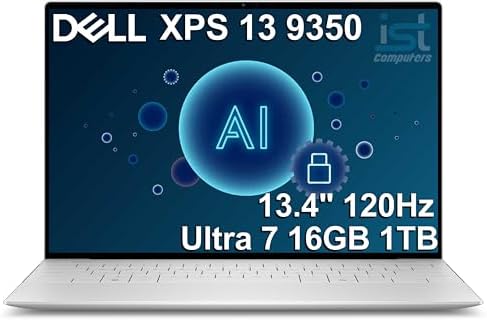
- THIN & DURABLE DESIGN — Weighing only 2.70 lbs, the Dell XPS 9350 Laptop combines a slim, lightweight design with robust…
- POWERFUL PERFORMANCE — Features the Intel Core Ultra 7 256V Processor (8 cores, up to 4.8 GHz) with 47 TOPS NPU and Inte…
- COPILOT+ PC AI POWERHOUSE — The dedicated NPU delivers 47 TOPS for local AI processing without relying on the cloud. Ena…
The XPS line has been Dell’s flagship consumer ultrabook for years, and the 9350 continues that tradition with a compact 13.4-inch footprint, a thin aluminum chassis, and a near-borderless InfinityEdge display. It’s built for people who want a laptop that feels premium in the hand and looks sharp in a coffee shop or conference room, without stepping up to full workstation bulk.
Key Specs
- 13.4″ FHD+ InfinityEdge display with up to 120Hz refresh rate
- Intel Core Ultra 7 256V processor
- 16GB LPDDR5X memory
- 1TB SSD storage
- Dual Thunderbolt 4 ports
- Wi-Fi 7 connectivity
- Backlit keyboard, edge-to-edge glass touchpad
Pros
- Exceptionally compact and lightweight for a 13-inch premium laptop
- High refresh-rate display makes scrolling and everyday use feel noticeably smoother
- Strong connectivity with Thunderbolt 4 and Wi-Fi 7
- Premium build materials throughout
Cons
- Limited port selection beyond the two Thunderbolt 4 ports means many users will need a dongle or hub
- Non-upgradeable RAM and storage once purchased
- Smaller screen size may feel cramped for users doing heavy multitasking
Buyer Sentiment Consistently well-rated among buyers shopping in the premium ultrabook category, with the display and portability frequently singled out as highlights.
What Buyers Are Saying Buyers in this category tend to emphasize how thin and light the XPS 13 feels for daily carry, along with praise for the display’s clarity and smoothness. Some note the limited port selection as a tradeoff they had to plan around with a hub or adapter.
Who It’s For The XPS 13 9350 makes the most sense for professionals and frequent travelers who prioritize portability and display quality over expandability. If your work revolves around email, presentations, writing, and browser-based tools — and you regularly carry your laptop between home, office, and transit — this is the kind of machine built specifically for that lifestyle. It’s less ideal for anyone who regularly connects multiple peripherals at once without a dock, simply due to the limited port count.
2. Dell Inspiron 15 3530 — Best Dell Budget Pick

- 【High Speed RAM And Enormous Space】16GB high-bandwidth RAM to smoothly run multiple applications and browser tabs all at…
- 【Processor】13th Generation Intel Core i7-1355U Processor (10 Cores, 12 Threads, 12MB Intel Smart Cache, Base Frequency a…
- 【Display】15.6″ FHD (1920 x 1080) Anti-glare LED Backlight Touchscreen Narrow Border WVA Display
Not everyone needs a premium ultrabook, and the Inspiron 15 3530 is Dell’s answer for buyers who want a larger screen, a numeric keypad, and dependable everyday performance without the ultrabook price tag. It’s aimed squarely at students, home users, and anyone whose laptop needs are centered on browsing, documents, and streaming rather than demanding workloads.
Key Specs
- 15.6″ Full HD touchscreen display
- Intel Core i7-1355U processor
- 16GB DDR4 memory
- 1TB SSD storage
- Full-size keyboard with numeric keypad
- Multiple USB ports including USB-C
Pros
- Larger 15.6″ screen is well suited to spreadsheet and document-heavy work
- Touchscreen adds flexibility for note-taking or quick navigation
- Numeric keypad is a genuine convenience for data entry tasks
- Generous 1TB storage for the price tier
Cons
- Bulkier and heavier than Dell’s ultrabook line, so less ideal for frequent travel
- Battery life tends to be more modest than thinner premium models
- Build materials are plastic-forward rather than metal
Buyer Sentiment Rated highly for everyday value, with buyers frequently comparing it favorably to pricier laptops for basic productivity tasks.
What Buyers Are Saying Buyers in this segment tend to highlight the combination of a large screen, keypad, and solid storage as good value for everyday and student use, while acknowledging it’s not designed to compete with ultrabooks on portability.
Who It’s For The Inspiron 15 3530 is a strong fit for students, home users, and anyone who primarily works at a desk rather than on the move. The combination of a large screen, touchscreen input, and a numeric keypad makes it particularly well suited to coursework, data entry, and general home-office use where portability is a secondary concern to screen real estate and comfort.
Lenovo Laptops Reviewed
3. Lenovo ThinkPad X1 Carbon Gen 12 — Best Premium Business Ultrabook

- 【Instant Gratification】Engineered for a No-Compromise Experience The Intel Evo Edition, ThinkPad X1 Carbon Gen 12 laptop…
- 【Processor & Operating System】Intel Ultra 7 165U Processor with vPro (E-cores up to 3.80 GHz P-cores up to 4.90 GHz with…
- 【Display】14″ WUXGA (1920 x 1200), IPS, Anti-Glare, Touch, 100%sRGB, 400 nits, Low Power
The ThinkPad X1 Carbon has been the benchmark business ultrabook for well over a decade, and the Gen 12 model keeps the formula that made it famous: a legendary keyboard, MIL-SPEC-tested durability, and enterprise-grade security features, now paired with Intel’s latest Core Ultra platform. This is the laptop most often recommended to professionals who type for a living and need a machine that survives years of travel and daily abuse.
Key Specs
- 14″ WUXGA touchscreen display
- Intel Core Ultra 7 165U processor with vPro
- 32GB LPDDR5X memory
- 256GB SSD storage
- MIL-SPEC 810H tested durability
- Thunderbolt 4 connectivity
- Fingerprint reader and IR camera for Windows Hello
Pros
- Widely regarded as having one of the best keyboards in the laptop market
- MIL-SPEC durability testing gives genuine peace of mind for travel and daily wear
- 32GB of RAM is excellent for multitasking and future-proofing
- Strong enterprise security features out of the box
Cons
- 256GB SSD is comparatively modest given the premium price point
- Carbon-fiber matte finish, while durable, is less flashy than glass-and-aluminum competitors
- vPro and security features are overkill for casual home users
Buyer Sentiment Frequently praised by buyers for keyboard feel, build quality, and reliability over years of use — a recurring theme across ThinkPad reviews generally.
What Buyers Are Saying Buyers in this category consistently point to the keyboard and overall sturdiness as the main reasons they return to the ThinkPad line, with the RAM capacity often called out as generous for a business ultrabook.
Who It’s For The X1 Carbon Gen 12 is built for business professionals, consultants, and anyone who spends long hours typing and traveling with their laptop. The combination of durability testing, enterprise security, and ample memory makes it especially well suited to IT-managed fleets and professionals who need their laptop to simply keep working, year after year, without drama.
4. Lenovo IdeaPad Slim 3 15.3″ — Best Lenovo Budget Pick

- 15.3″ 2K Touchscreen Display delivers sharp visuals, vibrant colors, and smooth touch interaction for work and entertain…
- Powered by AMD Ryzen 7 170 processor for fast, responsive performance in multitasking, productivity, and daily computing…
- 16GB DDR5 RAM and 512GB PCIe SSD deliver smooth multitasking performance with fast responsiveness, quick boot-up times, …
The IdeaPad Slim 3 is Lenovo’s budget-friendly line aimed at everyday users who still want a sharp display and modern processor without ThinkPad pricing. The 15.3-inch model stands out in its price tier thanks to a 16:10 2K touchscreen panel, which is unusually good for this segment.
Key Specs
- 15.3″ 2K touchscreen display, 16:10 aspect ratio
- AMD Ryzen 7 170 processor
- 16GB DDR5 memory
- 512GB SSD storage
- Backlit keyboard
- Modern USB-C connectivity
Pros
- 2K resolution display is a standout feature at this price point
- 16:10 aspect ratio provides more vertical screen space for documents and browsing
- AMD Ryzen 7 processor offers strong everyday performance
- Backlit keyboard is a nice touch not always found in this tier
Cons
- Build quality, while solid, doesn’t match the ThinkPad line’s durability testing
- Battery life is average rather than exceptional
- Speakers are adequate but not a highlight
Buyer Sentiment Well-regarded among buyers for offering display quality above what’s typical in its price class.
What Buyers Are Saying Buyers in this segment often mention being pleasantly surprised by the screen quality relative to the price, with the taller 16:10 aspect ratio noted as genuinely useful for everyday multitasking.
Who It’s For The IdeaPad Slim 3 is a great match for budget-conscious buyers who still want a genuinely good display — students, casual users, and anyone upgrading from an older laptop who will notice and appreciate the sharper 2K panel. It’s less suited to users with heavy professional workloads who need the durability certifications or security features found on the ThinkPad line.
HP Laptops Reviewed
5. HP Spectre x360 14 — Best Premium 2-in-1
The Spectre x360 has long been HP’s design flagship, known for its gem-cut aluminum chassis and convertible 2-in-1 hinge. The 14-inch model pairs that distinctive look with a high-end OLED display, making it a strong pick for buyers who want a laptop that doubles as a tablet without compromising on visual quality.
Key Specs
- 14″ 2.8K OLED touchscreen, 120Hz refresh rate
- Intel Core Ultra 7-155H processor
- 16GB RAM
- 2TB SSD storage
- 360° convertible hinge
- Thunderbolt 4 connectivity
- Included active pen support
Pros
- OLED display with 120Hz refresh rate is a genuine standout for color accuracy and smoothness
- 2TB of storage is exceptionally generous for this category
- 360° hinge adds real versatility for presentations, sketching, or media consumption
- Distinctive premium design that stands apart from typical clamshell laptops
Cons
- OLED panels can be more prone to long-term burn-in with static content compared to IPS
- Convertible hinge design adds some weight versus a standard clamshell
- Premium price point positions it as a luxury pick rather than a value one
Buyer Sentiment Consistently well-rated for design and display quality, with the 2-in-1 versatility frequently mentioned as a key selling point.
What Buyers Are Saying Buyers in this category often highlight the OLED screen and the flexibility of the 2-in-1 form factor as reasons they chose the Spectre over a standard laptop, while noting it’s priced as a premium device.
Who It’s For The Spectre x360 14 is suited to creative professionals, presenters, and anyone who wants a laptop that doubles as a note-taking tablet or media consumption device. The OLED display and pen support make it a particularly good fit for visual work, while the premium design appeals to buyers who want their laptop to look as good as it performs.
6. HP Pavilion 15 — Best HP Budget Pick

- Efficient Performance for Everyday Computing Powered by Intel N150 processor (4-core, 4-thread, up to 3.6GHz with Intel …
- Portable 14-Inch HD Display with Micro-Edge Design Work and learn comfortably on the 14-inch diagonal HD (1366 x 768) an…
- Modern Connectivity with Wi-Fi 6 and Bluetooth 5.4 Stay connected with the latest Wi-Fi 6 (2×2) wireless technology deli…
The Pavilion line is HP’s long-running mainstream series, and the 15-inch model is built for buyers who want dependable day-to-day performance — web browsing, office work, streaming — at an accessible price. It’s a straightforward, no-frills option that still includes a numeric keypad and a roomy 15.6-inch screen.
Key Specs
- 15.6″ Full HD anti-glare display
- Intel N100 processor
- 16GB RAM
- 512GB SSD storage
- Full-size keyboard with numeric keypad
- Anti-glare screen coating
Pros
- Anti-glare display is genuinely useful for bright rooms or near windows
- 16GB RAM is generous for a laptop at this price tier
- Numeric keypad adds practical value for everyday data entry
- Lightweight enough for casual portability
Cons
- Intel N100 processor is entry-level and not suited to demanding or professional workloads
- Build materials are budget-oriented plastic rather than metal
- Display, while anti-glare, is a standard FHD panel without the color depth of pricier options
Buyer Sentiment Rated highly among buyers looking for everyday value, particularly students and home users with lighter workloads.
What Buyers Are Saying Buyers in this segment tend to describe the Pavilion 15 as a solid fit for basic daily tasks, with the anti-glare screen and ample RAM cited as pleasant surprises at this price point, while acknowledging it isn’t meant for heavier computing tasks.
Who It’s For The Pavilion 15 is best suited to students, home users, and anyone whose laptop needs are centered on browsing, streaming, and basic office work rather than demanding applications. It’s a sensible pick for a secondary household laptop or a first laptop for a student who doesn’t yet need premium-tier performance.
Buyer’s Guide: How to Choose Between Dell, Lenovo, and HP
Choosing between Dell, Lenovo, and HP isn’t really about finding “the best” brand in the abstract — all three make excellent laptops and all three make forgettable ones. The real question is which brand’s strengths line up with how you actually plan to use the machine. Here’s how to think through it.
If keyboard feel and long-term durability are your top priority, lean toward Lenovo. This is the brand’s calling card, especially within the ThinkPad lineup. ThinkPads are built with business travelers in mind — people who are typing for hours a day and who need a laptop that survives being tossed in a bag, dropped on a desk, and used daily for years. The MIL-SPEC testing on models like the X1 Carbon isn’t just a marketing checkbox; it reflects a genuine design philosophy that prioritizes resilience over flash. If you’ve ever used an older ThinkPad and remember how good the keyboard felt, that reputation carries through to current models.
If display quality and a thin, premium feel matter most, lean toward Dell. The XPS line in particular has built its identity around minimalist design and excellent screens — high resolution, accurate colors, and in recent models, higher refresh rates that make everyday use feel noticeably smoother. Dell also tends to do a good job balancing premium feel with reasonable weight, which matters if you’re carrying the laptop daily. The tradeoff is usually port selection and repairability, since ultra-thin designs leave less room for full-size ports and easily accessible internals.
If you want design flair or a convertible 2-in-1 form factor, lean toward HP. The Spectre line stands out visually in a market where a lot of premium laptops start to look alike, and HP has invested heavily in 2-in-1 hinge designs that genuinely work well for presentations, note-taking, or media consumption. If versatility and aesthetics are as important to you as raw specs, HP’s premium tier is worth a close look.
At the budget tier, the three brands converge more than they diverge. The Dell Inspiron 15, Lenovo IdeaPad Slim 3, and HP Pavilion 15 all target the same buyer: someone who wants solid everyday performance without premium pricing. At this level, the differences often come down to small things — the IdeaPad’s unusually sharp 2K display, the Inspiron’s numeric keypad and touchscreen, or the Pavilion’s anti-glare coating and RAM allocation. None of these laptops are “winners” over the others in a universal sense; the right pick depends on which specific feature matters most to you.
Processor platform is also worth understanding before you buy. Most of the laptops above use Intel’s Core Ultra series, which is Intel’s current generation built around improved efficiency and integrated AI acceleration features. You can read more about how this platform is positioned directly from Intel’s Core Ultra processor page. The Lenovo IdeaPad Slim 3 instead uses an AMD Ryzen processor, which is a different but competitive platform — neither AMD nor Intel is inherently “better,” and the right choice often comes down to specific performance and efficiency tradeoffs for your workload.
Connectivity standards matter more than people expect. Several of these laptops include Thunderbolt 4, a connectivity standard that supports high-speed data transfer, external displays, and charging through a single port type. If you plan to connect external monitors, docking stations, or fast external storage, having Thunderbolt 4 (rather than a basic USB-C port) can meaningfully affect what peripherals you can use. You can read the technical specifics directly from Intel’s Thunderbolt technology overview.
Energy efficiency is another factor worth a quick look, particularly if you’re running a laptop plugged in for long stretches or care about its environmental footprint. The U.S. government’s ENERGY STAR program certifies computers that meet specific efficiency benchmarks, and you can check certified models and criteria on the ENERGY STAR certified computers page.
Ultimately, all three brands included here were chosen because they’re currently available, well-specced for their category, and represent genuinely different strengths rather than near-identical competitors. Match the laptop to your actual workflow — typing volume, portability needs, display expectations, and budget — rather than brand loyalty alone.
Screen size and weight are a tradeoff you should think through before specs. It’s easy to get drawn into comparing processors and RAM line by line, but for a lot of buyers, the single biggest factor in day-to-day satisfaction is simply whether the laptop feels right to carry and use. A 13 to 14-inch ultrabook like the XPS 13 or ThinkPad X1 Carbon is noticeably easier to use on a plane tray table, a couch, or a crowded coffee shop table than a 15.6-inch machine like the Inspiron 15 or Pavilion 15. On the other hand, that extra screen real estate on the 15-inch models genuinely helps for spreadsheet work, side-by-side document comparison, or simply reducing eye strain over a long session. Neither size is objectively correct — it depends on where and how you’ll actually be using the laptop most often.
RAM and storage age differently, so buy ahead of your needs rather than exactly at them. Several of the laptops in this comparison ship with memory and storage soldered to the motherboard, meaning you can’t upgrade RAM or swap in a bigger SSD later the way you often could with older laptop generations. The Lenovo ThinkPad X1 Carbon’s 32GB of memory is a good example of buying ahead of the curve — it’s more than most users need today, but it means the laptop will still feel responsive in three or four years when software has grown heavier. If you’re choosing between two otherwise similar configurations and one offers more RAM for a modest price difference, it’s usually the better long-term investment.
Battery life claims are worth verifying against your own usage pattern. Manufacturer battery estimates are typically measured under light, idealized workloads — often video playback at low brightness — which rarely matches how most people actually use a laptop. If battery life away from a charger is a priority for you, it’s worth reading current buyer feedback on the specific configuration you’re considering, since battery performance can vary noticeably between the base and upgraded processor options within the same model line.
Don’t overlook the keyboard and trackpad simply because displays get more attention. It’s easy to focus a laptop comparison entirely on screen resolution and refresh rate, but if you’re using a laptop for any serious amount of typing, the keyboard is arguably the part of the machine you’ll interact with the most. This is precisely why Lenovo’s ThinkPad line has held onto such a loyal following — the key travel, spacing, and feedback on ThinkPad keyboards are frequently cited by long-time users as a reason they keep buying the brand, even when competing laptops have flashier displays or thinner chassis.
Think about warranty and support coverage as part of the total cost. Dell, Lenovo, and HP all offer a base limited warranty on new laptops, typically around one year, with the option to purchase extended coverage. Business-focused lines — like the ThinkPad series or Dell’s professional lineups — often include more responsive support tiers aimed at minimizing downtime, which can be worth factoring in if the laptop will be central to your work. For a budget laptop used mainly for browsing and streaming, a standard warranty is usually sufficient; for a primary work machine, it’s worth checking what extended coverage costs before you buy.
Frequently Asked Questions
1. Which is more reliable: Dell, Lenovo, or HP?
All three brands have reliable and unreliable models depending on the specific line and build quality tier. Lenovo’s ThinkPad series has a particularly strong reputation for long-term durability due to its MIL-SPEC testing standards, but reliability within Dell’s XPS line and HP’s premium tier is also generally well-regarded. Reliability tends to track more closely with a specific model’s build quality than with the brand name alone.
2. Is the Dell XPS 13 better than the Lenovo ThinkPad X1 Carbon?
They’re built for different priorities rather than one being strictly “better.” The XPS 13 focuses on a compact, high-refresh-rate display and sleek design, while the X1 Carbon focuses on keyboard quality, durability, and business-grade security features. If display quality and portability are your priority, the XPS 13 is the stronger fit; if typing comfort and ruggedness matter more, the ThinkPad is the better choice.
3. Which brand is best for business use?
Lenovo’s ThinkPad line is the most commonly recommended option for business use, largely due to its durability testing, security features like vPro and fingerprint authentication, and keyboard reputation. That said, Dell’s XPS and HP’s Spectre lines are also used in professional settings, particularly by users who prioritize display quality or 2-in-1 versatility over ruggedness testing.
4. Is HP a lower-quality brand than Dell or Lenovo?
No — HP makes laptops across the same quality spectrum as Dell and Lenovo, from budget-friendly models like the Pavilion to premium devices like the Spectre x360. Perceptions of HP as “lower quality” usually stem from comparing HP’s budget tier to a competitor’s premium tier, which isn’t an apples-to-apples comparison.
5. Should I get a 2-in-1 laptop like the HP Spectre x360, or a standard clamshell?
This comes down to how you’ll use the laptop. A 2-in-1 like the Spectre x360 is worth considering if you value flexibility for presentations, sketching, or media consumption in tablet mode. If you primarily use a laptop for typing-focused work and don’t need the convertible form factor, a standard clamshell like the XPS 13 or ThinkPad X1 Carbon may offer better value since you’re not paying for hinge engineering you won’t use.
6. Does it matter if a laptop uses an Intel or AMD processor?
Both Intel and AMD make competitive modern processors, and the right choice depends on the specific chip and your workload rather than the brand name alone. The Lenovo IdeaPad Slim 3 in this guide uses an AMD Ryzen 7 170 processor, while the other models use Intel’s Core Ultra series — both platforms are well-suited to everyday productivity tasks.
7. Why do the budget laptops from all three brands look so similar in specs?
At the budget tier, manufacturers are generally working within similar cost constraints for processors, memory, and display panels, which naturally narrows the gap between brands. The differentiation at this tier tends to show up in smaller details — screen resolution, keyboard layout, or specific port selection — rather than dramatic overall performance differences.
8. Is it worth paying more for a premium model over a budget pick from the same brand?
It depends on your use case. If you need better build materials, a sharper or faster-refresh display, more RAM for multitasking, or enhanced security features, the premium tier delivers real, usable improvements. If your workload is primarily browsing, documents, and streaming, a budget model from any of these three brands will likely meet your needs without the added cost.
9. Can I use any of these laptops for light gaming?
None of the laptops in this comparison are built around dedicated graphics cards, so they’re better suited to casual, browser-based, or older titles rather than modern demanding games. The integrated graphics on the Intel Core Ultra and AMD Ryzen processors featured here can handle light gaming workloads, but buyers specifically looking for a gaming laptop should look at dedicated gaming lines from these brands, which are built with discrete GPUs and different cooling systems entirely.
10. How much RAM do I actually need for everyday use in 2026?
For typical browsing, document editing, video calls, and streaming, 16GB has become a comfortable baseline that keeps the system responsive even with multiple browser tabs and applications open at once. Buyers doing heavier multitasking, working with large files, or wanting to future-proof their purchase for several years may prefer the 32GB configuration offered on the ThinkPad X1 Carbon in this guide.
11. Do any of these laptops come with a touchscreen?
Yes — the Dell Inspiron 15 3530, Lenovo IdeaPad Slim 3, and HP Spectre x360 14 all include touchscreen displays, while the Dell XPS 13 9350, Lenovo ThinkPad X1 Carbon Gen 12, and HP Pavilion 15 are listed with standard non-touch displays in the configurations featured here. If a touchscreen is a priority for you, it’s worth double-checking the specific listing, since some of these models are also sold in non-touch or touch variants depending on configuration.
12. Is it better to buy a laptop directly from the manufacturer’s website or through Amazon?
Both are legitimate purchasing channels, and the laptop hardware itself is identical regardless of where you buy it. Buying through Amazon often provides a more consistent return process and the ability to compare buyer feedback across a large number of verified purchases, while manufacturer websites sometimes offer more configuration options or bundled accessories. It’s worth comparing current availability and return policies across both before deciding.
Final Verdict
There’s no single “best” brand among Dell, Lenovo, and HP — only the best laptop for your specific priorities. If keyboard feel and long-term durability top your list, the Lenovo ThinkPad X1 Carbon Gen 12 is the standout pick here. If you want a compact, high-refresh-rate display in a premium thin-and-light frame, the Dell XPS 13 9350 is hard to beat. And if design flair and 2-in-1 versatility matter most, the HP Spectre x360 14 delivers a genuinely distinctive experience with an excellent OLED display.
For buyers on a tighter budget, all three brands’ entry-level picks — the Dell Inspiron 15 3530, Lenovo IdeaPad Slim 3, and HP Pavilion 15 — offer solid everyday performance, and the right one comes down to which specific feature (touchscreen, display resolution, or anti-glare coating) matters most to you. Whichever you choose, all six models above were confirmed as currently available on Amazon at the time of writing — just double-check current stock and listing details before you buy.
At the end of the day, Dell, Lenovo, and HP all remain strong, trustworthy choices in 2026, and the “best” brand genuinely depends on what you value in a laptop. Rather than chasing a single universal winner, use the breakdown above to match your own priorities — typing comfort, display quality, portability, convertibility, or budget — to the model built around that strength, and you’re far more likely to end up with a laptop you’re happy with years down the line.
Disclosure: As an Amazon Associate, techrigreview.com earns from qualifying purchases. This means we may receive a small commission, at no additional cost to you, if you purchase a product through one of the links on this page. All products featured are selected based on independent research, and we only recommend items that are currently available for purchase on Amazon.

MD.HASAN is an experienced SEO expert and amazon products review writer passionate about helping people find right products on amzon for buy without confusion. With 4 years of hands-on experience in content strategy and search engine optimization, he specializes in writing SEO-friendly blog posts that rank, engage, and convert.


