
Affiliate disclosure: As an Amazon Associate, Tech Rig Review earns from qualifying purchases. Links on this page may be affiliate links, at no extra cost to you.
If you spend hours each day putting words on the page — whether you’re a novelist, blogger, copywriter, journalist, or content creator — your keyboard matters more than almost any other piece of gear you own. The right Amazon wireless keyboard can turn a painful writing session into a joyful one. The wrong choice will leave your wrists aching, your thoughts interrupted, and your word count suffering.
We’ve done the deep research so you don’t have to. After analyzing dozens of models, reading thousands of verified Amazon reviews, and comparing specs across every price range, we’ve rounded up the 10 best wireless keyboards for writers available on Amazon right now. Whether you need a featherweight travel companion, an ergonomic powerhouse for all-day sessions, or a mechanical keyboard with that satisfying clickety-clack, there’s something on this list for you.
Let’s get into it.
Table of Contents
What Makes a Great Wireless Keyboard for Writers?


Before we dive into our picks, here’s what separates a great writing keyboard from an average one:
Key feel and travel: Writers need keys with enough tactile feedback to feel confident about each keystroke. Too mushy and you’ll mistype constantly. Too stiff and your fingers will tire fast.
Noise level: Whether you work in a coffee shop, open office, or shared home, quieter keys keep the peace. Most writing-focused keyboards use scissor-switch or quiet mechanical switches.
Battery life: Nothing breaks your flow like a dead keyboard mid-chapter. Look for keyboards that last weeks — not just days — on a single charge.
Multi-device pairing: If you draft on your phone, edit on your laptop, and publish on a desktop, a keyboard that switches between all three with one button press is invaluable.
Layout and comfort: Full-size layouts give you every key you need. Compact 75% layouts save desk space without sacrificing essential keys. Ergonomic split designs protect your wrists during marathon sessions.
Wireless connectivity: The best options offer both Bluetooth and a 2.4GHz USB receiver for maximum flexibility and zero-lag performance.
Now, here are our top picks.
Quick Comparison Table
| # | Keyboard | Best For | Connectivity | Battery |
|---|---|---|---|---|
| 1 | Logitech MX Keys S | Best Overall | Bluetooth + Bolt | 5 months |
| 2 | Logitech MX Keys Mini | Travel Writers | Bluetooth + Bolt | ~5 months |
| 3 | Logitech Ergo K860 | Ergonomic | Bluetooth + USB | 2 years (AAA) |
| 4 | Keychron K3 V3 | Mechanical Feel | Bluetooth 5.2 + USB-C | ~200 hrs |
| 5 | Logitech K380s | Budget Pick | Bluetooth | 36 months (AAA) |
| 6 | Apple Magic Keyboard | Mac Writers | Bluetooth | ~1 month |
| 7 | NuPhy Air75 V3 | Slim + Mechanical | 2.4GHz + BT 5.2 | ~48 hrs |
| 8 | Logitech K780 | Multi-Device | Bluetooth + USB | 24 months (AAA) |
| 9 | Microsoft Designer | Windows Writers | Bluetooth 5.0 | 36 months (AAA) |
| 10 | Keychron Q1 Pro | Premium Desk | Bluetooth + USB-C | 300 hrs |
1. Logitech MX Keys S — Best Overall Amazon Wireless Keyboard for Writers

- Fluid Typing Experience: Laptop-like profile with spherically-dished keys shaped for your fingertips delivers a fast, fl…
- Automate Repetitive Tasks: Easily create and share time-saving Smart Actions shortcuts to perform multiple actions with …
- Smarter Illumination: Backlit keyboard keys light up as your hands approach and adapt to the environment; Now with more …
Rating: ⭐⭐⭐⭐⭐ | Best For: All-day professional writing
If there’s one wireless keyboard that dominates every “best for writers” list in 2026, it’s the Logitech MX Keys S. And for good reason — this keyboard is a masterclass in productivity design.
The spherically-dished keys are shaped to cradle your fingertips, which dramatically reduces typos during long sessions. The low-profile scissor switches deliver a satisfying, quiet typing experience that’s firm enough to feel responsive but quiet enough for any environment. Backlit keys automatically illuminate when your hands approach, which is a genuinely thoughtful touch for late-night writing sprints.
The MX Keys S connects to up to three devices simultaneously via Bluetooth Low Energy or the included Logi Bolt USB receiver, making it effortless to switch between your laptop, tablet, and smartphone with a single button press.
The Logi Options+ app unlocks Smart Actions — customizable shortcuts that let you automate repetitive tasks with a single keystroke. For writers who frequently format text, open research tabs, or switch between apps, this alone is worth the price of entry.
Battery life runs up to 10 days with backlighting or an impressive 5 months without it, charged via USB-C.
Pros:
- Spherically-dished keys virtually eliminate typos
- Smart backlighting adjusts automatically to your environment
- 3-device multi-pairing with one-tap switching
- Programmable Smart Actions save time
- USB-C rechargeable
- Compatible with Windows, Mac, Linux, Chrome OS, iOS, iPadOS, Android
Cons:
- Premium price point
- Heavy at 810g — not ideal for travel
Verdict: The MX Keys S is the writer’s keyboard. If you do serious, sustained word count work at a desk, this is the one to buy.
2. Logitech MX Keys Mini — Best Compact Wireless Keyboard for Writers on the Go
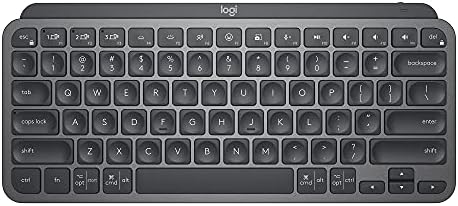
- Perfect Stroke Typing with Smart Keys (1): Type on keys shaped for your fingertips, with voice to text Dictation (4), Mi…
- Mini Size, Mighty Powerful: A layout designed for effortless precision, with a minimalist form for an ergonomic keyboard…
- Smart Illumination: The wireless keyboard’s backlit keys light up the moment your hands approach, and automatically adju…
Rating: ⭐⭐⭐⭐⭐ | Best For: Travel writers and mobile productivity
Everything that makes the MX Keys S great, shrunk into a compact 75% form factor — that’s the Logitech MX Keys Mini. It drops the numpad and trims the navigation cluster but keeps the dedicated arrow keys and function row that writers actually use. The result is a keyboard that fits in a laptop sleeve, backpack pocket, or airplane tray table without feeling like a toy-sized compromise.
The same quiet scissor switches, the same spherical key dishes, the same Logi Bolt + Bluetooth pairing across three devices. The backlit keys are powered by a rechargeable battery via USB-C, and the build quality feels genuinely premium — something you can toss in a bag daily without worry.
Writers who work from coffee shops, hotels, libraries, or coworking spaces will appreciate how this keyboard transforms a tablet or phone into a legitimate writing machine. The 75% layout is widely considered the sweet spot for portable typing — compact enough for the road, complete enough for serious work.
Pros:
- Compact 75% layout perfect for travel
- Same excellent key feel as the full MX Keys S
- 3-device multi-pairing
- USB-C rechargeable
- Backlit keys with proximity sensor
- Comes in multiple colors
Cons:
- No numpad
- Higher price for a compact keyboard
Verdict: The single best portable wireless keyboard for writers who need near-desktop performance anywhere in the world.
3. Logitech Ergo K860 — Best Ergonomic Wireless Keyboard for Writers

- Improved Typing Posture: Type more naturally with a curved, split keyframe and reduce muscle strain on your wrists and f…
- Pillowed Wrist Rest: Curved wrist rest with memory foam layer offers typing comfort with 54 per cent more wrist support;…
- Perfect Stroke Keys: Scooped keys match the shape of your fingertips so you can type with confidence on a wireless keybo…
Rating: ⭐⭐⭐⭐½ | Best For: Writers with wrist pain or RSI concerns
If you write for 6–10 hours a day, your wrists will eventually speak up. The Logitech Ergo K860 is the answer. This is an ergonomic wireless keyboard that actually works — and more importantly, doesn’t force you to relearn how to type.
Unlike exotic split keyboards that require weeks of muscle-memory rewiring, the K860 looks and functions like a familiar full-size keyboard. The curved split keyframe gently angles both halves of the board outward, bringing your wrists into a more natural, neutral position and reducing the side-to-side wrist bending (ulnar deviation) that contributes to repetitive strain injuries over time.
The built-in three-layer palm rest — knitted fabric over high-density foam over memory foam — provides genuine cushioning for long sessions, not just decorative padding. The keyboard also supports three negative tilt positions, angling the back of the board upward to keep your wrists flat and relaxed rather than bent upward.
At around $150, this is an investment. But if writing is your livelihood and your wrists are suffering, the K860 pays for itself in reduced discomfort and sustained productivity. It earns a 4.4-star rating from over 12,000 verified Amazon reviewers — one of the strongest track records in the ergonomic keyboard category.
Pros:
- Curved split design requires zero re-learning
- Pillow-soft integrated wrist rest
- Negative tilt options for neutral wrist posture
- Up to 2 years on AAA batteries
- Bluetooth + USB receiver connectivity
- Works with Windows and Mac
Cons:
- Membrane-only (no mechanical switch option)
- Large footprint — not portable
- Heavy, not for travel
Verdict: The gold standard ergonomic keyboard for writers who need all-day comfort without the learning curve of a split keyboard.
4. Keychron K3 Version 3 — Best Mechanical Wireless Keyboard for Writers
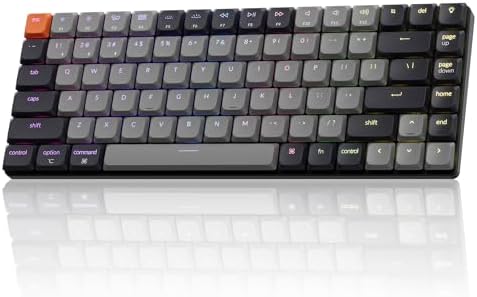
- The Keychron K3 Version 3 is a low-profile wireless mechanical keyboard with a 75% layout, now upgraded with QMK firmwar…
- QMK Firmware & Launcher Web Configurator: With open-source QMK firmware, it offers endless possibilities for key remappi…
- Bluetooth 5.2 & Type C Wired Modes: The K3 Version 3 now features Bluetooth 5.2 for a stable connection with low power c…
Rating: ⭐⭐⭐⭐½ | Best For: Writers who love mechanical key feel
For writers who crave the satisfying tactile crunch of mechanical keys without a bulky, desk-dominating board, the Keychron K3 Version 3 delivers everything you want in a 75% wireless package.
The K3 V3 is an upgrade to one of Keychron’s most beloved layouts. It now ships with QMK firmware for deep customization, enhanced acoustic foams for a quieter, more refined sound profile, Bluetooth 5.2 for stable wireless pairing, and shine-through PBT keycaps that resist shine and wear over years of daily use.
The 75% layout keeps all the essential keys — function row, dedicated arrows, delete, page navigation — while eliminating the numpad to shave down the footprint. You can choose from a variety of Gateron switch options to match your preference: smooth linears for silent typing, tactile browns for feedback without noise, or clicky blues if you write alone and love the sound.
Hot-swappable switches mean you can change the feel of the keyboard at any time without soldering. This is a keyboard you can grow and adapt with for years.
Pros:
- QMK firmware for complete customization
- Hot-swappable switches — change feel anytime
- Bluetooth 5.2 + wired connection
- Enhanced acoustic foams for quieter sound
- Multiple switch options to suit any preference
- Solid, portable 75% layout
Cons:
- Learning curve for QMK firmware
- Multi-device switching less seamless than Logitech
- Slightly thicker than scissor-switch options
Verdict: The best wireless mechanical keyboard for writers who want a premium, customizable typing experience without going full enthusiast-tier.
5. Logitech Pebble Keys 2 K380s — Best Budget Wireless Keyboard for Writers

Rating: ⭐⭐⭐⭐½ | Best For: Budget-conscious writers who need multi-device pairing
At around $30.99, the Logitech Pebble Keys 2 K380s is the keyboard that punches so far above its weight class it feels almost unfair. This compact wireless keyboard connects to three devices simultaneously via Bluetooth, lets you switch between them with one tap, and runs for an astonishing 36 months on two AAA batteries — batteries that come included in the box.
The round keycaps are Logitech’s signature design, and while they look unconventional, they’re surprisingly comfortable once your fingers adjust — typically within a day or two. The keys have a satisfying tactile click that makes typing feel lively without being loud, which CNN Underscored described as having “a typewriter-like feel with a satisfying tactile response.”
For writers who draft on a phone, edit on a laptop, and occasionally work from a tablet, the K380s handles all three seamlessly. Customizable shortcuts via Logi Options+ let you assign frequently-used writing functions to specific keys. It’s compatible with Windows, macOS, iPadOS, Android, and Chrome OS.
This is the keyboard to recommend to a writer just starting to invest in their setup — or to a seasoned writer who wants a no-fuss, affordable second keyboard for travel.
Pros:
- Excellent value at around $30.99
- 3-device Bluetooth multi-pairing
- Up to 36 months battery life on AAA batteries
- Compact and lightweight — easy to travel with
- Available in multiple color options
- Compatible with all major platforms
Cons:
- Round keycaps require adjustment period
- No backlight
- Shorter key travel than premium options
Verdict: The best budget wireless keyboard for writers. At this price, the features are genuinely remarkable. A must-buy for writers on a budget.
6. Apple Magic Keyboard with Touch ID — Best Wireless Keyboard for Mac Writers


Rating: ⭐⭐⭐⭐ | Best For: Mac and iPad writers who want seamless Apple integration
If your entire writing workflow lives inside the Apple ecosystem — MacBook, iPad, iPhone — the Apple Magic Keyboard with Touch ID is built precisely for you. The integration is seamless in a way that third-party keyboards simply can’t replicate: Touch ID unlocks your Mac instantly, the function keys map to native macOS shortcuts out of the box, and Bluetooth pairing happens effortlessly across Apple devices.
The low-profile scissor switches deliver Apple’s signature clean, confident typing feel — slightly firmer and a touch quieter than membrane keyboards. The aluminum body gives it a premium, desk-worthy aesthetic that matches the rest of the Apple setup. Battery life lasts about a month on a full charge via Lightning.
The tradeoff is ecosystem lock-in. The Magic Keyboard works almost exclusively with Apple devices, offers no multi-device pairing outside the Apple ecosystem, and doesn’t have the customization options of Logitech or Keychron keyboards. But for the dedicated Mac writer, these limitations won’t matter at all.
Pros:
- Seamless native macOS and iPadOS integration
- Touch ID for instant, secure login
- Beautiful aluminum build quality
- Quiet, confident key feel
- About one month battery life per charge
Cons:
- Apple ecosystem only — no Windows or Android support
- No multi-device pairing outside Apple
- Higher price for the features offered
- Lightning charging (not USB-C on older models)
Verdict: If you write exclusively on Mac or iPad, this is the most seamless wireless keyboard you can buy. For everyone else, look at Logitech or Keychron.
7. NuPhy Air75 V3 — Best Slim Mechanical Wireless Keyboard for Writers

- Gasket Mount Design: Air75 V3 mechanical keyboard’s gasket mount ensures smooth, quiet typing. Silicone gaskets absorb k…
- Thinner mechanical keyboard: Air75 V3 office keyboard is as thin as 13.2mm, which makes it easier for you to carry, whil…
- Multi-Device Compatibility: Air75 V3 low Profile Keyboard supports Bluetooth/2.4GHz/USB-C connectivity, which allows you…
Rating: ⭐⭐⭐⭐ | Best For: Writers who want slim profile + mechanical feel
Most mechanical keyboards are chunky. The NuPhy Air75 V3 defies that convention with a gasket-mount construction and ultra-slim aluminum chassis that clocks in at just 13.2mm at its thinnest point — making it one of the sleekest mechanical keyboards you’ll find anywhere.
The Air75 V3 connects to up to five devices — more than any keyboard on this list — via 2.4GHz wireless and Bluetooth 5.2, plus a wired USB-C option. For writers who work across multiple machines and platforms throughout the day, this is a genuine differentiator.
The gasket-mount construction isolates the switch plate from the chassis, resulting in a softer, more muted typing sound even with mechanical switches — a sound profile that’s substantially more office-friendly than traditional mechanical boards. Low-profile Gateron switches deliver that tactile mechanical feedback without adding height to the board.
PBT keycaps resist shine, the aluminum frame is robust, and the 75% layout preserves all the keys a writer needs. It’s a premium keyboard at a premium price, but the combination of slim design, five-device pairing, and mechanical feel is genuinely unique in this market.
Pros:
- Ultra-slim 13.2mm profile — the slimmest mechanical on this list
- Five-device connectivity (2.4GHz + Bluetooth)
- Gasket-mount for quieter mechanical sound
- Hot-swappable switches
- Premium aluminum chassis
- Compatible with Mac and Windows
Cons:
- Higher price point
- Low-profile switches not preferred by all mechanical fans
- Software ecosystem less polished than Logitech
Verdict: The best-looking, slimmest mechanical wireless keyboard for writers who refuse to compromise between form and feel.
8. Logitech K780 Multi-Device Wireless Keyboard — Best Wireless Keyboard for Multitaskers

- Multi-device wireless keyboard: beautiful type-on-everything keyboard for any computer, tablet and smartphone via USB or…
- Type and switch between devices: Type on up to three devices and switch between them at the touch of an easy-switch butt…
- Comfortable typing: full size, fully equipped keyboard with large, quiet keys and convenient Number pad
Rating: ⭐⭐⭐⭐ | Best For: Writers who switch between phone, tablet, and computer
The Logitech K780 is designed for the writer who never works on just one screen. It features a full-size layout — including a numpad — plus a built-in cradle along the top edge that holds a phone or tablet upright at a perfect viewing angle while you type.
Switch between your connected devices using the dedicated Easy-Switch keys, and the keyboard automatically adapts its key functions to match the connected device. Draft an email on your phone, expand the idea in a Google Doc on your laptop, then polish it on your iPad — all without moving your hands from the keyboard.
The slightly concave keys are comfortable for long writing sessions, and the quiet, tactile switches keep things peaceful in shared spaces. Battery life stretches to 24 months on two AAA batteries — one of the best runtimes in this price category. At roughly $54.99, it offers exceptional value for writers who manage multiple devices.
Pros:
- Built-in device cradle holds phone or tablet upright
- Full-size layout with numpad
- 3-device Easy-Switch pairing
- Up to 24 months battery life on AAA batteries
- Quiet, comfortable keys
- Great price-to-feature ratio
Cons:
- No backlighting
- Slightly dated design compared to newer Logitech models
- Keys don’t have the premium feel of the MX series
Verdict: The ultimate “ecosystem keyboard” for writers who live across multiple devices. The built-in device cradle alone makes it worth considering.
9. Microsoft Designer Compact Keyboard — Best Wireless Keyboard for Windows Writers


Rating: ⭐⭐⭐⭐ | Best For: Windows writers who want slim, modern design
Microsoft’s own Designer Compact Keyboard brings clean, modern Scandinavian-influenced design to the Windows writing experience. Slim, light, and elegant with a matte finish and flat-top keycaps, it’s a keyboard that looks as good as it performs.
It uses Bluetooth 5.0 for wireless connectivity and pairs with up to two devices — a step behind Logitech’s three-device standard but still practical for most writers. The compact layout eliminates the numpad while keeping essential function and navigation keys. Battery life is exceptional: up to 36 months on two AAA batteries.
Where this keyboard truly shines is in its deep Windows and Microsoft 365 integration. Dedicated keys for emoji, screenshots, Microsoft 365 apps, and voice dictation make it feel native to the Windows ecosystem in the same way Apple’s keyboard feels native to Mac. If you write in Microsoft Word, OneNote, or any other Microsoft application, this keyboard enhances that experience meaningfully.
Pros:
- Beautiful, slim modern design
- Deep Windows and Microsoft 365 integration
- Dedicated emoji, screenshot, and Office shortcut keys
- Up to 36 months battery life on AAA batteries
- Compact and portable
- Quiet, flat-top keys
Cons:
- Only 2-device Bluetooth pairing
- Less customizable than Logitech or Keychron
- Best suited for Windows users only
Verdict: A sleek, elegant wireless keyboard tailor-made for Windows writers who live inside the Microsoft ecosystem.
10. Keychron Q1 Pro — Best Premium Wireless Mechanical Keyboard for Writers
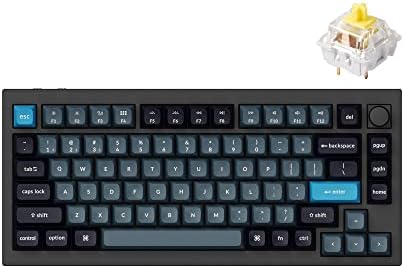
- Wireless and Full Metal: Meet the Keychron Q1 Pro, a groundbreaking full metal QMK/VIA wireless custom mechanical keyboa…
- Multitasking Wirelessly and Wired Connections: You can connect the Q1 Pro with up to 3 devices wirelessly via its stable…
- Programmable with QMK & VIA: Keychron Q1 Pro allows anyone to remap any key, and create macro commands, shortcuts, or co…
Rating: ⭐⭐⭐⭐½ | Best For: Writers who want the ultimate desk keyboard
If you’re ready to invest in a keyboard that will last a decade and make every typing session feel like a luxury, the Keychron Q1 Pro is that keyboard. This is the wireless version of Keychron’s legendary Q1 — a keyboard beloved by professional writers, programmers, and keyboard enthusiasts worldwide — upgraded with Bluetooth connectivity.
The anodized aluminum housing is dense and heavy — this keyboard does not move on your desk. The gasket-mounted switch plate with neoprene padding produces a deep, satisfying thud on each keystroke rather than a hollow rattle. Screw-in stabilizers keep larger keys — spacebar, shift, enter — smooth and wobble-free. The result is a typing experience CNN Underscored called “so comfortable and quiet to type on” that it’s hard to justify spending more.
QMK firmware gives you total control over every key on the board. The Q1 Pro supports both wireless Bluetooth and wired USB-C, with up to 300 hours of battery life without backlighting and 90 hours with the LEDs on. Choose from a range of pre-lubed switch options to match your preferred feel.
This is not a travel keyboard. It’s heavy, it’s large, and it’s unapologetically a desk piece. But for writers who spend serious time at a dedicated writing station, it’s one of the most rewarding keyboards money can buy.
Pros:
- Premium anodized aluminum construction
- Gasket-mount + neoprene pads for exceptional typing sound
- QMK firmware for complete customization
- Wireless Bluetooth + wired USB-C
- Up to 300 hours battery life (no backlight)
- Deep, satisfying typing feel beloved by professionals
Cons:
- Expensive for a keyboard
- Heavy — not portable
- Takes time to configure to your preferences
- Overkill for casual writers
Verdict: The best premium mechanical wireless keyboard for serious writers who want a desk keyboard they’ll never need to replace.
How to Choose the Right Amazon Wireless Keyboard for Your Writing Style
You’re a novelist or long-form writer: Go with the Logitech MX Keys S or Keychron Q1 Pro. You need all-day comfort, quiet keys, and a keyboard that disappears under your fingers so you can focus on your words.
You write on the go (cafés, co-working spaces, travel): The Logitech MX Keys Mini or Logitech K380s are your best friends. Lightweight, multi-device, and easy to slip into any bag.
Your wrists are hurting: Don’t wait — get the Logitech Ergo K860 now. Repetitive strain injuries get worse over time. The K860’s ergonomic design can genuinely protect your long-term writing career.
You’re a blogger or content creator on a budget: The Logitech K380s at roughly $39.99 is an unbeatable value. It does everything a writer needs at a price that won’t hurt.
You write exclusively on Apple devices: The Apple Magic Keyboard integrates so naturally with Mac and iPad that it earns its place even at a higher price.
You want the satisfaction of mechanical keys: Start with the Keychron K3 V3 for a compact and portable option. Graduate to the Keychron Q1 Pro when you’re ready for a forever keyboard.
Also Check:
10 Best Amazon Desk Lamps for Night Working Setup
Frequently Asked Questions
Are wireless keyboards good for writers?
Absolutely. Modern wireless keyboards — especially those using Logitech’s Logi Bolt technology or Bluetooth 5.0+ — have zero perceptible input lag for typing. The freedom from cables reduces desk clutter, allows flexible positioning, and makes it easy to switch between devices. Writers who move between workspaces benefit most from wireless.
What’s the difference between Bluetooth and 2.4GHz wireless?
Bluetooth pairs directly to devices without a dongle and lets you connect to phones, tablets, and laptops natively. A 2.4GHz USB receiver (like Logitech’s Logi Bolt) plugs into a USB port and offers slightly lower latency and more reliable connections in crowded wireless environments. The best keyboards for writers offer both options.
Should writers choose mechanical or membrane keyboards?
It depends on your preference and environment. Mechanical keyboards offer satisfying feedback and durability (rated for 50–100 million keystrokes), and many writers love the tactile response. Membrane and scissor-switch keyboards are quieter and thinner — ideal for shared spaces. The Keychron K3 V3 bridges both worlds with low-profile mechanical switches.
How long should a wireless keyboard battery last?
For a writing keyboard, aim for at least 1–2 months per charge (for rechargeable models) or 1–2 years for battery-powered models. The Logitech K380s leads with an extraordinary 36-month runtime on AAA batteries. The MX Keys S offers 5 months without backlighting on a USB-C rechargeable battery.
Can I use an Amazon wireless keyboard with multiple devices?
Yes — most of the keyboards on this list support pairing with 2–5 devices. Logitech’s Easy-Switch technology lets you jump between devices with a single key press. This is a game-changer for writers who draft on mobile and edit on a laptop.
Final Verdict
The best Amazon wireless keyboard for writers in 2026 depends entirely on how and where you write:
- Best Overall: Logitech MX Keys S — the most well-rounded writing keyboard available today.
- Best for Travel: Logitech MX Keys Mini — compact excellence for writers who work anywhere.
- Best for Ergonomics: Logitech Ergo K860 — the wrist-saver every serious writer should know about.
- Best Budget: Logitech K380s — shockingly capable for $39.99.
- Best Mechanical: Keychron K3 V3 — for writers who love the feel of mechanical switches.
Invest in the keyboard you’ll be spending thousands of hours on. Your words — and your wrists — will thank you.

MD.HASAN is an experienced SEO expert and amazon products review writer passionate about helping people find right products on amzon for buy without confusion. With 4 years of hands-on experience in content strategy and search engine optimization, he specializes in writing SEO-friendly blog posts that rank, engage, and convert.

