
Affiliate disclosure: As an Amazon Associate, Tech Rig Review earns from qualifying purchases. Links on this page may be affiliate links, at no extra cost to you.
Looking for the best wireless microphone for iPhone? Compare 10 researched Amazon picks for vlogging, interviews, TikTok, YouTube, and more.
What Is the Best Wireless Microphone for iPhone?
Your iPhone can record surprisingly good video, but the built-in microphone is often the weak point. If you record outside, walk while talking, interview another person, make TikTok videos, or shoot YouTube content, the sound can quickly become noisy or distant. That’s why a wireless microphone for iPhone can make such a big difference.
The good news: you don’t need a huge camera setup. Small wireless microphones now connect directly to smartphones and can give you much cleaner voice than the phone’s built-in microphone. The problem is that Amazon has hundreds of wireless microphones — some from well-known audio brands, others inexpensive generic systems; some work with USB-C iPhones, others with older Lightning iPhones; some include two transmitters, others just one. Choosing the right model takes more than looking at the product title.
For this guide, I compared current Amazon listings and focused on iPhone compatibility, wireless connection, microphone design, noise reduction, battery life, portability, recording features, and overall use case. I also looked at current Amazon market activity to avoid building the list around old or hard-to-find products — tracking shows strong activity around products like the DJI Mic Mini, Hollyland Lark A1, Hollyland Lark M2, MAYBESTA, and Mini Mic Pro. The result is a mix of premium, mid-range, and budget options.
Research note: This is a research-based buying guide. I did not personally purchase or hands-on test these microphones. Recommendations are based on current Amazon US product listings, verified product information, manufacturer specifications, available buyer-feedback patterns, and current Amazon-market data. Product availability, sellers, accessories, and compatibility can change — check the live Amazon listing before ordering.
Table of Contents




Quick Comparison Table
| Product | Best For | Key Feature | Buyer Sentiment | Link |
|---|---|---|---|---|
| DJI Mic Mini | Best Overall | Very small transmitters, noise cancellation, long battery life | Strongly positive overall | Check Price |
| Hollyland Lark A1 | Best Budget Branded Mic | 48kHz/24-bit audio and noise cancellation | Well-rated among buyers | Check Price |
| Hollyland Lark M2 | Best Value | Small transmitters and high-quality wireless audio | Very positive | Check Price |
| DJI Mic Mini Mobile RX | Best for Modern USB-C iPhones | Direct mobile receiver design | Positive | Check Price |
| DJI Mic 2 | Best Premium Choice | Internal recording and advanced features | Highly regarded | Check Price |
| RØDE Wireless Micro | Best Simple RØDE System | Compact two-transmitter smartphone system | Positive | Check Price |
| BOYA mini 2 | Best Smartphone Features | AI noise cancellation and app control | Generally positive | Check Price |
| MAYBESTA Wireless Mini Mic | Best Low-Cost Starter | Simple two-mic setup | Generally positive | Check Price |
| Mini Mic Pro | Best Budget 2-Pack | Two-mic wireless kit | Positive budget feedback | Check Price |
| Labstandard Wireless Lavalier | Best Ultra-Budget Option | Simple plug-and-play lavalier design | Generally positive | Check Price |
1. DJI Mic Mini
Best Overall — For Vloggers, YouTubers, Travelers, and Interviews
ASIN: B0DDL8WGH5
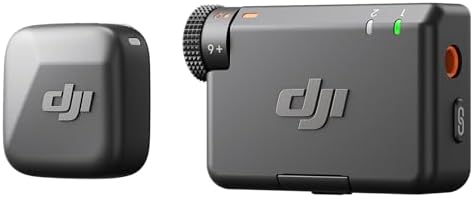
The DJI Mic Mini is one of the easiest wireless microphone systems to recommend for iPhone users because it balances size, features, portability, and ease of use. The current Amazon listing identifies it as a two-transmitter, one-receiver system with a charging case. The transmitters are designed to be very small and light, and DJI lists features such as noise cancellation, automatic limiting, and long total battery life.
That combination makes sense for smartphone creators — you don’t want a large transmitter hanging from your shirt while filming yourself, and you don’t want to spend several minutes setting up audio before every short video. The Mic Mini is designed around a simple workflow: clip the transmitter to your clothing, connect the receiver, and start recording.
Key Specs
- Two wireless transmitters, one wireless receiver
- Charging case included in this configuration
- Very small transmitter design (~10g each)
- 48kHz audio capability
- Noise cancellation and automatic limiting
- Up to 400m maximum transmission range under suitable conditions
- Up to 48 hours of total battery use with the charging case
- Compatible with iPhone, Android, cameras, and other supported devices
- USB-C connectivity; Lightning support via the appropriate DJI adapter for older iPhones
Pros
- Very compact and easy to carry
- Two transmitters useful for interviews
- Noise cancellation and automatic limiting for sudden loud sounds
- Long total battery life
- Suitable for smartphones and cameras
- Strong brand support
Cons
- More expensive than generic wireless microphones
- Some iPhone configurations need the correct connector
- Advanced users may want internal recording
- Range claims depend heavily on conditions and line of sight
Buyer Sentiment: Strongly positive overall, with buyers generally appreciating the small design, ease of use, and audio-focused feature set.
What Buyers Should Know: The headline range figure shouldn’t be treated as a normal indoor working distance — wireless range is affected by walls, people, interference, and receiver position. For most iPhone video, the important benefit isn’t whether you can walk hundreds of meters away; it’s whether the connection stays stable during the kind of shooting you actually do (walking around a room, standing several meters away, filming an interview, or recording outside).
Who Should Buy It: Anyone who wants a small, reputable wireless microphone system that can grow with their content creation needs — especially people who record frequently and don’t want a complicated audio setup.
2. Hollyland Lark A1
Best Budget Branded Wireless Mic — For Beginners, TikTok, and Casual Video
ASIN: B0F3D55D5R
The Hollyland Lark A1 is one of the strongest choices if you want a branded wireless microphone without moving into premium pricing. Current Amazon-market data shows the Lark A1 appearing strongly in wireless-microphone searches, including versions designed for iPhone and Android. The system focuses on what matters most to beginners: a compact transmitter, a receiver designed for smartphone use, noise cancellation, and high-quality digital audio.
Hollyland is also an established wireless-audio company — that matters when you’re buying a device you’ll use for hundreds of videos.
Key Specs
- Two-transmitter configuration available
- USB-C smartphone receiver configuration
- 48kHz/24-bit audio
- Three-level noise cancellation
- Magnetic microphone attachment
- Designed for iPhone and Android use
- 200m transmission range (per current listing)
- Charging case available on selected configurations
Pros
- Strong value and small transmitters
- Good fit for beginner creators
- High-resolution digital audio
- Multiple noise-cancellation levels
- Easy smartphone workflow
- Established brand
Cons
- Not as feature-rich as the DJI Mic 2
- No professional internal-recording workflow
- Smartphone-focused configurations vary
- Wireless range depends on environment
Buyer Sentiment: Well-rated among buyers, especially for simple smartphone video and beginner content creation.
What Makes It Different: The Lark A1 sits between cheap generic microphone kits and more expensive professional systems. A first-time creator doesn’t necessarily need internal recording, timecode, multiple camera outputs, or a touchscreen receiver — for short-form iPhone content, those features can add cost without solving the main problem. The Lark A1 focuses on the core job: getting your voice from the microphone to the phone clearly, without a cable running down your shirt.
Who Should Buy It: Anyone whose main goal is better iPhone audio without spending premium money — a sensible choice for new YouTubers, TikTok creators, teachers, online sellers, and social-media video makers.
3. Hollyland Lark M2
Best Value — For Serious Creators Who Want More Than Budget Audio
ASIN: B0CP7QXWPN
The Hollyland Lark M2 is one of the most established products in this group. The current Amazon listing has multiple configurations, including USB-C and Lightning connectivity, plus a combo configuration with two transmitters, receiver options, and a charging case. The Lark M2 is particularly attractive because the transmitters are tiny — a microphone can have excellent specs, but if it’s bulky and uncomfortable, you may stop using it. The Lark M2 was designed around portability.
Key Specs
- Two transmitters, wireless receiver
- USB-C and Lightning configurations available
- 48kHz/24-bit audio
- Environmental noise cancellation
- Charging case on selected configurations
- Smartphone and camera compatibility depending on configuration
Pros
- Small transmitters, good audio quality
- Multiple connection options
- Two-person recording
- Noise cancellation and good battery life
- Useful for phones and cameras
Cons
- More expensive than basic smartphone microphones
- Several package versions exist — buyers need to select the correct connector
- Maximum wireless range isn’t the same as real-world indoor range
Buyer Sentiment: Very positive overall, especially among creators looking for a compact upgrade from basic phone audio.
Why It’s a Good iPhone Choice: The biggest reason to choose the Lark M2 is flexibility — you can start with iPhone content and later expand into camera-based work. Imagine you start with iPhone TikToks and buy a camera six months later; a system that supports multiple connection types moves with you, reducing the chance you’ll need to replace your microphone.
Who Should Buy It: Anyone who wants better-than-budget wireless audio in a compact system that can support more serious content creation down the line.
4. DJI Mic Mini (Mobile Receiver Version)
Best for Modern USB-C iPhones
ASIN: B0FQJH54TR
The DJI Mic Mini family includes several configurations — important, since Amazon can show different versions under related listings. This configuration (B0FQJH54TR) is built around a mobile receiver aimed directly at smartphone creators. Current Amazon-market data identifies it as an active product for iPhone and Android users, and it’s worth considering if your workflow is almost entirely smartphone based.
Key Specs
- Two transmitters, mobile receiver
- USB-C smartphone connection, designed for modern USB-C phones
- Active noise cancellation
- Plug-and-play workflow, compact transmitter design
Pros
- Very portable, simple phone-focused workflow
- Two transmitters, DJI ecosystem, noise cancellation
- Good option for interviews
- No large receiver box required like traditional systems
Cons
- Less useful if you need a camera setup
- Connector compatibility matters
- Different DJI Mic Mini versions can be confusing
- Some accessories are sold separately
Buyer Sentiment: Positive among buyers seeking a compact smartphone-first microphone.
Who Is It For? Someone who mainly shoots with an iPhone and wants the smallest setup possible — different from a filmmaker who needs the same microphone to connect to a mirrorless camera, computer, and phone. For a phone-first workflow, less hardware is often better: fewer adapters and cables mean you can start recording faster.
5. DJI Mic 2
Best Premium Choice — For Professionals, Filmmakers, and Recording Backup
ASIN: B0CFZX734J
The DJI Mic 2 is the premium option on this list. It costs more than basic wireless smartphone microphones, but the extra money goes toward a much more advanced feature set. The current listing identifies it as a two-transmitter, one-receiver system with a charging case, with listed features including intelligent noise cancellation, 32-bit float internal recording, and long wireless transmission capability.
One of its biggest advantages is internal recording — if a wireless connection has a problem, an internally recorded track can provide a backup. That matters a lot for interviews and important shoots where you can’t just say “let’s do that again.”
Key Specs
- Two transmitters, one receiver, charging case
- Internal recording, 32-bit float internal recording
- Intelligent noise cancellation
- Bluetooth support
- Camera and smartphone compatibility
- Long-range wireless transmission
- Touchscreen receiver
Pros
- Advanced feature set with internal 32-bit float recording
- Good for professional workflows
- Two transmitters, smartphone and camera support
- Strong ecosystem
Cons
- Higher cost
- More features than casual users need
- Larger system than ultra-small smartphone microphones
- More setup options can mean a small learning curve
Buyer Sentiment: Highly regarded among creators who want advanced wireless recording features.
Why Choose It Over the Mic Mini? The DJI Mic Mini is about simplicity; the DJI Mic 2 is about capability. If you only make short social-media videos, the Mini is probably more sensible. If you record paid interviews, courses, documentaries, or important events, the Mic 2 makes more sense — it gives you more ways to protect your recording.
Who Should Buy It: Anyone for whom audio failure would be expensive or embarrassing. For casual videos, it may be more microphone than you need; for serious work, its advanced recording features can justify the higher investment.
6. RØDE Wireless Micro
Best Simple RØDE System
ASIN: B0DFXQDTDT
RØDE has a long history in microphones and creator audio, and the Wireless Micro is designed for smartphone content rather than large studio setups. Its appeal is simplicity — two small transmitters and a compact receiver system designed around smartphone recording. The product is also frequently mentioned alongside DJI and Hollyland systems in creator-audio discussions, reflecting how competitive the smartphone wireless microphone market has become.
Key Specs
- Two wireless transmitters, compact receiver
- Charging case
- Smartphone-focused design, RØDE ecosystem support
- Compact wearable transmitters
Pros
- Established audio brand, compact, two microphones
- Good for interviews, easy smartphone workflow
- Charging case, strong creator ecosystem
Cons
- Not the cheapest option
- Smartphone-first design
- Advanced professional users may want a more configurable system
- Connector version matters
Buyer Sentiment: Generally positive, especially among creators who value simple operation and the RØDE ecosystem.
Why Consider RØDE? Brand reputation isn’t everything, but it matters when you depend on audio. RØDE has built a large ecosystem of microphones, recording equipment, and creator tools — a good fit if you already use RØDE equipment, since staying in the same ecosystem can make your workflow easier.
Who Should Buy It: Anyone who wants a small, simple RØDE system for smartphone video.
7. BOYA mini 2
Best Smartphone-Focused Features
ASIN: B0DJSM8PHP
BOYA has become a major name in affordable creator microphones, and the mini 2 is aimed directly at smartphone creators. Current Amazon-market tracking lists it among active wireless microphone products, describing it as a wireless lavalier system for iPhone and Android. Its key differentiator is the feature mix — AI noise cancellation, app control, and smartphone recording.
Key Specs
- Wireless lavalier microphone
- iPhone and Android compatibility
- AI noise cancellation, app control
- Charging case, compact design
- Long combined battery capability on the listed configuration
Pros
- Smartphone-focused and compact
- AI noise cancellation and app control
- Charging case, easy to carry
- Good feature-to-cost balance
Cons
- Not designed as a full professional camera system
- App features may be unnecessary for simple users
- Noise reduction shouldn’t be expected to eliminate every background sound
- Compatibility should be checked before purchase
Buyer Sentiment: Generally positive, with buyers attracted to the compact design and feature set.
Noise Cancellation — What Should You Expect? Noise cancellation is useful, but it isn’t magic. A microphone can’t always remove a loud motorcycle, a nearby person talking, heavy wind, or a loud air conditioner without affecting the voice. Good microphone placement still matters: place the transmitter close to your mouth, use a windscreen outside, avoid rubbing the microphone against clothing, and keep the phone receiver in a position that gives the wireless system a clean path. These basic steps often matter as much as the microphone’s headline feature.
Who Should Buy It: Anyone who wants a feature-rich smartphone microphone without moving into premium DJI or RØDE pricing.
8. MAYBESTA Wireless Mini Microphone
Best Low-Cost Starter
ASIN: B0FQBSMB4H
Not everyone needs a professional microphone. If you only make occasional social-media videos, spending hundreds of dollars on wireless audio may not make sense — that’s where products like the MAYBESTA Wireless Mini Microphone come in. Current Amazon-market data shows it as one of the active products in Amazon’s iPhone wireless microphone search market, aimed at users who want a simple wireless upgrade from the built-in phone microphone.
Key Specs
- Wireless lavalier design, two-microphone configuration
- Clip-on transmitters, compact form factor
- Charging system
- iPhone and Android compatibility depending on configuration
Pros
- Low-cost entry point, two microphones
- Compact and easy to carry
- Suitable for casual content and two-person recordings
Cons
- Not a professional audio system
- Less established ecosystem than DJI or RØDE
- Compatibility must be checked carefully
- Build and long-term support may not match premium brands
Buyer Sentiment: Generally positive for budget-focused buyers who want a simple improvement over phone audio.
Who Should Buy It: Anyone whose goal is simply “I want something inexpensive that makes my iPhone videos sound better.” It’s not the microphone I’d choose for a paid documentary or major client project, but for casual content, it can make sense.
9. Mini Mic Pro
Best Budget Two-Mic Option
ASIN: B0CMJTSVRW
The Mini Mic Pro is another inexpensive wireless option with a large presence in Amazon’s smartphone microphone market. Current Amazon-market tracking shows it among the highest-selling products for iPhone wireless microphones, positioned as a two-pack wireless mini microphone system. The biggest advantage is simple: a small wireless setup without paying for premium branding.
Key Specs
- Wireless mini microphone design, two-microphone configuration
- Lavalier-style use, noise cancellation
- Rechargeable transmitters, compact body
Pros
- Very affordable entry point, two microphones
- Small, lightweight, good for casual video
- Easy to carry, useful for interviews
Cons
- Less advanced than DJI, RØDE, or Hollyland systems
- Budget construction
- Compatibility depends on the selected version
- Not intended for demanding professional recording
Buyer Sentiment: Positive budget-level sentiment, especially among users looking for a low-cost alternative to recording directly with an iPhone.
Is It Better Than the Built-In iPhone Microphone? For many users, the point of a small wireless lavalier system is microphone placement — the microphone sits much closer to your mouth than the phone, which alone can help voice clarity. But don’t expect a budget microphone to turn an untreated room into a recording studio; your environment still matters.
Who Should Buy It: Anyone who wants a very affordable way to experiment with wireless microphone recording — a good starting point for casual creators.
10. Labstandard Professional Wireless Lavalier
Best Ultra-Budget Choice
ASIN: B0C146LJ6G
The Labstandard Professional Wireless Lavalier is positioned at the very budget end of the Amazon wireless microphone market. Current Amazon-market tracking shows this ASIN among the strongest-selling products for the search term “wireless mic for iPhone” — a good example of why market activity and product suitability aren’t the same thing. A product can sell extremely well because it’s inexpensive and easy to understand; that doesn’t mean it’s the best choice for professional recording.
Key Specs
- Wireless lavalier microphone, clip-on design
- Smartphone-focused use, noise reduction
- Plug-and-play style workflow
- iPhone compatibility
- Designed for interviews, vlogs, livestreams, and similar uses
The listing also shows multiple connector variations, so buyers should carefully select the correct version before ordering.
Pros
- Very inexpensive and simple concept
- Compact, easy to carry
- Suitable for casual content
- Large Amazon market presence
Cons
- Basic feature set, not aimed at professional audio
- Connector selection matters
- Less ecosystem support than established brands
- Long-term durability may be less predictable
Buyer Sentiment: Generally positive at the budget level, particularly for buyers focused on price and basic functionality.
Who Should Buy It: Anyone trying wireless audio for the first time who wants to spend as little as possible. If your content becomes more serious, you can later move to a DJI, Hollyland, or RØDE system.
How to Choose the Right Wireless Microphone for iPhone
Buying the most expensive microphone isn’t automatically the best decision — the right microphone depends on how you use your iPhone.
1. Check your iPhone connector first. This is the first thing to check. Newer iPhones use USB-C; older iPhones use Lightning. A microphone designed for USB-C may not plug directly into an older Lightning iPhone — one of the easiest mistakes to make. Before ordering, look at the exact Amazon configuration; don’t assume that because a product title says “for iPhone” it works with every iPhone. Some products have separate USB-C and Lightning versions, others include both, and some need an adapter. The DJI Mic Mini, for example, has different mobile-adapter options, with a Lightning adapter designed specifically for compatible older Apple devices.
2. Decide whether you need one or two transmitters. If you only record yourself, one transmitter may be enough. If you interview another person, two transmitters are much better:
- Solo YouTube video → one transmitter is enough
- Two-person interview → two transmitters are useful
- Street interview → two transmitters make setup much easier
- Podcast with two speakers → two transmitters are usually preferable
This is why systems like the DJI Mic Mini, DJI Mic 2, Hollyland Lark M2, and RØDE Wireless Micro can be attractive.
3. Think about where you record. Indoors, you may face air conditioning, fans, computer noise, room echo, or traffic outside. Outdoors, you may face wind, cars, people, birds, construction, or crowds. Noise cancellation can help, but microphone placement remains critical — a microphone close to your mouth usually captures your voice more strongly than a phone sitting several feet away.
4. Do you need internal recording? This is one of the biggest differences between budget and professional wireless microphones. A basic wireless system sends audio directly to the phone; a system with internal recording also stores audio inside the transmitter as a backup. The DJI Mic 2 is a good example, with internal and 32-bit float recording. For casual TikTok videos, you may not need this — for a paid interview, you might. Ask yourself: “If this recording fails, can I easily do it again?” If not, backup recording becomes much more valuable.
5. Don’t buy based only on transmission range. You’ll see huge range numbers in wireless microphone listings — don’t treat them as normal shooting distances. A maximum range is generally measured under favorable conditions; walls, people, and other wireless devices all reduce it. For iPhone video, you rarely need to be hundreds of meters away — stable operation within a normal filming space matters more.
6. Battery life matters more than you think. A microphone that runs out of power halfway through filming is useless. Charging cases help, letting you recharge transmitters between recordings without carrying a large charger. The DJI Mic Mini is particularly attractive for travel because its charging-case configuration offers up to 48 hours of total battery use — that doesn’t mean continuous recording for 48 hours, but that the combined system can provide that much usage under the stated conditions. Always read battery claims carefully.
7. Size and weight matter for vlogging. A large microphone can look awkward on camera; a small transmitter can almost disappear. If you film yourself, look for a small transmitter, a strong clip or magnetic attachment, a small receiver, and a compact charging case. The less equipment you see, the cleaner your video can look.
Wireless Microphone vs. iPhone Built-In Microphone
The iPhone’s built-in microphone isn’t bad — for quick videos, calls, and casual clips, it can work. The problem is distance: if the phone is several feet away from you, your voice has to travel through the room before reaching the microphone. A wireless lavalier solves this by putting the microphone closer to your mouth. That’s the main reason creators buy wireless microphones — you’re not simply buying “better technology,” you’re changing microphone placement, which is a much more useful way to think about it.
Wireless Microphone vs. Bluetooth Earbuds
Some people wonder whether they should simply use AirPods or another Bluetooth headset. It depends — earbuds are convenient, but they’re not always the best solution for video production. A dedicated wireless microphone gives you better placement, dedicated transmitter hardware, clip-on mounting, more control, a better workflow for interviews, and more predictable video-production features. Some modern wireless microphone systems also support Bluetooth connections, but dedicated receivers can provide a more purpose-built recording workflow.
USB-C iPhone vs. Lightning iPhone
This deserves its own section because it can save you from ordering the wrong product.
USB-C iPhones (modern models) — look for a USB-C receiver, USB-C mobile receiver, USB-C compatible microphone, or a kit specifically marked for your iPhone generation.
Lightning iPhones (older models) — look for a Lightning receiver, Lightning adapter, or compatible Lightning kit.
Don’t buy a USB-C-only microphone and assume a cheap adapter will always solve the problem — digital audio compatibility can be more complicated than simple physical connector compatibility.
Are Cheap Wireless Microphones Worth Buying?
Sometimes. A cheap wireless microphone can be a good purchase if you make casual videos, are testing content creation, have a limited budget, only need basic voice recording, or don’t need professional backup recording.
A cheap microphone is less attractive if you record paid client work, record important interviews, need camera compatibility, need internal recording, need reliable long-term support, or can’t repeat the shoot. That’s why this list includes both budget and premium choices — there’s no single “best” microphone for everyone.
Best Wireless Microphone by Category
| Category | Pick |
|---|---|
| Best Overall | DJI Mic Mini |
| Best Budget Branded Option | Hollyland Lark A1 |
| Best Value | Hollyland Lark M2 |
| Best Premium | DJI Mic 2 |
| Best Simple RØDE Option | RØDE Wireless Micro |
| Best Feature-Focused Budget Choice | BOYA mini 2 |
| Best Cheap Starter | MAYBESTA Wireless Mini Microphone |
| Best Ultra-Budget Choice | Labstandard Professional Wireless Lavalier |
How to Get Better Audio From Any Wireless Microphone
Even the best wireless microphone can sound bad if used incorrectly.
- Keep the mic close to your mouth. The closer the microphone is to the speaker, the stronger the voice signal usually is compared with background noise. Don’t clip it too low on your chest — a position around the upper chest area often works well.
- Avoid clothing noise. Don’t let the microphone rub against jackets, scarves, loose shirts, necklaces, or cables. A tiny rubbing sound can become very obvious in a recording.
- Use a windscreen outside. Wind is one of the biggest problems with outdoor video — even a small breeze can create low-frequency noise. Use the included furry or foam wind protection when appropriate.
- Monitor before recording. Make a short test: say a few sentences, play them back, and listen for distortion, low volume, clothing noise, wind, dropouts, echo, or incorrect channel recording. A 20-second test can save an hour of unusable footage.
- Keep the receiver connected correctly. Before recording, confirm the phone is actually using the external microphone — don’t assume. Check your recording application, make a test clip, and play it back. This is especially important with third-party camera apps.
Do Wireless Microphones Work With iPhone Camera Apps?
Many wireless microphones work with the standard iPhone camera and popular video apps, but app behavior can vary. Some applications have their own audio settings, some may prioritize a Bluetooth microphone, and others use a connected receiver. Test your exact microphone with the exact app you plan to use, and check that app’s current audio-input support before filming an important project.
Can Two People Use One Wireless Microphone System?
Yes, if the system includes two transmitters — one of the biggest reasons to buy a two-transmitter kit. Two transmitters are useful for interviews, street videos, two-person podcasts, couple videos, teacher-and-student recordings, and customer testimonials. A single transmitter works fine for solo videos; a dual-transmitter kit gives you more flexibility.
Best Wireless Microphone by Use Case
For YouTube: Beginners should look at the Hollyland Lark A1 or DJI Mic Mini. For more professional recording features, the DJI Mic 2 makes more sense. For a middle-ground system, the Hollyland Lark M2 is worth considering.
For TikTok: Creators usually benefit from small size, fast setup, good voice clarity, noise reduction, long battery life, and easy phone connection. The DJI Mic Mini and Hollyland Lark A1 are especially attractive — you don’t need a professional cinema audio system to make a good TikTok, you need a microphone you’ll actually use.
For interviews: Prioritize two transmitters. The DJI Mic Mini, Hollyland Lark M2, and DJI Mic 2 are strong choices, with the Mic 2 becoming more attractive for important interviews since internal recording provides an extra layer of protection.
For outdoor video: Wind protection becomes important, noise cancellation becomes useful, and wireless stability matters. The DJI Mic Mini, Hollyland Lark M2, and DJI Mic 2 are strong candidates — but no wireless microphone can completely fix terrible wind. Use the windscreen, keep the microphone positioned correctly, and avoid placing it directly in the path of strong airflow.
On an extremely limited budget: The Labstandard Professional Wireless Lavalier, Mini Mic Pro, and MAYBESTA Wireless Mini Microphone are worth considering. If you can spend a bit more for a known audio brand, the Hollyland Lark A1 is a more compelling long-term choice. The key question isn’t “what’s cheapest,” but “how much do I need this microphone to do?”
FAQ
What is the best wireless microphone for iPhone in 2026?
For most creators, the DJI Mic Mini is one of the best overall choices — it combines a compact design, noise cancellation, automatic limiting, multiple transmitter options, and long battery life. For a lower budget, the Hollyland Lark A1 is a strong alternative. For professional users, the DJI Mic 2 offers more advanced recording features.
Do wireless microphones work with iPhone?
Yes. Many are designed specifically for iPhone, but compatibility depends on your iPhone’s connector — USB-C iPhones need compatible USB-C equipment, and older Lightning iPhones need Lightning-compatible equipment or the correct adapter. Always check the exact Amazon configuration before buying.
Is a wireless microphone better than the iPhone microphone?
For many video situations, yes. The biggest advantage is microphone placement — a wireless lavalier transmitter can sit close to your mouth while the iPhone may be several feet away, which can make speech much clearer and reduce the relative level of room noise.
Can I use a wireless microphone with an iPhone for TikTok?
Yes. Wireless microphones are widely used for short-form content — TikTok, YouTube Shorts, Instagram Reels, vlogging, interviews, and tutorials. Always make a short test recording before publishing important content.
Do I need two microphones?
Not always. If you only record yourself, one transmitter may be enough. If you interview another person, two transmitters are much more useful, and a two-transmitter system can also help if you plan to expand your content later.
Is the DJI Mic Mini better than the DJI Mic 2?
Neither is automatically better for everyone. The Mic Mini focuses on simplicity, small size, portability, and long battery life. The Mic 2 offers more advanced features, including internal and 32-bit float recording. Casual smartphone creators can get by with the Mini; professional users benefit from the Mic 2’s extra protection and control.
Is the Hollyland Lark M2 good for iPhone?
Yes. It’s designed for smartphone and camera use, and current Amazon configurations include USB-C and Lightning options — a good middle-ground choice for creators who want something more capable than a generic budget microphone.
Can I use a wireless microphone for an iPhone interview?
Yes — interviews are one of the best uses for a two-transmitter system. Give one transmitter to each speaker, keep the transmitters close to the speakers, and test both channels before starting.
Does noise cancellation remove all background noise?
No. It can reduce some unwanted sounds, but it can’t guarantee a completely silent recording — wind, traffic, loud voices, and strong room echo can still affect it. Good microphone placement and a suitable recording environment remain important.
Should I buy a cheap or expensive wireless microphone?
Choose based on your recording needs. For casual videos, a budget microphone can be enough. For regular content creation, a mid-range system like the Hollyland Lark M2 offers a better balance. For professional work, the DJI Mic 2’s advanced features can justify the higher cost.
Final Verdict
There’s no single wireless microphone that wins for every iPhone user — the right choice depends on your content, budget, iPhone model, and how important the recording is.
- 🏆 Best Overall: DJI Mic Mini — small, portable, feature-rich, and simple enough for everyday use.
- 💰 Best Budget Branded Option: Hollyland Lark A1 — a smart choice for beginners who want a recognizable audio brand without premium pricing.
- ⚖️ Best Value: Hollyland Lark M2 — an excellent middle ground, more serious than basic budget kits but still compact and creator-friendly.
- 🎬 Best Premium: DJI Mic 2 — the better choice for professional videos, interviews, courses, documentaries, or paid client content, thanks to internal recording as a major advantage.
- 🎙️ Best RØDE Option: RØDE Wireless Micro — a simple smartphone-focused system from an established audio brand.
- 📱 Best Smartphone Feature Set: BOYA mini 2 — worth considering for app control and noise-reduction features in a small package.
- 💵 Best Low-Cost Starter: MAYBESTA — sensible for casual creators who want to try wireless audio without spending much.
- 🔰 Best Ultra-Budget: Labstandard — aimed at buyers who want a very inexpensive entry point.
A wireless microphone can be one of the most useful upgrades you make to an iPhone video setup. You don’t need a cinema camera or an expensive studio — you simply need to get the microphone closer to your voice and choose a system that fits your phone. If you want the safest all-around choice, start with the DJI Mic Mini. If you want to save money, look at the Hollyland Lark A1. If you want a more flexible mid-range system, consider the Hollyland Lark M2. And if you create professional content where losing a recording would be a serious problem, move up to the DJI Mic 2.
Before ordering, always check the exact iPhone connector, included receiver, transmitter count, and current Amazon availability — listings can change even when the ASIN stays the same.
Related Reading
If you’re building a complete creator setup, see our guide to 10 Best Amazon Vlogging Equipment for Beginners for cameras, audio, lighting, and other useful gear.
If you also use a microphone with a desktop or laptop, our 10 Best Amazon Microphones for Computer guide covers larger USB and XLR microphone options.
A useful related guide is also our 10 Best Amazon Wireless Microphones Under $90 in 2026, especially if you want to compare more wireless options.
External Resources
For technical details, manufacturer resources are more reliable than competing “best microphone” roundups:
As an Amazon Associate I earn from qualifying purchases.

MD.HASAN is an experienced SEO expert and amazon products review writer passionate about helping people find right products on amzon for buy without confusion. With 4 years of hands-on experience in content strategy and search engine optimization, he specializes in writing SEO-friendly blog posts that rank, engage, and convert.


