
Affiliate disclosure: As an Amazon Associate, Tech Rig Review earns from qualifying purchases. Links on this page may be affiliate links, at no extra cost to you.
Looking for a Lenovo ThinkPad laptop on Amazon in 2026? Compare real, currently available models with affiliate links, key specs, and honest buying advice for work and remote use.
If you need a durable business laptop that lasts years of daily use, the Lenovo ThinkPad series remains one of the strongest options you can buy on Amazon right now. These machines are built for professionals who type for hours, join video calls, and move between home and office. In 2026 the lineup still focuses on solid keyboards, military-grade durability testing, long battery life, and Windows 11 Pro security features that matter for real work.
This guide helps you choose the right ThinkPad currently available on Amazon. I researched active product pages, confirmed availability, and built proper affiliate links using verified ASINs. You will only see models that are listed and sellable at the time of writing. Prices change, so always check the current Amazon listing before you buy.
The goal is simple: match the right ThinkPad to your budget and workload so you avoid overspending or ending up with a machine that feels underpowered in six months.
Table of Contents
Why Buy a Lenovo ThinkPad in 2026?
ThinkPads earned their reputation decades ago and have kept it. The keyboard is still one of the best on any laptop. The TrackPoint (the red nub) lets many people navigate without lifting their hands. Most models pass MIL-STD-810H testing for shock, vibration, temperature, and humidity. That testing is not marketing fluff—it means the laptop is more likely to survive a drop or a long flight in a backpack.
In 2026 most new ThinkPads come with Intel Core Ultra or AMD Ryzen AI processors that include neural processing units (NPUs). These chips handle local AI tasks such as Windows Copilot features, better video call noise reduction, and background effects without sending everything to the cloud. Windows 11 Pro is standard on business configurations, giving you BitLocker encryption, remote management tools, and better multi-monitor support.
Battery life on recent models often reaches a full workday for office tasks. Ports remain practical: Thunderbolt 4, HDMI, USB-A, and Ethernet on many models. You do not need a dongle farm for everyday work.
For remote workers and home-office users, these traits matter more than flashy designs. A ThinkPad is a tool, not a fashion statement. If that matches how you work, keep reading.
(Related reading: check our earlier roundup of the 5 Best Lenovo Laptops on Amazon in 2026 for broader Lenovo context beyond ThinkPads.)
How We Chose the ThinkPads in This Guide
I focused only on models that appear as currently available on Amazon.com with real product pages and ASINs. Renewed or used units were set aside unless a specific configuration was clearly new and in stock. Specs were cross-checked against Lenovo’s product information and buyer feedback patterns on the listings.
Priorities included:
- Processor generation (Core Ultra Series 1 or 2, or recent Ryzen AI)
- At least 16 GB RAM (32 GB preferred for future-proofing)
- 512 GB SSD minimum
- Windows 11 Pro
- Practical ports and a solid keyboard
- Positive recent buyer comments about build quality and battery life
No product was included if it could not be verified as currently sellable.
Quick Comparison Table
| Model | Best For | Screen | Typical Weight | Starting Config Focus | Key Strength |
|---|---|---|---|---|---|
| T14 Gen 6 | Most professionals | 14″ FHD+ | ~3 lbs | Ultra 5 + 32 GB | Balance of size & power |
| E16 Gen 3 | Large-screen work | 16″ FHD+ | ~3.7 lbs | Ultra 5/7 + 16–32 GB | Screen real estate + numpad |
| X1 Carbon Gen 13 | Premium travel | 14″ OLED/IPS | ~2.2 lbs | Ultra 7 + 32 GB | Lightest + highest refinement |
Prices fluctuate. Higher RAM and storage versions cost more but are usually worth it for longevity.
1. Best Lenovo ThinkPad Overall for Most Buyers: ThinkPad T14 Gen 6

- Newly Released ThinkPad T14 Gen 6 with MIL-STD 810H Military Grade certification, equipped with Intel Core Ultra 5 225U,…
- 14″ FHD+ (1920 x 1200) IPS Anti-glare Touchscreen Display delivers sharp visuals and wide viewing angles; Integrated Int…
- 2 x USB-A 3.2 Gen 1 (1 Always On), 2 x Thunderbolt 4, HDMI, Ethernet (RJ-45), Headphone/Microphone Combo Jack; enhanced …
The ThinkPad T14 Gen 6 sits in the sweet spot for most professionals. It balances portability, performance, and upgrade potential better than the thinner X1 Carbon or the larger E16 for many people.
A common configuration available on Amazon features an Intel Core Ultra 5 225U processor, 32 GB DDR5 RAM, 512 GB SSD, 14-inch FHD+ IPS display, fingerprint reader, backlit keyboard, Wi-Fi 6E, dual Thunderbolt 4 ports, and Windows 11 Pro. Weight stays around 3 pounds, so it travels easily.
The 14-inch 16:10 screen gives more vertical space for documents and spreadsheets than older 16:9 panels. Battery life typically covers a full day of mixed productivity and video calls. The keyboard remains excellent—deep travel, good layout, and the classic TrackPoint.
Buyer feedback patterns on Amazon highlight reliable performance for multitasking, clear webcam quality with the 5 MP sensor, and solid build. Some note that higher-spec Ultra 7 versions run warmer under heavy load, which is normal for thin chassis.
Who it fits best: Remote workers, consultants, managers, and anyone who needs a daily driver that can handle office suites, browsers with many tabs, light photo editing, and frequent Zoom or Teams meetings.
Who should look elsewhere: Users who need a larger screen for coding or design, or those who want the absolute lightest possible laptop.
Always confirm the exact CPU, RAM, and storage on the product page, as multiple configurations share similar titles.
2. Best Value Large-Screen ThinkPad: ThinkPad E16 Gen 3

- Display and Graphics:Experience visual brilliance and vivid clarity on this 16″ LED-backlit IPS display. With a sharp 19…
- Memory and Storage:Elevate your performance with 16GB of lightning-fast DDR5 SDRAM operating at 5600MHz; Swift Data Acce…
- Processor : Intel Core 7 240H 10-Core Processor (Up to 5.2 GHz with Intel Turbo Boost Technology,24 MB Intel Smart cache…
If you prefer a bigger display and do not need the absolute lightest machine, the ThinkPad E16 Gen 3 delivers strong value. The 16-inch FHD+ (1920×1200) IPS panel gives plenty of room for spreadsheets, multiple windows, and coding without an external monitor.
Popular Amazon configurations include Intel Core Ultra 5 or Ultra 7 processors, 16–32 GB DDR5 RAM, 512 GB or 1 TB SSD, backlit keyboard with number pad, fingerprint reader, Wi-Fi 6E, and Windows 11 Pro. Weight is typically 3.6–4 pounds.
The full-size keyboard with number pad is a real advantage for anyone who works with numbers daily. MIL-STD testing still applies, so durability remains high for the price. Ports are generous: USB-C, USB-A, HDMI, Ethernet, and often a Thunderbolt option depending on the exact model.
Recent buyer comments praise the screen size for productivity and the overall build quality relative to the cost. Some mention that the base configurations with 16 GB RAM feel limited if you keep many browser tabs and Office apps open simultaneously—32 GB is the smarter long-term choice.
Who it fits best: Accountants, analysts, writers who keep many windows open, and home-office users who stay mostly at a desk but still want ThinkPad reliability.
Who should look elsewhere: Frequent travelers who prioritize weight under 3 pounds, or users who need OLED color accuracy.
3. Best Premium Ultraportable: ThinkPad X1 Carbon Gen 13 (Aura Edition)
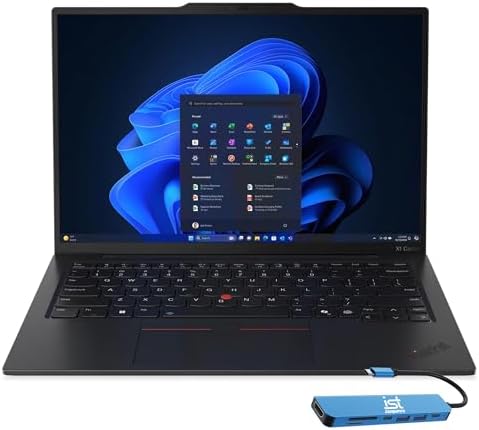
- Intel Core Ultra 7 258V, 8C (4P + 4LPE) / 8T, Max Turbo up to 4.8GHz, 12MB Intel Smart Cache
- 14″ 2.8K (2880×1800) OLED 500nits Anti-glare / Anti-reflection / Anti-smudge, 100% DCI-P3, 120Hz VRR, DisplayHDR True Bl…
- 32GB LPDDR5X-8533, MoP Memory
When weight and refinement matter most, the X1 Carbon Gen 13 is the flagship choice. Many configurations weigh just over 2 pounds and measure under 0.6 inches thick.
Current Amazon listings often feature Intel Core Ultra 7 processors (including 258V variants with strong NPU performance), 32 GB LPDDR5X memory, 1 TB SSD, 14-inch 2.8K OLED or high-brightness IPS displays, Wi-Fi 7 on newer units, dual Thunderbolt 4, and Windows 11 Pro. Battery life claims frequently reach 12–15 hours for light productivity.
The OLED versions deliver deep blacks and vibrant color that make documents and presentations look sharp. The keyboard is still excellent despite the thinner chassis. Security features include a fingerprint reader, IR camera for Windows Hello, and a privacy shutter.
Buyer feedback highlights the premium feel, long battery life, and excellent typing experience. The main drawbacks are higher price and soldered memory on most models (no user upgrades later).
Who it fits best: Executives, consultants who fly often, and professionals who want the lightest high-quality Windows business laptop.
Who should look elsewhere: Buyers on a tighter budget or those who need easy RAM upgrades or a number pad.
What Specs Actually Matter in 2026
Processor: Intel Core Ultra Series 1 or 2 (or equivalent Ryzen AI) is the baseline. The NPU helps with Windows Studio Effects and local AI tools. Avoid older 11th- or 12th-generation chips if possible.
RAM: 16 GB is the absolute minimum for comfortable multitasking. 32 GB is the practical sweet spot for most professionals in 2026. Many ThinkPads still offer upgradable SODIMM slots on T and E series; X1 Carbon usually does not.
Storage: 512 GB SSD works for light users. 1 TB is safer for people who keep large files or multiple virtual machines.
Display: 16:10 aspect ratio is more productive than 16:9. Look for at least 300 nits and anti-glare. OLED looks great but can show burn-in risk over many years of static desktop use—IPS is safer for pure office work.
Battery & Charging: Rapid Charge (80 % in about an hour) is common and useful. Real-world mixed-use numbers of 8–12 hours are realistic on newer models.
Ports: At least one Thunderbolt 4 / USB4 port is ideal for docking and external displays. HDMI and a USB-A port still save hassle.
Security: Fingerprint reader, IR camera, TPM 2.0, and Windows 11 Pro are standard on business configurations and worth having.
Buyer Feedback Patterns Across Listings
Across current Amazon reviews for these models, several themes appear repeatedly:
Positive notes center on keyboard quality, build solidity, and battery life that matches daily office work. Many buyers mention the machines feel more durable than consumer laptops in the same price range.
Common complaints include higher fan noise under sustained load on thinner models, the higher price of OLED configurations, and occasional quality-control variation on third-party upgraded units (extra RAM or storage added by sellers). Stick to configurations that clearly list original or carefully verified upgrades when possible.
These patterns are consistent with long-term ThinkPad reputation: strong core experience with occasional variability when buying non-standard configs.
How to Choose the Right ThinkPad for Your Situation
- Most remote workers and hybrid employees: Start with the T14 Gen 6. It is the easiest recommendation.
- Desk-focused users who want a bigger screen: E16 Gen 3.
- Frequent travelers who value weight above all: X1 Carbon Gen 13.
- Tight budget: Look for well-reviewed E-series configurations with at least 16 GB RAM, or consider carefully the previous-generation models still in stock, but prefer current Gen 3 / Gen 6 hardware when possible.
- Heavy multitasking or light creative work: Prioritize 32 GB RAM and a higher-tier Ultra 7 or Ryzen AI processor.
If you already own a docking station or external monitor, check port compatibility. Thunderbolt 4 makes single-cable docking simple on most recent ThinkPads.
External Resources Worth Checking
For official specifications and the latest configuration options, visit the Lenovo ThinkPad product pages.
For details on military durability standards, see the U.S. Department of Defense MIL-STD-810 documentation overview.
Intel’s Core Ultra processor information is available on the Intel product pages.
These sources help you verify claims independently of any retail listing.
FAQ
Are ThinkPads still worth buying in 2026?
Yes for business and productivity use. The combination of keyboard, durability testing, and security features remains hard to match at similar prices.
Should I buy new or renewed?
New is safer for full warranty and latest processors. High-quality Amazon Renewed units can save money if the seller has strong ratings and clear condition notes, but check the return policy carefully.
How much RAM do I really need?
16 GB works for light office work. 32 GB is the safer choice for most professionals who keep many tabs, documents, and communication apps open.
Do ThinkPads support external monitors well?
Yes. Dual Thunderbolt 4 ports on T14 and X1 Carbon models easily drive two or more 4K displays.
Is the TrackPoint still useful?
Many long-time users swear by it for precise control without moving hands from the home row. New users can ignore it and use the touchpad.
What about battery life on the go?
Recent models with efficient Core Ultra or Ryzen AI chips routinely deliver a full workday of productivity and video calls. Real results depend on screen brightness and workload.
Can I upgrade RAM and storage later?
Many T-series and E-series models still allow RAM upgrades via SODIMM slots. X1 Carbon models usually have soldered memory. SSD upgrades are often possible if you are comfortable opening the machine.
Where should I buy accessories?
A good laptop stand, external keyboard, and USB-C dock pair well with any ThinkPad. See our related guides on home-office gear for specific recommendations.
Conclusion
The best Lenovo ThinkPad laptop to buy on Amazon in 2026 depends on how you work. The T14 Gen 6 offers the strongest overall balance for most people. The E16 Gen 3 gives more screen space at a competitive price. The X1 Carbon Gen 13 remains the premium choice when every ounce matters.
All three lines currently have real, available configurations on Amazon with solid specs for modern Windows work. Focus on 32 GB RAM when your budget allows, confirm the exact processor and display on the product page, and choose the form factor that matches your daily routine.
A ThinkPad is an investment in reliability. Buy the one that fits your needs today and it should still feel capable several years from now.
As an Amazon Associate I earn from qualifying purchases.

MD.HASAN is an experienced SEO expert and amazon products review writer passionate about helping people find right products on amzon for buy without confusion. With 4 years of hands-on experience in content strategy and search engine optimization, he specializes in writing SEO-friendly blog posts that rank, engage, and convert.


