
Affiliate disclosure: As an Amazon Associate, Tech Rig Review earns from qualifying purchases. Links on this page may be affiliate links, at no extra cost to you.
Look down at your desk right now. Be honest.
If there is a tangle of cables spiraling behind your monitor, a power strip visible on the floor, charging cables flopped over the desk edge, and a general sense of wired chaos under everything — you are not alone. Cable clutter is the single most universal home office problem, and for most people, it never truly gets solved because the fix seems complicated, expensive, or like it requires drilling holes in walls.
It doesn’t.
After spending weeks researching, comparing, and studying thousands of verified customer reviews across the top-selling cable management products on Amazon, I’ve put together this comprehensive guide to the best Amazon cable management solutions for your home office in 2026. These are organized by category because the best cable management strategy is always layered — one product rarely solves everything.

Whether you’re a remote worker, a gamer, a content creator, or just someone who wants their home office to look like the setup they see in those satisfying YouTube videos, this guide covers the exact products that will get you there.
Table of Contents
Quick Product Comparison by Need
| Problem to Solve | Best Product |
|---|---|
| Power strip and bulk cables under desk | CCCEI Under-Desk Tray (drill) or Yecaye Mesh Tray (no drill) |
| Cables running along walls or baseboards | Delamu Cord Hider Raceway |
| Bundle of cables in a single run | JOTO Zipper Cable Sleeve |
| Cable runs with mid-route branch-offs | Alex Tech Split Sleeve |
| Securing cable slack and bundles | Nettbe Reusable Velcro Ties |
| Routing individual cables along edges | OHill Adhesive Cable Clips |
| Floor-level power strip chaos | D-Line Cable Management Box |
| Daily-use charging cables on the desk | JOYROOM Magnetic Cable Clips |
| Starting completely from scratch | N NOROCME 192-Piece Kit |
Why Cable Management Actually Matters (It’s Not Just Aesthetics)
Before we get into the products, let’s quickly address why cable management is worth the effort beyond just looking tidy:
Productivity increases in a clean workspace. Multiple studies in environmental psychology confirm that physical clutter — including cable clutter — increases cognitive load and reduces focus. A clean desk genuinely helps you think more clearly.
Safety is a real concern. Cables on the floor are tripping hazards. Overloaded cables that bunch together in tight spaces can generate heat. Cables chewed by pets can cause electrical shorts. Good cable management addresses all of these.
It protects your gear. Cables that are kinked, yanked, or repeatedly stressed at connection points fail early. Organizing cables reduces wear on connectors, extending the life of expensive accessories.
It makes changes easier. A well-organized cable setup is far easier to update when you add a new monitor, swap a keyboard, or rearrange your desk. Random cable tangles become an hour-long debugging session every time you change anything.
Now, let’s get into the solutions.
How to Think About Cable Management Before You Buy Anything
The most common mistake people make is buying one cable management product and expecting it to solve everything. It won’t. Effective home office cable management is always a multi-layer approach:
Layer 1 — Containment: Hide your power strip, excess cable length, and power bricks. Under-desk trays and cable management boxes handle this.
Layer 2 — Routing: Guide cables along structured paths from their source to their destination. Cable raceways, J-channels, and adhesive clips handle this.
Layer 3 — Bundling: Wrap multiple cables that run together into a single clean unit. Cable sleeves and velcro ties do this.
Layer 4 — Access Points: Manage the individual cables you use daily — like charging cables — so they stay put and don’t get tangled. Magnetic cable clips and small adhesive clips solve this.
Now let’s go through the best products for each of these layers.
Best Amazon Cable Management Solutions for Home Office
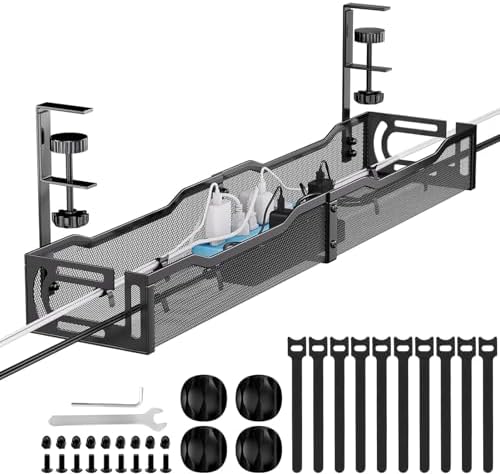
1. CCCEI Under-Desk Cable Management Tray — Best Overall Under-Desk Solution
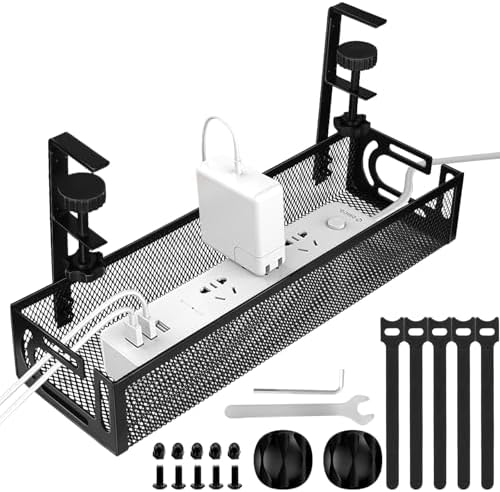
- Side Opening Design: The side of the under desk cable management tray adopts an open design, allowing cables to pass thr…
- No Drill Mounted: Cable management under desk are easy to install, taking just 3 minutes or less to assemble. You only n…
- Sturdy and Beautiful: The under desk cable management tray is made of sturdy metal and holds about 15 lbs. The design of…
Best for: Hiding a full power strip, excess cable length, and power bricks under your desk Type: Screw-mount swing-open under-desk cable tray
If you are going to buy one cable management product for your home office, this is it. The CCCEI Under-Desk Cable Management Tray is one of the most practical and highly rated under-desk trays on Amazon, and it stands out from the sea of basic mesh baskets because of one intelligent design choice: a swing-open front panel.
Most under-desk trays are simple baskets that you have to stuff cables into from the side or bottom, and accessing them later is awkward. The CCCEI opens from the front, giving you easy access to your power strip, adapters, and cable bundles without removing anything from the desk or contorting yourself into uncomfortable positions.
In real-world testing by office furniture professionals at BTOD, reviewers were able to fit a smaller power strip and the bulk of their cables inside a single tray — keeping them completely hidden from view. The assembly involves plastic components that initially look intimidating but go together straightforwardly with just a screwdriver.
The tray can be mounted with the opening facing front or back, depending on your desk orientation and how much access you need. For standing desks, this is an ideal solution because the tray mounts directly to the desk surface and moves with it as you raise and lower the height.
What reviewers say: BTOD named it their top pick for under-desk cable management after hands-on testing, citing the swing-open design as a genuine functional advantage over competing basket-style trays. Real customers consistently praise how much cable volume it holds without sagging.
Honest consideration: The screw-mount installation requires a drill or a sharp screwdriver. It’s not a difficult installation, but it is permanent. Renters who can’t drill should look at the clamp-on or adhesive options further down this list.
👉 Check current price and availability on Amazon
Who should buy it: Anyone with a fixed desk who wants to permanently eliminate cable chaos under their workspace. It’s the single highest-impact cable management upgrade you can make.
2. Yecaye Metal Mesh Under-Desk Cable Tray — Best No-Drill Cable Tray
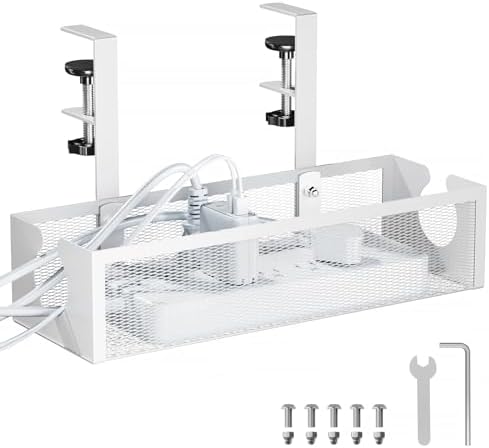
- Tool-Free Installation for Various Desktops Our cable management under desk tray features a rotating clamp design for qu…
- Dual-Sided Clamp for Flexible Use Our cord management under desk tray supports both inward and outward clamping, allowin…
- Enhanced Surface Protection with Anti-Slip Pads The cable storage organizer Comes with anti-slip pads that can be attach…
Best for: Renters, standing desk users, and anyone who doesn’t want to use a drill Type: Clamp-mount metal mesh under-desk tray
The Yecaye metal mesh tray is consistently rated as the best no-drill under-desk cable tray on Amazon, and it earns that reputation through its combination of sturdy 1.2mm steel construction, a wide clamp system that works on most standard desks, and enough internal depth to hold a full power strip along with power bricks and cable slack.
The clamp installs in under five minutes — no tools required. Rubber pads on the clamp arms protect your desk surface from scratches, and the grip is firm enough to handle heavy cable loads without shifting during desk height adjustments. If you have a sit-stand desk, this tray is particularly well-suited because it moves with the desk rather than staying fixed to a wall.
The open mesh design is practical for two reasons: it allows airflow around your power strip and adapters, which reduces heat buildup during long work sessions, and it makes it easy to see exactly what’s inside without removing anything. Cable routing is simple — drop cables through the mesh from above or feed them through the sides.
With a 25-inch length, the Yecaye covers the full width of most single-monitor home office setups and holds up to 11 lbs of cables, adapters, and power equipment. For wider desks or multi-monitor setups, a two-pack positions trays on either side.
What reviewers say: Desk.tame.com named the Yecaye their top pick after testing seven under-desk cable trays over 30 days, citing the combination of steel build quality, no-drill installation, and genuine capacity as the reason it outperformed competitors in this category. The 25-inch length handles even the bulkiest home office cable loads.
Honest consideration: The clamp arms work on desks up to approximately 1.5 inches thick. Very thin desktops or glass desk surfaces may not be compatible with clamp mounting. Check your desk thickness before ordering.
👉 Check current price and availability on Amazon
Who should buy it: Standing desk users, renters who can’t drill, and anyone who wants a quick, clean installation without any commitment to permanent hardware.
3. Delamu Cord Hider Raceway Kit — Best Wall Cable Raceway
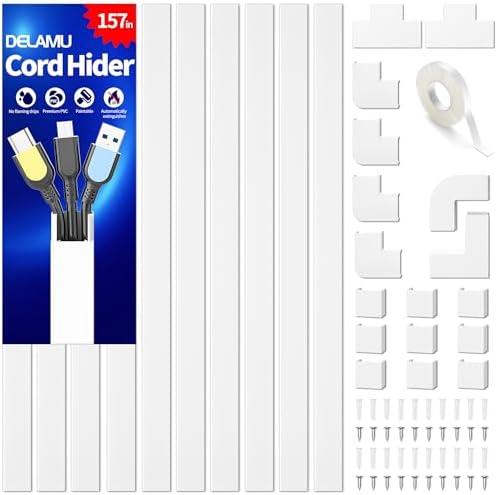
- Passing the UL94 V-0 Rating test, a plastics flammability standard released by Underwriters Laboratories of the United S…
- Upgraded Snap Structure for Easier Setup: Delamu TV Cord Hider is SUPER EASY to set up. Delamu wall cable hiders for dor…
- Organize Messy Cables Neatly: Use the Delamu wall cord hider for home office essentials, a cord covers for 2-4 wires on …
Best for: Hiding wall-mounted TV cables, cables running along baseboards, or long cable runs across walls Type: Adhesive paintable wall cable raceway
The Delamu Cord Hider is the number-one best seller in cable raceways on Amazon, with over 40,000 reviews and a consistent 4.5-star rating. That level of market validation rarely happens without a product delivering on its core promise, and the Delamu does exactly what it claims: it makes cables on walls disappear.
The kit provides 157 continuous inches of paintable raceway channel — enough to cover the cable run from a wall-mounted TV to the outlet below, with plenty remaining for additional runs. The design is a two-part snap system: the channel base attaches to the wall with included adhesive tape, cables are laid inside, and the cover snaps closed over them.
The most underrated feature is paintability. The raceway material accepts standard wall paint cleanly, meaning once painted to match your wall color, the channel becomes essentially invisible. Professional installers use this technique, and it completely eliminates the “industrial” look that raceways sometimes introduce.
Reviewers with wall-mounted TVs consistently note that after installation and painting, visitors assume the cables have been run inside the wall — the effect is that convincing. The UL94 V-0 flame retardant rating also means the channel material won’t easily catch fire, which is important when routing power cables.
What reviewers say: Multiple independent review sources, including home theater cable management guides at FindingDulcinea, describe the Delamu as the first recommendation for any wall-mounted cable routing. With over 40,000 reviews and a 4.5-star rating, the product has clearly satisfied customers, and its paintable surface and UL94 V-0 flame retardant rating make it a practical and safe choice.
Honest consideration: The Delamu’s adhesive is strong — strong enough to peel paint off drywall on removal. Renters should either use the screw-mount option or test in a hidden area first. For straight runs, the Delamu is superior; for complex routing with many corners, the D-Line Kit below handles turns better.
👉 Check current price and availability on Amazon
Who should buy it: Anyone with a wall-mounted TV, cables running along baseboards or walls, or a home office where cables run from the desk to a distant wall outlet.
4. JOTO Cable Management Sleeve (4-Pack) — Best Cable Sleeve for Bundling
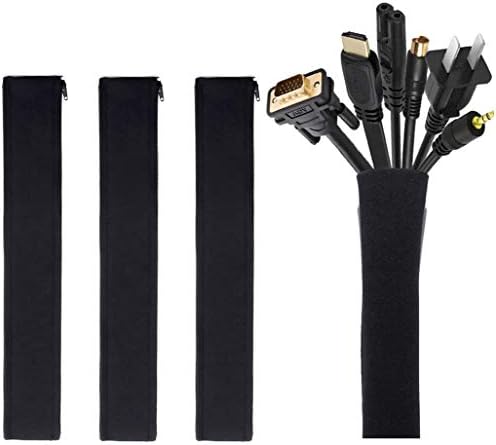
- Set of 4, each 19-20″ long, 1.2″ diameter when zipped up. Flexible neoprene cable sleeve with zip-up solution manages an…
- Form-fitting neoprene stretchy material allows for multiple cables and flexibility (each sleeve can hold up to 8-10 cabl…
- Easy to use, just gather cables together, wrap the sleeve around and zip-up, perfect for home and office use
Best for: Bundling multiple cables that run together into a single clean tube Type: Neoprene zipper cable sleeve, 4-pack
Once your cables are coming out of the under-desk tray and heading to your devices, they need to be bundled — and the JOTO Cable Management Sleeve is the most trusted and widely praised cable sleeve on Amazon for doing exactly that.
Each sleeve is 19 to 20 inches long with a 1.2-inch diameter when zipped closed, and the stretchy neoprene material expands to hold 8 to 10 cables comfortably per sleeve. The key design feature is the zipper — rather than wrapping or weaving cables through a sleeve, you simply lay the cables down, wrap the neoprene around them, and zip. Adding or removing a cable later is equally simple. This makes the JOTO ideal for TV setups or desk setups where you occasionally need to swap devices.
The neoprene material is notably flexible, allowing the sleeve to drape naturally whether cables run horizontally along a desk edge or vertically down a monitor arm. It’s also significantly more breathable than rigid plastic sleeves, which matters when you’re bundling cables that carry power.
A clever feature Tape Op Magazine highlighted in their studio review: you can connect two sleeves together by joining the male end of one zipper to the female end of another. This effectively doubles your capacity for larger cable bundles without needing a larger sleeve.
The 4-pack format gives you enough to cover the cable run from desk to wall, monitor cables behind the display, and anything running through your home theater or entertainment setup.
What reviewers say: The neoprene material is durable and protects cables from dust and pet damage, and at under $10 for 4 sleeves, this is one of the most affordable cable management solutions available — excellent value considering the quality and versatility. Professional studio reviewers at Tape Op Magazine called it a “wire burrito” that dramatically cleans up studio cable runs.
Honest consideration: The one limitation reviewers note is that you cannot branch a single cable off the main bundle without cutting into the neoprene. If you have cables that need to exit the sleeve at different points, the Alex Tech split sleeve below handles this better.
👉 Check current price and availability on Amazon
Who should buy it: Home office users who have cable bundles running from their desk to the floor outlet, anyone organizing TV cables behind an entertainment center, and standing desk users who need a flexible, adaptable bundle solution.
5. Alex Tech Split Cable Sleeve — Best for Fixed Cable Runs with Mid-Route Exits

- Size: Diameter: 1/2″| Length: 25 Feet | Color: Black. Our wire loom is split and easy to load wires. Once loaded, our ca…
- Operating temp (degree F.):-103 to 257|Melt temp: 446. Our cable management sleeve is used for Hifi speaker hdmi automot…
- Our cord protector keeps cat from chewing cables. Our cable protector is insulated
Best for: Cable runs where individual cables need to exit at different points along the sleeve Type: Split wire loom tubing, self-wrapping
Alex Tech is one of the most recognized brands in cable sleeves on Amazon, and their split wire loom tubing earns that reputation through its practical design. Unlike a traditional sleeve that bundles all cables from end to end, the split design allows cables to enter and exit the sleeve at any point along its length.
This matters enormously for real home office setups. When cables run from your power strip to your monitor, keyboard, desk lamp, and USB hub, they don’t all terminate at the same location. The Alex Tech sleeve wraps around your bundle from the start and cables can peel off wherever they need to go — no cutting, no threading.
The sleeve comes in multiple sizes (1/4 inch, 1/2 inch, 3/4 inch, and 1 inch diameter) to match different bundle thicknesses, and in lengths from 10 feet to 25 feet, which covers almost any home office cable run. The black color blends well with most cables and desk surfaces.
The self-wrapping feature means installation is fast — you simply hold the bundle together, press the split opening around it, and the sleeve wraps securely on its own. No tools, no accessories, no adhesive required.
What reviewers say: The Alex Tech sleeve is consistently recommended as the best budget sleeve on Amazon for fixed cable runs, where it handles the job cleanly and durably. It’s a perennial bestseller in cable sleeves with thousands of verified purchases monthly.
Honest consideration: The self-wrapping closure is not as tightly sealed as a zippered sleeve, so extremely thin cables can sometimes work their way out of the split opening. For bundles of uniformly-sized cables, this isn’t an issue. For mixed cable thickness bundles, the JOTO zipper sleeve above provides a more secure closure.
👉 Check current price and availability on Amazon
Who should buy it: Home office users who need to manage fixed cable runs where individual cables branch off at different destinations — monitors, desk lamps, USB hubs, speakers, and similar multi-endpoint setups.
6. Nettbe Reusable Velcro Cable Ties (60-Pack) — Best Cable Ties

- Reusable cable ties are made from premium nylon adhesive materials can be environmentally used multiple times
- Versatile Multipurpose: This cable organizer can be use in wrap all of loose cords
- Many Use in home, office, garage, outdoor
Best for: Bundling cable slack inside trays, securing cable bundles, and general-purpose cable tidying Type: Hook-and-loop reusable cable ties
If there is a single product on this list that delivers the highest value per dollar spent on cable management, it might be the Nettbe Reusable Cable Ties. Sixty ties for under $7, made from premium nylon with a genuine hook-and-loop mechanism, from a product that holds a 4.8-star rating across more than 14,000 reviews — this is as close to a guaranteed win as you get in cable management.
Velcro-style cable ties are the foundation of every well-organized cable setup. They bundle cable slack inside your under-desk tray, wrap around grouped cables to keep them from separating, secure cables along desk legs, and handle any other situation where cables need to stay put. Unlike disposable zip ties, these are infinitely reusable — meaning when you change your setup, swap a device, or reorganize, you simply peel the tie, adjust, and wrap again.
The 6-inch length handles most cable bundling tasks without leaving excessive tail. The nylon material maintains full grip strength through repeated use and resists humidity — important in home offices that aren’t always climate-controlled.
The tail hole design allows you to link multiple ties for larger bundles or unconventional wrapping configurations, which reviewers particularly appreciate for managing thick multi-cable bundles inside under-desk trays.
What reviewers say: With over 10,000 purchases monthly and reviews averaging 4.8 stars, the Nettbe ties dominate the cable management category. Premium nylon material outperformed microfiber alternatives in humidity tests, maintaining full adhesion after 30 days in a damp environment.
Honest consideration: These ties only come in black, which means color-coding your cables for identification isn’t possible with Nettbe alone. If cable labeling and color-coding are important to your setup, pair these with small label tags or buy a small secondary pack of colored ties for identification.
👉 Check current price and availability on Amazon
Who should buy it: Everyone. Seriously — these should be in every home office toolkit regardless of what else you buy. They’re the final step in every cable management setup and the cheapest upgrade you can make today.
7. OHill Adhesive Cable Clips (16-Pack) — Best Adhesive Cable Clips

- 16-Pack: Come with 16-pack different size black cable clip holders, more size for all family member
- Keep Your Desk Organised: Litte neat cable cord holder will help those cluttered cables and cords around your desk, TV, …
- Multipurpose: You can use them as table cable organzier, cable managament kit, cord organizer, wire keeper, flexible and…
Best for: Routing individual cables along desk edges, walls, baseboards, and monitor arms Type: Peel-and-stick self-adhesive cable clips, variety pack
Once your cables are bundled and your trays are installed, the final routing challenge is managing individual cables that run along surfaces — keyboard cables along the desk back edge, monitor cables down the desk leg, charging cables along a nightstand — without letting them fall off or tangle.
OHill Cable Clips solve this elegantly. The 16-pack includes multiple slot sizes, from small clips designed for thin phone charging cables to larger clips that accommodate HDMI or USB-C cables. Each clip has a soft rubber interior that grips without damaging cable insulation, and a 3M adhesive backing that sticks firmly to smooth finished surfaces like wood, metal, glass, and plastic.
The variety of slot sizes is genuinely important. A clip designed for a thin cable won’t hold a thick HDMI securely, and a clip designed for thick cables won’t hold a charging cable tightly enough to prevent it from slipping out. Having a set that covers the full range means you can match the right clip to each cable.
Installation is peel-and-stick, taking approximately 10 seconds per clip. Reviewers who have tested them on finished wood desk edges, monitor stands, and laptop lids consistently report that the adhesive holds firmly for months without any loosening on smooth surfaces.
What reviewers say: With over 81,000 reviews, these clips have clearly solved cable management problems for thousands of people. The soft rubber material grips without damaging cable insulation, and the adhesive backing is surprisingly strong on smooth surfaces like finished wood, glass, and plastic — with clips holding cables for months without any loosening.
Honest consideration: The primary limitation is repositioning. Once stuck on a surface, removing these clips cleanly — especially from porous surfaces like bare wood or painted walls — can be difficult. Plan your cable routing before sticking. On painted drywall, removal can lift paint.
👉 Check current price and availability on Amazon
Who should buy it: Anyone routing individual cables along desk edges, nightstands, or walls where you need a low-profile, lightweight solution that keeps cables in a fixed path without the bulk of a raceway or sleeve.
8. D-Line Cable Management Box — Best for Hiding Floor-Level Power Strips

- IMPROVE APPEARANCE! D-Line Cable Management Box contains popular sized power strips and excess cord clutter. By utilizin…
- PROTECT CABLES! D-Line Cord Organizer Boxes are Made in the UK from high quality electrically safe ABS plastic, so you c…
- STYLISH DESIGN! Curved edges & pin holes blend with surroundings. 3x rear cable entry/exit slots allow for a neat appear…
Best for: Hiding a power strip and its surrounding cables at floor level or behind furniture without drilling Type: Freestanding cable management box
You’ve organized the cables under the desk. You’ve routed the runs along the wall. But there’s still a power strip on the floor next to your desk, surrounded by adapter bricks and dangling cords — and it looks exactly as chaotic as everything else used to look.
The D-Line Cable Management Box is the cleanest solution for this specific problem. It’s a freestanding box with a hinged lid that opens from the front. Drop your power strip inside, run cables through the two pre-cut slots on either end, close the lid, and the entire mess disappears into a clean white or black enclosure.
The large version measures 16.5 inches long, 6.5 inches wide, and 5.25 inches tall — large enough to hold a standard 6 or 8-outlet power strip along with multiple adapter bricks. Multiple cable management guides rank it as the simplest no-tool solution for floor-level cable chaos.
Critically, this requires zero installation. No adhesive, no screws, no drilling. You simply place it wherever your power strip sits, and the visual transformation is immediate. For renters, people who move frequently, or anyone who wants a reversible solution, this is the ideal approach.
What reviewers say: The D-Line cable management box is consistently recommended as the simplest solution for hiding floor-level power strips without running cables through walls at all — a zero-tool install that takes about 60 seconds of setup time. Reviewers note it looks genuinely clean from all visible angles once the cables are fed through the end slots.
Honest consideration: This product hides the power strip from view but doesn’t eliminate the cables entirely. Individual device cables still run from the box to their destination. Combine it with the routing and bundling products above for a complete, clean system.
👉 Check current price and availability on Amazon
Who should buy it: Renters, anyone who moves their setup regularly, home office users with a floor-level power strip situation, and anyone who wants an instant visual improvement without any installation whatsoever.
9. N NOROCME 192-Piece Cable Management Kit — Best Complete Starter Kit

- Cable Management Kit: 4pcs Cable Sleeves( 20 in L x 0.4 in w), 20pcs reusable wire ties,35Cable Clips 11 Cord Holders, 2…
- 6 kinds of Cable Clips:46pcs wire Clips is made from eco-friendly Polyamide66 material, nontoxic, extra strong.Works on …
- Premium Material: Made of highly sturdy and quality materials the components included in this kit are built to las, ensu…
Best for: Anyone starting from scratch who wants a comprehensive kit covering every cable management need in one box Type: Complete cable management kit (sleeves, clips, holders, ties)
If you look at your home office and feel overwhelmed by the scale of the cable management problem — if you need sleeves AND clips AND ties AND holders and don’t want to buy them all separately — the N NOROCME 192-piece Cable Management Kit is the most practical single-box solution on Amazon.
The kit includes 4 cable sleeves, 35 adhesive cable clips, 11 cord holders, 2 rolls of self-adhesive cable tie wrap, 20 zip tie mounts, and 100 fastening ties — covering every layer of cable management from bundling to routing to holding. Both black and clear color options are included, which allows you to match different surfaces and aesthetics across your setup.
What distinguishes this from cheap generic kit on Amazon is how the components work together. A reviewer who gave it to a friend with zero cable management experience reported that the friend organized his entire desk, TV stand, and nightstand cables in 90 minutes using only what came in the box. That’s the mark of a kit that genuinely covers all the scenarios a home office presents.
The 4 cable sleeves hold 8 to 10 cables each, which is sufficient for monitor cable bundles, TV cable runs, and desk-to-outlet bundling. The 35 adhesive clips handle routing along surfaces, and the 100 ties manage slack and bundling throughout.
What reviewers say: The N NOROCME kit is described as the “Swiss Army knife of cable management” — a starter pack in a single box, with a 192-piece count that isn’t filler but includes genuinely useful components across multiple categories at exceptional value.
Honest consideration: The sheer quantity means most single-desk users will have leftover components. Treat this as a starter kit for the whole home — use what you need for the office today and save the rest for your TV setup, nightstand, or home theater.
👉 Check current price and availability on Amazon
Who should buy it: First-time cable organizers, people setting up a brand-new home office, and anyone who wants a single purchase that addresses every cable management need without five separate Amazon orders.
10. JOYROOM Magnetic Cable Clips — Best for Daily-Use Charging Cables
![9 Pack Magnetic Cable Clips [Cable Smooth Adjustable] Cord Holder...](https://m.media-amazon.com/images/I/41K7jjDw8mL._AC_.jpg)
- 7.5 mm Perfect Cable Slot Diameter: Diameter of 0.3 inches (7.5 mm) can hold most cables, such as phone charging cables,…
- Magnetic Clamp Design: The unique magnetic opening and closing cable clip design allows you to place and remove cables w…
- Enhanced No-Residue Acrylic Adhesive: The Upgraded Acrylic Adhesive sticky pad allows the cable organizer to stick firml…
Best for: Keeping charging cables accessible on your desk without tangling or falling behind the edge Type: Magnetic cable clip with adhesive base, 9-pack
Every home office has at least one charging cable — and probably three or four — that you pick up and put down multiple times a day. Your phone cable. Your laptop cable. Your earbuds cable. These are cables that can’t be neatly tucked away because you use them constantly, but they also can’t be left to tangle freely on the desk.
The JOYROOM Magnetic Cable Clips solve this problem better than any other product on Amazon in this specific category. Each clip has a magnetic clamp that snaps closed over your cable with one hand, holding it in place when you set it down. When you need the cable, the magnetic lid releases with a single touch. The base adheres to your desk edge, monitor stand, or any smooth surface with 3M acrylic adhesive.
The set includes 9 clips with a 7.5mm slot diameter, designed to hold USB-C, Micro-USB, and Lightning cables. The magnetic mechanism means there’s no fiddling with clips, no pushing cables through rubber rings, and no wrestling with tension mechanisms — one movement to secure, one movement to release.
BTOD reviewers described the Sinjimoru magnetic clips (a similar competitor) as their personal favorite in the entire cable management category for daily-use cables, citing how satisfying and genuinely useful the magnetic snap mechanism is for frequently accessed cables.
What reviewers say: The JOYROOM magnetic cable clips are described as the desk-top cable management solution many users reach for most often — stick them to the edge of your desk, drop your charging cable into the slot, and the magnetic top snaps closed, with the whole action taking one hand.
Honest consideration: The magnetic lid can release if cables are pulled hard at an angle. This is generally fine for normal use — you set the cable down, you pick it up — but if you frequently yank cables out forcefully, a non-magnetic clip may hold more securely. These are specifically designed for gentle daily-use cables.
👉 Check current price and availability on Amazon
Who should buy it: Anyone with multiple daily-use charging cables on their desk who wants a clean, accessible, one-handed solution that prevents cables from disappearing behind the desk or tangling constantly.
The Complete Home Office Cable Management System (How to Layer Everything)
Now that you know the individual products, here’s how to put them together into a system that permanently solves cable chaos:
Step 1 — Install an under-desk tray. Mount the CCCEI swing-open tray (for permanent desks) or the Yecaye clamp tray (for standing desks or renters) under your desk surface. Place your power strip inside. Route all main power cables and adapter bricks into the tray.
Step 2 — Bundle cables coming out of the tray. Use the JOTO zipper sleeve for the vertical cable run from your tray down to the floor outlet. Use the Alex Tech split sleeve for runs across the desk where individual cables branch off to monitors, hubs, and peripherals.
Step 3 — Route cables along surfaces. For cables that run along desk edges or down desk legs, stick OHill clips at regular intervals to create a clean, fixed path. For cables running along walls or baseboards, install Delamu raceways.
Step 4 — Secure all slack with Nettbe ties. Bundle any remaining loose cable slack inside the tray, behind the monitor, and anywhere cables run together. Use ties generously — with 60 per pack, there’s no reason to be stingy.
Step 5 — Handle your floor power strip. If your power strip is visible at floor level, place it inside a D-Line cable management box for an instant clean solution.
Step 6 — Clip your daily-use cables. Stick JOYROOM magnetic clips to your desk edge for the two or three charging cables you reach for every day.
Total investment for this full system runs between $50 and $80 depending on desk size and cable count. The result is a home office setup that looks intentional, organized, and professional — with every cable either hidden, bundled, or cleanly routed.
Frequently Asked Questions
Do I need to drill holes to install cable management?
Not at all. The Yecaye clamp tray, Delamu adhesive raceway, D-Line cable box, OHill clips, JOTO sleeves, and Nettbe ties all install without any drilling. The CCCEI tray and Alex Tech sleeve also require no drilling. The only reason to drill would be for a screw-mount raceway on a wall where adhesive won’t hold, or if you prefer a more permanent installation.
What is the best cable management solution for a standing or sit-stand desk?
For standing desks, clamp-on trays like the Yecaye are ideal because they mount to the desk surface and move with it as the height adjusts. Avoid any wall-mounted or fixed cable routing that doesn’t move with the desk — the cable tension during height changes will eventually pull things loose. A cable sleeve like the JOTO or N NOROCME sleeve on the vertical cable run from desk to floor provides enough flexibility for the full height adjustment range.
Can renters use these cable management products without damaging walls or getting their deposit back?
Yes, most of the products on this list are renter-friendly. The biggest risk is adhesive-backed raceways like Delamu, which can pull paint off walls on removal. For renters, use clamp-on trays, freestanding cable boxes, velcro ties, and the screw-mount version of raceways (which can be patched when you move out). Avoid adhesive wall raceways unless you test a hidden area first.
How do I manage cables on a glass desk?
Glass desks are the trickiest surface for cable management because you can’t clamp anything to the edge and can’t drill through the glass. Your options are: adhesive cable clips on the underside of the glass (the OHill set works on smooth glass), freestanding cable boxes on the floor for the power strip, cable sleeves that sit on or behind the desk, and cable ties to manage anything else. Avoid any product that requires clamping to the desk edge.
How often do I need to reorganize my cables once I set up the system?
A well-organized cable management system is largely maintenance-free. You only need to revisit it when you add or remove devices, swap peripherals, or rearrange your desk. Using reusable velcro ties instead of one-time zip ties means adjustments take minutes rather than requiring scissors and a full re-do.
How do I check current prices for these products?
Amazon prices update frequently and can change based on deals, Prime events, and stock levels. We never list specific prices in this article because they may be outdated within hours of publication. Click the affiliate link under any product above to see the current price and any available deals directly on Amazon.
Final Recommendation
If you’re overwhelmed by the choice and just want a straightforward starting point, here’s the honest short version:
For most home office setups, start with the Yecaye clamp-on mesh tray to hide the power strip (no drilling required), add Nettbe velcro ties to bundle all the remaining loose cable slack, and stick OHill clips along your desk edge for individual cable routing. That three-product, under-$30 combination will transform your desk dramatically.
If you want to go further and do it completely — wall routing, bundled cable runs, floor-level power strip containment, and daily charging cable management — layer in the remaining products from this guide based on your specific setup.
Cable management is one of those rare home office upgrades that costs very little money, takes a single afternoon, and delivers both a visual and functional improvement that you’ll appreciate every time you sit down to work. There’s no reason to put it off.
Check current pricing on Amazon for any product above and get started this weekend.
Found this guide useful? Share it with a fellow remote worker whose desk looks like a server room exploded. And if you have questions about any specific setup or product, drop them in the comments — we read every one.

MD.HASAN is an experienced SEO expert and amazon products review writer passionate about helping people find right products on amzon for buy without confusion. With 4 years of hands-on experience in content strategy and search engine optimization, he specializes in writing SEO-friendly blog posts that rank, engage, and convert.


