
Affiliate disclosure: As an Amazon Associate, Tech Rig Review earns from qualifying purchases. Links on this page may be affiliate links, at no extra cost to you.
Looking to buy the Logitech G502 mouse on Amazon? This research-backed guide covers the G502 HERO, Lightspeed, and X variants, specs, buyer patterns, and current availability so you can choose with confidence.
Gamers and power users still reach for the Logitech G502 family when they want a proven shape packed with buttons, a precise sensor, and real customization. The classic G502 HERO remains one of the best-selling gaming mice on Amazon year after year. Newer wireless and updated models expand the lineup without abandoning the ergonomic design that made the original popular.

- HERO Gaming Sensor: Next generation HERO mouse sensor delivers precision tracking up to 25600 DPI with zero smoothing, f…
- 11 programmable buttons and dual mode hyper-fast scroll wheel: The Logitech wired gaming mouse gives you fully customiza…
- Adjustable weights: Match your playing style. Arrange up to five 3.6 g weights for a personalized weight and balance con…
This article is a research-backed look at the Logitech G502 mice currently available to buy on Amazon. We compared official specifications from Logitech, examined patterns across tens of thousands of verified buyer reviews, and confirmed real product pages and stock status. You will find clear details on the wired G502 HERO, the wireless Lightspeed version, and the newer G502 X series. The goal is simple: help you decide which G502 (if any) fits your games, hand size, and budget before you click Add to Cart.
For a wider view of wireless options that includes other Logitech gaming mice, see our roundup of the 10 best Amazon wireless mice.
What Is the Logitech G502 Family?

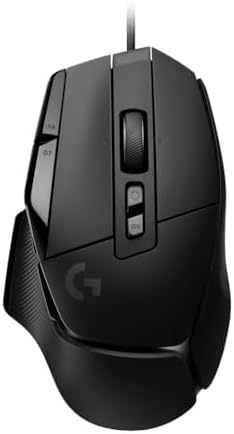
The G502 started as a feature-rich wired gaming mouse and evolved into a full product line. The core identity stays the same: a right-handed ergonomic shape with many programmable buttons, a dual-mode hyper-fast scroll wheel, and a high-performance optical sensor.
The main versions currently sold on Amazon include:
- G502 HERO — Wired, HERO 25K sensor, adjustable weights, 11 programmable buttons, LIGHTSYNC RGB.
- G502 Lightspeed — Wireless version of the classic design with LIGHTSPEED connectivity and POWERPLAY compatibility.
- G502 X series (Wired, Lightspeed, and Plus) — Updated switches (LIGHTFORCE hybrid optical-mechanical), lighter weight on some models, and refined internals.
All share the familiar G502 silhouette that suits medium-to-large hands and palm or claw grips. The HERO sensor (or its successors) delivers up to 25,600 DPI with zero smoothing, filtering, or acceleration. Most models support onboard memory for profiles so settings travel with the mouse.
The standout volume seller remains the wired G502 HERO. Listings show strong monthly sales (often 10K+ units) and ratings around 4.6 stars from tens of thousands of reviews. It is widely available new on Amazon.
Primary recommended product: Logitech G502 HERO High Performance Wired Gaming Mouse
Always verify the exact listing, seller, and current price on the live Amazon page, as offers change.
Key Specs of the Logitech G502 HERO
Official Logitech specifications for the G502 HERO include:
- Sensor: HERO optical, 100–25,600 DPI
- Report rate: 1,000 Hz (1 ms)
- Buttons: 11 programmable
- Scroll wheel: Dual-mode hyper-fast with tilt
- Weight: 121 g (mouse only); up to five 3.6 g removable weights (adds up to 18 g)
- Dimensions: Approximately 132 × 75 × 40 mm
- Cable: Braided, roughly 2.1 m USB
- Lighting: LIGHTSYNC RGB (customizable via software)
- Onboard memory: Up to 5 profiles
- Compatibility: Windows, macOS, Chrome OS
- Software: Logitech G HUB
The metal-spring tensioning system on the primary clicks aims for a crisp, consistent feel. PTFE feet are rated for long travel. These numbers come directly from Logitech’s product and support pages.
Why the G502 Shape Still Works in 2026
The G502 design prioritizes button access and comfort over ultra-light weight. Eleven buttons (or more on X models) give dedicated controls for DPI shift, sniper mode, macros, media, or in-game actions. MMO, MOBA, and strategy players especially value the side-button cluster and the dual-mode scroll wheel that switches between free-spin and precise ratchet modes.
Adjustable weights let you fine-tune balance. Many buyers report removing some or all weights to lighten the feel or shifting them for preferred front/rear bias. The right-handed contour with a pronounced thumb rest suits longer sessions for average-to-large hands.
Patterns in verified Amazon reviews repeatedly praise the button layout, sensor accuracy, and long-term durability. Common positive themes include “still going strong after years,” “perfect for games with many keybinds,” and “easy to customize in G HUB.” Criticisms usually center on weight (heavier than modern ultralight mice), the audible click sound, and the fact that it is right-handed only.
Wireless Options: G502 Lightspeed and G502 X
If you prefer wireless, the G502 Lightspeed keeps the classic shape and adds LIGHTSPEED 2.4 GHz connectivity. It is POWERPLAY-compatible for continuous charging on a compatible mat. Battery life is strong for a feature-rich mouse, and the HERO 25K sensor carries over.
The G502 X series refreshes the internals. LIGHTFORCE hybrid optical-mechanical switches replace traditional mechanical ones on the primary buttons for faster actuation and longer life claims. Some X models drop the adjustable weight system in favor of a lighter base weight. The X Plus adds more extensive RGB lighting. These versions appear on Amazon with current stock and solid ratings, though they sit at higher price points than the classic HERO.
When shopping, confirm the exact model name and ASIN. Wireless listings vary, so check the product title, images, and “About this item” section carefully.
Software: Logitech G HUB
Full customization requires Logitech G HUB (free download from Logitech’s site). With G HUB you can:
- Remap every programmable button
- Create macros and complex sequences
- Set multiple DPI stages and on-the-fly switching
- Customize RGB lighting and effects
- Save profiles to onboard memory
- Enable automatic profile switching by application
Onboard memory means you can configure the mouse once and use it on other PCs without installing software. Basic plug-and-play functions work without G HUB, but the full feature set (macros, advanced lighting, app-specific profiles) needs the software.
Official support pages and the G HUB download section confirm ongoing compatibility for the G502 HERO and related models.
Who Should Buy a Logitech G502?
The G502 family fits these buyers well:
- Players who use many in-game binds or macros (MMO, MOBA, strategy, some FPS)
- Users who prefer a full-size, palm-friendly shape with a thumb rest
- People who want adjustable weight or extensive onboard profiles
- Buyers seeking a proven, high-volume product with years of software support
- Anyone who values a dual-mode scroll wheel for both gaming and productivity
It is less ideal if you need an ultralight mouse under 80 g, silent clicks for a shared office, a left-handed design, or the absolute lowest latency wireless for pure competitive FPS. In those cases other Logitech or competing models may suit better.
Current Amazon Availability and Buying Tips
- HERO Gaming Sensor: Next generation HERO mouse sensor delivers precision tracking up to 25600 DPI with zero smoothing, f…
- 11 programmable buttons and dual mode hyper-fast scroll wheel: The Logitech wired gaming mouse gives you fully customiza…
- Adjustable weights: Match your playing style. Arrange up to five 3.6 g weights for a personalized weight and balance con…
As of the latest checks, the Logitech G502 HERO wired version remains widely available new on Amazon.com. Listings frequently carry Amazon’s Choice badges, show thousands of monthly purchases, and display ratings near 4.6 stars from 50,000+ reviews. Prices typically sit well below the original list price.
Wireless Lightspeed and G502 X variants also appear in stock with current offers. Always:
- Confirm the product title matches the exact model you want (HERO, Lightspeed, X, X Plus).
- Prefer “Ships from and sold by Amazon” or highly rated sellers for reliable fulfillment.
- Read the most recent customer questions and Q&A for any packaging or firmware notes.
- Check the ASIN and use a tracked link for proper affiliate attribution.
Recommended primary link: Logitech G502 HERO High Performance Wired Gaming Mouse on Amazon
Search “Logitech G502” directly on Amazon if you want to compare all current variants side by side.
How the G502 Compares to Nearby Options
Within the Logitech lineup the G502 sits between simpler mice and the more specialized PRO series. The G305 LIGHTSPEED offers lighter weight and excellent battery life in a more compact wireless package, which is why it appears in many budget gaming recommendations (see our wireless mouse guide). The MX Master series prioritizes productivity over gaming buttons and sensors. Ultralight PRO models focus on pure competitive FPS performance with fewer side buttons.
Outside Logitech, many competitors offer lighter shells or different switch technologies. The G502’s enduring strength is the combination of button count, dual-mode wheel, adjustable weight (on the HERO), and mature software support at a competitive price for the wired version.
Setup and First Steps
- Plug the wired G502 HERO into a USB port (or insert the Lightspeed receiver / pair the wireless model).
- Download and install Logitech G HUB from the official Logitech G site.
- Open G HUB, select the mouse, and explore the Assignments, DPI, and Lighting tabs.
- Create a profile, assign buttons and macros, set DPI stages, and save to onboard memory if desired.
- Install the optional weights (or leave them out) according to your preferred balance.
- Test the dual-mode scroll wheel by pressing the mode button beneath the wheel.
Most users report the process takes only a few minutes. Firmware updates, when available, appear inside G HUB.
Common Buyer Feedback Patterns
Aggregated verified Amazon reviews for the G502 HERO show consistent themes:
Frequently praised
- Precise tracking and high DPI range
- Abundant programmable buttons
- Comfortable shape for medium-to-large hands
- Dual-mode scroll wheel usefulness
- Build quality and longevity
- Value, especially when on sale
Common notes or criticisms
- Heavier than modern ultralight mice
- Clicks are not silent
- Right-handed only
- Software required for full customization
- Cable can feel restrictive for some players (wireless versions solve this)
These patterns appear across high-volume listings and remain stable over time. They describe a capable, feature-dense gaming mouse rather than a minimalist competitive tool.
External Resources for Further Reading
For the latest official specifications and software, visit Logitech’s product page:
Logitech G502 HERO High Performance Gaming Mouse
Logitech’s support site provides detailed technical specifications and download links for G HUB.
The official G HUB software page explains customization options, onboard memory, and compatibility across Logitech G devices.
FAQ Section
Is the Logitech G502 still available to buy new on Amazon?
Yes. The G502 HERO wired version and several wireless/X variants remain in stock on Amazon.com with current sales volume and ratings.
What is the difference between G502 HERO and G502 X?
The HERO is the classic wired model with adjustable weights and traditional mechanical primary switches. The X series updates the switches to LIGHTFORCE hybrid optical-mechanical, often reduces weight, and offers wired or wireless options. Some X models drop the weight tuning system.
Does the G502 work without software?
Yes. Basic movement, clicks, scrolling, and saved onboard profiles function without G HUB. Advanced remapping, macros, and lighting customization require the free Logitech G HUB software.
Is the G502 good for FPS games?
It works well for many FPS titles thanks to the accurate HERO sensor and high report rate. Players who prioritize the absolute lightest weight or fewest side buttons sometimes prefer dedicated ultralight models.
Can I use the G502 on Mac?
Yes. It is compatible with macOS. Full G HUB features are available, though some advanced gaming-centric options are more commonly used on Windows.
How many buttons does the G502 have?
The classic G502 HERO offers 11 programmable buttons. Some G502 X models increase that count slightly.
Does the wireless G502 support charging while playing?
The Lightspeed version is POWERPLAY-compatible. With a compatible POWERPLAY mat you can charge continuously while gaming.
Should I buy the wired or wireless G502?
Choose wired (HERO) for the lowest price, adjustable weights, and zero battery concerns. Choose wireless if freedom from a cable and POWERPLAY support matter more than the extra cost.
Conclusion
The Logitech G502 family continues to deliver a proven combination of sensor performance, button density, dual-mode scrolling, and software flexibility. The wired G502 HERO remains the volume leader on Amazon—widely available, highly rated, and frequently discounted. Wireless Lightspeed and updated X models extend the same core design for players who want cable-free operation or newer switch technology.
If you want a full-size gaming mouse with plenty of programmable controls and a sensor that has earned its reputation over years of use, the G502 is still a strong contender in 2026. Confirm the exact model and current stock on Amazon, read recent buyer questions if needed, and use a tracked link so the purchase supports independent research.
Primary recommendation: Buy the Logitech G502 HERO High Performance Wired Gaming Mouse on Amazon
For more wireless gaming and productivity mice, explore our detailed Amazon wireless mouse comparison.
As an Amazon Associate I earn from qualifying purchases.

MD.HASAN is an experienced SEO expert and amazon products review writer passionate about helping people find right products on amzon for buy without confusion. With 4 years of hands-on experience in content strategy and search engine optimization, he specializes in writing SEO-friendly blog posts that rank, engage, and convert.


